Amazon Bedrock
Disclaimer
Your use of this download is governed by Stonebranch's Terms of Use.
Version Information
Template Name | Extension Name | Version | Status |
|---|---|---|---|
Amazon Bedrock | ue-aws-bedrock | 1 (Current 1.0.0) | Fixes and new Features are introduced |
Refer to Changelog for version history information.
Overview
The Amazon Bedrock integration enables leverage of enterprise foundation large language models directly into UAC workflows, creating intelligent automation solutions capable of processing, generating, and transforming content. Integrating AWS Bedrock's AI capabilities with the automation infrastructure allows the development of systems that merge UAC's robust orchestration framework with advanced natural language processing and reasoning.
This integration opens up a wide range of automation possibilities, from analyzing logs and generating human-readable summaries of complex system states, to intelligently routing and classifying data, transforming unstructured information into structured formats, or even making context-aware decisions within workflows.
The integration provides native support for AWS Bedrock foundation models, enabling AI model invocation with customizable prompts and inference parameters. Users can enhance prompts using file inputs or UAC Variables, while outputs are stored for potential subsequent reuse across tasks and workflows, allowing them to create chained AI operations or distribute intelligence throughout the automation environment.
Key Features
Feature | Description |
|---|---|
Ask AI |
|
Response Formats | Support for text responses and JSON outputs with schema enforcement via Tool Use. |
Response Output | Stores the LLM response as a local file. |
Prompt Enrichment | Enriches prompts with data from files and UAC Variables. |
Advanced Options | Configure response behavior using temperature, top‑p, and max tokens. |
Requirements
This integration requires a Universal Agent and a Python runtime to execute the Universal Task.
Area | Details |
|---|---|
Python Version | Requires Python 3.11, Tested with Agent bundled python distribution. |
Universal Agent Compatibility | Compatible with Universal Agent for Windows x64 and version >= 7.9.0.0. Compatible with Universal Agent for Linux and version >= 7.9.0.0. |
Universal Controller Compatibility | Universal Controller Version >= 7.9.0.0. |
Network and Connectivity | Network Connectivity towards AWS Bedrock is required. |
Supported Actions
Ask AI:
- Ask AI (Converse API) - Sends prompts to foundation models using the AWS Bedrock Converse API, providing a unified interface across AWS Bedrock-supported models.
Action Output
- EXTENSION
- STDOUT
- STDERR
The extension output provides the following information:
-
exit_code, status_description:General info regarding the Task Instance execution. For more information, refer to the exit code table. -
invocation.fields:The Task Instance configuration. -
result.response:The AI-generated response. -
result.complete_conversation:Type : List of JSON Objects with "role" and "content" attributes. The full conversation between the user and the AI model split into the "system", "user", and "assistant" roles. -
result.metadata:Type : JSON Object. Information related to the prompt execution, generated tokens, stop_reason, etc. -
result.errors:List of errors that might have occurred during execution.
Examples:
Successful Execution
{
    "exit_code": 0,
    "status_description": "Task executed successfully",
    "invocation": {
        "extension": "ue-aws-bedrock",
        "version": "1.0.0",
        "fields": {
            "action": "Ask AI (Converse API)",
            "authentication_method": "AWS Access Key ID and Secret Access Key",
            "aws_credentials": { ... },
            "aws_region": "us-east-1",
            "role_arn": null,
            "model_deployment": "amazon.nova-micro-v1:0",
            "system_prompt_source": "Text Field",
            "system_prompt_text": "You are a helpful assistant.",
            "system_prompt_script": null,
            "conversation_thread_source": "Text Field",
            "conversation_thread_text": "What is 2 + 2?",
            "conversation_thread_script": null,
            "response_format_type": "Text",
            "response_format_json_schema": null,
            "save_options": "-- None --",
            "save_source": null,
            "save_local_path": null,
            "advanced_options": true,
            "temperature": 1.0,
            "top_p": 1.0,
            "max_tokens": 1000,
            "stdout_output": [
                "Show Latest Response Only"
            ],
            "extension_output": [
                "Show Latest Response Only",
                "Show Entire Conversation",
                "Token Usage and Metadata"
            ]
        }
    },
    "result": {
        "response": "2 + 2 equals 4. If you need any more help or have other questions,    feel free to ask!",
        "metadata": {
            "input_tokens": 14,
            "output_tokens": 26,
            "total_tokens": 40,
            "stop_reason": "end_turn"
        },
        "complete_conversation": [
            {
              "role": "user",
              "content": [
                  {
                      "text": "What is 2 + 2?"
                  }
              ]
            },
            {
              "role": "assistant",
              "content": [
                  {
                      "text": "2 + 2 equals 4. If you need any more help or have other questions, feel free to ask!"
                  }
               ]
            }
        ]
    }
}
Failed Execution
{
    "exit_code": 1,
    "status_description": "API Request Failed: AWS Bedrock Converse API failed: An error occurred (ValidationException) when calling the Converse operation: The provided model identifier is invalid.",
    "invocation": {
        "extension": "ue-aws-bedrock",
        "version": "1.0.0",
        "fields": {
            "role_arn": null,
            "save_options": "-- None --",
            "stdout_output": "Show Latest Response Only",
            "model_deployment": "amazon.nova-micro2-v1:0",
            "response_format_type": "Text",
            "aws_region": "us-east-1",
            "save_local_path": null,
            "extension_output": [
                "Show Latest Response Only",
                "Token Usage and Metadata"
            ],
            "max_tokens": 1000,
            "conversation_thread_text": "What is 2 + 2?",
            "save_source": null,
            "conversation_thread_source": "Text Field",
            "action": "Ask AI (Converse API)",
            "authentication_method": "AWS Access Key ID and Secret Access Key",
            "system_prompt_text": "You are a helpful assistant.",
            "top_p": null,
            "advanced_options": false,
            "system_prompt_source": "Text Field",
            "temperature": null,
            "aws_credentials": { ... }
        }
    },
    "result": {
        "errors": [
            "API Request Failed: AWS Bedrock Converse API failed: An error occurred (ValidationException) when calling the Converse operation: The provided model identifier is invalid."
        ]
    }
}
When configured, shows the "Latest Response Only" or the "Entire Conversation" with the LLM in a human readable way.
Shows the logs from the Task Instance execution. The verbosity is controlled by the Task configuration Log Level.
Configuration examples
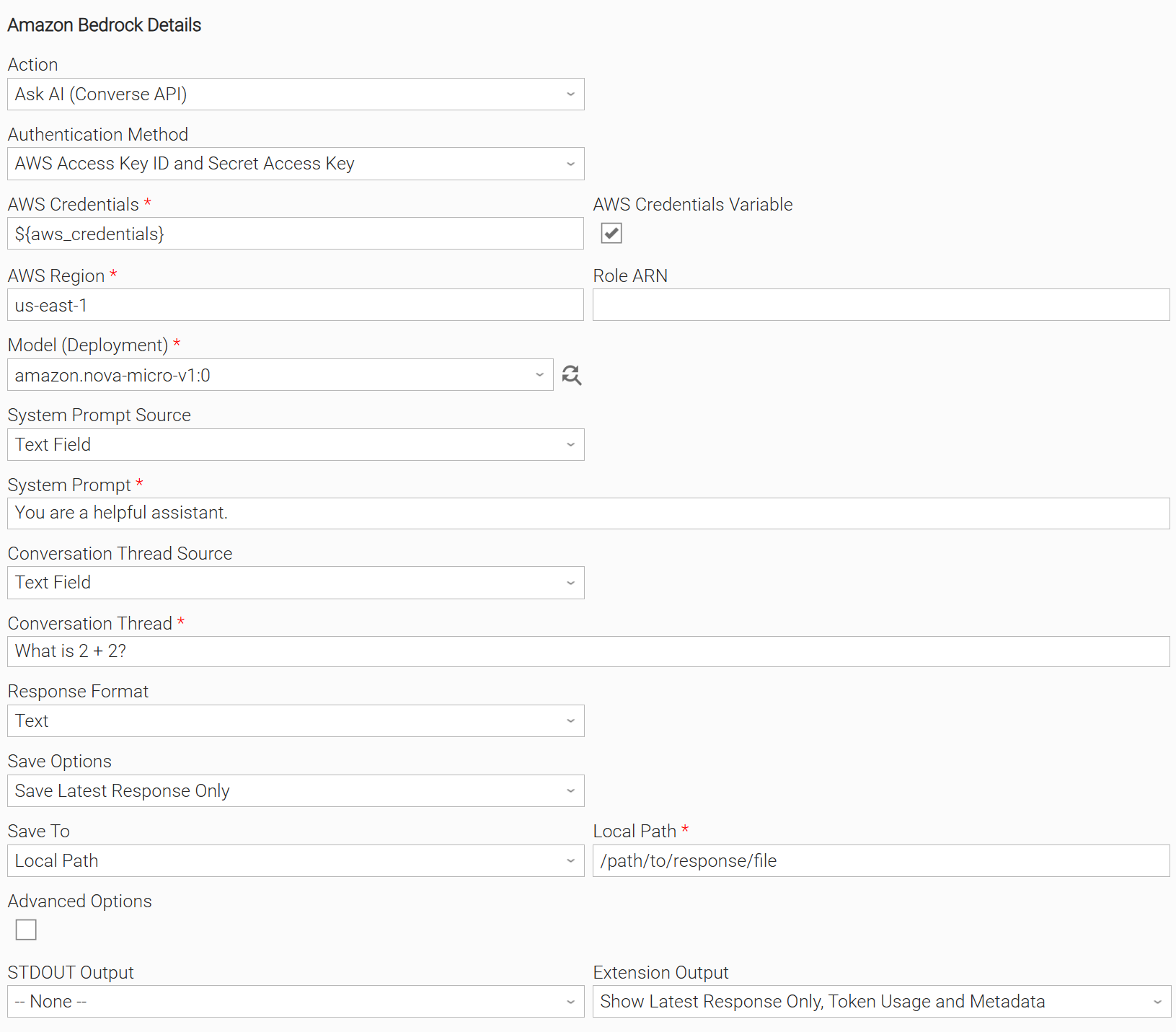
Example: Ask AI (Converse API) and save the response to a Local Path
In this example, the user configures a Universal Task to invoke the Converse API using "AWS Access Key ID and Secret Access Key" authentication and the amazon.nova-micro-v1:0 model. The task is configured to capture the AI-generated response in the EXTENSION output rather than printing it to STDOUT and save it to a local file. Finally, the user enables the display of token usage metadata, providing visibility into the resources consumed during response generation.
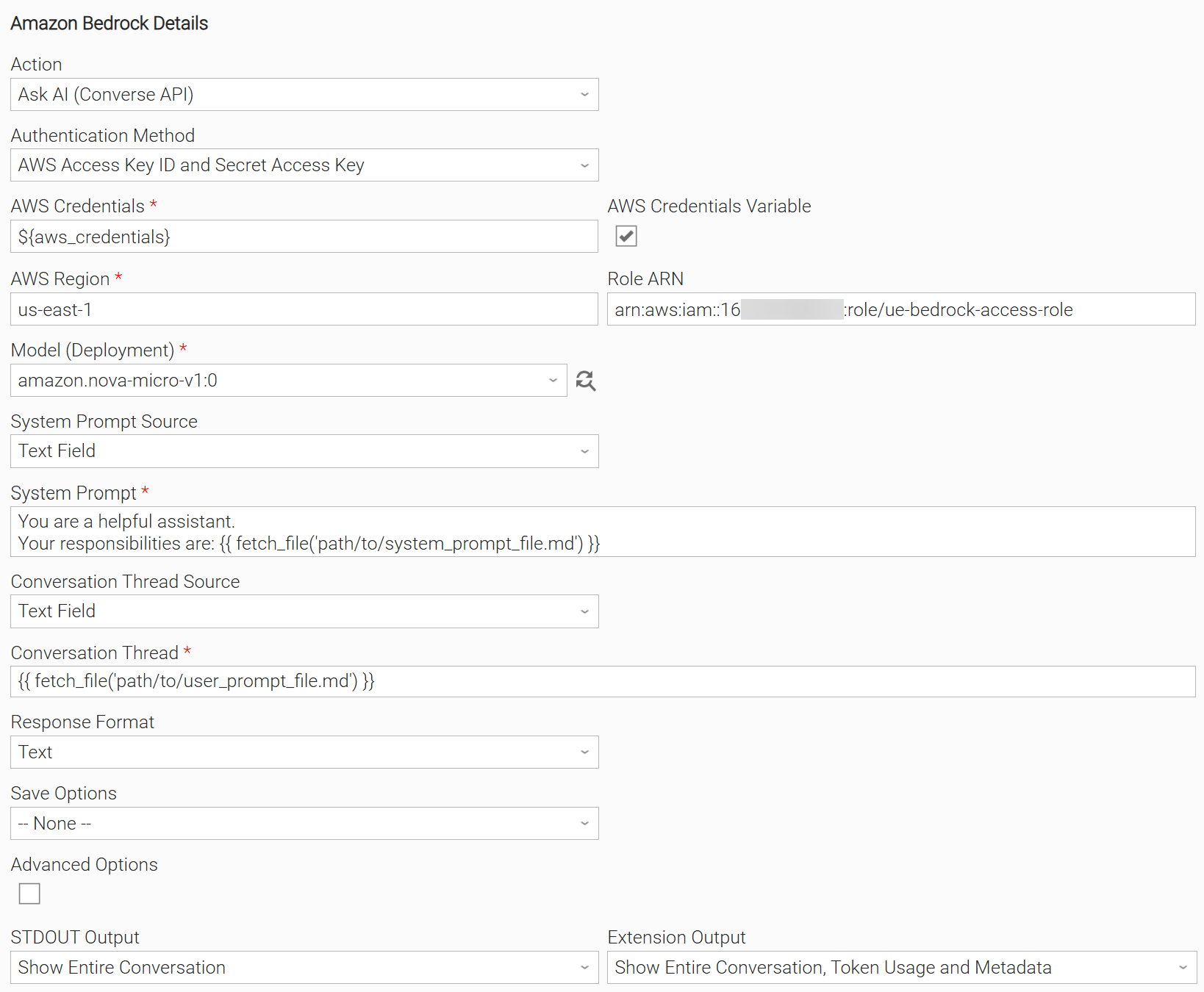
Example: Ask AI (Converse API) with assuming role and fetch prompts from files
In this example, the user configures a Universal Task to invoke the Converse API using "AWS Access Key ID and Secret Access Key" authentication with assuming role. Instead of defining the prompt inline, the task retrieves one or more prompts from files stored on disk. The user has also configured the task to display the entire conversation in both STDOUT and the EXTENSION output.
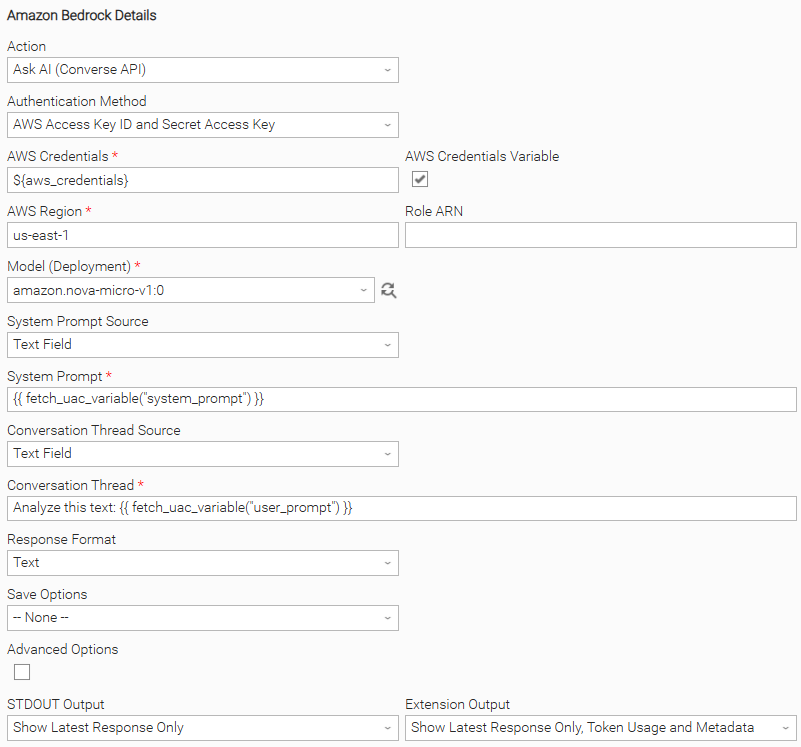
Example: Ask AI (Converse API) and fetch prompts from a UAC Variable
In this example, the user configures a Universal Task to invoke the Converse API using "AWS Access Key ID and Secret Access Key" authentication. The system prompt is dynamically retrieved from the system_prompt UAC Variable and the conversation thread from user_prompt UAC Variable. The task is configured to print the AI-generated response to STDOUT and EXTENSION output.
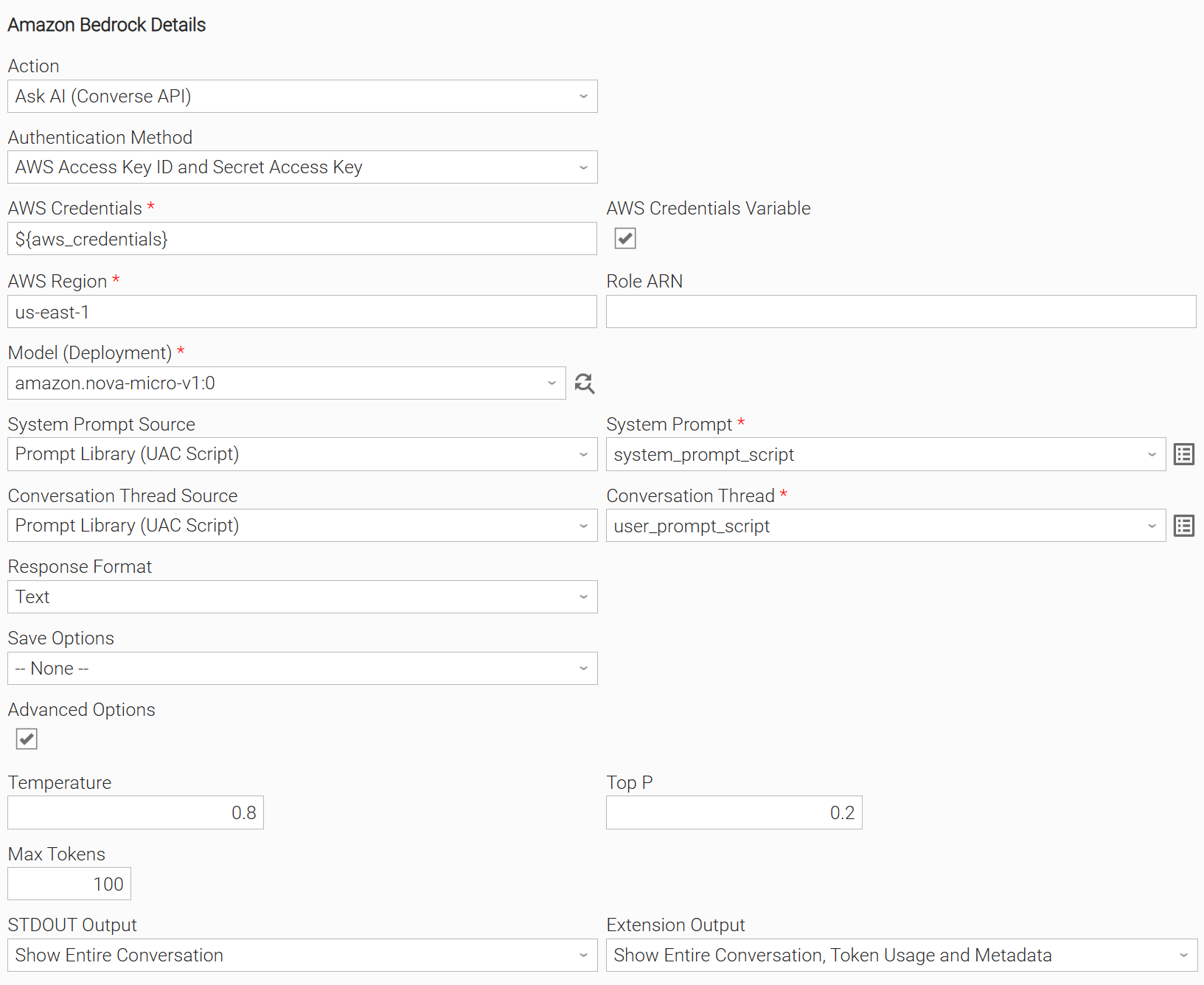
Example: Ask AI (Converse API) using Advanced Options and fetch the prompts from UAC Scripts
In this example, the user configures a Universal Task to invoke the Converse API using "AWS Access Key ID and Secret Access Key" authentication. Both the system prompt and the user prompt (conversation thread) are sourced from UAC Scripts. Advanced Options allow the user to adjust inference parameters (Temperature, Top P, and Max Tokens), and the task displays the entire conversation in STDOUT as well as in the Extension Output.
Example: Ask AI (Converse API) using 3rd-party Model and response format with Tool Use
In this example, the user configures a Universal Task to invoke the Converse API using "AWS Access Key ID and Secret Access Key" authentication. Instead of an Amazon model, the task is configured to use the Claude Sonnet 4.5 third-party model. The response format is set to use JSON Schema enforcement with Tool Use. The task is configured to display the latest response in STDOUT as well as in the EXTENSION Output.
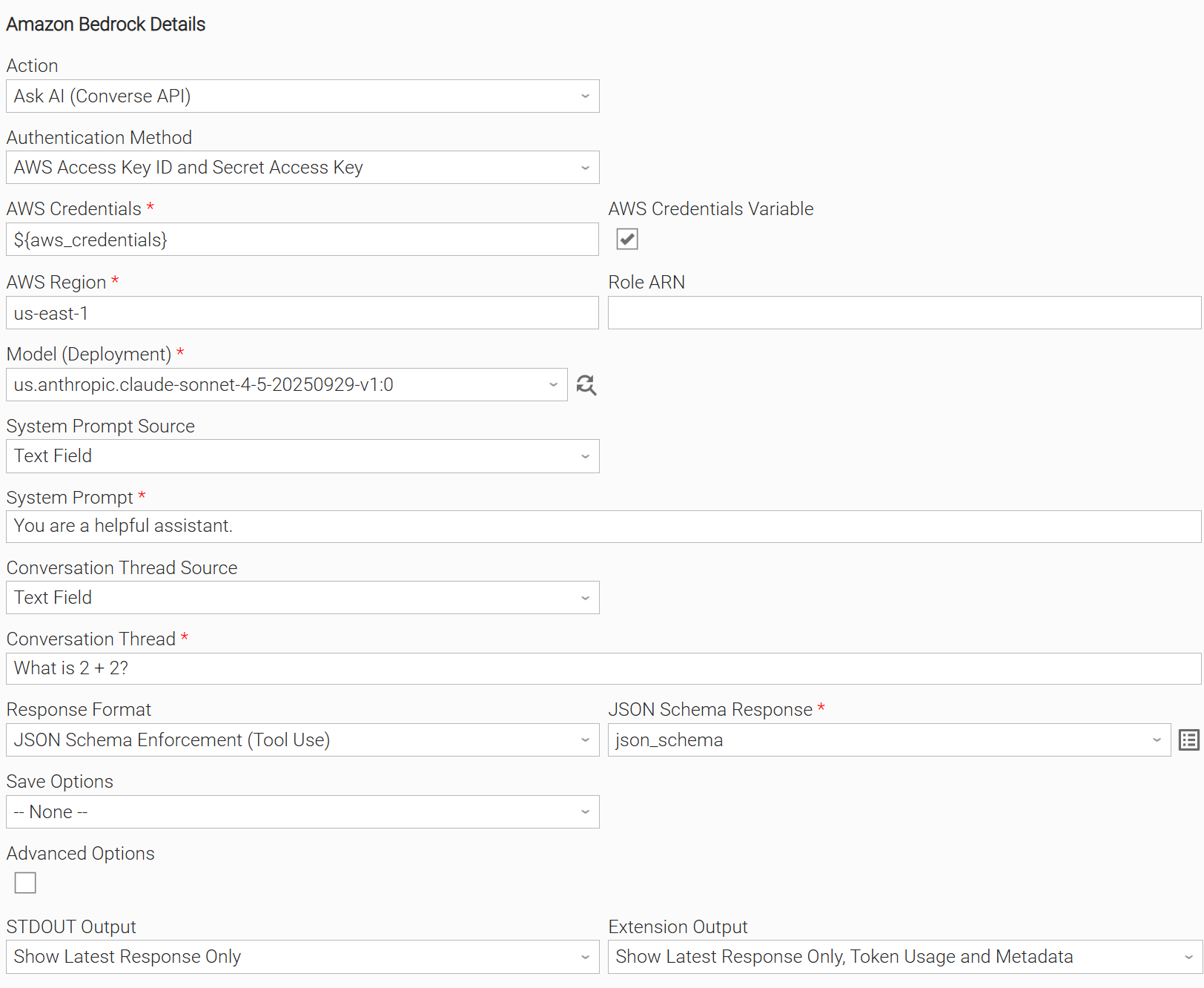
Input Fields
Name | Type | Description | Version Information |
|---|---|---|---|
Action | Choice | The action performed upon the task execution.
| Introduced in 1.0.0 |
Authentication Method | Choice | The authentication method used to connect to the AWS Bedrock platform. Authentication methods currently supported:
| Introduced in 1.0.0 |
AWS Credentials | Credentials | The AWS Credentials to access the AWS Bedrock platform. In case of Authentication Method = 'AWS Access Key ID and Secret Access Key' the definition of the credential should be as follows:
| Introduced in 1.0.0 |
AWS Region | Text | Region for the Amazon Web Service i.e. "us-east-1". This field is visible when "AWS Access Key ID and Secret Access Key" Authentication Method is selected. | Introduced in 1.0.0 |
Role ARN | Text | Role ARN of the AWS Assume Role functionality. The Assume Role functionality in AWS (Amazon Web Services) allows a user or service to take on the permissions of another IAM (Identity and Access Management) role temporarily. If the field is left empty, Role Assumption is not performed. This field is visible when "AWS Access Key ID and Secret Access Key" Authentication Method is selected. | Introduced in 1.0.0 |
Model (Deployment) | Dynamic Choice | The unique identifier of the AWS Bedrock model to be used. For cross-region inference or when on-demand support is not available in the region, specify a region prefix in the model identifier (e.g., For the dynamic model retrieval to work, the AWS Credentials used in the task must have the | Introduced in 1.0.0 |
System Prompt Source | Choice | System Prompt sources available:
| Introduced in 1.0.0 |
System Prompt | Text / Script | The system prompt to be sent to the AI model. This field supports Dynamic Placeholders. Users can type the following template functions and place them anywhere within the System Prompt or the Conversation Thread fields, constructing the prompt in a dynamic way:
It is a Script input field when "Prompt Library (UAC Script)" System Prompt Source is selected; otherwise it is Text. Dynamic Placeholders work with both Text and Script field types. | Introduced in 1.0.0 |
Conversation Thread Source | Choice | Conversation Thread sources available:
| Introduced in 1.0.0 |
Conversation Thread | Text / Script | The Conversation Thread (user prompt) to be sent to the AI model. This field supports Dynamic Placeholders. Users can type the following template functions and place them anywhere within the System Prompt or the Conversation Thread fields, constructing the prompt in a dynamic way:
It is a Script input field when "Prompt Library (UAC Script)" Conversation Thread Source is selected, else it is Text Dynamic Placeholders work with both Text and Script field types. | Introduced in 1.0.0 |
Response Format | Choice | Provide the capability to select the output format of the AI response. Response Formats available:
For more information please read Structured Outputs. | Introduced in 1.0.0 |
JSON Schema Response | Script | Provide the JSON Schema to format the AI model's output. This field is visible when "JSON Schema Enforcement (Tool Use)" Response Format is selected. For more information please read Structured Outputs. | Introduced in 1.0.0 |
Save Options | Choice | Specify the content to be saved from the response. The following Save Options are available:
| Introduced in 1.0.0 |
Save To | Choice | Specify the save location of the response. The following options are available:
This field is visible when either "Save Entire Conversation" or "Save Latest Response Only" Save Options is selected. | Introduced in 1.0.0 |
Local Path | Text | Provide the file path to save the response. If the file does not exist, the extension will attempt to create it. If the file already exists it will be overwritten. This field is visible when either "Save Entire Conversation" or "Save Latest Response Only" Save Options is selected. | Introduced in 1.0.0 |
Advanced Options | Checkbox | Enable advanced options. | Introduced in 1.0.0 |
Temperature | Float | Control the Sampling Temperature of the response. This field is visible when Advanced Options is selected. | Introduced in 1.0.0 |
Top P | Float | Control the Nucleus Sampling of the response. This field is visible when Advanced Options is selected. | Introduced in 1.0.0 |
Max Tokens | Integer | Specify the maximum number of tokens to be generated by the LLM. This field controls the length of the response. If the response attempts to exceed the limit, it is abruptly stopped. The highest value allowed for tokens is determined by the model used. This field is visible when Advanced Options is selected. | Introduced in 1.0.0 |
STDOUT Output | Choice | Specify the information to be displayed in STDOUT. The following options are available:
| Introduced in 1.0.0 |
EXTENSION Output | Multiple Choice | Specify the information to be displayed in the EXTENSION output. The following options are available:
| Introduced in 1.0.0 |
Structured Outputs
The Amazon Bedrock Integration offers three ways to control how the AI model formats its responses. This guide explains each option and helps you choose the right one for your needs.
Text
Plain text responses with no formatting constraints. The model responds naturally in plain text. You describe what you want in your prompt, and the model does its best to follow your instructions. Best used for natural language responses without structure.
However, an "N shot inference strategy" in your prompt can produce good results for a structured response. This mode is helpful when working with old cheaper models when JSON structure is not API provided.
System Prompt Example
You are an assistant that replies in specific format as mentioned in the examples below
Conversation Thread Example
[User]
Tokyo is experiencing a beautiful spring day with clear blue skies and gentle breezes flowing through the streets. The temperature has reached a comfortable 22 degrees, making it perfect for
outdoor activities.

[Assistant]
{ "city": "Tokyo", "temperature": 22}


[User]
New York is facing a harsh winter storm today with heavy snowfall blanketing the entire metropolitan area. Public transportation is experiencing major delays and cancellations. The temperature has plummeted to
a frigid 5 degrees below zero, making it one of the coldest days this season.

[Assistant]
{ "city": "New York", "temperature": -5}

[User]
London is having a typical autumn day with overcast skies and light drizzle throughout the morning hours. The temperature is holding steady at 15 degrees, which is quite typical for this time of year.

[Assistant]
{ "city": "London", "temperature": 15}

[User]
Sydney is experiencing an intense summer heatwave with scorching temperatures breaking records across the region.  Authorities have issued heat warnings advising people to stay hydrated and avoid prolonged sun exposure. The temperature
has soared to an extreme 35 degrees, making it one of the hottest days of the summer.
Extension Output Example
{
 ...
 "result": {
   "response": {
      "city": "Sydney",
      "temperature": 35
   },
   "metadata": {
   "input_tokens": 276,
   "output_tokens": 14,
   "total_tokens": 290,
   "stop_reason": "end_turn"
}
JSON Schema Enforcement (Tool Use)
You provide a detailed JSON Schema, and the API guarantees the model's response will match it exactly - correct fields, correct types, no extras, no omissions.
How it works:
- You provide a formal JSON Schema definition.
- The API enforces 100% compliance.
- No prompt engineering needed - the schema does the work.
Limitations
- Only supported by some AWS Bedrock models.
Additional Information:
System Prompt Example
You are a helpful assistant replying with a predefined JSON structure
Conversational Thread Example
[User]

New York is facing a harsh winter storm today with heavy snowfall blanketing the entire metropolitan area. The streets are covered in thick layers of snow, and visibility is significantly reduced due to the ongoing blizzard
conditions. Strong winds are creating dangerous wind chills, and residents are advised to stay indoors unless absolutely necessary. Public transportation is experiencing major delays and cancellations. The temperature has plummeted to
a frigid 5 degrees below zero, making it one of the coldest days this season.
JSON Schema Response Script Example
{
  "type": "object",
  "properties": {
    "city": {
      "type": "string",
      "description": "City Name"
    },
    "temperature": {
      "type": "number",
      "description": "Temperature of the City, Number"
    }
  },
  "required": ["city", "temperature"],
  "additionalProperties": false
}
Extension Output Example
{
 ...
 "result": {
   "response": {
      "city": "New York",
      "temperature": -5
   },
   "metadata": {
   "input_tokens": 276,
   "output_tokens": 14,
   "total_tokens": 290,
   "stop_reason": "end_turn"
}
Exit Codes
Exit Code | Status | Status Description | Meaning |
|---|---|---|---|
0 | Success | "Task executed successfully." | Successful Execution |
1 | Failure | "Execution Failed: <<Error Description>>" | Generic Error. Raised when not falling into the other Error Codes. |
2 | Failure | "Authentication Failed: <<Error Description>>" | Authentication Error |
20 | Failure | "Data Validation Error: <<Error Description>>" | Input fields validation error. |
STDOUT and STDERR
STDOUT is used for displaying Response information. It is controlled by STDOUT Options field. STDERR provides additional information to the user. The level of detail is tuned by the Log Level Task Definition field.
Backward compatibility is not guaranteed for the content of STDOUT/STDERR and can be changed in future versions without notice
Importable Configuration Examples
This integration provides importable configuration examples along with their dependencies, grouped as Use Cases to better describe end to end capabilities.
Those examples aid in allowing task authors to get more familiar with the configuration of tasks and related Use Cases. Such tasks should be imported in a Test system and should not be used directly in production.
Initial Preparation Steps
- STEP 1: Go to Stonebranch Integration Hub and download "Amazon Bedrock", "Amazon Elastic Kubernetes Service Jobs", "ServiceNow: Incident" and "UAC Utility: Email" integrations.
- STEP 2: Locate and import the above integrations to the target Universal Controller. For more information refer to the How To section in this document.
- STEP 3: Extract the Amazon Bedrock archive; Inside the directory named "configuration_examples" you will find a list of definition zip files. Upload them one by one in the order given below, by using the "Upload" functionality of the Universal Controller:
- 1_variables.zip
- 2_credentials.zip
- 3_scripts.zip
- 4_tasks.zip
- 5_workflows.zip
- STEP 4: Update the uploaded UAC Credential entities for both Azure OpenAI, Email Monitor, and ServiceNow Incident.
- STEP 5: Update the UAC global variables introduced with the 1_variables.zip file. Their names are prefixed with "ue_aws_bedrock". Review the descriptions of the variables as they include information on how should be populated.
- The order indicated above ensures that the dependencies of the imported entities need to be uploaded first.
- All imported entities are prefixed with UC1: Amazon Bedrock.
How to "Upload" Definition Files to a Universal Controller
The "Upload" functionality of Universal Controller allows Users to import definitions exported with the "Download" functionality.
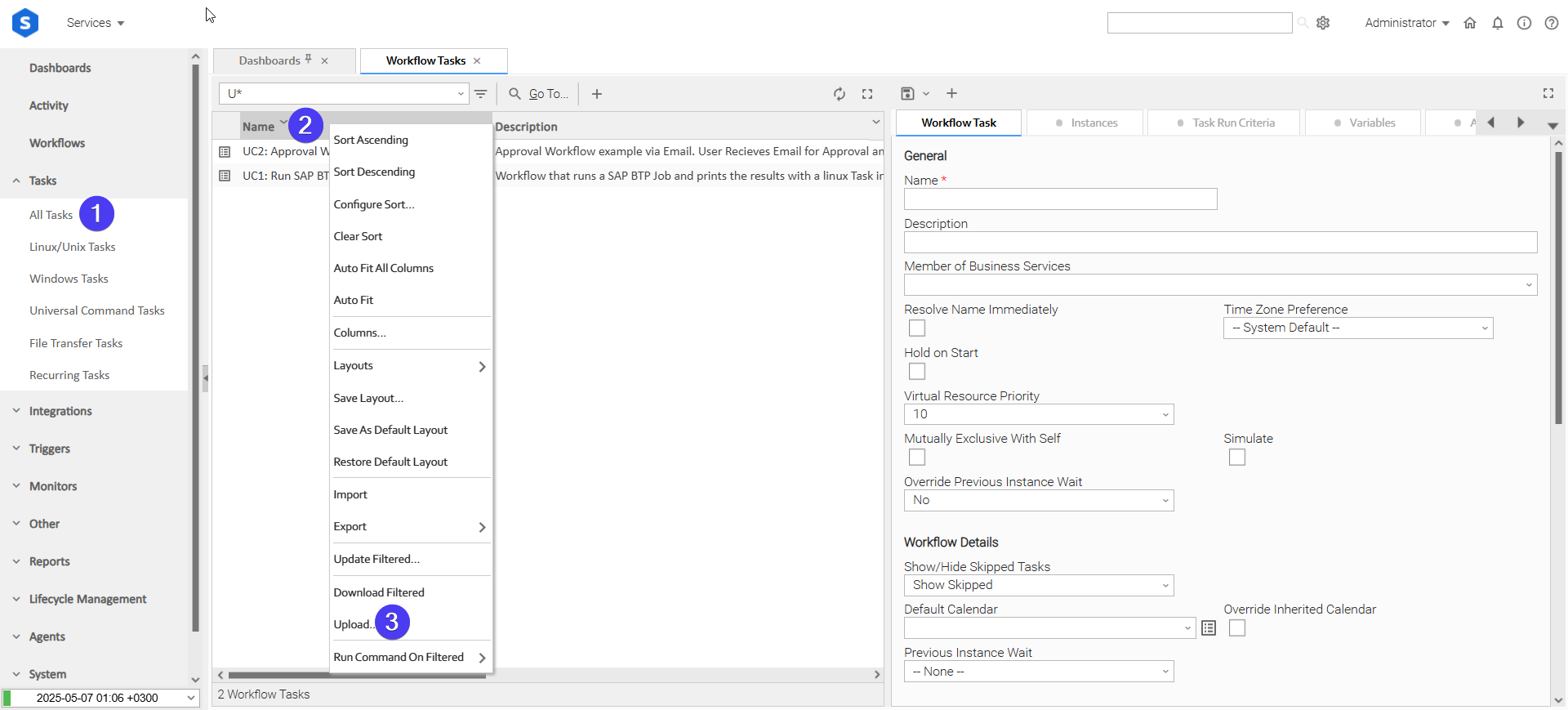
Login to Universal Controller and:
- STEP 1: Click "Tasks"→"All Tasks"
- STEP 2: Right click on the top of the column named "Name"
- STEP 3: Click "Upload..."
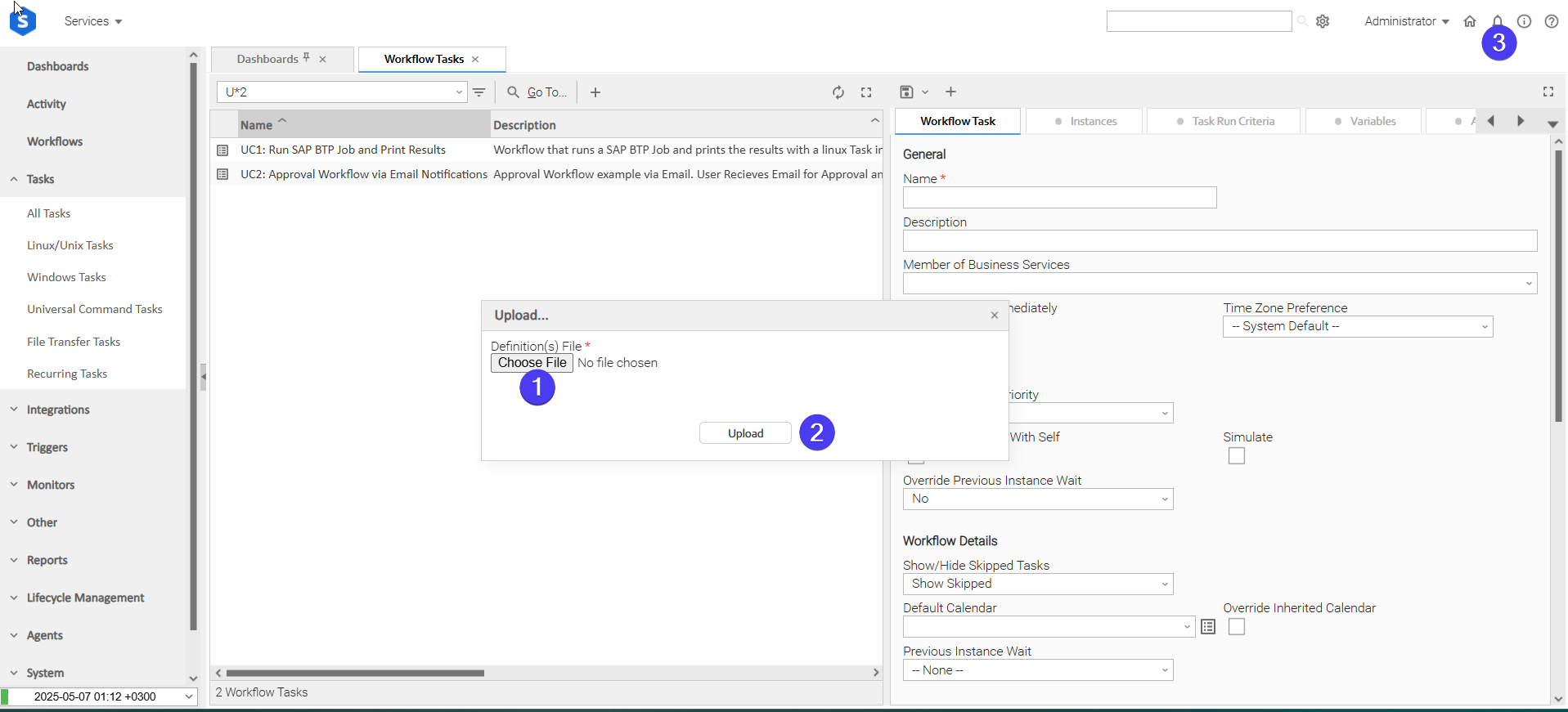
In the pop-up "Upload..." dialogue:
- STEP 1: Click "Choose File".
- STEP 2: Select the appropriate zip definition file and click "Upload".
- STEP 3: Observe the Console for possible errors.
Use Case 1: Incident Analysis and Resolution
Description
This workflow uses AWS Bedrock to analyze production incidents and generate automated remediation responses. A user provides an incident description, and Amazon Bedrock Tasks analyze the problem with confidence scoring and pattern recognition, create documentation, and generate artifacts for ServiceNow ticket creation, Kubernetes remediation jobs, and team email notifications.
The workflow demonstrates how AWS Bedrock can take an incident description, identify it as a recurring pattern, and produce ready-to-use outputs in multiple formats-ServiceNow API JSON for ticket creation, Kubernetes Job definitions for automated fixes, and professional team communications. This showcases how UAC leverages Bedrock's intelligence to automate complex incident response workflows.
The tasks configured demonstrate the following capabilities among others:
- Analyze unstructured incident descriptions and extract structured intelligence with AI.
- Pass incident context and insights between multiple connected tasks.
- Use AWS Bedrock to perform analysis with confidence scoring and pattern detection.
- Convert incident analysis into production-ready outputs (ServiceNow tickets, Kubernetes jobs, emails).
- Automatically create ServiceNow incidents and remediation job definitions from AI analysis.
- Provide actionable recommendations with business impact and effort assessments.
The components of the solution are described below:
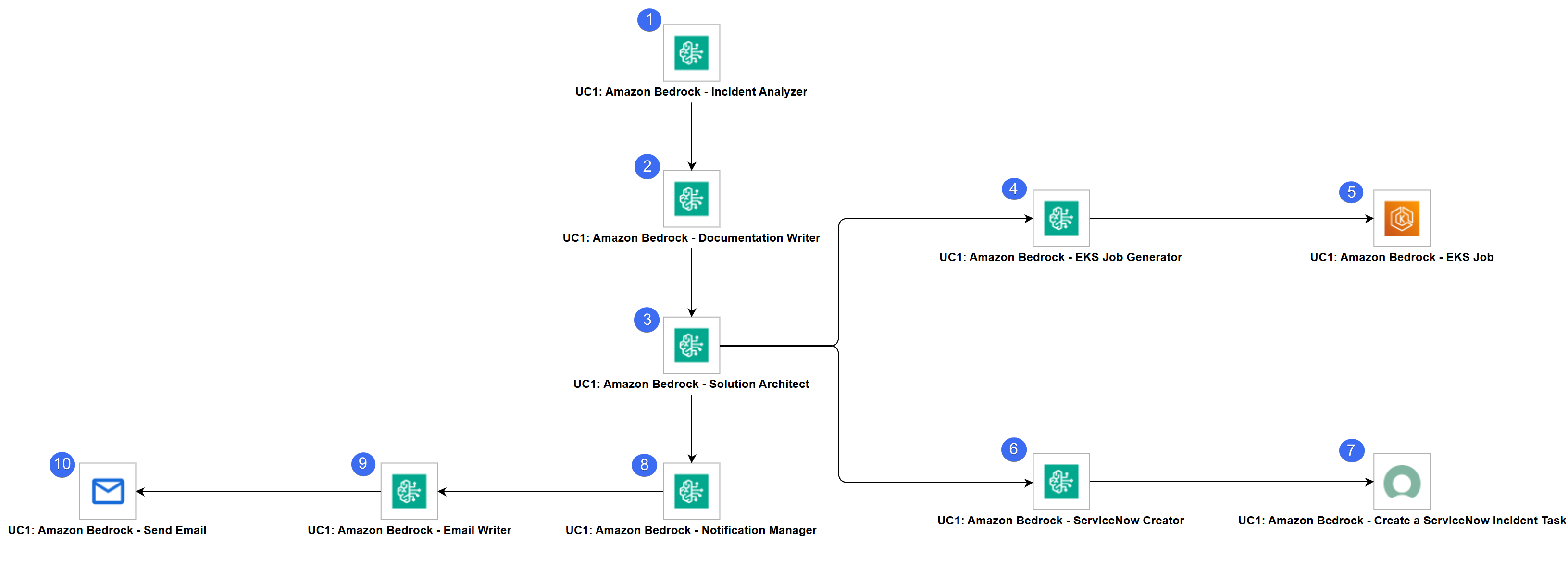
- "UC1: Amazon Bedrock - Incident Analyzer" - Analyzes incidents with AI to identify root causes, assess severity, and provide confidence scores with pattern recognition.
- "UC1: Amazon Bedrock - Documentation Writer" - Creates professional incident reports in Markdown with impact assessment, root cause details, and lessons learned.
- "UC1: Amazon Bedrock - Solution Architect" - Plans the technical response by coordinating ticket tracking and remediation execution paths.
- "UC1: Amazon Bedrock - EKS Job Generator" - Creates valid Kubernetes Job definitions for automated remediation with logging, validation, and cleanup policies.
- "UC1: Amazon Bedrock - EKS Job" - Executes the EKS job previously created by the Amazon Bedrock task.
- "UC1: Amazon Bedrock - ServiceNow Creator" - Generates production-ready ServiceNow incident creation API payloads with proper priority and assignment routing.
- "UC1: Amazon Bedrock - Create a ServiceNow Incident Task" - Creates a ServiceNow Incident using the JSON produced in the previous step.
- "UC1: Amazon Bedrock - Notification Manager" - Orchestrates incident communication strategy and health check validation planning for comprehensive response.
- "UC1: Amazon Bedrock - Email Writer" - Writes clear, actionable incident notification emails for engineering teams with impact and next steps.
- "UC1: Amazon Bedrock - Send Email" - Sends team notification with incident summary, resolution status, action items, and instructions to close ServiceNow ticket after validation.
How to Run
Execution Steps:
- STEP 1: Launch the "UC1: Amazon Bedrock - Incident Analysis and Resolution" workflow. This automatically starts the flow of the tasks to be executed.
Expected Results:
- Task "UC1: Amazon Bedrock - Incident Analyzer" successfully produces a JSON-structured analysis including root cause, severity, confidence score, and AI insights with pattern recognition across historical incidents.
- Task "UC1: Amazon Bedrock - Documentation Writer" successfully creates a comprehensive Markdown incident report with impact assessment, timeline, and prevention measures.
- Task "UC1: Amazon Bedrock - Solution Architect" successfully generates a dual-path plan with specifications for both ServiceNow ticket creation and Kubernetes remediation.
- Task "UC1: Amazon Bedrock - ServiceNow Creator" successfully produces a ServiceNow API JSON payload ready for incident ticket creation.
- Task "UC1: Amazon Bedrock - EKS Job Generator" successfully creates a valid Kubernetes Job definition for automated remediation.
- Task "UC1: Amazon Bedrock - Notification Manager" successfully plans team communication with key points and action items.
- Task "UC1: Amazon Bedrock - Email Writer" successfully generates a professional email body with incident details, resolution status, and instructions to close the ServiceNow ticket after validation.
The workflow uses sample incident that can be changed and adapted to any incident scenario. The sample incident used is the following.
Sample Incident Scenario
Incident Description:
Database query response times increased from average 50ms to 5000ms starting at 10:30 AM today. Users are reporting slow page loads across checkout and search functionality. The orders table has grown to 2 million rows. Recent deployment added a feature that queries orders by created_at timestamp without using an index.

Additional Context:
- Traffic is normal (not a spike)
- Database CPU is at 85% (normally 40%)
- 5,000+ users currently active
- Checkout conversion rate dropped from 8% to 2%
- Search abandonment increased from 10% to 45%
- This is the 3rd similar incident in 6 months (different tables each time)
- Previous incidents: April 2025 (products table), December 2025 (customers table)
- Each previous incident took 30-45 minutes to resolve manually
Based on the provided incident scenario, the following sample responses were generated by the Amazon Bedrock Tasks.
Incident Analysis Response
{
  "incident_type": "Database",
  "severity": "Critical",
  "root_cause": "Unindexed query on a large orders table",
  "affected_systems": ["Database", "Checkout", "Search"],
  "user_impact": "5,000+ active users affected",
  "business_impact": "Checkout conversion rate dropped from 8% to 2%, Search abandonment increased from 10% to 45%, estimated cost: $5000 per minute of delay",
  "recommendation": "Add an index on the created_at column of the orders table and optimize the recent feature deployment to use indexed queries.",
  "secondary_effects": ["Potential loss of revenue", "Decreased user satisfaction", "Increased customer support tickets"],
  "ai_insights": {
    "confidence_score": 95,
    "reasoning": "The database query response time spike correlates directly with the recent feature deployment that uses unoptimized queries on a growing table. Historical data shows a similar pattern in previous incidents.",
    "similar_incidents": {
      "count": 2,
      "pattern": "Incidents occur when large tables are queried without indexes after feature deployments.",
      "last_occurrence": "December 2025",
      "recurrence_trend": "Stable recurrence every 2-3 months"
    },
    "prediction": {
      "fix_duration_estimate": "15-30 minutes",
      "business_impact_if_delayed": "$5000 per minute of delay",
      "probability_of_recurrence": "50% based on recent pattern"
    },
    "recommendations_priority": [
      {
         "action": "Add index on created_at column of orders table",
         "impact": "Critical - Directly addresses root cause",
         "effort": "Medium - Index creation requires DBA intervention",
         "timeframe": "Immediate"
      },
      {
         "action": "Review and optimize recent feature deployments",
         "impact": "High - Prevents future incidents",
         "effort": "High - Requires development and testing",
         "timeframe": "Short-term, post-incident"
      }
    ]
  }
}
Document Writer Response
# Incident Report: Database Performance Degradation

## Incident Summary
A critical incident occurred at 10:30 AM due to an unindexed query on a large `orders` table, resulting in degraded performance across the Database, Checkout, and Search systems.

## Impact Assessment
- **User Impact**: Over 5,000 active users were affected.
- **System Impact**:
- **Checkout**: Conversion rate dropped from 8% to 2%.
- **Search**: Abandonment rate increased from 10% to 45%.
- **Business Impact**: Estimated cost of $5000 per minute of delay.

## Root Cause Analysis
The root cause of the incident was identified as an unindexed query on the `created_at` column of the `orders` table, which was part of a recent feature deployment. This query became a bottleneck as the `orders` table continued to grow, leading to significant response time spikes.

**Technical Evidence**:
- Query execution time increased from 50ms to 5 seconds.
- CPU and memory usage spiked by 40% during peak load.
- Direct correlation observed between query response time and feature deployment timestamps.

## Resolution Plan
1. **Immediate Action**:
- Add an index on the `created_at` column of the `orders` table.
2. **Short-term Action**:
- Review and optimize recent feature deployments to ensure they utilize indexed queries.
- Implement query optimization best practices for future deployments.

## Timeline
- **10:30 AM**: Incident start time.
- **10:45 AM**: Incident detected (manual user reports).
- **11:00 AM**: Initial investigation began.
- **11:15 AM**: Root cause identified.
- **11:30 AM**: Remediation plan initiated.
- **Ongoing**: Remediation being planned and executed.

## Prevention Measures
1. **Index Creation**:
- Create an index on the `created_at` column of the `orders` table to ensure faster query performance.
2. **Query Optimization**:
- Enforce a review process for all feature deployments to ensure they utilize indexed queries.
- Implement automated testing to detect performance regressions pre-deployment.
3. **Monitoring**:
- Enhance database performance monitoring to quickly identify and address query performance issues.

## Lessons Learned
- **Patterns**: Incidents tend to occur when large tables are queried without indexes following feature deployments.
- **Improvements**:
- Introduce a mandatory code review for database query performance as part of the deployment pipeline.
- Develop a post-mortem process to analyze and document the root cause and impact of each incident to prevent future occurrences.

**AI Insights**:
- **Confidence Score**: 95%
- **Reasoning**: The spike in query response time correlates directly with the recent feature deployment involving unoptimized queries on a growing table. Historical data shows a similar pattern in previous incidents.
- **Similar Incidents**: 2 occurrences in December 2025 on different tables.
- **Prediction**: Fix duration estimate is 15-30 minutes, business impact if delayed is $5000 per minute, and the probability of recurrence is 50% based on recent patterns.
- **Recommendations Priority**:
- **Immediate**: Add an index on the `created_at` column of the `orders` table (Critical, Medium effort, Immediate).
- **Short-term**: Review and optimize recent feature deployments (High impact, High effort, Short-term post-incident).

---

**Note**: This report is still in progress as remediation efforts are ongoing. Further updates will be provided as more information becomes available.
Solution Architect Response
{
  "servicenow_path": {
    "short_description": "Database Performance Degradation - Unindexed Query on Orders Table",
    "description": "A critical incident occurred at 10:30 AM due to an unindexed query on a large `orders` table, resulting in degraded performance across the Database, Checkout, and Search systems. Over 5,000 active users were affected, leading to a significant drop in Checkout conversion rate and increased Search abandonment rate. The incident is causing an estimated cost of $5000 per minute of delay.",
    "urgency": "1",
    "impact": "4",
    "priority": "1",
    "category": "Database",
    "assignment_group": "DBA Team"
  },
  "solution_path": {
    "fix_type": "database",
    "fix_description": "Add an index on the `created_at` column of the `orders` table to ensure faster query performance. Review and optimize recent feature deployments to ensure they utilize indexed queries.",
    "affected_component": "orders table",
    "validation_required": "Validate query performance improvements post-index addition and ensure recent feature deployments are optimized to use indexed queries."
  }
}
ServiceNow Creator Response
{
  "short_description": "Database Performance Degradation - Unindexed Query on Orders Table",
  "description": "A critical incident occurred at 10:30 AM due to an unindexed query on a large `orders` table, resulting in degraded performance across the Database, Checkout, and Search systems. Over 5,000 active users were affected, leading to a significant drop in Checkout conversion rate and increased Search abandonment rate. The incident is causing an estimated cost of $5000 per minute of delay.",
  "urgency": "1",
  "impact": "4",
  "priority": "1",
  "category": "Database",
  "subcategory": "Performance",
  "assignment_group": "DBA Team",
  "assigned_to": "Database Administrator",
  "state": "2",
  "comments": "Initial notes: Investigate unindexed query and implement indexing solution."
}
EKS Job Generator Response
{
  "apiVersion": "batch/v1",
  "kind": "Job",
  "metadata": {
    "name": "index-addition-orders-table",
    "labels": {
      "type": "database",
      "severity": "critical"
    }
  },
  "spec": {
    "ttlSecondsAfterFinished": 3600,
    "template": {
      "metadata": {
        "name": "index-addition-orders-table-pod"
      },
     "spec": {
       "restartPolicy": "Never",
       "containers": [
         {
           "name": "database-remediation",
           "image": "postgres:latest",
           "command": [
             "sh",
             "-c"
           ],
          "args": [
            "/bin/sh -c 'set -xe; echo \"Starting database index remediation\"; date; psql -h <database_host> -U <database_user> -d <database_name> -c \"CREATE INDEX idx_orders_created_at ON orders (created_at);\"; echo \"Index created\"; date; psql -h <database_host> -U <database_user> -d <database_name> -c \"EXPLAIN ANALYZE SELECT * FROM orders WHERE created_at > NOW() - INTERVAL \'1 day\';\"; echo \"Validation complete\"; date;'"
          ]
        }
      ]
    }
  }
 }
}
Notification Manager Response
{
  "notification_path": {
  "audience": "engineering team|management|customers",
  "urgency": "immediate",
  "key_points": [
    "Critical database incident occurred at 10:30 AM due to an unindexed query on the large orders table.",
    "Over 5,000 active users were affected.",
    "Checkout conversion rate dropped from 8% to 2% and Search abandonment rate increased from 10% to 45%.",
    "The incident is estimated to cause $5000 per minute of delay.",
    "Immediate action to add an index on the created_at column of the orders table is underway."
  ],
  "action_items": [
    "Engineers: Ensure the index on the created_at column of the orders table is added immediately.",
    "Management: Monitor the incident progress and provide necessary support.",
    "Customers: Expect some performance issues, but remediation is ongoing."
  ]
},
  "health_check_path": {
    "checks_required": [
      "Verify that an index has been successfully added to the created_at column of the orders table.",
      "Check query performance before and after index addition.",
      "Monitor CPU and memory usage to ensure they have returned to normal levels.",
      "Validate that the Checkout conversion rate has improved.",
      "Validate that the Search abandonment rate has decreased."
    ],
    "success_criteria": [
      "Index on created_at column of the orders table is confirmed.",
      "Query response time has returned to acceptable levels.",
      "CPU and memory usage have returned to normal levels.",
      "Checkout conversion rate has recovered to near pre-incident levels.",
      "Search abandonment rate has decreased to near pre-incident levels."
    ]
  }
}
Email Writer Response
A critical database incident occurred at 10:30 AM due to an unindexed query on the large orders table. This has led to significant performance degradation, affecting over 5,000 active users.

- **Quantified impact:**
- Checkout conversion rate dropped from 8% to 2%
- Search abandonment rate increased from 10% to 45%
- Estimated financial impact: $5,000 per minute of delay

**Current status and resolution actions:**
- Immediate action to add an index on the created_at column of the orders table is underway. The remediation job has been initiated and is currently in progress.

**Specific action items for recipients:**
- **Engineers:** Ensure the index on the created_at column of the orders table is added immediately.
- **Management:** Monitor the incident progress and provide necessary support.
- **Customers:** Expect some performance issues, but remediation is ongoing.

**Timeline and next steps:**
- Incident started at 10:30 AM.
- Remediation job started immediately.
- Close the ServiceNow ticket after validating the fix.

Please act swiftly to add the required index and keep an eye on the incident progress.
How To
Import Universal Template
To use the Universal Template, you first must perform the following steps
For large Universal Templates like this one, some parameters need to be adjusted, particularly for MySQL, Universal Controller and Universal Agent: (tomcat/conf/uc.properties)
MySQL (my.cnf)
max_allowed_packet: Defines the maximum size of a single network packet that can be read or written by the server and clients.
- Recommended setting: Ensure it is configured to a value at least 25% greater than the size of your largest imported integration
innodb_log_file_size: Determines the size of InnoDB redo log files. While this parameter has been simplified in recent MySQL versions, it's still relevant for MySQL versions prior to 8.0.30
- Purpose: Prevents "BLOB/TEXT data inserted in one transaction is greater than 10% of redo log size" errors that might appear on Universal Controller logs
- Recommended setting: Ensure 10% of the log file size exceeds your largest imported integration
Universal Agent Configuration (config/omss.conf):
max_msg_size: Specifies the maximum allowable size for messages. Messages exceeding the limit will not be accepted by the server.
- Recommended setting: Ensure the configured value is 10% greater than your largest imported integration
Universal Controller Configuration
Universal Controller configuration can restrict import of an integration if the extension maximum bytes is not properly set. This can be configured in the following ways:
- Universal Controller configuration file (tomcat/conf/uc.properties):
uc.universal_template.extension.maximum_bytes - Universal Controller UI Admin Panel: Administration → Properties → Universal Template Extension Maximum Bytes
- Recommended setting: Ensure the configured value is greater than the size of your largest imported integration
The deployment of an integration from Universal Controller to Universal Agents, can also be restricted by the JVM heap size of the Tomcat serving the Universal Controller. Ensure to configure the JVM heap size adequately.Things to consider.
- # of agents configured to accept the extension(s).
- # of agents configured to deploy on-registration and how many would be registering simultaneously.
- # of parallel, on-demand deployments, where deployment happens the first time the extension needs to execute on a specific agent.
- This Universal Task requires the Resolvable Credentials feature. Check that the Resolvable Credentials Permitted system property has been set to true.
- Import the Universal Template into your Controller:
- Extract the zip file, you downloaded from the Integration Hub.
- In the Controller UI, select Services > Import Integration Template option.
- Browse to the "export" folder under the extracted files for the ZIP file (Name of the file will be unv_tmplt_*.zip) and click Import.
- When the file is imported successfully, refresh the Universal Templates list; the Universal Template will appear on the list.
Modifications of this integration, applied by users or customers, before or after import, might affect the supportability of this integration. For more information refer to Integration Modifications.
Configure Universal Task
For a new Universal Task, create a new task, and enter the required input fields.
Integration Modifications
Modifications applied by users or customers, before or after import, might affect the supportability of this integration. The following modifications are discouraged to retain the support level as applied for this integration.
- Python code modifications should not be done.
- Template Modifications
- General Section
- "Name", "Extension", "Variable Prefix", and "Icon" should not be changed.
- Universal Template Details Section
- "Template Type", "Agent Type", "Send Extension Variables", and "Always Cancel on Force Finish" should not be changed.
- Result Processing Defaults Section
- Success and Failure Exit codes should not be changed.
- Success and Failure Output processing should not be changed.
- Fields Restriction Section
The setup of the template does not impose any restrictions. However, concerning the "Exit Code Processing Fields" section.- Success/Failure exit codes need to be respected.
- In principle, as STDERR and STDOUT outputs can change in follow-up releases of this integration, they should not be considered as a reliable source for determining the success or failure of a task.
- General Section
Users and customers are encouraged to report defects, or feature requests at Stonebranch Support Desk.
Document References
This document references the following documents:
Document Link | Description |
|---|---|
User documentation for creating, working with and understanding Universal Templates and Integrations. | |
User documentation for creating Universal Tasks in the Universal Controller user interface. | |
Documentation for the Converse API used to send messages and manage conversations with foundation models. | |
Complete list of available foundation models in Amazon Bedrock. | |
Complete list of available regions in Amazon Bedrock. | |
IAM policies and permissions required to use Amazon Bedrock services. | |
AWS managed IAM policies for Amazon Bedrock including full access and limited access permissions. |
Changelog
ue-aws-bedrock-1.0.0 (2026-02-12)
Initial Version