AWS Glue
Disclaimer
Your use of this download is governed by Stonebranch's Terms of Use.
Version Information
Template Name | Extension Name | Extension Version | Status |
|---|---|---|---|
AWS Glue | ue-aws-glue | 2 (Current 2.1.0) | Fixes and new Features are introduced. |
AWS Glue | ue-aws-glue | 1 | Hot Fixes Only (Until UAC 7.2 and 7.3 are End of Support) |
Refer to Changelog for version history information.
Overview
AWS Glue is a serverless data-preparation service for extract, transform, and load (ETL) operations. It makes it easy for data engineers, data analysts, data scientists, and ETL developers to extract, clean, enrich, normalize, and load data.
This Universal Extension provides the capability to submit a new AWS Glue Job.
Software Requirements
This integration requires a Universal Agent and a Python runtime to execute the Universal Task.
Software Requirements for Universal Template and Universal Task
Tested with Python version 3.7.6 and 3.11.6 and with the Universal Agent bundled Python distribution.
Software Requirements for Universal Agent
Both Windows and Linux agents are supported.
- Universal Agent for Windows x64 Version >= 7.4.0.0
- Universal Agent for Linux Version >= 7.4.0.0
Software Requirements for Universal Controller
Universal Controller Version >=7.4.0.0
Network and Connectivity Requirements
Extension's Universal Agent host should be able to reach AWS Glue REST endpoints. The AWS Credentials provided in the AWS Glue Universal Task, should have sufficient permissions on AWS to invoke Glue Jobs.
Key Features
This Universal Extension provides the following key features.
- Actions
- Start a Glue job.
- Start a Glue job and wait until it reaches state "success" or "failed".
- Authentication
- Authentication through HTTPS
- Authentication through IAM Role-Based Access Control (RBAC) strategy.
- Input/Output
- Option to pass Input Arguments as UAC script supporting UAC environment variables and UAC Functions.
- Other
- Support for Proxy communication via HTTP/HTTPS protocol.
Import Universal Template
To use the Universal Template, you first must perform the following steps.
- This Universal Task requires the Resolvable Credentials feature. Check that the Resolvable Credentials Permitted system property has been set to true.
- To import the Universal Template into your Controller, follow the instructions here.
- When the files have been imported successfully, refresh the Universal Templates list; the Universal Template will appear on the list.
Modifications of this integration, applied by users or customers, before or after import, might affect the supportability of this integration. For more information refer to Integration Modifications.
Configure Universal Task
For a new Universal Task, create a new task, and enter the required input fields.
Input Fields
The input fields for this Universal Extension are described in the following table.
Field | Input type | Default value | Type | Description |
|---|---|---|---|---|
Action | Required | Start Job Run | Choice | The action performed upon the task execution. The available actions are as follows.
|
AWS Region Optional since version 1.1.0 | Optional | - | Text | Region for the Amazon Web Service. Find more information about the AWS Service endpoints and quotas here. When AWS Region is not populated as part of the task definition, during task execution the integration will look for credentials on the task execution environment. Refer to configuration options for more information. AWS Region field is optional, however it is necessary to provide a valid AWS Region via this field or one of the other Amazon-supported methods in order for the AWS Glue Task to work properly. |
AWS Credentials Optional since version 1.1.0 | Optional | - | Credentials | The Credentials definition should be as follows.
When AWS Credentials are not populated as part of the task definition, during task execution the integration will look for AWS Credentials on the task execution environment. Refer to configuration options for more information. |
Role Based Access | Optional | False | Boolean | Special type of authorization is provided by Role Assumption where the client sends his own credentials and the role he wants to assume from another user. If allowed, the client receives temporary credentials with limited time access to some resources. |
Role ARN | Optional | - | Text | Role Arn: Amazon Role, which is applied for the connection. Role ARN format: Required when Role Based Access="True". |
Endpoint URL | Optional | - | Text | URL of the AWS endpoint to use instead of the default one. |
Job Name | Required | - | Text | Name of the Glue job that will be invoked. |
Job Run ID | Optional | - | Text | ID of a previous Job Run to retry. |
Security Configuration | Optional | - | Text | Name of the Security Configuration structure to be used with the Job Run. |
Execution Class Introduced in version 2.0.0 | Optional | -- None -- | Choice | Indicates what execution class is used when the job is run. Available options are the following.
|
Worker Type | Optional | -- None -- | Choice | Type of predefined worker that is allocated when a job runs. Available options are the following.
Introduced in version 2.0.0: G.4X, G.8X, G.025X |
Number Of Workers | Optional | - | Integer | Number of workers of a defined Worker Type that are allocated when a job is executed. The maximum number of workers that can be defined are as follows.
Required when Worker Type is not None. |
Job Timeout | Optional | 2880 | Integer | Job Run timeout in minutes. info The value of 2880 Minutes is the default timeout value provided by Amazon for new AWS Glue Jobs. It is suggested that users tune this parameter to the minimum value to avoid having running jobs for more than expected. For more information please refer to Amazon AWS Glue pricing guide. |
Notify Delay Period | Optional | - | Integer | After a job run starts, the number of minutes to wait before sending a job run delay notification. |
Input Arguments Source Introduced in version 1.2.0 | Required | Array Field | Choice | Source of job arguments with possible choices: "Array Field" or "Script". Job arguments replace the default arguments set in the job definition, for the current run. More info here. |
Input Arguments Script Introduced in version 1.2.0 | Optional | - | Script | Job arguments in UAC Script in JSON format. Used to pass arguments from UAC environment variables or UAC Functions. Data Type of arguments must be string and character escaping actions to be performed where needed. Check the example for more information. Visible when Input Arguments Source is configured as "Script". |
Input Arguments | Optional | - | Array | Job arguments in array format. Visible when Input Arguments Source is configured as "Array Field". |
Wait for Success or Failure Introduced in version 1.2.0 | Optional | False | Boolean | If selected, the task will continue running until Job reaches the "SUCCEDED" or "FAILED" state."STOPPED", "TIMEOUT","ERROR' are considered "FAILED" states. |
Polling Interval Introduced in version 1.2.0 | Optional | 60 | Integer | The polling interval in seconds between checking for the Job status. |
Use Proxy | Optional | - | Boolean | Flag to indicate whether a Proxy should be used for the communication. Proxies set up using this option would overwrite any proxy settings present in the environmental variables. |
Proxy Type Removed in version 2.1.0 | Optional | HTTP | Choice | Type of proxy connection to be used. The type of proxy connection chosen depends on the scheme type of the Endpoint and not the proxy server used. Available options are the following.
Visible only when Use Proxy = "True". tip This field is removed (hidden) as it is not required to be filled anymore by users, and only HTTPS endpoints are supported. |
Proxy | Optional | - | Text | URL of the proxy server to be used. Valid formats are the following.
Visible when Use Proxy is checked. |
Proxy CA Bundle File | Optional | - | Text | The path to a custom certificate bundle to use when establishing SSL/TLS connections with proxy. Visible when Use Proxy is checked. |
Proxy Credentials | Optional | - | Credentials | Credentials to be used for the proxy communication. The credential definition should be as follows.
Visible when Use Proxy is checked. |
Task Examples
Start Job Run
Start a new job run.
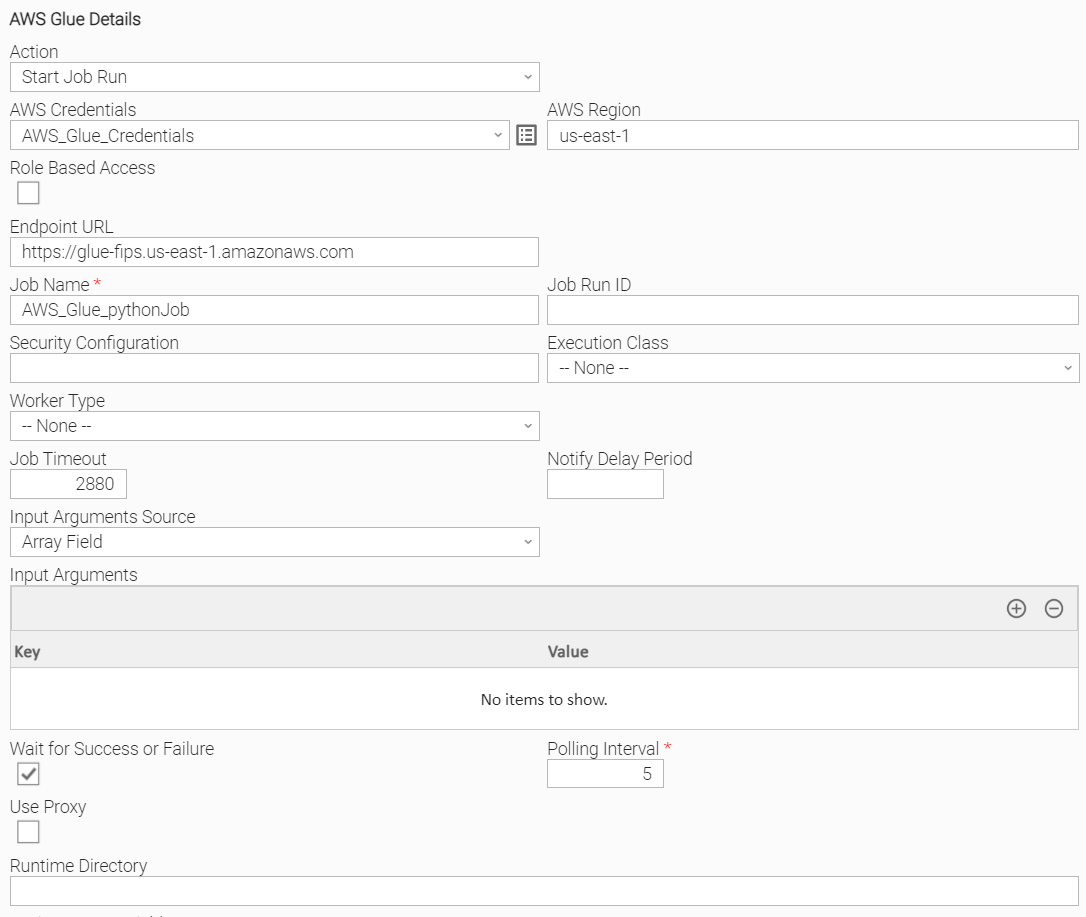
Start Job Run with all optional input arguments
Start a new Job Run for a given Run ID (retries a previous execution), with all optional input argument.
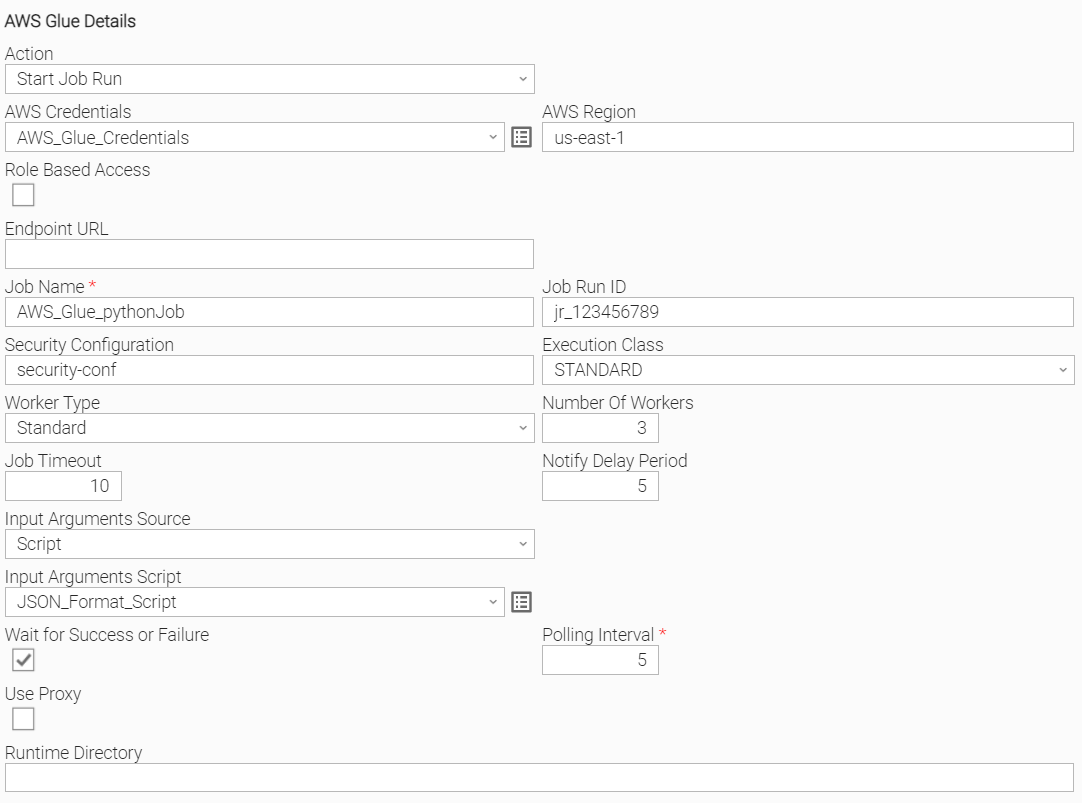
Start Job Run with all optional input arguments and script
Start a new Job Run for a given Run ID (retries a previous execution), with all optional input argument as above but use "Script" as Input Arguments Source.
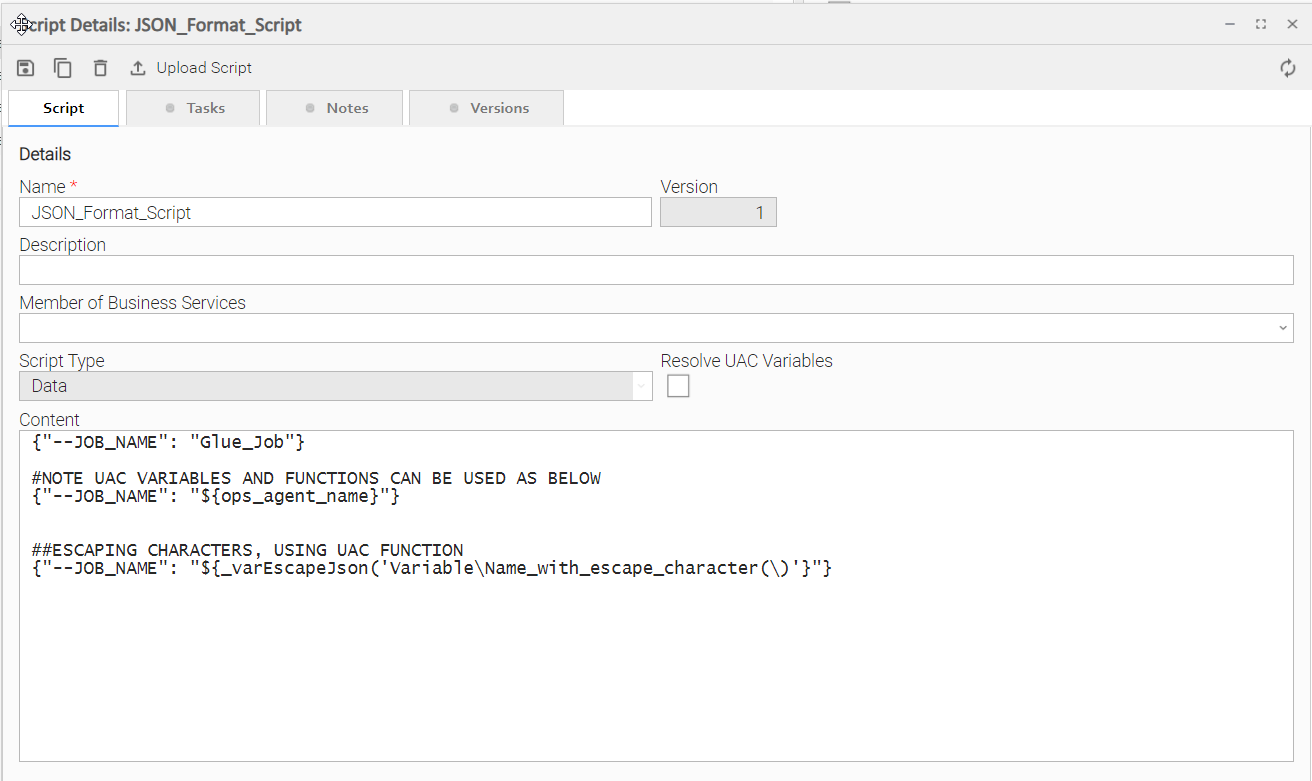
Job arguments in UAC Script in JSON format can pass arguments from UAC Variables or UAC Functions as shown below. More information about escaping characters for json format here.
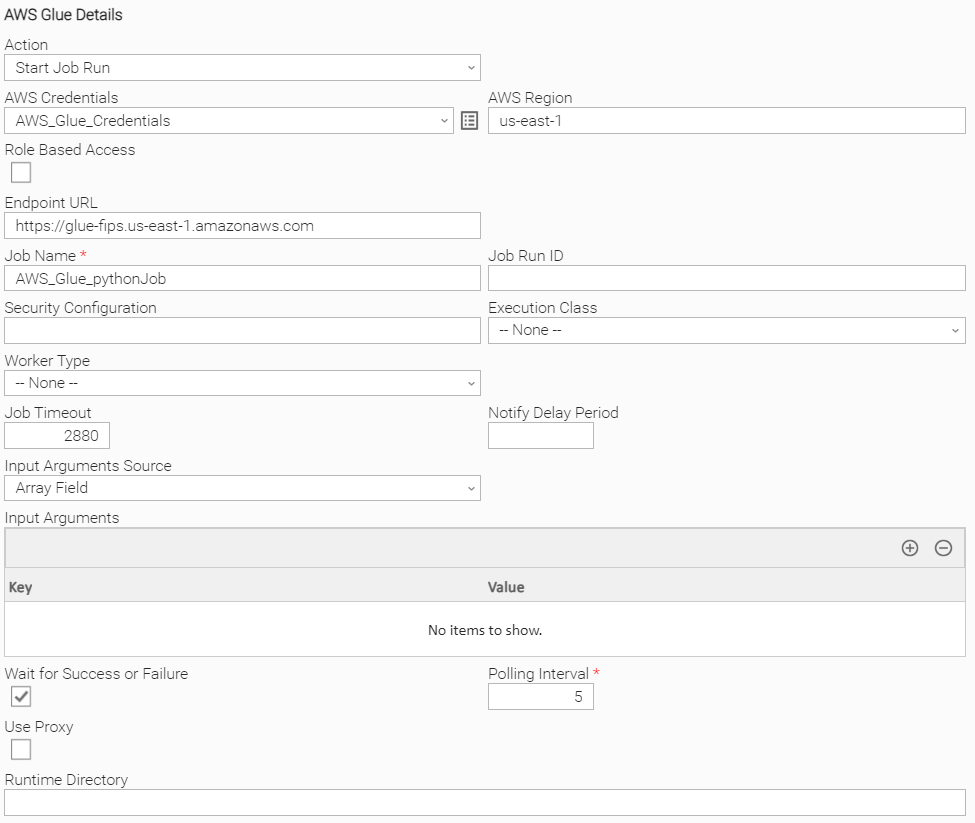
Start Job Run with Endpoint URL
Start a new Job Run, overriding the default AWS Endpoint.
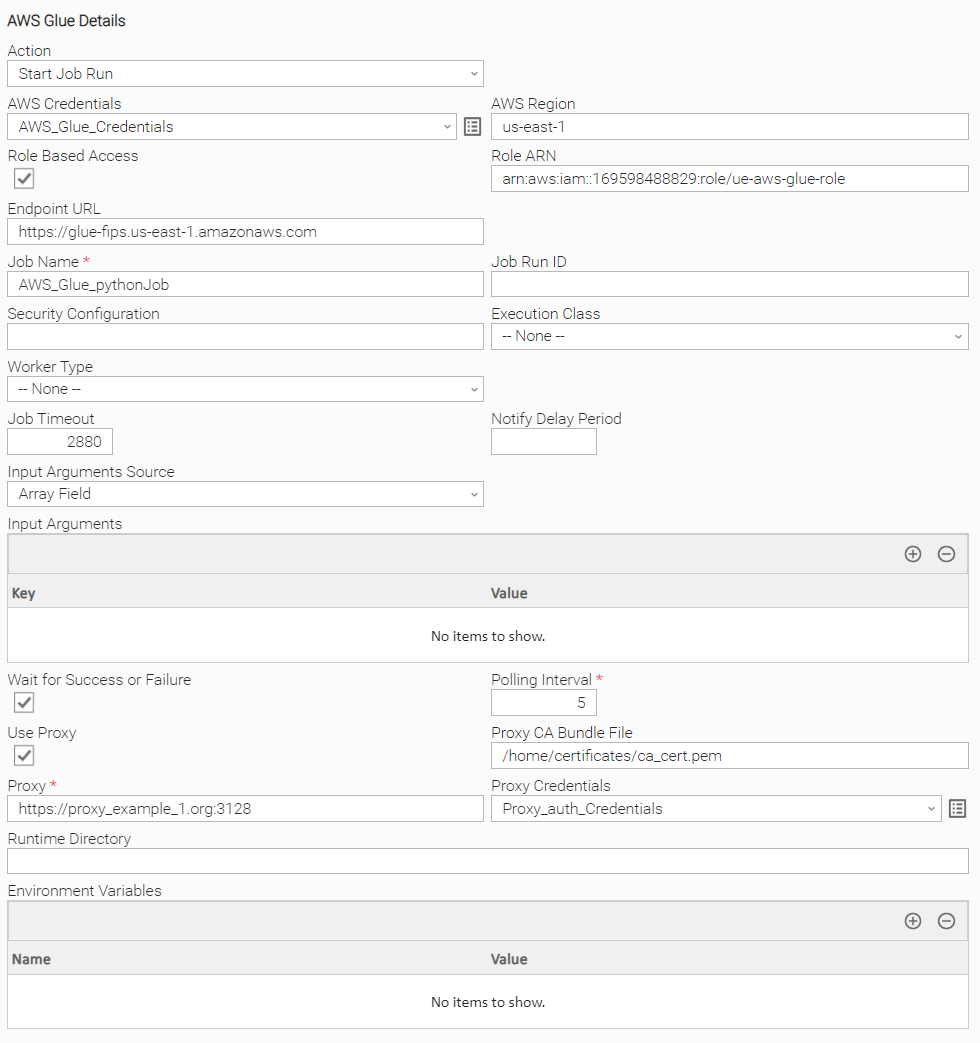
Start Job Run with Role ARN and Proxy configuration
Start a new Job Run assuming a provided ARN Role, and also using a Proxy configuration.
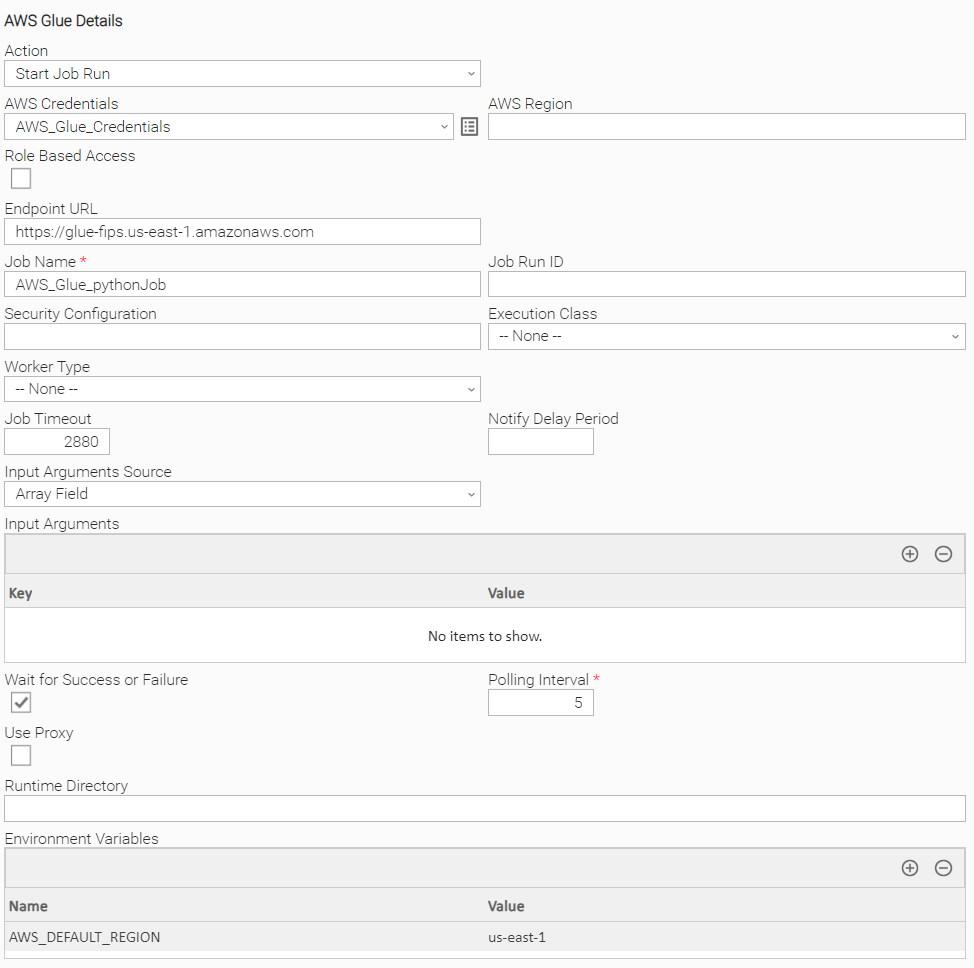
Start Job Run with Environment Variables as Region
Start a new job run, providing no AWS Credentials in task definition and providing AWS Region as Environment Variable, leaving the respective input fields empty. AWS Credentials are expected in this case to be configured on the task execution environment. Please refer to AWS Credentials input field for more information.
Task Output
Output Only Fields
The output fields for this Universal Extension are described below.
Field | Type | Description |
|---|---|---|
Job Run ID | text | ID of the started job run |
Job Run Status | text | Status of the job run. Generated for Action "Start Job Run" and Wait for Success or Failure = "True", updating live during execution. |
Exit Codes
The exit codes for the Extension are described below.
Exit Code | Status Classification Code | Status Classification Description | Status Description |
|---|---|---|---|
0 | SUCCESS | Successful Execution | SUCCESS: AWS Glue Job started successfully. |
0 | SUCCESS | Successful Execution with Wait for Success or Failure="True" | SUCCESS: AWS Glue Job started successfully and resulted in status SUCCEEDED. |
1 | FAIL | Failed Execution | FAIL: < Error Description >. |
1 | FAIL | Failed Execution with Wait for Success or Failure="True" | FAIL: Job Run started successfully but resulted in status < STATUS > Available values for are listed below.
|
2 | AUTHENTICATION_ERROR | Bad credentials | AUTHENTICATION_ERROR: Account cannot be authenticated. |
3 | AUTHORIZATION_ERROR | Insufficient Permissions | AUTHORIZATION_ERROR: Account is not authorized to perform the requested action. |
10 | CONNECTION_ERROR | Bad connection data or connection timed out | CONNECTION_ERROR: < Error Description >. |
11 | CONNECTION_ERROR | Extension specific connection error | CONNECTION_ERROR: ProxyConnectionError: Failed to connect to proxy URL |
20 | DATA_VALIDATION_ERROR | Input fields validation error | DATA_VALIDATION_ERROR: Some of the input fields cannot be validated. See STDERR for more details. |
21 | FAIL | User Stopped the execution | FAIL: Job Run started successfully but resulted in status STOPPED. |
Extension Output
In the context of a workflow, subsequent tasks can rely on the information provided by this integration as Extension Output.
Attribute changed is populated as follows.
- true in case the job is triggered successfully
- false otherwise
result section includes the following attributes.
Attribute | Type | Description |
|---|---|---|
out_job_run_id | string | ID of the started job run |
job_run_status Introduced in version 1.2.0 | text | Status of the job run. Generated for Action "Start Job Run" with Wait for Success or Failure = "True". |
started_on Introduced in version 1.2.0 | text | The date and time at which this job run was started. Generated for Action "Start Job Run" with Wait for Success or Failure = "True". |
last_modified_on Introduced in version 1.2.0 | text | The last time that this job run was modified. Generated for Action "Start Job Run" with Wait for Success or Failure = "True". |
completed_on Introduced in version 1.2.0 | text | The date and time that this job run completed. Generated for Action "Start Job Run" with Wait for Success or Failure = "True". |
error_message Introduced in version 1.2.0 | text | An error message associated with this job run. Generated for Action "Start Job Run" with Wait for Success or Failure = "True". |
An example of the Extension Output with Wait for Success or Failure = "False" for a successful triggering job is presented below.
Extension Output with Wait for Success or Failure = "False"
{
    "exit_code": 0,
    "status_description": "SUCCESS: AWS Glue Job started successfully.",
    "changed": true,
    "invocation": {
        "extension": "ue-aws-glue",
        "version": "2.1.0",
        "fields": { ... }
    },
    "result": {
        "out_job_run_id": "jr_123456789"
    }
}
An example of the Extension Output with Wait for Success or Failure = "True" for a successful triggering job is presented below.
Extension Output with Wait for Success or Failure = "True"
{
    "exit_code": 0,
    "status_description": "SUCCESS: AWS Glue Job started successfully and resulted in status SUCCEEDED.",
    "changed": true,
    "invocation": {
        "extension": "ue-aws-glue",
        "version": "2.1.0",
        "fields": { ... }
    },
    "result": {
        "job_run_id": "jr_57133f7bb82f13a29fa8813d95e2b941a3c6f5f67475227e1bb8d213e888478c",
        "job_run_status": "SUCCEEDED",
        "started_on": "2024-03-27 15:26:30.998000+02:00",
        "last_modified_on": "2024-03-27 15:26:58.791000+02:00",
        "completed_on": "2024-03-27 15:26:58.791000+02:00",
        "error_message": null
    }
}
STDOUT and STDERR
STDOUT and STDERR provide additional information to the user.
Backward compatibility is not guaranteed for the content of STDOUT/STDERR and can be changed in future versions without notice
Extensions Cancellation and Re-Run
- Canceling a task in UAC will only cancel it in UAC and will not have any effect on the running AWS Glue Job.
- Re-Running a task in UAC will execute the task again and start a new AWS Glue Job.
Integration Modifications
Modifications applied by users or customers, before or after import, might affect the supportability of this integration. The following modifications are discouraged to retain the support level as applied for this integration.
- Python code modifications should not be done.
- Template Modifications
- General Section
- "Name", "Extension", "Variable Prefix", "Icon" should not be changed.
- Universal Template Details Section
- "Template Type", "Agent Type", "Send Extension Variables", "Always Cancel on Force Finish" should not be changed.
- Result Processing Defaults Section
- Success and Failure Exit codes should not be changed.
- Success and Failure Output processing should not be changed.
- Fields Restriction Section
The setup of the template does not impose any restrictions, However with respect to "Exit Code Processing Fields" section.- Success/Failure exit codes need to be respected.
- In principle, as STDERR and STDOUT outputs can change in follow-up releases of this integration, they should not be considered as a reliable source for determining success or failure of a task.
- General Section
Users and customers are encouraged to report defects, or feature requests at Stonebranch Support Desk.
Document References
This document references the following documents:
Document Link | Description |
|---|---|
User documentation for creating, working with and understanding Universal Templates and Integrations. | |
User documentation for creating Universal Tasks in the Universal Controller user interface. | |
User documentation for creating and working with credentials. | |
User documentation for Resolvable Credentials Permitted Property. |
Changelog
ue-aws-glue-2.1.0 (2024-08-29)
Enhancements
Added:new input field - Endpoint URL (#41648, #118162)
Fixes
Fixed: "Proxy Type" field incorrectly used. It is not required to be filled anymore by users on task definition and from this version onwards it is hidden and not used (#41745)
ue-aws-glue-2.0.0 (2024-04-18)
Deprecations and Breaking Changes
Breaking Change:drop support for agent 7.3.X or lower, agent version 7.4.X or higher is required
Enhancements
Added:new input field - Execution ClassAdded:newer worker types compatible with AWS Glue version 3, are now supported
ue-aws-glue-1.2.1 (2023-12-21)
Fixes
Fixed: auto-renew AWS temporary credentials before expiration when using ARN based accessFixed: fixed issue with polling logic where task would get stuck with status Running (#35135)
ue-aws-glue-1.2.0 (2022-11-11)
Enhancements
Added: Support Start Glue Job and Wait until Job Reaches status "Succeeded" or "Failed" (#30157)Added: Larger set of output fields (#30157)Added: Log payload response for Job Run Status and Start Glue Job Run Action on debug mode.Added: Option to pass Input Arguments as UAC script supporting UAC environment variables and UAC Functions.
ue-aws-glue-1.1.0 (2022-06-23)
Enhancements
Added: Allow AWS Credentials and AWS Region as optional fields enabling their configuration on the task execution environment. (#28312)
ue-aws-glue-1.0.0 (2022-03-31)
Initial Version