AWS Lambda
Disclaimer
Your use of this download is governed by Stonebranch's Terms of Use.
Version Information
Template Name | Extension Name | Version | Status |
|---|---|---|---|
AWS Lambda | ue-aws-lambda | 1 (Current 1.3.0) | Fixes and new Features are introduced. |
Refer to Changelog for version history information.
Overview
AWS Lambda is a serverless compute service that runs your code in response to events and automatically manages the underlying compute resources for you. You can use AWS Lambda to extend other AWS services with custom logic, or create your own back-end services that operate at AWS scale, performance, and security.
This Universal Extension provides the capability to execute a AWS Lambda function and return the result of that execution.
Key Features
- Trigger Lambda function Synchronously or Asynchronously.
- Support authorization via IAM Role-Based Access Control (RBAC) strategy.
- Support Proxy communication via HTTP/HTTPS protocol.
Requirements
This integration requires a Universal Agent and a Python runtime to execute the Universal Task.
Area | Details |
|---|---|
Python Version | Requires Python 3.7 or 3.11. Tested with Agent bundled python distribution |
Universal Agent Compatibility |
|
Universal Controller Compatibility | Universal Controller Version >= 7.5.0.0. |
Task Examples
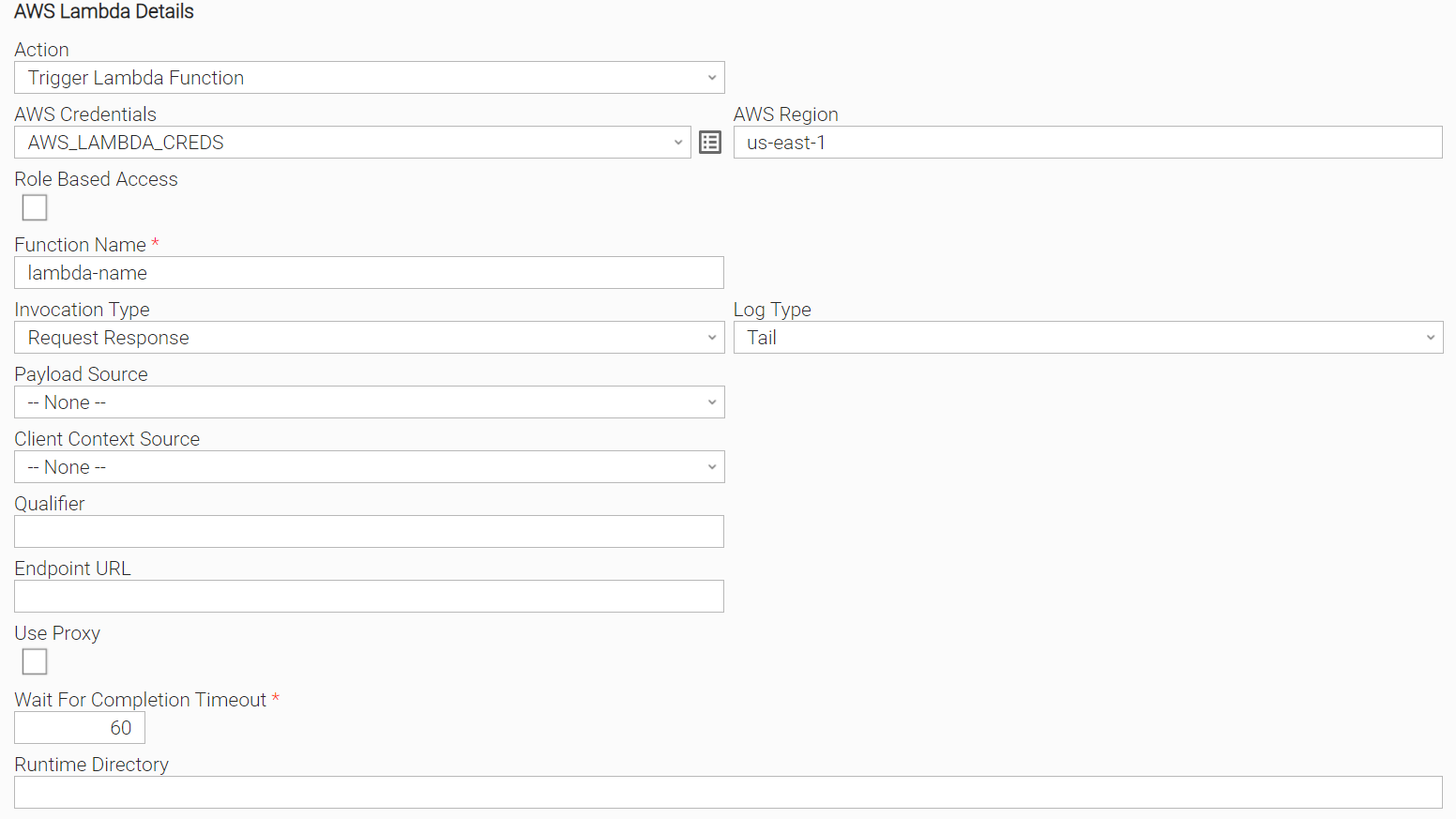
Trigger Lambda Synchronously with Log
Triggering a Lambda function Synchronously with Log Type set to "Tail".
Synchronicity is set by Invocation Type = "Request_Response".
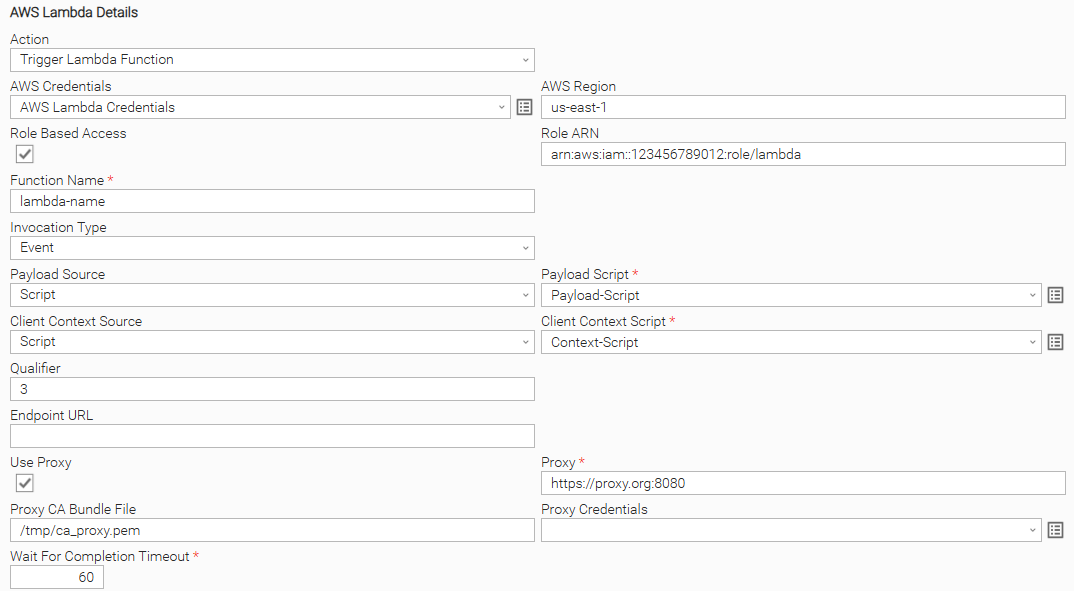
Trigger Lambda Asynchronously with Role Based Access and HTTPS Proxy
Triggering Lambda function Asynchronously with:
- Role Based Access
- HTTPS Proxy connection
- Payload Source
- Client Context Source
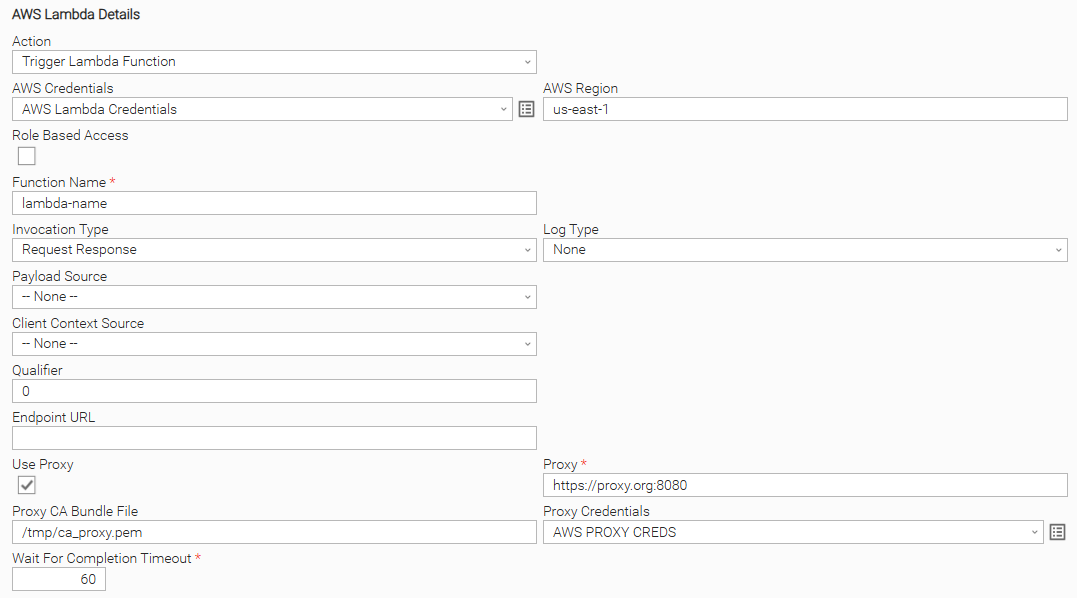
Trigger Lambda Synchronously with HTTPS with Credentials Proxy
Triggering a Lambda function Synchronously with "HTTPS with Credentials" Proxy connection.
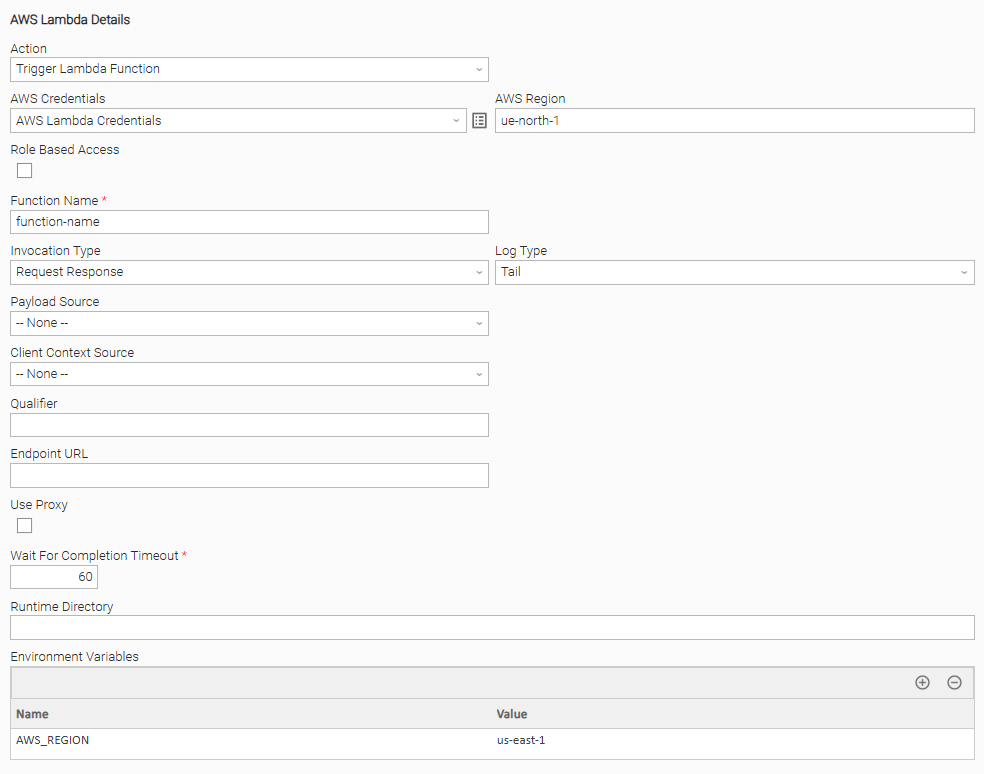
Trigger Lambda Synchronously with Log
Triggering a Lambda function Synchronously with "Region" provided as Environment Variables and without AWS Credentials. See AWS Credentials input field for more information.
Input Fields
The input fields for this Universal Extension are described below.
Field | Input type | Default value | Type | Description |
|---|---|---|---|---|
Action | Required | Trigger Lambda function | Choice | The action performed upon the task execution. Available actions:
|
AWS Region Optional since version 1.1.0 | Optional | - | Text | Region for the Amazon Web Service. Find more information about the AWS Service endpoints and quotas here. When AWS Region is not populated as part of the task definition, during task execution the integration will look for credentials on the task execution environment. Refer to configuration options for more information. |
AWS Credentials Optional since version 1.1.0 | Optional | - | Credentials | The Credentials definition should be as follows.
When AWS Credentials are not populated as part of the task definition, during task execution the integration will look for AWS Credentials on the task execution environment. Refer to configuration options for more information. |
Role Based Access | Optional | False | Boolean | Special type of authorization is provided by Role Assumption where the client sends their own credentials and the role they want to assume from another user. If allowed, the client receives temporary credentials with limited time access to some resources. |
Role ARN | Optional | - | Text | Role Arn: Amazon Role, which is applied for the connection. Role ARN format: Required when Role Based Access="True". |
Function Name | Required | - | Text | Name of the Lambda function, which will be triggered. For example, my-function (name-only) or my-function:v1 (with alias). |
Invocation Type | Required | Request Response | Choice | Type of execution for the function being triggered. Available choices are:
|
Log Type | Optional | None | Choice | Can be set to "Tail" to include the execution log in the response. Available choices are:
Visible only when Invocation Type="Request Response". |
Payload Source | Optional | None | Choice | Source of payload to be sent.
|
Payload Script | Optional | - | Script Field | Script field where the payload can be entered. The scripts must evaluate to a proper JSON format. Required when Payload Source = "Script". |
Client Context Source | Optional | None | Choice | Client context provided to Lambda function by the client application.
|
Client Context Script | Optional | - | Script | Script passing parameters using the ClientContext object. The scripts must evaluate to a proper JSON format. Required when Client Context Source= "Script". |
Use Proxy | Optional | False | Boolean | Specification for whether or not Proxy will be used in the communication with AWS. |
Proxy Type Removed in version 1.3.0 | Optional | HTTP | Choice | Type of proxy connection to be used. Available options are the following.
Visible only when Use Proxy = "True". tip This field is removed (hidden) as it is not required to be filled anymore by users, and only HTTPS endpoints are supported. |
Proxy | Optional | - | Text | URL of the proxy server to be used. Valid formats are the following: Visible when Use Proxy is checked. |
Proxy CA Bundle File | Optional | - | Text | The path to a custom certificate bundle to use when establishing SSL/TLS connections with proxy. Visible when Use Proxy is checked. |
Proxy Credentials | Optional | - | Credentials | Credentials to be used for the proxy communication. The credential definition should be as follows.
Visible when Use Proxy is checked. |
Qualifier | Optional | - | Text | Version or alias to invoke a published version of the function. For example, for version 1, Qualifier = "1". If empty, default value is the latest version. |
Wait For Completion Timeout Introduced in version 1.1.1 | Required | 60 | Integer | The time in seconds that the task will wait for a server response until it throws a timeout exception. This is linked with the read_timeout config value that is passed to the AWS client. |
Endpoint URL Introduced in version 1.2.0 | Optional | - | Text | The URL of the custom endpoint to use. The URL must contain a scheme which is either HTTP or HTTPS. |
Task Output
Exit Codes
The exit codes for AWS Lambda Extension are described in the following table.
Exit Code | Status Classification Code | Status Classification Description | Status Description |
|---|---|---|---|
0 | SUCCESS | Successful Execution | SUCCESS: Successful Task execution |
0 | SUCCESS | Successful Execution, but could not decode AWS log message | DECODE_WARNING: AWS Lambda function invoked successfully, but log message could not be decoded |
1 | FAIL | Failed Execution | FAIL: < Error Description > |
2 | AUTHENTICATION_ERROR | Bad credentials | AUTHENTICATION_ERROR: Account cannot be authenticated. |
3 | AUTHORIZATION_ERROR | Insufficient Permissions | AUTHORIZATION_ERROR: Account is not authorized to perform the requested action. |
10 | CONNECTION_ERROR | Bad connection data or connection timed out | CONNECTION_ERROR: < Error Description > |
11 | CONNECTION_ERROR | Extension specific connection error | CONNECTION_ERROR: ProxyConnectionError: Failed to connect to proxy URL |
20 | DATA_VALIDATION_ERROR | Input fields validation error | DATA_VALIDATION_ERROR: Some of the input fields cannot be validated. See STDOUT for more details. |
21 | READ_TIMEOUT_ERROR | Lambda function completion timeout error | READ_TIMEOUT_ERROR: Did not receive a server response within the allotted time frame (wait_for_completion_timeout). |
Extension Output
In the context of a workflow, subsequent tasks can rely on the information provided by this integration as Extension Output.
Attribute changed is populated as follows.
- true in case the job is triggered successfully
- false otherwise
result section includes the following attributes.
Attribute | Type | Description |
|---|---|---|
| integer | The HTTP status code is in the 200 range for a successful request. For the RequestResponse invocation type, this status code is 200. For the Event invocation type, this status code is 202. For the DryRun invocation type, the status code is 204. |
| string | The last 4 KB of the execution log, which is base64 encoded. |
| string | The response from the function, or an error object. |
| string | The version of the function that was executed. When you invoke a function with an alias, this indicates which version the alias is resolved to. |
| string | If present, indicates that an error occurred during function execution. Details about the error are included in the response payload. |
An example of the Extension Output for a successful triggering job is presented below.
{
    "exit_code": 0,
    "status_description": "SUCCESS: AWS Lambda function invoked successfully",
    "changed": true,
    "invocation": {
        "extension": "ue-aws-lambda",
        "version": "1.3.0",
        "fields": {
            "action": "Trigger Lambda Function",
            "credentials_user": "****",
            "credentials_password": "****",
            "region": "us-east-1",
            "role_based_access": false,
            "role_arn": null,
            "function_name": "test-function",
            "invocation_type": "Event",
            "payload_source": null,
            "payload_script": null,
            "client_context_source": null,
            "client_context_script": null,
            "log_type": "None",
            "qualifier": null,
            "use_proxy": false,
            "proxy_type": null,
            "proxy": null,
            "proxy_credentials_user": null,
            "proxy_credentials_password": null,
            "proxy_ca_bundle_file": null,
            "wait_for_completion_timeout": 60,
            "endpoint_url": null
        }
    },
    "result": {
        "status_code": 202,
        "log_result": null,
        "payload": null,
        "executed_version": null,
        "function_error": null
    }
}
STDOUT and STDERR
STDOUT and STDERR provide additional information to the User. The populated content can be changed in future versions of this extension without notice. Backward compatibility is not guaranteed.
How To
Import Universal Template
- This Universal Task requires the Resolvable Credentials feature. Check that the Resolvable Credentials Permitted system property has been set to true.
- Import the Universal Template into your Controller:
- Extract the zip file, you downloaded from the Integration Hub.
- In the Controller UI, select Services > Import Integration Template option.
- Browse to the "export" folder under the extracted files for the ZIP file (Name of the file will be unv_tmplt_*.zip) and click Import.
- When the file is imported successfully, refresh the Universal Templates list; the Universal Template will appear on the list.
Modifications of this integration, applied by users or customers, before or after import, might affect the supportability of this integration. For more information refer to Integration Modifications paragraph.
Integration Modifications
Modifications applied by users or customers, before or after import, might affect the supportability of this integration. The following modifications are discouraged to retain the support level as applied for this integration.
- Python code modifications should not be done.
- Template Modifications
- General Section
- "Name", "Extension", "Variable Prefix", and "Icon" should not be changed.
- Universal Template Details Section
- "Template Type", "Agent Type", "Send Extension Variables", and "Always Cancel on Force Finish" should not be changed.
- Result Processing Defaults Section
- Success and Failure Exit codes should not be changed.
- Success and Failure Output processing should not be changed.
- Fields Restriction Section
The setup of the template does not impose any restrictions. However, concerning the "Exit Code Processing Fields" section.- Success/Failure exit codes need to be respected.
- In principle, as STDERR and STDOUT outputs can change in follow-up releases of this integration, they should not be considered as a reliable source for determining the success or failure of a task.
- General Section
Event Template configuration related to "Metric Label Attributes" & "Optional Metric Labels" is allowed. However, administrators should be cautious of high cardinality scenarios that might occur.
Users and customers are encouraged to report defects, or feature requests at Stonebranch Support Desk.
Known Issues
Issue | Description | Workaround |
|---|---|---|
Task instance stuck in queue | When the extension is first imported, the initial task instance may become stuck in a queued state due to a controller-side issue. This problem has been resolved in the following maintenance releases:
| If the Controller is in a version lower to the ones mentioned on the description, the following workaround can be applied:
Subsequent task instances should then execute normally without getting stuck in the queue. |
Document References
This document references the following documents.
Document Link | Description |
|---|---|
User documentation for creating, working with and understanding Universal Templates and Integrations. | |
User documentation for creating Universal Tasks in the Universal Controller user interface. | |
Documentation for AWS Lambda. | |
User Documentation for Comparing ABAC to the traditional RBAC model. |
Changelog
ue-aws-lambda-1.3.0 (2025-08-14)
Enhancements
Changed: Updated the bundled Boto3 library which makes the integration compatible with more AWS environment variables like AWS_ENDPOINT_URL_STS (#45471)
Fixes
Fixed: "Proxy Type" field incorrectly used. It is not required to be filled anymore by users on task definition and from this version onwards it is hidden and not used (#47840)
ue-aws-lambda-1.2.0 (2024-01-04)
Enhancements
Added: Provide the capability to specify a custom endpoint URL to call instead of the default one. (#33020)
ue-aws-lambda-1.1.2 (2023-09-01)
Fixes
Fixed: Provide a fix on the decoding of AWS Log Message. (#34100)
ue-aws-lambda-1.1.1 (2023-02-24)
Fixes
Fixed: Provide the capability to define the completion timeout of the lambda function and avoid lambda function re-execution if the completion timeout is exceeded. (#31671)
ue-aws-lambda-1.1.0 (2022-06-30)
Enhancements
Added: Provide the capability to rely on AWS credentials set-up on the environment where the extension is running and therefore it is not mandatory to be passed on the task definition as input fields. The same applies to AWS Region. (#29115)
ue-aws-lambda-1.0.1 (2022-03-14)
Fixes
Fixed:Change of template SysId. (#27744)