AWS Step Functions
Disclaimer
Your use of this download is governed by Stonebranch's Terms of Use.
Version Information
Template Name | Extension Name | Version | Status |
|---|---|---|---|
AWS Step Functions | ue-aws-stepfunctions | 3.0.1 | Fixes and new Features are introduced. |
3.0.0 is a major release and introduces breaking changes that might affect some customers depending on their setup. Administrators are strongly advised to refer to Changelog for more information on the changes introduced in this release.
Refer to Changelog for version history information.
Overview
This integration allows customers to execute AWS Step Functions from Universal Controller.
Key Features
Feature | Description |
|---|---|
Step Function Execution | Execute an AWS Step Function asynchronously without waiting for the execution to finish, or wait until it reaches a final state. |
AWS Credentials Authentication | Authenticate using AWS Credentials with support for IAM Role-Based Access Control (RBAC). |
Proxy Support | Communication through a proxy using HTTP or HTTPS. |
Requirements
This integration requires a Universal Agent and a Python runtime to execute the Universal Task.
Area | Details |
|---|---|
Python Version | Requires Python 3.11. Tested with Agent bundled Python distribution. |
Universal Agent Compatibility |
|
Universal Controller Compatibility | Universal Controller Version >= 7.6.0.0. |
Network and Connectivity | The Universal Agent host must be able to reach AWS Step Functions REST endpoints. The AWS Credentials provided in the Universal Task must have sufficient permissions on AWS to execute the Step Function. |
Supported Actions
Action: Start Asynchronous Execution
Starts an AWS Step Function execution. The task can be configured to return immediately after triggering the execution, or to wait until the execution reaches a final state (SUCCEEDED, FAILED, ABORTED, or TIMED_OUT).
Action Output
- EXTENSION
- STDOUT
The extension output provides the following information:
exit_code,status_description: General information regarding the task execution.changed: Indicates whether the AWS Step Function was successfully triggered.invocation.fields: The task configuration used for this execution.result.executionArn: The ARN identifying the execution.result.stateMachineArn: The ARN identifying the state machine.result.name: The name of the execution.result.startDate: The date the execution started.result.stopDate: The date the execution stopped. Populated only when Wait for Success or Failure is selected.result.status: The current status of the execution.result.output: The JSON output data of the execution. Populated only when Wait for Success or Failure is selected.result.outputDetails: Details about execution output. Populated only when Wait for Success or Failure is selected.
Examples:Successful execution
Failed execution
STDOUT provides additional information to the user. The populated content can be changed in future versions of this extension without notice.
Configuration Examples
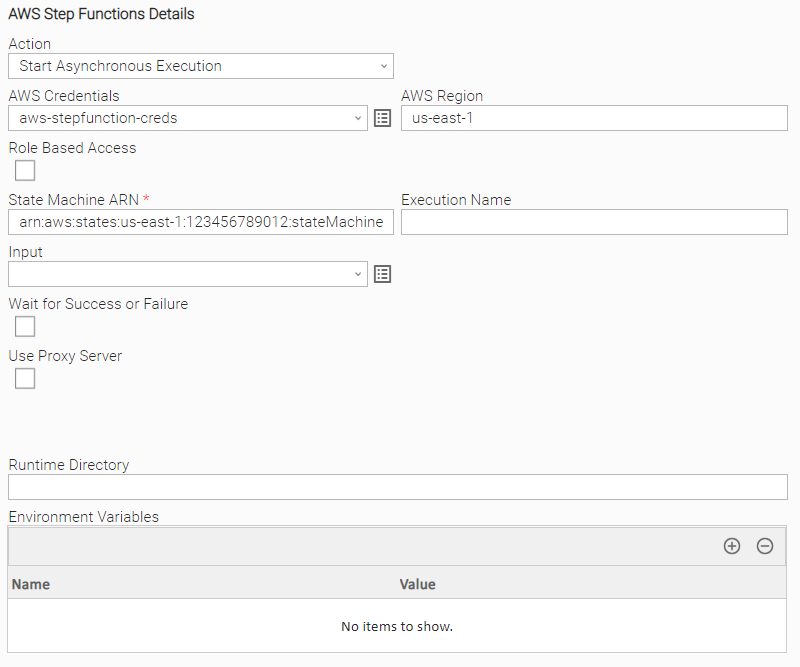
Example: Start Asynchronous Execution
Example of AWS Step Functions Universal Task for triggering a Step Function with AWS Credentials and State Machine ARN only.
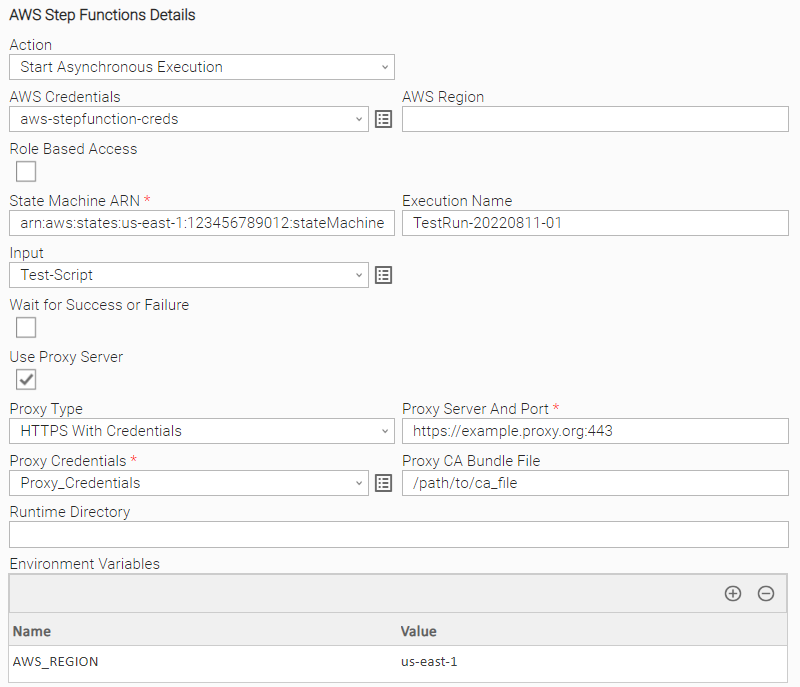
Example: Start Asynchronous Execution With Proxy
Example of AWS Step Functions Universal Task for submitting a new AWS Step Function with the following arguments.
- Environment Variables for AWS Region
- Input script
- Execution Name
- Proxy Type "HTTPS With Credentials"
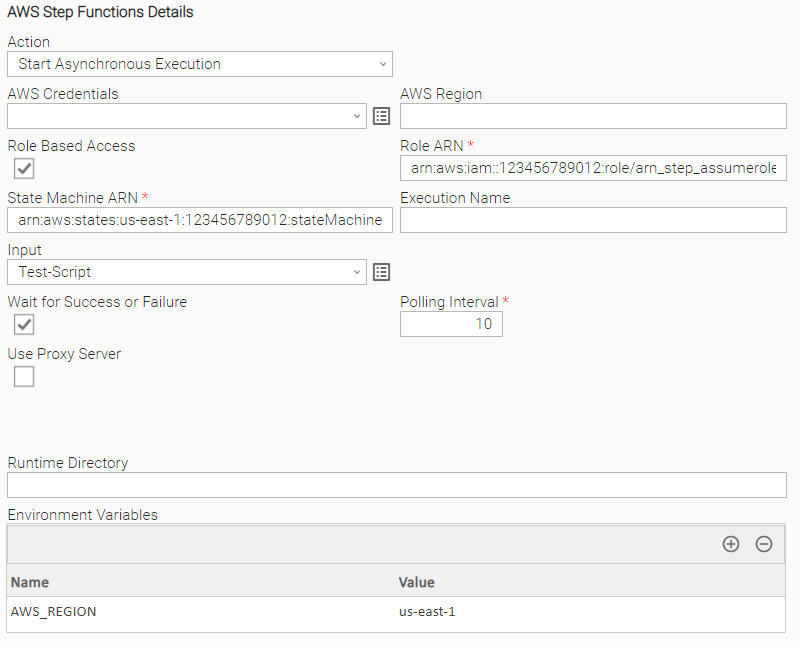
Example: Start Asynchronous Execution With IAM Role
Example of AWS Step Functions Universal Task for submitting a new AWS Step Function using an IAM Role and without providing AWS Credentials.
AWS Credentials are expected in this case to be configured on the task execution environment.
Wait for Success or Failure is selected so the Universal Task instance will continue execution until the AWS Step Function reaches one of the following final states.
- SUCCESS
- FAIL
- ABORTED
- TIMEOUT
Input Fields
Field | Type | Description | Version Information |
|---|---|---|---|
Action | Choice | Action performed upon the task execution. Available values: "Start Asynchronous Execution" (default). | Introduced in 1.0.0 |
AWS Region | Text | Region for the Amazon Web Service. When not populated, the integration will look for the region configured on the task execution environment. Refer to configuration options for more information. | Introduced in 1.0.0 |
AWS Credentials | Credentials | AWS credentials used to authenticate with the service. The credential definition should be as follows.
When not populated, the integration will look for credentials configured on the task execution environment. Refer to configuration options for more information. | Introduced in 1.0.0 |
Role Based Access | Boolean | Enables Role Assumption authorization, where the client sends its own credentials along with the role to assume. If allowed, the client receives temporary credentials with limited time access to the specified resources. Defaults to "False". | Introduced in 1.0.0 |
Role ARN | Text | Role Amazon Resource Name (ARN) used to access and execute the Step Function. Role ARN format: This field is required when Role Based Access is "True". | Introduced in 1.0.0 |
State Machine Arn | Text | The Amazon Resource Name (ARN) of the state machine to execute. This field is required. | Introduced in 1.0.0 |
Execution Name | Text | The name of the execution. For more information and restrictions refer to Limits Related to State Machine Executions in the AWS Step Functions Developer Guide. If empty, the Universal Task will generate a unique value for each instance. On the first and subsequent runs of a task instance, a suffix is appended to the name representing the execution count of the task, making the execution name unique across runs. This field is visible when Action is "Start Asynchronous Execution". | Introduced in 1.0.0 |
Input | Script | The string that contains the JSON input data for the execution. | Introduced in 1.0.0 |
Wait for Success or Failure | Boolean | If selected, the task will continue running until the execution reaches a final state: "SUCCEEDED", "FAILED", "ABORTED", or "TIMED_OUT". Defaults to "False". | Introduced in 1.0.0 |
Polling Interval | Integer | The polling interval in seconds between checks for the Step Function status. Defaults to 10. This field is required when Wait for Success or Failure is "True". | Introduced in 1.0.0 |
Use Proxy | Boolean | Indicates whether a proxy should be used for communication with AWS. Defaults to "False". | Introduced in 1.0.0 |
Proxy Type | Choice | Type of proxy connection to be used. Available values: "HTTP" (default), "HTTPS", "HTTPS With Credentials". This field is required when Use Proxy is "True". | Introduced in 1.0.0 |
Proxy | Text | Comma-separated list of proxy servers. Valid formats: This field is required when Use Proxy is "True". | Introduced in 1.0.0 |
Proxy CA Bundle File | Text | The path to a custom certificate bundle to use when establishing SSL/TLS connections with the proxy. This field is visible when Proxy Type is "HTTPS" or "HTTPS With Credentials". | Introduced in 1.0.0 |
Proxy Credentials | Credentials | Credentials used for proxy communication. The credential definition should be as follows.
This field is required when Proxy Type is "HTTPS With Credentials". | Introduced in 1.0.0 |
Output Fields
The following output-only fields provide better visibility during the execution of Universal Task Instances.
Field | Type | Description | Version Information |
|---|---|---|---|
Execution Arn | Text | The Amazon Resource Name (ARN) which identifies the execution. | Introduced in 1.0.0 |
Execution Status | Text | The current status of the execution. | Introduced in 1.0.0 |
Generated Execution Name | Text | The unique execution name generated by the task and used when the AWS service is called. | Introduced in 1.0.0 |
Exit Codes
Exit Code | Status | Description |
|---|---|---|
0 | SUCCESS | AWS Step Functions workflow executed successfully. When Wait for Success or Failure is "False", the execution was successfully started. When Wait for Success or Failure is "True", the execution reached a final succeeded state. |
1 | FAIL | Unexpected error. Execute in Debug mode for more information. |
2 | AUTHENTICATION_ERROR | Account cannot be authenticated. |
3 | AUTHORIZATION_ERROR | Account is not authorized to perform the requested action. |
10 | CONNECTION_ERROR | Bad connection data or connection timed out. |
11 | CONNECTION_ERROR | Failed to connect to proxy URL. |
20 | DATA_VALIDATION_ERROR | Some of the input fields cannot be validated. See STDOUT for more details. |
23 | FAIL | Step Function is in FAILED state. |
24 | FAIL | Step Function is in ABORTED state. |
25 | FAIL | Step Function is in TIMEOUT state. |
How To
Import Universal Template
To use the Universal Template, you first must perform the following steps:
For large Universal Templates, some parameters need to be adjusted, particularly for MySQL, Universal Controller and Universal Agent:
MySQL (my.cnf)
max_allowed_packet: Defines the maximum size of a single network packet. Recommended setting: at least 25% greater than the size of your largest imported integration.innodb_log_file_size: Determines the size of InnoDB redo log files. Recommended setting: ensure 10% of the log file size exceeds your largest imported integration.
Universal Agent Configuration (config/omss.conf)
max_msg_size: Specifies the maximum allowable size for messages. Recommended setting: at least 10% greater than your largest imported integration.
Universal Controller Configuration
Universal Controller configuration can restrict import of an integration if the extension maximum bytes is not properly set. This can be configured in the following ways:
- Universal Controller configuration file (tomcat/conf/uc.properties):
uc.universal_template.extension.maximum_bytes - Universal Controller UI Admin Panel: Administration → Properties → Universal Template Extension Maximum Bytes
Recommended setting: ensure the configured value is greater than the size of your largest imported integration.
- This Universal Task requires the Resolvable Credentials feature. Check that the Resolvable Credentials Permitted system property has been set to true.
- Import the Universal Template into your Controller:
- Extract the zip file downloaded from the Integration Hub.
- In the Controller UI, select Services > Import Integration Template.
- Browse to the
exportfolder under the extracted files for the ZIP file (the file name will beunv_tmplt_*.zip) and click Import. - When the file is imported successfully, refresh the Universal Templates list; the Universal Template will appear on the list.
Modifications of this integration, applied by users or customers, before or after import, might affect the supportability of this integration. For more information refer to Integration Modifications.
Configure Universal Task
- Create a new Universal Task and enter the required input fields as defined in the Universal Template.
- Before creating the task, ensure any required external accounts, access tokens, or service credentials are available.
- Create the required Resolvable Credentials to be used as input fields in the Universal Task configuration.
- If additional resources are needed (such as configuration scripts, data files, or prerequisite tasks), set these up before configuring the Universal Task.
Integration Modifications
Modifications applied by users or customers, before or after import, might affect the supportability of this integration. The following modifications are discouraged to retain the support level as applied for this integration.
- Python code modifications should not be done.
- Template Modifications
- General Section
- "Name", "Extension", "Variable Prefix", "Icon" should not be changed.
- Universal Template Details Section
- "Template Type", "Agent Type", "Send Extension Variables", "Always Cancel on Force Finish" should not be changed.
- Result Processing Defaults Section
- Success and Failure Exit codes should not be changed.
- Success and Failure Output processing should not be changed.
- Fields Restriction Section
The setup of the template does not impose any restrictions. However, concerning the "Exit Code Processing Fields" section:
- Success/Failure exit codes need to be respected.
- As STDERR and STDOUT outputs can change in follow-up releases of this integration, they should not be considered as a reliable source for determining the success or failure of a task.
- General Section
Users and customers are encouraged to report defects, or feature requests at Stonebranch Support Desk.
Document References
This document references the following documents.
Document Link | Description |
|---|---|
User guide for AWS Step Functions. | |
User documentation for Comparing ABAC to the traditional RBAC model. |
Changelog
ue-aws-stepfunctions-3.0.1 (2026-08-04)
Fixes
Fixed: ExpiredTokenException causes task to fail after 1 hour of execution when using ARN access. (#149068)
ue-aws-stepfunctions-3.0.0 (2026-06-02)
Deprecations and Breaking Changes
Breaking Change: Dropping support for Agents with version <= 7.5 and for Python 3.7.
Enhancements
Added: Update boto3 library to increase compatibility.Added: Improving Python compatibility with future Agent versions.
ue-aws-stepfunctions-2.0.0 (2023-09-01)
Deprecations and Breaking Changes
Breaking Change: This version supports Universal Agent and Universal Controller from version 7.2 onwards. Customers that used older versions of this integration on Universal Controller and Universal Agent of versions <= 7.2 are required to upgrade to use the new functionality introduced by 2.0.0.
Enhancements
Added: A suffix is added to the Execution Name before the AWS Service is called. That suffix represents the execution count for a specific task instance, therefore providing uniqueness of the Execution Name.
Fixes
Fixed: The Extension Output attributefields.invocation.execution_nameis corrected to represent the user input after the resolution of UC Functions and variables.
ue-aws-stepfunctions-1.0.1 (2022-09-29)
Fixes
Fixed: Correct the handling of escaped characters within input field JSON payload which led to the impossibility of execution of the Step Function. (#30334)
ue-aws-stepfunctions-1.0.0 (2022-08-23)
Enhancements
Added: Basic functionality for triggering an AWS Step Functions. (#28543)