Azure AZ CLI
Disclaimer
Your use of this download is governed by Stonebranch's Terms of Use.
Version Information
Template Name | Version |
|---|---|
Azure AZ CLI |
|
Refer to Changelog for version history information.
Overview
The Azure command-line interface (Azure CLI) is a set of commands used to create and manage Azure resources. The Azure CLI is available across Azure services and is designed to get you working quickly with Azure, with an emphasis on automation.
The Universal Task for Azure AZ CLI allows calling a single or a set of Azure CLI commands.
Software Requirements
Software Requirements for Universal Agent
- Universal Agent for Linux or Windows Version 7.2.x or later is required, including SAP Connector license (USAP).
- Requires Python 3.7.0 or higher. Tested with the Universal Agent bundled Python distribution.
- Python modules required:
- azure-cli (v2.44.1 or higher)
Software Requirements for Universal Controller
- Universal Controller 7.2.x or later is required.
Software Requirements for the Application to be Scheduled
- This task has been tested with the Azure CLI Versions:
- azure-cli-core==2.32.0
- azure-core==1.26.2
- azure-cli==2.44.1
- pyOpenSSL==22.0.0
Key Features
This Universal Task provides the following key features:
The Universal Task for Azure AZ CLI allows you to schedule and Invoke Azure CLI commands.
Either a single command or a list of commands can be invoked.
No Azure CLI needs to be installed. This Universal Task uses Microsoft-maintained Python modules azure-cli.
The following functionalities can be performed:
- Authentication
- Authenticate with Azure using your Azure user credentials.
- Authenticate with Azure with a service principal.
- Actions
- Invoke a single Azure CLI commands.
- Invoke a list of Azure CLI commands provides via a Universal Controller Script file.
- Logging
- Chooses different log-levels.
- Other
- The Universal Task can run on any Windows or Linux Agent, without the need to install the Azure CLI.
Import Universal Template
To use the Universal Template, you first must perform the following steps.
- This Universal Task requires the Resolvable Credentials feature. Check that the Resolvable Credentials Permitted system property has been set to true.
- To import the Universal Template into your Controller, follow the instructions here.
- When the files have been imported successfully, refresh the Universal Templates list; the Universal Template will appear on the list.
Modifications of this integration, applied by users or customers, before or after import, might affect the support of this integration. For more information, refer to Integration Modifications.
Configure Universal Task
For the new Universal Task type, create a new task, and enter the task-specific details that were created in the Universal Template.
Input Fields
The Azure AZ CLI Universal Task contains the following input fields.
Field | Input type | Value | Type | Description | ||||||||||||
|---|---|---|---|---|---|---|---|---|---|---|---|---|---|---|---|---|
Authentication Method | Required | Azure user credentials | Service-principal | Choice | Choose how to authenticate to Azure.
| ||||||||||||
Azure Credentials | Required | Runtime User Runtime Password | Credential | In Case of Azure user credentials Authentication:
In case of Azure Service-principal Authentication: (Azure App Registration)
| ||||||||||||
Tenant ID | Optional | Azure Tenant ID | Text | Field is only visible in case of Authentication Method "Service-principal" | ||||||||||||
Command or Script | Required | Command | Script info The command is provided without the key word az. Example: In Microsoft Azure AZ: az version Command or Script: version | Choice |
| ||||||||||||
AZ Command | Optional | Single Azure CLI command. | Text | Single Azure CLI command. | ||||||||||||
AZ Script | Optional | Script with a list of Azure CLI commands. | Script | The listed Azure CLI commands will be executed one after the other. | ||||||||||||
Log Level | Required | INFO | DEBUG | WARNING | ERROR | Choice | Python Log Level |
Task Examples
Single Azure CLI Command
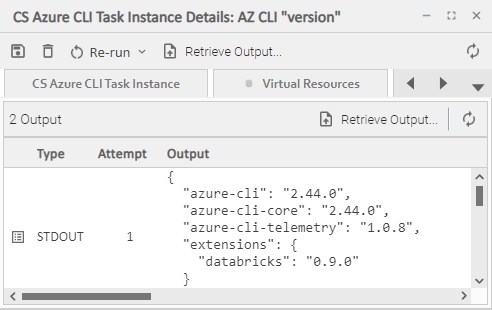
The following example invokes a single Azure CLI Command.
The Azure CLI to be invoke is:
az version
Task Output:
Multiple Azure CLI Commands
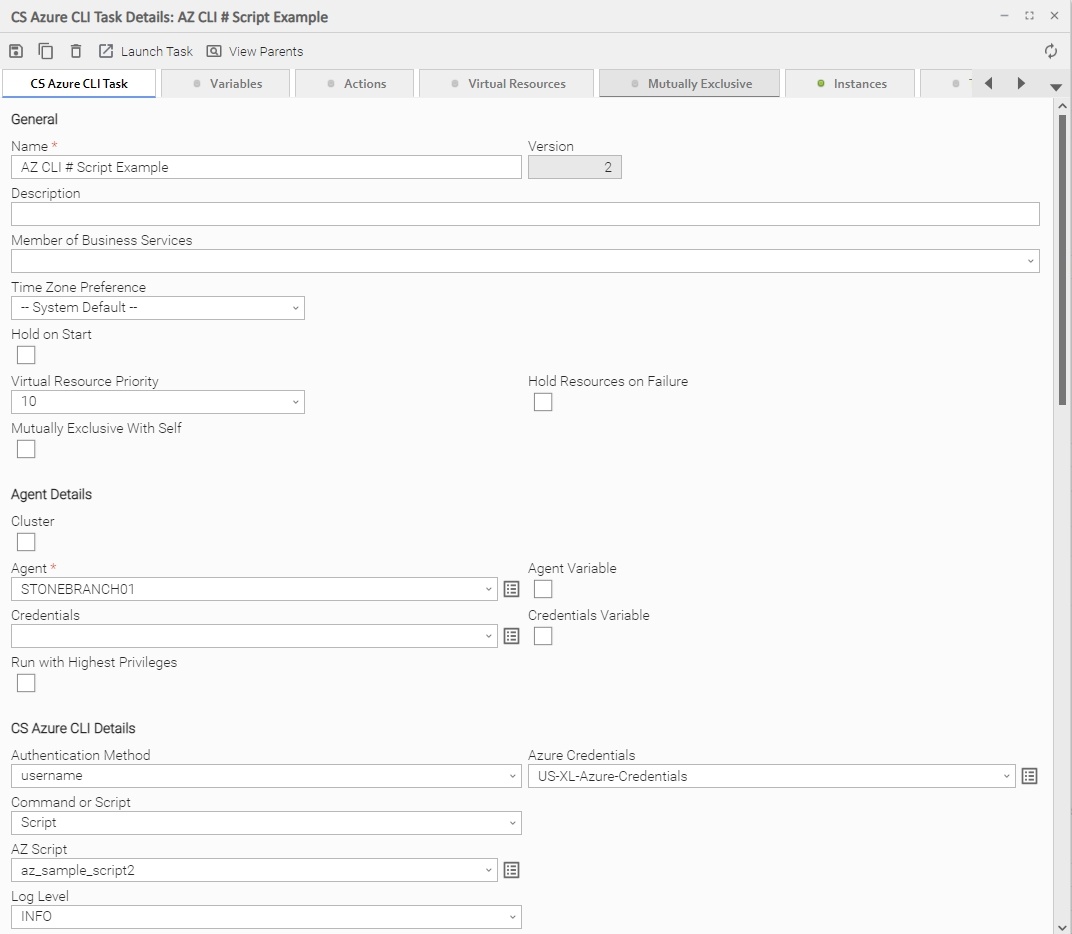
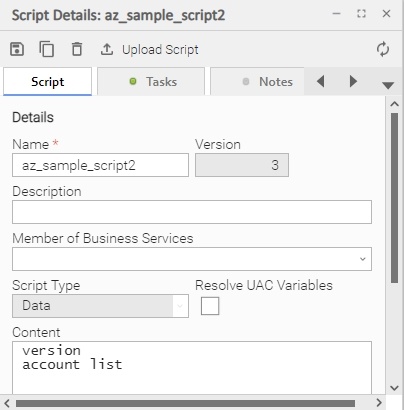
The following example invokes two Azure CLI Commands.
az version
az account list
Assigned Script:
Integration Modifications
Modifications applied by users or customers, before or after import, might affect the support of this integration. The following modifications are discouraged to retain the support level as applied for this integration.
- Python code modifications should not be done.
- Template Modifications
- General Section
- "Name", "Extension", "Variable Prefix", "Icon" should not be changed.
- Universal Template Details Section
- "Template Type", "Agent Type", "Send Extension Variables", "Always Cancel on Force Finish" should not be changed.
- Result Processing Defaults Section
- Success and Failure Exit codes should not be changed.
- Success and Failure Output processing should not be changed.
- Fields Restriction Section
The setup of the template does not impose any restrictions. However, with respect to "Exit Code Processing Fields" section.- Success/Failure exit codes need to be respected.
- In principle, as STDERR and STDOUT outputs can change in follow-up releases of this integration, they should not be considered as a reliable source for determining success or failure of a task.
- General Section
Users and customers are encouraged to report defects, or feature requests at Stonebranch Support Desk.
Document References
This document references the following documents.
Document Link | Description |
|---|---|
User documentation for creating, working with and understanding Universal Templates and Integrations. | |
User documentation for creating Universal Tasks in the Universal Controller user interface. | |
User documentation for creating and working with credentials. | |
User documentation for Resolvable Credentials Permitted Property. |
Changelog
ut-azure-az-cli-1.0.0 (2023-02-10)
Initial Version