Azure Data Factory: Schedule, Trigger, and Monitor
Disclaimer
Your use of this download is governed by Stonebranch's Terms of Use.
Introduction
This Integration allows Stonebranch users to schedule, trigger, and monitor the Azure Data Factory pipeline process directly from Universal Controller.
Overview
- This integration uses Python modules azure-mgmt-resource and azure-mgmt-datafactory to make REST-API calls to Azure Data Factory.
- This integration uses the Azure Tenant id, Subscription id, client id, client secret, Resource group, and location for authenticating the REST-API calls to Azure Data Factory.
- The Authentication Method field selects how the integration authenticates with Azure: Service Principal (client ID and client secret, the default), Workload Identity, or Managed Identity (system-assigned or user-assigned). Authentication with certificate is also possible, and overrides the selected Authentication Method.
- User can perform the following Azure Data Factory operations:
- Run a Pipeline.
- Get information on a Pipeline.
- List all Pipelines.
- Cancel Pipeline run.
- List factory by resource group.
- Also, with respect to Azure Data Factory triggers, users can perform the following operations from UAC:
- Start Trigger.
- Stop Trigger.
- List Trigger by Factory.
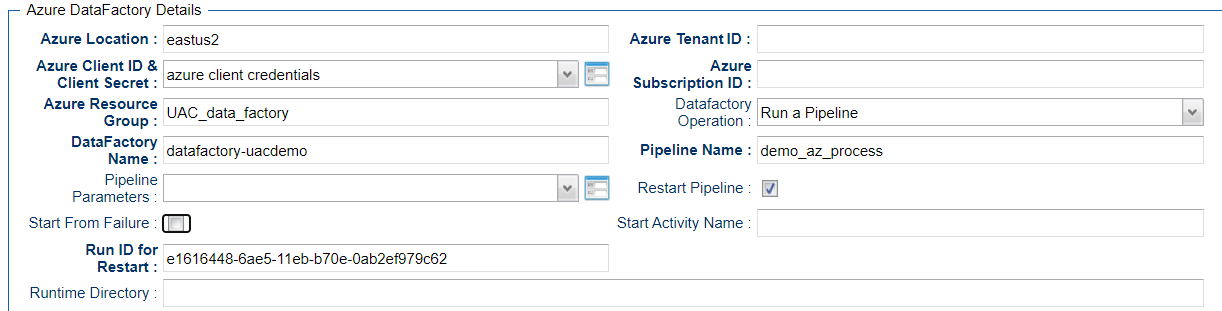
- UAC also can restart a failed pipeline either from the failed step or from any activity name in the failed pipeline.
Software Requirements
This integration requires a Universal Agent and a Python runtime to execute the Universal Task against an Azure Data Factory.
Software Requirements for Universal Template and Universal Task
- Requires Python 3.11 or higher. Tested with the Universal Agent bundled Python distribution.
- Python modules required:
- azure-mgmt-resource
- azure-mgmt-datafactory
- azure-identity
Software Requirements for Universal Agent
Either:
- Universal Agent for Windows x64 Version 7.7 and later with Python options installed.
- Universal Agent for Linux Version 7.7 and later with Python options installed.
Software Requirements for Universal Controller
- Universal Controller Version 7.7.0.0 and later.
Software Requirements for the Application to be Scheduled
This Universal Task has been tested with the Azure Data Factory Version 2.
Technical Considerations
- This integration uses the Python modules Azure resource Management Module and Azure Data Factory management to make REST-API calls with Azure Data Factory.
- Use Azure App Registration services to create an app, client ID, and client and associate it with Data Factory to provide appropriate roles (for example, Contributor).
Key Features
Feature | Description |
|---|---|
Run a Pipeline | Execute a pipeline defined in Azure Data Factory. Schedule, trigger, and monitor the execution of a pipeline. |
Get Information on a Pipeline | Get information about the pipeline name. |
List all Pipelines | List all pipelines that belongs to a Data Factory. |
Cancel a Pipeline Run | Abort a pipeline execution from UAC by providing the run ID for the pipeline execution. |
List Factory by resource group | List the available factory name that belongs to a resource group. |
Start a Trigger | Start a trigger that will manage pipeline execution schedule in the Azure Data Factory. |
Stop a Trigger | Stop a trigger that is in the Azure Data Factory. |
List Trigger by Factory | List all the triggers that belongs to the Data Factory. |
Import Azure Data Factory Integration Downloadable Universal Template
To use this downloadable Universal Template, you first must perform the following steps:
- This Universal Task requires the Resolvable Credentials feature. Check that the Resolvable Credentials Permitted system property has been set to true.
- To import the Universal Template into your Controller, follow the instructions here.
- When the files have been imported successfully, refresh the Universal Templates list; the Universal Template will appear on the list.
Configure Azure Data Factory Integration Universal Task
For the new Universal Task type, create a new task, and enter the task-specific details that were created in the Universal Template.
Field Descriptions for Azure Data Factory Integration Universal Task
Field | Description |
|---|---|
Azure Location | Provide the Azure location. |
Authentication Method | The method used to authenticate with Azure. Defaults to "Service Principal".
Enabling Authenticate ADF via Certificates overrides this selection. Because the certificate requires a Tenant ID and Client ID, the override is only usable when "Service Principal" or "Workload Identity" is selected. |
Tenant ID | Provide the Azure Tenant ID or Directory ID. Only applicable if Authentication Method is "Service Principal" or "Workload Identity". |
Azure Data Factory Credentials | If "Authenticate ADF via Certificates" is not checked, then Azure Client ID and Client Secret is activated and the field should be populated as follows:
Client ID and Client Secret are defined on the Azure App Registration Services. If Authentication Method is "Workload Identity", only the Client ID (Runtime User) is used. If Authentication Method is "Managed Identity", this field is optional. Leave it empty to use the system-assigned identity, or set the Runtime User to the Client ID of a user-assigned identity to use that one. The Runtime Password is not used. If Authenticate ADF via Certificates is checked, the credential field should be populated as follows:
|
Authenticate ADF via Certificates | Enable or disable Certificate Based Authentication. When enabled, this overrides the selected Authentication Method and uses certificate authentication instead. |
Certificate Password | Select whether the certificate is protected by password. Only applicable if Authenticate ADF via Certificates is checked. |
PEM or PFX File | UAC script that includes the contents of PEM or PFX file. Only applicable if Authenticate ADF via Certificates is checked. |
Subscription | Azure Subscription ID. |
Azure Resource Group | Azure Resource group responsible for the Data Factory. |
Data factory Operation | Select the required Azure Data Factory function for the task. |
Data Factory Name | Provide the Azure Data Factory Name. |
Pipeline Name | Pipeline name that needs to be executed in Azure Data factory. |
Pipeline Parameters | Provide the pipeline run time parameters that needs to be passed for the pipeline execution. |
Run ID | Run id for the Azure Data Factory Pipeline execution - Required in case of a restart. |
Restart Pipeline | Check if the pipeline execution needs to be restarted for a failure. |
Start From Failure | Pipeline needs to be restarted from a Failure step. |
Start Activity Name | If Start from Failure is not checked, specify if a failed pipeline needs to be restarted from a specific activity. |
Run ID for Restart | Provide the Pipeline run ID for the restart. |
Trigger Name | Trigger Name in the Azure Data Factory. |
Polling | True for ARM Polling, False for no polling, or a polling object for personal polling strategy. |
Examples for Azure Data Factory Integration Universal Tasks
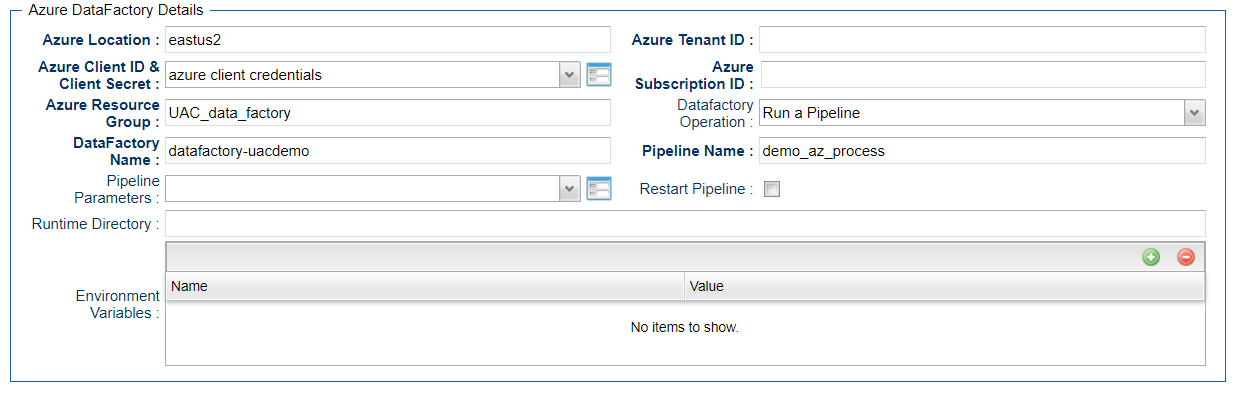
Run a Pipeline
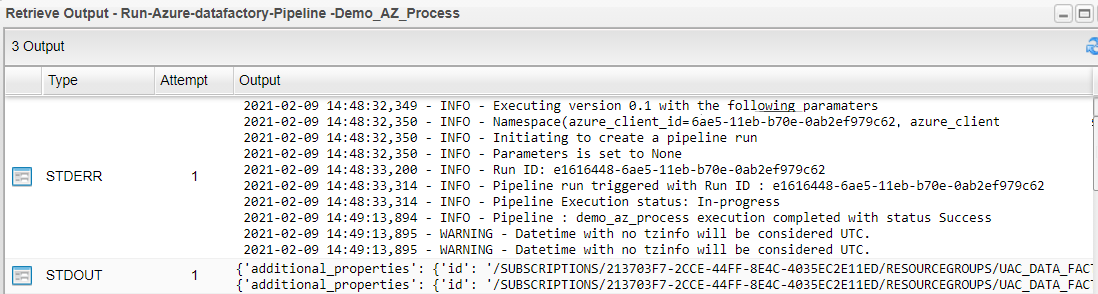
Pipeline Execution Logs
Restart a Failed Pipeline Execution
Cancel a Pipeline Run

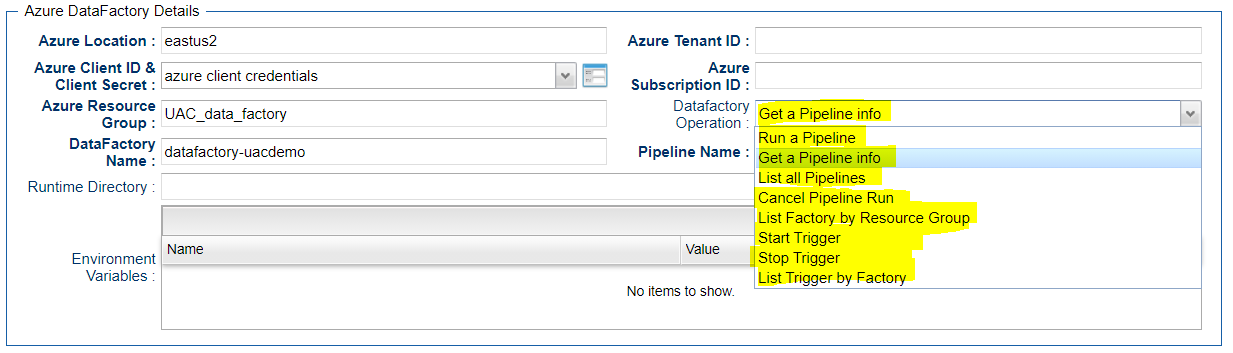
Other Azure Data Factory Operation from UAC
Document References
This document references the following documents:
Name | Description |
|---|---|
User documentation for creating Universal Templates in the Universal Controller user interface. | |
User documentation for creating Universal Tasks in the Universal Controller user interface. |
Changelog
ut-cs-azure-datafactory-1.3.0 (2026-09-09)
Enhancements
Added: New Authentication Method field to select between Service Principal, Workload Identity and Managed Identity. Defaults to Service Principal.Added: Managed Identity authentication, using a managed identity of the Azure resource hosting the Agent. An empty credential selects the system-assigned identity; a credential whose Runtime User is a Client ID selects that user-assigned identity.Added: Workload Identity authentication, using the federated token file referenced by theAZURE_FEDERATED_TOKEN_FILEenvironment variable on the Agent.Changed: Authenticate ADF via Certificates now acts as an override of the selected Authentication Method.Changed: Tenant ID is hidden when Managed Identity is selected, as it is not required. Azure Data Factory Credentials remains visible and optional, so a user-assigned identity can be specified.
ut-cs-azure-datafactory-1.2.1 (2026-06-09)
Fixes
Fixed: Template updated to include fields "Authenticate ADF via Certificates", "Certificate Password" and "PEM or PFX File"Fixed: Documentation Updated with description of new fieldsFixed: Compatibility updated to Agent/Controller 7.7Fixed: Documentation Updated to include python dependency moduleazure-identity
ut-cs-azure-datafactory-1.2.0 (2025-10-30)
Enhancements
Added: install_if_missing function to install azure python packages if missingAdded: Authenticate ADF via Certificate