Azure Kubernetes Service Jobs
Disclaimer
Your use of this download is governed by Stonebranch's Terms of Use.
Version Information
Template Name | Extension Name | Version | Status |
|---|---|---|---|
Azure Kubernetes Service Jobs | ue-aks-jobs | 1.3.0 | Fixes and new Features are introduced. |
Refer to Changelog for version history information.
Overview
Azure Kubernetes Service (AKS) is a managed Kubernetes service that you can use to deploy and manage containerized applications. You need minimal container orchestration expertise to use AKS. AKS reduces the complexity and operational overhead of managing Kubernetes by offloading much of that responsibility to Azure. AKS is an ideal platform for deploying and managing containerized applications that require high availability, scalability, and portability, and for deploying applications to multiple regions, using open-source tools, and integrating with existing DevOps tools.
This integration provides the capability to define, deploy, and delete AKS Jobs and CronJobs on a specified Azure-powered Kubernetes cluster directly from UAC.
Key Features
Feature | Description |
|---|---|
Deploy Resources | Deploy Job and Cronjob resources, either declaratively or imperatively, from local YAML or JSON files, remote URLs, or UAC scripts. |
Create Jobs from Cronjobs | Create one-off Job resources based on existing Cronjob definitions in the cluster. |
Delete Resources | Delete Job and Cronjob resources via the delete action or manually through a Dynamic Command. Job resources can also be set to be deleted automatically after completion. |
Pod Information Streaming | Live stream real-time updates about Kubernetes pods as they are created, modified, or terminated. |
Automatic or Manual Container Information Retrieval | Option to automatically or manually retrieve information, including logs, for all containers pertaining to a specific job. |
Requirements
This integration requires a Universal Agent and a Python runtime to execute the Universal Task.
Area | Details |
|---|---|
Python Version | Requires Python 3.11, tested with Agent bundled python distribution. |
Universal Agent Compatibility |
|
Universal Controller Compatibility | Universal Controller Version >= 7.6.0.0. |
Network and Connectivity | Network Connectivity towards a job definition directly to the cluster Azure Kubernetes Service is required. |
Southbound System | Tested with an Azure Cluster that has Kubernetes 1.35.5 installed. It should be compatible on later versions as long as backwards compatibility is guaranteed on the API level. |
Supported Actions
There are six Top-Level actions controlled by the Action Field:
- Apply a Job definition directly to the cluster
- Apply a CronJob to schedule recurring tasks
- Create a new Job using a provided specification
- Create a one-time Job from an existing CronJob definition
- Create a new CronJob for scheduled task execution
- Delete a Job or CronJob
Additional options and post-action capabilities vary depending on the chosen Action.
Action Output
- EXTENSION
- STDOUT
exit_code,status,status_description: General info regarding the task execution. In case of failure, it's set according to the specific error that happened during the execution. A list of possible values is provided in the exit codes table in this document.invocation.fields: The task configuration used for this task execution.result.containers: Information gathered related to the containers spawned by the deployed job. Information is retrieved from the AKS cluster using the values appointed to the Output Only fields during execution. Only available if the corresponding Extension Output option has been selected.result.resource_specification: Information relating to the specification of the deployed resource. Only available if the corresponding Extension Output option has been selected.
Examples:Successful Execution of "Apply Job" Action, with all Extension Output options and Wait for Success or Failure selected
Failed Execution
The STDOUT output produced during the execution of the task instance.
Output can be controlled via the STDOUT Options input field. Available choices are
- "Enable Pod Monitoring", which streams information about the state of pods relating to the deployed job.
- "Include Container Logs" which outputs logs for all containers tied to the deployed job.
Both options are only applicable if Wait for Success or Failure has been selected.
Example:Truncated STDOUT, generated by the above successful task, which has all STDOUT options selected
Configuration Examples
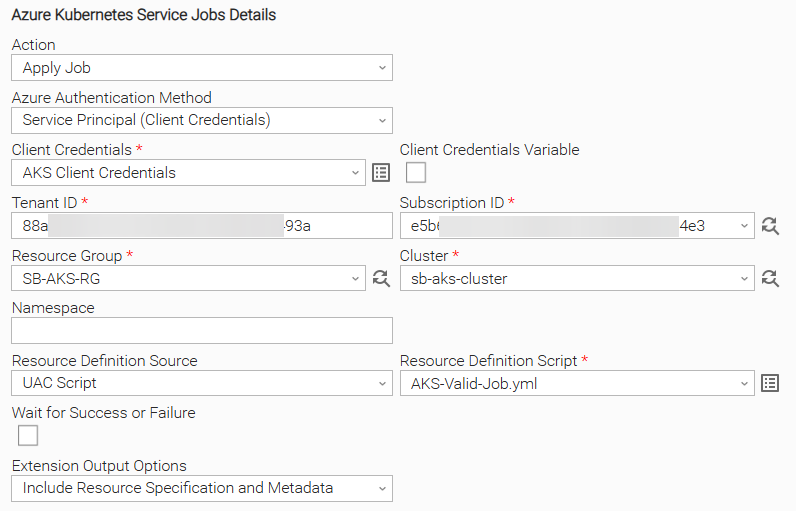
Example: Apply a Job stored as a UAC Script
Apply a Job to a specific AKS cluster, with the Resource Definition provided as a UAC script. The Extension Output includes detailed information about the Job specification.
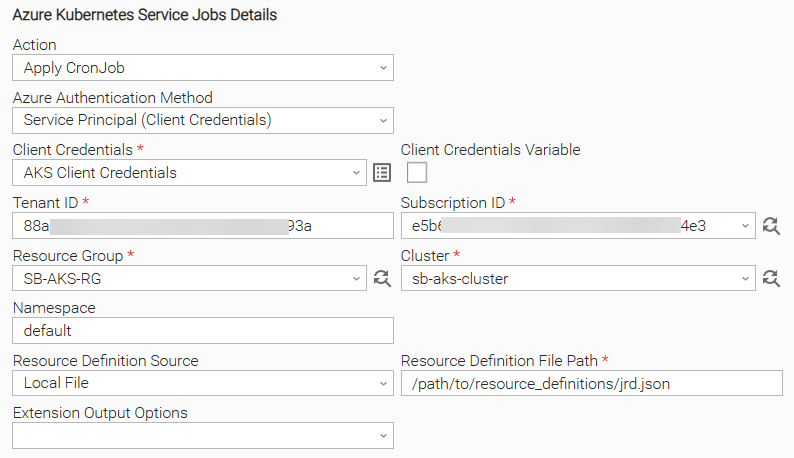
Example: Apply a CronJob stored as a Local File
Apply a CronJob to a specific AKS cluster, with the Resource Definition provided as a Local File. The Namespace field is used for specifying the namespace where the CronJob will be applied.
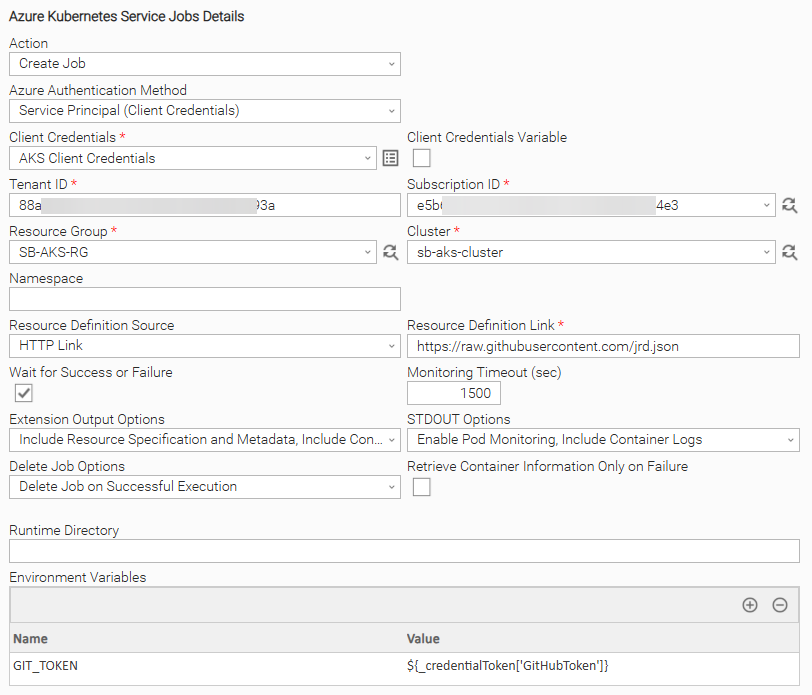
Example: Create a Job defined on an external HTTP Link and wait for Job completion
Deploy a Job to a specific AKS cluster, with the Resource Definition provided as an HTTP Link. The Job's execution is monitored until completion for up to 1500 seconds, with any information related to the pods tied to the Job printed on STDOUT. If the Job executes successfully, it will be deleted from the designated namespace. Once the Job completes, the container logs and are printed on STDOUT. The EXTENSION Output includes detailed information about the Job specification and the containers created to complete it.
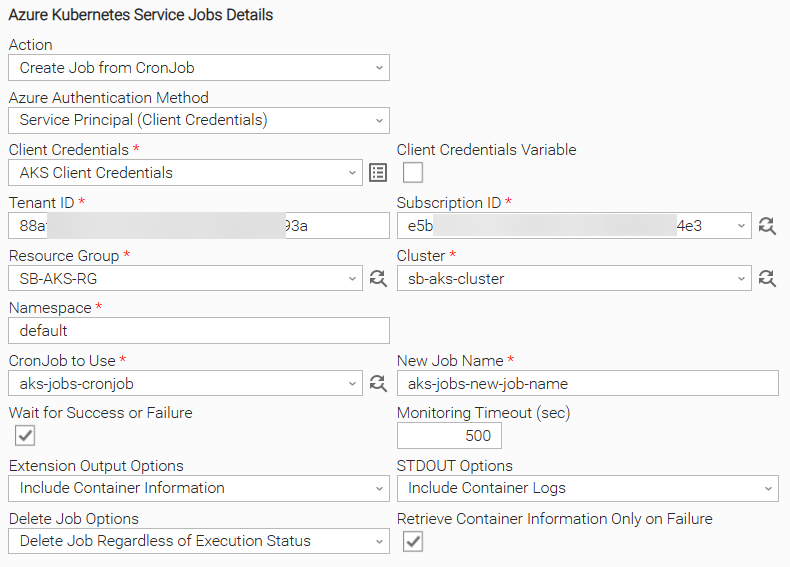
Example: Create a Job from an existing CronJob and wait for Job completion
Deploy a Job to a specific AKS cluster, using the selected CronJob. The Job's execution is monitored until completion for up to 500 seconds, retrieving the Container Logs and Information if the Job fails. Once the Job completes, it will be deleted from the designated namespace.
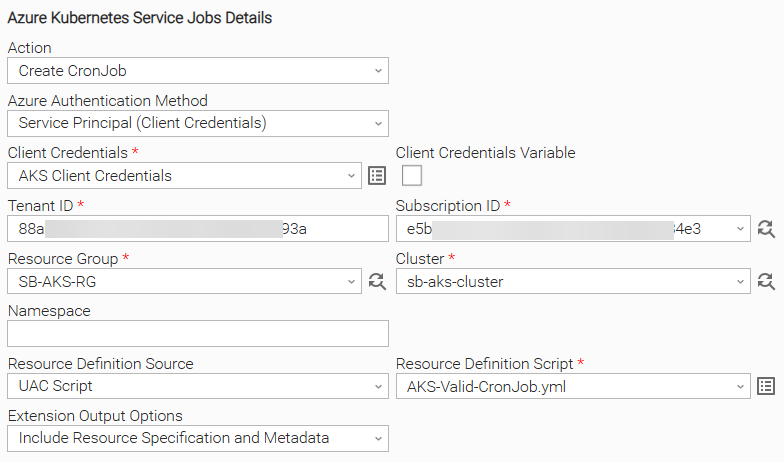
Example: Create a CronJob stored as a UAC script
Deploy a CronJob to a specific AKS cluster, with the Resource Definition provided as a UAC Script. The EXTENSION Output includes detailed information about the CronJob specification.
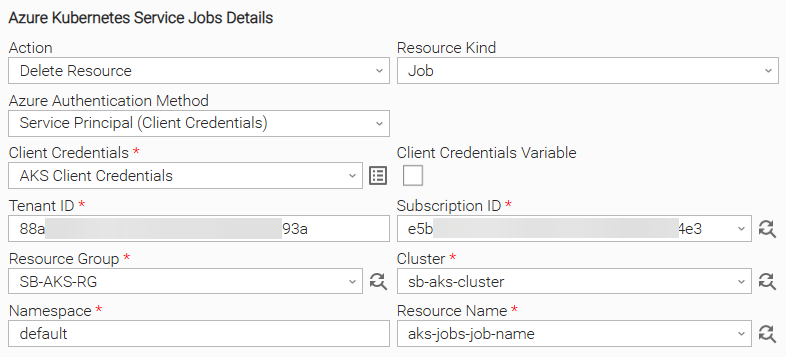
Example: Delete Resource
Delete Resource of Resource Kind "Job" on the AKS cluster, retrieving the Job name using the Dynamic Choice field from specific namespace.
Input Fields
Name | Type | Description | Version Information |
|---|---|---|---|
Action | Choice | The action to be executed. The following options are available.
| Introduced in 1.0.0 |
Azure Authentication Method | Choice | The authentication method used to connect to AKS. Authentication methods currently supported:
| Introduced in 1.0.0. Modified in 1.2.0 |
Client Credentials | Credentials | The Client Credentials that have access to the AKS Resource. The Runtime User field should be populated with the Application (client) ID, while the Runtime Password with the Application (client) Secret. Required if Azure Authentication Method is set to "Service Principal (Client Credentials)" or "Service Principal (Microsoft Entra ID)". Optional if Azure Authentication Method is set to "Workload Identity" or "Managed Identity". In these cases only the Runtime User is used, holding the Client ID of the federated Application or of the user-assigned Managed Identity. Leave the field empty to use the system-assigned Managed Identity. | Introduced in 1.0.0. Modified in 1.2.0, 1.3.0. |
Tenant ID | Text | The Directory (Tenant) ID of the Application with access to the AKS Resource. This field is optional if Azure Authentication Method is set to "Workload Identity". | Introduced in 1.0.0. Modified in 1.2.0. |
Subscription ID | Dynamic Choice | The Subscription ID associated with the AKS Resource. | Introduced in 1.0.0 |
Resource Group | Dynamic Choice | The Resource Group associated with the AKS Cluster. | Introduced in 1.0.0 |
Cluster | Dynamic Choice | The AKS Cluster. | Introduced in 1.0.0 |
Namespace | Text | The namespace in which resources are to be deployed or deleted. In the case of resource deployment, this field will be used only as a fallback in case a 'namespace' value is not specified inside of the Resource Definition. | Introduced in 1.0.0 |
Resource Definition Source | Choice | Specifies the source of the Job, CronJob, or Template manifest. The input must be in YAML or JSON format and must define exactly one resource.
Available if Action is set to any of "Apply Job", "Apply CronJob", "Create Job", "Create CronJob". | Introduced in 1.0.0 |
Resource Definition Script | Script | The UAC Script containing the Resource definition. Mandatory if Resource Definition Source is set to "UAC Script". | Introduced in 1.0.0 |
Resource Definition File Path | Text | The Agent's local full filename path to the Resource Definition. Mandatory if Resource Definition Source is set to "Local File". | Introduced in 1.0.0 |
Resource Definition Link | Text | The HTTP link that points to the Job Definition or CronJob Manifest. Environment variables in the URL are resolved; The Mandatory if Resource Definition Source is set to "HTTP Link". | Introduced in 1.0.0 |
CronJob to Use | Dynamic Choice | The CronJob to use when creating Job from CronJob. Available and Mandatory if Action is set to "Create Job from CronJob". | Introduced in 1.0.0 |
New Job Name | Text | The name that the created Job should have. Available and Mandatory if Action is set to "Create Job from CronJob" | Introduced in 1.0.0 |
Resource Kind | Choice | The type of Resource to be deleted. Available options are:
Available and Mandatory if Action is set to "Delete Resource". | Introduced in 1.0.0 |
Resource Name | Dynamic Choice | The name of the Resource to be deleted. Available and Mandatory if Action is set to "Delete Resource". | Introduced in 1.0.0 |
Wait for Success or Failure | Checkbox | Choose where the UAC task should wait until the deployed Job is completed. Available if Action is set to "Apply Job", "Create Job", "Create Job from CronJob". | Introduced in 1.0.0 |
Monitoring Timeout (sec) | Integer | The maximum number of seconds to monitor whether the job has been completed. If exceeded, a TimeoutExceededError is raised. Set to 0 to monitor indefinitely. Only available if Wait for Success or Failure is selected. | Introduced in 1.0.0 |
Extension Output Options | Choice | Controls whether additional information is printed to Extension Output. Available options are:
Available for all Actions except "Delete Resource". | Introduced in 1.0.0 |
STDOUT Options | Choice | Controls whether additional information is printed to Standard Output. Available options are:
Only available if Wait for Success or Failure is selected. | Introduced in 1.0.0 |
Delete Job Options | Choice | Specifies the conditions under which the Deployed Job should be deleted. When deploying a job from CronJob, only the job instance itself will be deleted. Available options are:
Only available if Wait for Success or Failure is selected. | Introduced in 1.0.0 |
Retrieve Container Information Only on Failure | Checkbox | Specifies whether container information is only retrieved when Job fails. This option does nothing if "Include Container Logs" or "Include Container Information" options are not requested as part of the Standard Output or Extension Output options, respectively. Only available if Wait for Success or Failure is selected. | Introduced in 1.0.0 |
Output Fields
The following output-only fields provide better visibility during the execution of Universal Task Instances.
Name | Type | Description | Version Information |
|---|---|---|---|
Resource Name | Text | Name of deployed Resource. Applicable for all Actions except "Delete Resource". | Introduced in 1.0.0 |
Resource Namespace | Text | The Namespace in which the resource has been deployed on. Applicable for all Actions except "Delete Resource". | Introduced in 1.0.0 |
Job Status | Text | The latest status of the AKS Job. | Introduced in 1.0.0 |
Last Updated On | Text | The timestamp when the task instance was last updated. | Introduced in 1.0.0 |
Environment Variables
Environment Variables can be set from the Environment Variables task definition table.
Environment Variables can be used for authentication purposes when retrieving the Resource Definition via HTTP Link. Environment variables will be resolved when provided inside of the specified link (Example https://${GITLAB_TOKEN}@stonebranch.com/path/to/file.json).
Alternatively, the GIT_TOKEN variable can be used to specify a value for the Authorization header when making the request.
Environment Variable Name | Description | Version Information |
|---|---|---|
UE_HTTP_TIMEOUT | This environment variable defines the global timeout value for all requests. It affects both connection and read timeouts, preventing requests from hanging. Accepted values: Positive integer (in seconds). If the environment variable is not set, or is set to an invalid value, the timeout will default to 60 seconds. | Introduced in 1.0.0 |
GIT_TOKEN | If specified, this environment variable will be used as a Bearer token in the Authorization header when making the request to retrieve a Resource Definition via HTTP Link. | Introduced in 1.0.0 |
UE_RESOURCE_DEFINITION_LINK_GIT_PROVIDER | This environment variable is used only when Supported values are:
If the environment variable is not set, | Introduced in 1.1.0 |
UE_JOB_FINALIZATION_POLL_INTERVAL | This environment variable defines the interval (in seconds) between successive checks for job finalization after the pods have completed. It controls the polling frequency to ensure that job completion is detected reliably without overwhelming the server or agent resources. Accepted values: Positive integer (in seconds). If the environment variable is not set, or is set to an invalid value, the polling interval will default to 1 second. | Introduced in 1.1.0 |
AAD-Integrated Clusters
For AAD-integrated clusters, the login method used to authenticate with the cluster must be explicitly specified. This can be done by setting the AAD_LOGIN_METHOD environment variable on the task. For example, to use Workload Identity as the login method, set the variable as follows:
AAD_LOGIN_METHOD = workloadidentity
Cancellation and Rerun
- In case of cancellation, monitoring of the deployed job is halted. No additional actions are taken on the AKS Cluster. If the deployment process has already been initiated, it will not be impacted in any way.
- In case of rerun the extension follows the same execution flow as the initial execution. As such, resources will be deployed or deleted, depending on the specified input fields, with no regards to the existing condition of the AKS Cluster.
Dynamic Commands
Users can interact with Task Instances through Dynamic Commands. The following Dynamic Commands are supported.
Name | Description | Version Information |
|---|---|---|
Delete Resource | Deletes the deployed resource from the specified namespace. The name of the Job to delete, as well as the project it exists inside of, is inferred using the Resource Name and Resource Namespace Output Fields. Available in the "Cancelled", "Failed", "Finished", and "Success" states. Applicable for all Actions except "Delete Resource". | Introduced in 1.0.0 |
Retrieve Container Logs | Retrieves all container logs associated with the deployed job that have been generated up to that point. The name of the Job to retrieve container logs for is inferred from the Resource Name and Resource Project Output Fields. Available in the "Running", "Cancelled", "Failed", "Finished", and "Success" states. Only applicable if Action is set to "Apply Job", "Create Job", "Create Job from CronJob". | Introduced in 1.0.0 |
Importable Configuration Examples
This integration provides importable configuration examples along with their dependencies, grouped as Use Cases to better describe end to end capabilities.
These examples aid in allowing task authors to get more familiar with the configuration of tasks and related Use Cases. Such tasks should be imported in a Test system and should not be used directly in production.
Initial Preparation Steps
- STEP 1: Go to Stonebranch Integration Hub download integration with name "Azure Kubernetes Service Jobs" and extract the archive in a local directory.
- STEP 2: Locate and import the "Azure Kubernetes Service Jobs" integration to the target Universal Controller. For more information refer to Overview.
- STEP 3: Inside directory named "configuration_examples" you will find a list of definition zip files. Upload them one by one respecting the order presented below, by using the "Upload" functionality of Universal Controller:
- variables.zip
- credentials.zip
- scripts.zip
- tasks.zip
- workflows.zip
- The order indicated above ensures that the dependencies of the imported entities need to be uploaded first.
- All imported entities are prefixed with UC1.
- STEP 4: Update the uploaded UAC Credential entity, with the proper Client ID/Client Secret.
- STEP 5: Update the UAC global variables introduced with the "variables.zip" definition file. Their name is prefixed with "ue_aks_jobs". Review the description of the variables as they include information on how should be populated.
- STEP 6: Create an OMS record on the Universal Controller. Ensure the address matches the one assigned to the relevant global variable from the previous step. For more information refer to the Creating OMS Server Records in this document.
- STEP 7: Create an Agent Cluster on the Universal Controller. Ensure the name matches the one assigned to the relevant global variable from the previous step. For more information refer to the Creating an Agent Cluster in this document,
How to "Upload" Definition Files to a Universal Controller
The "Upload" functionality of Universal Controller allows Users to import definitions exported with the "Download" functionality.
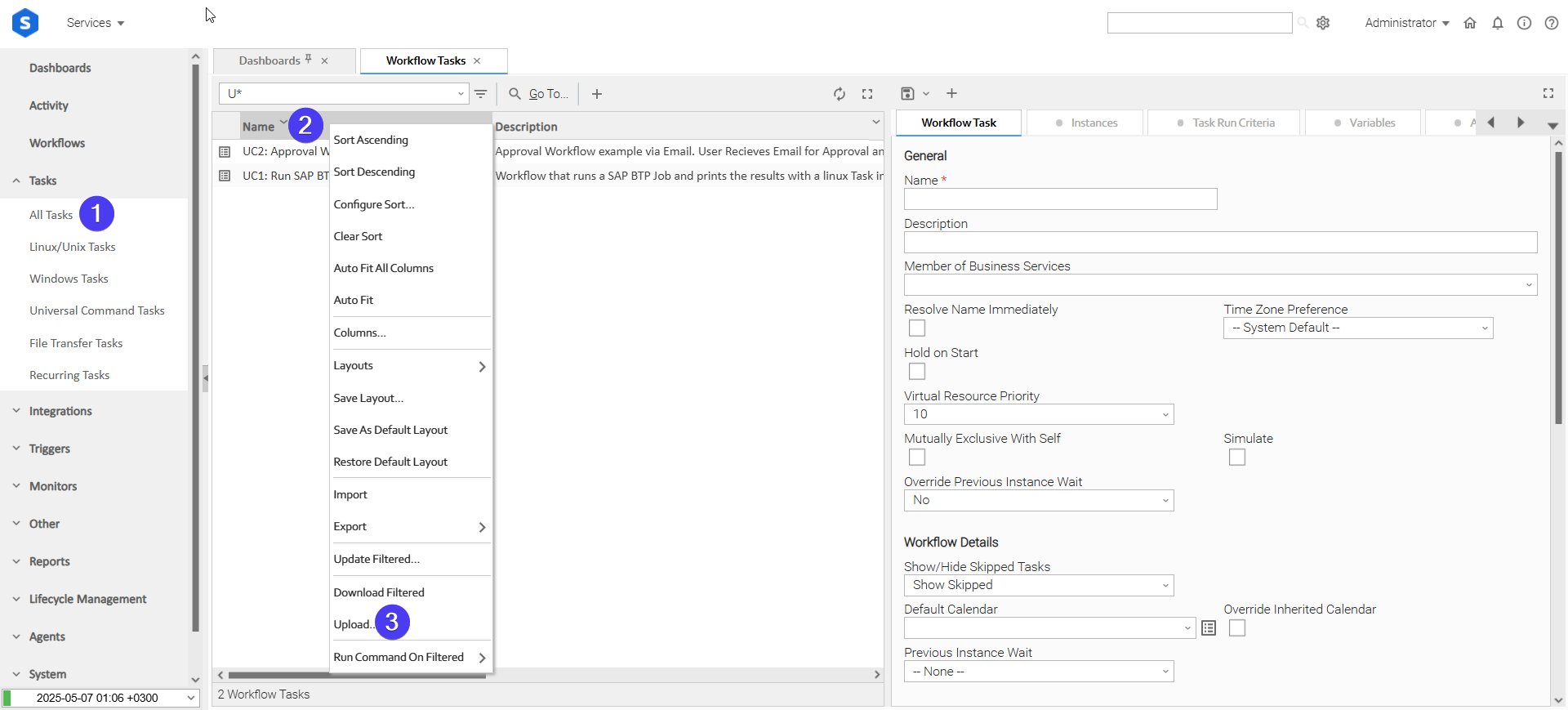
Login to Universal Controller and:
- STEP 1: Click on "Tasks" → "All Tasks"
- STEP 2: Right click on the top of the column named "Name"
- STEP 3: Click "Upload..."
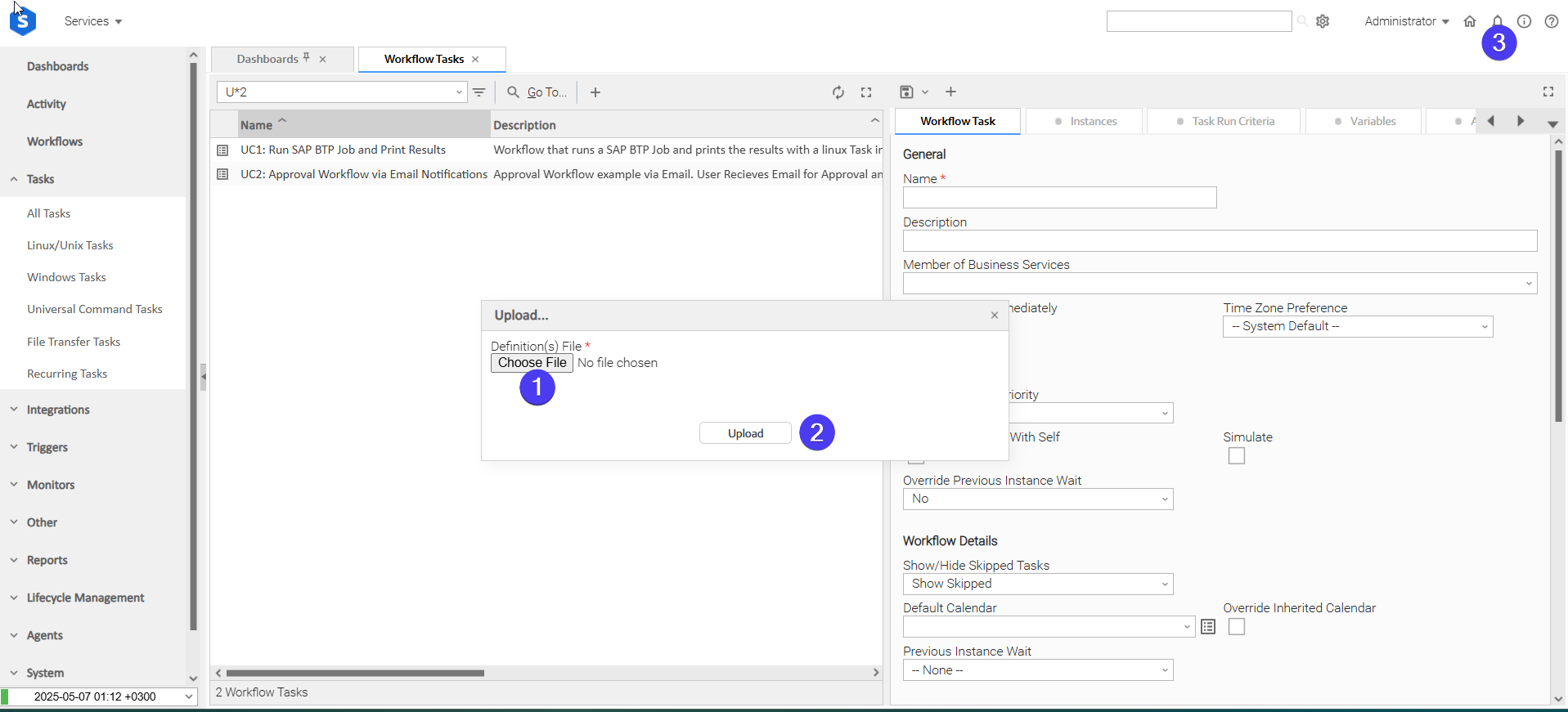
In the pop-up "Upload..." dialogue:
- STEP 1: Click "Choose File".
- STEP 2: Select the appropriate zip definition file and click "Upload".
- STEP 3: Observe the Console for possible errors.
Use Case 1: Deploy a Universal Agent inside an AKS Cluster, using it to execute a Linux Task.
Description
In this Use Case, a Job is executed on the AKS cluster that creates an agent. This agent is used for running a Linux Task. Upon successful completion of the Linux Task, the created agent (resource) is deleted from the AKS cluster.
The tasks configured demonstrate the following capabilities among others:
- Capability to use the extension for executing various jobs that have different functionalities.
- Demonstrate a case where the deployed resources can be used for executing other tasks on the Controller.
- Combining the different actions in a single workflow. (Create the resource → Delete the resource)
The components of the solution are described below:
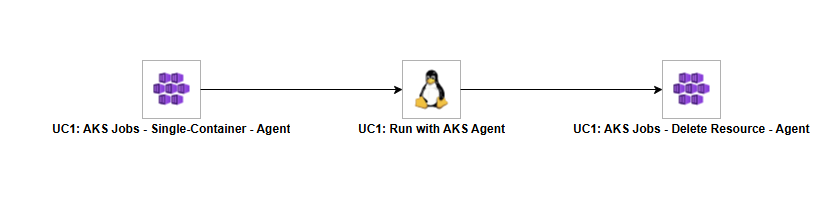
- "UC1: AKS Jobs - Single-Container - Agent" - This is the starting task of the workflow. It triggers the execution of a Job on the AKS cluster that creates the agent.
- "UC1: Run with AKS Agent" - The Linux Task to be executed on the deployed agent.
- "UC1: AKS Jobs - Delete Resource - Agent" - This task deletes the deployed agent on the AKS Cluster.
How to Run
Execution Steps:
- STEP 1: Launch Workflow "UC1: AKS Jobs - Agent Workflow".
- STEP 2: Review the outputs of the task instances.
Expected Results:
- The Job that creates the agent is executed successfully on the AKS cluster.
- The Linux Task is executed successfully on the deployed agent.
- The Job is deleted successfully on the AKS cluster.
Exit Codes
Exit Code | Status | Description |
|---|---|---|
0 | Success | Successful Execution. |
1 | Failure | Generic Error. Raised when not falling into the other Error Codes. |
2 | Failure | Authentication error. The account cannot be authenticated with the provided credentials. |
20 | Failure | Input fields validation error. |
21 | Failure | A job sharing the provided name already exists in the specified namespace. Raised only if attempting to manage the resource imperatively. |
40 | Failure | The number of seconds to monitor the job, specified by the Monitoring Timeout (sec) field, has been exceeded. |
STDOUT and STDERR
STDOUT is used for displaying Job information and its controlled by STDOUT Options field.
STDERR provides additional information to the user, the detail of it is tuned by Log Level Task Definition field.
Backwards compatibility is not guaranteed for the content of STDOUT/STDERR and can be changed in future versions without notice.
Document References
This document references the following links:
Document Link | Description |
|---|---|
Azure Kubernetes Service documentation. | |
The Kubernetes documentation. |
Changelog
ue-aks-jobs-1.3.0 (2026-09-01)
Enhancements
Added: Support for user-assigned Managed Identities. The Client ID of the user-assigned identity is supplied through the Runtime User of the Client Credentials field; leaving the field empty continues to use the system-assigned Managed Identity.
Fixes
Fixed: Authentication failures against Microsoft Entra ID integrated clusters. All authentication methods now inject the cluster access token automatically when required.
ue-aks-jobs-1.2.0 (2026-07-08)
Enhancements
Added: Workload Identity Authentication Method.Added: Managed Identity Authentication Method.Added: Service Principal Authentication Method through Entra ID (#141626).
ue-aks-jobs-1.1.0 (2026-01-22)
Enhancements
Added: Improved compatibility with future agent releases (#52172).Added: New environment variable UE_JOB_FINALIZATION_POLL_INTERVAL to configure the polling interval for job finalization checks (#48566, #48371).Added: New environment variable UE_RESOURCE_DEFINITION_LINK_GIT_PROVIDER to allow configuration of the Git provider used for retrieving Kubernetes job resource definitions (#51123, #51126).
Fixes
Fixed: Issue where environment variables were not being sent during dynamic choice and dynamic command execution (#52173).Fixed: Improved handling of job finalization checks to ensure completion is detected accurately and prevent timeout errors (#48371).
ue-aks-jobs-1.0.0 (2025-09-04)
Initial Release