Azure Synapse
Disclaimer
Your use of this download is governed by Stonebranch's Terms of Use.
Version Information
Template Name | Extension Name | Version |
|---|---|---|
CS Azure Synapse | ue-cs-azure-synapse | 1.3.0 |
Refer to Changelog for version history information.
Overview
This Universal Task provides the capability to run, monitor, and re-start Azure Synapse Pipelines from the Universal Automation Center.
To run a Notebook, the Universal Task can trigger an Azure Synapse pipeline with notebook activity.
The following functionalities are supported:
- Run a Pipeline.
- Run a Pipeline with parameters.
- List all Pipelines in a Workspace.
- Monitor the started Synapse Pipeline.
- Cancel a Pipeline Run.
- Cancel a Pipeline Run Recursive.
- Rerun a Pipeline from a specified activity or the beginning.
- Service Principal-based authentication to Azure Synapse.
- Azure Managed Identity based Authentication to Azure Synapse
- Certificate-based TLS connection
Key Features
This Universal Task provides the following main features:
Actions
- Creates a run of a pipeline. This action is also used to re-run a pipeline.
- Get Pipelines by Workspace. This action lists all Pipelines in a Workspace.
Instance Commands
Commands can be executed during run-time of the Azure Pipeline
- Cancel Pipeline Run.
- Cancel Pipeline Run Recursive.
Authentication Methods
- Azure Managed Identity based Authentication to Azure Synapse
- Eliminates password and secret management, since Azure automatically handles credential issuance, rotation, and security
- Service Principal based authentication is used to connect to the Azure Synapse REST APIs (Application Programming Interface).
- Service Principal based Authentication uses the following information to acquire a REST API Access token:
- The Azure Active Directory (tenant) ID where the application is registered.
- The Application (client) ID for the application registered in Azure AD.
- The Value of the client secret for the application registered in Azure AD.This information needs to be provided as prerequisites to configure a new Azure Synapse Universal Task.
- Service Principal based Authentication uses the following information to acquire a REST API Access token:
Logging
- The current pipeline status is monitored in a configurable poll interval; e.g., every 60s
Software Requirements
This integration requires a Universal Agent and a Python runtime to execute the Universal Task and a script that contains the Beta UX integration script to be executed.
Area | Details |
|---|---|
Python Version | Requires Python 3.11 tested with Agent Bundled Python 3.11.6. |
Universal Agent Compatibility |
|
Universal Controller Compatibility | Universal Controller Version >= 7.6.0.0. |
Network and Connectivity |
|
Import Universal Template
To use the Universal Template, you first must perform the following steps.
- This Universal Task requires the Resolvable Credentials feature. Check that the Resolvable Credentials Permitted system property has been set to true.
- To import the Universal Template into your Controller, follow the instructions here.
- When the files have been imported successfully, refresh the Universal Templates list; the Universal Template will appear on the list.
Modifications of this integration, applied by users or customers, before or after import, might affect the support of this integration. For more information, refer to Integration Modifications.
Configure Universal Task
For a new Universal Task, create a new task, and enter the required input fields.
Input Fields
The input fields for this Universal Extension are described in the following table.
Field | Input Type | Value | Type | Description |
|---|---|---|---|---|
Azure Location | Required | e.g., eastus2 | Text | The Azure location. |
Azure Tenant ID | Required | e.g., 44af330b-a795-47b6-82fe-64db323a499a | Text | The Azure Tenant ID or Directory ID. |
Authentication | Required | Azure Service Principal | Azure Managed Identity | Choice | Select the Authentication Method:
If using Azure Service Principal Authentication, the Azure Client Id & Secret must be provided in the Azure Client Id & Secret field. |
Azure Client Id & Secret | Required if Authentication is "Azure Service Principal" | Credential Value | Credential | Available only if Authentication is "Azure Service Principal". A Credential with the Azure Client Id as username and Client Secret as password. (These values come from your Azure App registration services.) |
Certificate | Required | None | Certificate File | Agent Default | Choice | Specify if a certificate should be used for the connection.
|
Certificate File Path | Optional | Path to the certification pem file | Test | Enter the file system path to the Certificate; e.g. |
Synapse Operation | Required | Create Pipeline Run | Get Pipelines By Workspace | Choice | Select the required Azure Synapse function for the task.
|
Workspace Name | Required | SBDemoWorkspace | Text | The Azure Synapse Workspace Name. |
Pipeline Name | Optional | All Pipelines in the selected Workspace are listed for selection, e.g.
| Dynamic Choice | Pipeline name that needs to be executed in Azure Synapse. This field is provided as Dynamic Choice field to retrieve the available pipelines in the given workspace. By providing the Azure Location, Tenant ID, Azure Client ID and Client Secret, and Workspace Development Endpoint, all Azure Synapse Pipelines in the Workspace are listed for selection. |
Parameters | Optional | True | False | Boolean | Check to enable the Pipeline Parameters Field |
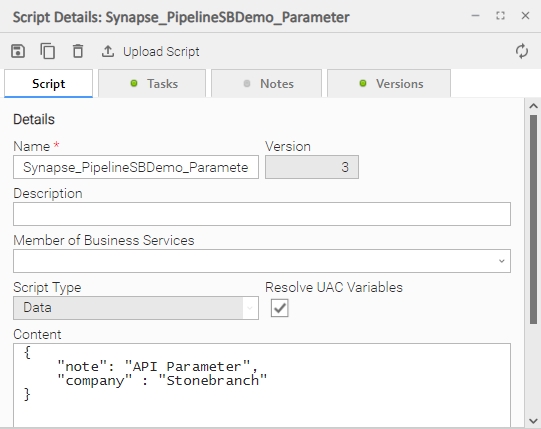
Pipeline Parameters | Optional | Parameter should be provided in JSON format, e.g. | Script | The pipeline run time parameters that needs to be passed for the pipeline execution as script from the Universal Controller script library. The format should be JSON. |
Restart Pipeline | Optional | True | False | Boolean | Enable if the pipeline execution needs to be restarted for failure. The Restart Pipeline Run ID field will appear. |
Is Recovery | Optional | True | False | Boolean | Enable if the pipeline execution needs to be restarted in recovery mode. If recovery mode is set to True, the specified referenced pipeline run and the new run are grouped under the same |
Restart Pipeline Run ID | Optional | e.g., 5128441a-626e-4a7c-b7c9-152da8435272 | Text | The Pipeline Run ID of the Pipeline to be re-started. The Pipeline Run ID can be retrieved from the Task instance Field Pipeline Run ID. |
Start Activity Name | Optional | e.g., PipelineSBDemo3-2 Would perform a restart from Activity: PipelineSBDemo3-2 | Text | Specify if a failed pipeline needs to be restarted from a specific activity. If the field is left empty, the restart is done from the beginning. |
Monitor Interval | Required | Default Value is 60s | Integer | Interval to check for the status of the pipeline. |
Monitor Retry | Required | Default Value is 99 retries | Integer | Number of retries to check for the pipeline status. If the number is reached the task goes to success. This value is used in combination with Monitor Interval |
Output-Only fields
These fields are shown as soon as the pipeline is started
Field | Type | Description | Introduced in Version |
|---|---|---|---|
Pipeline Run ID | Text | Displays the Pipeline Run ID, e.g., 5128441a-626e-4a7c-b7c9-152da8435272 The field is shown as soon as the pipeline is started. The Run ID is used in case of a pipeline restart. | 1.0.0 |
Pipeline Status | Text | Displays the Pipeline Run Status in Azure Synapse:
| 1.0.0 |
Dynamic Commands
Dynamic commands enable users to interact with a running task instance. The following dynamic commands are supported
Command | Description | Introduced in Version |
|---|---|---|
Cancel Pipeline Run | Cancels a running Pipeline by its Pipeline Run ID. | 1.0.0 |
Cancel Pipeline Run Recursive | Cancels a pipeline recursively its Pipeline Run ID. Recursive means to cancel all the Child pipelines that are triggered by the current pipeline. | 1.0.0 |
Task Example
Create Pipeline Run with Parameters
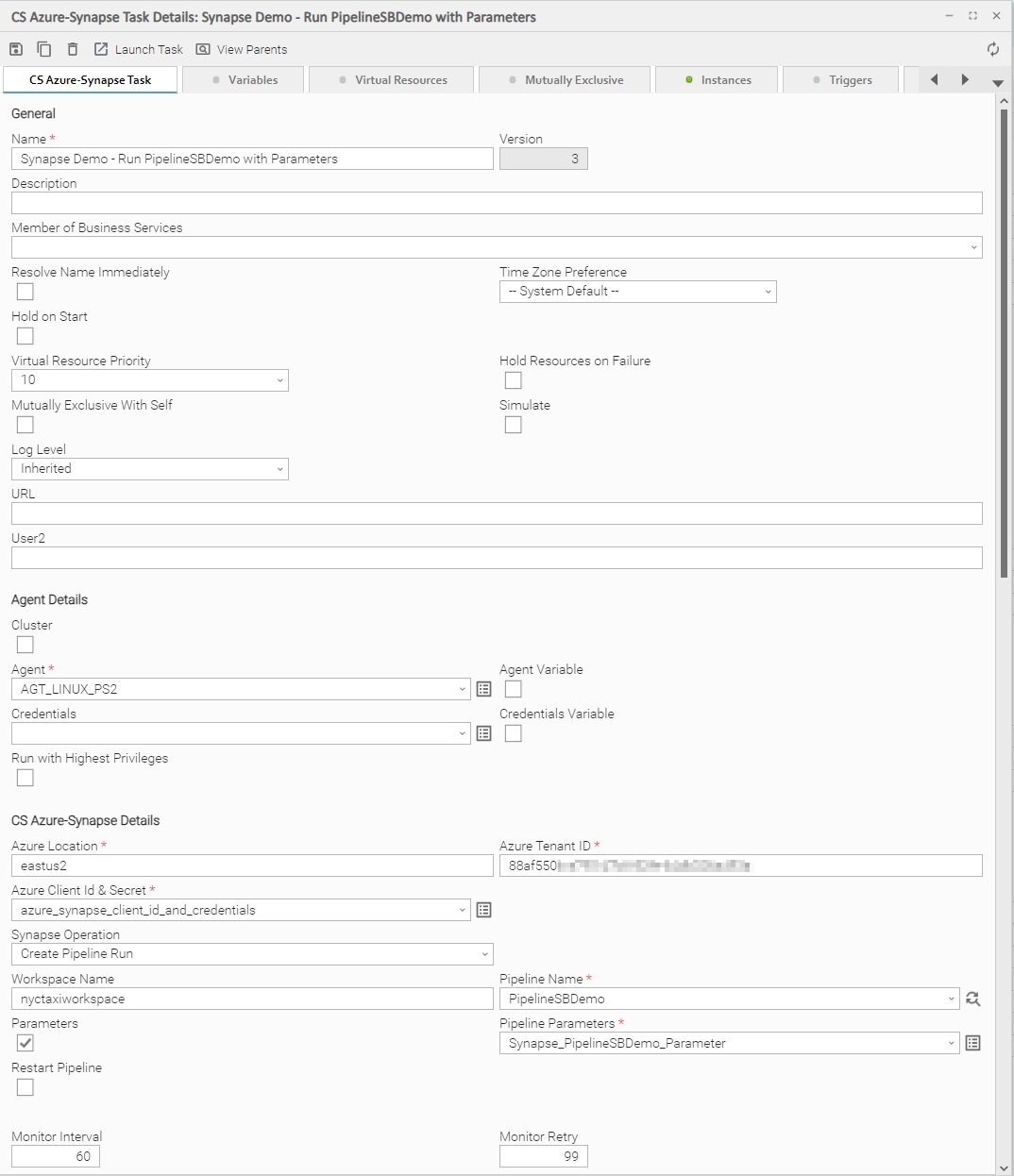
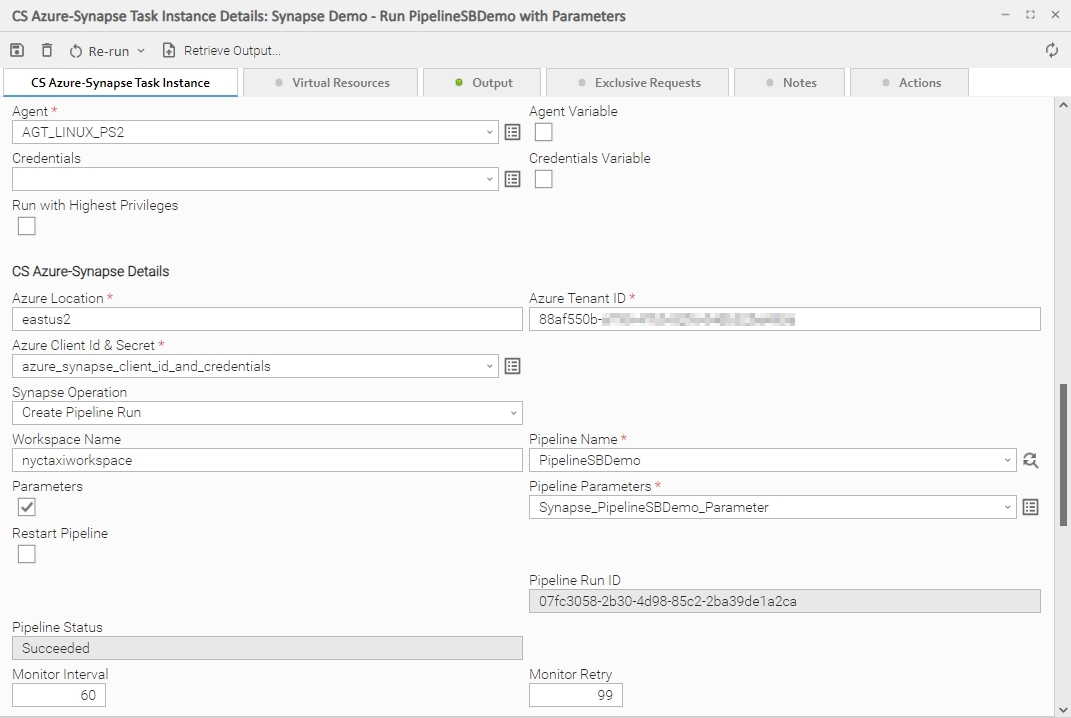
The following Task starts an Azure Synapse Pipeline, with Basic Pipeline Parameters.
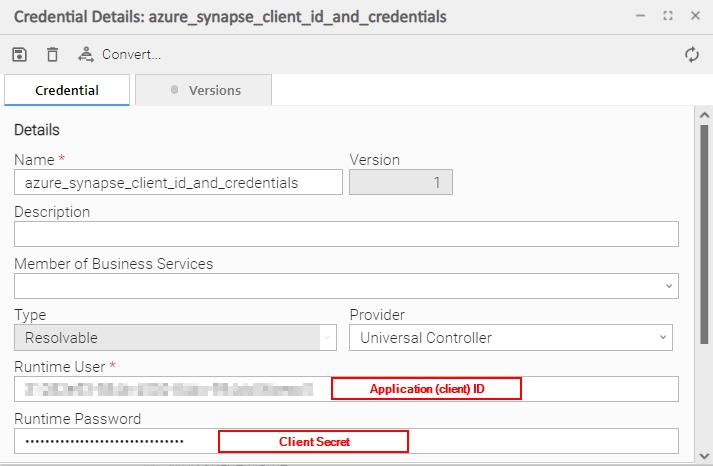
Azure Synapse Credential Details:
Azure Synapse Basic Pipeline Parameters:
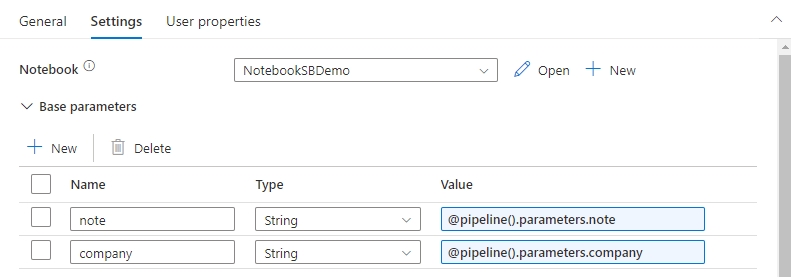
Azure Synapse Basic Pipeline Parameters in Azure Synapse Studio:
When using Pipeline Parameters in the Universal Task, those Parameters need to be set as dynamic Parameters in Azure Synapse Studio.
Example: @pipeline().parameters.note
Finished Task
Once the execution of the Pipeline in Azure is finished, the Task goes to "Success" and the Pipeline Status field shows "Succeeded".
Re-start a Pipeline Run
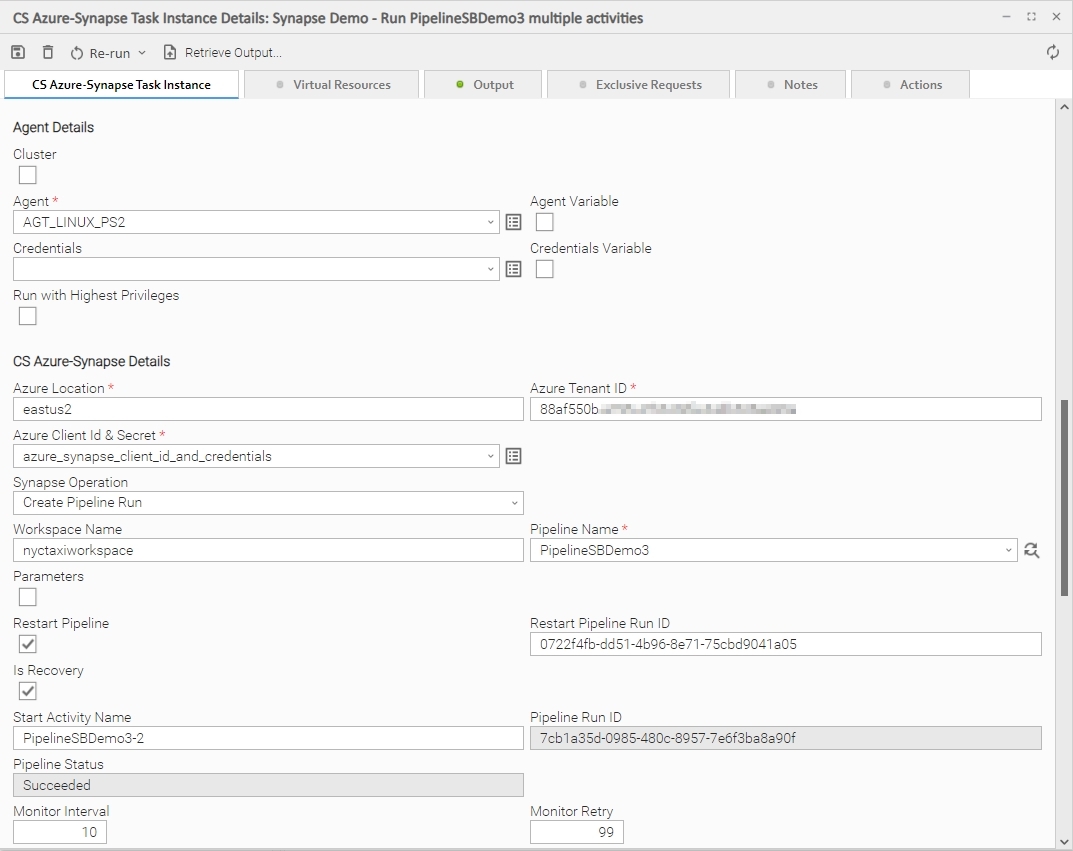
The following example shows a re-start of a pipeline from the activity PipelineSBDemo3-2.
The re-start is performed in recovery mode, which means that the referenced pipeline run and the new run are grouped under the same groupId.
Task Output
The Task output provides detailed Information on the processing of the Pipeline.
Exit Codes
The exit codes and related Task Output for this Universal Task are described in the following table.
Task Exit Code | Task Status | Status Classification Description | Task Output |
|---|---|---|---|
0 | Success | Successful Execution | The endpoint has successfully executed the job. |
1 | Failed | Wrong Credentials | {'error': 'unauthorized_client'..} |
1 | Failed | Wrong Pipeline Parameter | {'errors': {'': ["Unexpected character encountered while parsing value: .."]} |
1 | Failed | Wrong Pipeline Name | {'code': 'BadRequest', 'message': 'Entity xPipelineSBDemo not found' ..} |
1 | Failed | Wrong Tenant Name | {'error': 'invalid_request', 'error_description': "AADSTS900023: Specified tenant identifier 'xyz..' is neither a valid DNS name, nor a valid external domain ..'} |
1 | Failed | Cancel Pipeline which is not running | {'code': 'PipelineRunNotRunning', 'message': "Pipeline run has already completed with status 'Cancelled'.Only pipeline runs that are in progress or queued can be canceled."..} |
1 | Failed | Error in the Azure Synapse Pipeline | The Error Message created in Synapse are visible in the Output, e.g. "message": "Operation on target PipelineSBDemoError failed: .. xtime.sleep(30) NameError: name 'xtime' is not defined" |
STDOUT and STDERR
STDOUT and STDERR provide additional information to User. The populated content can be changed in future versions of this Universal Task without notice. Backward compatibility is not guaranteed.
Integration Modifications
Modifications applied by users or customers, before or after import, might affect the supportability of this integration. The following modifications are discouraged to retain the support level as applied for this integration.
- Python code modifications should not be done.
- Template Modifications
- General Section
- "Name", "Extension", "Variable Prefix", "Icon" should not be changed.
- Universal Template Details Section
- "Template Type", "Agent Type", "Send Extension Variables", "Always Cancel on Force Finish" should not be changed.
- Result Processing Defaults Section
- Success and Failure Exit codes should not be changed.
- Success and Failure Output processing should not be changed.
- Fields Restriction Section
The setup of the template does not impose any restrictions, however with respect to "Exit Code Processing Fields" section.- Success/Failure exit codes need to be respected.
- In principle, as STDERR and STDOUT outputs can change in follow-up releases of this integration, they should not be considered as a reliable source for determining success or failure of a task.
- General Section
Users and customers are encouraged to report defects, or feature requests at Stonebranch Support Desk.
Document References
This document references the following documents:
Document Link | Description |
|---|---|
User documentation for creating, working with and understanding Universal Templates and Integrations. | |
User documentation for creating Universal Tasks in the Universal Controller user interface. | |
SAP Job Scheduler REST API for XS Advanced to the HANA XSA Application. |
Changelog
ue-cs-azure-synapse-1.3.0 (2026-01-08)
Enhancements
- Managed Identify has been added as additional Authentication method. It eliminates password and secret management, since Azure automatically handles credential issuance, rotation, and security.
Fixes
- Whenever the Authentication Token expires, a new Authentication Token is automatically generated
ue-cs-azure-synapse-1.2.0 (2024-05-29)
Enhancements
- Json Output is provided for further processing of the output in, e.g. Workflows.
ue-cs-azure-synapse-1.1.2 (2024-04-25)
Enhancements
- Suport for dynamic Bearer Token
ue-cs-azure-synapse-1.1.0
Enhancements
- Suport for TLS Certificate based connections using either a local certificate file or the default Agent Python certify module certificate file
ue-cs-azure-synapse-1.0.1 (2023-08-24)
Enhancements
- Added: Parameter Support
ue-cs-azure-synapse-1.0.0
Initial Version