Databricks: Automate Jobs and Clusters
Disclaimer
Your use of this download is governed by Stonebranch's Terms of Use.
Version Information
Template Name | Version |
|---|---|
Databricks | 1.4.0 |
Refer to Changelog for version history information.
Introduction
This Universal Task allows Stonebranch users to perform end-to-end Orchestration and Automation of Jobs & Clusters in Databricks environment, either in AWS or Azure.
Overview
This integration will use the Databricks URL and the user bearer token to connect with the Databricks environment. Users can perform the following actions with respect to the Databricks jobs.
- Create and list jobs
- Get job details
- Run now jobs
- Run submit jobs
- Repair jobs
- Cancel run jobs
Also with respect to Databricks clusters, this integration can perform the following operations.
- Create, start, and restart a cluster
- Terminate a cluster
- Get cluster information
- List clusters
With respect to Databricks DBFS, this Universal Task also provides a feature to upload larger files.
Software Requirements
This integration requires a Universal Agent and a Python runtime to execute the Universal Task against a Databricks environment. This Universal Task has been tested with the Azure Databricks environment API version 2.0.
Software Requirements for Universal Template and Universal Task
Requires Python 3.11.0 or higher. Tested with the Universal Agent bundled Python distribution. It requires "requests" python module.
Software Requirements for Universal Agent
- Universal Agent for Windows x64 Version 7.4 and later with Python options installed
- Universal Agent for Linux Version 7.4 and later with Python options installed
Software Requirements for Universal Controller
- Universal Controller Version 7.4.0.0 and later
Technical Considerations
-
This task uses Python module "requests" to make REST API calls to the Databricks environment.
-
Databricks URL and user bearer token would be required as basic input for this Universal Task.
-
Authentication is possible either by generating a personal access token in Databricks Environment or an Azure AD-based authentication.
-
Using the Azure AD based Authentication involves some configuration as shown below in Azure (https://portal.azure.com).
-
Login to Azure; Use the App registrations services to create an application registration for Azure Databricks to get the client id / Client secret credentials
-
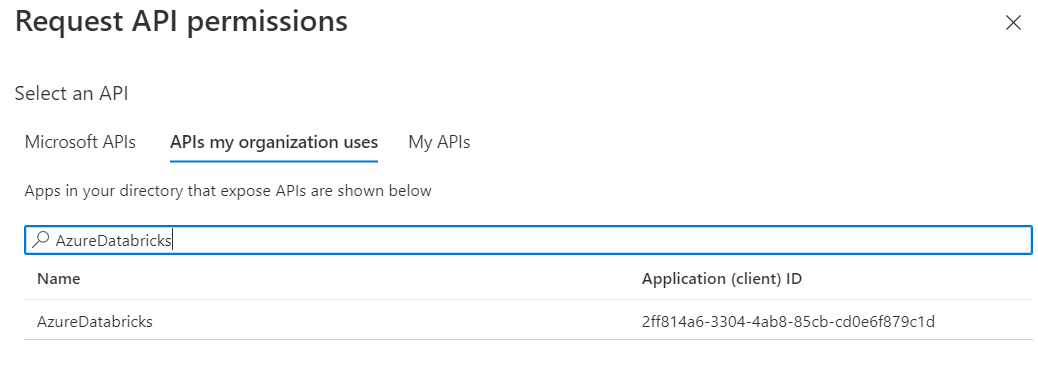
For the newly created Databricks App registration add the API permission for Azure Databricks as shown below:
-
Finally, add the service principal to Azure Databricks
-
-
Please refer to the Databricks API related to jobs and clusters.
Key Features
Feature | Description |
|---|---|
Create Job | Create a job in a Databricks environment from Universal Controller. Here, a JSON input for job creation in Databricks environment will be used. |
List jobs | List the jobs available within the Databricks environment. |
Get Job details | Provides an existing job definition in Databricks by providing the job ID as input. |
Run now Jobs | This feature helps to run an existing job in Databricks environment using the run time input parameters supplied in JSON from the Universal Task and the Universal Controller will be monitoring the execution of the job until it gets completed. |
Run Submit jobs | This feature helps to run a job in Databricks environment that can be dynamically defined in JSON as an input parameter in the Universal Task and the Universal Controller will be monitoring the execution of the job until it gets completed. |
Repair jobs | This feature lets you re-run one or more tasks within an existing job. The tasks use the latest job and task settings, and their execution is logged in the history of the original job run. |
Cancel Run job | Cancel an execution of a job that is in a running state within the Databricks environment. |
Create Cluster | Create a cluster in Databricks environment. Input to be provided in the JSON in a script in this Universal Task. |
List clusters | List the clusters available in the Databricks environment. |
Start cluster | Start a cluster that is in a stopped state in Databricks. |
Restart cluster | Restart a cluster in the Databricks environment. |
Terminate cluster | Terminate cluster in Databricks environment by providing cluster ID as input. |
Get a Cluster info | Provides the definition of an existing cluster in Databricks environment in JSON. |
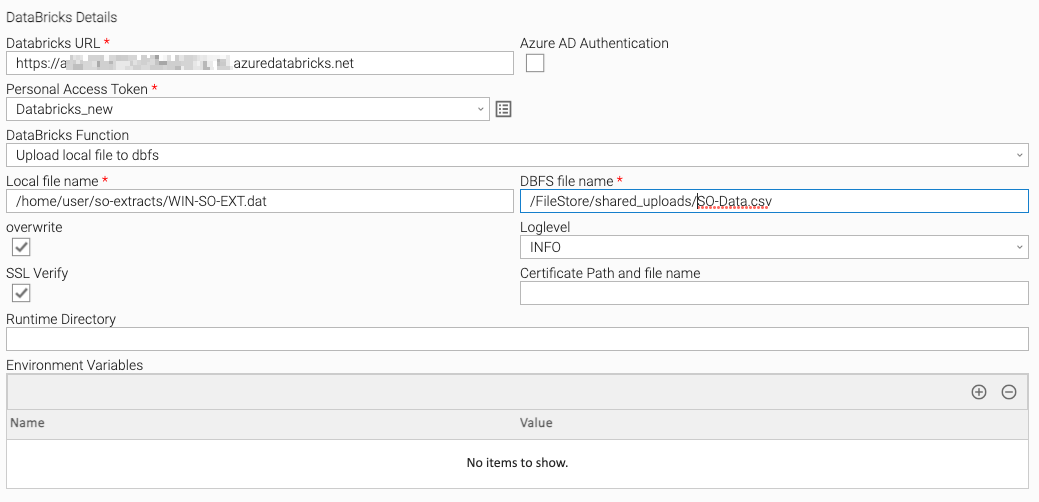
Upload file to DBFS | Upload a file from local server to a Databricks file system DBFS.+ |
Import Universal Template
To use this downloadable Universal Template, you first must perform the following steps:
- This Universal Task requires the Resolvable Credentials feature. Check that the Resolvable Credentials Permitted system property has been set to true.
- To import the Universal Template into your Controller, follow the instructions here.
- When the files have been imported successfully, refresh the Universal Templates list; the Universal Template will appear on the list.
Modifications of this integration, applied by users or customers, before or after import, might affect the supportability of this integration.
Configure Universal Task
For the new Universal Task type, create a new task, and enter the task-specific details that were created in the Universal Template.
Input Fields
Field | Input Type | Default Value | Type | Description |
|---|---|---|---|---|
Databricks URL | Required | Text | Specify the Databricks URL. | |
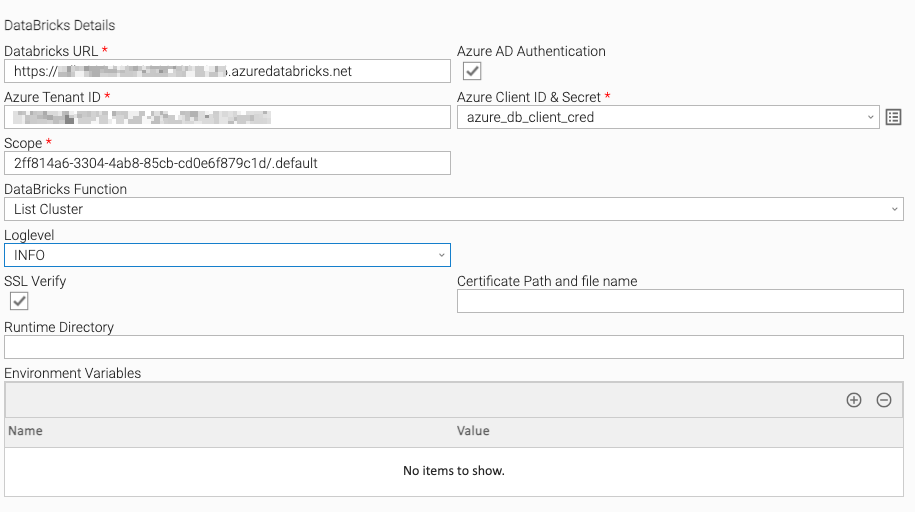
Azure AD Authentication | Optional | False | Boolean | Check the box when authentication must go via Azure AD. |
Azure Tenant ID | Required | Text | If Azure AD Authentication is checked then specify the Azure Tenant id from the App registrations for databricks. | |
Azure Client ID & Secret | Required | Credential | If Azure AD Authentication is checked then specify the runtime User as Azure client id & runtime Password as the Secret value from the App registrations for databricks. | |
Scope | Required | 2ff814a6-3304-4ab8-85cb-cd0e6f879c1d/.default | Text | If Azure AD Authentication is checked then specify the scope. The default value of scope would be "2ff814a6-3304-4ab8-85cb-cd0e6f879c1d/.default" as mentioned in the Azure Databricks documents |
Bearer Token | Required | Credential | Provide the Databricks Personal token or the Azure AD token. | |
Databricks Function | Required | Choice | Select a Function that would like to perform with Databricks. | |
Create Request Script | Required | Script | Feed the script for the new job creation or cluster in Databricks. | |
Job ID | Optional | Text | Provide the Databricks Job ID. | |
Job Run Request | Optional | Script | Specify the parameters for Jar or notebook or python or spark-submit or the Job submit run request. | |
Run ID | Optional | Text | Specify the Databricks Run ID. | |
Repair | Optional | False | Boolean | Check the box to perform a repair request |
First Repair Attempt | Optional | True | Boolean | Check the box if it is the first attempt of repairing the job (no latest Repair ID available ) |
Latest Repair ID | Optional | Text | The ID of the latest repair. This parameter is not required when repairing a run for the first time, but must be provided on subsequent requests to repair the same run. | |
Cluster ID | Optional | Text | Provide the cluster ID. | |
Local file name | Optional | Text | Local file name with path. | |
DBFS file name | Optional | Text | Provide the Databricks file path and name. | |
overwrite | Optional | False | Boolean | Specify if the uploaded files need to be overwritten in DBFS. |
Log Level | Optional | INFO | Choice | Log Level. |
SSL Verify | Optional | True | Boolean | Check if this Universal Task requires certificate verification for Databricks REST-API calls. |
Certificate Path and file name | Optional | Text | Path of the certificate for SSL Verification, if the SSL Verify field is enabled. | |
Status Check Interval | Optional | 10 | Integer | The interval for checking the status of the job. |
Maximum Retry | Optional | 10 | Integer | Number of retries during waiting for the task to be completed. |
Task Examples
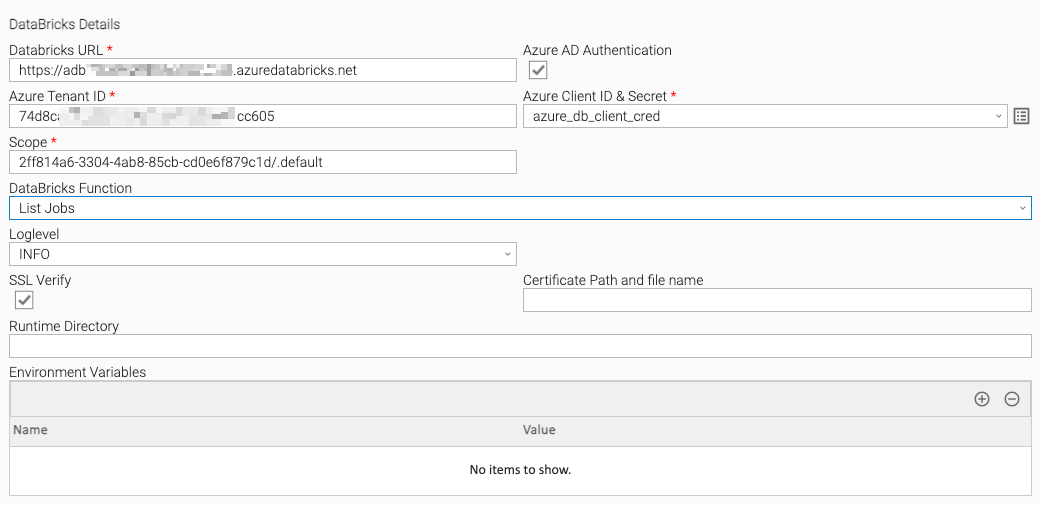
List Job
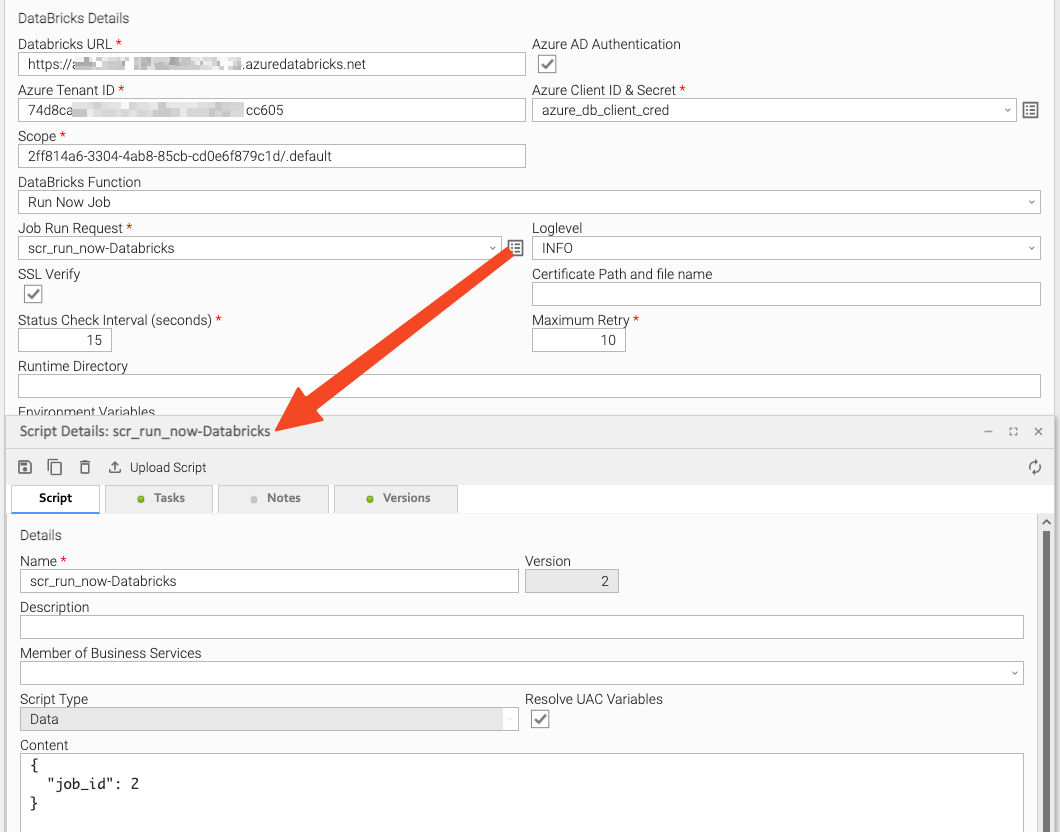
Run now Job
Run Now Job - Script Details
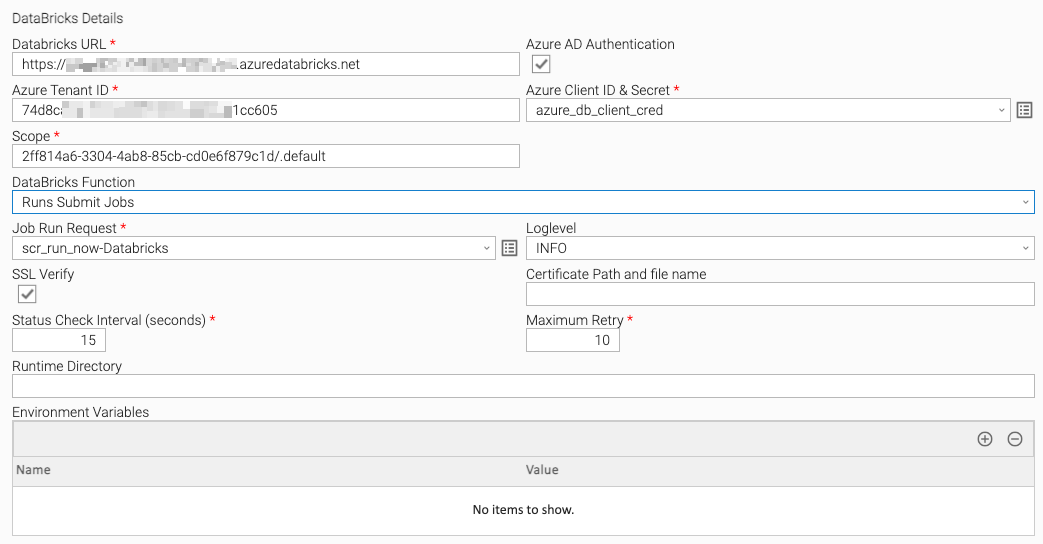
Run Submit Job
Repair Job - First Attempt
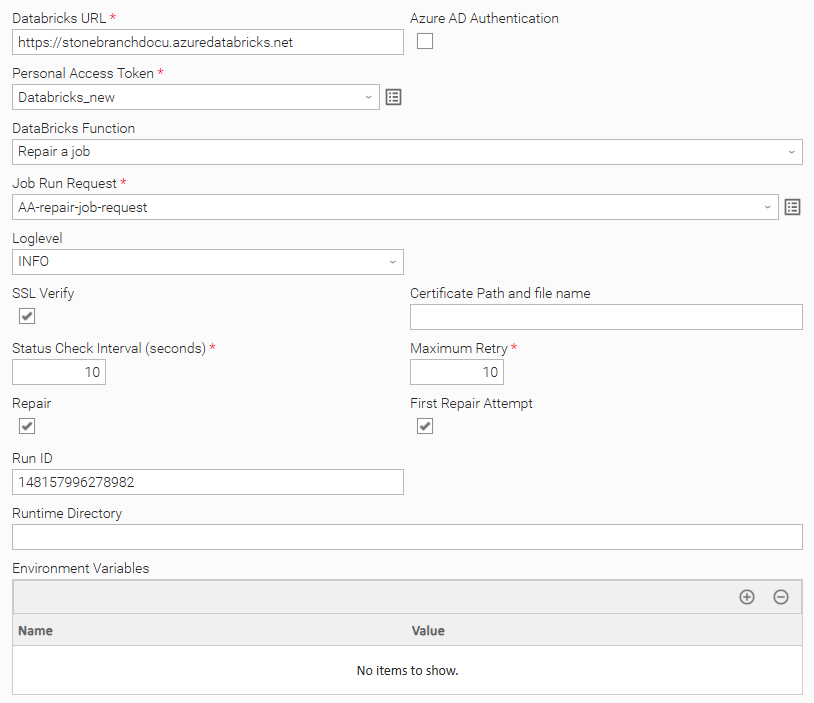
Repair Job - Second Attempt
List Cluster
Upload Local File to DBFS
Task Output
Exit Codes
The exit codes for this Universal Task are described in the following table.
Exit Code | Status Classification Code | Status Classification Description |
|---|---|---|
0 | SUCCESS | Successful Execution |
1 | FAIL | The unsuccessful response from the Databricks server can be an incorrect parameter or something on the Databricks side. |
10 | FAIL | Error acquiring authorization token. Check your tenantID, clientID, and clientSecret. |
Document References
This document references the following documents:
Name | Description |
|---|---|
User documentation for creating Universal Templates in the Universal Controller user interface. | |
User documentation for creating Universal Tasks in the Universal Controller user interface. |
Changelog
ut-cs-databricks-1.4.0 (2025-10-09)
Enhancements
- Added:
repair_joboption to support repairing failed or incomplete jobs. - Added: Support for Databricks multi-task run job outputs in
Run Job. - Added:
repairparameter forrun_nowandrun_submitfunctions to enable on-demand repair. - Added: Enhanced Databricks job logging for improved observability and debugging.
Fixes
- Fixed: Minor issues with Retry Interval and Max Retry configurations.
- Fixed: Refactored large functions into smaller, modular units to improve code quality, maintainability, and readability.
ut-databricks-1.3.3 (2023-04-28)
Fixes
Fixed: Retry Interval and Max Retry parsing secured. It was failing for actions that don't use these values.
ut-databricks-1.3.2 (2022-07-17)
Enhancements
Added: Retry count will reset on successful execution.
ut-databricks-1.3.1 (2022-07-08)
Fixes
Fixed:Retry options added for connection errors also
ut-databricks-1.3.0 (2022-06-13)
Enhancements
Added:Timeout and Retry options added to requests module
ut-databricks-1.2.2 (2022-06-01)
Enhancements
Added: A field added for the sleep interval during job status check
ut-databricks-1.2.1 (2022-05-19)
Fixes
Fixed: check Run Status command may not return run_state value
ut-databricks-1.2.0 (2022-03-16)
Enhancements
Added: Regenerate Azure Ad token while Job monitor if token expires
ut-databricks-1.1.0 (2022-03-14)
Enhancements
Added: Included azure Ad based access to DB via MSAL
ut-databricks-1.0.4 (2021-01-04)
Enhancements
Added: SSL Verify option added
ut-databricks-1.0.3 (2021-12-20)
Fixes
Fixed: Usage for the Double quotes for the _scriptPath
ut-databricks-1.0.2 (2021-09-20)
Fixes
Fixed: Print state run now print logs
ut-databricks-1.0.1 (2021-05-06)
Enhancements
Added: Updates for customer requirements
ut-databricks-1.0.0 (2021-02-05)
Enhancements
Added: Upload & Export functionalities