HashiCorp: Terraform
Disclaimer
Your use of this download is governed by Stonebranch's Terms of Use.
Version Information
Template Name | Extension Name | Extension Version |
|---|---|---|
Terraform | ue-terraform | 1.0.1 |
Refer to Changelog for version history information.
Overview
Terraform is an infrastructure as code tool that lets you define both cloud and on-prem resources in human-readable configuration files that you can version, reuse, and share. You can then use a consistent workflow to provision and manage all of your infrastructure throughout its lifecycle.
This Universal Extension allows Stonebranch users to orchestrate infrastructure provisioning processes using Terraform.
Software Requirements
This integration requires Terraform, Universal Agent and Python runtime to execute the Universal Task.
Software Requirements for Universal Template and Universal Task
- Requires Python 3.7.0 or higher. Tested with the Universal Agent bundled Python distribution.
- Requires Terraform 1.0.0 version or higher.
Terraform is required to be installed on the host where the Universal Agent is installed. Related Terraform binaries and libraries need to be accessible by the agent.
Software Requirements for Universal Agent
Linux agents are supported.
- Universal Agent for Linux Version 7.0.0.0 and later with python options installed.
Software Requirements for Universal Controller
Universal Controller Version 7.0.0.0 and later.
Network and Connectivity Requirements
Extension's Universal Agent host should be able to reach endpoints of services related to resource provisioning used by Terraform.
Key Features
This Universal Extension supports the following main features.
- Init Terraform (Supports upgrade option)
- Plan Terraform (Supports Refresh-only planning mode)
- Apply Terraform
- Destroy Terraform
Import Universal Template
To use the Universal Template, you first must perform the following steps.
- This Universal Task requires the Resolvable Credentials feature. Check that the Resolvable Credentials Permitted system property has been set to true.
- To import the Universal Template into your Controller, follow the instructions here.
- When the files have been imported successfully, refresh the Universal Templates list; the Universal Template will appear on the list.
Configure Universal Task
For the new Universal Task type, create a new task and enter the task-specific details that were created in the Universal Template.
Input Fields
Filed | Input type | Default value | Type | Description |
|---|---|---|---|---|
Action | Required | Init | Choice | Terraform command. The valid values are as follows.
|
Upgrade Plugins | Optional | False | Boolean | If selected, this flag upgrades all previously-selected plugins to the newest version that complies with the configuration's version constraints. This will cause Terraform to ignore any selections recorded in the dependency lock file, and to take the newest available version matching the configured version constraints. Visible only when Action is "Init". |
Terraform Credentials Introduced in version 1.0.1 | Optional | - | Credentials | Credentials that can be passed to the Variable Script. When the task is launched, they will be resolved and be part of the generated terraform variables file to be used when executing the terraform command. More information on how to use the Terraform Credentials can be found here. Visible when Action is "Plan", "Apply" or "Destroy". |
Variables Script | Optional | Empty | Script | UAC script that contains Terraform input variables including all required credential mappings |
Plan Output File | Optional | Empty | Text | Specifies the file name for the generated plan. If the file already exists, it will be overwritten. Visible only when Action = "Plan". |
Plan File | Optional | Empty | Text | Path to a previously generated plan file that will be used when applying a new configuration. Visible only when Action = "Apply". |
Planning mode | Optional | None | Choice | Terraform Planning Mode that will be applied.
|
Print Log on STDERR | Optional | True | Boolean | If selected the generated, Terraform log will be printed on STDERR. When not selected, the Terraform log is not printed. |
JSON Output | Optional | False | Boolean | If selected, Terraform log will be printed in JSON format. Visible only when Print Log on STDERR = "True". |
Runtime Directory | Optional | Empty | Text | Directory in which the application should be executed. It needs to contain the Terraform .tf files, as well as any additional mandatory Terraform files required for the specific action. |
Task Examples
Terraform Init
Init action with setting the runtime directory where the Terraform will be initialized.

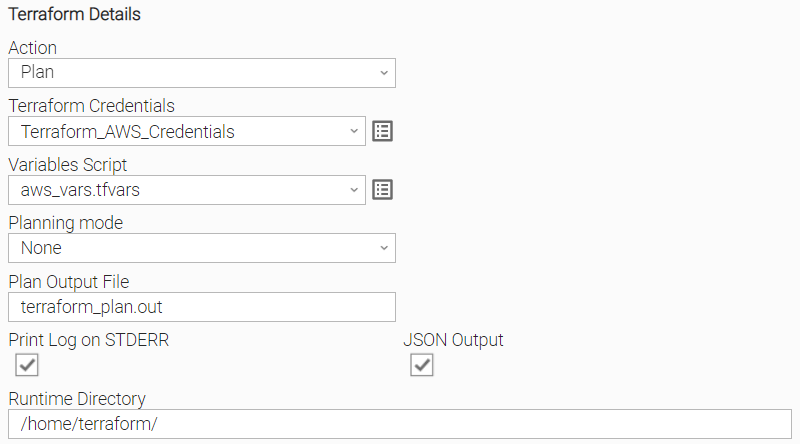
Terraform Plan
Plan action with provided Plan Output File, Variables Script, Printing logs in JSON format on STDERR using a specific runtime directory.
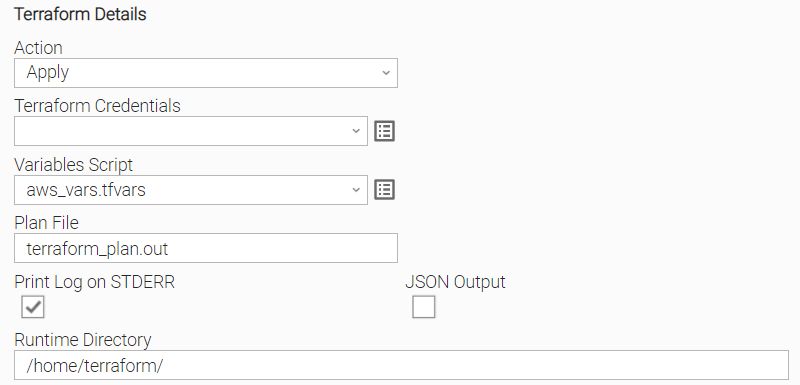
Terraform Apply
Apply action with provided Plan File, using a specific runtime directory.
When Terraform is using a previously generated plan file, variable scripts can not be re-evaluated.
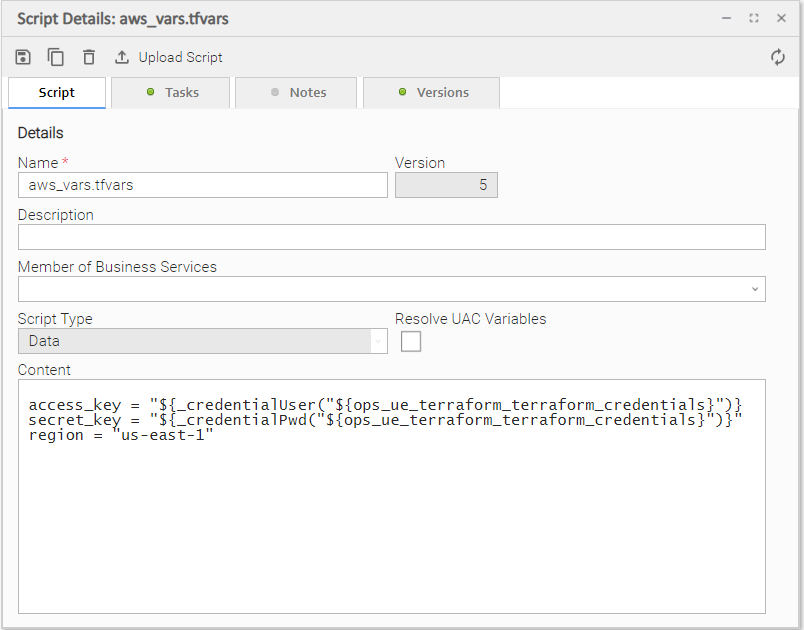
Variable Script
Passing credentials from the template to the terraform variable file.
One credential field can be passed, the configuration of which can be used to allow users to pass credentials into variable scripts. User has the freedom to decide which credential parameters (like "Runtime User", Runtime Password", "Key Location") can be used from the credential field to propagated to the variables script.
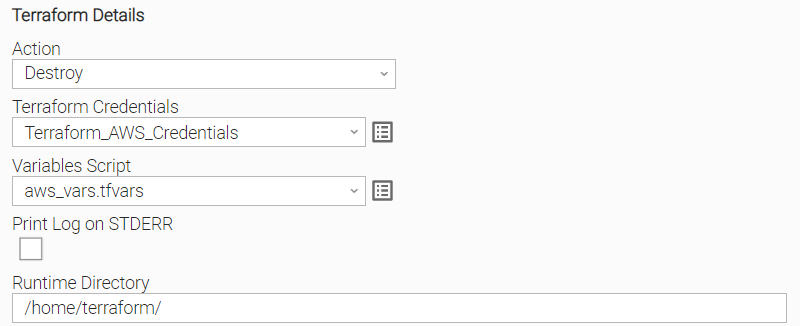
Terraform Destroy
Destroy action with Printing logs in JSON format using a specific runtime directory.
Task Output
Exit Codes
The exit codes for this Universal Extension are described below.
Exit Code | Status Classification Code | Status Classification Description | Status Description |
|---|---|---|---|
0 | SUCCESS | Successful Execution | SUCCESS: Terraform command executed successfully! |
1 | FAIL | Failed Execution | FAIL: Unexpected error. See STDERR for more details. |
20 | DATA_VALIDATION_ERROR | Input fields validation error | DATA_VALIDATION_ERROR: Some of the input fields cannot be validated. See STDERR for more details. |
Extension Output
In the context of a workflow, subsequent tasks can rely on the information provided by this integration as Extension Output.
Attribute changed is populated as follows.
null | If Action is Init/Apply/Destroy. |
false | If Action is Plan, and it has succeeded with empty diff (no changes). |
true | If Action is Plan, and it has succeeded with non-empty diff (changes present). |
Attribute result.commands provides information for the Terraform executed command. It contains the following sub-attributes.
Attribute | Output Type | Type | Description |
|---|---|---|---|
cmd | Mandatory | Text | The executed command |
rc | Mandatory | Integer | Return code of executed command. |
An example of the Extension Output for a execution of Init action is presented below.
{
  "exit_code": 0,
  "status_description": "SUCCESS: Terraform command executed successfully!",
  "changed": true,
  "invocation": {
    "extension": "ue-terraform",
    "version": "1.0.1",
    "fields": {
      "action": "Init",
      "upgrade_plugins": false,
      "variables_script": "",
      "plan_file": "",
      "plan_output_file": "",
      "planning_mode": [],
      "print_log_on_stderr": true,
      "json_output": false
    }
  },
  "result": {
    "commands": [
      {
        "cmd": "terraform init -no-color -input=false",
        "rc": 0
      }
    ]
  }
}
STDOUT and STDERR
STDOUT and STDERR provide additional information to user. The populated content can be changed in future versions of this extension without notice. Backward compatibility is not guaranteed.
Document References
Document Link | Description |
|---|---|
User documentation for creating, working with and understanding Universal Templates and Integrations. | |
User documentation for creating Universal Tasks in the Universal Controller user interface. | |
User documentation for creating and working with credentials. | |
User documentation for Resolvable Credentials Permitted Property. | |
Introduction to Terraform official documentation | |
Terraform Cli official documentation |
Changelog
ue-terraform-1.0.1 (2022-07-19)
Enhancements
Fixed: Credentials can now be passed from Credential field to the variable script.