Kong AI Gateway
Disclaimer
Your use of this download is governed by Stonebranch's Terms of Use.
For general information on how integrations work, importing templates, and UAC documentation refer to Overview.
Version Information
Template Name | Extension Name | Version | Status |
|---|---|---|---|
Kong AI Gateway | ue-kong-ai-gateway | 1.0.0 | Initial Version. |
Refer to Changelog for version history information.
Overview
Kong AI Gateway is a layer in front of large language model providers that presents them through a single OpenAI-compatible interface, applying authentication, routing, and model selection centrally rather than in each client. It also fronts Model Context Protocol (MCP) servers, which expose callable tools that a model can use to gather information or perform work. Both self-managed Kong Gateway deployments and Kong Konnect are supported.
This Universal Task allows customers to send prompts to large language models and run autonomous tool-calling sessions against MCP servers in Kong AI Gateway straight from the Universal Controller. Prompts are supplied inline or from Universal Controller Scripts, responses are returned as plain text or as schema-validated JSON, and token consumption is reported back to the task instance.
Key Features
Feature | Description |
|---|---|
Chat Completions | Sends single-turn or multi-turn conversations to any model exposed through Kong and returns the response. |
Agentic Tool Calling | Runs an autonomous loop in which the model selects and invokes MCP tools until it produces a final answer. |
MCP Tool Discovery | Lists the tools published by one or more MCP servers, with an optional filter restricting which tools a run may use. |
Structured Responses | Returns answers as plain text, prompt-described JSON, or JSON validated by the provider against a supplied schema. |
Prompt Templating | Resolves prompts held in Universal Controller Scripts, including Universal Controller variable and file references. |
Flexible Authentication | Authenticates to Kong with an OAuth2 client-credentials grant or a key-auth API key in a configurable header. |
Requirements
This integration requires a Universal Agent and a Python runtime to execute the Universal Task.
Area | Details |
|---|---|
Python Version | Requires Python 3.11 or 3.14, tested with Agent bundled python distribution. |
Universal Agent Compatibility |
|
Universal Controller Compatibility | Universal Controller Version >= 7.8.0.0. |
Network and Connectivity | Network connectivity to Kong AI Gateway is required. Populating the dynamic choice fields additionally requires connectivity to the Kong Admin API (Self-Managed) or the regional Konnect API (Konnect). |
Supported Actions
There are 3 Top-Level actions controlled by the Action Field:
- Chat: Sends a prompt to a model through Kong and returns the response.
- Agentic MCP: Lets the model call MCP tools repeatedly until it reaches a final answer.
- List MCP Tools: Reports the tools published by the selected MCP servers.
Action: Chat
Sends a system prompt and a user prompt to the selected model and returns the response, optionally as JSON validated against a supplied schema. The task ends as soon as the model replies.
Action: Agentic MCP
Sends the prompt to the model together with the tool catalog discovered from the selected MCP servers, then executes the tools the model requests and feeds the results back. The loop ends when the model produces a final answer, or when the configured maximum number of turns is reached.
Action: List MCP Tools
Connects to each selected MCP server and reports the tools it publishes, together with their descriptions. No model is contacted, so no tokens are consumed.
Action Output
- EXTENSION
- STDOUT
The extension output provides the following information:
exit_code, status_description: General info regarding the task execution.invocation.fields: The task configuration used for this execution. For more information refer to the exit codes table.result.response: The model's reply for the Chat action.result.final_answer: The model's concluding reply for the Agentic MCP action.result.metadata: Token usage and the reason the model stopped generating.result.complete_conversation: The complete message sequence for the Chat action, when requested through the Extension Output field.result.tool_call_transcript: The tool-call transcript for the Agentic MCP action, when requested through the Extension Output field. When the transcript is longer thanUE_MAX_OUTPUT_RECORDS, only the first entries are embedded andresult.transcript_truncatedreports the total and shown entry counts.result.servers: For the List MCP Tools action, one entry per MCP connection, holding themcp_connectionroute path and the names of itstools.result.tool_count: For the List MCP Tools action, the total number of tools discovered.result.dry_run,result.rendered_conversation,result.resolved_model,result.estimated_prompt_tokens: Returned instead of a model reply when Dry Run is enabled. For the Agentic MCP action,result.discovered_toolsandresult.allowed_tools_filter_appliedare also returned.result.errors: List of errors that might have occurred during execution.
Examples:Successful execution
Failed execution
The content written to STDOUT is controlled by the STDOUT field. "Final Result Only" prints the chat response or the agentic final answer on its own. "Full Output" prints the entire conversation for the Chat action, and the live tool-call progress for the Agentic MCP action. The List MCP Tools action prints the discovered tool catalog as a table.
Example:
The deployment completed successfully across all four regions. No rollback was
required and all health checks reported green.
Configuration Examples
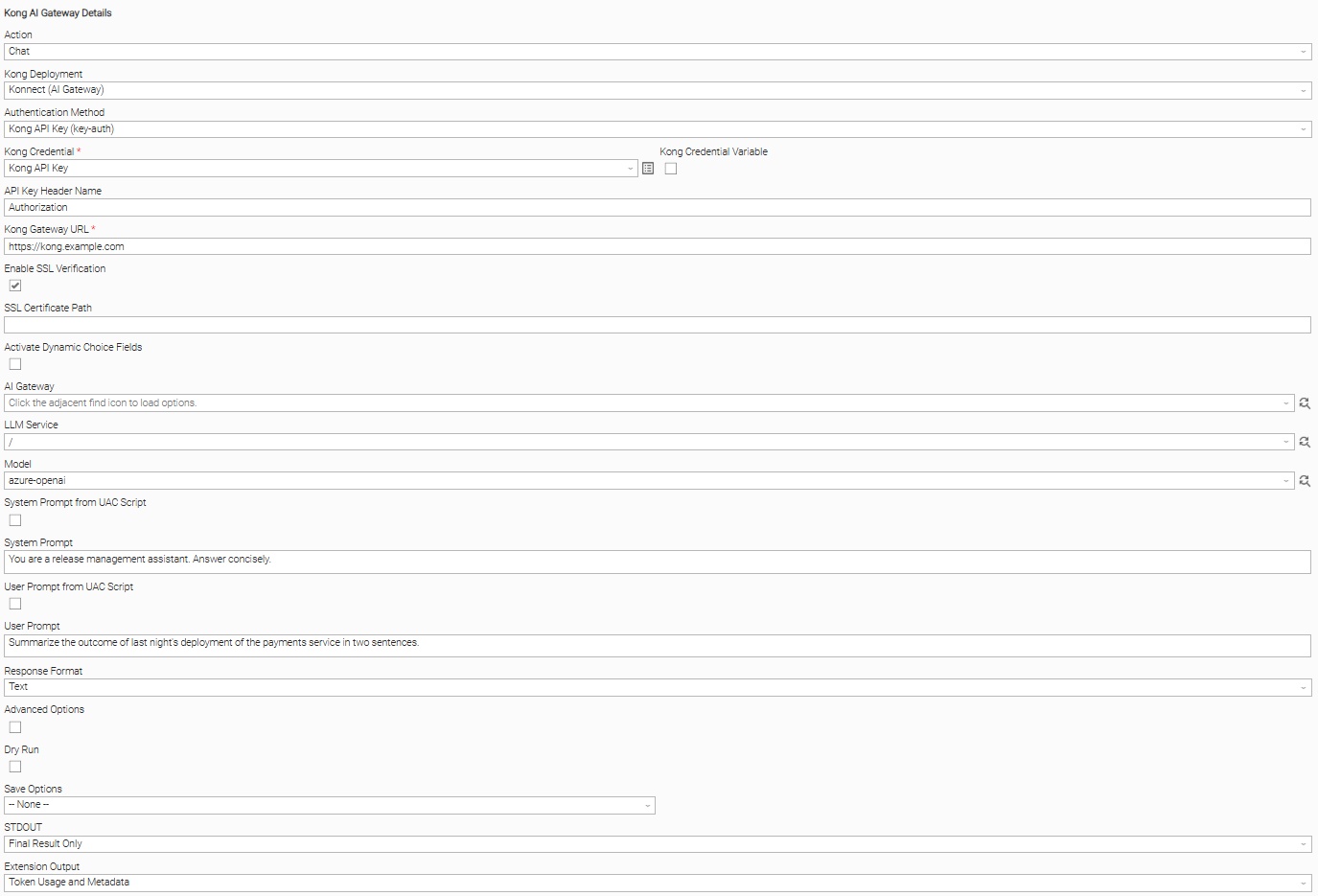
Example: Key-auth authentication, inline prompts, text response
A Chat task authenticating with a key-auth API key presented in the Authorization header, where the Bearer scheme is added automatically. Kong Gateway URL points at the Kong proxy, LLM Service holds the route path serving chat traffic, and Model names the model to invoke. Both prompts are typed directly into the form, Response Format is left at "Text", and Extension Output requests "Token Usage and Metadata" so that the token counts are also included in the Extension Output; the Output Only fields are populated either way. The task ends as soon as the model replies.
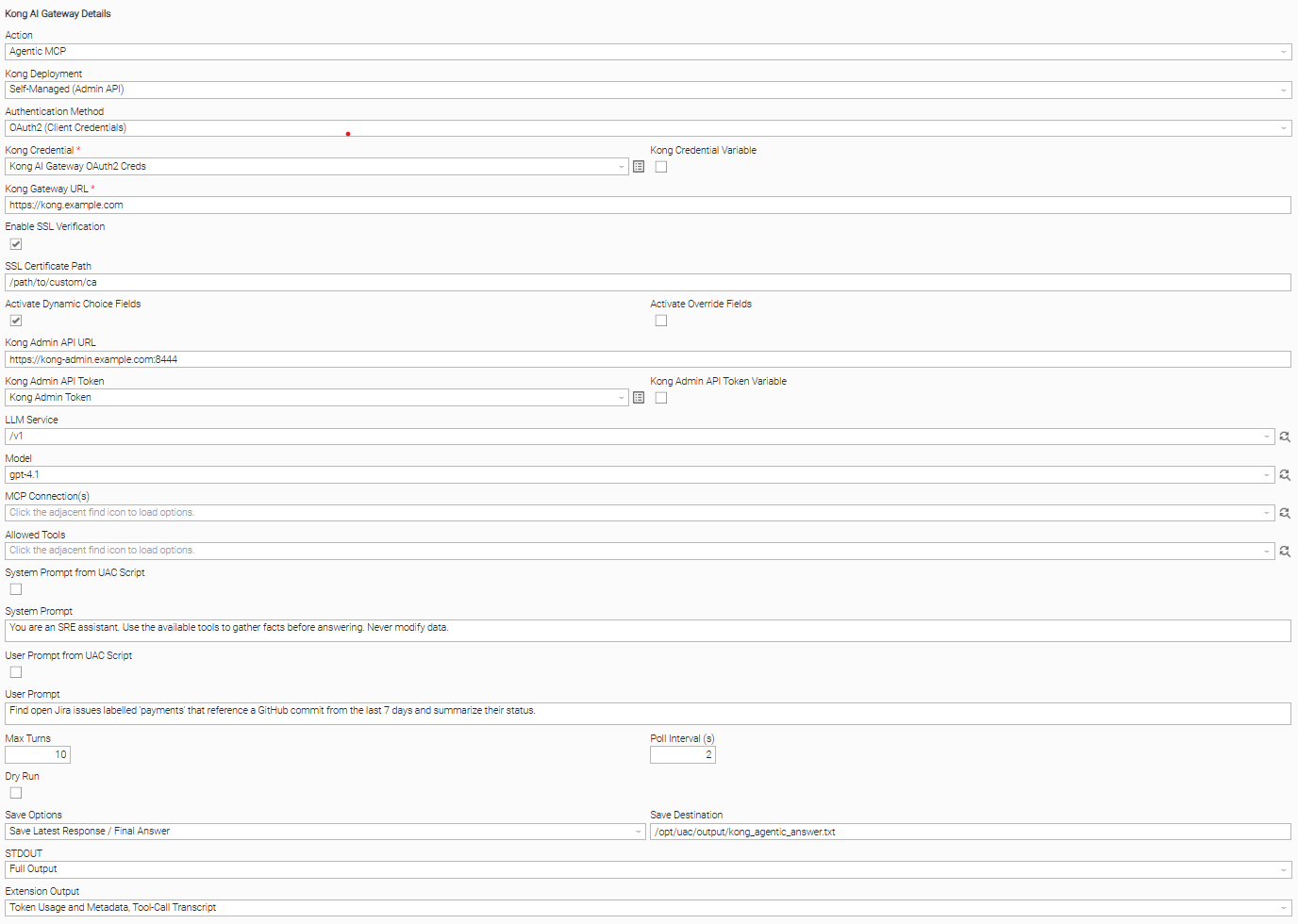
Example: OAuth2 authentication, agentic tool calling, restricted tool set
An Agentic MCP task authenticating with an OAuth2 client-credentials grant, where the Kong Credential holds the Client ID as the user and the Client Secret as the password. Activate Dynamic Choice Fields lets the LLM Service, Model, MCP Connection(s) and Allowed Tools fields be populated from the Kong Admin API. One or more MCP route paths are selected in MCP Connection(s), and Allowed Tools can restrict the run to an approved subset of the discovered catalog. Max Turns caps how many times the model may call tools before the run is stopped, and Poll Interval (s) paces the turns. Save Options writes the final answer to the file given in Save Destination on the Agent, and Extension Output requests "Tool-Call Transcript" so the sequence of tool invocations is recorded in the Extension Output.
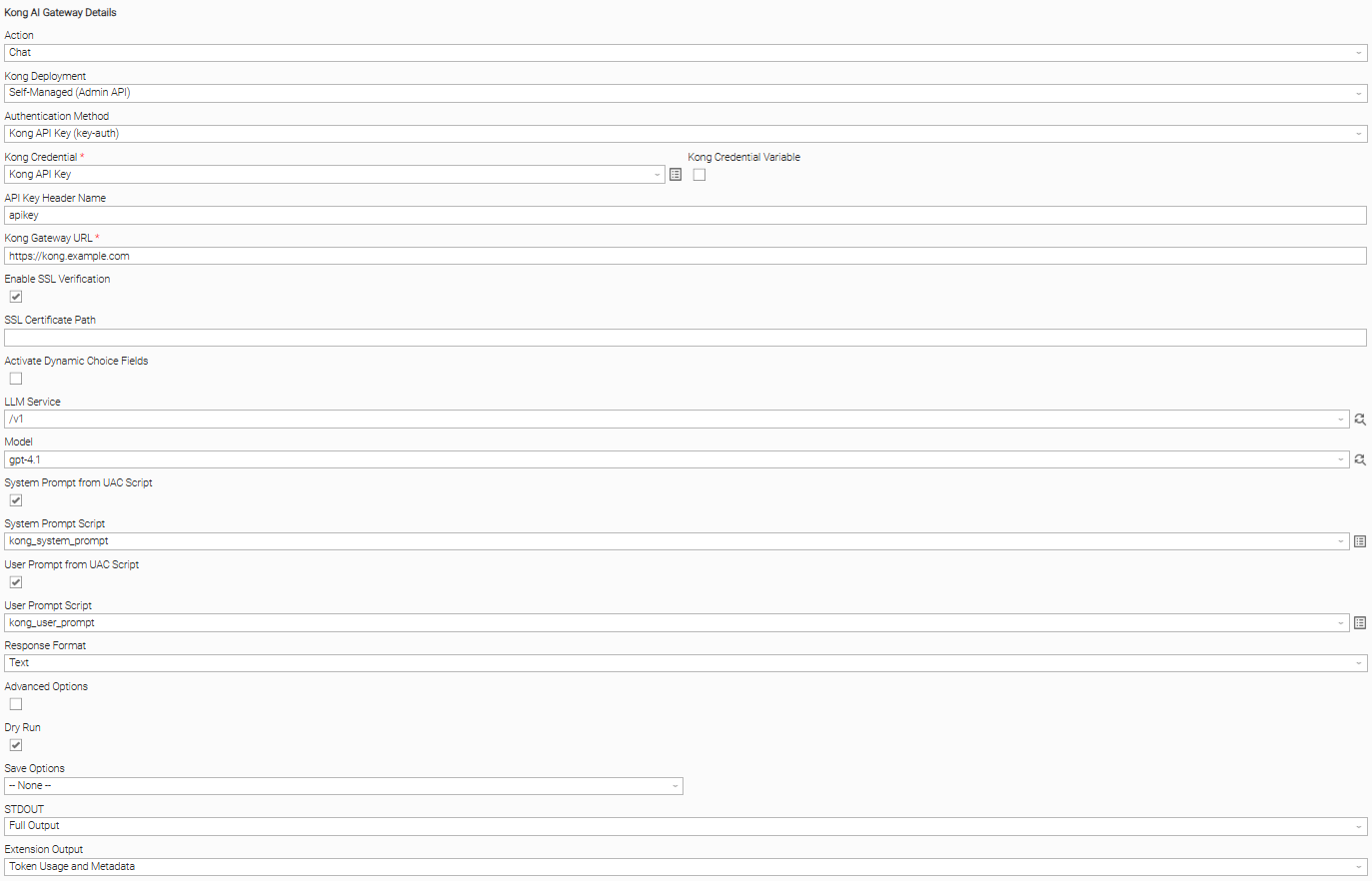
Example: Dry run validation, prompts from Universal Controller Scripts
A Chat task with Dry Run enabled, used to validate a configuration before spending tokens. System Prompt from UAC Script and User Prompt from UAC Script are both enabled, so the prompts are read from Universal Controller Scripts and any variable or file references they contain are resolved. Because Dry Run is enabled, no request reaches the model; the extension returns the fully rendered conversation and an estimated prompt token count so the templating can be confirmed.
Input Fields
Name | Type | Description | Version Information |
|---|---|---|---|
Action | Choice | The operation performed against Kong AI Gateway. Available options:
| Introduced in 1.0.0 |
Kong Deployment | Choice | The Kong deployment that serves the configuration read by the discovery dropdowns. Available options:
| Introduced in 1.0.0 |
Authentication Method | Choice | The mechanism used to authenticate to Kong on every proxy call. Available options:
| Introduced in 1.0.0 |
Kong Credential | Credential | The Resolvable Credential holding the Kong credentials. For OAuth2, the user is the Client ID and the password is the Client Secret. For key-auth, the password holds the API key, or the token if the key exceeds 255 characters. | Introduced in 1.0.0 |
API Key Header Name | Text | The header Kong reads the API key from. Kong's key-auth plugin uses This field is visible when Authentication Method is "Kong API Key (key-auth)". | Introduced in 1.0.0 |
Kong Gateway URL | Text | The address of the Kong proxy serving chat and MCP traffic, for example | Introduced in 1.0.0 |
Enable SSL Verification | Checkbox | Check to verify Kong's certificate on every connection. Clear only for a test Kong presenting a self-signed certificate; otherwise supply the certificate path below. | Introduced in 1.0.0 |
SSL Certificate Path | Text | The full path on the agent to the CA certificate file, required when Kong uses a private or self-signed certificate. Left empty when Kong's certificate comes from a public authority. This field is visible when Enable SSL Verification is "true". | Introduced in 1.0.0 |
Activate Dynamic Choice Fields | Checkbox | Check to enable discovery for the AI Gateway, LLM Service, Model and MCP Connection(s) dropdowns through the Konnect API or the Kong Admin API. Allowed Tools works without it. | Introduced in 1.0.0 |
Activate Override Fields | Checkbox | Check to show the free-text Override fields for the multi-select dropdowns, for use when discovery cannot populate them. This field is visible when Action is "Agentic MCP" or "List MCP Tools". | Introduced in 1.0.0 |
Kong Admin API URL | Text | The API host used for discovery. For Konnect, the regional API host such as This field is visible when Activate Dynamic Choice Fields is "true". | Introduced in 1.0.0 |
Kong Admin API Token | Credential | The Resolvable Credential holding the discovery token, which is never used at task runtime. Konnect requires a Personal or System Account token. A self-managed deployment uses an Enterprise RBAC token, and none on Kong OSS. The token is supplied bare, without a This field is visible when Activate Dynamic Choice Fields is "true". | Introduced in 1.0.0 |
AI Gateway | Dynamic Choice | The Konnect AI Gateway holding the Models and MCP Servers, selected from the dropdown or typed as a UUID. The LLM Service, Model and MCP Connection(s) dropdowns require it to be set first. This field is visible when Kong Deployment is "Konnect (AI Gateway)". | Introduced in 1.0.0 |
LLM Service | Dynamic Choice | The Kong route path serving chat traffic, with an optional leading slash. On Konnect this is usually This field is visible when Action is "Chat" or "Agentic MCP". | Introduced in 1.0.0 |
Model | Dynamic Choice | The model to invoke. Required on Konnect, where every model shares one route path and is selected by name. On a self-managed deployment this is left empty so the route's ai-proxy configuration decides. This field is visible when Action is "Chat" or "Agentic MCP". | Introduced in 1.0.0 |
MCP Connection(s) | Dynamic Choice | One or more Kong MCP route paths, each with an optional leading slash. On Konnect these come from MCP Server entities. On a self-managed deployment they are the Services and Routes tagged This field is visible when Action is "Agentic MCP" or "List MCP Tools". | Introduced in 1.0.0 |
MCP Connection(s) (Override) | Text | A comma-separated list of Kong MCP route paths, for example This field is visible when Activate Override Fields is "true". | Introduced in 1.0.0 |
Allowed Tools | Dynamic Choice | The subset of tools the run may use, read from the selected MCP connections. An empty value allows all discovered tools. This field is visible when Action is "Agentic MCP". | Introduced in 1.0.0 |
Allowed Tools (Override) | Text | A comma-separated list of tool names, where an empty value allows all tools. Overrides the Allowed Tools dropdown when populated. This field is visible when Activate Override Fields is "true". | Introduced in 1.0.0 |
System Prompt from UAC Script | Checkbox | Check to read the system prompt from a Universal Controller Script instead of the inline System Prompt field. This field is visible when Action is "Chat" or "Agentic MCP". | Introduced in 1.0.0 |
System Prompt | Text | The instructions that set the model's role and behaviour, for example "You are a support agent." Left empty when the user prompt is sufficient on its own. This field is visible when System Prompt from UAC Script is "false". | Introduced in 1.0.0 |
System Prompt Script | Script | The Universal Controller Data Script holding the system prompt, for when it is reused or version-controlled rather than typed into the form. This field is visible when System Prompt from UAC Script is "true". | Introduced in 1.0.0 |
User Prompt from UAC Script | Checkbox | Check to read the user prompt from a Universal Controller Script instead of the inline User Prompt field. This field is visible when Action is "Chat" or "Agentic MCP". | Introduced in 1.0.0 |
User Prompt | Text | The question or task sent to the model. For a multi-turn conversation, This field is visible when User Prompt from UAC Script is "false". | Introduced in 1.0.0 |
User Prompt Script | Script | The Universal Controller Script holding the prompt or conversation, for when it is reused or version-controlled rather than typed into the form. This field is visible when User Prompt from UAC Script is "true". | Introduced in 1.0.0 |
Response Format | Choice | The shape of the answer returned by the model. Available options:
This field is visible when Action is "Chat". | Introduced in 1.0.0 |
Response Schema | Script | The Universal Controller Script holding the JSON Schema the answer must follow, given either as the schema itself or as an object with This field is visible when Response Format is "JSON Schema (API Enforced)". | Introduced in 1.0.0 |
Advanced Options | Checkbox | Check to show the model tuning options covering creativity, answer length and repetition. Left clear, the model's own defaults apply. This field is visible when Action is "Chat". | Introduced in 1.0.0 |
Temperature | Float | How varied the answers are, from This field is visible when Advanced Options is "true". | Introduced in 1.0.0 |
Top P | Float | An alternative to Temperature that keeps the model to the most likely wording. This field is visible when Advanced Options is "true". | Introduced in 1.0.0 |
Frequency Penalty | Float | How strongly repetition of the same words is discouraged, from This field is visible when Advanced Options is "true". | Introduced in 1.0.0 |
Presence Penalty | Float | How strongly the model is encouraged to introduce new topics, from This field is visible when Advanced Options is "true". | Introduced in 1.0.0 |
Max Tokens | Integer | The longest answer the model may produce, in tokens, where 1000 tokens is roughly 750 words. The effective ceiling is the model's own limit. This field is visible when Advanced Options is "true". | Introduced in 1.0.0 |
Seed | Integer | A number from This field is visible when Advanced Options is "true". | Introduced in 1.0.0 |
Stop Sequences | Text | A comma-separated list of sequences that end generation, for example This field is visible when Advanced Options is "true". | Introduced in 1.0.0 |
Max Turns | Integer | The number of times, from This field is visible when Action is "Agentic MCP". | Introduced in 1.0.0 |
Poll Interval (s) | Integer | The number of seconds to wait between tool-calling turns, used to pace the run. This field is visible when Action is "Agentic MCP". | Introduced in 1.0.0 |
Dry Run | Checkbox | Check to preview the configuration without calling the model. The Chat action sends nothing at all, while the Agentic MCP action still connects to the MCP servers to list their tools but calls none of them. This field is visible when Action is "Chat" or "Agentic MCP". | Introduced in 1.0.0 |
Save Options | Choice | Whether output is persisted to a local file on the agent. Available options:
This field is visible when Action is "Chat" or "Agentic MCP". | Introduced in 1.0.0 |
Save Destination | Text | The local file path written on the agent, for example This field is visible when Save Options is "Save Latest Response / Final Answer" or "Save Entire Conversation". | Introduced in 1.0.0 |
STDOUT | Choice | What the task writes to STDOUT. Available options:
This field is visible when Action is "Chat" or "Agentic MCP". | Introduced in 1.0.0 |
Extension Output | Multiple Choice | The optional result sections included in the Extension Output, where the response or final answer is always included. Available options:
This field is visible when Action is "Chat" or "Agentic MCP". | Introduced in 1.0.0 |
Output Fields
The following output-only fields provide better visibility during the execution of Universal Task Instances.
Name | Type | Description | Version Information |
|---|---|---|---|
Prompt Tokens | Integer | The number of tokens consumed by the prompt, for the Chat action. | Introduced in 1.0.0 |
Completion Tokens | Integer | The number of tokens consumed by the model's reply, for the Chat action. | Introduced in 1.0.0 |
Total Tokens | Integer | The combined prompt and completion token count, for the Chat action. | Introduced in 1.0.0 |
Finish Reason | Text | The reason the model stopped generating, for the Chat action. | Introduced in 1.0.0 |
Turns Used | Integer | The number of model round-trips consumed, for the Agentic MCP action. | Introduced in 1.0.0 |
Tool Call Count | Integer | The number of tool invocations performed, for the Agentic MCP action. | Introduced in 1.0.0 |
Tool Count | Integer | The number of tools discovered, for the List MCP Tools action. | Introduced in 1.0.0 |
Environment Variables
Environment Variables can be set from the Environment Variables task definition table.
Environment Variable Name | Description | Version Information |
|---|---|---|
UE_HTTP_TIMEOUT | The timeout in seconds applied to every outbound call to Kong. Defaults to | Introduced in 1.0.0 |
UE_MAX_OUTPUT_RECORDS | The maximum number of transcript entries embedded inline in the Extension Output. Defaults to | Introduced in 1.0.0 |
Importable Configuration Examples
This integration provides importable configuration examples along with their dependencies, grouped as Use Cases to better describe end to end capabilities.
These examples aid in allowing task authors to get more familiar with the configuration of tasks and related Use Cases. Such tasks should be imported in a Test system and should not be used directly in production.
Initial Preparation Steps
- STEP 1: Go to Stonebranch Integration Hub and download the "Kong AI Gateway" integration. Extract the downloaded archive in a local directory.
- STEP 2: Locate and import the integration to the target Universal Controller. For more information refer to the How To section in this document.
- STEP 3: Inside the directory named "configuration_examples" you will find a list of definition zip files. Upload them one by one in the order given below, by using the "Upload" functionality of Universal Controller:
- 1_variables.zip
- 2_credentials.zip
- 3_tasks.zip
- 4_workflows.zip
- STEP 4: Update the uploaded UAC Credential "UC1: Kong AI Gateway - Kong API Key Credentials" with your Kong API key in the "Runtime Password" field.
- STEP 5: Update the UAC global variables introduced with the 1_variables.zip file. Their names are prefixed with "ue_kong_ai_gateway". Review the descriptions of the variables as they include information on how they should be populated.
- The order indicated above ensures that the dependencies of the imported entities need to be uploaded first.
- All imported entities are prefixed with UC1: Kong AI Gateway.
How to "Upload" Definition Files to a Universal Controller
The "Upload" functionality of Universal Controller allows Users to import definitions exported with the "Download" functionality.
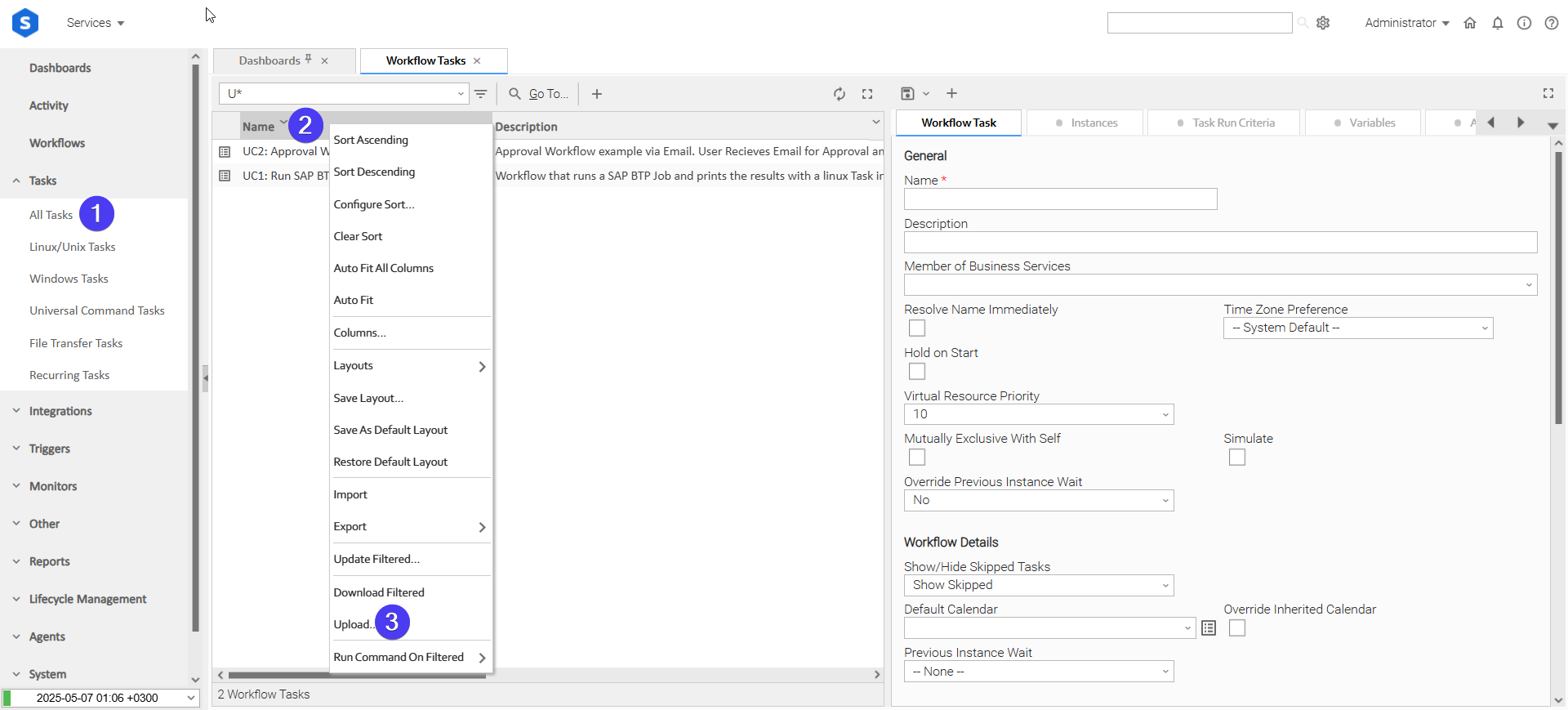
Login to Universal Controller and:
- STEP 1: Click "Tasks" → "All Tasks"
- STEP 2: Right click on the top of the column named "Name"
- STEP 3: Click "Upload..."
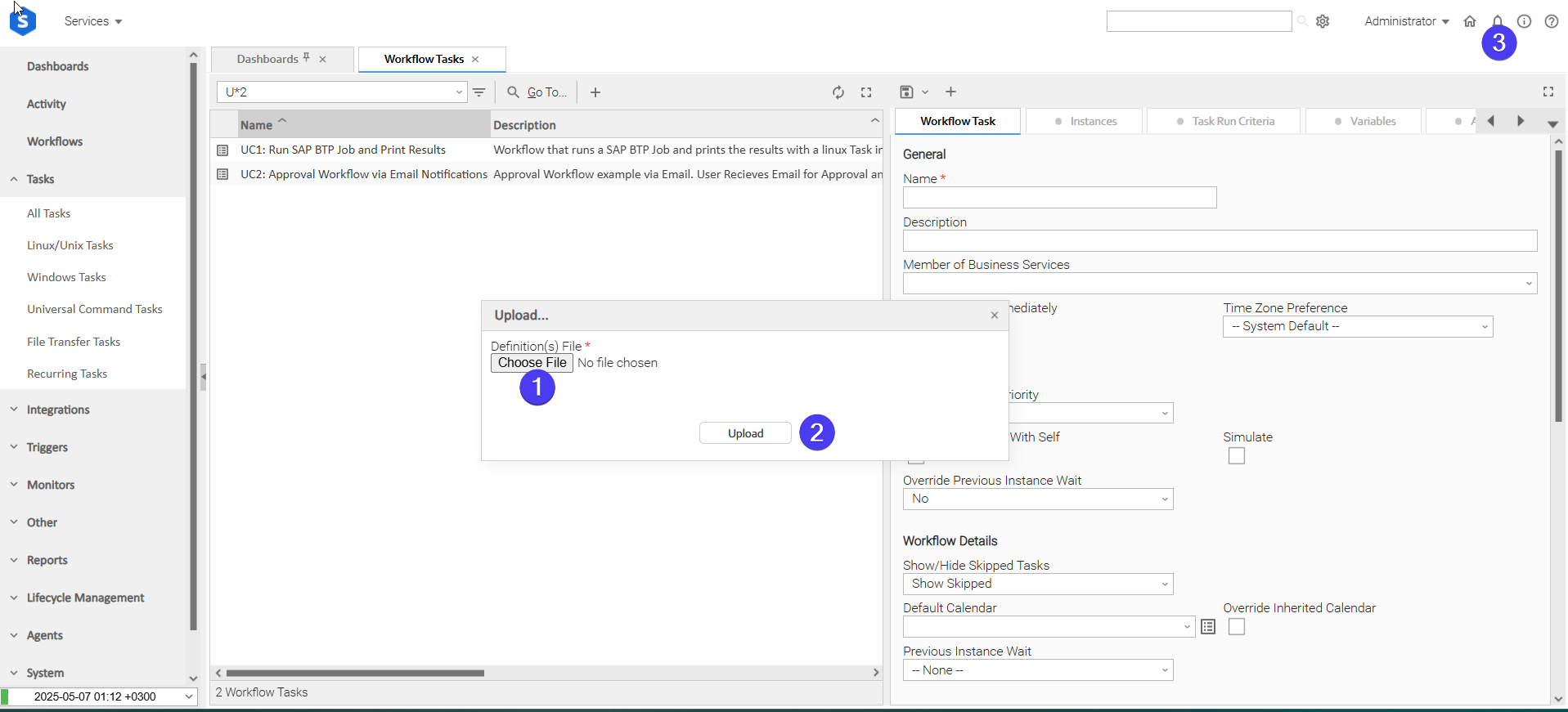
In the pop-up "Upload..." dialogue:
- STEP 1: Click "Choose File".
- STEP 2: Select the appropriate zip definition file and click "Upload".
- STEP 3: Observe the Console for possible errors.
Use Case 1: AI Briefing
Description
This workflow asks an AI Agent a question and lets it answer using the MCP tools published through Kong AI Gateway. The first task lists the available MCP tools, which confirms that the gateway and its MCP servers are reachable without consuming any LLM tokens. Only when that succeeds does the second task run the AI Agent, which calls those tools to gather facts, answers the question, and saves the answer as a Markdown file on the Agent.
The question, the Kong routes, the model and the report location are all UAC variables, so the same workflow can be scheduled as a recurring briefing or launched on demand with a different question.
The tasks configured demonstrate the following capabilities among others:
- Inventory the MCP tools available through Kong without a model call.
- Let the model decide which MCP tools to call, capped by a turn limit.
- Save the AI Agent's answer to a file on the Agent for downstream use.
- Report token usage on every task instance.
The components of the solution are described below:

- "UC1: Kong AI Gateway - List Available MCP Tools" - Lists the tools published through the MCP connection in
ue_kong_ai_gateway_mcp_connection. No model is contacted, so no tokens are consumed. - "UC1: Kong AI Gateway - Ask the AI Agent" - Runs only if (1) succeeds. Sends the question in
ue_kong_ai_gateway_questionto the model with those tools, for up to 5 turns, prints each tool call to STDOUT, and saves the final answer toue_kong_ai_gateway_report_path.
How to Run
Execution Steps:
- STEP 1: Ensure all Initial Preparation Steps have been completed successfully.
- STEP 2: Launch the workflow "UC1: Kong AI Gateway - AI Briefing".
- STEP 3: Review the STDOUT and the Output Only fields of (1) and (2), and the file at the configured report path.
Expected Results:
- Task (1) lists the discovered MCP tools and populates the Tool Count field.
- Task (2) prints the tool calls it made and their results, and writes the final answer to the report path on the Agent.
- The token counts, turns used and tool-call count appear in the Output Only fields of task (2).
- The workflow completes in the Success state.
Exit Codes
Exit Code | Status | Description |
|---|---|---|
0 | Success | Successful Execution. |
1 | Failure | Generic Error. Raised when not falling into the other Error Codes. |
2 | Failure | Authentication error. The provided credentials are invalid or insufficient. |
20 | Failure | Input fields validation error. |
Observability
Token usage metrics are generated and exported by this integration, following the OpenTelemetry semantic conventions for generative AI. They are emitted only when the Universal Agent is OpenTelemetry-compatible and metrics are enabled for the task.
Metric: gen_ai.client.token.usage
Name | Instrument Type | Unit (UCUM) | Attributes | Description |
|---|---|---|---|---|
| Histogram |
| As defined on Metric Attributes List | Number of input and output tokens used, recorded once per model call. |
Metric Attributes List:
Attribute Name | Description |
|---|---|
|
|
| The operation performed, |
| The API dialect used towards Kong, |
| The model requested in the Model field. Omitted when the field is empty. |
| The model that produced the response, as reported by Kong. |
| The host name of the Kong Gateway URL. |
| The port of the Kong Gateway URL. |
Document References
Document Link | Description |
|---|---|
Covers how Kong AI Gateway exposes model providers through a single interface, and how models and routes are configured. | |
Describes the plugin that maps a Kong route onto an upstream model provider, which determines the route paths and model names entered in this task. | |
Documents key-auth configuration, including the header names the key can be presented in. | |
Documents the OAuth2 plugin and the client-credentials grant used to obtain a token from the route's own token endpoint. | |
Explains how MCP servers are published through Kong, which determines the MCP route paths and the tools available to an agentic run. |
Changelog
ue-kong-ai-gateway-1.0.0 (2026-10-20)
Initial Version