Microsoft Power BI
Disclaimer
Your use of this download is governed by Stonebranch's Terms of Use.
For general information on how integrations work, importing templates, and UAC documentation refer to Overview.
Version Information
Template Name | Extension Name | Version | Status |
|---|---|---|---|
Microsoft Power BI | ue-ms-powerbi | 1.4.0 | Fixes and new Features are introduced. |
Refer to Changelog for version history information.
Overview
Microsoft Power BI is a Business Intelligence Tool. Power BI users can connect to and combine data from multiple data sources through a secure interface, creating Power BI datasets. Additionally, users may combine and transform collections of tables into a data pipeline, creating Power BI dataflows. This integration provides the capability to perform refresh actions on Microsoft PowerBI Datasets and Dataflows.
A typical Use Case is when UAC is used as a Data Pipeline orchestrator, where the last step of a workflow could be the refresh of a Microsoft Dataset or Dataflow.
Key Features
Feature | Description |
|---|---|
Refresh Datasets or Dataflows | Refresh Datasets or Dataflows on Power BI and monitor until the refresh completes with success or failure. |
Requirements
This integration requires a Universal Agent and a Python runtime to execute the Universal Task.
Area | Details |
|---|---|
Python Version | Requires Python 3.11 or later. Tested with Agent bundled python distribution. |
Universal Agent Compatibility |
|
Universal Controller Compatibility | Universal Controller Version >= 7.8.0.0. |
Network and Connectivity | Network Connectivity towards MS Power BI is required. |
MS Power BI Versions | Tested with Power BI version 2.130.754.0 with REST API version 5.10.0. It should be compatible on later versions as long as backwards compatibility is guaranteed on the API level. |
Supported Actions
Action: Refresh Dataset/Dataflow
This action allows users to refresh a dataset or a dataflow on Power BI. The task author has to provide the required Domain or Tenant ID and Authentication fields, as well as the Dataset/Dataflow Name to refresh. Additionally, it can be decided (through the Wait For Completion field) whether the task will simply initiate the refresh process, or also wait for a final success or failure state to be reached. In that case, a polling interval and maximum number of polls may be defined.
Currently, only Gen1 Dataflows are supported.
Action Output
- EXTENSION
- STDOUT
The extension output provides the following information:
exit_code, status_description: General info regarding the task execution. For more information refer to exit codes table.invocation.fields: The task configuration used for this execution.result.dataset_refresh_info: The latest Dataset refresh information provided by the Power BI API. Only available when Action is"Refresh Dataset".result.dataflow_refresh_info: The latest Dataflow refresh information provided by the Power BI API. Only available when Action is"Refresh Dataflow".result.errors: List of errors that might have occurred during execution.
Examples:Successful execution
Failed execution
This integration does not produce any STDOUT output. STDERR provides additional information to the user, the detail of it is tuned by Log Level Task Definition field.
Backward compatibility is not guaranteed for the content of STDOUT/STDERR and can be changed in future versions without notice.
Configuration Examples
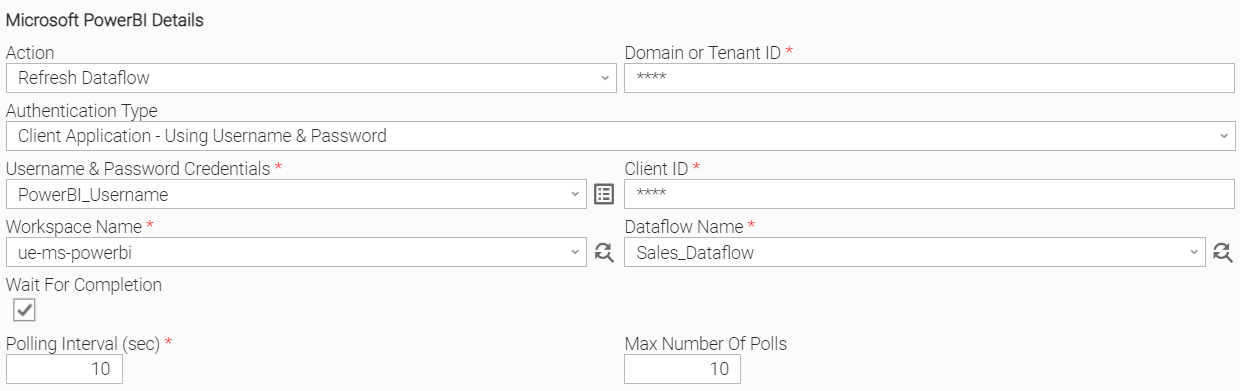
Example: Username & Password Authentication, Dataflow Refresh
Connect to Power BI Services using Domain, Username & Password Authentication and Client ID. Afterwards, refresh selected Dataflow from given list and start polling every 10 seconds for the refresh's status for 10 poll cycles.
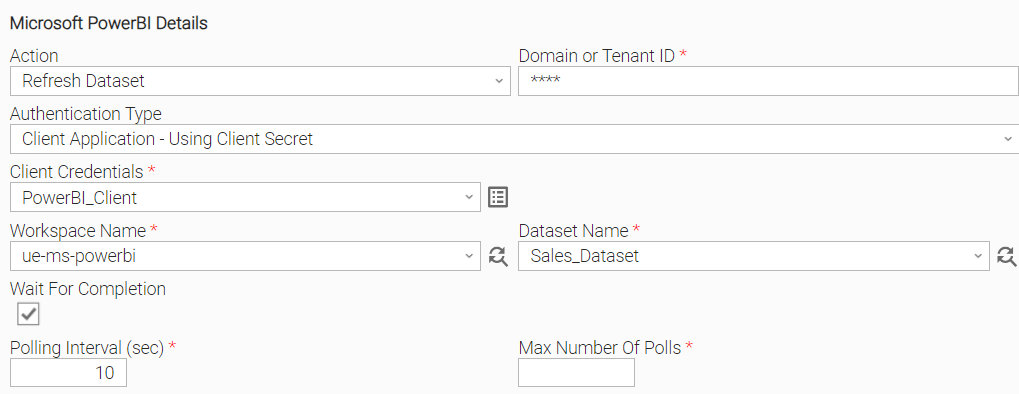
Example: Client Secret Authentication, Dataset Refresh
Connect to Power BI Services using Domain and Client Credentials Authentication. Afterwards, refresh selected Dataset from given list and start polling every 10 seconds until refresh is completed.
Input Fields
Name | Type | Description | Version Information |
|---|---|---|---|
Action | Choice | The action performed upon the task execution. Available options:
| Introduced in 1.0.0 |
Domain or Tenant ID | Text | Unique Microsoft domain or identifier to be used when communicating with the foreign API. | Introduced in 1.0.0 |
Authentication Type | Choice | The authentication type to be used when communicating with the foreign API. Available options:
| Introduced in 1.0.0 |
Client Credentials | Credential | Credentials for the Client Secret authentication. The Credentials definition should be as follows.
The application's service principal must be allowed to use the Power BI APIs in the tenant settings (Service principals can use Fabric APIs). Only available if Authentication Type is "Client Application - Using Client Secret". | Introduced in 1.0.0 |
Username & Password Credentials | Credential | Credentials for the Username & Password authentication. The Credentials definition should be as follows.
Only available if Authentication Type is "Client Application - Using Username & Password". | Introduced in 1.0.0 |
Client ID | Text | The ID returned upon the creation of the Client Application. Only available if Authentication Type is "Client Application - Using Username & Password". | Introduced in 1.0.0 |
Workspace Name | Dynamic Choice | The Microsoft Power BI Workspace Name. "My Workspace" is only applicable for Datasets and when Authentication Type is "Client Application - Using Username & Password". | Introduced in 1.0.0 |
Dataset Name | Dynamic Choice | The name of the Power BI Dataset to refresh. Only available if Action is "Refresh Dataset". | Introduced in 1.0.0 |
Dataflow Name | Dynamic Choice | The name of the Power BI Dataflow to refresh. Only available if Action is "Refresh Dataflow". | Introduced in 1.0.0 |
Wait For Completion | Checkbox | Check to keep the Universal Task Instance running until the triggered refresh is completed with success or failure. Otherwise, the Task Instance finishes immediately after the refresh is triggered successfully. | Introduced in 1.0.0 |
Polling Interval (sec) | Integer | The polling interval in seconds while checking the Dataflow/Dataset Refresh Status. As a best practice, if the Refresh expected completion duration is long, set the Polling Interval to a larger value. A short value will trigger frequent checks towards Power BI, which in the case of long-duration refreshes, is inefficient in terms of resources. Only available if Wait For Completion is checked. | Introduced in 1.0.0 |
Max Number Of Polls | Integer | Maximum number of polls. If left empty, polling runs indefinitely. Can be used to control the approximate expected duration of Dataset/Dataflow Refresh (along with Polling Interval (sec)). If the Maximum Number of Polls is reached, the exit code of the task will be 40. Only available if Wait For Completion is checked. | Introduced in 1.0.0 |
Output Fields
The following output-only fields provide better visibility during the execution of Universal Task Instances.
Name | Type | Description | Version Information |
|---|---|---|---|
Refresh Status | Text | Current status of ongoing refresh. | Introduced in 1.0.0 |
Refresh ID | Text | The ID of the refresh started by the Task Instance, or "Initiated" while a started Dataflow refresh is not yet identified. Preserved on Rerun, see Rerun. | Introduced in 1.4.0 |
Environment Variables
Environment Variables can be set from the Environment Variables task definition table.
Environment Variable Name | Description | Version Information |
|---|---|---|
UE_HTTP_TIMEOUT | This environment variable defines the global timeout value for all requests. It affects both connection and read timeouts, preventing requests from hanging. Accepted values: Positive integer (in seconds). If the environment variable is not set, or is set to an invalid value, the timeout will default to 120 seconds. | Introduced in 1.1.0 |
UE_DATAFLOW_REFRESH_BACKOFF_LIMIT | The maximum number of attempts to locate a newly initiated Dataflow refresh in the Dataflow refresh history. The wait between attempts doubles after each attempt, starting at 1 second. Accepted values: Positive integer. If the environment variable is not set, or is set to an invalid value, the limit will default to 5 attempts. | Introduced in 1.2.0 |
Cancellation and Rerun
Cancellation
The extension stops polling for the refresh status. A refresh already initiated in Power BI is not cancelled.
Rerun
On Rerun, the extension checks the Refresh ID preserved from the previous run:
- If the latest refresh of the selected Dataset/Dataflow is still in progress and either has that ID or Refresh ID is "Initiated", it is monitored instead of initiating a new refresh.
- Otherwise, a new refresh is initiated. If another refresh is still in progress, the task fails with exit code 21.
Exit Codes
Exit Code | Status | Description |
|---|---|---|
0 | Success | Successful Execution. |
1 | Failure | Generic Error. Raised when not falling into the other Error Codes. |
2 | Failure | Bad credentials. |
3 | Failure | Insufficient permissions. |
20 | Failure | Input fields validation error. |
21 | Failure | Another refresh is already running for the selected Dataset/Dataflow. |
40 | Failure | The refresh has not been completed after max number of polls. |
Document References
This document references the following documents:
Document Link | Description |
|---|---|
User documentation for creating, working with and understanding Universal Templates and Integrations. | |
User documentation for creating Universal Tasks in the Universal Controller user interface. | |
Microsoft reference for triggering a Dataset refresh, including its limitations and required permissions. | |
Microsoft reference for the Dataset refresh history used to monitor a Dataset refresh and its status values. | |
Microsoft reference for triggering a Dataflow refresh, including its limitations and required permissions. | |
Microsoft reference for the Dataflow transactions used to monitor a Dataflow refresh. |
Changelog
ue-ms-powerbi-1.4.0 (2026-10-27)
Enhancements
Added: Rerun support: a rerun Task Instance monitors the refresh started by its previous run, if still in progress, instead of failing with exit code 21. The refresh is tracked through the new Refresh ID output field (#61841).
Fixes
Fixed: Refreshing a Dataflow that had no previous refresh history failed (#61841).Fixed: Failed Power BI API requests could be reported asExecution Failed: 'value'instead of their HTTP status code (#61841).
ue-ms-powerbi-1.3.0 (2026-01-22)
Enhancements
- Detection of Dataflow refreshes that result in "Unknown" status are now immediately reported as failures (#51022).
- Improved support for upcoming agent releases.
ue-ms-powerbi-1.2.0 (2025-12-19)
Enhancements
- Implement client-side detection of latest dataflow refresh record (#50463)
- Change polling logic to use dataflow refresh initiation timestamp for tracking
- Implemented graceful cancellation.
- Improved python compatibility with future Agent versions
Fixes
- Fixed typo in logging output
ue-ms-powerbi-1.1.0 (2025-10-09)
Enhancements
- Added the capability to control the HTTP requests timeout using the UE_HTTP_TIMEOUT environment variable. (#48414)
Fixes
- Fixed requests timing out while waiting for response from Microsoft Server. (#48414)
- Fixed token expiration while polling for refresh completion. (#48417)
- Fixed issue where Datasets/Dataflows were not found in environments containing a large number of entities. (#48418, #48299)
ue-ms-powerbi-1.0.0 (2024-08-14)
Initial Version