N8N
Disclaimer
Your use of this download is governed by Stonebranch's Terms of Use.
Version Information
Template Name | Extension Name | Version | Status |
|---|---|---|---|
N8N | ue-n8n | 1.0.0 | Initial Version. |
Refer to Changelog for version history information.
Overview
n8n is a workflow automation platform that lets users design and run automations composed of nodes, connecting APIs and services and triggering execution through webhooks.
This Universal Task allows customers to trigger and monitor n8n workflow executions straight from the Universal Controller, exposing the execution's result or failure detail as Universal Task output.
Key Features
Feature | Description |
|---|---|
Workflow Triggering | Trigger an n8n workflow via its webhook and poll the execution to a terminal state. |
Execution Recovery | Resume a previously failed, crashed, or cancelled execution from its last completed node instead of restarting the workflow. |
Cancellation Handling | Stop the underlying n8n execution when the Universal Controller task instance is cancelled. |
Requirements
This integration requires a Universal Agent and a Python runtime to execute the Universal Task.
Area | Details |
|---|---|
Python Version | Requires Python 3.11, tested with the Agent-bundled Python distribution. |
Universal Agent Compatibility |
|
Universal Controller Compatibility | Universal Controller Version >= 7.7.0.0. |
Network and Connectivity | Network connectivity to the target n8n instance is required. |
Supported Actions
There is one Top-Level action controlled by the Action Field:
Triggers an n8n workflow via its webhook, or resumes a previously failed, crashed, or cancelled execution from its last completed node when a previous run's Execution ID is available, and polls the resulting n8n execution to a terminal state (success, error, crashed, or canceled).
n8n Workflow Setup
Before a workflow can be triggered by this Universal Task, its Webhook node must be configured to match the contract below. This configuration is validated against the target workflow before every fresh trigger, and any failed check is rejected with a Configuration Error before the webhook is called.
Webhook URL is copied directly from the workflow's Webhook node (its Production URL, as shown in the n8n editor) rather than derived from Instance Base URL. n8n's REST API never exposes a workflow's full public trigger URL (only the Webhook node's relative Path segment) so the extension has no way to construct Webhook URL from Instance Base URL and the selected Workflow alone; Webhook URL is only used to validate that its path suffix matches the Webhook node actually configured on the target workflow.
-
Webhook node - The workflow must contain a node of type Webhook. Its Path value is matched against the suffix of the Webhook URL input field, both compared with trailing slashes stripped. Example: a Webhook node with Path "sync-customer-records" matches a Webhook URL of
https://acme.app.n8n.cloud/webhook/sync-customer-records. -
Response Mode - The Webhook node's Response Mode must be set to "Using Respond to Webhook Node" (
responseMode: responseNode). Other modes (including the default "When Last Node Finishes", "Immediately", or "Using Streaming Response") are rejected, since only this mode returns an execution ID immediately and allows the extension to poll for completion independently. -
HTTP Method - The Webhook node's HTTP Method must be explicitly set to one of
GET,POST,PUT,PATCH,DELETE,HEAD, orOPTIONS. No default is applied; an unset or unrecognized method is rejected. -
Respond to Webhook node - The workflow must contain at least one Respond to Webhook node, anywhere in the workflow, configured to return the following JSON body so the extension can identify the execution to poll:
{ "executionId": "{{ $execution.id }}" }This body content is not validated statically; a webhook response missing the
executionIdkey at runtime is reported as a Trigger Error rather than a Configuration Error.
If the workflow's Save execution progress setting is disabled, per-node completion is not visible in STDOUT until the execution reaches a terminal state; a non-fatal warning is logged in this case.
Action Output
- EXTENSION
- STDOUT
The extension output provides the following information:
exit_code, status_description: General info regarding the task execution.invocation.fields: The task configuration used for this execution.result.execution_id: The n8n execution ID.result.workflow_status: n8n's raw terminal execution status.result.last_node_executed: The name of the last node that completed.result.output: Per-node output entries — last node only, or all executed nodes, depending on Extension Output Options.result.errors: List of errors that might have occurred during execution.
Examples:Successful execution
Failed execution
STDOUT reports the workflow trigger (or retry) confirmation, a line for each n8n node as it completes during polling, and a final bordered Execution Summary panel with the execution ID, status, duration, node count, and longest-running node.
Example:
Triggered workflow 'Sync Customer Records [42]' via webhook https://acme.app.n8n.cloud/webhook/sync-customer-records (POST). Execution ID: 1583
Node completed: Fetch Customer  (320ms)
Node completed: Update Customer Record  (842ms)
╭─────────────────── Execution Summary ───────────────────╮
│ Execution ID:    1583                                    │
│ Status:          success                                 │
│ Started At:      2026-07-15T09:12:03.000Z                │
│ Stopped At:      2026-07-15T09:12:04.162Z                │
│ Total Duration:  00:00:01                                │
│ Nodes Executed:  2                                        │
│ Last Node:       Update Customer Record                  │
│ Longest Node:    Update Customer Record  (842ms)          │
╰────────────────────────────────────────────────────────╯
Configuration Examples
Example: API Key authentication, POST payload, wait for completion
Authentication Method is set to "API Key" with a configured API Key credential. Instance Base URL points to the target n8n instance. Workflow selects the target workflow from the dynamic dropdown, and Webhook URL matches its trigger endpoint. Webhook Payload provides the JSON body sent to the webhook. The task waits, polling every 10 seconds up to a Maximum Wait Time of 30 minutes, and Extension Output Options is left at its default so only the last executed node's output is surfaced.
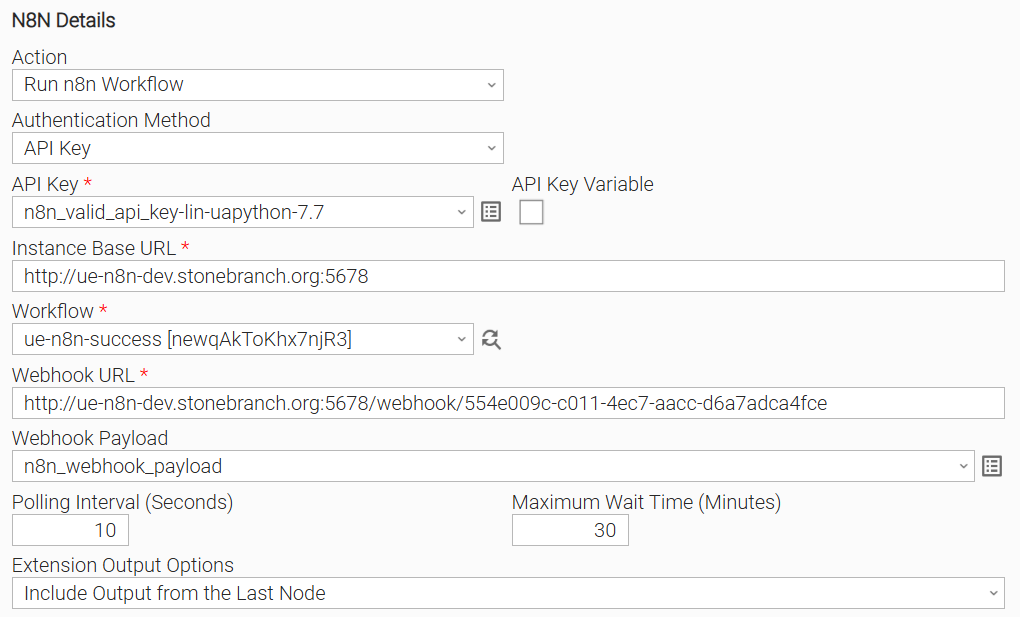
Input Fields
Name | Type | Description | Version Information |
|---|---|---|---|
Action | Choice | The operation performed by the task instance. Available options:
| Introduced in 1.0.0 |
Authentication Method | Choice | The authentication method used on n8n REST API calls. Available options:
| Introduced in 1.0.0 |
API Key | Credential | The n8n API key used to authenticate REST API calls, mapped to the credential's token attribute. This field is visible when Authentication Method is "API Key". | Introduced in 1.0.0 |
Instance Base URL | Text | The base URL of the target n8n instance's API, for example | Introduced in 1.0.0 |
Workflow | Dynamic Choice | The n8n workflow to orchestrate, populated from the target instance's available workflows. Required for a fresh run. Not used when resuming a previous execution (Re-run). | Introduced in 1.0.0 |
Webhook URL | Text | The target n8n workflow's webhook trigger endpoint, copied from its Webhook node's Production URL. Not derived from Instance Base URL, since the n8n REST API never exposes a workflow's full public trigger URL. | Introduced in 1.0.0 |
Webhook Payload | Script | The JSON payload sent as the webhook call's body. Not used with "GET", "HEAD", or "DELETE" webhook methods, or for Re-run. | Introduced in 1.0.0 |
Polling Interval (Seconds) | Integer | The interval, in seconds, between execution status polls. Defaults to | Introduced in 1.0.0 |
Maximum Wait Time (Minutes) | Integer | The maximum total time, in minutes, to wait for the execution to reach a terminal state. Defaults to | Introduced in 1.0.0 |
Extension Output Options | Choice | Controls the verbosity of the output list in Extension Output. Available options:
| Introduced in 1.0.0 |
Output Fields
The following output-only fields provide better visibility during the execution of Universal Task Instances.
Name | Type | Description | Version Information |
|---|---|---|---|
Workflow Status | Text | n8n's raw execution status (for example | Introduced in 1.0.0 |
Execution ID | Text | The n8n execution ID. | Introduced in 1.0.0 |
Last Completed Node | Text | The name of the most recently completed n8n node. | Introduced in 1.0.0 |
Environment Variables
Environment Variables can be set from the Environment Variables task definition table.
Environment Variable Name | Description | Version Information |
|---|---|---|
UE_HTTP_TIMEOUT | Timeout, in seconds, applied to each HTTP call made to the n8n instance (workflow lookup, execution polling, retry, stop, and the webhook trigger call). Defaults to | Introduced in 1.0.0 |
UE_HTTP_RETRIES | Number of retry attempts for an n8n REST API call that returns HTTP 429 or 5xx, before it is reported as a Service Unavailable error. Defaults to | Introduced in 1.0.0 |
UE_HTTP_INTERVAL | Interval, in seconds, to wait between retry attempts. Defaults to | Introduced in 1.0.0 |
Cancellation and Rerun
- In case of cancellation, a best-effort call is made to stop the underlying n8n execution; the task instance completes as Cancelled regardless of whether the stop call succeeds.
- In case of rerun, n8n allocates a new execution ID and resumes the workflow from its last completed node rather than triggering a fresh execution.
Importable Configuration Examples
This integration provides importable configuration examples along with their dependencies, grouped as Use Cases to better describe end to end capabilities.
These examples aid in allowing task authors to get more familiar with the configuration of tasks and related Use Cases. Such tasks should be imported in a Test system and should not be used directly in production.
Initial Preparation Steps
- STEP 1: Go to Stonebranch Integration Hub and download the integration along with any additional integrations required by the Use Cases. Extract the downloaded archives in a local directory.
- STEP 2: Locate and import the above integration(s) to the target Universal Controller. For more information refer to the How To section in this document.
- STEP 3: Inside the directory named "configuration_examples" you will find a list of definition zip files. Upload them one by one respecting the order presented below, by using the "Upload" functionality of Universal Controller:
- 1_credentials.zip
- 2_variables.zip
- 3_tasks.zip
- 4_workflows.zip
- STEP 4: Update the uploaded UAC Credential entity(ies) with the required credentials. Review each credential's description for guidance on what to provide.
- STEP 5: Update the UAC global variables introduced with the
2_variables.zipfile. Their name is prefixed with the extension name using underscores instead of hyphens (ue_n8n_*). Review the descriptions of the variables as they include information on how they should be populated. - STEP 6: If applicable, create an OMS record on the Universal Controller. Ensure the address matches the one assigned to the relevant global variable from the previous step. For more information refer to Creating OMS Server Records.
- STEP 7: If applicable, create an Agent Cluster on the Universal Controller. Ensure the name matches the one assigned to the relevant global variable from the previous step. For more information refer to Creating an Agent Cluster.
- The order indicated above ensures that the dependencies of the imported entities need to be uploaded first.
- All imported entities are prefixed with the Use Case number (e.g. UC1, UC2, UC3) they belong to.
How to "Upload" Definition Files to a Universal Controller
The "Upload" functionality of Universal Controller allows Users to import definitions exported with the "Download" functionality.
Login to Universal Controller and:
- STEP 1: Click "Tasks" → "All Tasks"
- STEP 2: Right click on the top of the column named "Name"
- STEP 3: Click "Upload..."
In the pop-up "Upload..." dialogue:
- STEP 1: Click "Choose File".
- STEP 2: Select the appropriate zip definition file and click "Upload".
- STEP 3: Observe the Console for possible errors.
Use Case 1: n8n Workflow Trigger and Monitor & Email Notification
Description
Models an end-to-end automation where an n8n workflow is triggered from Universal Controller and the configured recipient is notified by email of the outcome, whether it succeeds or fails. The workflow is composed of the following components:
- UC1: n8n - Trigger and Monitor Workflow - Triggers the target n8n workflow via its webhook and polls the execution to a terminal state.
- UC1: n8n - Send Email for Success (Email Task) - Sends a notification email to the configured recipient when the n8n workflow execution completes successfully.
- UC1: n8n - Send Email for Failure (Email Task) - Sends a notification email to the configured recipient if the n8n workflow execution fails, is cancelled, or times out.
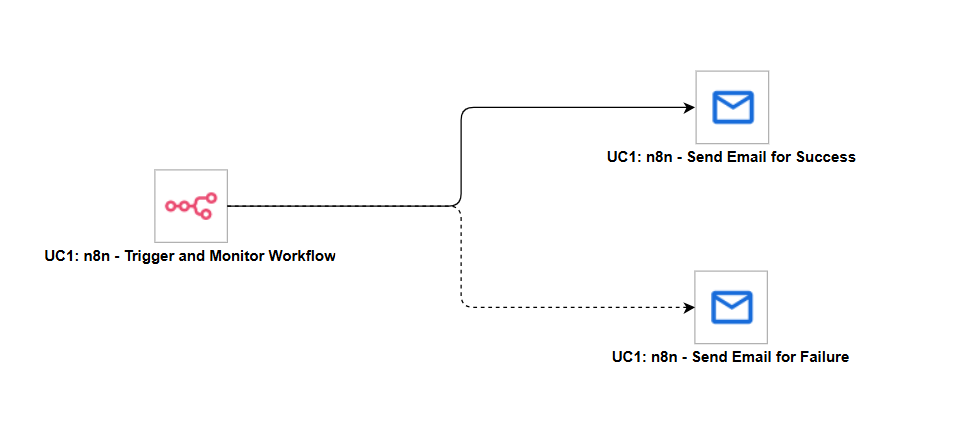
How to Run
Execution Steps
- Ensure all Initial Preparation Steps have been completed successfully.
- Confirm the target n8n workflow is reachable from the configured Instance Base URL and its Webhook node uses
responseMode: responseNode. - Launch the workflow task and monitor the execution in Universal Controller.
Expected Results
- On success, the success notification task sends an email to the configured recipient.
- On failure, cancellation, or timeout, the failure notification task sends an email to the configured recipient.
- The Trigger and Monitor Workflow task instance reflects the terminal outcome (Success, Failure, or Cancelled) reported by the extension.
Exit Codes
Exit Code | Status | Description |
|---|---|---|
0 | Success | Successful Execution. |
1 | Failure | General failure - covers authentication failures, connectivity errors, workflow trigger failures, n8n execution failures, and polling timeouts reported by the target n8n instance. |
20 | Failure | Configuration or input validation error - raised when a workflow contract check fails (missing Webhook node, mismatched URL or HTTP method, missing Respond to Webhook node) or an input field value is invalid. |
21 | Cancelled | The n8n execution was cancelled, either by n8n itself or in response to a Universal Controller Cancel signal. |
Document References
Document Link | Description |
|---|---|
Overview of n8n's Public REST API used for workflow lookup, execution polling, retry, and stop calls. | |
Describes how to generate and use an API key to authenticate n8n REST API calls. | |
Explains n8n execution statuses and lifecycle, relevant to interpreting the polled execution result. | |
Documents the Webhook node's configuration, required to trigger a workflow from this Universal Task. | |
Documents the Respond to Webhook node, required by the workflow contract validated before triggering. |
Changelog
ue-n8n-1.0.0 (2026-08-18)
Initial Version