Oauth2: Get Token
Disclaimer
Your use of this download is governed by Stonebranch's Terms of Use.
Version Information
Template Name | Extension Name | Version | Status |
|---|---|---|---|
OAuth2 Token | ue-oauth-token | 2 (Current 2.0.0) | Fixes and new Features are introduced. Compatibility starts from UAC/UAG 7.6.0.0 onwards. |
Refer to Changelog for version history information.
Version 2.0.0 is a major release introduces breaking changes that might affect some customers depending on their setup. Administrators are strongly advised to refer to Changelog for more information on the changes introduced in this release.
Overview
The Oauth 2.0 authorization framework enables a third-party application to obtain limited access to an HTTP service, either:
- On behalf of a resource owner by orchestrating an approval interaction between the resource owner and the HTTP service,
- By allowing the third-party application to obtain access on its own behalf.
With Universal Automation Center, you can obtain Oauth2 access tokens that can be used to authorize UAC tasks.
Key Features
Feature | Description |
|---|---|
Get Oauth2 Access Token | Support for obtaining Oauth2 Access token for "Resource Owner Password Credentials" (aka "Password Credentials") or "Client Credentials" Grant Types. More information about the supported Grant Types can be found here: Resource Owner Password Credentials Grant, Client Credentials Grant. |
Authorization Scopes | Support for authorization scopes. |
Client Credentials | Support for using Client Credentials in the request Body or as Basic Authentication Header. |
Requirements
This integration requires a Universal Agent and a Python runtime to execute the Universal Task.
Area | Details |
|---|---|
Python Version | Requires Python 3.11, tested with Agent bundled Python distribution. |
Universal Agent Compatibility |
|
Universal Controller Compatibility | Universal Controller Version >= 7.6.0.0. |
Network and Connectivity | Universal Agent needs to have network access to Access Token URL. |
Supported Actions
Action: Get Access Token
Configuration Examples
Follow the steps below to create a OAuth2 Authentication Token Task using "Password Credentials" Grant Type.
The same process can be followed for "Client Credentials" Grant Type (in this case Resource Owner Credentials are not required).
-
Give the task a name (for example, sample-1-task-1).
-
Select an active agent of version 7.6.0.0 or higher for the task to run on.
-
Select the action.
-
Select the Grant Type.
-
Fill the Access Token URL field.
-
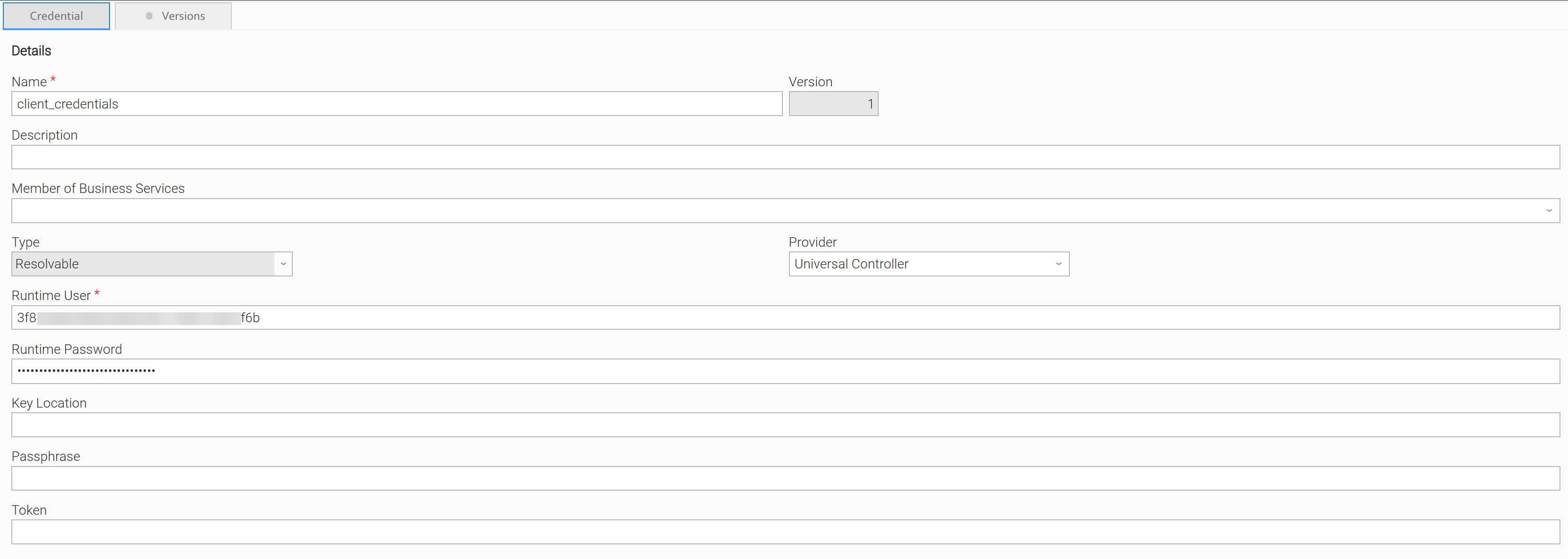
Set your Client Credentials.
Example of Client Credentials:
-
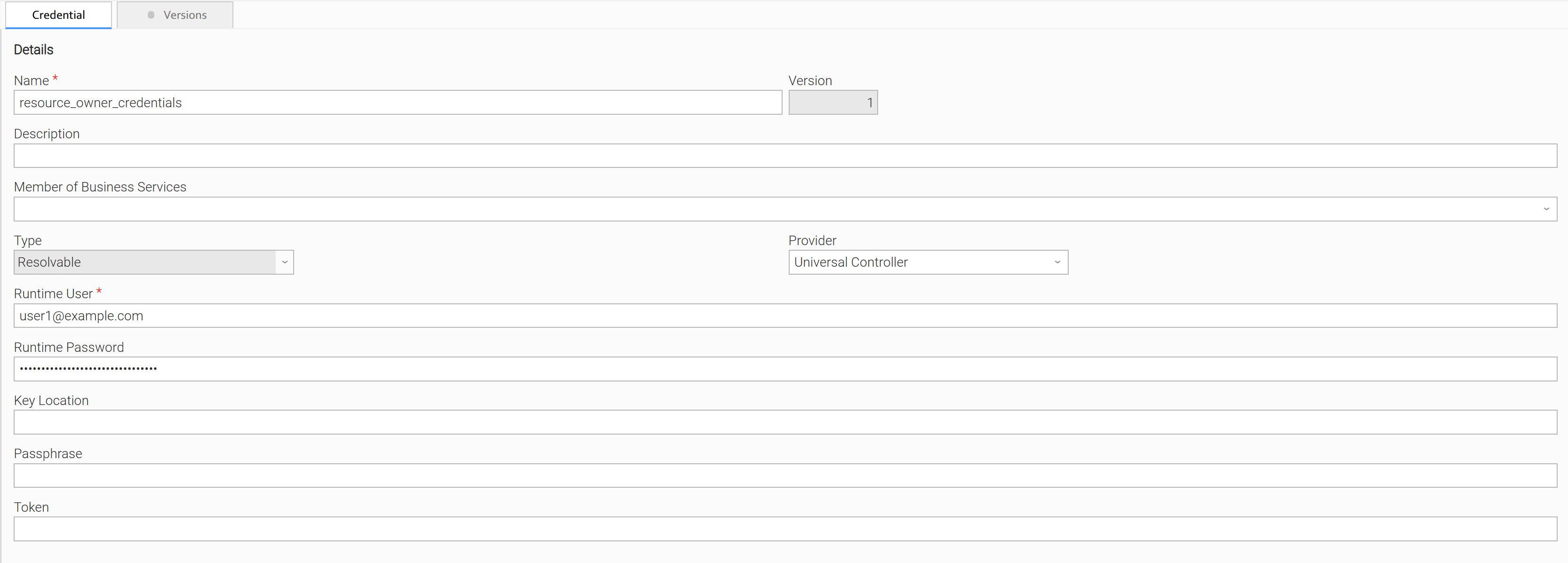
Set your Resource Owner Credentials.
Example of Resource Owner Credentials:
-
Fill the scope.
-
Select the Client Authentication method.
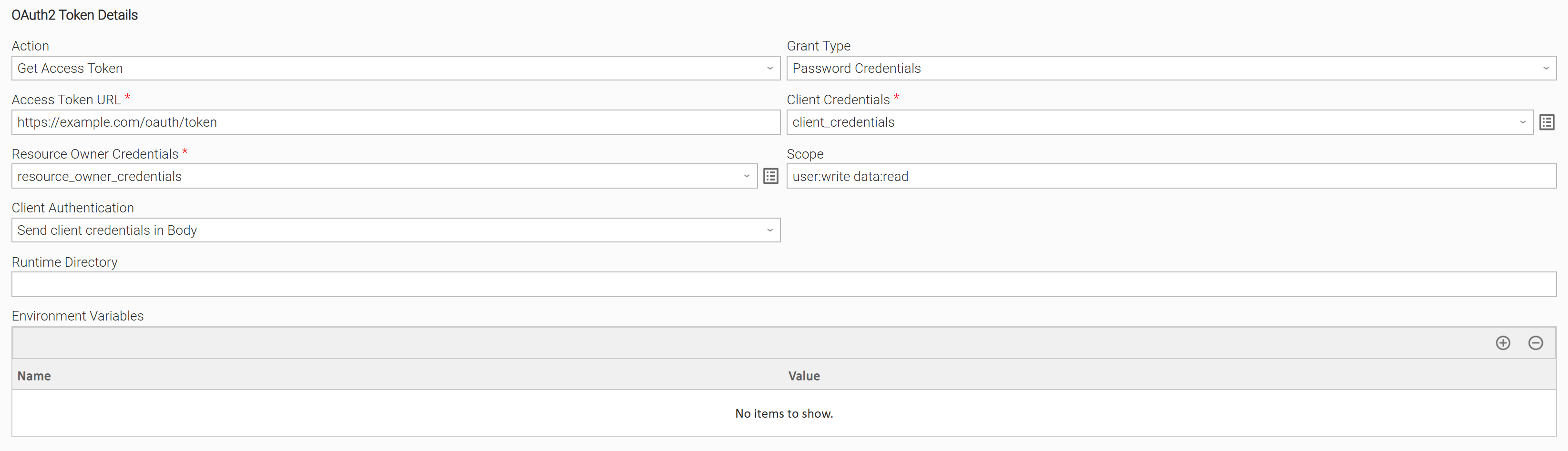
Example of Get Access Token Action:
Input Fields
Name | Type | Description | Version Information |
|---|---|---|---|
Action | Choice | "Get Access Token": The action that gets an access token from the Server. | Introduced in 1.0.0 |
Grant Type | Choice | The OAuth 2.0 Grant Type used to get the token. Supported Grant Types are:
| Introduced in 1.0.0 |
Access Token URL | Text | The endpoint for authentication server. It is used to exchange the Client Credentials (and the Resource Owner Credentials in the case of "Password Credentials" Grant Type) for an access token. | Introduced in 1.0.0 |
Client Credentials | Credentials | Client credentials are comprised of:
| Introduced in 1.0.0 |
Resource Owner Credentials | Credentials | Required only for Grant Type "Password Credentials". The Resource Owner Credentials are comprised of:
| Introduced in 1.0.0 |
Scope | Text | A space-separated list of scopes of the request. | Introduced in 1.0.0 |
Client Authentication | Choice | Controls whether the client credentials are sent in the request body or as a basic authentication header:
| Introduced in 1.0.0 |
Output Fields
The following output-only fields provide better visibility during the execution of Universal Task Instances.
Name | Type | Description | Version Information |
|---|---|---|---|
Access Token | Large Text | The access token in the case of successful execution. Although it is an output field, it is hidden by default. UAC tasks that require the generated access token for authorization purposes can reference the variable ops_oauth_token_access_token of the respective Oauth Token task instance | Introduced in 1.0.0 |
Exit Codes
Exit Code | Status | Status Description | Meaning |
|---|---|---|---|
0 | Success | Access token is retrieved successfully. | Successful Execution |
1 | Failure | There was an error during execution of Universal Extension. | Generic Error. Raised when not falling into the other Error Codes. |
STDOUT and STDERR
STDOUT is used for displaying Get Access Token information.
STDERR provides additional information to the user, the detail of it is tuned by Log Level Task Definition field.
Backwards compatibility is not guaranteed for the content of STDOUT/STDERR and can be changed in future versions without notice.
How To
Import Universal Template
- This Universal Task requires the Resolvable Credentials feature. Check that the Resolvable Credentials Permitted system property has been set to true.
- Import the Universal Template into your Controller:
- Extract the zip file, you downloaded from the Integration Hub.
- In the Controller UI, select Services > Import Integration Template option.
- Browse to the "export" folder under the extracted files for the ZIP file (Name of the file will be unv_tmplt_*.zip) and click Import.
- When the file is imported successfully, refresh the Universal Templates list; the Universal Template will appear on the list.
Modifications of this integration, applied by users or customers, before or after import, might affect the supportability of this integration. For more information refer to Integration Modifications.
Configure Universal Task
For a new Universal Task, create a new task, and enter the required input fields.
Integration Modifications
Modifications applied by users or customers, before or after import, might affect the supportability of this integration. The following modifications are discouraged to retain the support level as applied for this integration.
- Python code modifications should not be done.
- Template Modifications
- General Section
- "Name", "Extension", "Variable Prefix", and "Icon" should not be changed.
- Universal Template Details Section
- "Template Type", "Agent Type", "Send Extension Variables", and "Always Cancel on Force Finish" should not be changed.
- Result Processing Defaults Section
- Success and Failure Exit codes should not be changed.
- Success and Failure Output processing should not be changed.
- Fields Restriction Section
The setup of the template does not impose any restrictions. However, concerning the "Exit Code Processing Fields" section.- Success/Failure exit codes need to be respected.
- In principle, as STDERR and STDOUT outputs can change in follow-up releases of this integration, they should not be considered as a reliable source for determining the success or failure of a task.
- General Section
Event Template configuration related to "Metric Label Attributes" & "Optional Metric Labels" is allowed. However, administrators should be cautious of high cardinality scenarios that might occur.
Users and customers are encouraged to report defects, or feature requests at Stonebranch Support Desk.
Document References
This document references the following links:
Document Link | Description |
|---|---|
User documentation for creating Universal Templates in the Universal Controller user interface. | |
User documentation for creating Universal Tasks in the Universal Controller user interface. | |
User Documentation for Credentials Details Field Description. |
Changelog
ue-oauth-token-2.0.0 (2026-01-15)
Deprecations and Breaking Changes
Breaking Change: Dropping support for Agents with version <= 7.5 and for Python 3.7.
Enhancements
Added:Improving Python compatibility with future Agent versions.