Oracle Analytics Publisher Fusion Applications
Disclaimer
Your use of this download is governed by Stonebranch's Terms of Use.
For general information on how integrations work, importing templates, and UAC documentation refer to Overview.
Version Information
Template Name | Extension Name | Version | Status |
|---|---|---|---|
Oracle Analytics Publisher Fusion Applications | ue-oracle-analytics-publisher-fusion-applications | 1.0.0 | Initial Version. |
Refer to Changelog for version history information.
Overview
Oracle Analytics Publisher, formerly BI Publisher, is the reporting engine built into Oracle Fusion Cloud Applications. Financials, HCM, SCM and the other modules use it to produce formatted reports such as trial balances, payslips and invoices. Fusion users normally run these reports from the Reports and Analytics work area or schedule them from the Publisher catalog.
This integration schedules a Publisher report from the Universal Controller and follows the job until it finishes. The report runs inside Oracle with the parameters, output format, layout and delivery channel set on the task, and the final Oracle status sets the exit code of the task. The task instance keeps the Oracle Job ID, so a re-run picks up the same job instead of producing the report a second time.
The integration uses the Publisher SOAP web services (ScheduleService and ReportService, version 2).
Key Features
Feature | Description |
|---|---|
Report Scheduling and Monitoring | Submit a Publisher report by its catalog path and wait for the Oracle job to finish. A failed or canceled report fails the task with its own exit code. |
Report Parameters | Pass report parameters as a JSON object stored in a Universal Controller Script, including parameters that take several values. |
Output Format and Layout | Choose one of 16 Publisher output formats, such as PDF, Excel or CSV, and a layout template read from the report definition in Oracle. Set the locale and time zone of the report and of the job. |
Report Delivery | Have Oracle deliver the report by Email, FTP or SFTP, WebDAV, Printer, or to Oracle WebCenter Content. |
Re-run Without Re-submission | A re-run of a task instance resumes monitoring the Oracle job it already submitted, for example after the maximum wait time was reached. |
Report Cancellation | Cancel the running Oracle job with the Cancel Oracle Report Dynamic Command, or by cancelling the task instance. |
Requirements
This integration requires a Universal Agent and a Python runtime to execute the Universal Task.
Area | Details |
|---|---|
Python Version | Requires Python 3.11 or later, tested with Agent bundled python distribution. |
Universal Agent Compatibility |
|
Universal Controller Compatibility | Universal Controller Version >= 7.6.0.0. The Resolvable Credentials Permitted system property must be set to |
Network and Connectivity | The Agent must reach the Oracle Fusion Cloud Applications host given in Schedule Service URL over HTTPS. |
Oracle Fusion Privileges | The user in Oracle Credential signs in with a username and password, so it must be an account that can sign in to Fusion with a password. It needs permission to run and schedule the report in Oracle Analytics Publisher. The email servers, FTP servers, content servers and printers named in the delivery options must be registered in Publisher, under Administration → Delivery. |
Supported Actions
There is one Top-Level action controlled by the Action field:
- Schedule and Monitor Report: Submits a Publisher report and waits for the Oracle job to reach a final status.
Action: Schedule and Monitor Report
The task sends a scheduleReport request to the ScheduleService with the report path, the Report Parameters, the output options and, if Delivery Channel is not "None", the delivery options. Oracle answers with a Job ID, which is written to the Scheduled Job ID output field right away.
The task then reads the job status every Poll Interval (seconds) until Oracle reports a final status, or until Maximum Wait (seconds) has passed. The current status is written to the Final Status output field after every read. The final status sets the exit code of the task (see Exit Codes), and a summary of the report, the delivery and the Oracle job is printed to STDOUT.
When the task instance already has a Scheduled Job ID, the task does not submit a new report and monitors that job instead. See Cancellation and Rerun.
The report itself stays in Oracle. The task does not download the report output. To get the output somewhere else, use a delivery channel, or check Save Output and open the job in the Publisher Report Job History.
Action Output
- EXTENSION
- STDOUT
The extension output provides the following information:
exit_code,status_description: General info regarding the task execution. After a report was submitted, the status description names the Oracle job status, for exampleOracle report job success.For more information refer to the exit codes table.invocation.fields: The task configuration used for this execution. Passwords are masked. Once a final job status was read, the content of the Report Parameters and Delivery Options Script scripts is included in full. When the task fails earlier, these two fields hold the path of the script file instead.result.scheduled_job_id: The Oracle Job ID of the report.result.status: The final job status as interpreted by the integration, for exampleSUCCESSorFAILED.result.final_status: The job status exactly as Oracle returned it.result.status_message: The message Oracle returned with the final status.result.elapsed_seconds: Seconds from the start of monitoring to the final status read. A re-run starts again from zero.result.report_path: The value of Report Absolute Path.result.errors: List of errors that occurred during execution. Only present when the task failed before a final job status could be read.
Examples: The report was submitted and monitored, but Oracle reported the Oracle rejected the user name or password, so no report was submitted. Most input fields are left out of this example.Successful execution
Report failed in Oracle
Failed status. The task fails with exit code 104 and the result still holds the Job ID. Most input fields are left out of this example.Failed execution
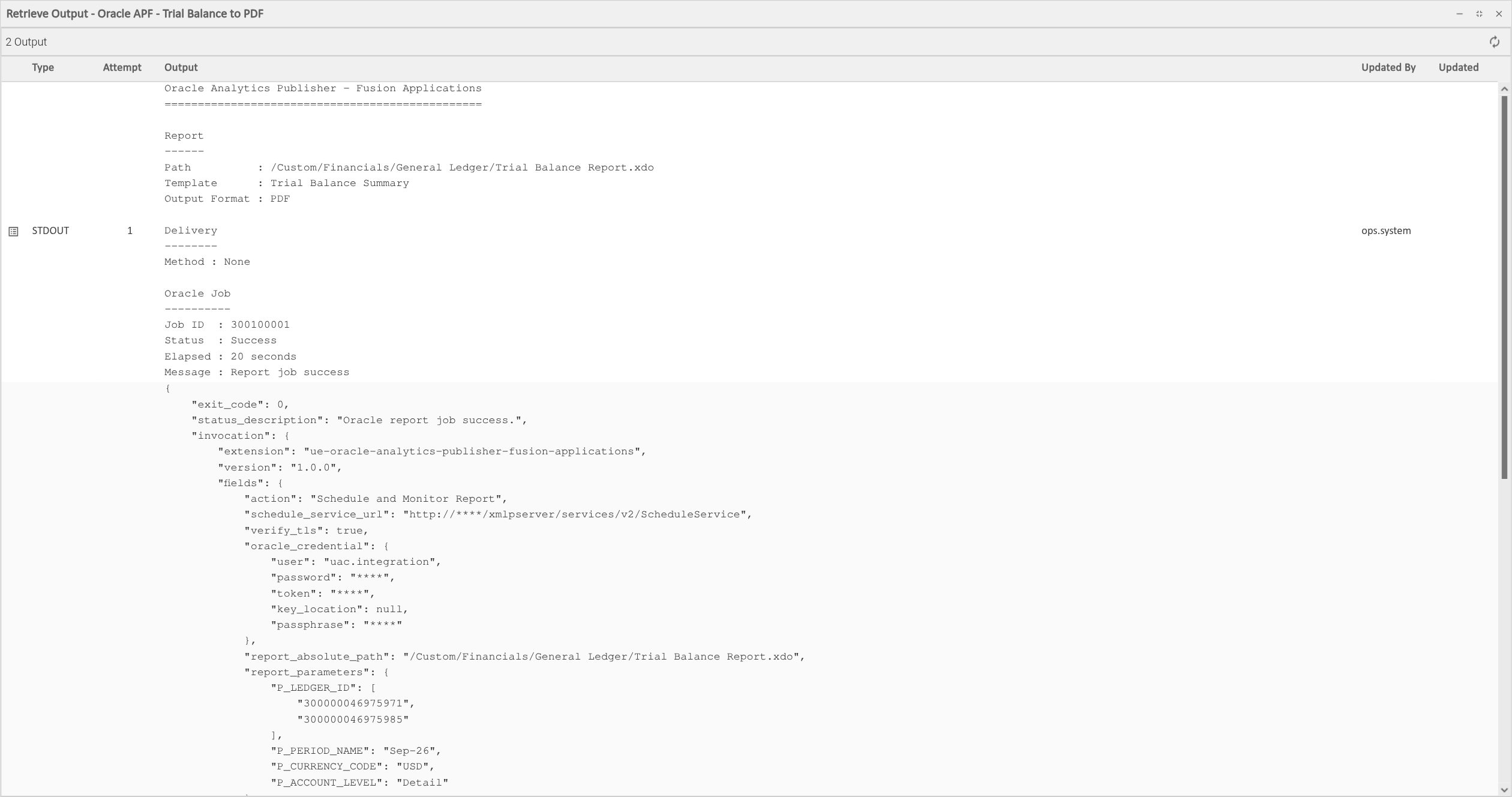
STDOUT holds a summary of the execution once the job has reached a final status. It has three parts: the report, the delivery channel with its main options, and the Oracle job. Passwords and other delivery options that may be secret are never printed. STDOUT stays empty when the task fails before a final job status is read. When the task instance is cancelled while the report runs, STDOUT holds the outcome of the cancellation in Oracle instead, in the same format as the Cancel Oracle Report command output.
Example:
Oracle Analytics Publisher - Fusion Applications
================================================

Report
------
Path          : /Custom/Financials/General Ledger/Trial Balance Report.xdo
Template      : Oracle Default
Output Format : XLSX

Delivery
--------
Method      : FTP
Protocol    : SFTP
Server      : FINANCE_SFTP
Remote File : /inbound/gl/trial_balance_sep26.xlsx

Oracle Job
----------
Job ID  : 300100002
Status  : Success
Elapsed : 30 seconds
Message : Report job success
The screenshot below shows the output of a run without a delivery channel.
Report Parameters
Report Parameters selects a Universal Controller Data Script that holds a JSON object. Each key is the name of a parameter as defined in the data model of the report, for example P_PERIOD_NAME. Each value is either a single value or an array of values for a parameter that accepts several:
{
    "P_LEDGER_ID": ["300000046975971", "300000046975985"],
    "P_PERIOD_NAME": "Sep-26",
    "P_CURRENCY_CODE": "USD",
    "P_ACCOUNT_LEVEL": "Detail"
}
The parameters are sent to Oracle in the order of the script. Values are sent as text, so "2026-09-30" and 2026 both work. A null value is sent as an empty value. An empty array fails the task with exit code 20.
The script is read as UTF-8 on Linux and Windows agents, with or without a byte order mark. The same applies to the Delivery Options Script.
Parameter names and accepted values are defined in the data model of the report, in the Publisher catalog.
Delivery Options
When Delivery Channel is not "None", Delivery Options Script selects a Universal Controller Data Script that holds a JSON object with the options of that channel. The keys are the option names of the Publisher ScheduleService. Options are passed to Oracle as given, except for "Content Server", where only the options listed below are sent and any other key is logged as a warning and left out.
Use JSON true and false for sftpOption and WCCIncludeMetadata. The strings "true" and "false" are accepted for these two as well. Options with an empty value are not sent, except the required Content Server options.
The task fails with exit code 20 before anything is submitted when the script is missing or a required option is not in it.
Delivery Channel | Required Options | Other Options |
|---|---|---|
|
| |
FTP |
|
|
WebDAV |
|
|
Printer |
|
|
Content Server |
|
|
Server names, such as emailServerName, ftpServerName and WCCServerName, refer to servers registered in Publisher under Administration → Delivery. For FTP, the server definition in Publisher holds the SSH key or password. With a server that authenticates with a key, ftpUserName and ftpUserPassword can be left out.
The content of the Delivery Options Script is included in the EXTENSION output of the task instance. Do not put passwords such as ftpUserPassword or the WebDAV password in the script. Store them in the server definition in Publisher instead.
WCCFolderPath is not part of every Fusion release. Check the WSDL of your instance, at <Schedule Service URL>?wsdl, before using it.
Configuration Examples
The examples on this page use the Report Parameters script from Report Parameters.
Example: Run a Report with Parameters
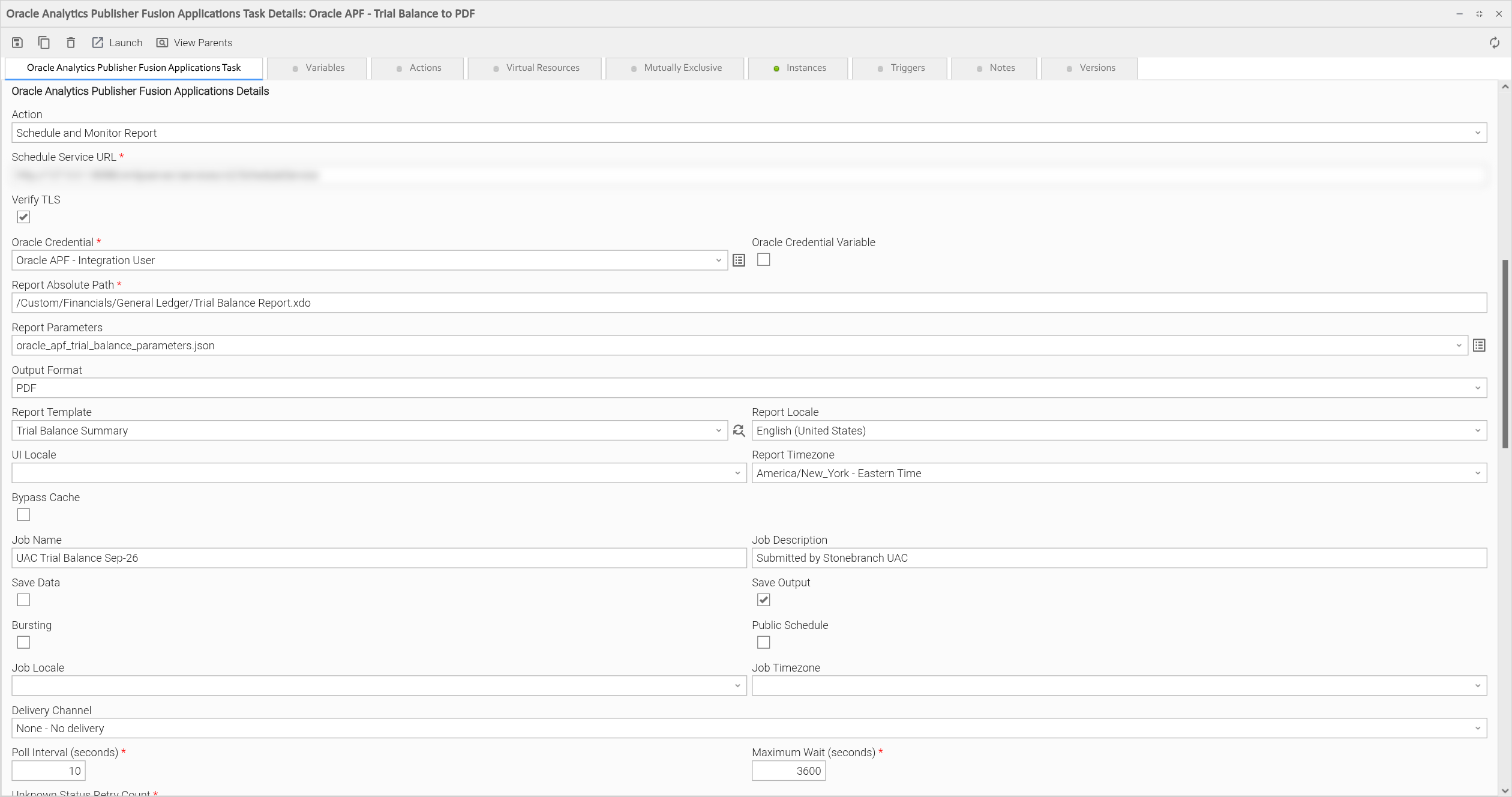
The task runs the Trial Balance Report for two ledgers and the period Sep-26, with the "Trial Balance Summary" layout picked from the Report Template list. The report is produced as PDF in US English with dates in Eastern Time. Save Output is checked, so the PDF stays in the Publisher Report Job History under the job name "UAC Trial Balance Sep-26". Nothing is delivered. The task checks the job status every 10 seconds for up to an hour.
Example: Email the Report
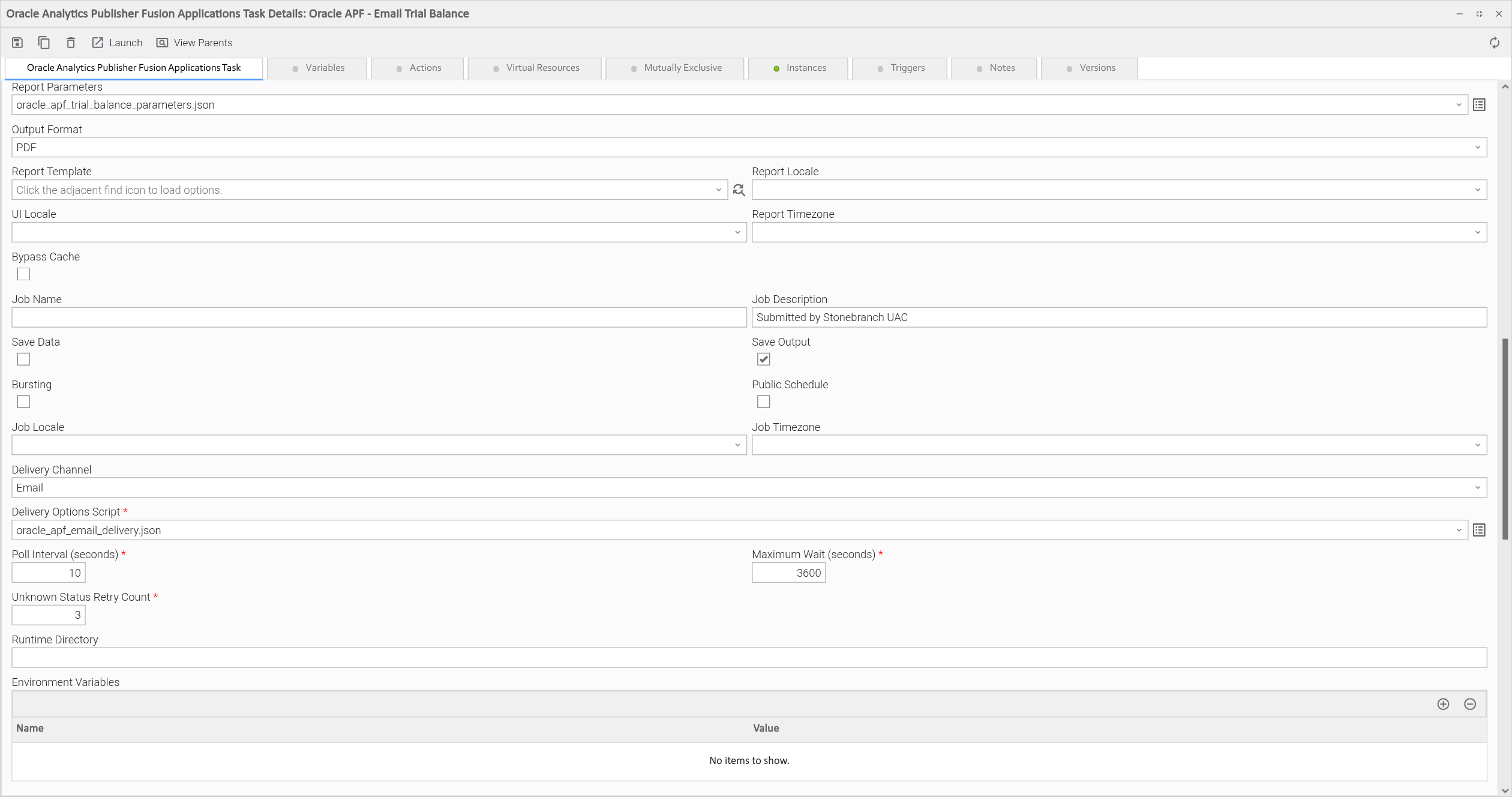
The task runs the same report with the default layout and emails the PDF to the GL close team through the email server "FinanceMail" registered in Publisher.
{
    "emailServerName": "FinanceMail",
    "emailFrom": "oracle-reports@example.com",
    "emailTo": "gl-close@example.com",
    "emailCC": "controller@example.com",
    "emailSubject": "Trial Balance Sep-26",
    "emailBody": "The September trial balance is attached."
}
Example: Upload the Report to an SFTP Server
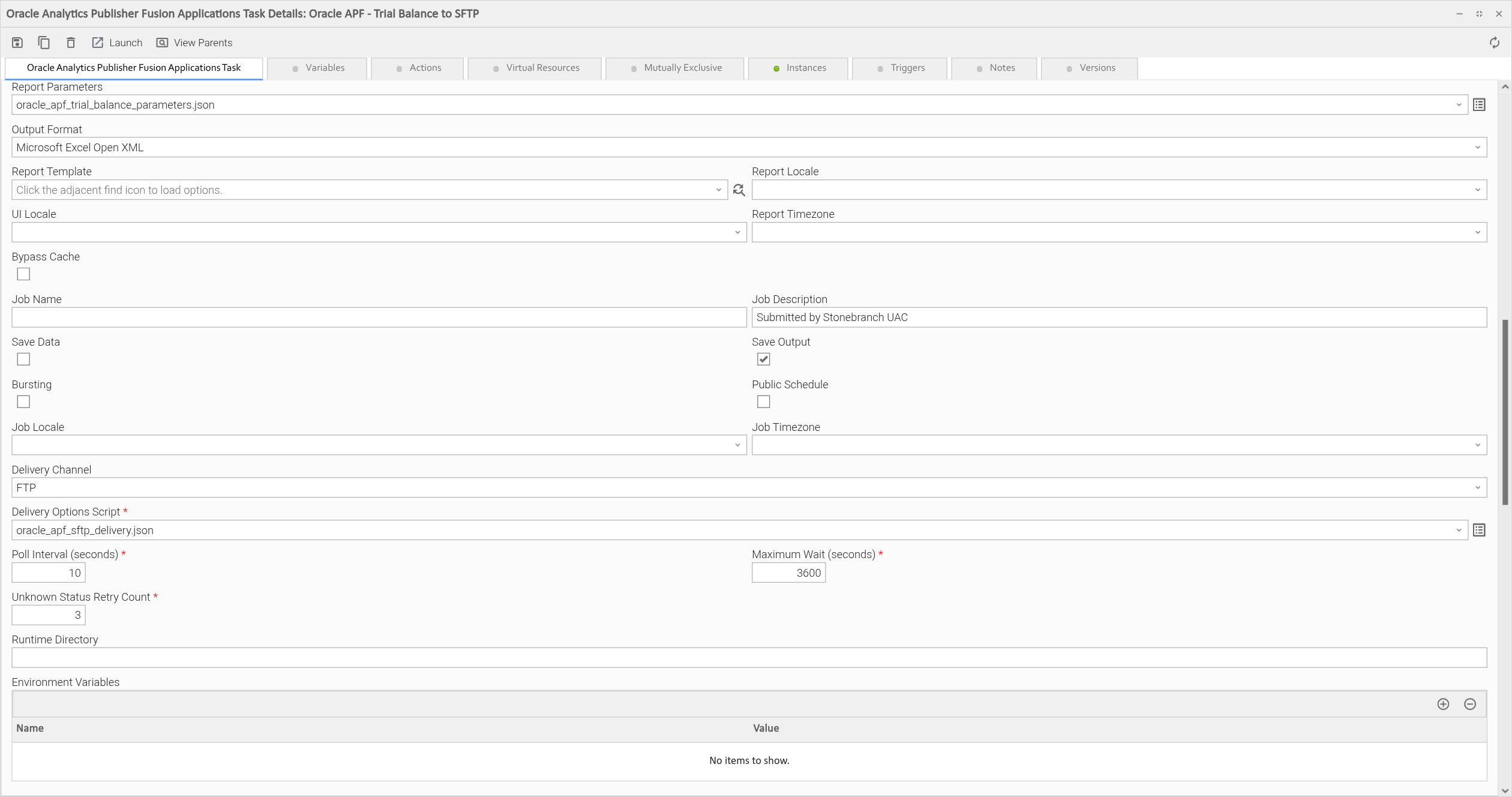
The task produces the report as an Excel workbook ("Microsoft Excel Open XML") and uploads it to the SFTP server FINANCE_SFTP. The server is registered in Publisher with an SSH key, so the script holds no user or password. sftpOption set to true makes Oracle use SFTP instead of FTP.
{
    "ftpServerName": "FINANCE_SFTP",
    "remoteFile": "/inbound/gl/trial_balance_sep26.xlsx",
    "sftpOption": true
}
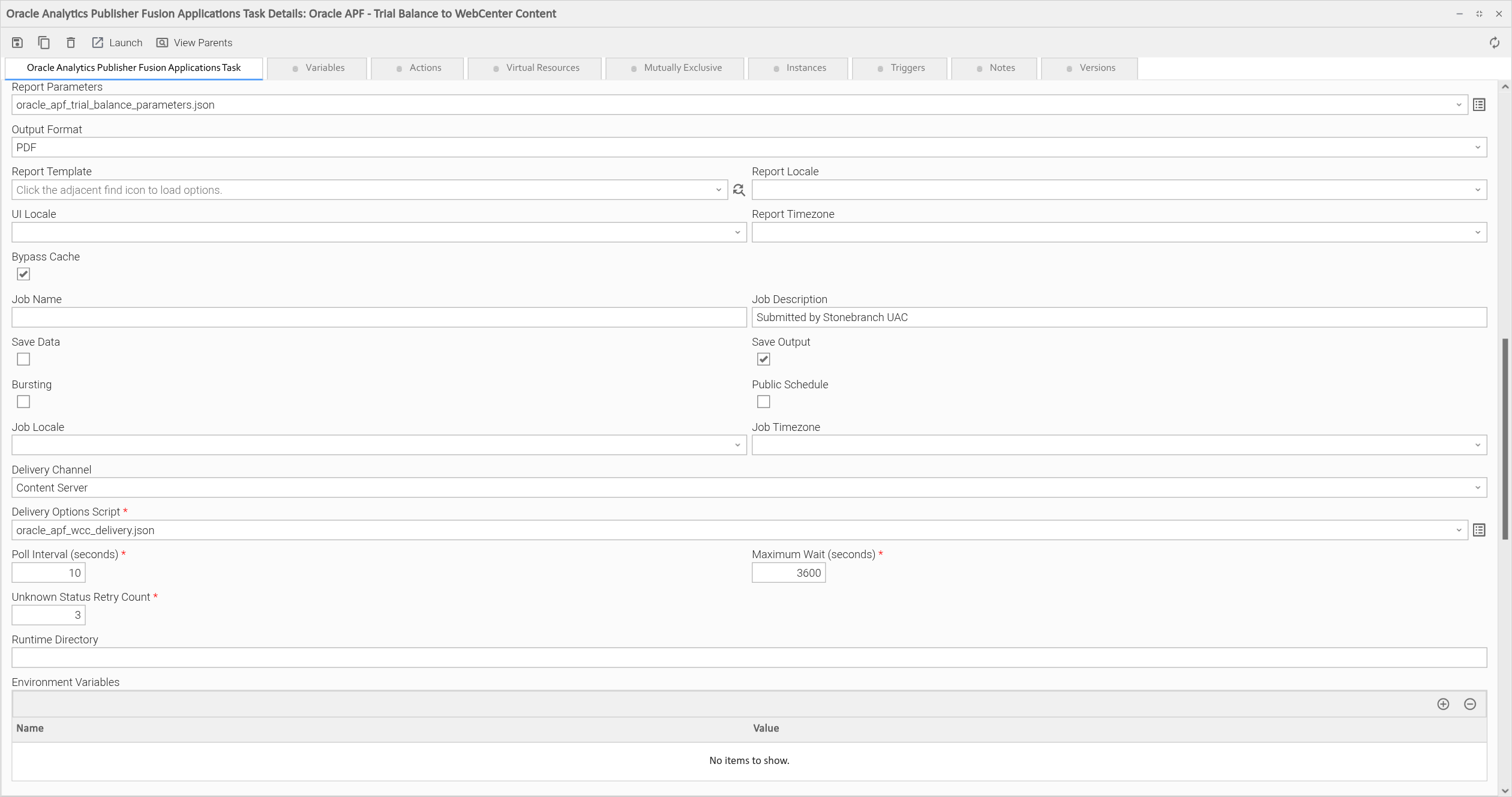
Example: Check the Report into Oracle WebCenter Content
The task checks the PDF into Oracle WebCenter Content, in the security group FinanceReports and the account GL/Close. Bypass Cache is checked, so the report reads fresh data rather than a cached data set.
{
    "WCCServerName": "FinanceContentServer",
    "WCCSecurityGroup": "FinanceReports",
    "WCCAccount": "GL/Close",
    "WCCFileName": "trial_balance_sep26.pdf",
    "WCCTitle": "Trial Balance Sep-26",
    "WCCAuthor": "uac.integration",
    "WCCIncludeMetadata": false
}
Input Fields
Name | Type | Description | Version Information |
|---|---|---|---|
Action | Choice | The action to perform. The following option is available:
| Introduced in 1.0.0 |
Schedule Service URL | Text | Full URL of the Publisher ScheduleService, for example | Introduced in 1.0.0 |
Verify TLS | Checkbox | When checked (default), the certificate of the Oracle host is verified. When unchecked, it is not, and a warning is logged. To trust an internal certificate authority, set | Introduced in 1.0.0 |
Oracle Credential | Credentials | The Oracle Fusion user that runs the report:
The credential accepts a Universal Controller variable when the Oracle Credential Variable box is checked. | Introduced in 1.0.0 |
Report Absolute Path | Text | Path of the report in the Publisher catalog, ending with | Introduced in 1.0.0 |
Report Parameters | Script | The Universal Controller Data Script with the report parameters as a JSON object. See Report Parameters for the format. Leave empty to run the report with its default parameter values. | Introduced in 1.0.0 |
Output Format | Choice | The format of the report output. The following options are available:
Which formats work depends on the layout of the report. | Introduced in 1.0.0 |
Report Template | Dynamic Choice | The layout template of the report. The list is read from the report definition in Oracle, with the default layout first. It loads once Schedule Service URL, Oracle Credential and Report Absolute Path are filled in. Leave empty to use the default layout of the report. | Introduced in 1.0.0 |
Report Locale | Choice | Locale of the report content, for example "English (United States)" ( | Introduced in 1.0.0 |
UI Locale | Choice | Locale of the Publisher labels shown in the report output. Same options as Report Locale. Leave empty to use the Publisher default. | Introduced in 1.0.0 |
Report Timezone | Choice | Time zone of the dates and times in the report, for example "America/New_York - Eastern Time". Ten time zones are available. Leave empty to use the Publisher default. | Introduced in 1.0.0 |
Bypass Cache | Checkbox | When checked, Oracle ignores cached report data and runs the data model again. Unchecked by default. | Introduced in 1.0.0 |
Job Name | Text | Name of the job in the Publisher Report Job History. Leave empty to have the task name it | Introduced in 1.0.0 |
Job Description | Text | Description of the job in Publisher. Defaults to "Submitted by Stonebranch UAC". | Introduced in 1.0.0 |
Save Data | Checkbox | When checked, Oracle keeps the XML data of the report with the job. Unchecked by default. | Introduced in 1.0.0 |
Save Output | Checkbox | When checked, Oracle keeps the report output with the job, so it can be opened from the Report Job History. Unchecked by default. | Introduced in 1.0.0 |
Bursting | Checkbox | When checked, Oracle applies the bursting definition of the report, which splits the output and delivers each part as the definition says. Unchecked by default. | Introduced in 1.0.0 |
Public Schedule | Checkbox | When checked, the job is visible to all Publisher users. Unchecked by default. | Introduced in 1.0.0 |
Job Locale | Choice | Locale of the Publisher job. Same options as Report Locale. Leave empty to use the Publisher default. | Introduced in 1.0.0 |
Job Timezone | Choice | Time zone of the Publisher job. Same options as Report Timezone. Leave empty to use the Publisher default. | Introduced in 1.0.0 |
Delivery Channel | Choice | How Oracle delivers the report. The following options are available:
| Introduced in 1.0.0 |
Delivery Options Script | Script | The Universal Controller Data Script with the options of the delivery channel as a JSON object. See Delivery Options for the options of each channel. Required if Delivery Channel is not "None". | Introduced in 1.0.0 |
Poll Interval (seconds) | Integer | Seconds between two status reads. Must be at least | Introduced in 1.0.0 |
Maximum Wait (seconds) | Integer | Seconds to wait for the job to reach a final status. When they have passed, the task fails with exit code 40 and the job keeps running in Oracle. Must be at least | Introduced in 1.0.0 |
Unknown Status Retry Count | Integer | Number of status reads in a row that may return a status the integration does not know. One more fails the task with exit code 41. A known status resets the count. Must not be negative. Defaults to | Introduced in 1.0.0 |
Output Fields
The following output-only fields provide better visibility during the execution of Universal Task Instances. All of them keep their value when the task instance is re-run.
Name | Type | Description | Version Information |
|---|---|---|---|
Scheduled Job ID | Text | The Oracle Job ID of the submitted report. Written as soon as Oracle accepts the report. A re-run uses it to resume monitoring, see Cancellation and Rerun. A value entered by hand must be a number. Spaces around it are removed. | Introduced in 1.0.0 |
Final Status | Text | The job status as Oracle returned it, for example | Introduced in 1.0.0 |
Status Message | Text | The message Oracle returned with the final status. | Introduced in 1.0.0 |
Elapsed Seconds | Text | Seconds since monitoring of the job started. Updated after every status read. A re-run starts again from zero. | Introduced in 1.0.0 |
Report Path | Text | The value of Report Absolute Path, written when the job has reached a final status. | Introduced in 1.0.0 |
Environment Variables
Environment Variables can be set from the Environment Variables task definition table.
Environment Variable Name | Description | Version Information |
|---|---|---|
UE_HTTP_TIMEOUT | Seconds to wait for Oracle to answer a request once connected. Defaults to | Introduced in 1.0.0 |
UE_HTTP_CONNECT_TIMEOUT | Seconds to wait for the connection to Oracle. Defaults to | Introduced in 1.0.0 |
SSL_CERT_FILE | Path, on the Agent host, of a PEM file with the certificate authorities to trust for the Oracle host. Use it when Fusion is reached through a proxy or gateway that presents an internal certificate. | Introduced in 1.0.0 |
SSL_CERT_DIR | Same as | Introduced in 1.0.0 |
HTTPS_PROXY, NO_PROXY | Proxy for the requests to Oracle, for example | Introduced in 1.0.0 |
Cancellation and Rerun
Cancellation. Cancelling the task instance also cancels the report in Oracle. The task stops waiting for the next status read, sends the cancellation to Oracle the same way the Cancel Oracle Report command does, writes the outcome to STDOUT and ends with exit code 102. If Oracle did not accept the cancellation, the status description says that the report may still be running. If the task had already read a final status of the report, it ends with that status as usual. If the report finished after the last status read, Oracle has nothing left to cancel and the task still ends with exit code 102.
The Cancel Oracle Report command cancels the report in Oracle while the task instance keeps monitoring it, so the task instance ends with the Canceled status of the job.
Rerun. A re-run does not submit the report again. The Scheduled Job ID output field keeps its value, so the re-run monitors the same Oracle job. A job that has already finished returns its final status right away. This makes a re-run safe after exit code 40 (Maximum Wait reached), 5 (Oracle unavailable) or 41 (unknown status). A re-run after a cancellation reads the Canceled status of the same job again. To produce the report again, launch the task instead of re-running the task instance.
A task instance that failed before Oracle returned a Job ID has no Scheduled Job ID, so its re-run submits the report. After exit code 9, check the Publisher Report Job History first. The report may have been scheduled even though no usable answer from Oracle arrived.
Dynamic Commands
Users can interact with Task Instances through Dynamic Commands. The following Dynamic Commands are supported.
Name | Description | Version Information |
|---|---|---|
Cancel Oracle Report | Cancels the Oracle job of the task instance. Available when the task instance is in the Running state. Run before Oracle has returned a Scheduled Job ID, the command ends with exit code 1 and sends nothing. The command finds the running execution of the job, which can take up to 30 seconds right after submission, and asks Oracle to cancel it. It does not change the status of the task instance. The task instance keeps monitoring the job and ends with exit code 102 once Oracle reports it as canceled. The result is kept as command output named Oracle Report Cancellation. The command ends with exit code 0 when Oracle accepted the cancellation, or when the job status read afterwards is | Introduced in 1.0.0 |
Example output of the command when Oracle accepts the cancellation:
Oracle Publisher Cancellation
-----------------------------
Scheduled Job ID : 300100001
Job Instance ID  : 300100002
Result           : Cancellation request accepted
Some Oracle Fusion versions answer the cancellation with a code such as G instead of true or false. The command then reads the job status to confirm the cancellation:
Oracle Publisher Cancellation
-----------------------------
Scheduled Job ID : 300100001
Status           : CANCELED
Result           : Report canceled successfully
Exit Codes
Codes 3 to 9 mean a call to Oracle failed. Codes 102 and 104 mean the calls worked and the report did not.
Exit Code | Status | Description |
|---|---|---|
0 | Success | The report finished in Oracle with the |
1 | Failure | Unexpected error. This includes a connection failure outside of the status reads, for example a host name that does not resolve or a certificate that cannot be verified. |
3 | Failure | Authorization error. The server answered with HTTP 401 or 403, for example a gateway in front of Oracle. Oracle itself reports a wrong user name or password as a SOAP fault, which is exit code 6. |
4 | Failure | Client error. Oracle answered with HTTP 404, usually because Schedule Service URL is wrong, or with another unexpected HTTP status. Redirects are not followed, so a redirect to a sign-in page also ends here. |
5 | Failure | Server error. The status reads kept failing with HTTP 408, 429 or 5xx, or with a connection error. A status read that fails this way is tried 3 times, 5 seconds apart, before the task fails. A submission is never retried, so the report is not submitted twice. The same answers to the submission end with exit code 9. |
6 | Failure | Oracle returned a SOAP fault. The status description holds the fault message. A wrong user name or password ends here, with the message |
7 | Failure | The answer of Oracle is not valid XML, for example an HTML sign-in page returned with HTTP 200. |
8 | Failure | Oracle accepted the request but returned no Job ID. |
9 | Failure | The submission was sent but no usable answer came back: it timed out, the connection dropped, or the server answered with HTTP 408, 429 or 5xx without a SOAP fault. The report may have been scheduled anyway. Check the Publisher Report Job History before running the task again. A connection that could not be opened at all ends with exit code 1, because nothing reached Oracle. |
20 | Failure | Data validation error, for example a script that is not a valid JSON object, a Schedule Service URL that does not start with |
40 | Failure | Maximum Wait (seconds) passed before the job reached a final status. The job keeps running in Oracle, and a re-run resumes monitoring it. |
41 | Failure | Oracle returned a status the integration does not know more than Unknown Status Retry Count times in a row. |
42 | Failure | Oracle returned the status of a different job than the one asked for. |
102 | Failure | The report finished in Oracle with the |
104 | Failure | The report finished in Oracle with the |
The statuses Pending, Scheduled, Waiting, Running, Processing and Cancelling are not final, and the task keeps monitoring the job. Oracle returns no status at all while a job runs, which the task treats as Running.
STDOUT and STDERR
STDOUT holds the summary of the report, the delivery and the Oracle job, as described in Action Output.
STDERR holds the execution log of the extension, with the Job ID and every status read. Its verbosity is controlled by the Log Level task field.
Backward compatibility is not guaranteed for the content of STDOUT/STDERR and can be changed in future versions without notice.
Document References
Document Link | Description |
|---|---|
Oracle reference for the SOAP service used to schedule, monitor and cancel reports, Fusion Applications serves the v2 version of this service. | |
Oracle reference for the SOAP service used to read the layout templates of a report. | |
Oracle reference for the request types, including the delivery options of each channel used in the Delivery Options Script. |
Changelog
ue-oracle-analytics-publisher-fusion-applications-1.0.0 (2026-11-10)
Initial Version