Oracle EBS Request
Disclaimer
Your use of this download is governed by Stonebranch's Terms of Use.
Version Information
Template Name | Extension Name | Extension Version |
|---|---|---|
Oracle EBS Request | ue-cs-oracle-ebs | 1.0.6 |
Refer to Changelog for version history information.
Overview
This Universal Task provides the capabilities for submitting Oracle EBS Concurrent Requests by using CONCSUB CLI Command with additional capabilities like fetching the logs and output files, validating successful execution and running EBS environment script before running the concurrent request.
The CONCSUB command is an operating system utility used to submit concurrent requests in Oracle E-Business Suite. It allows users to submit requests without having to log in to the Oracle E-Business Suite application.
Requirements
Software Requirements for Universal Template and Universal Task
This integration requires CONCSUB command and optionally an environment script to set the config parameters of the CONCSUB command like ORACLE_HOME, ORACLE_SID and so on.
Software Requirements Universal Agent
Only Linux agents are supported:
- Universal Agent for Linux Version 7.2.0.0 and later with python options installed.
Software Requirements Universal Controller
Universal Controller Version 7.2.0.0 and later.
Key Features
The Universal Task provides the following key features:
- Submit Concurrent Request
- Fetch Logs
- Execute Environment Script
Import Universal Template
To use the Universal Template, you first must perform the following steps.
- This Universal Task requires the Resolvable Credentials feature. Check that the Resolvable Credentials Permitted system property has been set to true.
- To import the Universal Template into your Controller, follow the instructions here.
- When the files have been imported successfully, refresh the Universal Templates list; the Universal Template will appear on the list.
Configure Universal Task
For a new Universal Task, create a new task, and enter the required input fields.
The following lists the input fields required for a selected Action.
Supported Actions
The following Actions are supported:
Action | Use Case | Required Parameters |
|---|---|---|
Submit | Submitting Concurrent Request |
|
Action: Submit
Input Fields
The input fields for this Universal Task are described in the following table.
Field | Input Type | Default Value | Type | Description |
|---|---|---|---|---|
Action | Required | Choice | The action to be executed. Only "Submit" action is possible. | |
Credential | Required | Credential | Credentials for \ in CONCSUB command. Username and password of the ORACLE ID for Applications. | |
Username | Required | SYSADMIN | Text | Enter value for Username for CONCSUB command. Enter the name of your Application Object Library user. |
Resp App Short Name | Required | Text | The application short name of the responsibility whose concurrent processing options to be used | |
Responsibility | Required | Text | Enter value for Responsibility name. This name, along with your responsibility application short name, will be used to select a responsibility for your concurrent request to run in | |
Program Short Name | Required | Text | The application short name of the concurrent program | |
Program Name | Required | Text | The uppercase name of the program. It must be the short name that was enter in the Concurrent Programs window when defining a concurrent program | |
Operating Unit | Optional | Text | Optional. Introduced in R12, set to org id required for the report to be run with. (ORG_ID) | |
Language | Optional | Text | The NLS language for the request | |
Implicit | Optional | Choice | Whether to show this concurrent request on the View Requests form. | |
Territory | Optional | Text | The NLS territory for the request | |
Attributes | Optional | Array | Enter values for CONCSUB Attributes. The attributes order must be same as the definitions. Name field is only informative purposed, only the value will be used in the command. | |
Binary Path | Optional | Text | Enter value for CONCSUB command path. Leave blank if the CONCSUB command is in PATH | |
Run Environment Script | Required | false | Boolean | Environment Script will be executed if selected. |
Environment Path | Optional | /u01/install/APPS/EBSapps.env | Text | Enter value for EBS environment script file. Required if 'Run Environment Script' field is selected |
Fetch Logs | Required | false | Boolean | Select to enable fetching logs |
Fetch Logs On Failure | Optional | false | Boolean | Select to enable fetching logs -ONLY- on failure |
Out Path | Optional | Text | Enter value for the out folder path. If empty, fetching out file will be ignored | |
Log Path | Optional | Text | Enter value for the log folder path. If empty, fetching log file will be ignored | |
request_id | Output | Text | This field will display request id |
Task Examples
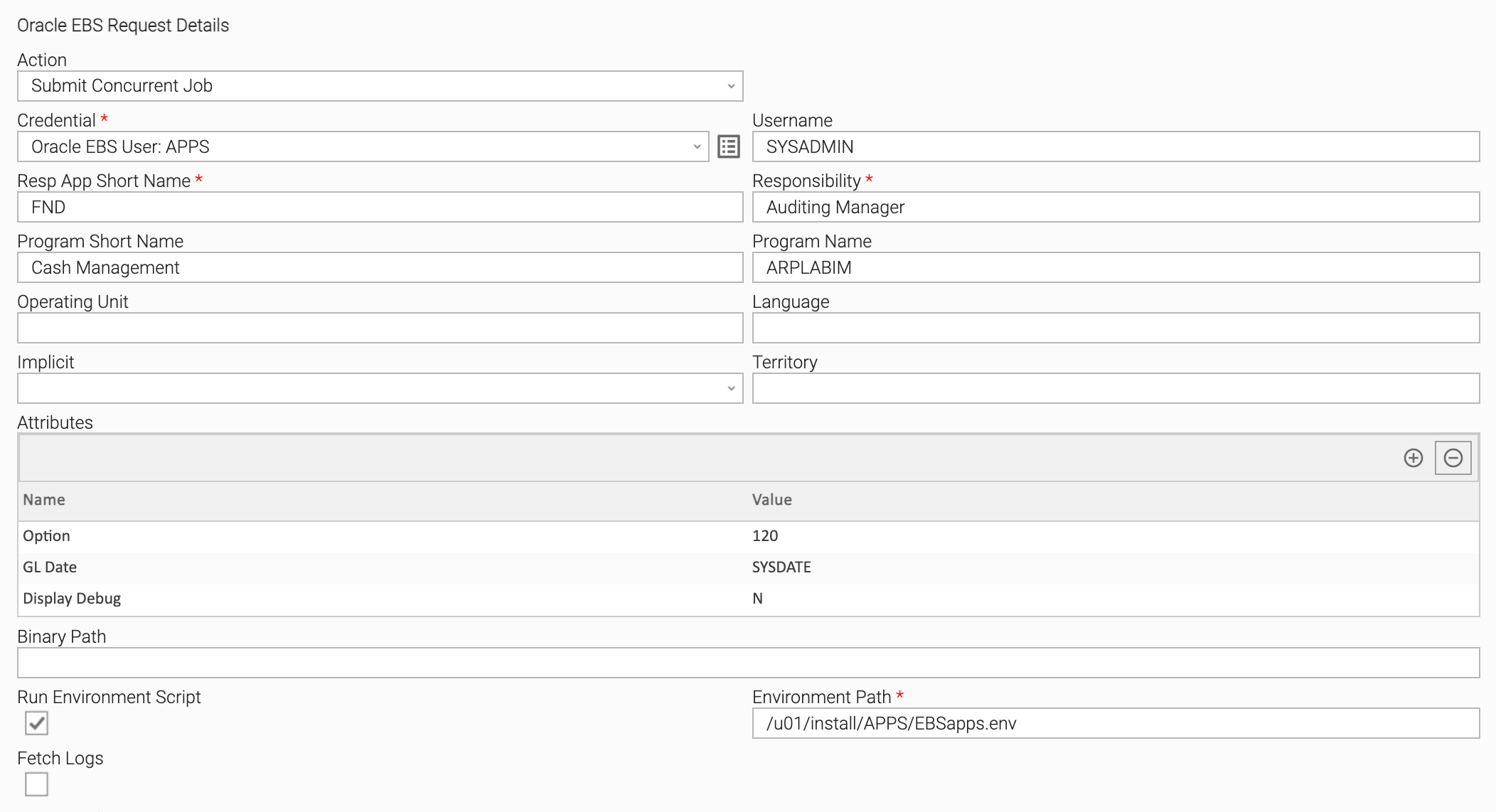
Configuration examples - Running a request with Environment Script
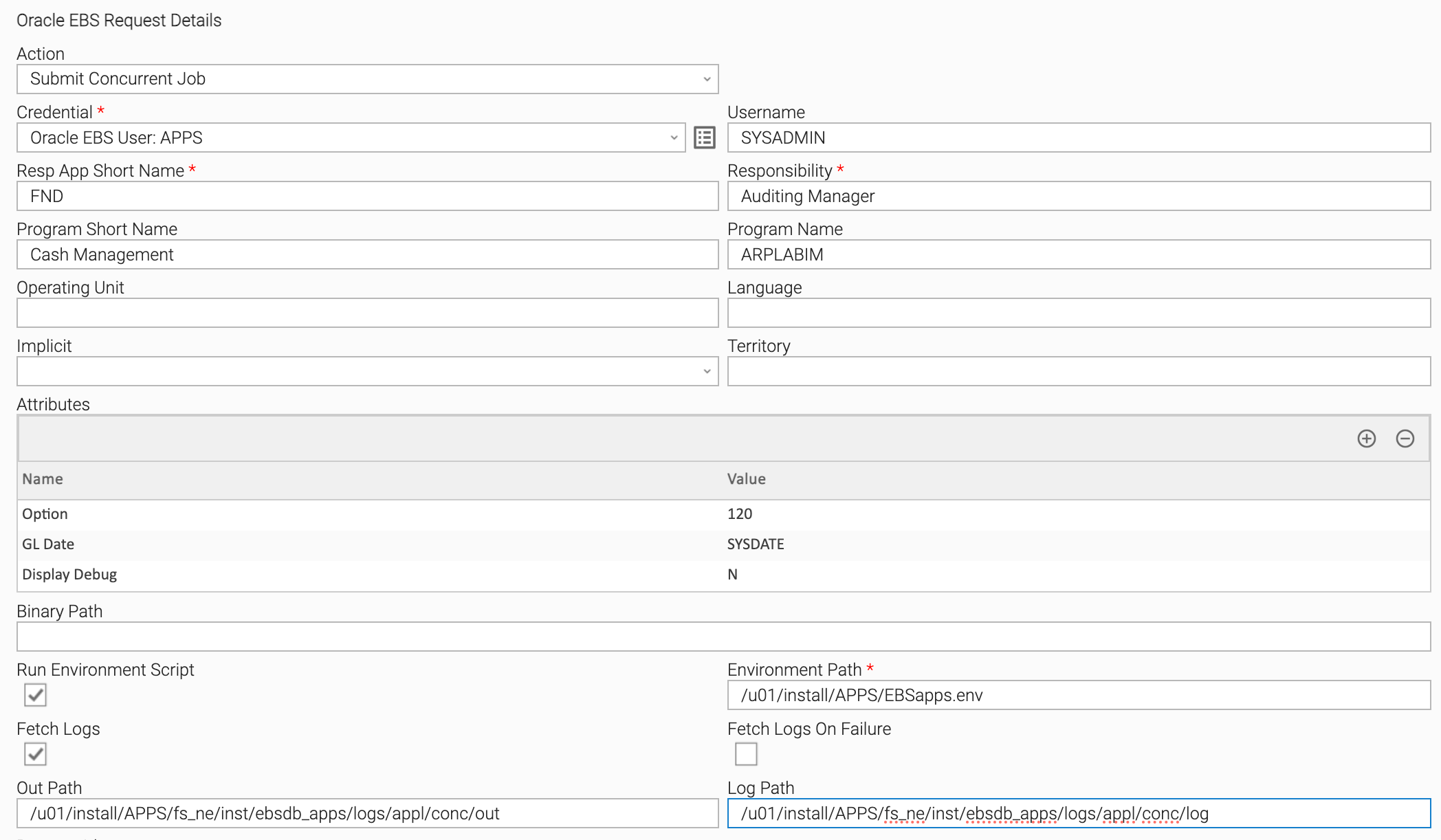
Configuration examples - Running a request and Fetch Logs
You need to provide the path of the out and log folders. You can use UC functions like ${_date('yyyy-MM-dd')} to use the current date in the path.
Task Output
Exit Codes
The exit codes for this Universal Extension are described below.
Exit Code | Status Classification Code | Status Classification Description | Description |
|---|---|---|---|
0 | SUCCESS | Successful Execution | SUCCESS: Successful Task execution |
1 | FAILED | Failed Execution | This exit code indicates that there was a problem in the CONCSUB commands main fields like responsibility or responsibility app short name. Check the output to see the error message that is returned from CONCSUB command |
11 | FAILED | Binary Path not found | The CONCSUB binary path does not exists or not accessible by the user that runs the command. Check the user in the Credential under the Agent Details, if the Credential value is empty than the task will be executed by the agents default user (Default: ubroker) and check if that user have permission to the folder. |
12 | FAILED | File not found | The environment script not found or not accessible by the user. Check the user in the Credential under the Agent Details, if the Credential value is empty than the task will be executed by the agents default user (Default: ubroker) and check if that user have permission to the folder. |
253 | FAILED | Concurrent Manager encountered an error | CONCSUB command submitted the request but the request had an error or warning in EBS. Check the EBS Attributes and then check the outputs |
X | FAILED | Program exited with status X | The concurrent program exited with a status other than 0. Exit code will be same as the status code. Check the EBS Attributes and then check the outputs. |
STDOUT and STDERR
STDOUT and STDERR provide additional information to the User. The populated content can be changed in future versions of this extension without notice. Backward compatibility is not guaranteed.
STDOUT will have the output from CONCSUB command and the log file content
EXTENSION will have the output from out file.
Changelog
ue-cs-oracle-ebs-1.0.6 (2024-01-10)
Enhancements
- Initial Version