Oracle ESS Fusion Jobs
Disclaimer
Your use of this download is governed by Stonebranch's Terms of Use.
For general information on how integrations work, importing templates, and UAC documentation refer to Overview.
Version Information
Template Name | Extension Name | Version | Status |
|---|---|---|---|
Oracle ESS Fusion Jobs | ue-oracle-ess-fusion-jobs | 1.3.0 | Fixes and new Features are introduced. |
Refer to Changelog for version history information.
Overview
Oracle Enterprise Scheduler Service (ESS) runs the background jobs of Oracle Fusion Cloud Applications: reports, data imports and exports, and batch processes in Financials, HCM, SCM and the other modules. Fusion users normally submit and track these jobs from the Scheduled Processes page.
This integration submits ESS jobs from the Universal Controller, follows them until they finish, and brings the job log and output back into the task instance. It works with predefined Oracle jobs and with custom job definitions. Jobs are described once in a Parameter Mapping script, so task authors pass readable parameter names such as Bank Account Name instead of submit.argument11.
Key Features
Feature | Description |
|---|---|
Submit ESS Jobs by Name | Submit an ESS job by the name given in the Parameter Mapping script. The script translates readable parameter names into the job's ESS arguments, applies defaults, and rejects the submission when a required parameter is missing. |
Dynamic Value Lookups | Look up a parameter value through the Fusion REST API before the job is submitted, for example a bank account ID from the bank account name. |
Raw Payload Submission | Submit an ESS REST request body as is, for jobs that are not described in the Parameter Mapping script. |
OAuth2 and Basic Authentication | Authenticate with OAuth2, using the Client Credentials or Password grant, or with Basic authentication. Expired OAuth2 tokens are renewed during long-running jobs. |
Job Monitoring | Wait for the job to reach a final state and turn the ESS status into the task exit code, or submit the job and return right away. |
Job Log and Output Retrieval | Print the ESS log and output files of the job to STDOUT, either always or only when the job does not succeed. |
Monitoring Without Re-submission | Monitor a job submitted earlier by its ESS process ID, and optionally resume monitoring instead of submitting the job again when a task instance is re-run. |
Requirements
This integration requires a Universal Agent and a Python runtime to execute the Universal Task.
Area | Details |
|---|---|
Python Version | Requires Python 3.11 or later, tested with Agent bundled python distribution. |
Universal Agent Compatibility |
|
Universal Controller Compatibility | Universal Controller Version >= 7.7.0.0. The Resolvable Credentials Permitted system property must be set to |
Network and Connectivity | The Agent must reach the Oracle Fusion Cloud Applications host given in Oracle ESS Base URL and, for OAuth2, the identity domain host given in Token URL. |
Oracle Fusion Privileges | The authenticated user or client application needs access to the ESS REST API ( |
Supported Actions
There is one Top-Level action controlled by the Action field:
- Submit ESS Job: Submits an ESS job and, optionally, waits for it to finish and retrieves its log and output.
Action: Submit ESS Job
The job is described in one of two ways:
- With Use Raw Payload unchecked, the task names the job in Job Name and passes its parameters in Job Parameters. The Parameter Mapping script turns them into the ESS request body.
- With Use Raw Payload checked, the task sends the JSON in Payload to ESS without any changes.
After submission, the ESS process ID is written to the Process ID (ESS) output field. What happens next depends on Wait For Success Or Failure:
- Unchecked: the extension reads the job status once and ends. A job that is still waiting or running ends the task with exit code 0.
- Checked: the extension polls the job status every Polling Interval seconds until the job reaches a final state, or until Maximum Polls is reached. The final ESS status sets the exit code of the task (see Exit Codes). The log and output files selected in Log Retrieval Options are then printed to STDOUT.
When Process ID (In case of monitoring) is populated, the task does not submit anything. It monitors the given ESS process instead, as described in Cancellation and Rerun.
Action Output
- EXTENSION
- STDOUT
The extension output provides the following information:
exit_code,status_description: General info regarding the task execution. For a submitted job, the status description names the ESS status, for exampleJob submitted (succeeded).For more information refer to the exit codes table.invocation.fields: The task configuration used for this execution. Passwords are masked. The content of the Parameter Mapping script is included in full.result.id: The ESS process ID of the job.result.status: The last ESS status read for the job, for exampleWAIT,RUNNING,SUCCEEDEDorERROR.result.payload: The request body sent to ESS when the job was submitted. Empty when an existing process was monitored.result.errors: List of errors that occurred during execution. Only present when the task failed before a job status could be read.
Examples:
The The job was submitted and monitored, but ESS reported the A required parameter was missing from Job Parameters, so no job was submitted. Most input fields are left out of this example.parameter_mapping value is shortened in the examples below.Successful execution
Job ended in error
ERROR status. The task fails with exit code 104 and the result still holds the process ID and the submitted payload. Most input fields are left out of this example.Failed execution
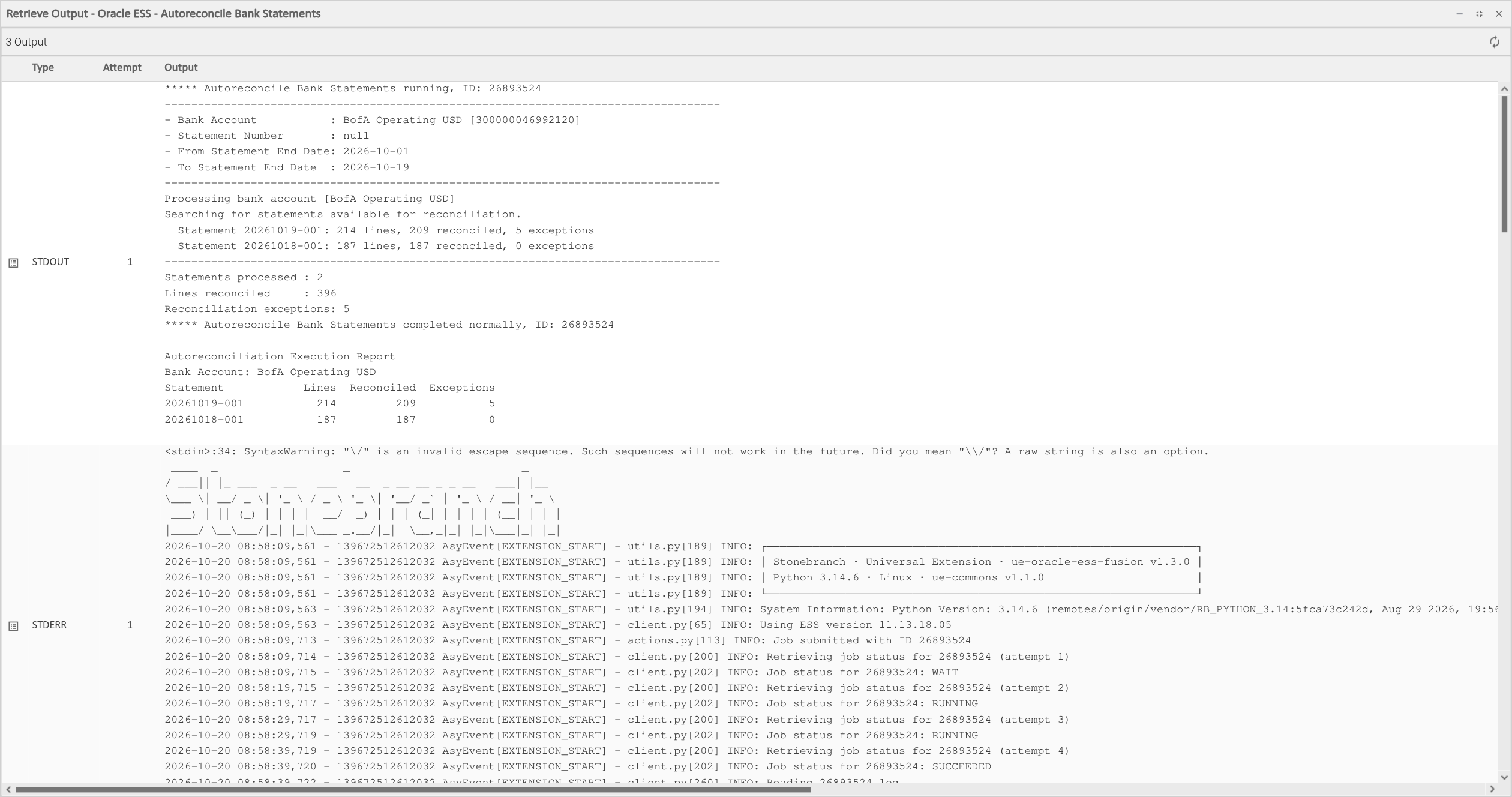
STDOUT holds the log (.log) and output (.out) files that ESS produced for the job, one after the other. They are only retrieved when Wait For Success Or Failure is checked, and only for the file types selected in Log Retrieval Options and allowed by permit_logs in the Parameter Mapping script. With Only retrieve logs in case of error checked, STDOUT stays empty for jobs that end with exit code 0.
Example:
***** Autoreconcile Bank Statements running, ID: 26893524
------------------------------------------------------------------------------------
- Bank Account           : BofA Operating USD [300000046992120]
- Statement Number       : null
- From Statement End Date: 2026-10-01
- To Statement End Date  : 2026-10-19
------------------------------------------------------------------------------------
Processing bank account [BofA Operating USD]
Searching for statements available for reconciliation.
  Statement 20261019-001: 214 lines, 209 reconciled, 5 exceptions
  Statement 20261018-001: 187 lines, 187 reconciled, 0 exceptions
...
***** Autoreconcile Bank Statements completed normally, ID: 26893524

Autoreconciliation Execution Report
Bank Account: BofA Operating USD
Statement            Lines  Reconciled  Exceptions
20261019-001           214         209           5
20261018-001           187         187           0
Parameter Mapping
The Parameter Mapping is a JSON document, stored as a Universal Controller Script and selected in the Parameter Mapping field. It describes the ESS jobs that tasks can submit by name: the job definition, the application it belongs to, and how each readable parameter name maps to an ESS argument. It can also define dynamic value lookups that query the Fusion REST API before a job is submitted.
One script can describe any number of jobs, and many tasks can share it. The Job Name field lists the jobs defined in the selected script.
ESS identifies job parameters by position (submit.argument1, submit.argument2 and so on). The position, type and meaning of each argument for a job can be found in Oracle's documentation for that job, or on the job definition in the Setup and Maintenance work area of Fusion.
Example
The following script defines two Financials jobs. Autoreconcile Bank Statements resolves the bank account ID from the bank account name, and Import Payables Invoices has required parameters and a default value. The configuration examples on this page use this script.
{
    "version": 1,
    "ess_version": "11.13.18.05",
    "permit_logs": ["LOG", "OUT"],
    "dynamic_values": {
        "@getBankAccountId": {
            "endpoint": "fscmRestApi/resources/11.13.18.05/cashBankAccounts",
            "query": {
                "q": "BankAccountName=$1",
                "fields": "BankAccountId",
                "limit": 1,
                "onlyData": true
            }
        }
    },
    "job_definitions": {
        "Autoreconcile Bank Statements": {
            "jobDefinitionId": "JobDefinition://oracle/apps/ess/financials/cashManagement/bankStatements/AutoReconciliation",
            "application_name": "FscmEss",
            "mappings": {
                "Bank Account": {"alias": "submit.argument1", "type": "STRING", "default": "@getBankAccountId(Bank Account Name)"},
                "Statement ID": {"alias": "submit.argument2", "type": "STRING"},
                "From Statement End Date": {"alias": "submit.argument3", "type": "STRING"},
                "To Statement End Date": {"alias": "submit.argument4", "type": "STRING"},
                "Bank Account Name": {"alias": "submit.argument11", "type": "STRING", "required": true}
            }
        },
        "Import Payables Invoices": {
            "jobDefinitionId": "JobDefinition://oracle/apps/ess/financials/payables/invoices/transactions/APXIIMPT",
            "application_name": "FscmEss",
            "mappings": {
                "Accounting Date": {"alias": "submit.argument4", "type": "STRING"},
                "Source": {"alias": "submit.argument8", "type": "STRING", "required": true},
                "Import Set": {"alias": "submit.argument9", "type": "STRING"},
                "Ledger": {"alias": "submit.argument12", "type": "STRING", "required": true},
                "Number of Parallel Processes": {"alias": "submit.argument14", "type": "STRING", "default": "1"},
                "Business Unit": {"alias": "submit.argument15", "type": "STRING"}
            }
        }
    }
}
Top-Level Keys
Key | Required | Description | Version Information |
|---|---|---|---|
| No | Format version of the script. The only supported value is | Introduced in 1.0.0 |
| No | Version of the Fusion REST API used to retrieve job logs, as it appears in REST resource paths ( | Introduced in 1.0.0 |
| No | List of the file types that tasks using this script may retrieve: | Introduced in 1.2.0 |
| No | Dynamic value lookups, keyed by lookup name. See Dynamic Values. | Introduced in 1.0.0 |
| Yes | Job definitions, keyed by the job name shown in Job Name. See Job Definitions. | Introduced in 1.0.0 |
Job Definitions
Each key of job_definitions is a job name. The name is free text. Task authors pick it in Job Name, so the name used in the Fusion Scheduled Processes page is a good choice.
Key | Required | Description |
|---|---|---|
| Yes | The ESS job definition path, which starts with |
| Yes | The ESS application that hosts the job, for example |
| Yes | The job parameters, keyed by the readable name used in Job Parameters. Use |
Parameter Mappings
Each key of mappings is a readable parameter name, for example Bank Account Name. Task authors use this name in the Parameter Name column of Job Parameters. Names are case sensitive.
Key | Required | Description | Version Information |
|---|---|---|---|
| Yes | The ESS argument name, for example | Introduced in 1.0.0 |
| Yes | The ESS parameter type, sent as | Introduced in 1.0.0 |
| No | When | Introduced in 1.0.0. Since 1.3.0, an empty |
| No | Value sent when the parameter is not given in Job Parameters. A default can be a dynamic value call such as | Introduced in 1.0.0 |
Every parameter defined in mappings is sent to ESS, in this order: the parameters given in Job Parameters first, then the remaining ones with their default value. A parameter without a default is sent with the value null, which ESS treats as not set. Parameter values are trimmed of leading and trailing spaces.
Dynamic Values
Some ESS jobs expect internal IDs, such as a bank account ID or a ledger ID, where users think in names. A dynamic value looks up the ID through the Fusion REST API just before the job is submitted.
A dynamic value is defined under dynamic_values. Its key is the name used to call it and must start with @, for example @getBankAccountId.
Key | Required | Description |
|---|---|---|
| Yes | The REST resource to query, relative to Oracle ESS Base URL, for example |
| Yes | The query parameters of the request. Every key in this object is sent as a query parameter, so any parameter the REST resource supports can be added, such as |
| Yes | The filter of the request in Oracle REST query syntax, for example |
| Yes | The single field to return. Its value in the first returned item becomes the parameter value. |
A dynamic value is called as the value of a parameter, either in Job Parameters or as a default in the mapping:
@getBankAccountId(Bank Account Name)
The argument in parentheses is the name of another parameter of the same job, as defined in mappings. Its value, given in Job Parameters or taken from its default, replaces $1 in query.q. A call takes exactly one argument.
With the example script and Bank Account Name set to BofA Operating USD, the extension sends this request before submitting the job:
GET <Oracle ESS Base URL>/fscmRestApi/resources/11.13.18.05/cashBankAccounts?q=BankAccountName=BofA Operating USD&fields=BankAccountId&limit=1&onlyData=true
It then sends the BankAccountId of the first item as submit.argument1, exactly as returned by the REST resource. If the request returns no items, or the first item has no such field, the task fails and no job is submitted.
Parameters Not in the Mapping
A parameter name of the form +<argument>|<type> in Job Parameters bypasses the mapping and is sent as is. For example, +submit.argument5|STRING sends {"name": "submit.argument5", "paramType": "STRING", "value": ...}. When the type is left out, as in +submit.argument5, it defaults to STRING. Use it for arguments that are rarely set and not worth adding to the mapping.
Any other parameter name that is not defined in mappings for the selected job fails the task with Parameter <name> not found in mapping!.
Configuration Examples
Example: Submit a Job by Name with OAuth2
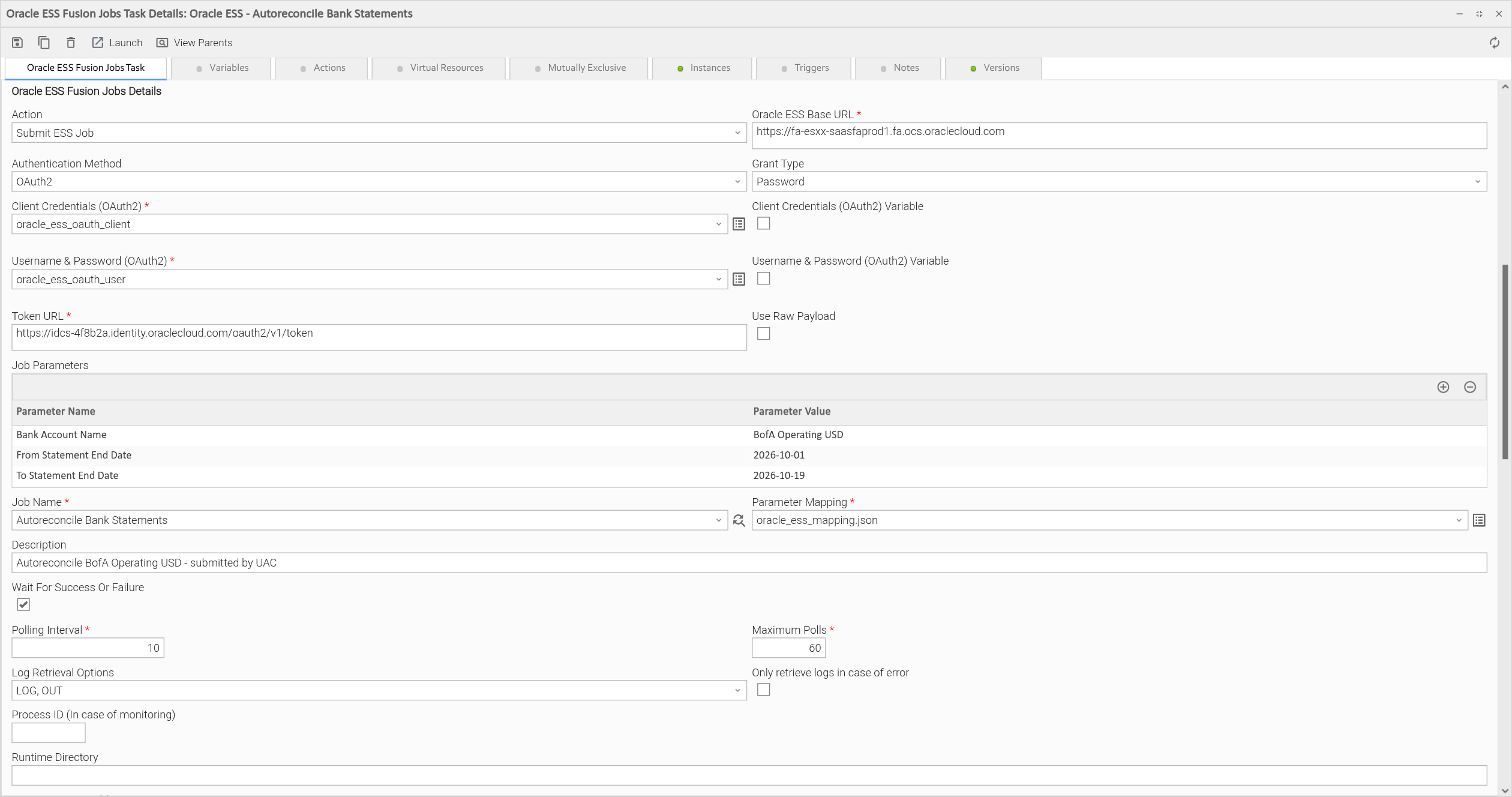
The task submits Autoreconcile Bank Statements from the example Parameter Mapping script. It authenticates with the OAuth2 Password grant, so it uses both the client credentials and the integration user's credentials. Only Bank Account Name and the statement date range are given. The mapping resolves Bank Account from the name through @getBankAccountId, and sends the remaining parameters with their defaults. The task waits for the job, checking its status every 10 seconds for up to 60 checks, and prints both the log and the output file to STDOUT.
Example: Retrieve the Job Log Only When the Job Fails
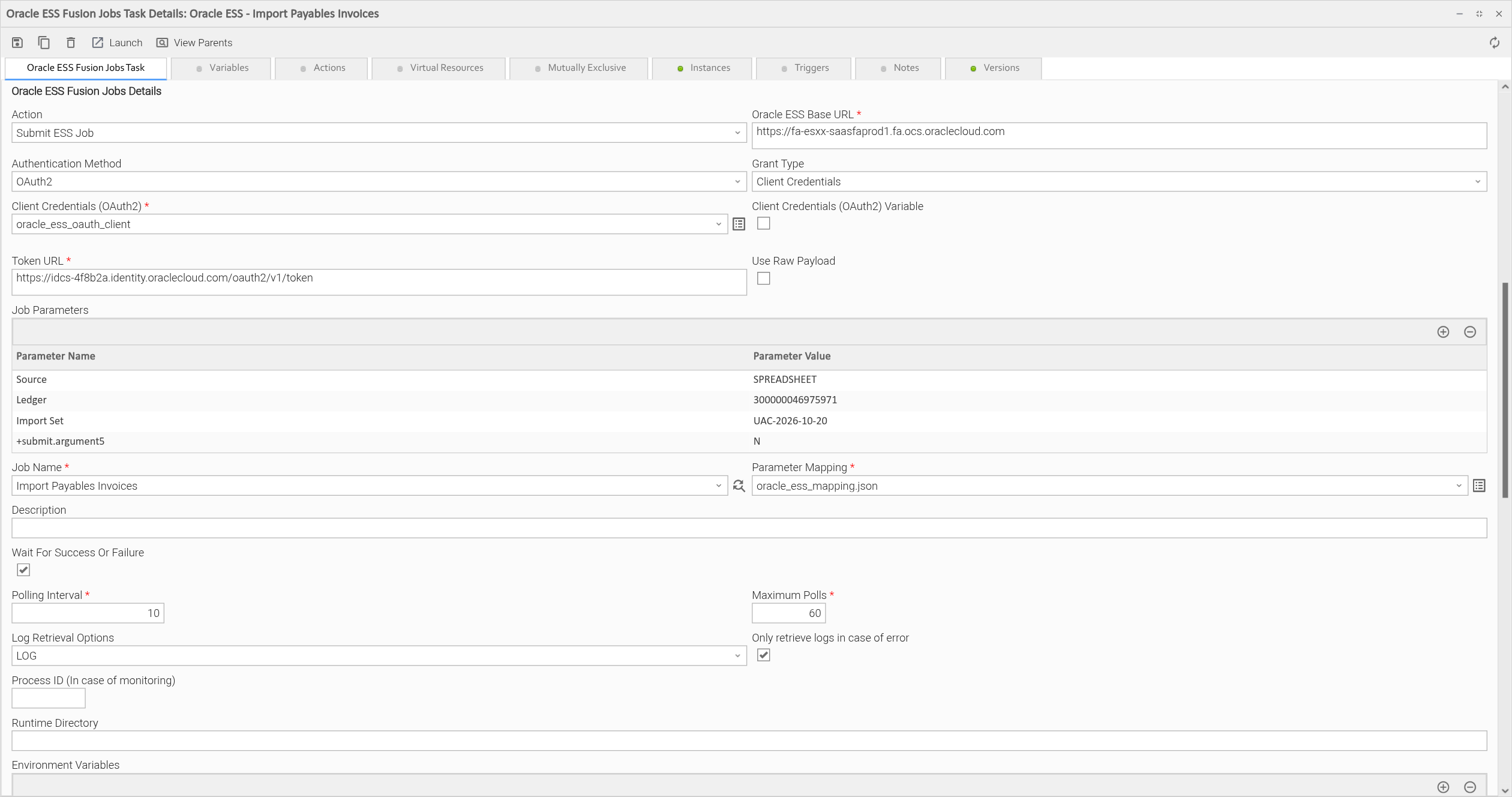
The task submits Import Payables Invoices with the OAuth2 Client Credentials grant. Source and Ledger are required by the mapping, Import Set is optional, and +submit.argument5 passes the Hold argument without a mapping entry. With Only retrieve logs in case of error checked, the job log is printed to STDOUT only when the job does not succeed.
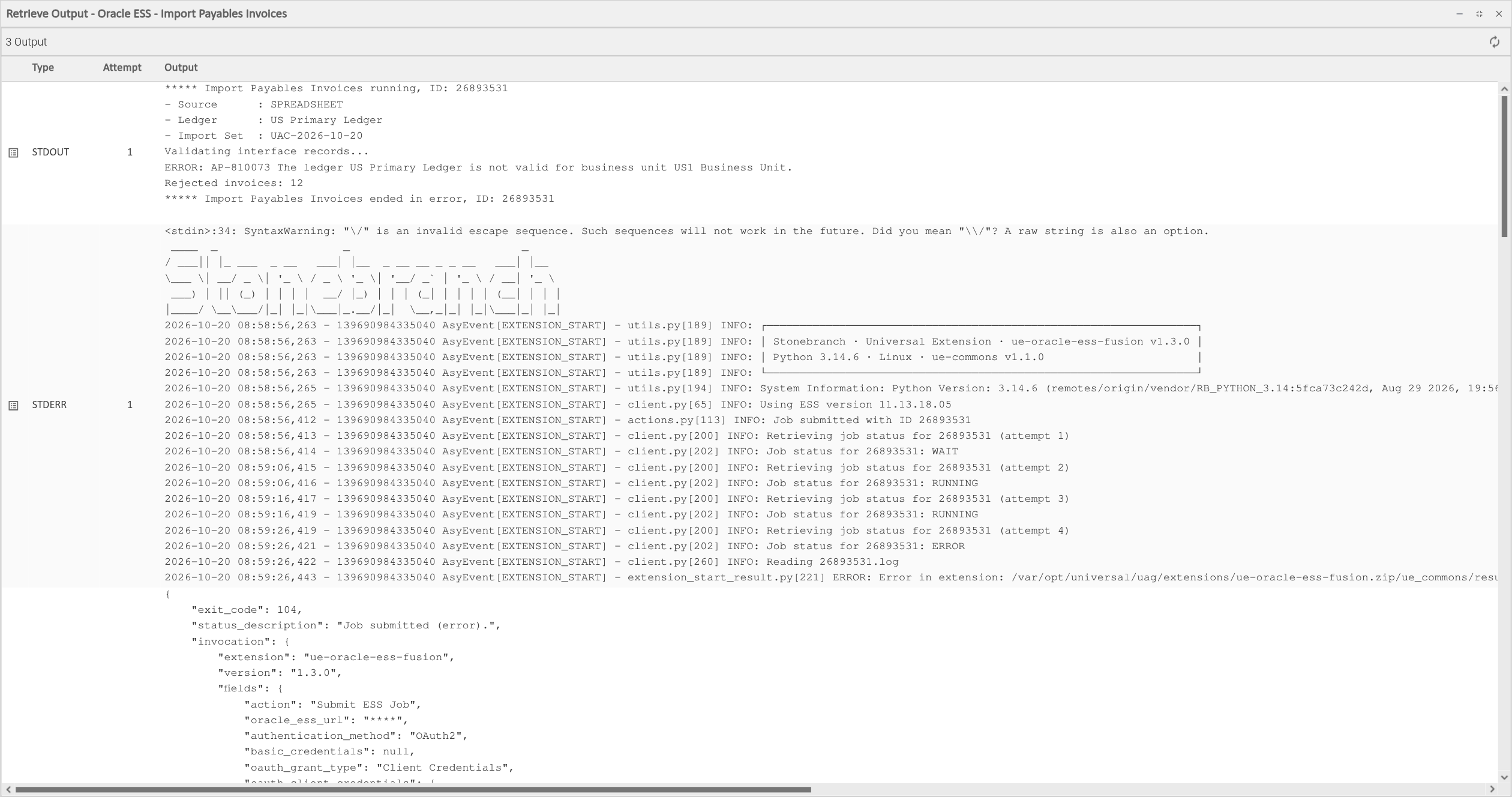
When the job ends in the ERROR state, the task fails with exit code 104 and STDOUT holds the job log:
Example: Submit a Raw Payload with Basic Authentication
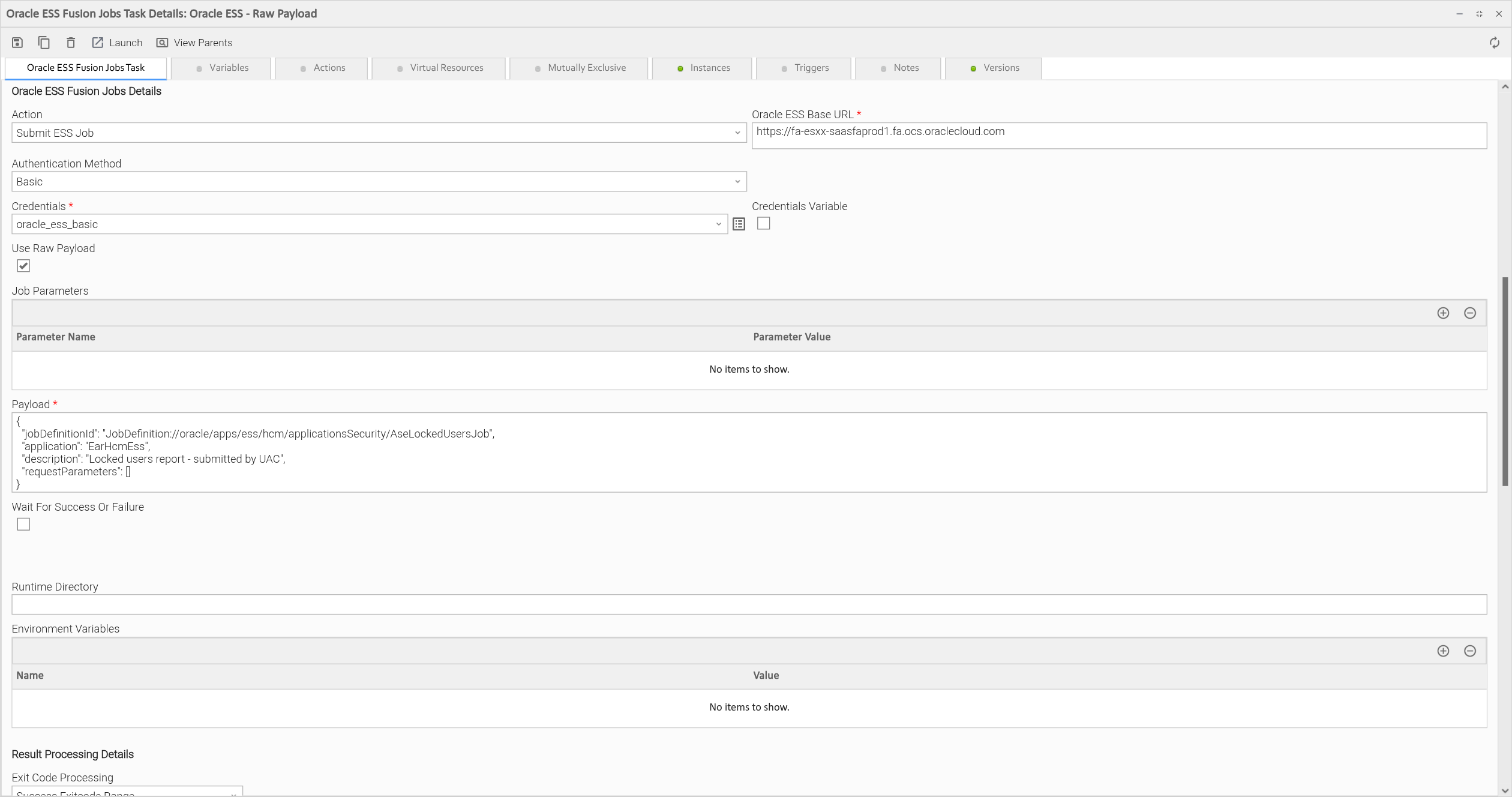
The task authenticates with Basic authentication and sends the JSON in Payload to ESS as is, so no Parameter Mapping script is needed. Wait For Success Or Failure is unchecked. The task reads the job status once after submission and ends with exit code 0 while the job is still waiting or running.
Example: Monitor a Job Submitted Earlier
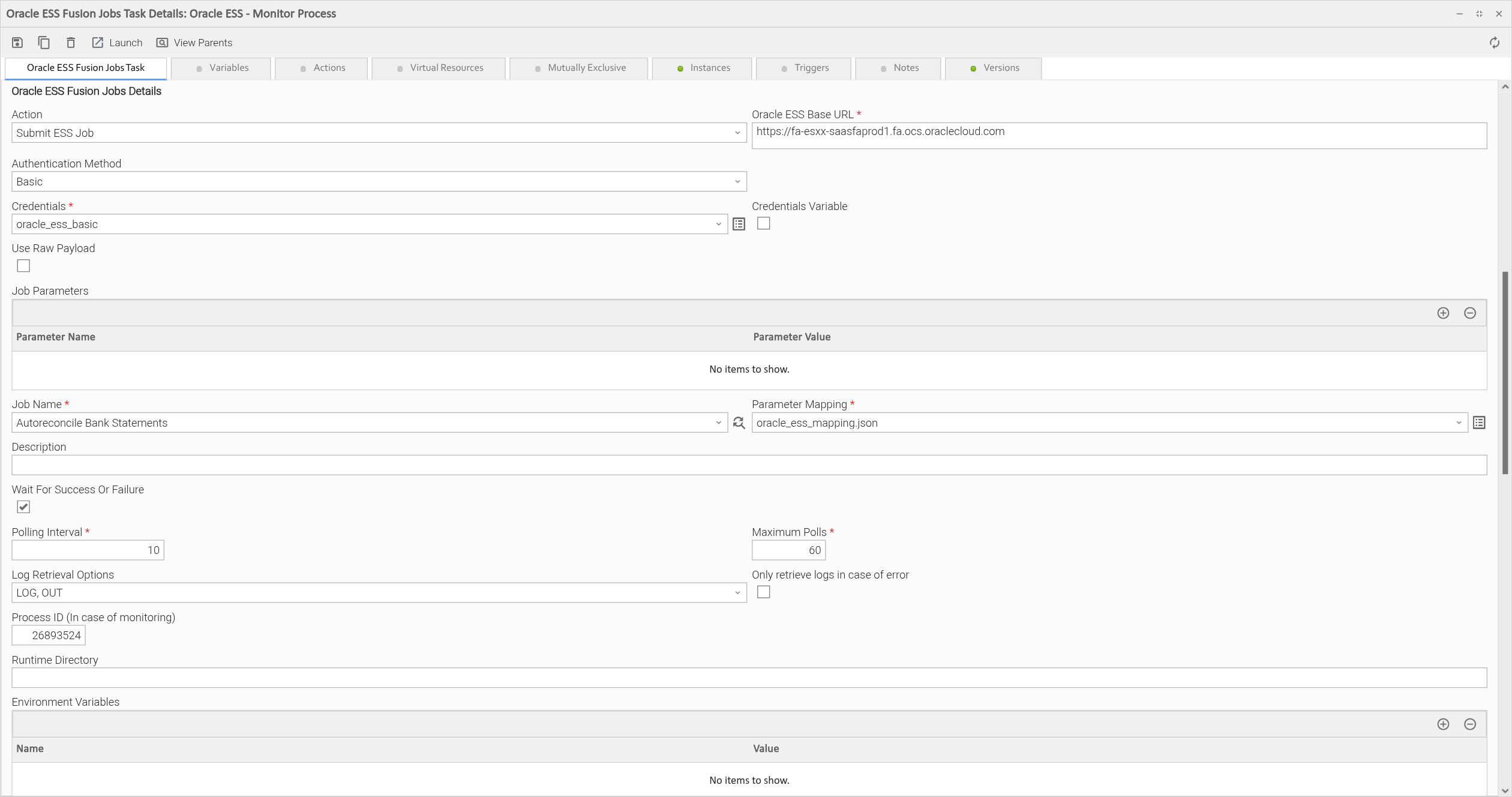
Process ID (In case of monitoring) holds the process ID of a job that is already in ESS. The task does not submit anything. It monitors that job until it reaches a final state and retrieves its log and output. Job Name and Parameter Mapping still have to be filled in because the form requires them, but they are not used.
Input Fields
Name | Type | Description | Version Information |
|---|---|---|---|
Action | Choice | The action to perform. The following option is available:
| Introduced in 1.0.0 |
Oracle ESS Base URL | Text | Base URL of the Oracle Fusion Cloud Applications instance, the part of the Fusion address before the first | Introduced in 1.0.0 |
Authentication Method | Choice | The authentication method. The following options are available:
| Introduced in 1.0.0. Option "Basic" introduced in 1.3.0. |
Credentials | Credentials | Username and password for Basic authentication:
Required if Authentication Method is "Basic". | Introduced in 1.3.0 |
Grant Type | Choice | The OAuth2 grant used to request a token. The following options are available:
Available if Authentication Method is "OAuth2". | Introduced in 1.0.0 |
Client Credentials (OAuth2) | Credentials | The client application used to request the OAuth2 token, for both grant types:
Required if Authentication Method is "OAuth2". | Introduced in 1.0.0 |
Username & Password (OAuth2) | Credentials | The Fusion user on whose behalf the token is requested with the Password grant:
The Password grant also sends the client application from Client Credentials (OAuth2). Required if Grant Type is "Password". | Introduced in 1.0.0 |
Token URL | Text | The token endpoint of the identity domain, which ends with Required if Authentication Method is "OAuth2". | Introduced in 1.0.0 |
Use Raw Payload | Checkbox | When checked, the JSON in Payload is sent to ESS as is. When unchecked (default), the job is built from Job Name, Job Parameters and the Parameter Mapping script. | Introduced in 1.0.0 |
Job Parameters | Array | The parameters of the job, as name and value pairs. Each name must be defined for the selected job in the Parameter Mapping script, or have the form Not used when Use Raw Payload is checked. | Introduced in 1.0.0 |
Job Name | Dynamic Choice | The job to submit. The list holds the job names defined under Required if Use Raw Payload is unchecked. | Introduced in 1.0.0 |
Parameter Mapping | Script | The Universal Controller Script with the job definitions, parameter mappings and dynamic values. See Parameter Mapping for the format. Required if Use Raw Payload is unchecked. | Introduced in 1.0.0 |
Description | Text | Description of the job request, shown in the Scheduled Processes page of Fusion. Available if Use Raw Payload is unchecked. | Introduced in 1.0.0 |
Payload | Large Text | The ESS job request body in JSON, as accepted by the Required if Use Raw Payload is checked. | Introduced in 1.0.0 |
Wait For Success Or Failure | Checkbox | When checked, the task polls the job until it reaches a final state, sets its exit code from the final ESS status and retrieves the job log and output. When unchecked (default), the task reads the job status once after submission and ends. | Introduced in 1.0.0 |
Polling Interval | Float | Seconds between two status checks. Defaults to Required if Wait For Success Or Failure is checked. | Introduced in 1.0.0 |
Maximum Polls | Integer | Maximum number of status checks. When the job is still not in a final state after the last check, the task fails with exit code 40 and the job keeps running in ESS. Required if Wait For Success Or Failure is checked. | Introduced in 1.0.0 |
Log Retrieval Options | Multiple Choice | The ESS files to print to STDOUT once the job has finished. The following options are available:
Both are selected by default. Select none to skip retrieval. The Available if Wait For Success Or Failure is checked. | Introduced in 1.2.0 |
Only retrieve logs in case of error | Checkbox | When checked, the files in Log Retrieval Options are retrieved only if the job did not end with exit code 0, for example when it ended in the Available if Wait For Success Or Failure is checked. | Introduced in 1.2.0 |
Process ID (In case of monitoring) | Integer | The ESS process ID of a job submitted earlier. When populated, the task does not submit a job. It monitors the given process instead, with the same polling and log retrieval settings. Available if Wait For Success Or Failure is checked. | Introduced in 1.2.0 |
Action, Authentication Method and the three credential fields accept Universal Controller variables. For a credential field, check the Variable box next to it and enter the variable, for example ${ess_credentials}. This is supported since version 1.3.0.
Output Fields
The following output-only fields provide better visibility during the execution of Universal Task Instances.
Name | Type | Description | Version Information |
|---|---|---|---|
Process ID (ESS) | Text | The ESS process ID of the submitted job. The value is kept when the task instance is re-run, see Cancellation and Rerun. | Introduced in 1.0.0 |
Job Status | Text | The ESS status of the job, for example | Introduced in 1.2.0 |
Environment Variables
Environment Variables can be set from the Environment Variables task definition table.
Environment Variable Name | Description | Version Information |
|---|---|---|
UE_HTTP_TIMEOUT | Timeout in seconds for every request to Oracle Fusion. Applies to both connecting and reading. Defaults to | Introduced in 1.0.0 |
RESUME_MONITORING_ON_RERUN | When set to | Introduced in 1.2.0 |
Cancellation and Rerun
Cancellation. Cancelling the task instance stops the monitoring. The job is not cancelled in ESS and keeps running. Cancel it from the Scheduled Processes page of Fusion if needed.
Rerun. By default, a re-run submits the job again and ESS assigns it a new process ID. To continue with the job that was already submitted, for example after the task failed with exit code 40 because Maximum Polls was reached, use one of the following:
- Set the
RESUME_MONITORING_ON_RERUNenvironment variable on the task totrue. The Process ID (ESS) output field keeps its value when a task instance is re-run, so the re-run monitors that process instead of submitting a new job. The first run of a new task instance has no process ID yet and submits the job as usual. - Fill in Process ID (In case of monitoring) with the process ID. Every run of the task then monitors that process. This field takes precedence over
RESUME_MONITORING_ON_RERUN.
Monitoring a job that has already finished returns its final status right away, and its log and output are retrieved again.
Exit Codes
Exit Code | Status | Description |
|---|---|---|
0 | Success | The job was submitted, or monitored, and its last status maps to exit code 0. See the table below. |
1 | Failure | Generic error, for example a missing required parameter, a parameter not found in the mapping, a dynamic value that could not be resolved, a failed token request, or an unexpected HTTP error from Oracle Fusion. The status description starts with |
3 | Failure | Authorization error. Oracle Fusion answered with HTTP 401 or 403, for example because of wrong credentials or missing privileges. With OAuth2, the task first requests a new token and retries once. |
4 | Failure | Client error. Oracle Fusion answered with HTTP 400, for example for an invalid raw payload or an unknown job definition. |
20 | Failure | Data validation error, for example a negative Polling Interval or Maximum Polls, or a process ID that is not a number. |
40 | Failure | Maximum polls reached. The job was still not in a final state after Maximum Polls status checks. The job keeps running in ESS. |
100-108, 200 | Failure | The job reached an ESS status that is not successful. See the table below. |
Exit Codes Based on the Job Status
The last ESS status read for the job sets the exit code. The status description has the form Job submitted (<status>)., for example Job submitted (error). When Wait For Success Or Failure is checked, polling stops at the statuses marked as final.
ESS Status | Exit Code | Final |
|---|---|---|
SUCCEEDED, FINISHED | 0 | Yes |
WAIT, READY, RUNNING, PAUSED, HOLD, COMPLETED, PENDING_VALIDATION, SCHEDULE_ENDED | 0 | No |
WARNING | 100 | Yes |
BLOCKED | 101 | No |
CANCELLED | 102 | Yes |
CANCELLING | 103 | No |
ERROR | 104 | Yes |
ERROR_AUTO_RETRY | 105 | No |
ERROR_MANUAL_RECOVERY | 106 | No |
EXPIRED | 107 | Yes |
VALIDATION_FAILED | 108 | Yes |
UNKNOWN | 200 | No |
The non-final statuses with an exit code other than 0 only end a task when Wait For Success Or Failure is unchecked, because the task then stops after the first status check.
STDOUT and STDERR
STDOUT holds the job log and output files retrieved from ESS, as described in Action Output. It is empty when Wait For Success Or Failure is unchecked.
STDERR holds the execution log of the extension, with the submitted process ID and every status check. Its verbosity is controlled by the Log Level task field. At Debug, it also shows the request body sent to ESS.
Backward compatibility is not guaranteed for the content of STDOUT/STDERR and can be changed in future versions without notice.
Document References
Document Link | Description |
|---|---|
Oracle reference for the ESS REST endpoint that submits jobs, including the request body accepted in Payload. | |
Oracle reference for the ESS REST endpoint that returns the status of a job, used for monitoring. | |
Oracle reference for the | |
Oracle reference for the Financials REST resources that dynamic values can query, such as |
Changelog
ue-oracle-ess-fusion-jobs-1.3.0 (2026-10-27)
Deprecations and Breaking Changes
Breaking Change: Requires Universal Controller and Universal Agent 7.7.0.0 or later.
Enhancements
Added: Basic authentication with a username and password, as an alternative to OAuth2 (#59108)Added: Action, Authentication Method and the credential fields accept Universal Controller variables (#59603)
Fixes
Fixed: A job is no longer submitted when a required parameter from the Parameter Mapping is missing. An emptydefaultno longer satisfies a required parameter (#61973)Fixed:RESUME_MONITORING_ON_RERUNis only turned on bytrue,yesor1. Before, any value turned it on, includingfalse(#62146)
ue-oracle-ess-fusion-jobs-1.2.0 (2026-06-08)
Enhancements
Added: Log Retrieval Options field to choose which ESS files (LOG, OUT) are retrieved, andpermit_logskey in the Parameter Mapping to restrict them (#51671)Added: Job Status output field with the current ESS status of the job (#54760)Added: Only retrieve logs in case of error field (#57401)Added: Process ID (In case of monitoring) field to monitor a job submitted earlier, andRESUME_MONITORING_ON_RERUNenvironment variable to resume monitoring on re-run instead of submitting the job again (#57463)Changed: Every file of the requested type in the ESS result archive is printed, not only the file named after the process ID (#57372)
ue-oracle-ess-fusion-jobs-1.0.2 (2025-12-12)
Fixes
Fixed: Expired OAuth2 tokens are renewed automatically (#51721)
ue-oracle-ess-fusion-jobs-1.0.1 (2025-11-10)
Fixes
Fixed: The task always ends with exit code 40 when Maximum Polls is reached (#50892)
ue-oracle-ess-fusion-jobs-1.0.0 (2025-09-26)
Initial Version