Oracle Object Storage
Disclaimer
Your use of this download is governed by Stonebranch's Terms of Use.
For general information on how integrations work, importing templates, and UAC documentation refer to Overview.
Version Information
Template Name | Extension Name | Version | Status |
|---|---|---|---|
Oracle Object Storage | ue-oracle-object-storage | 1.0.0 | Initial Version. |
This integration replaces the Oracle Object Storage community solution (ue-cs-oracle-object-storage). Importing it replaces that Universal Template, and Monitor Objects publishes the same oracle_storage_matched_file Universal Event, so existing event triggers stay bound. The actions and fields have changed, so existing task definitions must be reconfigured, and the List Buckets and Delete Bucket actions are not carried over.
Refer to Changelog for version history information.
Overview
Oracle Cloud Infrastructure (OCI) Object Storage is a scalable, durable storage service for unstructured data of any type, kept as objects in buckets within an OCI tenancy. It is commonly used for data lakes, backups and archives, and for exchanging files between applications and partners.
This Universal Task allows customers to transfer objects between a Universal Agent and Object Storage buckets, copy and move objects between buckets, list and delete objects, and monitor a bucket for new objects, straight from the Universal Controller.
Key Features
Feature | Description |
|---|---|
Object Transfer | Upload local files to, and download objects from, a bucket, with control over existing targets and source retention. |
Bucket-to-Bucket Transfer | Copy or move objects between buckets, or between prefixes of one bucket, without routing the data through the agent. |
Object Management | List and delete objects selected by a prefix, a glob pattern and a recursion depth. |
Object Monitoring | Monitor a bucket for new objects and publish a Universal Event for each match, to trigger tasks and workflows as files arrive. |
Requirements
This integration requires a Universal Agent and a Python runtime to execute the Universal Task.
Area | Details |
|---|---|
Python Version | Requires Python 3.11 or 3.14, tested with Agent bundled python distribution. |
Universal Agent Compatibility |
|
Universal Controller Compatibility | Universal Controller Version >= 7.8.0.0. |
Network and Connectivity | Network connectivity to the OCI Object Storage endpoint of the region, |
OCI API Signing Key | An OCI user with an API signing key is required. The key details are read from an OCI config file on the agent, or entered on the task when Auth Method is "API Key". The private key file must be readable by the agent user. |
OCI Policies | The user's group needs |
Supported Actions
There are 6 Top-Level actions controlled by the Action Field:
- Upload Objects: Uploads files from a directory on the agent into a bucket.
- Download Objects: Downloads objects from a bucket into a directory on the agent.
- List Objects: Lists the objects in a bucket.
- Delete Objects: Deletes objects from a bucket.
- Monitor Objects: Monitors a bucket for new objects.
- Transfer Between Buckets: Copies or moves objects into another bucket, or into another prefix of the same bucket.
Every action selects objects, or local files for Upload Objects, by matching Pattern against each name relative to Prefix, or to Local Directory for Upload Objects, down to Recursion Depth levels. The pattern is matched against the whole relative path, so with a Recursion Depth of 2, *.csv matches both a.csv and emea/a.csv, while */*.csv matches emea/a.csv only. The subdirectories below the source are recreated in the object names or local paths at the destination. Every action except Monitor Objects fails with exit code 1 when nothing matches.
Action: Upload Objects
Uploads every file matching Pattern under Local Directory on the agent into Prefix of Bucket. Operation determines whether each local file is kept or deleted once it is uploaded, and Write Option determines how an object that already exists is handled. A file that fails does not stop the others, and the task then ends with exit code 30.
Action: Download Objects
Downloads every object matching Pattern under Prefix of Bucket into Local Directory, which must already exist. Each object is written to a temporary .part file that is renamed once the download is complete, so an interrupted download leaves no partial file. Operation determines whether each object is kept in the bucket or deleted once it is downloaded, and Write Option determines how a local file that already exists is handled.
Action: List Objects
Lists the names of every object matching Pattern under Prefix of Bucket. No object is changed.
Action: Delete Objects
Deletes every object matching Pattern under Prefix of Bucket. The deletion continues past an object that fails, and the task ends with exit code 30 when any object could not be deleted.
Action: Monitor Objects
Polls Bucket every Interval seconds for objects matching Pattern under Prefix, and publishes the Universal Event oracle_storage_matched_file for each new match, with the attributes bucket, namespace and object_name. When Trigger on Existence is unchecked, the objects present at the first poll are ignored and only later arrivals match. An object overwritten under the same name is not matched again. Monitoring continues until Max Runtime elapses or the task instance is cancelled, and the task ends successfully in both cases.
Action: Transfer Between Buckets
Copies every object matching Pattern under Prefix of Bucket into Target Prefix of Target Bucket, recreating the paths below Prefix. The copy runs inside OCI, so no object data passes through the agent, and the task waits for each copy to complete. Target Bucket can be the same as Bucket as long as no target object name is also a source object name; a run where they coincide fails before anything is copied. Operation determines whether each source object is kept or deleted once its copy has completed.
Action Output
- EXTENSION
- STDOUT
The extension output provides the following information:
exit_code, status_description: General info regarding the task execution. For more information refer to exit codes table.invocation.fields: The task configuration used for this task execution.result.transferred,result.skipped: The object names, or the local paths for Download Objects, written or skipped by Upload Objects, Download Objects and Transfer Between Buckets, along withresult.transferred_countandresult.skipped_count.result.objects: The names of the objects found by List Objects, along withresult.object_count.result.deleted: The names of the objects removed by Delete Objects, along withresult.deleted_count.result.matched: The names of the objects matched by Monitor Objects, along withresult.matched_count.result.errors: List of errors that might have occurred during execution. When a transfer partially fails, there is one entry per failed file or object, in the form<name>: <error>.
An empty list is returned as null.
Examples:Successful execution
Failed execution
This integration does not produce any STDOUT output.
Configuration Examples
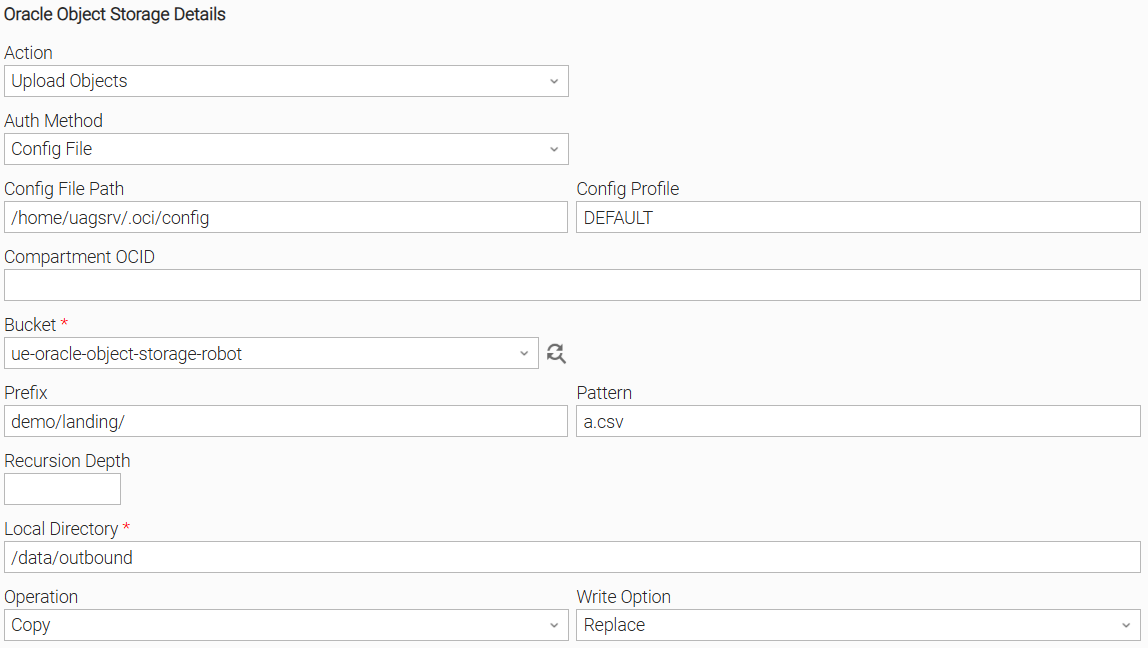
Example: Upload Objects, Config File authentication, copy, replace existing objects
Uploads the file matching the Pattern a.csv from the Local Directory on the agent into the demo/landing/ prefix of the bucket, authenticating with the DEFAULT profile of the OCI config file set in Config File Path. Operation is "Copy", so the local file remains, and Write Option is "Replace", so an existing object with the same name is overwritten. The task ends successfully once the file is uploaded, and the Extension Output lists the uploaded object in result.transferred.
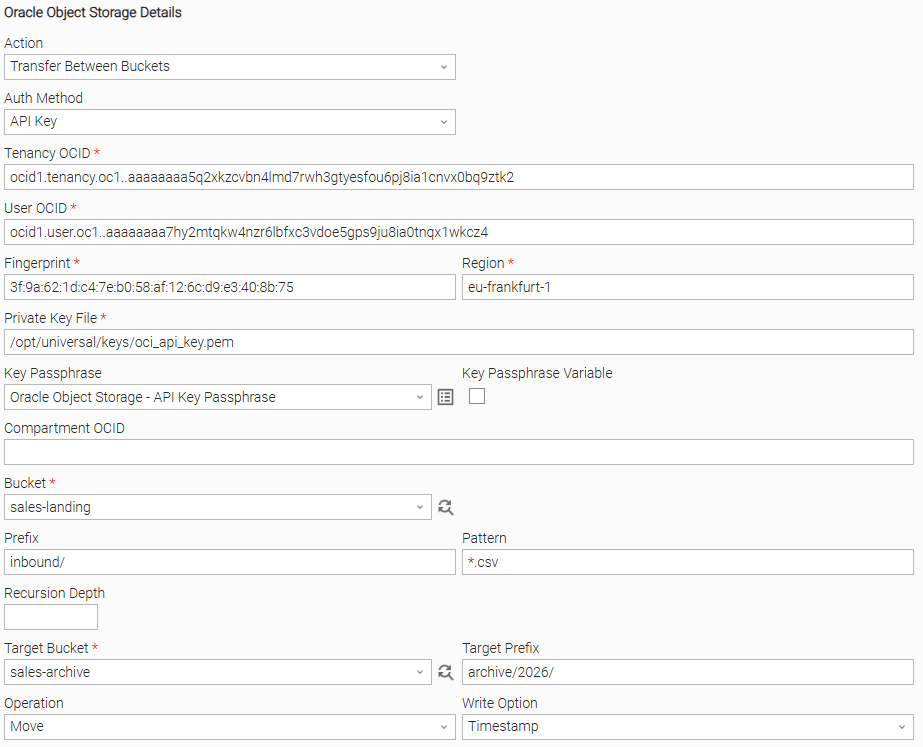
Example: Transfer Between Buckets, API Key authentication, move, timestamp existing objects
Moves every object matching *.csv under the inbound/ prefix of the source Bucket into the archive/2026/ prefix of the Target Bucket, recreating the paths below inbound/. Authentication uses the API key details entered on the task: Tenancy OCID, User OCID, Fingerprint, Region and the Private Key File on the agent, with the key's passphrase held in the Key Passphrase Credential. The copies run inside OCI, so no data passes through the agent. Operation is "Move", so each source object is deleted once its copy has completed, and Write Option is "Timestamp", so an object that already exists in the target is kept and the new copy is written with a timestamp suffix. The tenancy needs the Object Storage service policy described in Requirements.
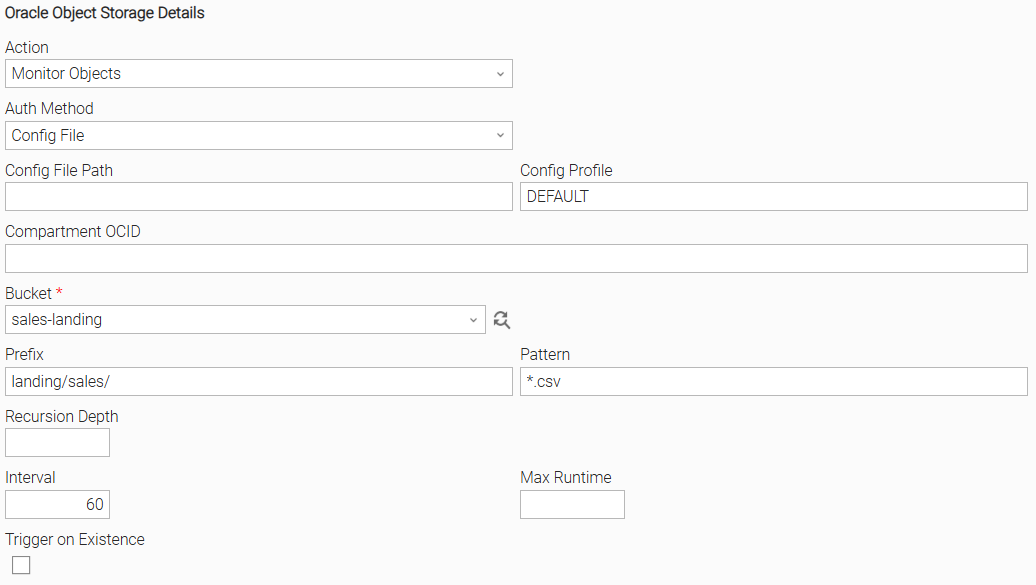
Example: Monitor Objects, new arrivals only, run until cancelled
Polls the landing/sales/ prefix of the bucket every 60 seconds for objects matching *.csv, authenticating with the DEFAULT profile of the OCI config file at ~/.oci/config, which is used when Config File Path is empty. Trigger on Existence is unchecked, so the objects already present when monitoring starts are ignored. For each new object, the task publishes the oracle_storage_matched_file Universal Event, so a Universal Monitor and its trigger can launch processing for each arriving object. Max Runtime is empty, so the task runs until it is cancelled, and then ends successfully with the matched objects in result.matched.
Input Fields
Name | Type | Description | Version Information |
|---|---|---|---|
Action | Choice | The operation performed on the bucket. Available options:
| Introduced in 1.0.0 |
Auth Method | Choice | The way the task authenticates to OCI. Available options:
| Introduced in 1.0.0 |
Config File Path | Text | The path to the OCI config file on the agent. Defaults to Available if Auth Method is "Config File". | Introduced in 1.0.0 |
Config Profile | Text | The profile in the config file that holds the tenancy, user, fingerprint, region and private key file. A passphrase for the private key is read from the profile's Available if Auth Method is "Config File". | Introduced in 1.0.0 |
Tenancy OCID | Text | The OCID of the tenancy, for example Available and required if Auth Method is "API Key". | Introduced in 1.0.0 |
User OCID | Text | The OCID of the user the API signing key belongs to. Available and required if Auth Method is "API Key". | Introduced in 1.0.0 |
Fingerprint | Text | The fingerprint of the API signing key's public key. Available and required if Auth Method is "API Key". | Introduced in 1.0.0 |
Region | Text | The OCI region identifier, for example Available and required if Auth Method is "API Key". | Introduced in 1.0.0 |
Private Key File | Text | The path on the agent to the PEM private key of the API signing key. The file must be readable by the agent user. Available and required if Auth Method is "API Key". | Introduced in 1.0.0 |
Key Passphrase | Credential | The Credential whose Runtime Password unlocks the private key. Left empty when the key is not encrypted. Available if Auth Method is "API Key". | Introduced in 1.0.0 |
Compartment OCID | Text | The OCID of the compartment whose buckets fill the Bucket and Target Bucket lists. When empty, the buckets of the root compartment are listed, whose OCID is the tenancy OCID. Not used when the task runs. | Introduced in 1.0.0 |
Bucket | Dynamic Choice | The bucket the action works in, and the source bucket for Transfer Between Buckets. The list is filled from the buckets in Compartment OCID, or in the root compartment when it is empty. | Introduced in 1.0.0 |
Prefix | Text | The object name prefix to read from or upload into, for example | Introduced in 1.0.0 |
Pattern | Text | The glob pattern matched against each object name, or file path for Upload Objects, relative to Prefix or Local Directory, for example | Introduced in 1.0.0 |
Recursion Depth | Integer | The number of path levels below Prefix, or below Local Directory for Upload Objects, that are included. | Introduced in 1.0.0 |
Target Bucket | Dynamic Choice | The bucket the objects are copied into, from the same list as Bucket. It can be the same bucket as Bucket. Available and required if Action is "Transfer Between Buckets". | Introduced in 1.0.0 |
Target Prefix | Text | The prefix the copies are written under, for example Available if Action is "Transfer Between Buckets". | Introduced in 1.0.0 |
Local Directory | Text | The directory on the agent that is the upload source or the download destination. For Download Objects, the directory must already exist. Available and required if Action is "Upload Objects" or "Download Objects". | Introduced in 1.0.0 |
Operation | Choice | The handling of the source once it is transferred. Available options:
Available and required if Action is "Upload Objects", "Download Objects" or "Transfer Between Buckets". | Introduced in 1.0.0 |
Write Option | Choice | The handling of a target object or file that already exists. Available options:
Available and required if Action is Upload Objects, Download Objects or Transfer Between Buckets. | Introduced in 1.0.0 |
Interval | Integer | The number of seconds between polls of the bucket. Defaults to Available if Action is "Monitor Objects". | Introduced in 1.0.0 |
Max Runtime | Integer | The number of seconds after which monitoring stops and the task ends successfully. The task can end up to one Interval later. Empty or Available if Action is "Monitor Objects". | Introduced in 1.0.0 |
Trigger on Existence | Checkbox | Check to also match the objects already present when monitoring starts. When unchecked, only objects that arrive later are matched. Available if Action is "Monitor Objects". | Introduced in 1.0.0 |
Environment Variables
Environment Variables can be set from the Environment Variables task definition table.
Environment Variable Name | Description | Version Information |
|---|---|---|
HTTPS_PROXY | The proxy used for the connections to OCI Object Storage, including those that fill the Bucket and Target Bucket lists. The lowercase | Introduced in 1.0.0 |
NO_PROXY | The comma-separated list of hosts that bypass the proxy. The lowercase | Introduced in 1.0.0 |
Cancellation and Rerun
- In case of cancellation, Upload Objects finishes the file in progress and stops before the next one, Download Objects stops during the object in progress and removes its partial
.partfile, and List Objects and Delete Objects stop before the next object. The task ends with exit code 40. Files and objects already transferred or deleted remain so, and with "Move" the sources of those already transferred stay removed. The names processed are returned inresult.transferred,result.skippedandresult.errors. For Delete Objects,result.transferredholds the objects deleted. - In case of cancellation, Transfer Between Buckets asks OCI to cancel the copy in progress, stops, and ends with exit code 40. Copies that completed remain, and with "Move" their sources stay removed. The cancellation of the copy in progress is best effort, because OCI can complete the copy before the request arrives.
- In case of cancellation, Monitor Objects stops monitoring and ends successfully with exit code 0, returning the objects matched so far in
result.matched. Cancelling is the designed way to stop a monitor without a Max Runtime. - In case of rerun, the task starts a new execution from the beginning. Transfers are evaluated again against the current contents of both sides, with Write Option determining how files and objects that already exist at the destination are handled. A rerun of Monitor Objects with Trigger on Existence unchecked ignores the objects already present, including any that arrived while no monitor was running.
Importable Configuration Examples
This integration provides importable configuration examples along with their dependencies, grouped as Use Cases to better describe end to end capabilities.
These examples aid in allowing task authors to get more familiar with the configuration of tasks and related Use Cases. Such tasks should be imported in a Test system and should not be used directly in production.
Initial Preparation Steps
- STEP 1: Go to Stonebranch Integration Hub and download the "Oracle Object Storage" and "UAC Utility: Email" integrations. Extract the downloaded archives in a local directory.
- STEP 2: Locate and import the above integrations to the target Universal Controller. For more information refer to the How To section in this document.
- STEP 3: Inside the directory named "configuration_examples" of the Oracle Object Storage archive you will find a list of definition zip files. Upload them one by one respecting the order presented below, by using the "Upload" functionality of Universal Controller:
- 1_variables.zip
- 2_credentials.zip
- 3_tasks.zip
- 4_workflows.zip
- STEP 4: Update the uploaded UAC Credential entity(ies) with the required credentials. Review each credential's description for guidance on what to provide.
- STEP 5: Update the UAC global variables introduced with the
*_variables.zipfile. Their name is prefixed with the extension name using underscores instead of hyphens. Review the descriptions of the variables as they include information on how they should be populated. - STEP 6: If applicable, create an OMS record on the Universal Controller. Ensure the address matches the one assigned to the relevant global variable from the previous step. For more information refer to Creating OMS Server Records.
- STEP 7: If applicable, create an Agent Cluster on the Universal Controller. Ensure the name matches the one assigned to the relevant global variable from the previous step. For more information refer to Creating an Agent Cluster.
- The order indicated above ensures that the dependencies of the imported entities need to be uploaded first.
- All imported entities are prefixed with the Use Case number (e.g. UC1, UC2, UC3) they belong to.
How to "Upload" Definition Files to a Universal Controller
The "Upload" functionality of Universal Controller allows Users to import definitions exported with the "Download" functionality.
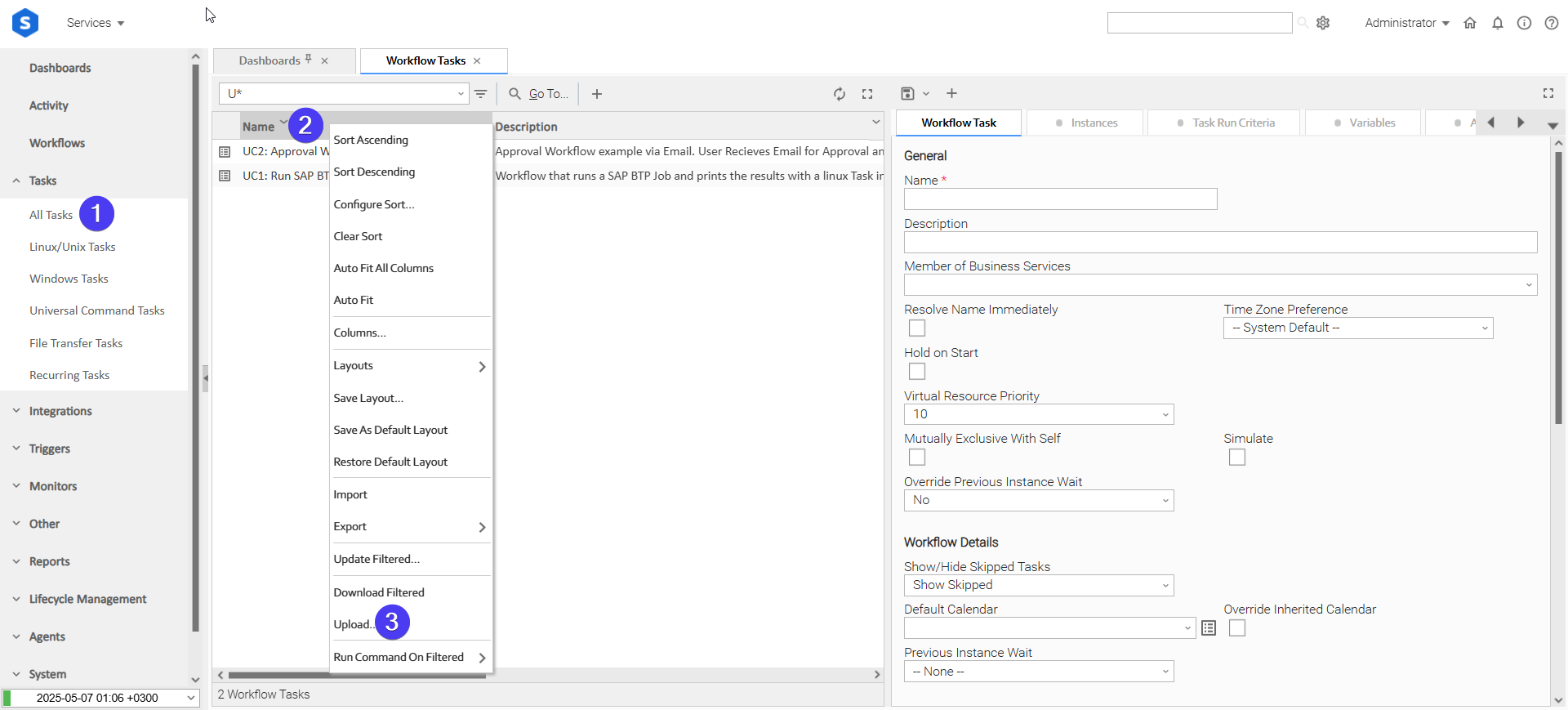
Login to Universal Controller and:
- STEP 1: Click "Tasks" → "All Tasks"
- STEP 2: Right click on the top of the column named "Name"
- STEP 3: Click "Upload..."
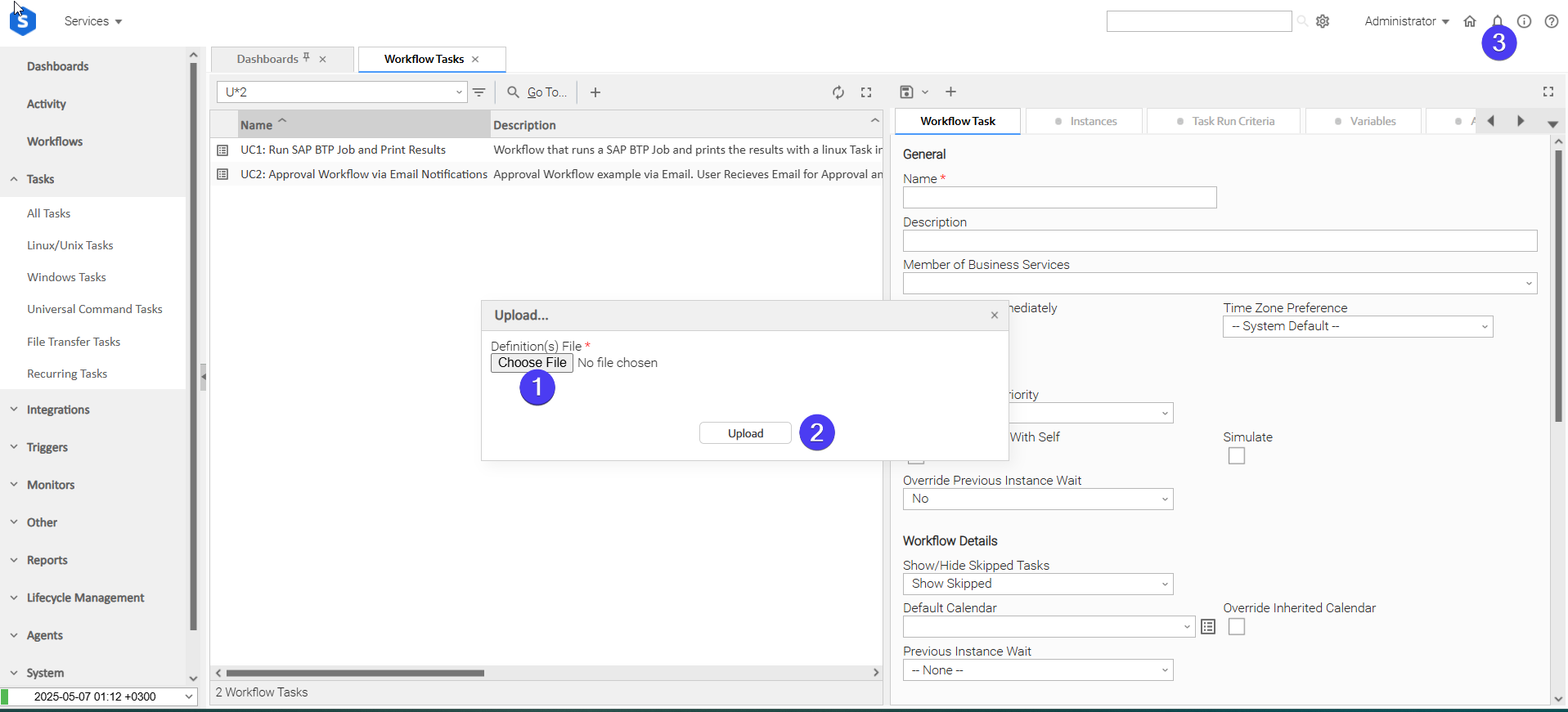
In the pop-up "Upload..." dialogue:
- STEP 1: Click "Choose File".
- STEP 2: Select the appropriate zip definition file and click "Upload".
- STEP 3: Observe the Console for possible errors.
Use Case 1: Deliver Agent Extracts to an Oracle Object Storage Landing Zone
Description
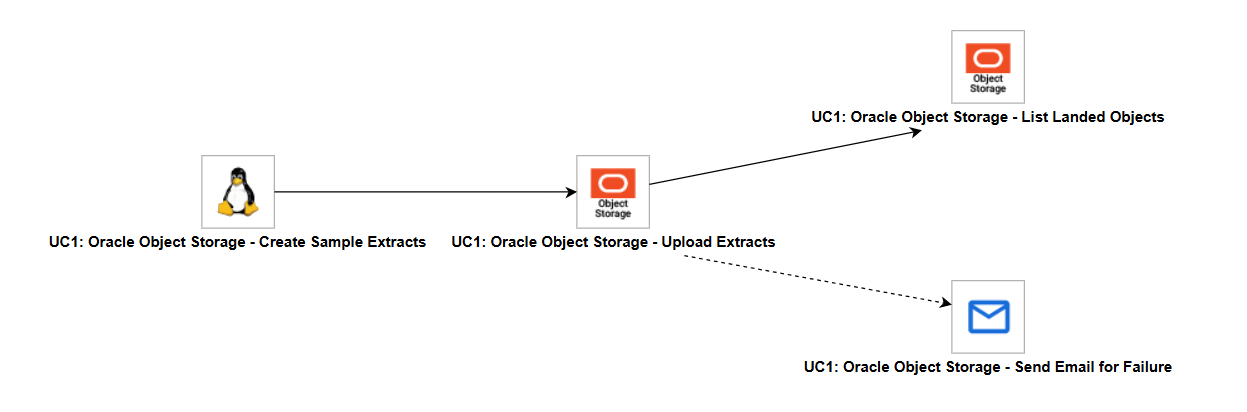
This Use Case creates sample CSV extracts on an agent, uploads them into a landing prefix of a bucket, and lists the landing prefix to confirm what was delivered. When the upload fails, an email notifies the recipients.
The workflow "UC1: Oracle Object Storage - Deliver Agent Extracts to Object Storage" is composed of the following components:
- UC1: Oracle Object Storage - Create Sample Extracts: A Linux/Unix Task that writes
emea/sample_sales.csvandamer/sample_sales.csvunder the agent directory set byue_oracle_object_storage_local_path. It stands in for the job that produces real extracts. - UC1: Oracle Object Storage - Upload Extracts: Uploads every file matching
*/sample_*.csv, with a Recursion Depth of 2, into the landing prefix set byue_oracle_object_storage_prefix, keeping the subdirectories in the object names. It authenticates with the OCI config file and profile set byue_oracle_object_storage_config_pathandue_oracle_object_storage_config_profile. Operation is"Copy", so the agent files are kept, and Write Option is "Replace", so a rerun overwrites the objects already delivered. - UC1: Oracle Object Storage - List Landed Objects: Runs when the upload succeeds and lists the landing prefix with the same pattern and depth.
- UC1: Oracle Object Storage - Send Email for Failure: Runs when the upload fails and emails the recipients set by
ue_oracle_object_storage_email_to, using the Email integration with Microsoft App Only authentication.
How to Run
Execution Steps
- Ensure all Initial Preparation Steps have been completed successfully.
- Ensure the agent set by
ue_oracle_object_storage_agentis a Linux/Unix agent, that the OCI config file set byue_oracle_object_storage_config_pathexists on it with the profile set byue_oracle_object_storage_config_profile, and that the bucket set byue_oracle_object_storage_bucketexists. - Launch the workflow task and monitor the execution in Universal Controller.
Expected Results
emea/sample_sales.csvandamer/sample_sales.csvare uploaded under the landing prefix, keeping their subdirectories in the object names.- The listing task returns the delivered objects in
result.objectsof its Extension Output. - The workflow completes in Success state when the upload and the listing succeed.
- To see the failure path, change the Pattern of the upload task to
*.json. No file matches, the upload ends with exit code 1, and the email is sent.
Exit Codes
Exit Code | Status | Description |
|---|---|---|
0 | Success | Successful Execution. |
1 | Failure | Generic Error. Raised when not falling into the other Error Codes, for example when nothing matches the Pattern, the Local Directory of a download does not exist, or the target of Transfer Between Buckets overlaps the source. |
2 | Failure | Authentication error. OCI rejected the API signing key. |
3 | Failure | Authorization error. The user lacks the required policy. |
10 | Failure | Connection error. The Object Storage endpoint could not be reached, or the service is busy or unavailable. |
20 | Failure | Input fields validation error, or the OCI config file, profile or private key could not be loaded. |
21 | Failure | Not found. The bucket or object does not exist. OCI also returns this when the user is not authorized to access the bucket. |
30 | Failure | Transfer failed. One or more files or objects could not be uploaded, downloaded, copied or deleted, while others may have succeeded or the files failed for different reasons. When nothing was transferred or skipped and every file failed for the same reason, the exit code of that reason is returned instead. |
40 | Failure | Cancelled. The task instance was cancelled during execution. Not returned by Monitor Objects, which ends successfully when cancelled. |
Document References
Document Link | Description |
|---|---|
Describes buckets, objects, namespaces and prefixes in Object Storage. | |
Describes how to generate an API signing key, upload its public key, and find the tenancy OCID, the user OCID and the key fingerprint. | |
Describes the format and default location of the OCI config file read when Auth Method is "Config File". | |
Describes the IAM policy verbs and permissions for buckets and objects. | |
Describes object copies between buckets and the Object Storage service policy that Transfer Between Buckets requires. |
Changelog
ue-oracle-object-storage-1.0.0 (2026-10-27)
Initial Version