Oracle OIC
Disclaimer
Your use of this download is governed by Stonebranch's Terms of Use.
Version Information
Template Name | Extension Name | Version | Status |
|---|---|---|---|
Oracle OIC | ue-oracle-oic | 1.0.2 | Fixes and new Features are introduced. |
Refer to Changelog for version history information.
Overview
Oracle Integration Cloud (OIC) is Oracle's cloud-based platform for building and managing integrations between enterprise applications, enabling automated data exchange and process flows across cloud and on-premise systems.
This Universal Extension provides the capability to trigger pre-built OIC integrations directly from UAC, allowing Oracle integrations to participate in broader automation pipelines managed by UAC. Scheduled integrations can be triggered on demand rather than waiting for their OIC-defined schedule, and their execution can be tracked until a final state is reached. REST-based integrations can be invoked through their trigger endpoint and return results immediately upon completion. Jobs can also be launched and monitored through an Oracle API Gateway. To support pipeline setup and discovery, the extension can retrieve and display all integrations available on a given OIC instance.
Parameters and payloads can be defined inline or loaded from external files, and execution results are captured and made available for use in subsequent pipeline steps, giving full control over how OIC integrations fit within a larger automation context.
Key Features
Feature | Description |
|---|---|
Start Integrations and Gateway Jobs | Start OIC Gateway Jobs and REST and Scheduled Integrations. |
Monitor Integrations and Gateway Jobs | Monitor for Integrations and Jobs with setting monitor interval and number of times for monitor retry. |
Configure Payload for Job Execution | Configure payload to be sent when starting jobs and integrations. |
Configure Parameters for Job Execution | Configure parameters for job execution for OIC Gateway Jobs. |
Configure Parameters for REST Integrations | Configure query parameters when starting REST integrations. |
Requirements
This integration requires a Universal Agent and a Python runtime to execute the Universal Task.
Area | Details |
|---|---|
Python Version | Requires Python 3.11, tested with Agent bundled python distribution |
Universal Agent Compatibility |
|
Universal Controller Compatibility | Universal Controller Version >= 7.6.0.0. |
Network and Connectivity | Network Connectivity to Oracle. |
Supported Actions
Action: Start - Scheduled Integration
This action triggers a pre-built scheduled OIC integration on demand, bypassing its OIC-defined schedule, and tracks the execution until a final state is reached.
Action Output
- EXTENSION
- STDOUT
The extension output provides the following information:
exit_code, status_description: General info regarding the task execution. For more information users can refer to the exit code table.invocation.fields: The task configuration used for this task execution.result.execution_status:Displays the Execution Status of the integration.result.response:Displays the full response of the starting of the integration.result.activity_stream:Displays activity stream details if Activity Stream field is checked.result.errors:List of errors that might have occurred during execution.
Successful Execution
{
    "exit_code": 0,
    "status_description": "Task executed successfully",
    "invocation": {
      "extension": "ue-oracle-oic",
      "version": "1.0.2",
      "fields": {
        "action": "Start - Scheduled Integration",
        "authentication": "Oauth 2.0",
        "grant_type": "Client Credentials",
        "token_url": "https://idcs.example.com/oauth2/v1/token",
        "client_id_secret": "****",
        "username_password": "****",
        "scope": "https://oic.example.com:443urn:opc:resource:consumer::all",
        "oic_base_url": "https://oic.example.com",
        "oic_rest_base_url": "https://oic.example.com",
        "oic_rest_monitor_url": "",
        "use_tst_endpoint_rest": false,
        "integration_instance": "my-oic-instance",
        "integration_version": "01.00.0000",
        "project_id": "",
        "integration_filter": "",
        "integration_status": "-- None --",
        "integration_id": "MY_SCHEDULED_INTEGRATION|ACTIVATED",
        "payload_exec_as_script": false,
        "payload_for_exec_script": "",
        "payload_for_execution": [
          { "startDate": "2024-01-15" },
          { "region": "US" }
        ],
        "wait_for_execution": true,
        "monitor_interval": 30,
        "monitor_retry": 10,
        "activity_stream": true,
        "stdout_output": "Show Full Response",
        "extension_output": ["Show Execution Status", "Show Full Response"]
      }
    },
    "result": {
      "execution_status": "SUCCEEDED",
      "response": {
        "job": {
          "instanceId": "abc-123-xyz",
          "status": "SUCCEEDED",
          "integrationCode": "MY_SCHEDULED_INTEGRATION",
          "integrationVersion": "01.00.0000",
          "startTime": "2024-01-15T10:00:00.000Z",
          "endTime": "2024-01-15T10:05:32.000Z"
        },
        "activityStream": {
          "statusCode": 200,
          "details": {
            "items": [
              {
                "activityType": "BPM",
                "status": "COMPLETED",
                "message": "Integration completed successfully"
              }
            ]
          }
        }
      },
      "activity_stream": {
        "statusCode": 200,
        "details": {
          "items": [
            {
              "activityType": "BPM",
              "status": "COMPLETED",
              "message": "Integration completed successfully"
            }
          ]
        }
      }
    }
  }
Failed Execution
{
    "exit_code": 1,
    "status_description": "Execution Failed: Max number of retries: 10 reached, quitting program with error status code
  40",
    "invocation": {
      "extension": "ue-oracle-oic",
      "version": "1.0.2",
      "fields": {
        "action": "Start - Scheduled Integration",
        "authentication": "Oauth 2.0",
        "grant_type": "Client Credentials",
        "token_url": "https://idcs.example.com/oauth2/v1/token",
        "client_id_secret": "****",
        "username_password": "****",
        "scope": "https://oic.example.com:443urn:opc:resource:consumer::all",
        "oic_base_url": "https://oic.example.com",
        "oic_rest_base_url": "https://oic.example.com",
        "oic_rest_monitor_url": "",
        "use_tst_endpoint_rest": false,
        "integration_instance": "my-oic-instance",
        "integration_version": "01.00.0000",
        "project_id": "",
        "integration_filter": "",
        "integration_status": "-- None --",
        "integration_id": "MY_SCHEDULED_INTEGRATION|ACTIVATED",
        "payload_exec_as_script": false,
        "payload_for_exec_script": "",
        "payload_for_execution": [
          { "startDate": "2024-01-15" },
          { "region": "US" }
        ],
        "wait_for_execution": true,
        "monitor_interval": 30,
        "monitor_retry": 10,
        "activity_stream": true,
        "stdout_output": "Show Full Response",
        "extension_output": ["Show Execution Status", "Show Full Response"]
      }
    },
    "result": {
      "errors": [
        "Max number of retries: 10 reached, quitting program with error status code 40"
      ]
    }
  }
When configured through the STDOUT Output field:
SUCCEEDED
When Activity Stream is checked, the activity stream details are also printed to STDOUT:
SUCCEEDED

Activity Stream Details:
{
  "statusCode": 200,
  "details": {
    "items": [
      {
        "activityType": "BPM",
        "status": "COMPLETED",
        "message": "Integration completed successfully"
      }
    ]
  }
}
{
  "job": {
    "instanceId": "abc-123-xyz",
    "status": "SUCCEEDED",
    "integrationCode": "MY_SCHEDULED_INTEGRATION",
    "integrationVersion": "01.00.0000",
    "startTime": "2024-01-15T10:00:00.000Z",
    "endTime": "2024-01-15T10:05:32.000Z"
  },
  "activityStream": {}
}
Action: Start - REST Integration
The action invokes a pre-built REST-based OIC integration through its trigger endpoint and returns the results upon a successful response from OIC.
Action Output
- EXTENSION
- STDOUT
The extension output provides the following information:
exit_code, status_description: General info regarding the task execution. For more information users can refer to the exit code table.invocation.fields: The task configuration used for this task execution.result.execution_status:Displays the Execution Status of the integration.result.response:Displays the full response of the starting of the integration.result.errors:List of errors that might have occurred during execution.
Successful Execution
{
  "exit_code": 0,
  "status_description": "Task executed successfully",
  "invocation": {
    "extension": "ue-oracle-oic",
    "version": "1.0.0",
    "fields": {
      "action": "Start - REST Integration",
      "authentication": "Oauth 2.0",
      "grant_type": "Client Credentials",
      "token_url": "https://idcs.example.com/oauth2/v1/token",
      "client_id_secret": "****",
      "username_password": "****",
      "scope": "https://oic.example.com:443urn:opc:resource:consumer::all",
      "oic_base_url": "https://oic.example.com",
      "oic_rest_base_url": "https://oic.example.com",
      "oic_rest_monitor_url": "",
      "use_tst_endpoint_rest": false,
      "integration_instance": "my-oic-instance",
      "integration_version": "01.00.0000",
      "project_id": "",
      "integration_filter": "",
      "integration_status": "-- None --",
      "integration_id": "MY_REST_INTEGRATION|ACTIVATED",
      "parameters_rest_as_script": false,
      "parameters_for_rest_script": "",
      "parameters_for_rest": [
        { "startDate": "2024-01-15" },
        { "region": "US" }
      ],
      "wait_for_execution": true,
      "monitor_interval": 30,
      "monitor_retry": 10,
      "activity_stream": false,
      "stdout_output": "Show Full Response",
      "extension_output": ["Show Execution Status", "Show Full Response"]
    }
  },
  "result": {
    "execution_status": "REST Integration completed successfully",
    "response": {
      "status": "SUCCESS",
      "message": "Data processed successfully",
      "recordsProcessed": 150
    }
  }
}
Failed Execution
{
  "exit_code": 1,
  "status_description": "Execution Failed: {\"code\": 400, \"message\": \"Bad Request: invalid parameter value for
'startDate'\"}",
  "invocation": {
    "extension": "ue-oracle-oic",
    "version": "1.0.0",
    "fields": {
      "action": "Start - REST Integration",
      "authentication": "Oauth 2.0",
      "grant_type": "Client Credentials",
      "token_url": "https://idcs.example.com/oauth2/v1/token",
      "client_id_secret": "****",
      "username_password": "****",
      "scope": "https://oic.example.com:443urn:opc:resource:consumer::all",
      "oic_base_url": "https://oic.example.com",
      "oic_rest_base_url": "https://oic.example.com",
      "oic_rest_monitor_url": "",
      "use_tst_endpoint_rest": false,
      "integration_instance": "my-oic-instance",
      "integration_version": "01.00.0000",
      "project_id": "",
      "integration_filter": "",
      "integration_status": "-- None --",
      "integration_id": "MY_REST_INTEGRATION|ACTIVATED",
      "parameters_rest_as_script": false,
      "parameters_for_rest_script": "",
      "parameters_for_rest": [
        { "startDate": "invalid-date" },
        { "region": "US" }
      ],
      "wait_for_execution": true,
      "monitor_interval": 30,
      "monitor_retry": 10,
      "activity_stream": false,
      "stdout_output": "Show Full Response",
      "extension_output": ["Show Execution Status", "Show Full Response"]
    }
  },
  "result": {
    "errors": [
      "{\"code\": 400, \"message\": \"Bad Request: invalid parameter value for 'startDate'\"}"
    ]
  }
}
When configured through the STDOUT Output field:
REST Integration completed successfully
{
  "status": "SUCCESS",
  "message": "Data processed successfully",
  "recordsProcessed": 150
}
Action: Start - OIC Gateway Job
Using this action, a job is submitted to OIC through an Oracle API Gateway and monitored until a completed state is reached.
Action Output
- EXTENSION
- STDOUT
The extension output provides the following information:
exit_code, status_description: General info regarding the task execution. For more information users can refer to the exit code table.invocation.fields: The task configuration used for this task execution.result.execution_status:Displays the Execution Status of the job.result.response:Displays the full response of the starting of the job.result.errors:List of errors that might have occurred during execution.
Successful Execution
{
  "exit_code": 0,
  "status_description": "Job submitted (status is Succeeded).",
  "invocation": {
    "extension": "ue-oracle-oic",
    "version": "1.0.0",
    "fields": {
      "action": "Start - OIC Gateway Job",
      "authentication": "Oauth 2.0",
      "grant_type": "Password Credentials",
      "token_url": "https://idcs.example.com/oauth2/v1/token",
      "client_id_secret": "****",
      "username_password": "****",
      "scope": "https://oic.example.com:443urn:opc:resource:consumer::all",
      "oic_base_url": "https://oic.example.com/gateway/MYAPI/1.0",
      "oic_rest_base_url": "https://oic.example.com",
      "oic_rest_monitor_url": "",
      "use_tst_endpoint_rest": false,
      "integration_instance": "my-oic-instance",
      "integration_version": "01.00.0000",
      "project_id": "",
      "integration_filter": "",
      "integration_status": "-- None --",
      "integration_id": "MY_GATEWAY_JOB|ACTIVATED",
      "parameters_exec_as_script": false,
      "parameters_for_exec_script": "",
      "parameters_for_execution": [
        { "runDate": "2024-01-15" },
        { "batchSize": "500" }
      ],
      "payload_exec_as_script": false,
      "payload_for_exec_script": "",
      "payload_for_execution": [
        { "entity": "Orders" },
        { "mode": "FULL" }
      ],
      "wait_for_execution": true,
      "monitor_interval": 30,
      "monitor_retry": 10,
      "activity_stream": false,
      "stdout_output": "Show Full Response",
      "extension_output": ["Show Execution Status", "Show Full Response"]
    }
  },
  "result": {
    "execution_status": "Job submitted (status is Succeeded).",
    "response": {
      "Status": "Success",
      "InstanceID": "abc-456-xyz",
      "Message": "Job completed successfully",
      "StartTime": "2024-01-15T10:00:00.000Z",
      "EndTime": "2024-01-15T10:08:45.000Z"
    }
  }
}
Failed Execution
{
  "exit_code": 1,
  "status_description": "Execution Failed: Error status of the OIC Job, RC is not 200",
  "invocation": {
    "extension": "ue-oracle-oic",
    "version": "1.0.0",
    "fields": {
      "action": "Start - OIC Gateway Job",
      "authentication": "Oauth 2.0",
      "grant_type": "Password Credentials",
      "token_url": "https://idcs.example.com/oauth2/v1/token",
      "client_id_secret": "****",
      "username_password": "****",
      "scope": "https://oic.example.com:443urn:opc:resource:consumer::all",
      "oic_base_url": "https://oic.example.com/gateway/MYAPI/1.0",
      "oic_rest_base_url": "https://oic.example.com",
      "oic_rest_monitor_url": "",
      "use_tst_endpoint_rest": false,
      "integration_instance": "my-oic-instance",
      "integration_version": "01.00.0000",
      "project_id": "",
      "integration_filter": "",
      "integration_status": "-- None --",
      "integration_id": "MY_GATEWAY_JOB|ACTIVATED",
      "parameters_exec_as_script": false,
      "parameters_for_exec_script": "",
      "parameters_for_execution": [
        { "runDate": "2024-01-15" },
        { "batchSize": "500" }
      ],
      "payload_exec_as_script": false,
      "payload_for_exec_script": "",
      "payload_for_execution": [
        { "entity": "Orders" },
        { "mode": "FULL" }
      ],
      "wait_for_execution": true,
      "monitor_interval": 30,
      "monitor_retry": 10,
      "activity_stream": false,
      "stdout_output": "Show Full Response",
      "extension_output": ["Show Execution Status", "Show Full Response"]
    }
  },
  "result": {
    "errors": [
      "Error status of the OIC Job, RC is not 200"
    ]
  }
}
When configured through the STDOUT Output field:
Job submitted (status is Succeeded).
{
  "Status": "Success",
  "InstanceID": "abc-456-xyz",
  "Message": "Job completed successfully",
  "StartTime": "2024-01-15T10:00:00.000Z",
  "EndTime": "2024-01-15T10:08:45.000Z"
}
Action: List - Integrations
This action retrieves and displays all integrations available on a given OIC instance, including their ID, version, status, and name.
Action Output
- EXTENSION
- STDOUT
The extension output provides the following information:
exit_code, status_description: General info regarding the task execution. For more information users can refer to the exit code table.invocation.fields: The task configuration used for this task execution.result.execution_status:Displays the Execution Status of the integration.result.response:Displays the full response of the starting of the integration.result.errors:List of errors that might have occurred during execution.
Successful Execution
{
  "exit_code": 0,
  "status_description": "Task executed successfully",
  "invocation": {
    "extension": "ue-oracle-oic",
    "version": "1.0.0",
    "fields": {
      "action": "List - Integrations",
      "authentication": "Oauth 2.0",
      "grant_type": "Client Credentials",
      "token_url": "https://idcs.example.com/oauth2/v1/token",
      "client_id_secret": "****",
      "username_password": "****",
      "scope": "https://oic.example.com:443urn:opc:resource:consumer::all",
      "oic_base_url": "https://oic.example.com",
      "oic_rest_base_url": "https://oic.example.com",
      "oic_rest_monitor_url": "",
      "use_tst_endpoint_rest": false,
      "integration_instance": "my-oic-instance",
      "integration_version": "01.00.0000",
      "project_id": "",
      "integration_filter": "",
      "integration_status": "-- None --",
      "integration_id": "MY_SCHEDULED_INTEGRATION|ACTIVATED",
      "wait_for_execution": false,
      "monitor_interval": 30,
      "monitor_retry": 10,
      "activity_stream": false,
      "stdout_output": "Show Full Response",
      "extension_output": ["Show Execution Status", "Show Full Response"]
    }
  },
  "result": {
    "execution_status": "Successfully listed 3 integrations",
    "response": {
      "items": [
        {
          "code": "MY_SCHEDULED_INTEGRATION",
          "version": "01.00.0000",
          "status": "ACTIVATED",
          "name": "My Scheduled Integration"
        },
        {
          "code": "MY_REST_INTEGRATION",
          "version": "01.00.0000",
          "status": "ACTIVATED",
          "name": "My REST Integration"
        },
        {
          "code": "MY_INACTIVE_INTEGRATION",
          "version": "01.00.0000",
          "status": "CONFIGURED",
          "name": "My Inactive Integration"
        }
      ],
      "count": 3,
      "totalResults": 3,
      "hasMore": false,
      "limit": 50,
      "offset": 0
    }
  }
}
Failed Execution
{
  "exit_code": 1,
  "status_description": "Execution Failed: {\"code\": 401, \"message\": \"Unauthorized: invalid or expired access
token\"}",
  "invocation": {
    "extension": "ue-oracle-oic",
    "version": "1.0.0",
    "fields": {
      "action": "List - Integrations",
      "authentication": "Oauth 2.0",
      "grant_type": "Client Credentials",
      "token_url": "https://idcs.example.com/oauth2/v1/token",
      "client_id_secret": "****",
      "username_password": "****",
      "scope": "https://oic.example.com:443urn:opc:resource:consumer::all",
      "oic_base_url": "https://oic.example.com",
      "oic_rest_base_url": "https://oic.example.com",
      "oic_rest_monitor_url": "",
      "use_tst_endpoint_rest": false,
      "integration_instance": "my-oic-instance",
      "integration_version": "01.00.0000",
      "project_id": "",
      "integration_filter": "",
      "integration_status": "-- None --",
      "integration_id": "MY_SCHEDULED_INTEGRATION|ACTIVATED",
      "wait_for_execution": false,
      "monitor_interval": 30,
      "monitor_retry": 10,
      "activity_stream": false,
      "stdout_output": "Show Full Response",
      "extension_output": ["Show Execution Status", "Show Full Response"]
    }
  },
  "result": {
    "errors": [
      "{\"code\": 401, \"message\": \"Unauthorized: invalid or expired access token\"}"
    ]
  }
}
When configured through the STDOUT Output field:
Successfully listed 3 integrations
Found 3 integrations:

Integration ID            Version     Status      Integration Name
------------------------  ----------  ----------  ------------------------
MY_SCHEDULED_INTEGRATION  01.00.0000  ACTIVATED   My Scheduled Integration
MY_REST_INTEGRATION       01.00.0000  ACTIVATED   My REST Integration
MY_INACTIVE_INTEGRATION   01.00.0000  CONFIGURED  My Inactive Integration
Configuration Examples
Example: Start and Monitor Scheduled Integration
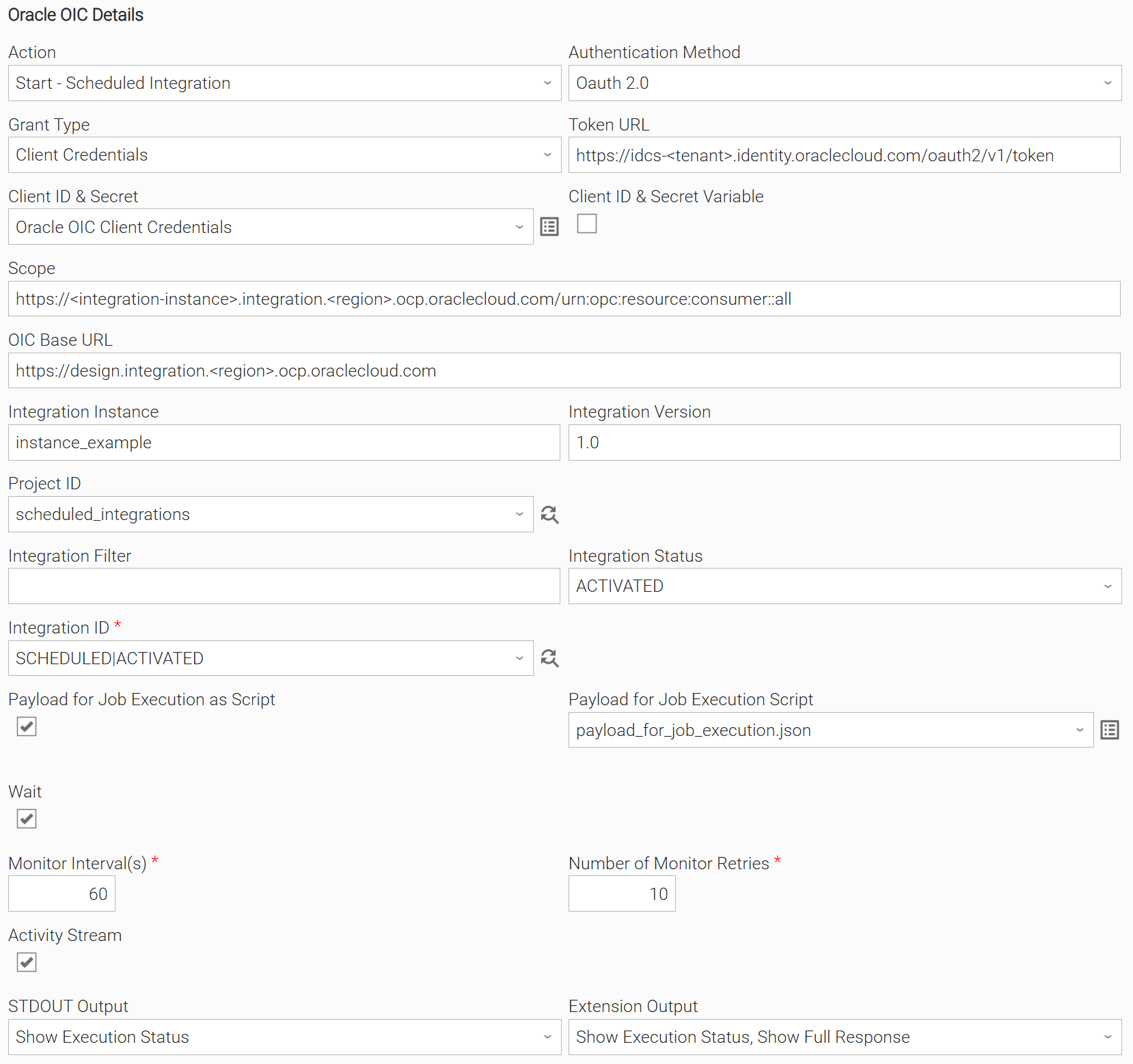
Start and monitor until the Scheduled Integration finishes in Project "scheduled_integrations" using "Client Credentials" Grant Type. The Payload for Job Execution is set through UAC Script. The execution status is displayed on STDOUT, while both the execution status and response are displayed on the Extension Output. Since Activity Stream is checked, the activity stream details are also displayed on both output types.
Example: Start and Wait for REST Integration to complete
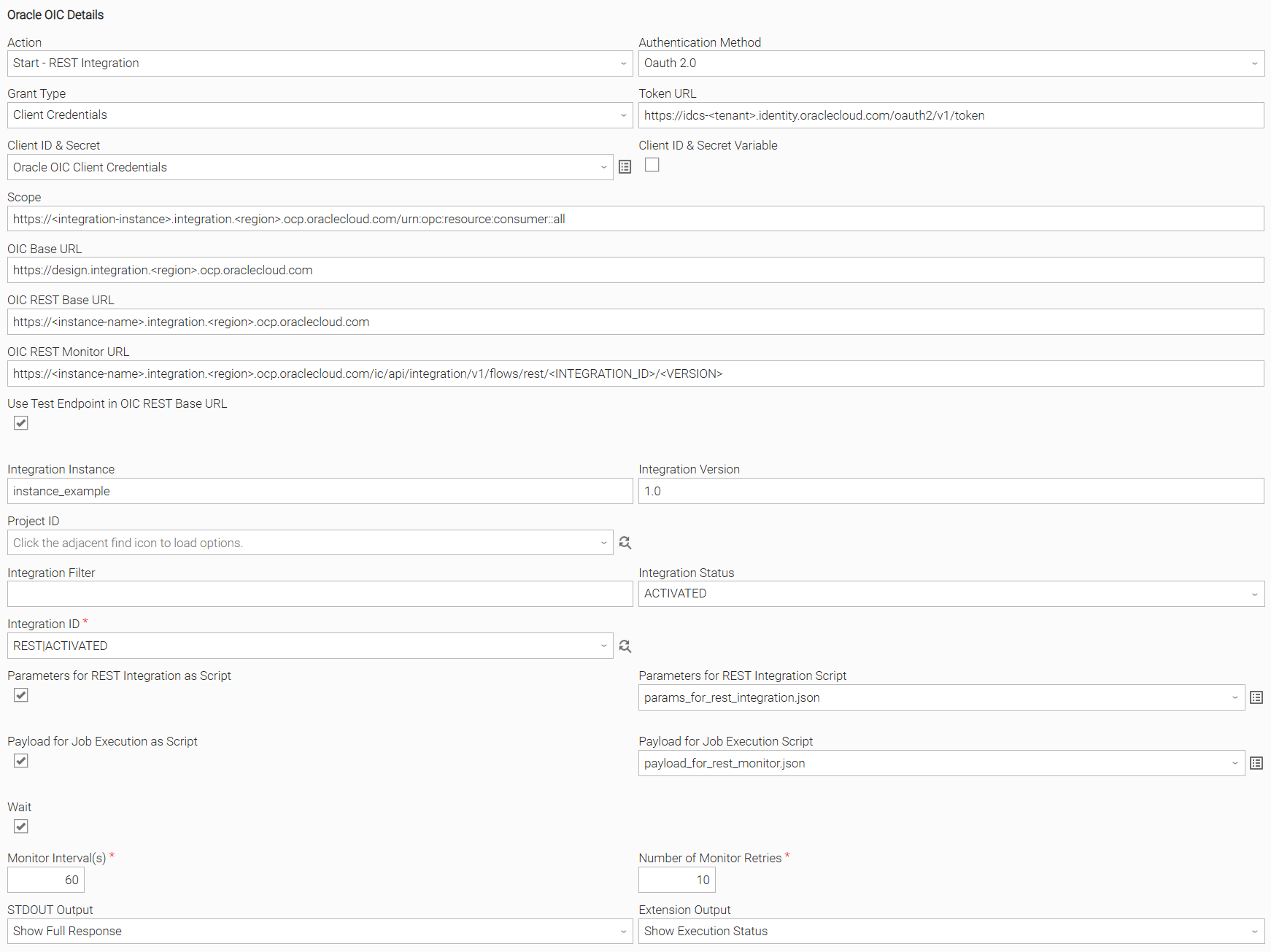
Start and wait for the REST Integration to complete with using "Client Credentials" Grant Type and configured OIC REST Monitor URL. Use Test Endpoint in OIC REST Base URL is checked. The Parameters for REST Integration and Payload for Job Execution are set through UAC Script. The response is displayed on STDOUT, while the execution status is displayed on the Extension Output.
Example: Start and Monitor OIC Gateway Job
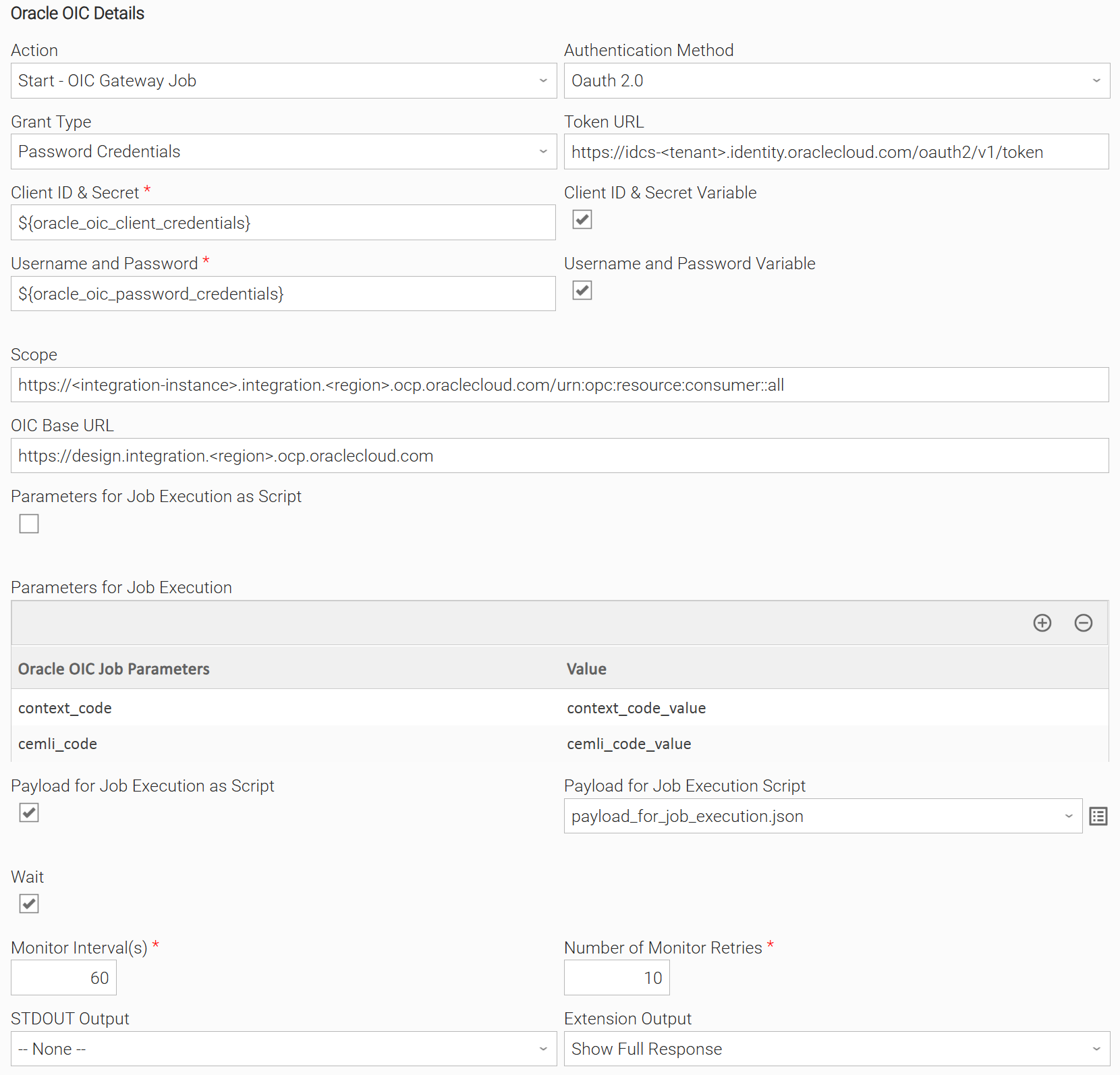
Start and monitor until the OIC Gateway Job finishes using "Password Credentials" Grant Type. The Parameters for Job Execution are set through Array Field, while the Payload for Job Execution is set using UAC Script. No information is displayed on STDOUT, while the response is displayed on the Extension Output.
Example: List Integrations
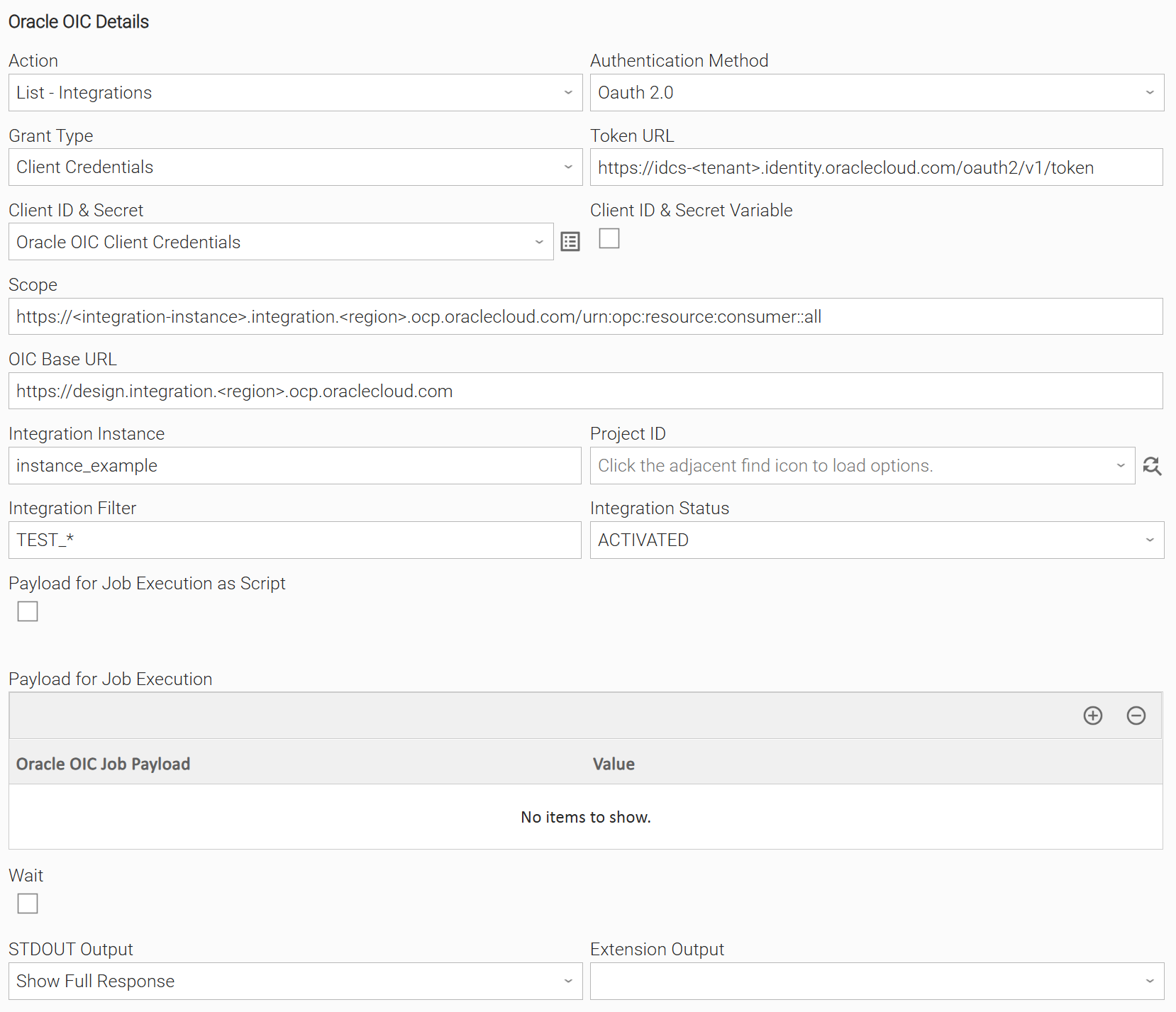
List all integrations that have status "ACTIVATED" and begin with "TEST" using "Client Credentials" Grant Type. The response listing all integrations and their information is displayed on STDOUT, while no information is displayed on the Extension Output.
Input Fields
Name | Type | Description | Version Information |
|---|---|---|---|
Action | Choice | The action performed upon the task execution.
| Introduced in 1.0.0 |
Authentication Method | Choice | The authentication method used to connect to the Oracle OIC platform. Authentication methods currently supported:
| Introduced in 1.0.0 |
Grant Type | Choice | The OAuth 2.0 grant type used to obtain an access token.
| Introduced in 1.0.0 |
Token URL | Text | The endpoint used to request an OAuth 2.0 access token. | Introduced in 1.0.0 |
Client ID & Secret | Credentials | The client credentials used to authenticate against the OAuth 2.0 token endpoint. The definition of the credential should be as follows:
| Introduced in 1.0.0 |
Username and Password | Credentials | The user credentials used when authenticating with the Password Credentials grant type. The definition of the credential should be as follows:
Available when Grant Type is "Password Credentials". | Introduced in 1.0.0 |
Scope | Text | The OAuth 2.0 scope defining the level of access requested for the token. | Introduced in 1.0.0 |
OIC Base URL | Text | The base URL of the OIC instance. | Introduced in 1.0.0 |
OIC REST Base URL | Text | The base URL used to invoke REST-based OIC integrations on the OIC instance. Available when Action is "Start - REST Integration". | Introduced in 1.0.0 |
OIC REST Monitor URL | Text | The URL used to poll for the completion status of a REST integration triggered asynchronously. When set, the extension submits the integration via POST using a generated TraceId, then polls this URL until a final state is reached. Available when Action is "Start - REST Integration". | Introduced in 1.0.0 |
Use Test Endpoint in OIC REST Base URL | Checkbox | Enable using test endpoint in the OIC REST Base URL. This enables appending "/test" to the URL. Available when Action is "Start - REST Integration". | Introduced in 1.0.0 |
Integration Instance | Text | The name of the OIC integration instance to target. Available when Action is "Start - Scheduled Integration", "Start - REST Integration" or "List - Integrations". | Introduced in 1.0.0 |
Integration Version | Text | The version of the integration to be triggered. Available when Action is "Start - Scheduled Integration" or "Start - REST Integration". | Introduced in 1.0.0 |
Project ID | Dynamic Choice | The OIC project identifier used to scope integration lookups to a specific project. When set, API requests target integrations and schedules within that project. Available when Action is "Start - Scheduled Integration", "Start - REST Integration" or "List - Integrations". | Introduced in 1.0.0 |
Integration Filter | Text | A wildcard pattern used to filter integrations by code or name. Supports Available when Action is "List - Integrations". | Introduced in 1.0.0 |
Integration Status | Choice | Filters integrations by status when Integration Filter is set.
Available when Action is "List - Integrations". | Introduced in 1.0.0 |
Integration ID | Dynamic Choice | The unique identifier of the integration to be executed. Available and required when Action is "Start - Scheduled Integration" or "Start - REST Integration" . | Introduced in 1.0.0 |
Parameters for Job Execution as Script | Checkbox | Enable specifying Parameters for Job Execution through UAC Script. Available when Action is "Start - OIC Gateway Job". | Introduced in 1.0.0 |
Parameters for Job Execution Script | Script | The UAC Script containing the Parameters for Job Execution in JSON format. Available when Parameters for Job Execution as Script is checked. | Introduced in 1.0.0 |
Parameters for Job Execution | Array | The list of key-value pairs passed as parameters when launching the OIC Gateway Job. Available when Parameters for Job Execution as Script is unchecked. | Introduced in 1.0.0 |
Parameters for Rest Integration as Script | Checkbox | Enable specifying Parameters for Rest Integration through UAC Script. Available when Action is "Start - REST Integration". | Introduced in 1.0.0 |
Parameters for Rest Integration Script | Script | The UAC Script containing the Parameters for Rest Integration in JSON format. Available when Parameters for Rest Integration as Script is checked. | Introduced in 1.0.0 |
Parameters for Rest Integration | Array | The list of key-value pairs passed as query parameters when invoking the REST integration. Available when Parameters for Rest Integration as Script is unchecked. | Introduced in 1.0.0 |
Payload for Job Execution as Script | Checkbox | Enable specifying Payload for Job Execution through UAC Script. Available when Action is "Start - Scheduled Integration", "Start - OIC Gateway Job", or "List - Integrations". | Introduced in 1.0.0 |
Payload for Job Execution Script | Script | The UAC Script containing the Payload for Job Execution in JSON format. Available when Payload for Job Execution as Script is checked. | Introduced in 1.0.0 |
Payload for Job Execution | Array | The key-value pairs sent as the request body when submitting the job. Available when Payload for Job Execution as Script is unchecked. | Introduced in 1.0.0 |
Wait | Checkbox | When enabled, the extension waits for the integration or job to reach a final state before completing. | Introduced in 1.0.0 |
Monitor Interval(s) | Integer | The number of seconds to wait between each status check when monitoring execution progress. Available when Wait is checked. | Introduced in 1.0.0 |
Number of Monitor Retries | Integer | The maximum number of status checks performed before the execution is considered timed out. Available when Wait is checked. | Introduced in 1.0.0 |
Activity Stream | Checkbox | When enabled, the activity stream details of the scheduled integration execution are fetched and included in the output. Available when Action is "Start - Scheduled Integration". | Introduced in 1.0.0 |
STDOUT Output | Choice | Specify the information to be displayed in STDOUT. The following options are available:
| Introduced in 1.0.0 |
Extension Output | Multiple Choice | Specify the information to be displayed in the EXTENSION output. The following options are available:
| Introduced in 1.0.0 |
Output Fields
The following output-only fields provide better visibility during the execution of Universal Task Instances.
Name | Type | Description | Version Information |
|---|---|---|---|
OIC Run Instance ID | Text | The instance ID assigned by OIC when the OIC Gateway Job is launched. Available when Action is "Start - OIC Gateway Job". | Introduced in 1.0.0 |
Environment Variables
Environment Variables can be set from the Environment Variables task definition table. The following environment variables can affect the behavior of the extension.
Environment Variable Name | Description | Version Information |
|---|---|---|
UE_HTTP_TIMEOUT | This environment variable defines the global timeout value for all HTTP requests to Oracle. It affects both connection and read timeouts, preventing requests from hanging. Accepted values: Positive integer (in seconds). If the environment variable is not set, the timeout will default to 300 seconds. | Introduced in 1.0.0 |
UE_SSL_CERT_FILE | The path to a custom CA bundle or certificate file used to verify SSL certificates for all HTTP requests to Oracle. When set, the provided file is used instead of the default system CA bundle. | Introduced in 1.0.0 |
UE_ORACLE_OIC_USE_IC_API | When set to | Introduced in 1.0.1 |
Importable Configuration Examples
This integration provides importable configuration examples along with their dependencies, grouped as Use Cases to better describe end to end capabilities.
These examples aid in allowing task authors to get more familiar with the configuration of tasks and related Use Cases. Such tasks should be imported in a Test system and should not be used directly in production.
Initial Preparation Steps
- STEP 1: Go to Stonebranch Integration Hub and download the "Oracle OIC", "Amazon Bedrock" and "UAC Utility: Email" integrations.
- STEP 2: Locate and import the above integrations to the target Universal Controller.
- STEP 3: Extract the Oracle OIC archive; Inside the directory named "configuration_examples" you will find a list of definition zip files. Upload them one by one in the order given below, by using the "Upload" functionality of the Universal Controller:
- 1_variables.zip
- 2_credentials.zip
- 3_scripts.zip
- 4_tasks.zip
- 5_workflows.zip
- STEP 4: Update the uploaded UAC Credential entities for Oracle OIC, Amazon Bedrock and Email.
- STEP 5: Update the UAC global variables introduced with the 1_variables.zip file. Their names are prefixed with "ue_oracle_oic". Review the descriptions of the variables as they include information on how they should be populated.
- The order indicated above ensures that the dependencies of the imported entities need to be uploaded first.
- All imported entities are prefixed with UC1: Oracle OIC.
How to "Upload" Definition Files to a Universal Controller
The "Upload" functionality of Universal Controller allows Users to import definitions exported with the "Download" functionality.
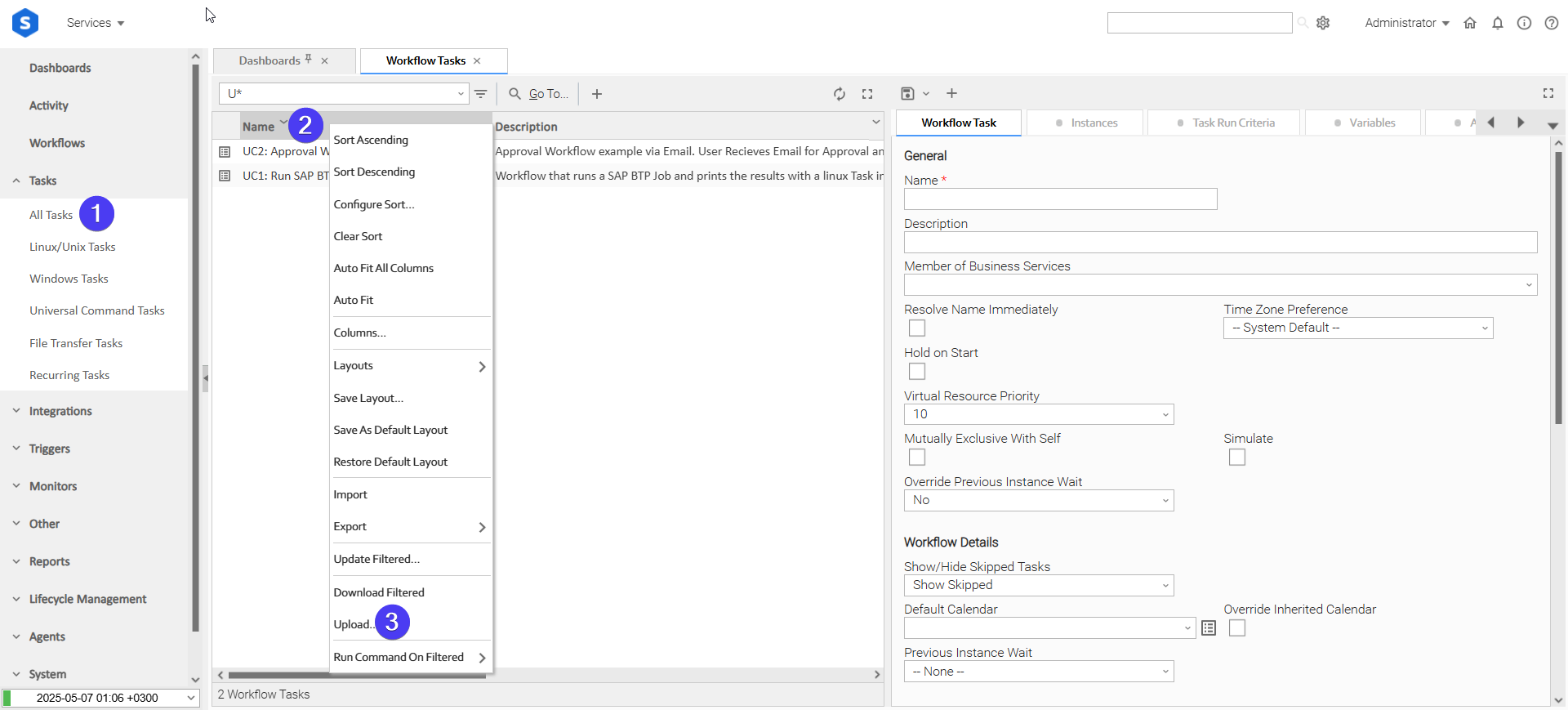
Login to Universal Controller and:
- STEP 1: Click "Tasks"→"All Tasks"
- STEP 2: Right click on the top of the column named "Name"
- STEP 3: Click "Upload..."
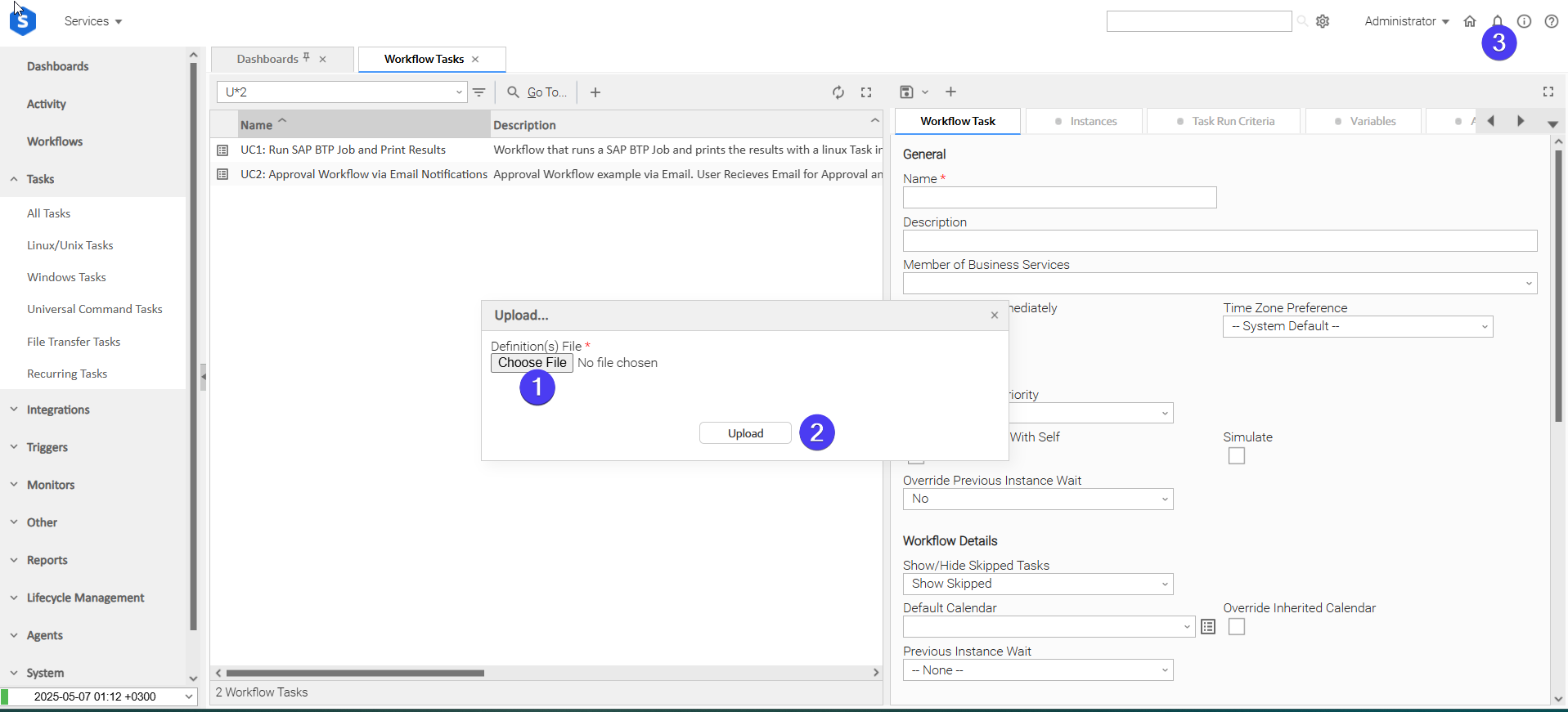
In the pop-up "Upload..." dialogue:
- STEP 1: Click "Choose File".
- STEP 2: Select the appropriate zip definition file and click "Upload".
- STEP 3: Observe the Console for possible errors.
Use Case: List Integrations, Start Selected Scheduled Integration and Send Email Summary
Description
This workflow uses AWS Bedrock to orchestrate Oracle OIC scheduled integrations end to end. A list of activated scheduled integrations is retrieved from Oracle OIC, and Amazon Bedrock selects the first available integration to start. Once execution completes, a second Bedrock task generates a professional email notification summarising the outcome, which is automatically sent to the ops team.
The workflow demonstrates how AWS Bedrock can sit inside an Oracle OIC orchestration flow to handle both data extraction and human-readable reporting, removing the need for manual intervention or hardcoded integration selection.
The tasks configured demonstrate the following capabilities among others:
- Retrieve and filter Oracle OIC integrations by status using the OIC Universal Extension.
- Use AWS Bedrock to extract structured data from a JSON integration list and return a typed response via JSON Schema enforcement.
- Pass structured outputs between tasks using extension output variable references.
- Start a scheduled Oracle OIC integration programmatically and monitor its execution until completion.
- Use AWS Bedrock to transform raw OIC execution output into a professional plain-text email subject and body.
- Deliver AI-generated notifications to an ops team via the Email Universal Extension.
The components of the solution are described below:
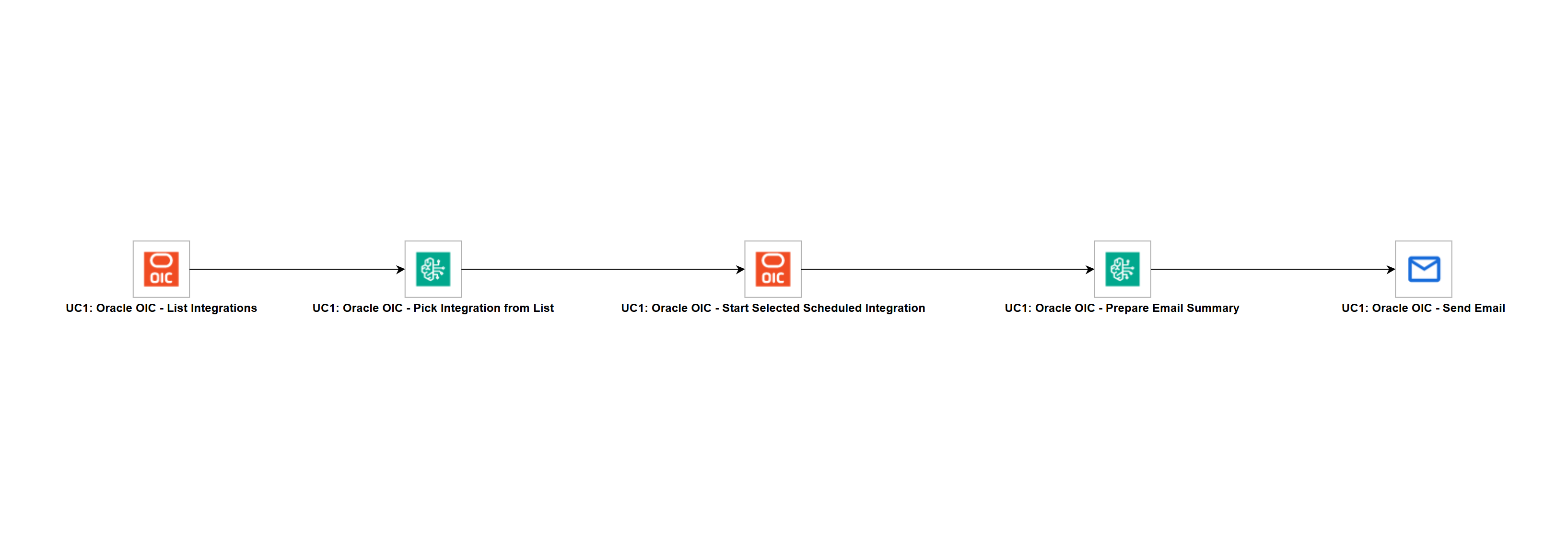
- List Integrations — Retrieves all activated scheduled integrations from Oracle OIC based on a customer-defined filter and passes the list to Bedrock.
- Bedrock Pick Integration — Receives the integration list and extracts the integration ID and version of the first item to pass to the scheduled integration task.
- Start Scheduled Integration — Starts the integration selected by Bedrock using its ID and version and waits until execution completes.
- Bedrock Write Email — Receives the execution result from OIC and generates a professional email subject and body summarising what ran and the outcome.
- Send Email — Sends the AI-generated subject and body to the ops team as a plain text email.
How to Run
Execution Steps:
- STEP 1: Ensure the Oracle OIC and Amazon Bedrock Universal Extensions are imported into your Universal Controller.
- STEP 2: Update the OIC credentials with your OAuth Client ID and Secret and set the correct OIC Base URL and Token URL.
- STEP 3: Update the AWS credentials with your Access Key ID and Secret Access Key and set the correct AWS Region.
- STEP 4: Update the Integration Filter field in the List Integrations task to match the naming convention used in your OIC instance.
- STEP 5: Update the Email task with your SMTP server details, From address, and To address.
- STEP 6: Launch the workflow. This automatically starts the flow of tasks.
Expected Results
- Task List Integrations successfully retrieves all activated integrations matching the configured filter from Oracle OIC and returns them as a structured JSON list.
- Task Bedrock Pick Integration successfully extracts the integration ID and version from the first item in the list and returns them as a typed JSON object.
- Task Start Scheduled Integration successfully starts the selected integration and monitors it until it reaches a terminal state of
SUCCEEDED,FAILED,ERRORED,ABORTED, orCOMPLETED. - Task Bedrock Write Email successfully generates a concise professional email subject and plain-text body based on the OIC execution result.
- Task Send Email successfully delivers the AI-generated notification to the ops team.
Exit Codes
Exit Code | Status | Description |
|---|---|---|
0 | Success | Successful Execution. |
1 | Failure | Generic Error. Raised when not falling into the other Error Codes. |
11 | Failure | Exception raised when the OIC Job Launch fails. |
12 | Failure | Exception occurred while the OIC Job Launch Request. |
20 | Failure | Input fields validation error. |
40 | Failure | The Job is executed out of the normal duration boundaries. |
100 | Warning | The OIC Gateway Job completed with a Warning status. Available when Action is "Start - OIC Gateway Job". |
101 | Failure | The OIC Gateway Job completed with an Error status. Available when Action is "Start - OIC Gateway Job". |
Document References
This document references the following links:
Document Link | Description |
|---|---|
Main OIC 3 documentation hub. | |
Full REST API reference for OIC. | |
OAuth 2.0 authorization types supported in OIC 3. | |
Creating and scheduling integrations in OIC 3. | |
REST Adapter capabilities for triggering and invoking REST APIs in OIC. | |
Setting up and connecting OIC API Gateway with Oracle Integration. |
Changelog
ue-oracle-oic-1.0.2 (2026-07-21)
Fixes
Fixed: Added missing token refresh mechanism. (#148859)
ue-oracle-oic-1.0.1 (2026-07-08)
Fixes
Fixed: Scheduled Integration tasks now correctly report failure when the OIC job completes with a FAILED, ERRORED, or ABORTED status.Fixed: API URL construction now respects theUE_ORACLE_OIC_USE_IC_APIenvironment variable, allowing compatibility with OIC instances that expose the integration API under the/ic/path prefix.
ue-oracle-oic-1.0.0 (2026-06-23)
Initial Version