Qlik Sense
Disclaimer
Your use of this download is governed by Stonebranch's Terms of Use.
Version Information
Template Name | Extension Name | Extension Version |
|---|---|---|
Qlik Sense | ue-qliksense | 1.1.0 |
Refer to Changelog for version history information.
Overview
Qlik Sense is a Business Intelligence (BI) Tool. Qlik Sense users can connect and combine data from hundreds of data sources by defining data pipelines as applications. Data can then be visualized via custom dashboards on a Qlik Sense Cloud instance (Business or Enterprise edition) or by using a Desktop application (Enterprise Windows edition).
This Universal Extension provides the capability to perform reload related actions upon an Application, stored on a Qlik Sense Cloud instance.
Software Requirements
This integration requires a Universal Agent and a Python runtime to execute the Universal Task.
Software Requirements for Universal Template and Universal Task
Requires Python 3.7.0 or higher. Tested with the Universal Agent bundled Python distribution.
Software Requirements for Universal Agent
Both Windows and Linux agents are supported:
- Universal Agent for Windows x64 Version 7.0.0.0 and later with python options installed.
- Universal Agent for Linux Version 7.0.0.0 and later with python options installed.
Software Requirements for Universal Controller
Universal Controller Version 7.0.0.0 and later.
Network and Connectivity Requirements
- Universal Agent where the extension is deployed should be able to reach the Qlik Sense Cloud instance.
- A Qlik Sense API Key should be generated in prior from the Qlik Sense Cloud Management Console. API Keys can be generated by users who have either 'Tenant Admin' or 'Delelopers' Role assigned.
Support Qlik Sense SaaS API versions
This Universal Extension is compatible with SaaS API version 24-Feb-2022.
Key Features
This Universal Extension provides the following main features for a Qlik Sense Cloud instance.
- Actions
- Reload App
- Reload App
- Trigger and Wait until the Qliksense app reaches status "Success" or "Failed"
- Support for partial reload
- Read Reload Status
- Reload App
- Authentication
- Support for SSL communication
Import Universal Template
To use this downloadable Universal Template, you first must perform the following steps:
- This Universal Task requires the Resolvable Credentials feature. Check that the Resolvable Credentials Permitted system property has been set to true.
- To import the Universal Template into your Controller, follow the instructions here.
- When the files have been imported successfully, refresh the Universal Templates list; the Universal Template will appear on the list.
Modifications of this integration, applied by users or customers, before or after import, might affect the supportability of this integration. For more information refer to Integration Modifications.
Configure Universal Task
For the new Universal Task type Qlik Sense, create a new task and enter the task-specific details that were created in the Universal Template
Input Fields
The input fields for this Universal Extension are described below.
Field | Input type | Default value | Type | Description |
|---|---|---|---|---|
Action | Required | Reload App | Choice | Αction performed upon the task execution. Available actions are listed below.
|
Qlik Sense Type | Required | Cloud | Choice | Qlik Sense instance Type based on each installation. Available actions are listed below.
|
API Credentials | Optional | - | Credentials | Developer's API Key for Qlik Sense. API Key should be stored in the Credentials record as Required when Qlik Sense Type = Cloud. |
Tenant URL | Optional | - | Text | Qlik Sense Tenant Cloud instance URL. Required when Qlik Sense Type = Cloud. |
App ID | Optional | - | Text | Qlik Sense Application ID to be reloaded. Required when Action = Reload App. |
Reload ID | Optional | - | Text | Reload ID of an already reloaded Qlik Sense application. Required when Action = Read Reload Status. |
Partial Reload | Optional | False | Boolean | Indication to perform Partial Reload during Reload App on Cloud. Optional when Action = Reload App. |
Enable SSL certificate verification | Optional | True | Boolean | Verify SSL certificates when sending a request. Verification failures will result in the request being aborted. Optional when Qlik Sense Type = Cloud. |
Wait for success or failure Introduced in version 1.1.0 | Optional | False | Boolean | Wait for the Reload app status response. Optional when Action = Reload App. |
Pooling interval Introduced in version 1.1.0 | Optional | 60 | Integer | The amount of time the task will wait before pooling for a new response when the response is not Valid values from 0 to 60. |
Task Examples
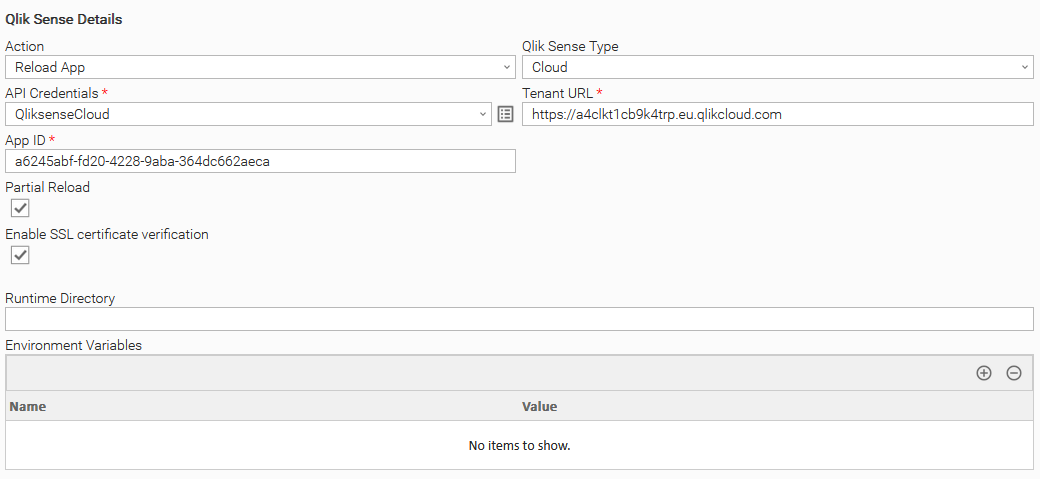
Reload a Qlik Sense Application
Reload an application on a Qlik Sense Cloud instance.
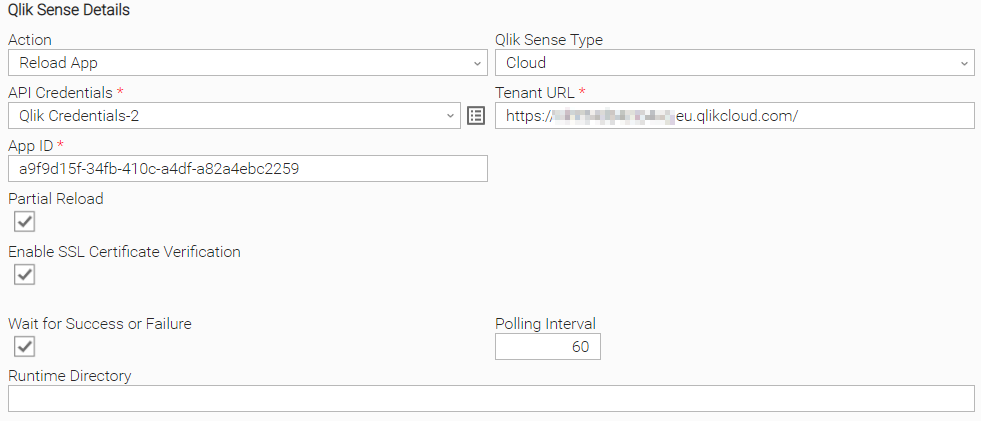
Reload a Qlik Sense Application and Wait for Success or Failure
Reload an application on a Qlik Sense Cloud instance and Wait for Success or Failure.
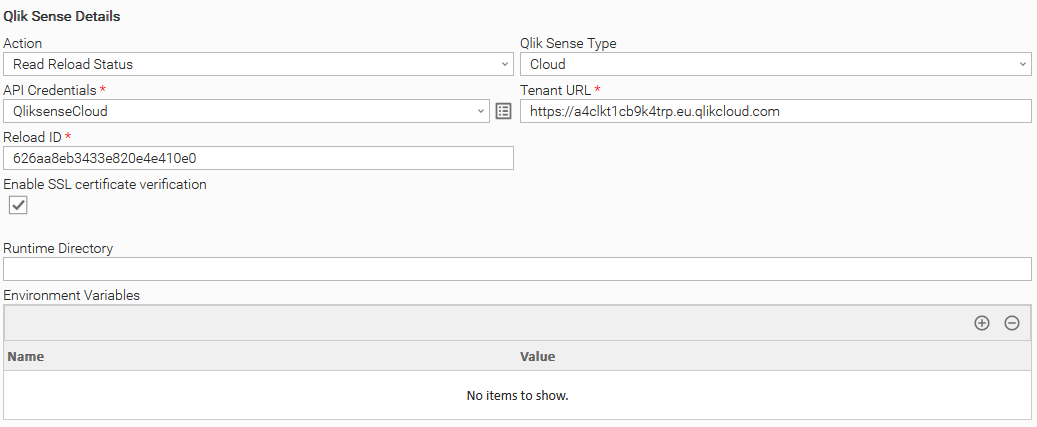
Read Reload Status of a Qlik Sense Application
Read the status of an already reloaded Qlik Sense application.
Task Output
Output Only Fields
The output parameters are set after every message processing. If they are 'preserved on re-run', they prevent a re-run of the task instance from restarting from scratch.
The output fields for this Universal Extension are described below.
Field | Type | Preserved on re-run | Description |
|---|---|---|---|
Reload Status | Text | No | Reload status returned from Read Reload Status action Reload App action when the Wait for Success or Failure button is turned on. Can be used as a Condition on a Workflow level. |
Reload Id | Text | No | Reload id returned from Reload App action when the Wait for Success or Failure button is turned on. |
Exit Codes
The exit codes for this Universal Extension are described below.
Exit Code | Status Classification Code | Status Classification Description | Status Description |
|---|---|---|---|
0 | SUCCESS | Successful Execution | SUCCESS: QlikSense App reloaded successfully. |
1 | FAIL | Failed Execution | FAIL: < Error Description > |
3 | AUTHORIZATION_ERROR | Insufficient Permissions | AUTHORIZATION_ERROR: Account is not authorized to perform the requested action. |
10 | CONNECTION_ERROR | Bad connection data or connection timed out | CONNECTION_ERROR: < Error Description > |
20 | DATA_VALIDATION_ERROR | Input fields validation error | DATA_VALIDATION_ERROR: Some of the input fields cannot be validated. See STDERR for more details |
21 | SUCCESS | Read Reload Status succesul execution | SUCCESS: Reload status is CREATED. |
22 | SUCCESS | Read Reload Status succesul execution | SUCCESS: Reload status is QUEUED. |
23 | SUCCESS | Read Reload Status succesul execution | SUCCESS: Reload status is RELOADING. |
24 | SUCCESS | Read Reload Status succesul execution | SUCCESS: Reload status is FAILED. |
25 | SUCCESS | Read Reload Status succesul execution | SUCCESS: Reload status is SUCCEEDED. |
Extension Output
Extension Output example for a successful execution of Reload App.
{
    "exit_code": 0,
    "status_description": "SUCCESS: QlikSense App reloaded successfully.",
    "changed": true,
    "invocation": {
        "extension": "ue-qliksense",
        "version": "1.1.0",
        "fields": {
            "action": "Reload App",
            "qliksense_type": "Cloud",
            "tenant_url": "https://a4clkt1cb9k4trp.eu.qlikcloud.com",
            "api_credentials": "****",
            "app_id": "5aca2029-f5d7-48b7-9606-45d55f6bc469",
            "reload_id": null,
            "partial_reload": true,
            "enable_ssl_cert_verification": true,
            "wait_for_success_or_failure": false,
            "polling_interval": 0
        }
    },
    "result": {
        "reload_id": "626bc4aef8699d7f94fd30da"
    }
}
Extension Output example for a successful execution of Read Reload Status.
{
    "exit_code": 25,
    "status_description": "SUCCESS: Reload status is SUCCEEDED.",
    "changed": true,
    "invocation": {
        "extension": "ue-qliksense",
        "version": "1.1.0",
        "fields": {
            "action": "Read Reload Status",
            "qliksense_type": "Cloud",
            "tenant_url": "https://a4clkt1cb9k4trp.eu.qlikcloud.com",
            "api_credentials": "****",
            "app_id": null,
            "reload_id": "626aa8eb3433e820e4e410e0",
            "partial_reload": false,
            "enable_ssl_cert_verification": true,
            "wait_for_success_or_failure": false,
            "polling_interval": 0
        }
    },
    "result": {
        "reload_status": "SUCCEEDED"
    }
}
Extension Output example for a successful execution of Reload App with Wait for success or failure button activated.
{
    "exit_code": 0,
    "status_description": "SUCCESS: QlikSense App reloaded successfully.",
    "changed": true,
    "invocation": {
        "extension": "ue-qliksense",
        "version": "1.1.0",
        "fields": {
            "action": "Reload App",
            "qliksense_type": "Cloud",
            "tenant_url": "https://a4clkt1cb9k4trp.eu.qlikcloud.com",
            "api_credentials": "****",
            "app_id": "5aca2029-f5d7-48b7-9606-45d55f6bc469",
            "reload_id": null,
            "partial_reload": true,
            "enable_ssl_cert_verification": true,
            "wait_for_success_or_failure": true,
            "polling_interval": 60
        }
    },
    "result": {
        "reload_id": "626bc4aef8699d7f94fd30da",
        "reload_status": "SUCCEEDED"
    }
}
Integration Modifications
Modifications applied by users or customers, before or after import, might affect the supportability of this integration. The following modifications are discouraged to retain the support level as applied for this integration.
- Python code modifications should not be done.
- Template Modifications
- General Section
- "Name", "Extension", "Variable Prefix", "Icon" should not be changed.
- Universal Template Details Section
- "Template Type", "Agent Type", "Send Extension Variables", "Always Cancel on Force Finish" should not be changed.
- Result Processing Defaults Section
- Success and Failure Exit codes should not be changed.
- Success and Failure Output processing should not be changed.
- Fields Restriction Section
The setup of the template does not impose any restrictions, However with respect to "Exit Code Processing Fields" section.- Success/Failure exit codes need to be respected.
- In principle, as STDERR and STDOUT outputs can change in follow-up releases of this integration, they should not be considered as a reliable source for determining success or failure of a task.
- General Section
Users and customers are encouraged to report defects, or feature requests at Stonebranch Support Desk.
Document References
This document references the following documents:
Name | Location | Description |
|---|---|---|
Universal Templates | User documentation for creating Universal Templates in the Universal Controller user interface. | |
Universal Tasks | User documentation for creating Universal Tasks in the Universal Controller user interface. | |
Qlik Sense | Qlik Sense home page | |
Qlik Sense Reload | Qlik Sense reload API documentation | |
Qlik Sense API Key | Managing API Keys |
Changelog
ue-qliksense-1.1.0 (2022-09-29)
Enhancements
Added: Introduced a new Wait for success or failure functionality, where the user gets the reload app status after reloading the app. (#30178)
ue-qliksense-1.0.0 (2022-05-04)
Initial Version