SAP: Datasphere
Disclaimer
Your use of this download is governed by Stonebranch's Terms of Use.
Version Information
Template Name | Extension Name | Version | Status |
|---|---|---|---|
SAP Datasphere | ue-sap-datasphere | 1.0.0 | Initial Version. |
Refer to Changelog for version history information.
Overview
SAP Datasphere is SAP's cloud-native data service, unifying data cataloging, integration, semantic modeling, and virtualization across on-premise and cloud sources. Task chains in SAP Datasphere combine multiple data integration tasks, such as replication flows, transformation flows, and views persistence, into a single automated sequence.
This Universal Task allows customers to trigger and monitor SAP Datasphere Task Chains straight from Universal Controller.
Key Features
Feature | Description |
|---|---|
Task Chain Execution | Trigger a named SAP Datasphere Task Chain in a target space. |
Completion Monitoring | Poll task chain execution until a terminal status is reached. |
Automatic Retry | Retry a task chain once when it ends in failure. |
Task Chain Cancellation | Cancel a running task chain through a Dynamic Command. |
Requirements
This integration requires a Universal Agent and a Python runtime to execute the Universal Task.
Area | Details |
|---|---|
Python Version | Requires Python 3.11, tested with Agent bundled python distribution. |
Universal Agent Compatibility |
|
Universal Controller Compatibility | Universal Controller Version >= 7.7.0.0. |
Network and Connectivity | Network connectivity to SAP Datasphere is required. |
Supported Actions
There is one Top-Level action controlled by the Action Field:
Start Task Chain authenticates against SAP Datasphere using OAuth 2.0 Client Credentials and triggers a named task chain within a specified space. When Wait for Completion is enabled, execution polls the task chain until it reaches a terminal state, optionally retrying once on failure.
Action Output
- EXTENSION
- STDOUT
The extension output provides the following information:
exit_code, status_description: General info regarding the task execution.invocation.fields: The task configuration used for this execution. For more information refer to exit codes table.result.logs: Full task chain log details, including child task statuses and messages. Included when Extension Output Options is "Include Task Chain Logs".result.errors: List of errors that might have occurred during execution.
Examples:Successful execution
Failed execution
When STDOUT Options includes "Include Task Chain Messages", new task chain messages are printed to STDOUT as they are discovered on each poll cycle.
Example:
Task Chain Messages:
New message(s) detected at [2026-07-02 14:32:05 UTC]:
  [INFO] Task 'Load_Sales_Data' started.
  [ERROR] Task 'Load_Sales_Data' failed: Connection timeout.
Configuration Examples
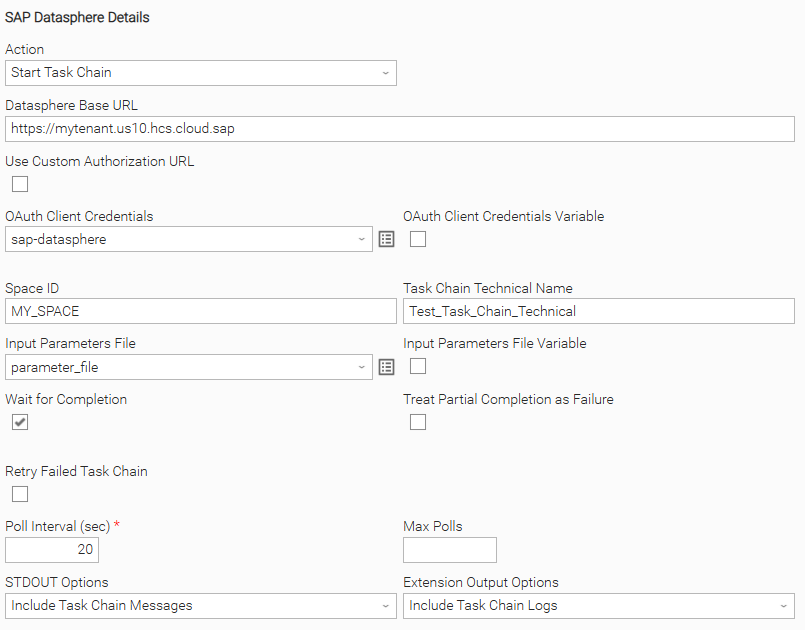
Example: Wait for completion with input parameters
Use Custom Authorization URL is unchecked, so the OAuth token URL is derived automatically from Datasphere Base URL (https://mytenant.us10.hcs.cloud.sap). Authentication uses the OAuth Client Credentials credential, and the target chain Test_Task_Chain_Technical is triggered in Space ID MY_SPACE with runtime parameters supplied through the Input Parameters File. Wait for Completion is checked with Poll Interval (sec) 20 and Max Polls left empty (poll indefinitely). STDOUT Options streams task chain messages and Extension Output Options includes the full task chain logs. The task instance polls until the chain reaches COMPLETED, PARTIALLY_COMPLETED, or a failure status.
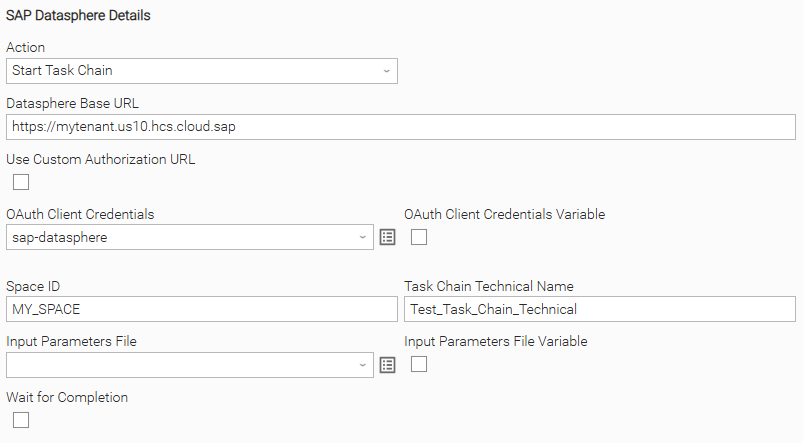
Example: Trigger without waiting (fire-and-forget)
The same connection and target chain are configured, but no Input Parameters File is provided and Wait for Completion is unchecked. The task instance ends as soon as the run endpoint responds, with the Log ID output field populated so a later task can reference the run. The polling, retry, and output fields are hidden because they only apply when waiting for completion.
Input Fields
Name | Type | Description | Version Information |
|---|---|---|---|
Action | Choice | The operation to perform. Available options:
| Introduced in 1.0.0 |
Datasphere Base URL | Text | The full base URL of the SAP Datasphere tenant. Must start with | Introduced in 1.0.0 |
Use Custom Authorization URL | Checkbox | Check to show and use the Token URL field as-is instead of deriving it automatically from Datasphere Base URL. | Introduced in 1.0.0 |
Token URL | Text | The OAuth 2.0 token endpoint URL used to obtain an access token, e.g. This field is visible when Use Custom Authorization URL is "true". | Introduced in 1.0.0 |
OAuth Client Credentials | Credential | The Universal Controller Credential used for OAuth 2.0 Client Credentials authentication, where the credential user maps to the client ID and the credential token maps to the client secret. | Introduced in 1.0.0 |
Space ID | Text | The technical name of the SAP Datasphere space containing the task chain, e.g. | Introduced in 1.0.0 |
Task Chain Technical Name | Text | The technical name of the task chain to trigger, e.g. | Introduced in 1.0.0 |
Input Parameters File | Script | The path to a JSON file containing the task chain input parameters. The outer | Introduced in 1.0.0 |
Wait for Completion | Checkbox | Check to poll the task chain until it reaches a terminal state. When unchecked, the task chain is triggered and the task instance ends immediately after the run endpoint responds. | Introduced in 1.0.0 |
Treat Partial Completion as Failure | Checkbox | Check to treat a task chain ending with This field is visible when Wait for Completion is "true". | Introduced in 1.0.0 |
Retry Failed Task Chain | Checkbox | Check to automatically retry a failed task chain once. This field is visible when Wait for Completion is "true". | Introduced in 1.0.0 |
Poll Interval (sec) | Integer | The number of seconds to wait between status polls. This field is visible and required when Wait for Completion is "true". | Introduced in 1.0.0 |
Max Polls | Integer | The maximum number of polls performed before timing out. Leave empty or set to This field is visible when Wait for Completion is "true". | Introduced in 1.0.0 |
STDOUT Options | Multiple Choice | Controls what is written to task STDOUT during monitoring. Available options:
This field is visible when Wait for Completion is "true". | Introduced in 1.0.0 |
Extension Output Options | Multiple Choice | Controls what is included in the Extension Output JSON. Available options:
This field is visible when Wait for Completion is "true". | Introduced in 1.0.0 |
Output Fields
The following output-only fields provide better visibility during the execution of Universal Task Instances.
Name | Type | Description | Version Information |
|---|---|---|---|
Log ID | Text | The log identifier returned by the SAP Datasphere run endpoint, populated after the task chain is triggered. | Introduced in 1.0.0 |
Task Chain Status | Text | The current status of the task chain run, e.g. This field is visible when Wait for Completion is "true". | Introduced in 1.0.0 |
Environment Variables
Environment Variables can be set from the Environment Variables task definition table.
Environment Variable Name | Description | Version Information |
|---|---|---|
UE_HTTP_TIMEOUT | The number of seconds to wait for HTTP responses from SAP Datasphere before timing out. Defaults to | Introduced in 1.0.0 |
Cancellation and Rerun
- In case of cancellation, the cancellation is propagated to SAP Datasphere: a cancel request is sent for the running task chain and the task instance then exits without waiting for the API to confirm the
CANCELLEDterminal status. This is distinct from the Cancel Task Chain Dynamic Command described below, which does wait for SAP Datasphere to confirm theCANCELLEDstatus. - In case of rerun, a new task chain run is triggered and a new Log ID is generated; the previous run's log entry is not reused.
The same task chain cannot be executed concurrently with itself in SAP Datasphere. If a run is triggered while a previous run of the same task chain is still active, SAP Datasphere rejects the new run.
Dynamic Commands
Users can interact with Task Instances through Dynamic Commands. The following Dynamic Commands are supported.
Name | Description | Version Information |
|---|---|---|
Cancel Task Chain | Sends a cancellation request for the currently running task chain to SAP Datasphere. Available in the Running state. Sets the task instance to Success once SAP Datasphere confirms the task chain reached the | Introduced in 1.0.0 |
Importable Configuration Examples
This integration provides importable configuration examples along with their dependencies, grouped as Use Cases to better describe end to end capabilities.
These examples aid in allowing task authors to get more familiar with the configuration of tasks and related Use Cases. Such tasks should be imported in a Test system and should not be used directly in production.
Initial Preparation Steps
-
STEP 1: Go to Stonebranch Integration Hub and download the integration along with any additional integrations required by the Use Cases. Extract the downloaded archives in a local directory.
-
STEP 2: Locate and import the above integration(s) to the target Universal Controller. For more information refer to the How To section in this document.
-
STEP 3: Inside the directory named "configuration_examples" you will find a list of definition zip files. Upload them one by one respecting the order presented below, by using the "Upload" functionality of Universal Controller:
- 1_variables.zip
- 2_credentials.zip
- 3_tasks.zip
- 4_workflows.zip
The number prefix indicates the order in which the files must be uploaded so that each entity's dependencies are imported first.
-
STEP 4: Update the uploaded UAC Credential entity(ies) with the required credentials. Review each credential's description for guidance on what to provide.
-
STEP 5: Update the UAC global variables introduced with the
1_variables.zipfile. Their name is prefixed with the extension name using underscores instead of hyphens. Review the descriptions of the variables as they include information on how they should be populated.
- The order indicated above ensures that the dependencies of the imported entities need to be uploaded first.
- All imported entities are prefixed with the Use Case number (e.g. UC1, UC2, UC3) they belong to.
How to "Upload" Definition Files to a Universal Controller
The "Upload" functionality of Universal Controller allows Users to import definitions exported with the "Download" functionality.
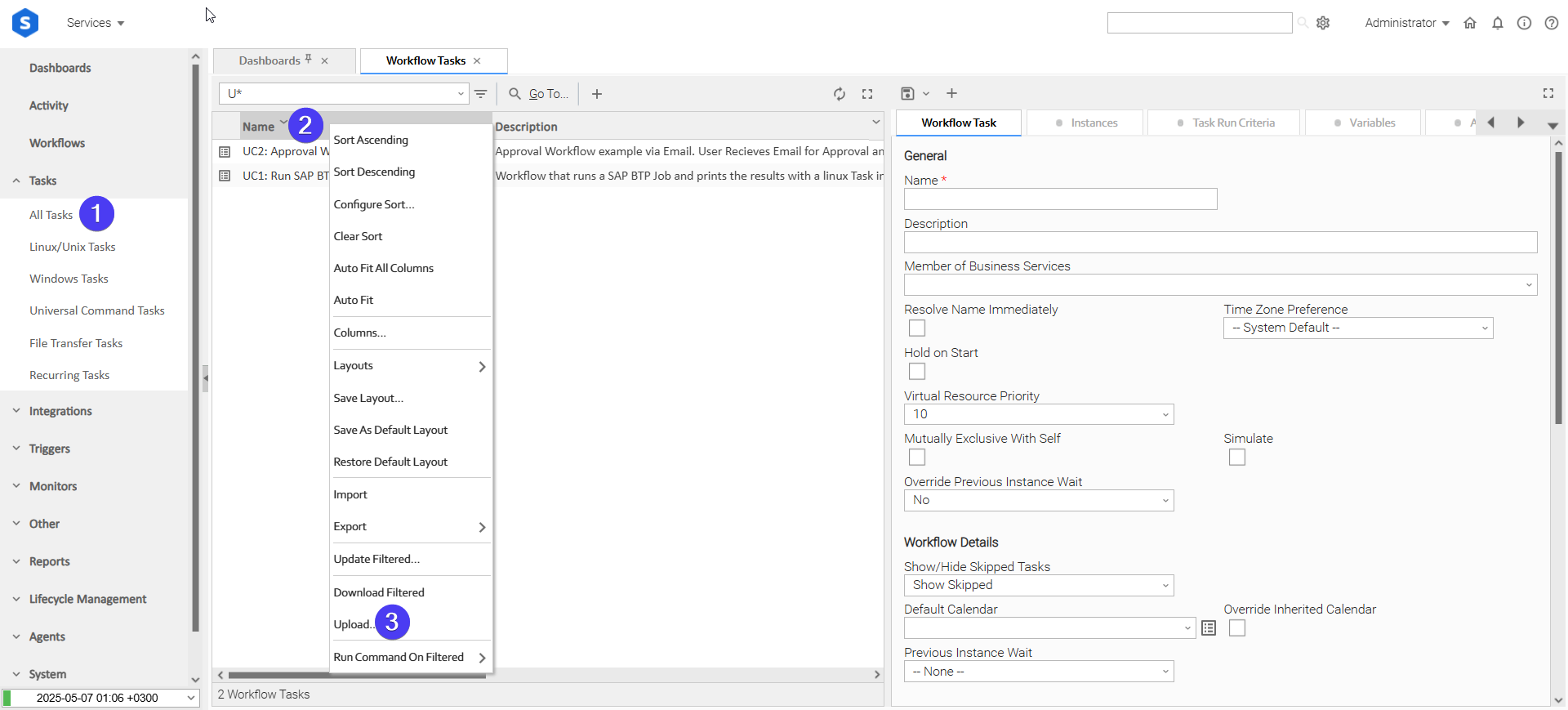
Login to Universal Controller and:
- STEP 1: Click "Tasks" → "All Tasks"
- STEP 2: Right click on the top of the column named "Name"
- STEP 3: Click "Upload..."
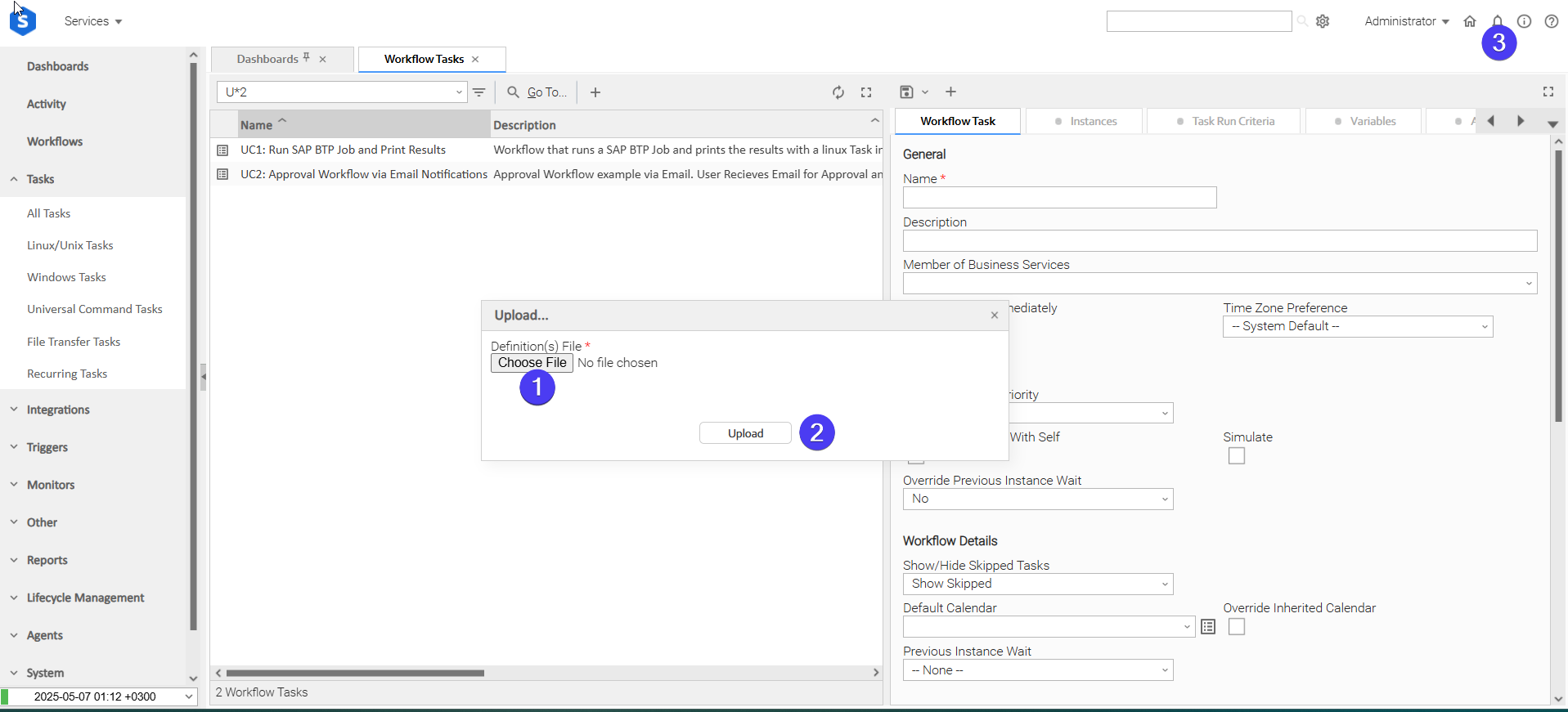
In the pop-up "Upload..." dialogue:
- STEP 1: Click "Choose File".
- STEP 2: Select the appropriate zip definition file and click "Upload".
- STEP 3: Observe the Console for possible errors.
Use Case 1: Trigger SAP Datasphere Task Chain, Wait for Completion, and Notify Stakeholders
Description
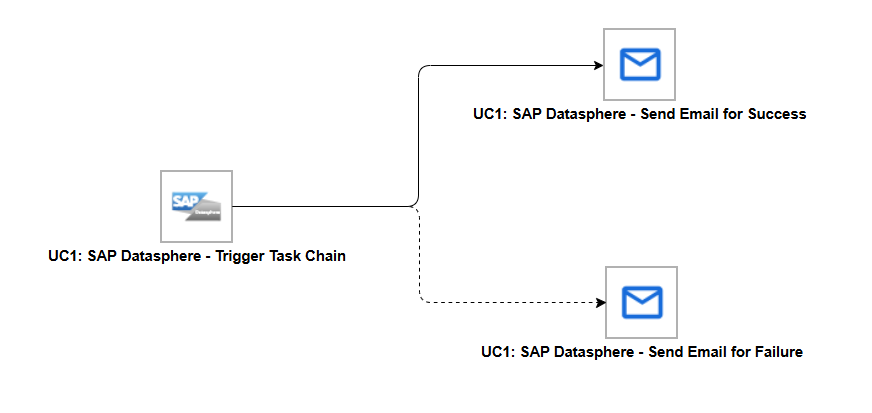
This use case triggers an SAP Datasphere Task Chain, waits for it to reach a terminal state, and then notifies the operations team by email on either outcome. The workflow branches on the result of the task chain run: a confirmation email on success and an alert email on failure. It is composed of the following components:
- UC1: SAP Datasphere - Trigger Task Chain - triggers the target SAP Datasphere Task Chain with Wait for Completion enabled and polls until a terminal status is reached.
- UC1: SAP Datasphere - Send Email for Success - an Email Task that sends a confirmation notification, triggered on the success branch of the Trigger Task Chain task.
- UC1: SAP Datasphere - Send Email for Failure - an Email Task that sends an alert notification, triggered on the failure branch of the Trigger Task Chain task.
How to Run
Execution Steps
- Ensure all Initial Preparation Steps have been completed successfully.
- Update the Space ID and Task Chain Technical Name fields (or their backing global variables) on the UC1 Trigger Task Chain task to reference an existing task chain in the target SAP Datasphere tenant.
- Set the recipient addresses on the two Email Tasks so the notifications reach the intended stakeholders.
- Launch the workflow task and monitor the execution in Universal Controller.
Expected Results
- The SAP Datasphere Task Chain is triggered and its status is polled until it reaches a terminal state.
- On success, the Send Email for Success task runs and the Task Chain Status output field shows the terminal status.
- On failure, the Send Email for Failure task runs and sends an alert notification.
- The workflow task instance reflects the final outcome of the task chain run.
Exit Codes
Exit Code | Status | Description |
|---|---|---|
0 | Success | Successful Execution. |
1 | Failure | Generic Error. Raised when not falling into the other Error Codes. |
2 | Failure | Authentication error. OAuth 2.0 token acquisition fails, or a refreshed token is still rejected. |
3 | Failure | Authorization error. The SAP Datasphere API returns HTTP 403 (authenticated but not permitted). |
20 | Failure | Input fields validation error. Raised when the input parameters file is not valid JSON or contains non-string parameter values. |
Document References
Document Link | Description |
|---|---|
Describes the Task Chain REST API used to run, monitor, and cancel task chains. | |
SAP Datasphere Create an OAuth2.0 Client with a Technical User Purpose | Explains how to configure the OAuth 2.0 Client Credentials technical user required by this integration. |
Lists the DW Integrator role and scoped role required for the service account triggering task chains. | |
Covers how task chains are built in SAP Datasphere before they can be triggered by this integration. | |
SAP Datasphere Create OAuth2.0 Clients to Authenticate Against SAP Datasphere | General reference for creating and managing OAuth 2.0 clients used for authentication. |
Changelog
ue-sap-datasphere-1.0.0 (2026-07-08)
Initial Version