SAP: Event History Monitor
Disclaimer
Your use of this download is governed by Stonebranch's Terms of Use.
For general information on how integrations work, importing templates, and UAC documentation refer to Overview.
Version Information
Template Name | Version |
|---|---|
CS SAP Event History Monitor | 2.2.2 |
Upgrading from major version 1 is not supported.
Refer to Changelog for version history information.
Overview
This Universal Task queries the SAP Event history table for a selected SAP Event & Parameter. If the Event is found, it gets confirmed, so that it is not triggered again. Optionally, a task can be launched based on the occurrence of an Event & Parameter.
Key Features
Feature | Description |
|---|---|
Event History Monitoring | Query the SAP Event history table for a selected SAP Event & Parameter. For the Parameter, wildcards |
Event Confirmation | Confirm Events in the SAP History Table (SM62). When the Event and Parameter have been identified, the Event is confirmed in SAP so that the monitor does not trigger a second time (optional setting). |
Task Launch | Launch a task in Universal Controller based on the occurrence of an Event & Parameter, or run in monitoring mode without launching a task. |
Automatic Restart | Restart the task automatically by adding an action to the Universal Task, which restarts the task in the case of status success. |
SAP Connections | Use any SAP Connection defined in the Universal Controller. For version backward compatibility, SAPNWRFC.INI Destination connections are supported. |
Variable Support | Set all Credential Fields and the SAP Connection as Variables. |
Linux and Windows Support | Run the Universal Task on Linux and Windows Agents. |
Log Levels | Set different log levels for the Universal Task, which provide more information in case of issues. |
Requirements
This integration requires a Universal Agent and a Python runtime to execute the Universal Task.
Area | Details |
|---|---|
Python Version | Requires Python 3.x, tested with Agent bundled python distribution. The Universal Agent needs to be installed with the python option ( |
Universal Agent Compatibility |
|
Universal Controller Compatibility |
|
SAP System | SAP Credentials (Username and Password) to connect via the XBP-RFC Interface to the SAP ERP System are required. |
Network and Connectivity | Network connectivity to the SAP system is required. Network connectivity to the Universal Controller REST API is required when Task(s) is set. |
Configuration Examples
Example: SAP Connection, task launch, Multilaunch
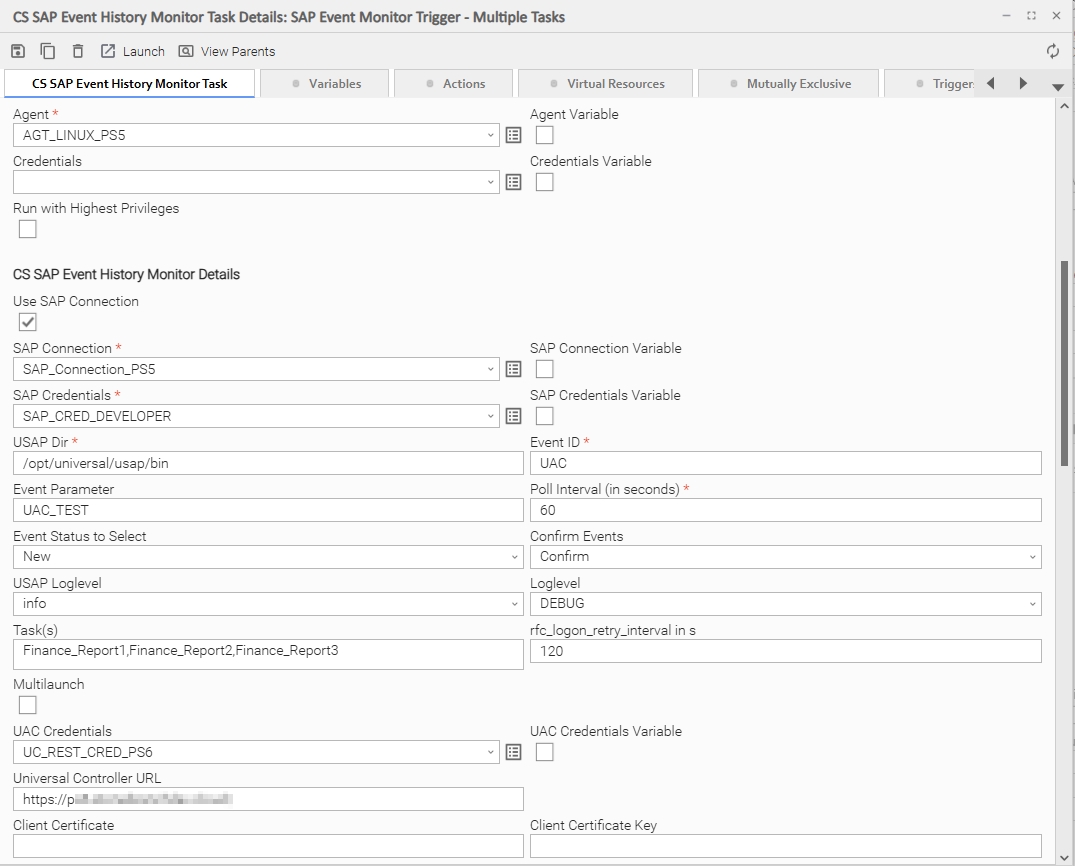
The following example monitors the SAP Event UAC with Parameter UAC_TEST in the SAP Event History.
If the Event occurs in the SAP Event history table with status "New", the Task "Collect_Orders" is launched and the Event is confirmed in SAP.
In this example, Multilaunch is enabled. This means that if several events are found with the status "New", the task "Collect_Orders" is launched for each confirmed event.
The connection to the SAP System is established via the SAP connection "SAP_Connection_PS5".
Example: SAP Connection with load balancing
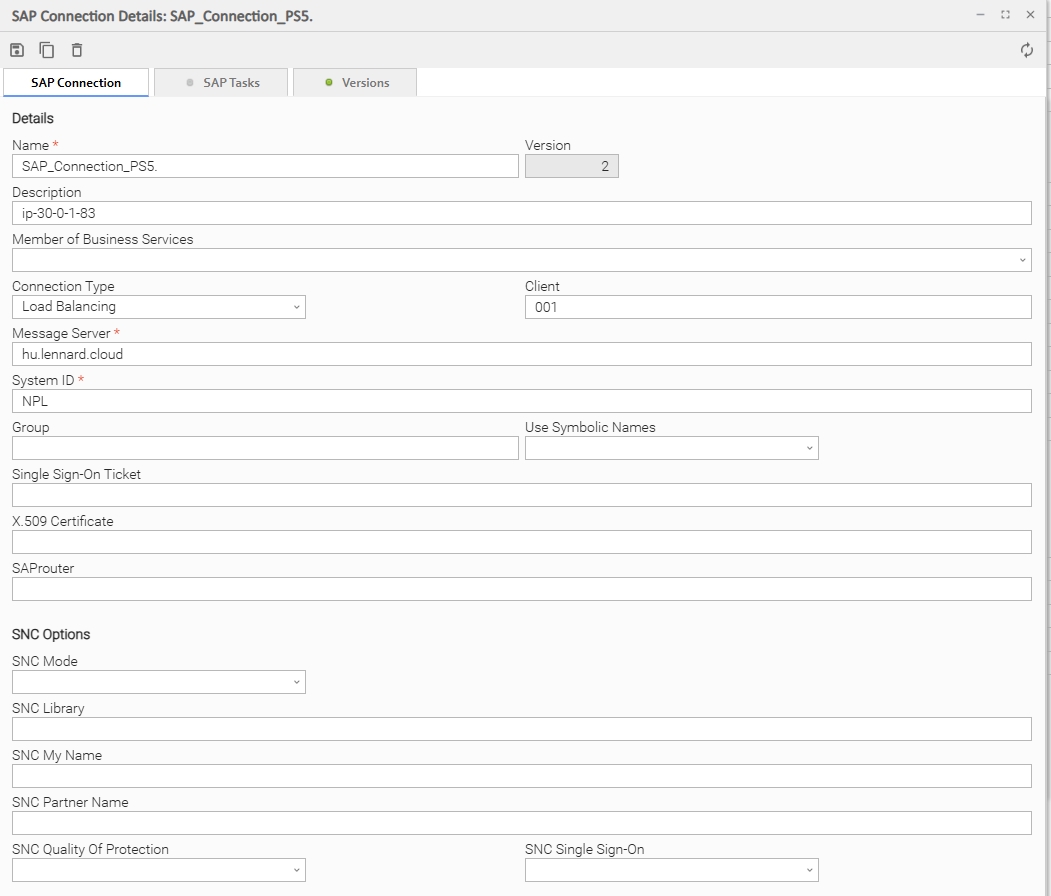
The following example shows a Load Balancer Connection using a message server.
Example: Task Monitor trigger mode
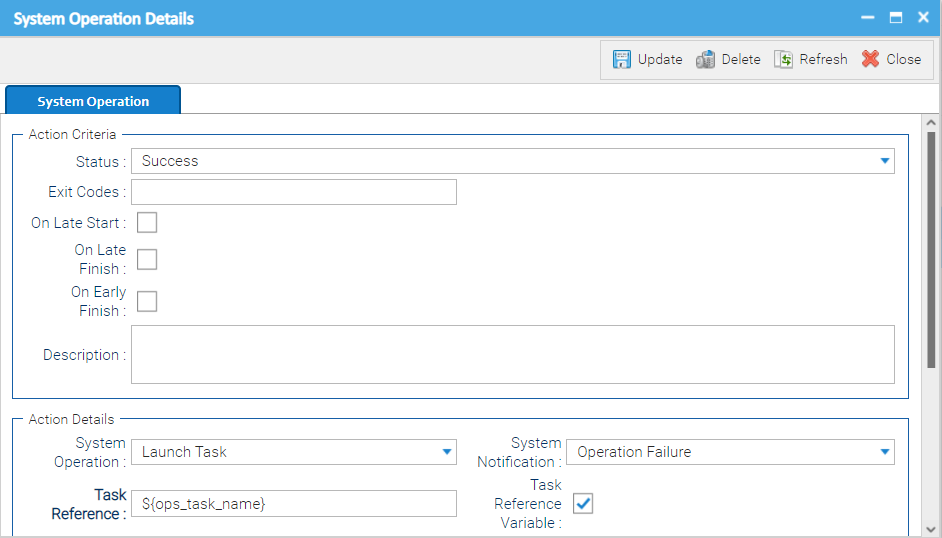
A Task Monitor trigger can be created from this task by adding an action to the Universal Task, which restarts the task in the case of status success.
Event Configuration in SAP
The SAP History Event Task Monitor scans for Events in the SAP Event history.
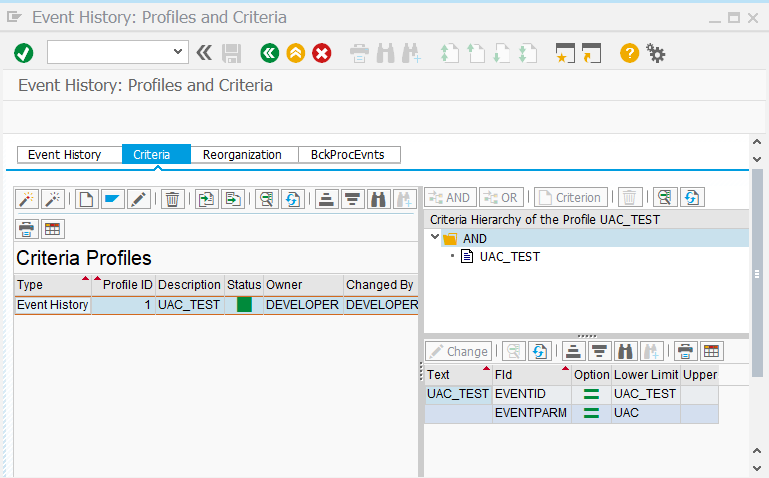
An Event only shows up in the Event history if an appropriate event criteria profile has been set-up in SAP by using transaction SM62.
Optionally, a criteria profile can also be set-up via an SAP Task of command group "Set CM Profile" in Universal Controller.
The following screen shows an example of the set-up in SAP using SM62.
Event History Table
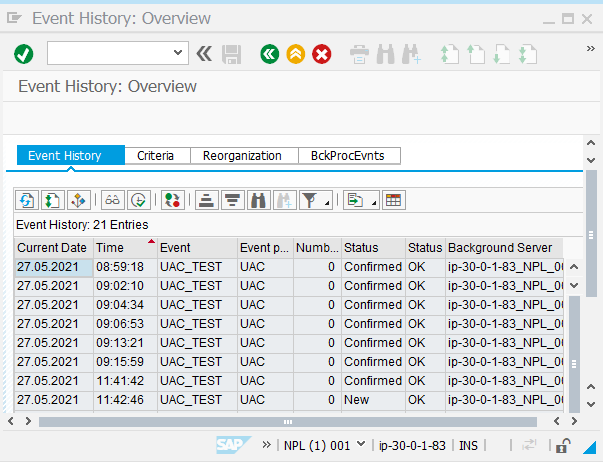
The following provides an example of the Event history table in SAP (SM62).
Only Events showing up here can trigger the SAP Event History Monitor Universal Task.
Input Fields
Name | Type | Description | Version Information |
|---|---|---|---|
Use SAP Connection | Checkbox | Check to use a pre-configured Universal Controller SAP Connection for the SAP connection details. | Introduced in 2.2.0 |
SAP Connection | SAP Connection | The Universal Controller SAP Connection to use. Can be set as a variable. This field is visible and required when Use SAP Connection is checked. | Introduced in 2.2.0 |
SAP Connection Type | Choice | The type of connection to the SAP system. Available options:
This field is visible when Use SAP Connection is unchecked. info The file If no user credentials are provided, this is:
| Introduced in 1.0.0 |
Client | Text | The SAP Client (3 digits), for example, This field is visible when Use SAP Connection is unchecked. | Introduced in 1.0.0 |
SAP ASHOST | Text | The SAP Application Server hostname or IP address, for example, This field is visible when SAP Connection Type is "Application Server Connection". | Introduced in 1.0.0 |
SAP SysNr | Text | The SAP System Number (2 digits), for example, This field is visible when SAP Connection Type is "Application Server Connection". | Introduced in 1.0.0 |
Destination | Text | The name of the destination entry in the file This field is visible when SAP Connection Type is "SAPNWRFC.INI Connection". | Introduced in 1.0.0 |
SAP Credentials | Credential | The SAP Credentials (Username and Password) to connect to SAP via the XBP 3.0 RFC/XMI interface. Can be set as a variable. | Introduced in 1.0.0 |
USAP Dir | Text | The directory where the USAP binary is stored. Defaults to
| Introduced in 1.0.0 |
Event ID | Text | The name of the Event to scan for in the SAP Event History Table. For wildcards, use the escape character, for example, | Introduced in 1.0.0 |
Event Parameter | Text | The name of the Event Parameter to scan for. The wildcard To scan for any Event Parameter, enter | Introduced in 1.0.0 |
Poll Interval (in seconds) | Text | The interval, in seconds, between two queries of the SAP Event History Table. Defaults to | Introduced in 1.0.0 |
Event Status to Select | Choice | The status of the Events to scan for. Available options:
| Introduced in 1.0.0 |
Confirm Events | Choice | The status that is set on the Events that are found. Available options:
| Introduced in 1.0.0 |
USAP Loglevel | Choice | The log level of the Universal Connector for SAP. Available options:
| Introduced in 1.0.0 |
Loglevel | Choice | The logging level of the Universal Task. Available options:
| Introduced in 1.0.0 |
Task(s) | Large Text | The names of the tasks to launch in case a new Event has been identified. Multiple tasks are separated by a comma, for example, If no task is specified, the Universal Task runs in monitoring mode and goes to success in case an Event has been identified, for example, when the Event monitor is part of a Workflow. In that case, remove the action that automatically restarts the Universal Task if the status is "Success". | Introduced in 1.0.0 |
Task Launch Reason | Text | The launch reason that is passed to every task launched by the Universal Task. This field is required when Task(s) is set and the Universal Controller property Task Launch Reason Required is enabled. | Introduced in 2.2.1 |
rfc_logon_retry_interval in s | Text | The interval, in seconds, between two logon attempts to SAP. Defaults to Per default, 10 retries are performed; for example, | Introduced in 1.0.0 |
Multilaunch | Checkbox | Check to launch the tasks in Task(s) once for each Event found. If unchecked, the tasks are launched only once, even if several Events are found. | Introduced in 1.0.0 |
UAC Credentials | Credential | The credentials of the Universal Controller user that launches the tasks in Task(s) through the REST API. Can be set as a variable. This field is required when Task(s) is set. | Introduced in 1.0.0 |
Universal Controller URL | Text | The Universal Controller URL, for example, This field is required when Task(s) is set. | Introduced in 1.0.0 |
Exit Codes
Exit Code | Status | Description |
|---|---|---|
0 | Success | Successful Execution. |
1 | Failure | Generic Error. Raised when not falling into the other Error Codes. |
STDOUT and STDERR
STDOUT shows the task settings and the progress of the monitor, such as each query of the SAP Event History Table and each launched task.
STDERR execution logs are controlled by the Log Level field.
Document References
Document Link | Description |
|---|---|
Explains the SAP background processing Events that the Universal Task scans for in the Event history. | |
Describes how to raise an Event manually in SAP GUI, for example, to test the Universal Task. |
Changelog
ut-cs-sap-event-history-monitor-2.2.2 (2026-11-24)
Deprecations and Breaking Changes
Breaking Change: Universal Controller and Universal Agent 7.7 are no longer supported. Version 7.8.0.0 or later is required.
Enhancements
Added: Support for Universal Agent 8.1.Changed: Security improvements.
Fixes
Fixed: An SAP password that contains special characters, such as∨, no longer breaks the connection to SAP.Fixed: An unexpected response from the Universal Controller REST API fails the task with a clear error message instead of a Python traceback.
ut-cs-sap-event-history-monitor-2.2.1 (2025-10-24)
Enhancements
Added: Optional Task Launch Reason field. The reason is passed to every task the Universal Task launches, and it is required when the Universal Controller property Task Launch Reason Required is enabled.
Fixes
Fixed: SNC settings from a Universal Controller SAP Connection (SNC mode, quality of protection, single sign-on, and library or names that contain spaces) are passed to the Universal Connector for SAP correctly.
ut-cs-sap-event-history-monitor-2.2.0 (2024-12-05)
Enhancements
Added: Support Variables for all Credentials and SAP ConnectionAdded: Support for Universal Controller SAP connections
ut-cs-sap-event-history-monitor-2.1.7 (2024-06-06)
Enhancements
Added: Use the SAP Event History Monitor in monitoring modeChanged: Universal Template Name is changed (prefixed with "CS")
ut-sap-event-history-monitor-1.0.0 (2021-05-26)
Initial Version