SAP Kyma Jobs
Disclaimer
Your use of this download is governed by Stonebranch's Terms of Use.
Version Information
Template Name | Extension Name | Version | Status |
|---|---|---|---|
SAP Kyma Jobs | ue-sap-kyma-jobs | 1 (Current 1.0.0) | Initial version. |
Refer to Changelog for version history information.
Overview
SAP Kyma provides a managed Kubernetes-based environment for building and operating cloud-native applications and extensions. It abstracts much of the underlying platform complexity, allowing teams to focus on application development rather than cluster management. Kyma is well suited for workloads that demand resilience, elastic scaling, and portability, particularly for extending SAP solutions in a loosely coupled manner. It enables event-driven integrations, supports open-source technologies, and fits naturally into existing CI/CD and DevOps practices across cloud providers.
This integration provides the capability to trigger, control, and manage Kubernetes Jobs and CronJobs on a specified Kyma cluster.
Key Features
Feature | Description |
|---|---|
Deploy Resources | Deploy Job and CronJob resources, either declaratively or imperatively, from local YAML or JSON files, remote URLs, or UAC scripts. |
Create Jobs from CronJobs | Create one-off Job resources based on existing CronJob definitions in the cluster. |
Delete Resources | Delete Job and CronJob and resources via the delete action or manually through a Dynamic Command. Job resources can also be set to be deleted automatically after completion. |
Pod Information Streaming | Live stream real-time updates about Kubernetes pods as they are created, modified, or terminated. |
Automatic or Manual Container Information Retrieval | Option to automatically or manually retrieve information, including logs, for all containers pertaining to a specific job. |
Requirements
This integration requires a Universal Agent and a Python runtime to execute the Universal Task.
Area | Details |
|---|---|
Python Version | Requires Python 3.11, tested with Python 3.11.8. |
Universal Agent Compatibility |
|
Universal Controller Compatibility | Universal Controller Version >= 7.6.0.0. |
Network and Connectivity | Network Connectivity towards the cluster on SAP Kyma is required. |
Southbound System | Tested with a SAP Kyma cluster that has Kubernetes 1.35.5 installed. It should be compatible on later versions as long as backwards compatibility is guaranteed on the API level. |
Supported Actions
There are six Top-Level actions controlled by the Action Field:
- Apply a Job definition directly to the cluster
- Apply a CronJob to schedule recurring tasks
- Create a new Job using a provided specification
- Create a one-time Job from an existing CronJob definition
- Create a new CronJob for scheduled task execution
- Delete a Job or CronJob
Additional options and post-action capabilities vary depending on the chosen Action.
Action Output
- EXTENSION
- STDOUT
- STDERR
exit_code,status,status_description: General info regarding the task execution. In case of failure, it's set according to the specific error that happened during the execution. A list of possible values is provided in the exit codes table in this document.invocation.fields: The task configuration used for this task execution.result.containers: Information gathered related to the containers spawned by the deployed job. Information is retrieved from the Kyma cluster using the values appointed to the Output Only fields during execution. Only available if the corresponding Extension Output option has been selected.result.resource_specification: Information relating to the specification of the deployed resource. Only available if the corresponding Extension Output option has been selected.
Examples:Successful Execution of "Apply Job" Action, with all Extension Output options and Wait for Success or Failure selected
Failed Execution
The STDOUT output produced during the execution of the task instance.
Output can be controlled via the STDOUT Options input field. Available choices are
- "Enable Pod Monitoring", which streams information about the state of pods relating to the deployed job.
- "Include Container Logs" which outputs logs for all containers tied to the deployed job.
Both options are only applicable if Wait for Success or Failure has been selected.
Example:Truncated STDOUT, generated by the above successful task, which has all STDOUT options selected
Shows the logs from the Task Instance execution. The verbosity is controlled by the Task configuration Log Level.
Configuration Examples
The configuration for tasks to Create a Resource on the cluster remains unchanged compared to the configuration to Apply a Resource. Only a different action is selected from the available fields.
Create and Apply a Job on the Kyma Cluster
This configuration creates a Job definition. The Job definition is retrieved from a defined script on the Controller. After the Job is created, the task waits for it to complete and deletes the Job from the cluster if it finishes successfully. All output options are enabled, providing additional information on STDOUT and Extension Output.
Create and Apply a CronJob on the Kyma Cluster
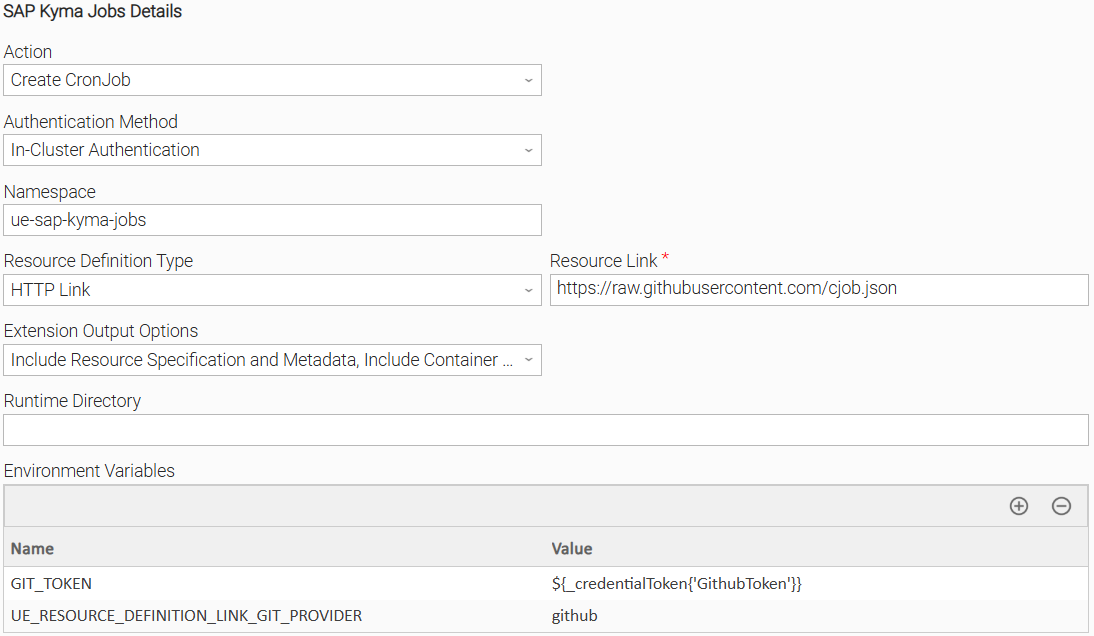
This configuration applies a CronJob. The Job definition is fetched from an HTTP link, using the GIT_TOKEN and UE_RESOURCE_DEFINITION_LINK_GIT_PROVIDER environment variables for access. The resource specification for the deployed CronJob will be visible on the Extension's output. However, container information will be omitted, as no containers are tied to the deployment of the CronJob.
Create a Job from a CronJob on the Kyma Cluster
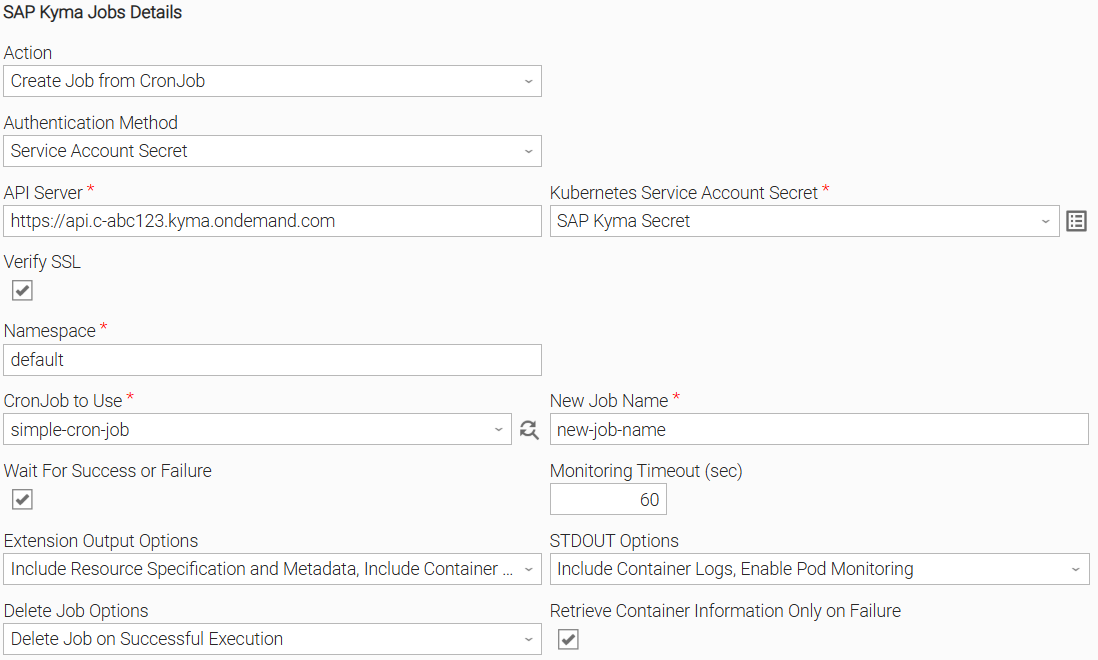
This configuration creates a Job from an existing CronJob. The Job will be created based on the CronJob's specification, and its name is specified in the relevant field. The resulting Job is to be monitored, producing information on both output streams. Note that container logs are to be retrieved and displayed only in the event that the Job results in failure.
Delete a Resource from the Kyma Cluster
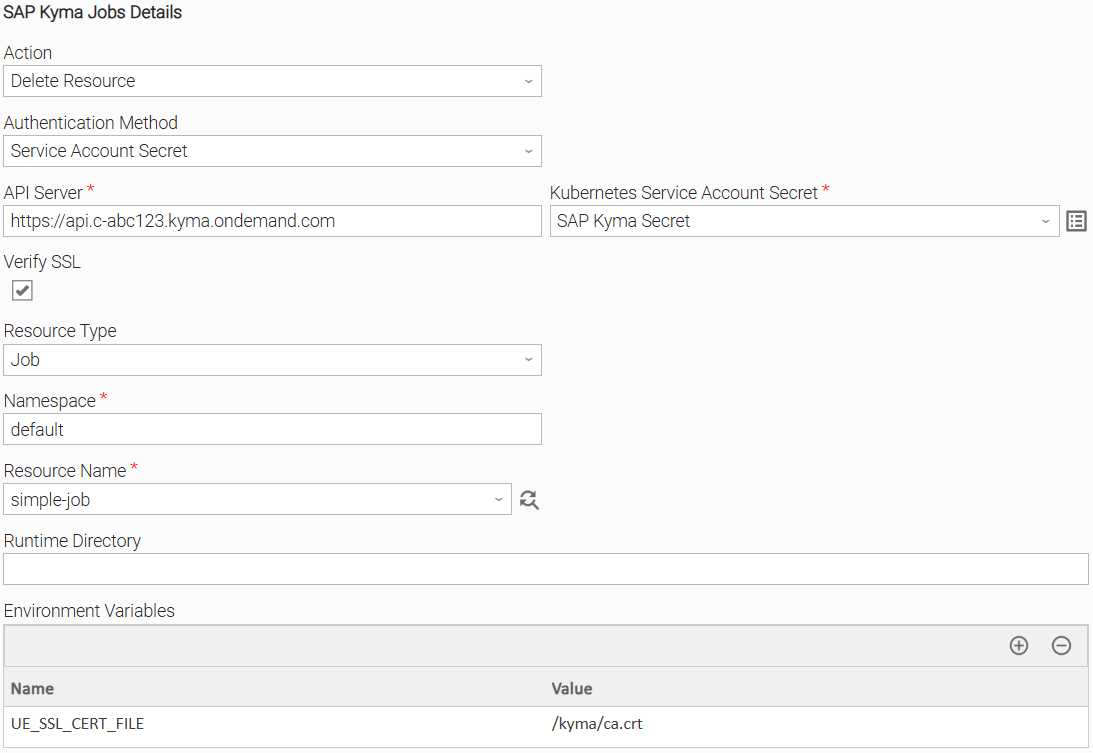
This configuration deletes a Job present on the Kyma Cluster. The resource type chosen can be a Job or a CronJob, whereas the relevant Resource Name dynamic choice field can be used to load all resources of the specified type.
Input Fields
Name | Type | Description | Version Information |
|---|---|---|---|
Action | Choice | The action to be executed. The following options are available.
| Introduced in 1.0.0 |
Resource Type | Choice | The type of Resource to be deleted. Available options are:
Available & Mandatory if Action is set to "Delete Job" | Introduced in 1.0.0 |
Authentication Method | Choice | The type of authentication method to use. Available options are:
| Introduced in 1.0.0 |
Kubernetes Service Account Secret | Credentials | The Credentials definition should be as follows.
Available & Mandatory if Authentication Method is set to "Service Account Secret". | Introduced in 1.0.0 |
API Server | Text | Kubernetes API server that runs in a Kyma-managed cluster. Ensure you specify the appropriate URL for API communication. Example: https://api.c-abc123.kyma.ondemand.com Available & Mandatory if Authentication Method is set to "Service Account Secret". The field is applicable for all the Actions. | Introduced in 1.0.0 |
Verify SSL | Checkbox | Enable to verify the server's SSL certificate. Disable to skip verification. CA Bundle is specified using the UE_SSL_CERT_PATH environment variable. | Introduced in 1.0.0 |
Namespace | Text | The namespace in which resources are to be deployed or deleted. In the case of resource deployment, this field will be used only as a fallback in case a 'namespace' value is not specified inside of the Resource Definition. Mandatory if Action is set to "Delete Resource" or "Create Job from CronJob" | Introduced in 1.0.0 |
Resource Definition Source | Choice | Specifies the source of the Job, CronJob, or Template manifest. The input must be in YAML or JSON format and must define exactly one resource.
Available if Action is set to any of "Apply Job", "Apply CronJob", "Create Job", "Create CronJob", "Create Template" | Introduced in 1.0.0 |
Resource Definition Script | Script | The UAC Script containing the Resource definition. Mandatory if Resource Definition Source is set to "UAC Script" | Introduced in 1.0.0 |
Resource Definition File Path | Text | The Agent's local full filename path to the Resource Definition. Mandatory if Resource Definition Source is set to "Local File" | Introduced in 1.0.0 |
Resource Definition Link | Text | The HTTP link that points to the Job Definition or CronJob/Template Manifest. Environment variables in the URL are resolved; The Mandatory if Resource Definition Source is set to "HTTP Link" | Introduced in 1.0.0 |
CronJob to Use | Dynamic Choice | The CronJob to use when creating Job from CronJob. Available & Mandatory if action is set to "Create Job from CronJob" | Introduced in 1.0.0 |
New Job Name | Text | The name that the created Job should have. Available & Mandatory if action is set to "Create Job from CronJob" | Introduced in 1.0.0 |
Resource Name | Dynamic Choice | The name of the Resource to be deleted. Available & Mandatory if Action is set to "Delete Job" | Introduced in 1.0.0 |
Wait for Success or Failure | Checkbox | Choose where the UAC task should wait until the deployed Job is completed. Available if Action is set to "Apply Job", "Create Job", "Create Job from CronJob" | Introduced in 1.0.0 |
Monitoring Timeout (sec) | Integer | The maximum number of seconds to monitor whether the job has been completed. If exceeded, a TimeoutExceededError is raised. Set to 0 to monitor indefinitely. Only available if Wait for Success or Failure is selected. | Introduced in 1.0.0 |
Extension Output Options | Choice | Controls whether additional information is printed to Extension Output. Available options are:
Available for all Actions except "Delete Job". | Introduced in 1.0.0 |
STDOUT Options | Choice | Controls whether additional information is printed to Standard Output. Available options are:
Only available if Wait for Success or Failure is selected. | Introduced in 1.0.0 |
Delete Job Options | Choice | Specifies the conditions under which the Deployed Job should be deleted. When deploying a job from a Template or CronJob, only the job instance itself will be deleted. Available options are:
Only available if Wait for Success or Failure is selected. | Introduced in 1.0.0 |
Retrieve Container Information Only on Failure | Checkbox | Specifies whether container information is only retrieved when Job fails. This option does nothing if "Include Container Logs" or "Include Container Information" options are not requested as part of the Standard Output or Extension Output options, respectively. Only available if Wait for Success or Failure is selected. | Introduced in 1.0.0 |
Output Fields
The following output-only fields provide better visibility during the execution of Universal Task Instances.
Field | Type | Description | Version Information |
|---|---|---|---|
Resource Name | Text | Name of deployed Resource. Applicable for all Actions except "Delete Job". | Introduced in 1.0.0 |
Resource Namespace | Text | The Namespace in which the resource has been deployed on. Applicable for all Actions except "Delete Job". | Introduced in 1.0.0 |
Job Status | Text | The latest status of the Kyma Job. | Introduced in 1.0.0 |
Last Updated On | Text | The timestamp when the task instance was last updated. | Introduced in 1.0.0 |
Environment Variables
Environment Variables can be set from the Environment Variables task definition table. The following environment variables can affect the behavior of the extension.
Environment Variable Name | Description | Version Information |
|---|---|---|
UE_SSL_CERT_PATH | Used to specify the local path to a CA Bundle to be used for SSL Verification. If not set, and Verify SSL has been selected, the system default CA Bundle will be used. | Introduced in 1.0.0 |
UE_HTTP_TIMEOUT | Specifies the timeout (in seconds) for HTTP requests made by the Task Instance. A higher value allows for slower responses, while a lower value enforces stricter time constraints. If not set, a default of 60 seconds is used. When a timeout happens, the Task Instance ends in failure. | Introduced in 1.0.0 |
GIT_TOKEN | If specified, this environment variable will be used as a Bearer token in the Authorization header when making the request to retrieve a Resource Definition via HTTP Link. | Introduced in 1.0.0 |
UE_RESOURCE_DEFINITION_LINK_GIT_PROVIDER | This environment variable is used only when Supported values are:
If the environment variable is not set, | Introduced in 1.0.0 |
UE_JOB_FINALIZATION_POLL_INTERVAL | This environment variable defines the interval (in seconds) between successive checks for job finalization after the pods have completed. It controls the polling frequency to ensure that job completion is detected reliably without overwhelming the server or agent resources. Accepted values: Positive integer (in seconds). If the environment variable is not set, or is set to an invalid value, the polling interval will default to 1 second. | Introduced in 1.0.0 |
Cancellation and Rerun
- In case of cancellation, monitoring of the deployed job is halted. No additional actions are taken on the Kyma Cluster. If the deployment process has already been initiated, it will not be impacted in any way. If Extension Output Options have been specified, information that has been produced at the point of cancellation will be returned.
- In case of rerun, the extension follows the same execution flow as the initial execution. As such, resources will be deployed or deleted, depending on the specified input fields, with no regard to the existing condition of the Kyma Cluster.
Dynamic Commands
Command Name | Allowed Task Instance Status | Description |
|---|---|---|
Delete Resource | Cancelled, Failed, Finished, Success | Deletes the deployed resource from the specified namespace. The name of the Job to delete, as well as the project it exists inside of, is inferred using the Resource Name and Resource Namespace Output Fields. Applicable for all Actions except "Delete Job". |
Retrieve Container Logs | Running, Cancelled, Failed, Finished, Success | Retrieves all container logs associated with the deployed Job that have been generated up to that point. The name of the Job to retrieve container logs for is inferred from the Resource Name and Resource Project Output Fields. Only applicable if Action is set to "Apply Job", "Create Job", "Create Job from CronJob". |
Exit Codes
Exit Code | Status | Status Description | Meaning |
|---|---|---|---|
0 | Success | "Task executed successfully." | Successful Execution. |
1 | Failure | "Execution Failed: <<Error Description>>" | Generic Error. Raised in case of failure and in case no other failure exit code is applicable. |
2 | Failure | "Authentication Error: Account cannot be authenticated." | Bad Credentials. |
20 | Failure | "Data Validation Error: <<Error Description>>" | Input fields validation error. |
21 | Failure | "DuplicateJobNameError: Job Naming Error." | A job sharing the provided name already exists in the specified namespace. Raised only if attempting to manage resource imperatively. |
40 | Failure | "TimeoutExceededError: Timeout Error." | The number of seconds to monitor the job, specified by the Timeout Seconds field, has been exceeded. |
STDOUT and STDERR
STDOUT is used for displaying Job information. It is controlled by STDOUT Options field.
STDERR provides additional information to the user. The level of detail is tuned by Log Level Task Definition field.
Backwards compatibility is not guaranteed for the content of STDOUT/STDERR and can be changed in future versions without notice
How To
Import Universal Template
To use the Universal Template, you first must perform the following steps.
- This Universal Task requires the Resolvable Credentials feature. Check that the Resolvable Credentials Permitted system property has been set to true.
- Import the Universal Template into your Controller:
- Extract the zip file, you downloaded from the Integration Hub.
- In the Controller UI, select Services > Import Integration Template option.
- Browse to the "export" folder under the extracted files for the ZIP file (Name of the file will be unv_tmplt_*.zip) and click Import.
- When the file is imported successfully, refresh the Universal Templates list; the Universal Template will appear on the list.
Modifications of this integration, applied by users or customers, before or after import, might affect the supportability of this integration. For more information refer to Integration Modifications.
Configure Universal Task
For a new Universal Task, create a new task, and enter the required input fields.
Deploy Universal Agent on Kubernetes Cluster
To use the In-Cluster Authentication method, the Universal Agent needs to be deployed inside the cluster as a pod.
For the integration and its full feature set to function properly with the In-Cluster Authentication method, a ServiceAccount must be configured with an RBAC role that includes the following permissions:
rules:
# Job management
- apiGroups: ["batch"]
resources: ["jobs", "jobs/status", "cronjobs"]
verbs: ["get", "list", "watch", "create", "update", "patch", "delete"]
# Pod monitoring (for job status)
- apiGroups: [""]
resources: ["pods", "pods/log", "pods/status"]
- Prepare the Universal Agent YAML (universal-agent.yml).
-
-
Specify namespace. Replace the
namespacefield value with your namespace. -
Specify ServiceAccount. Replace the
serviceAccountNamefield value with your ServiceAccount. -
Specify OMS Server. Replace the value of the
UAGOMSSERVERSfield with your OMS Server.infoIn order to be able to connect the agent, the OMS server needs to be accessible by the cluster.
-
Apply the YAML to the cluster.
kubectl apply -f universal-agent.yaml -
Once the pod is running, you should be able to use the agent from the Universal Controller that the OMS Server is connected to.
-
Integration Modifications
Modifications applied by users or customers, before or after import, might affect the supportability of this integration. The following modifications are discouraged to retain the support level as applied for this integration.
- Python code modifications should not be done.
- Template Modifications
- General Section
- "Name", "Extension", "Variable Prefix", and "Icon" should not be changed.
- Universal Template Details Section
- "Template Type", "Agent Type", "Send Extension Variables", and "Always Cancel on Force Finish" should not be changed.
- Result Processing Defaults Section
- Success and Failure Exit codes should not be changed.
- Success and Failure Output processing should not be changed.
- Fields Restriction Section
The setup of the template does not impose any restrictions. However, concerning the "Exit Code Processing Fields" section.- Success/Failure exit codes need to be respected.
- In principle, as STDERR and STDOUT outputs can change in follow-up releases of this integration, they should not be considered as a reliable source for determining the success or failure of a task.
- General Section
Users and customers are encouraged to report defects, or feature requests at Stonebranch Support Desk.
Document References
This document references the following documents:
Document Link | Description |
|---|---|
User documentation for creating, working with and understanding Universal Templates and Integrations. | |
User documentation for creating Universal Tasks in the Universal Controller user interface. | |
SAP Kyma documentation. | |
The Kubernetes documentation. |
Changelog
ue-sap-kyma-jobs-1.0.0 (2026-02-05)
Initial Version