ServiceNow: Event
Disclaimer
Your use of this download is governed by Stonebranch's Terms of Use.
Version Information
Template Name | Extension Name | Version | Status |
|---|---|---|---|
ServiceNow Event | ue-servicenow-event | 2.1.0 | Fixes and new Features are introduced. |
Refer to Changelog for version history information.
Overview
ServiceNow is a cloud-based platform that provides a suite of IT service management (ITSM) and business process automation (BPA) tools. It is designed to help organizations streamline and automate various processes, improving efficiency and collaboration across different departments. ServiceNow Events refer to the event management functionality within the broader ServiceNow platform. This feature is designed to help organizations detect, analyze, and respond to various events in real-time.
This integration provides the capability to generate (register) an Event in ServiceNow Platform.
Key Features
Feature | Description |
|---|---|
Event Registration | Capability to register an event on ServiceNow Platform with various authentication methods |
Requirements
This integration requires a Universal Agent and a Python runtime to execute the Universal Task.
Area | Details |
|---|---|
Python Version | Requires Python 3.11 or 3.14. Tested with the Universal Agent bundled Python distribution. |
Universal Agent Compatibility |
|
Universal Controller Compatibility | Universal Controller Version >= 7.8.0.0. |
Network and Connectivity | Connection towards ServiceNow Endpoints is required |
ServiceNow Platform | Tested against Australia release. Should be compatible also with future releases if API backward compatibility is preserved |
Supported Actions
Action: Create Event
Through this action is it possible to Create (Register) an Event on ServiceNow Platform passing mandatory and optional fields.
Action Output
- EXTENSION
- STDOUT
The extension output provides the following information:
exit_code,status,status_description: General info regarding the task execution. For more information users can refer to the exit code table.invocation.fields: The task configuration used for this task execution.result.event_info: Detailed information on registered event is printed as returned by ServiceNow EndPoints. Visibility of information might differ based on ServiceNow Platform configuration and version.result.errors: List of errors that might have occurred during execution.
Examples:Successful task execution with result.event_info JSON element populated.
Erroneous execution
Empty
Configuration Examples
Example: Create an event with common fields
Send an Event with some Common Fields using Basic Authentication. "Time of Event" is empty, therefore the local time of Agent will be used as event timestamp. Detailed event information is printed on Extension Output.

Send an Event with some Common Fields using OAuth2 Password Grant Authentication.
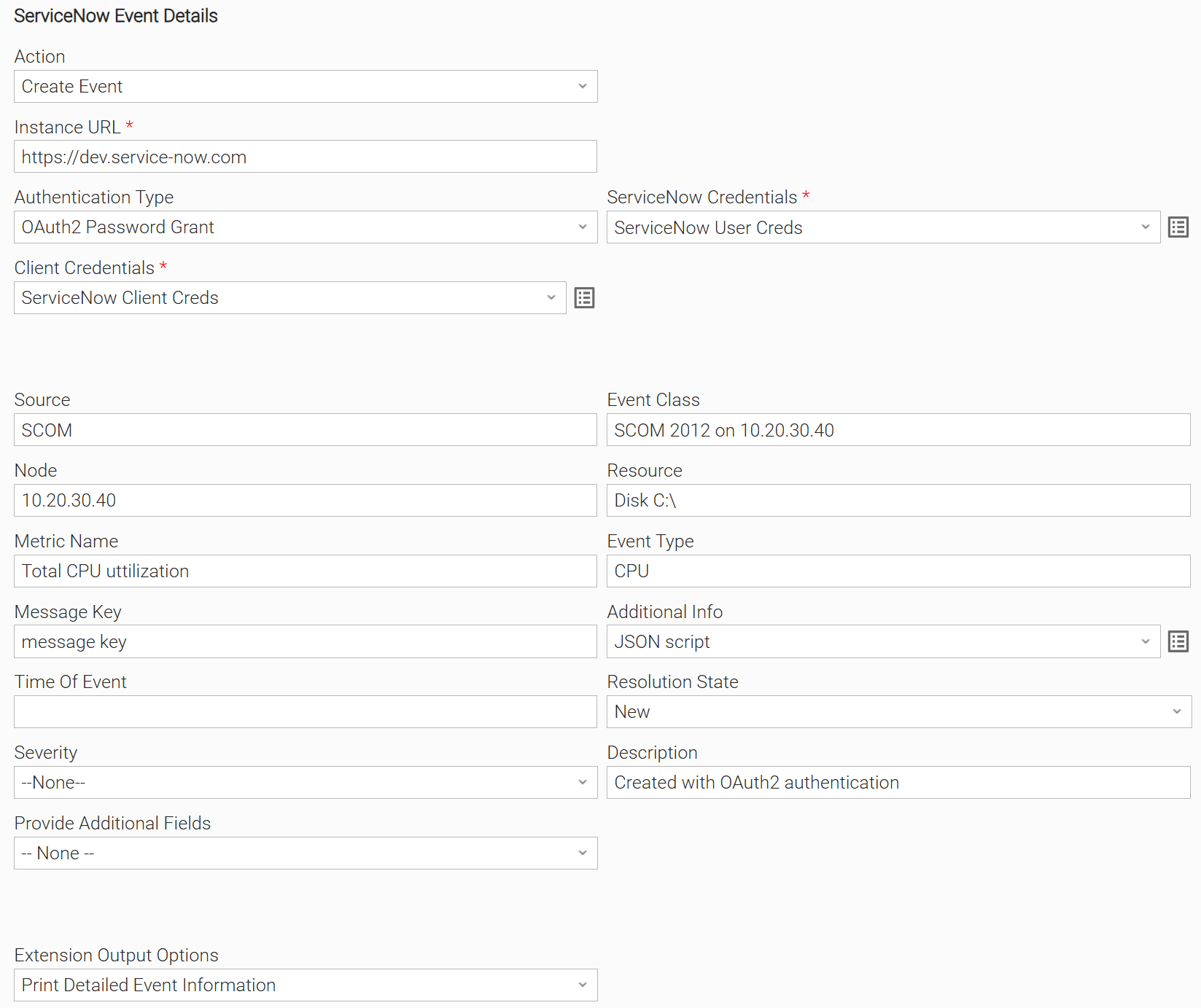
Example: Create an event with common and additional fields
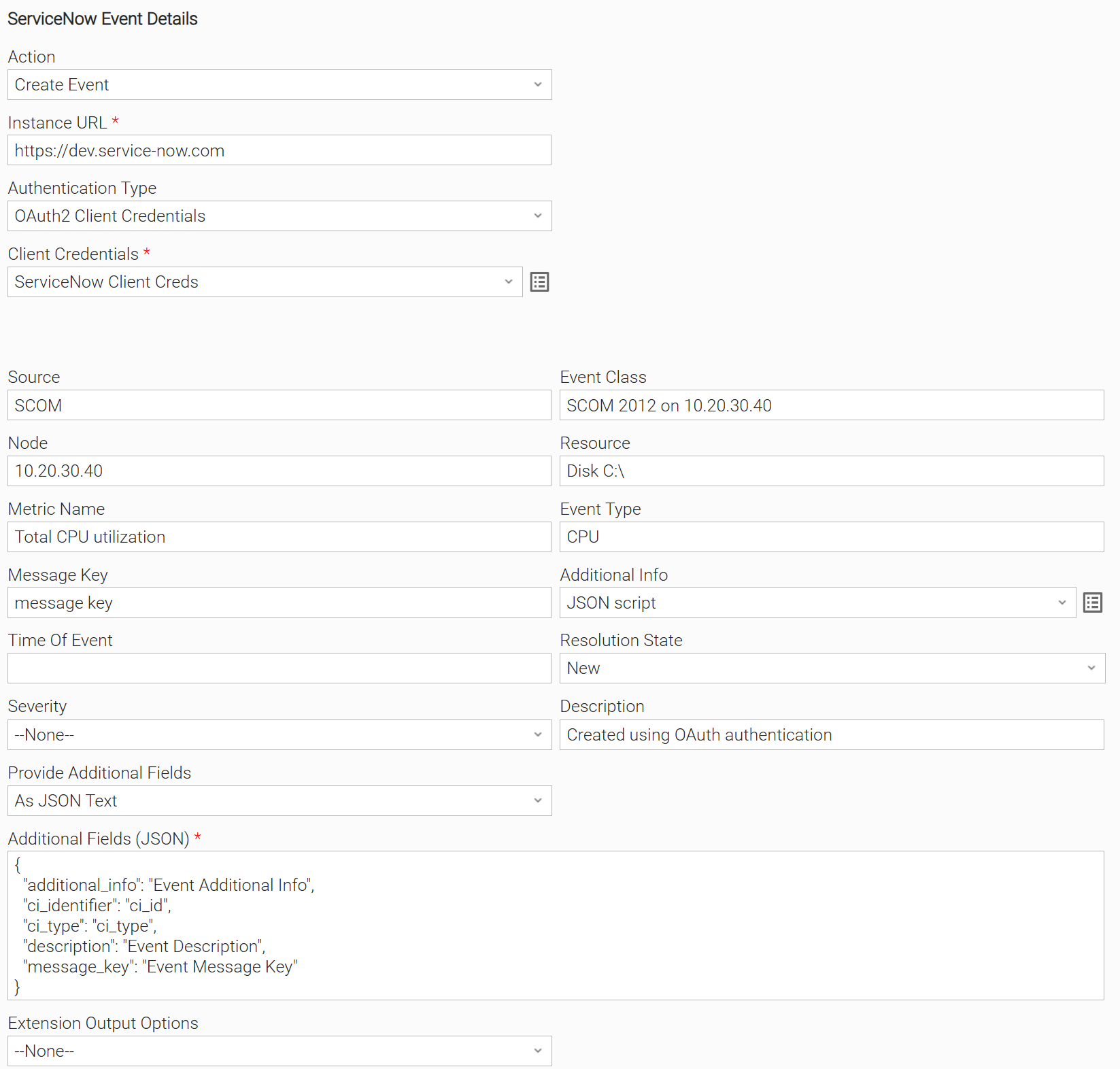
If a ServiceNow Field is defined in Additional Fields (JSON), and at the same time it is defined with a value on another existing field, the value defined on the specific designated field has precedence and the one defined on Additional Fields (JSON) will be ignored.
Send an Event with some Common and Additional Fields using Basic Authentication. "Time of Event" is empty, therefore the local time of Agent will be used as event timestamp.

Send an Event with some Common and Additional Fields using OAuth2 Client Credentials Authentication.
Input Fields
Field | Type | Description | Introduced in Version |
|---|---|---|---|
Action | Choice | The action performed upon the task execution. | 1.0.0 |
Instance URL | Text | ServiceNow URL e.g. https://dev532313.service-now.com | 1.0.0 |
Authentication Type | Choice | The Authentication Type used:
"Certificate Based Authentication" is not for public use. Please contact Support if you are interested in using this option | 1.0.0 Modified in 2.1.0 |
ServiceNow Credentials | Credentials | Credentials for "Basic Authentication" or "OAuth2 Password Grant" Authentication Type. The Credentials definition should be as follows.
Required when Authentication Type is "Basic Authentication" or "OAuth2 Password Grant" | 1.0.0 Modified in 2.1.0 |
Client Credentials | Credentials | Client Credentials. The Credentials Definition should be as follows:
Required when Authentication Type is "OAuth2 Password Grant" or "OAuth2 Client Credentials" | 1.0.0 Modified in 2.1.0 |
Client Certificate Path | Text | Full Path of the public key certificate for SSL client-side authentication. The file must be in PEM format. Required when Authentication Type is set to "Certificate Based Authentication". | 1.0.0 |
Client Private Key Path | Text | Full Path of the private key file for SSL client-side authentication. The file must be in PEM format and not encrypted. Required when Authentication Type is set to "Certificate Based Authentication". | 1.0.0 |
Source | Text | The name of the event source type. For example, "SCOM" or "SolarWinds". | 1.0.0 |
Event Class | Text | Specific instance of the source. For example, "SCOM 2012 on 10.20.30.40" | 1.0.0 |
Node | Text | The Node field should contain an identifier for the Host (Server/Switch/Router/etc.) that the event was triggered for. The value of the Node field can be one of the following identifiers of the Host:
If it exists in the CMDB, this value is also used to bind the event to the corresponding ServiceNow CI. | 1.0.0 |
Resource | Text | If the event refers to a device, such as, Disk, CPU, or Network Adapter, or to an application or service running on a Host, the name of the device or application must be populated in this field. For example "Disk C:" or "Nic 001".i | 1.0.0 |
Metric Name | Text | Name of the metric that triggered the alert. For example, "Used Memory" or "Total CPU utilization". | 1.0.0 |
Type | Text | The type of event. This type might be similar to the Metric Name field, but is used for general grouping of event types. | 1.0.0 |
Message Key | Text | This field is used for de-duplication of events. For example, there might be two events for the same CI, where one event has CPU of 50% and the next event has CPU of 99%. Where both events must be mapped to the same ServiceNow alert, they should have the same message key. The field can be left empty. | 1.0.0 |
Additional Info | Script | This field references a UAC Script in JSON key/value format, and is meant to contain any information that might be of use to the user. It does not map to a pre-defined ServiceNow event field. Examples include IDs of objects in the event source, event priority (if it is not the same as severity), assignment group information, and so on. An example of a script content is below: | 1.0.0 |
Time Of Event | Text | Time when the event occurred on the event origin. The format is: yyyy-MM-dd HH:mm:ss. If left empty, the current Agent local time is used. | 1.0.0 |
Resolution State | Text | The resolution state of the Event. If left empty, the state is "New". Possible Values:
| 1.0.0 |
Severity | Choice | Severity of the event. Possible Values:
| 1.0.0 |
Extension Output Options | Choice | Control the Extension Ouput "results"
| 1.0.0 |
Provide Additional Fields | Choice | The Provide Additional Fields provided as a Choice field. This field allows the user to choose whether or not to include additional ServiceNow fields in the request as a JSON formatted text. The following options are available.
| 1.1.0 |
Additional Fields (JSON) | Text | Additional Fields (JSON) provided as JSON formatted text. Each additional field can be sent as a key/value pair. Required when Provide Additional Fields is "As JSON Text". | 1.1.0 |
Environment Variables
Environment Variables can be set from Environment Variables task definition table. The following environment variables can affect the behavior of the extension.
Environment Variable Name | Description | Version Information |
|---|---|---|
UE_HTTP_TIMEOUT | This environment variable defines the global timeout value for sending all requests to the ServiceNow platform. It affects both connection and read timeouts, preventing requests from hanging. Accepted values: Positive integer (in seconds). If the environment variable is not set, the timeout will default to 60 seconds. | 1.2.0 |
Cancellation and Rerun
In the case of Rerun, the same Event will be sent again to ServiceNow.
Exit Codes
Exit Code | Status | Description |
|---|---|---|
0 | Success | Successful Execution. |
1 | Failure | Generic Error. Raised when not falling into the other Error Codes. |
2 | Failure | Bad credentials |
3 | Failure | Insufficient permissions |
20 | Failure | Input fields validation error. |
Document References
This document references the following documents:
Document Link | Description |
|---|---|
Describes how events are sent to ServiceNow Event Management through the REST API. | |
Describes how to configure OAuth applications in ServiceNow, required for OAuth2 Password Grant and OAuth2 Client Credentials authentication. |
Changelog
ue-servicenow-event-2.1.0 (2026-10-27)
Deprecations and Breaking Changes
Breaking Change: Universal Controller and Universal Agent 7.8.0.0 or later, and Python 3.11 or later, are required.
Enhancements
Added: Support for OAuth2 Client Credentials authentication.Changed: Authentication Type option "Oauth2 (ServiceNow API endpoint)" renamed to "OAuth2 Password Grant".
ue-servicenow-event-2.0.0 (2026-01-15)
Deprecations and Breaking Changes
Breaking Change: Dropping support for Agents with version <= 7.5 and for Python 3.7.
Enhancements
Added:Improving Python compatibility with future Agent versions.Added:Environment variable UE_HTTP_TIMEOUT for setting up timeout for requests.
ue-servicenow-event-1.1.0 (2024-08-01)
Enhancements
- Added support for all ServiceNow Event fields.
Changes
- This integration is no longer importable on Universal Controller 7.2 or runnable on Agent version 7.2.
ue-servicenow-event-1.0.2 (2024-05-16)
Fixes
Fixed: Fixedmessage_keyalways beingNULL(118251/#36755)
ue-servicenow-event-1.0.1 (2024-04-25)
Fixes
Fixed: Fixed bug where the contents of theadditional_infofield were not being properly recognized by ServiceNow (118066/#36165)
ue-servicenow-event-1.0.0 (2024-03-14)
Initial Version