Snowflake: Schedule, Trigger, Monitor, and Orchestrate Operations
Disclaimer
Your use of this download is governed by Stonebranch's Terms of Use.
Version Information
Template Name | Version |
|---|---|
CS Snowflake | 1.3.0 |
Refer to Changelog for version history information.
Overview
Snowflake is a cloud-based data warehousing platform that allows users to store, manage, and analyze large amounts of data. It offers high performance, scalability, and ease of use by separating storage and compute resources.
This Universal Task allows Stonebranch users to orchestrate, schedule, trigger, and monitor the Snowflake load and unload process from different data sources (cloud storage or local VMs) directly from Universal Controller. It uses Python libraries to perform all functions listed in the following sections. Alternatively, you also can perform all these operations using the Snowflake JDBC driver, which you can add to the Universal Controller libraries, and use a SQL Task to perform any operations with Snowflake (https://docs.snowflake.com/en/user-guide/jdbc-download.html )
Users can orchestrate the Snowflake functionalities using the following features available in the Universal Task
- UAC functionalities (Snowflake -Loading)
- Load data from AWS S3 to Snowflake.
- Load data from Azure Storage to Snowflake.
- Load data from Google storage to Snowflake.
- Load Internal stage file to Snowflake Table.
- Copy from local server to Internal staging.
- UAC functionalities (Snowflake - Unloading)
- Unload Snowflake data to AWS S3.
- Unload Snowflake data to Azure Storage.
- Unload Snowflake data to Google Storage.
- Unload Snowflake data to Internal stage.
- Unload from internal stage to local server.
- UAC functionalities (Snowflake - Execute Commands)
- Execute a Snowflake command.
Key Features
Feature | Description |
|---|---|
Load data from AWS S3 to Snowflake | Load the S3 bucket file(s) into a Snowflake table, You may specify the file format options and copy options appropriately. |
Load data from Azure Storage to Snowflake | Load the Azure container blobs into a Snowflake table, You may specify the file format options and copy options appropriately. |
Load data from Google storage to Snowflake | Load the google storage bucket files into a Snowflake table, You may specify the file format options and copy options appropriately. Please note that you will need to define the storage integration in Snowflake and provide this in the Universal Task. |
Load Internal stage file to Snowflake Table | Files that are available in Snowflake internal storage to be loaded into a Snowflake table using the pipe name and authentication using private public key files. The data can be loaded in Snowflake using patterns. |
Copy from local server to Internal staging | Copies files from local Windows or Linux server to Snowflake internal staging area. |
Unload Snowflake data to AWS S3 | This feature helps to unload the data from a Snowflake table to a AWS S3 bucket, file format options and copy options can be provided appropriately. |
Unload Snowflake data to Azure Storage | This feature helps to unload the data from a Snowflake table to an Azure container; file format options and copy options can be provided appropriately. |
Unload Snowflake data to Google Storage | This feature helps to unload the data from a Snowflake table to a Google cloud Storage; file format options and copy options can be provided appropriately. Also, this would need an storage integration name from Snowflake. |
Unload Snowflake data to Internal stage | Unloads the Snowflake table into an internal staging area in Snowflake. |
Unload from internal stage to local server | This feature helps to copy the files in staging area to a local windows or a Linux server. |
Execute a Snowflake command | Users can use this feature to execute snowflake commands; for example: Copy, Remove, Select, Delete, etc. |
Software Requirements
This integration requires a Universal Agent and a Python runtime to execute the Universal Task against Snowflake.
Software Requirements for Universal Template and Universal Task
- Note: Starting from version 1.3.0, the required Python modules are automatically downloaded and installed by the Universal Task.
Manual setup ofsnowflake-connector-python,snowflake-ingest, or any additional Python dependencies is no longer required for new installations or upgrades to this version and above. - Requires Python 3.6 or higher. Tested with the Universal Agent bundled Python distribution.
- Python modules required:
- https://raw.githubusercontent.com/snowflakedb/snowflake-connector-python/v2.3.9/tested_requirements/requirements_36.reqs
- snowflake-connector-python
- snowflake-ingest
- Please refer to Snowflake URL : https://docs.snowflake.com/en/user-guide/python-connector-install.html for the latest Python connector details.
Software Requirements for Universal Agent
Either:
- Universal Agent for Windows x64 Version 7.0 and later with Python options installed.
- Universal Agent for Linux Version 7.0 and later with Python options installed.
Software Requirements for Universal Controller
- Universal Controller Version 7.0.0.0 and later.
Software Requirements for the Application to be Scheduled
This Universal Task has been tested with the snowflake-connector-python=2.3.9 and snowflake-ingest=1.0.3.
Technical Considerations
- This task uses Python modules snowflake-connector-python and snowflake-ingest to make REST-API calls to Snowflake, Additionally, as a prerequisite, users might need to install other packages listed in https://raw.githubusercontent.com/snowflakedb/snowflake-connector-python/v2.3.9/tested_requirements/requirements_36.reqs.
- Snowflake login credential, Snowflake Account name, and URL would be needed in UAC for this Universal Task.
- In the case of data ingest from internal staging to Snowflake table through a pipeline, you would need to supply a private key file from local server and public key for the same to be loaded against the Snowflake user used in Universal Task.
- Key pair authentication and rotation process: Use the Snowflake instructions in this URL : https://docs.snowflake.com/en/user-guide/key-pair-auth.html .
- MS Entra ID as an External OAuth Provider Setup: Use the Snowflake instruction in this URL: https://docs.snowflake.com/en/user-guide/oauth-azure .
Import Snowflake Integration Downloadable Universal Template
To use this downloadable Universal Template, you first must perform the following steps:
- This Universal Task requires the Resolvable Credentials feature. Check that the Resolvable Credentials Permitted system property has been set to true.
- To import the Universal Template into your Controller, follow the instructions here.
- When the files have been imported successfully, refresh the Universal Templates list; the Universal Template will appear on the list.
Configure Snowflake Integration Universal Task
For the new Universal Task type, create a new task, and enter the task-specific details that were created in the Universal Template.
Field Descriptions for Snowflake Integration Universal Task
Field | Description |
|---|---|
Snowflake Account | Provide the Snowflake user account; for example, sr14548.eu-central-1. |
Snowflake Authentication | Select from list down options either Basic or Key-pair Authentication |
Encrypted Private Key | Select only if you have a encrypted private key. |
Oauth Client Credentials | Enter the Client ID and Client Secret issued by Microsoft Entra ID for your OAuth app registration. |
Oauth Config | Array of Microsoft Entra ID OAuth parameters with fixed field names and default placeholders, used to configure token acquisition; the field names are mandatory and must not be modified by users.
|
Snowflake Login Name |
|
Snowflake Host URL | Specify your host information in the form of a URL; for example, sr14548.eu-central-1.snowflakecomputing.com. |
Warehouse | Specify the warehouse name; If not specified, connects to the default warehouse for the user. |
Database | Specify the database name. |
Role | Name of the default role to use. |
Schema | Name of the default schema to use for the database. |
Select a Snowflake function | Select the required Snowflake function (if the required function not available, check the SQL task to invoke snowflake DB). |
Log Level | Select a log level. |
Snowflake Command | Provide a Snowflake command either in SQL or put / get commands etc. |
Local file Name & Path | Provide the local file name that need to be copied to stage. |
Stage Name | Provide the stage(internal) name in Snowflake. |
Encrypted Private Key | Select only if you have an encrypted private key. |
Stage File Name(s) | Provide the stage file names; if there are multiple files, separate by comma. |
Pipe Name | Specify the fully-qualified name of the pipe to use to load the data. |
Private Key File Path | Provide the private key file path to establish connection to Snowflake for data ingest. |
Private Key Password | Provide the password for private if it is encrypted. |
Snowflake Table Name | Provide the full path and the Snowflake table name where the table to be loaded. |
Use AWS Credentials | Check this if you need to supply AWS access key credentials. |
AWS Key ID & Secret Access Key | Provide the AWS secret Access Key (runtime user AWS Key id and secret key in the password section). |
AWS Storage Integration | Provide the name of the AWS storage integration created in Snowflake. |
Load using Pattern | If you need load the data using a pattern, check this option. |
S3 Bucket URL | Provide your S3 bucket URL: |
Azure container File | Provide the Azure container file URL starting with |
Azure Storage Integration | Provide the Azure storage integration created in Snowflake. |
GCP storage URL | Provide the bucket name and the file name; for example, |
Azure Sas Token | Provide the Azure Sas Token. |
Existing File Format Name | Specify an existing named file format to use for loading data into the table. |
Storage Integration | Provide the Snowflake storage integration details. |
Pattern | Regular expression pattern string - specifying the file names and/or paths to match. |
File Format Name | Specifies an existing named file format to use for loading data into the table. |
Format Type | Specify the format type: CSV | JSON | AVRO | ORC | PARQUET | XML. |
File Format Type Options | Specify the file format type options; for example, FIELD_DELIMITER = '|' if CSV type -- Refer to https://docs.snowflake.com/en/sql-reference/sql/copy-into-table.html |
Copy Options | Include other copy options; for example, ON_ERROR = CONTINUE or FORCE=TRUE- Refer to https://docs.snowflake.com/en/sql-reference/sql/copy-into-table.html |
Polling Interval (Secs) | Provide the Polling Interval time in Seconds, in the case of data ingestion from internal staging to Snowflake Table. |
Number of times to Poll | Specify the number of times to poll; otherwise, default is set to 50, in the case of data ingestion from internal staging to Snowflake Table. |
Examples for Snowflake Integration Universal Tasks
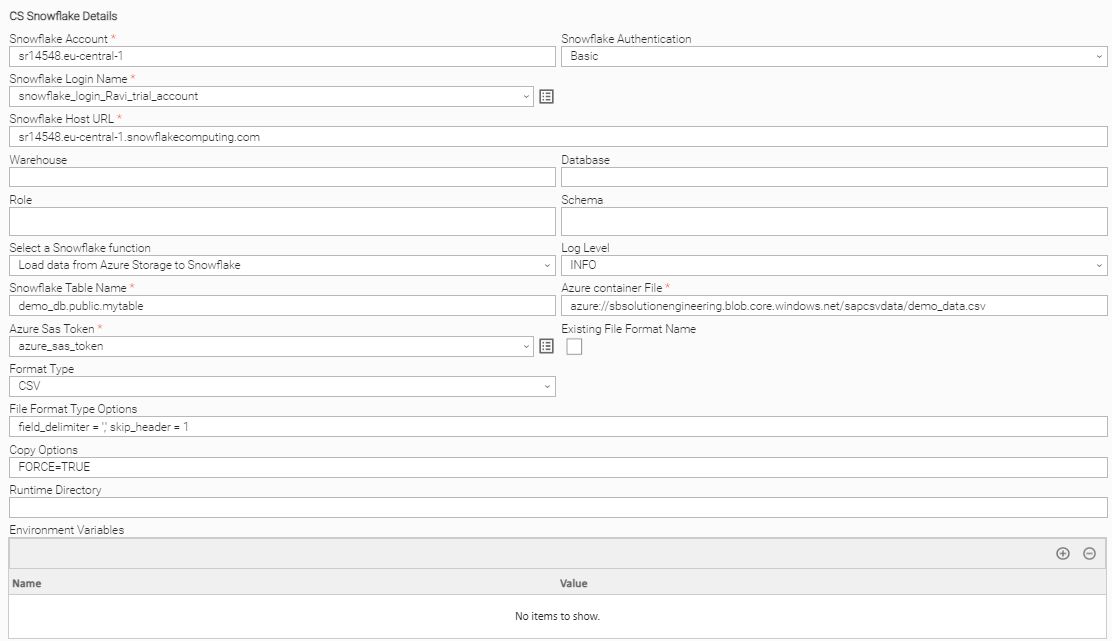
Load Data from Azure Storage to Snowflake Table
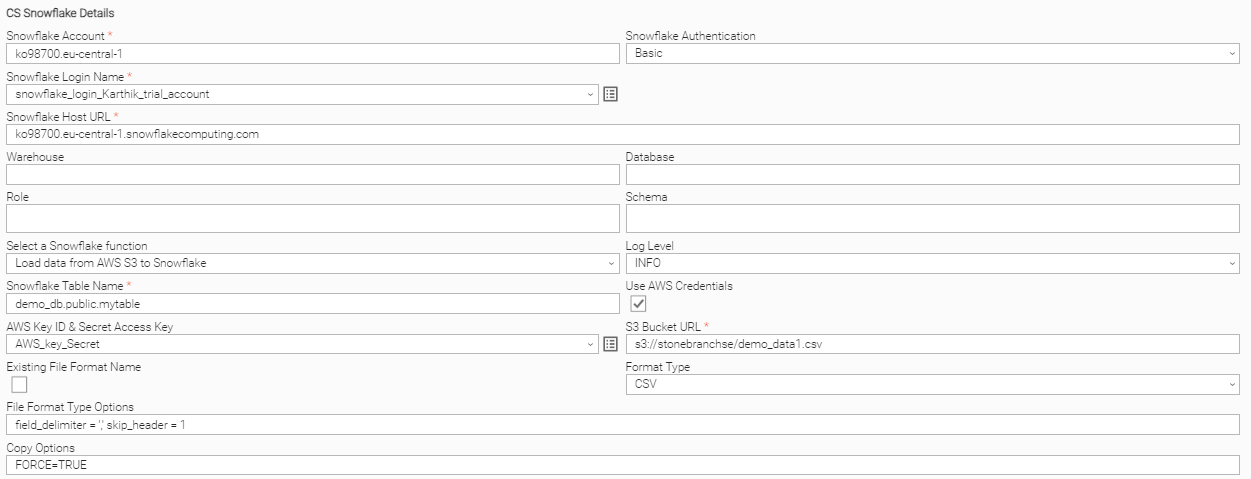
Load Data from AWS S3 to Snowflake Table
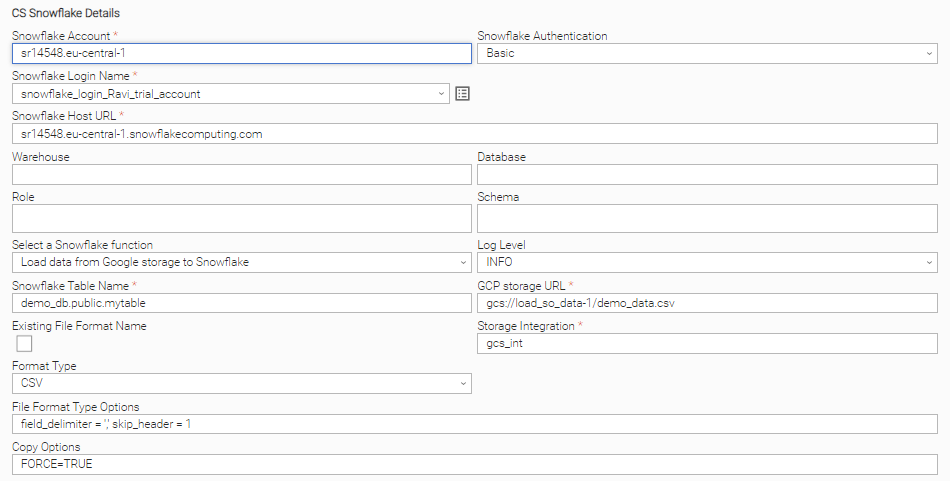
Load Data from Google Cloud Storage to Snowflake Table
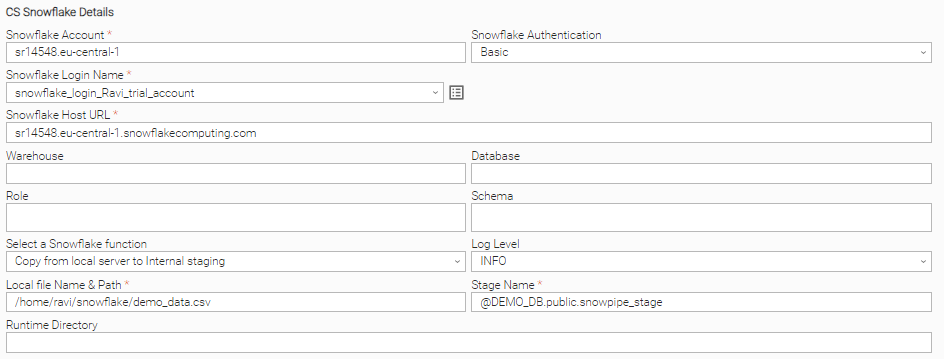
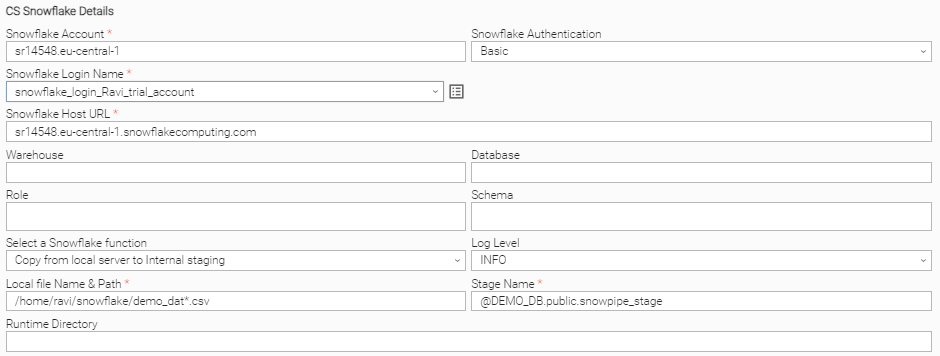
Copy Local File to Snowflake Staging
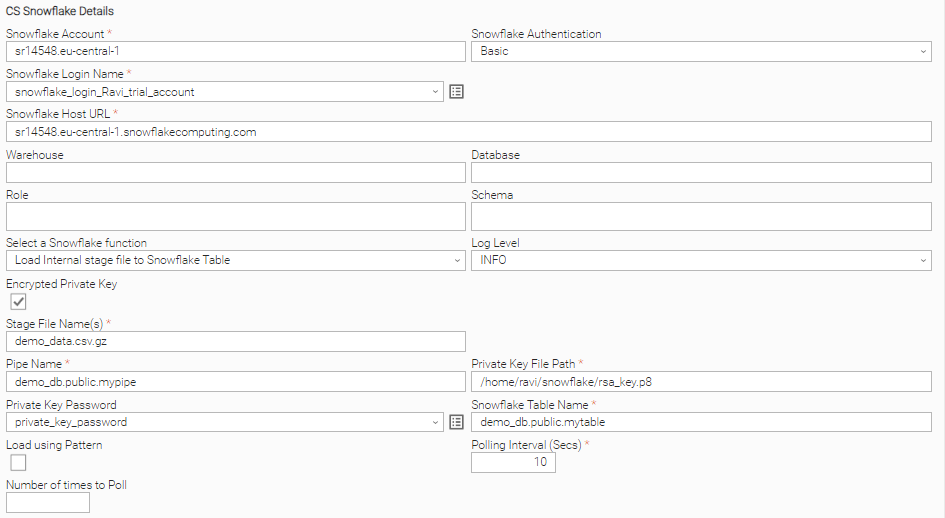
Load Snowflake Staging File to Table
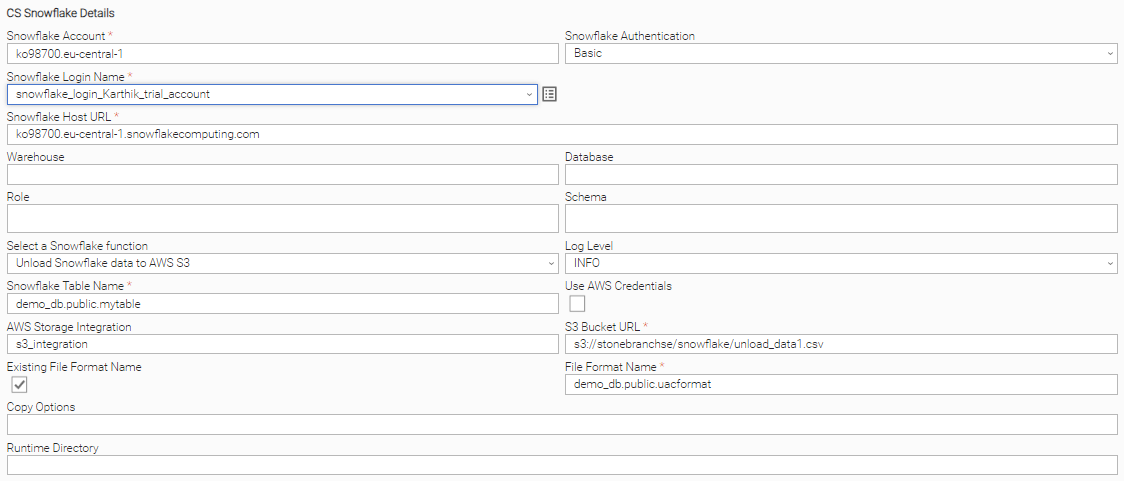
Unload Snowflake Table to AWS S3 Storage
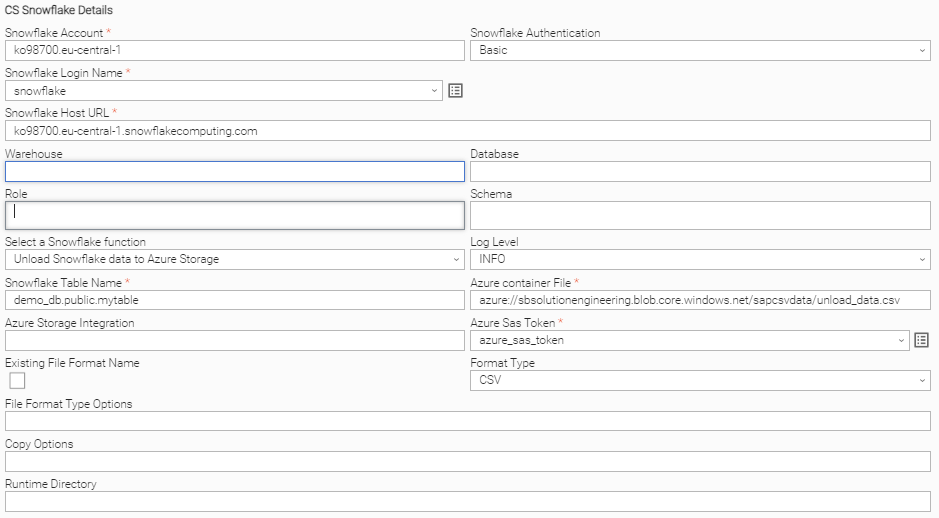
Unload Snowflake Table to Azure Storage
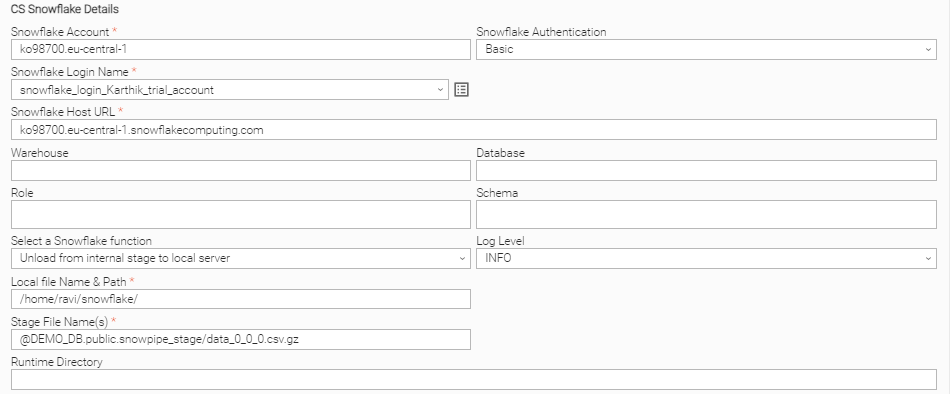
Download Snowflake Stage File to Local Linux Server
Copy Multiple Files (Linux Server) to Snowflake Staging Area
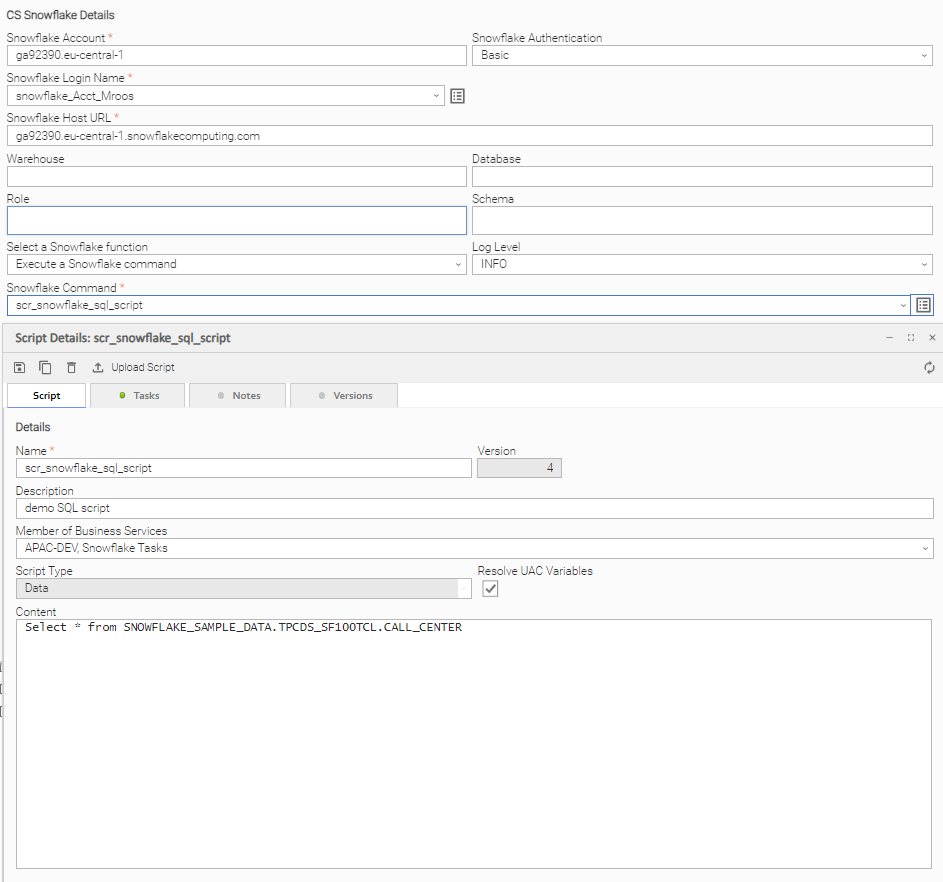
Executing a Snowflake Command
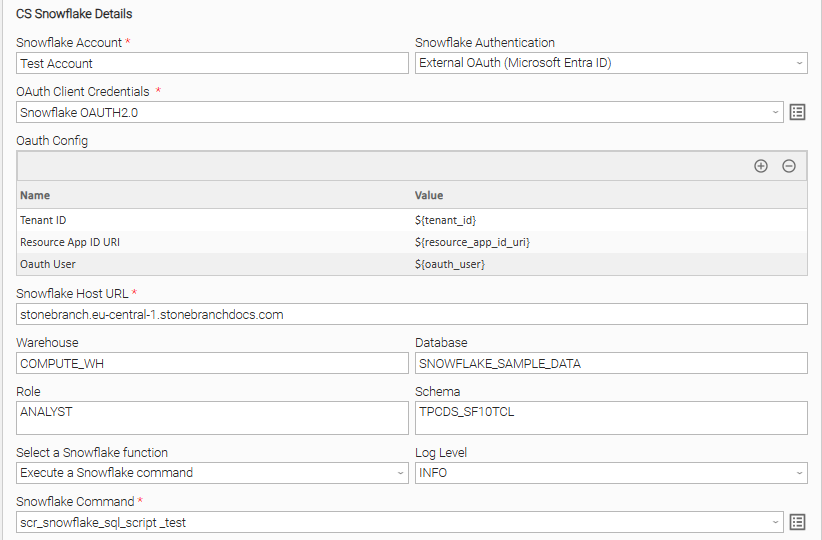
Execute a Snowflake Command (via Entra ID Oauth)
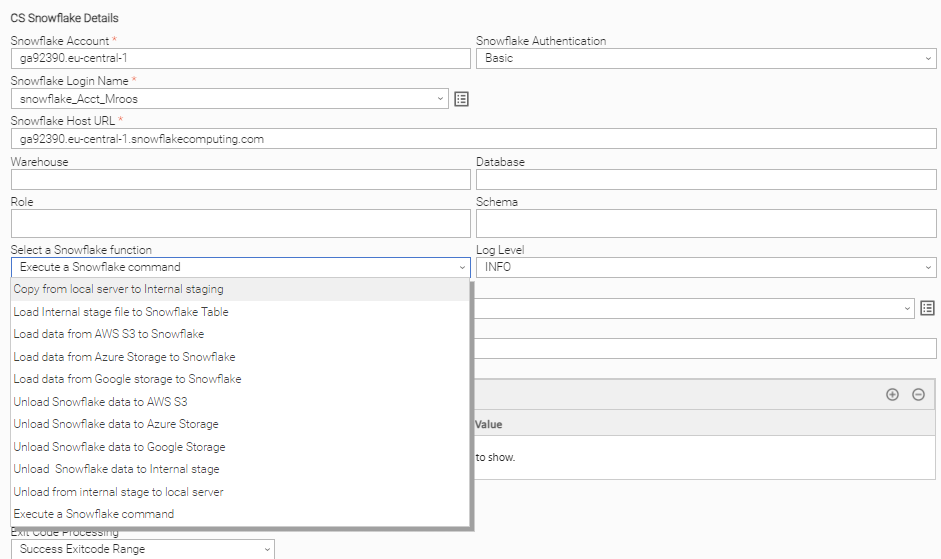
Snowflake Universal Task Functions
Document References
This document references the following documents:
Name | Description |
|---|---|
User documentation for creating Universal Templates in the Universal Controller user interface. | |
User documentation for creating Universal Tasks in the Universal Controller user interface. |
Changelog
ut-cs-snowflake-1.3.0 (2026-04-16)
Enhancements
- Added: Support of OAuth authentication via Microsoft Entra ID.
- Added: Support of variable for Snowflake Login Name field
- Added: Automatic installation of Snowflake Python packages.
- Added: Snowflake command status monitoring
Fixes
- Fixed: Private Key Location not found error while the task is executed on a Windows agent
ut-cs-snowflake-1.2.0 (2024-08-08)
Enhancements
- Added: key pair Authentication
ut-cs-snowflake-1.1.4 (2022-09-05)
Enhancements
- Added: Datawarehouse field
ut-cs-snowflake-1.0.0
- Initial version