Talend Cloud
Disclaimer
Your use of this download is governed by Stonebranch's Terms of Use.
Version Information
Template Name | Extension Name | Extension Version |
|---|---|---|
Talend Cloud | ue-cs-talend-cloud | 1.0.4 |
Refer to Changelog for version history information.
Overview
This Universal Task provides the capabilities for running API commands of Talend Cloud related to executing and managing various tasks and plans within your Talend environment, with additional functionalities like monitoring execution statuses and handling dependencies.
Talend Cloud is a data management platform that helps organizations integrate, govern, and manage data across different environments. It can be used for data integration tasks in public, private, and hybrid clouds, as well as on-premises environments. Talend Cloud is designed to help data engineers provide a complete view of data quickly and with integrity. It can be used to modernize data warehouses, build data lakes, and more.
Key Features
The Universal Task provides the following key features:
- Run executable
- Run Plan Executable
- List Executables
- Monitor execution status
- Handle failures and provide detailed failure messages
Software Requirements
Software Requirements for Universal Template and Universal Task
This integration doesn't require any additional packages.
Software Requirements Universal Agent
Only Linux agents are supported:
- Universal Agent for Linux Version 7.2.0.0 and later with python options installed.
Software Requirements Universal Controller
Universal Controller Version 7.2.0.0 and later.
Import Universal Template
To use the Universal Template, you first must perform the following steps.
- This Universal Task requires the Resolvable Credentials feature. Check that the Resolvable Credentials Permitted system property has been set to true.
- To import the Universal Template into your Controller, follow the instructions here.
- When the files have been imported successfully, refresh the Universal Templates list; the Universal Template will appear on the list.
Configure Universal Task
For a new Universal Task, create a new task, and enter the required input fields.
The following lists the input fields required for a selected Action.
Supported Actions
The following Actions are supported:
Action | Use Case | Required Parameters |
|---|---|---|
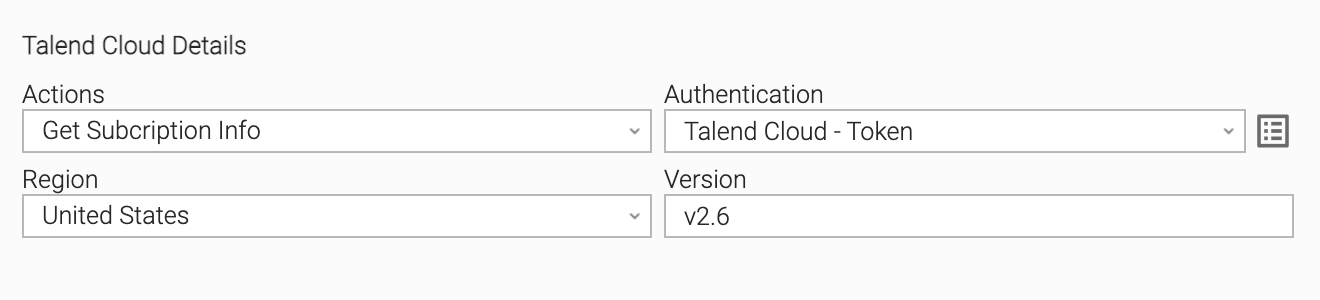
Get Subscription Info | Retrieve subscription details of the Talend Cloud environment. |
|
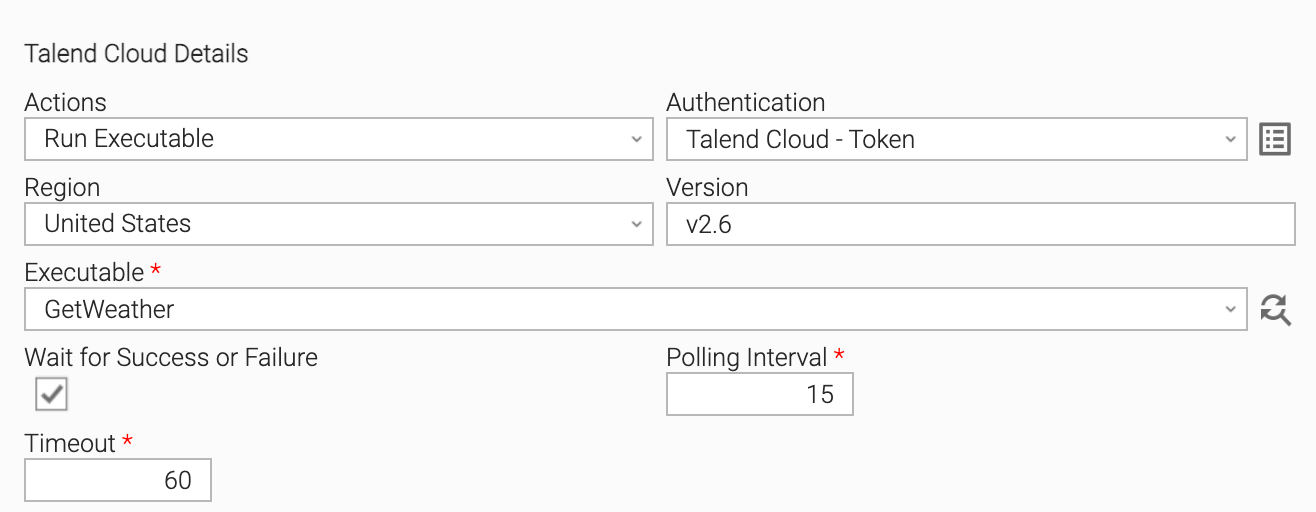
Run Executable | Run a specific executable job in Talend Cloud. |
|
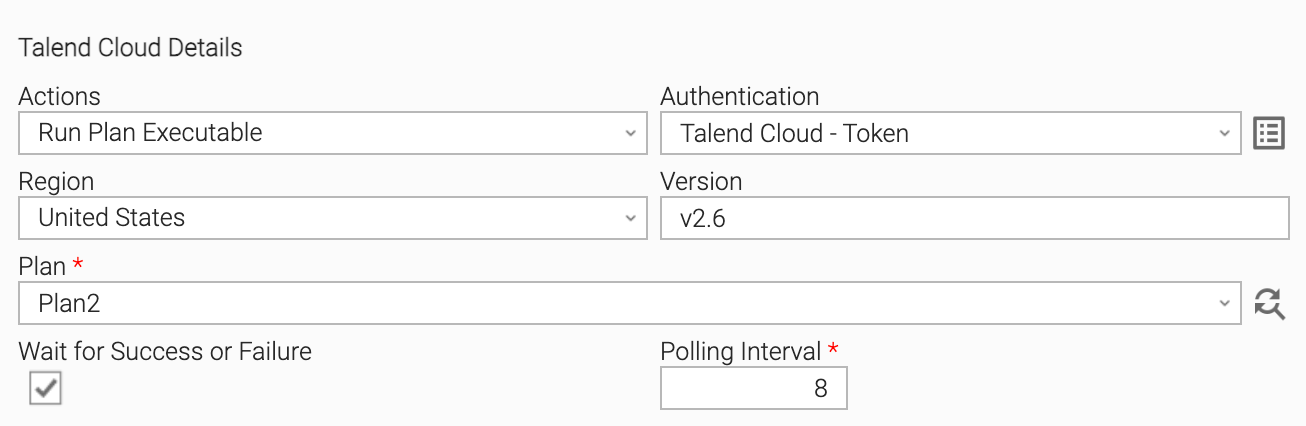
Run Plan Executable | Run a specific plan consisting of multiple jobs/tasks in sequence. |
|
Input Fields
The input fields for this Universal Task are described in the following table.
Field | Input Type | Default Value | Type | Description |
|---|---|---|---|---|
Action | Required | Choice | This field allows you to choose the operation you want to perform, such as getting subscription info, running an executable, or running a plan executable. | |
Authentication | Required | Credential | Write the Bearer token (Personal Access Token) value to the token value to authenticate API requests. | |
Region | Required | Choice | Select the region in which your Talend Cloud instance is hosted (e.g., United States, Europe). | |
Version | Optional | v2.6 | Text | Provide the version of the Talend API you are working with. Defaults to v2.6. |
Executable | Optional | Choice | This field will list available executables automatically based on your configuration. This field is only available for action = Run Executable. | |
Plan | Optional | Choice | This field will list available plans automatically based on your configuration. This field is only available for action = Run Plan Executable. | |
Wait for success or failure | Optional | false | Boolean | If selected, the task will continue running until the job reaches either the "SUCCEEDED" or "FAILED" state. This field is only available for actions = Run Executable and Run Plan Executable. |
Polling interval | Required | 10 | Integer | The polling interval, in seconds, to check the execution state. This field is only available if 'Wait' is selected. |
Timeout duration | Required | 60 | Integer | Enter the timeout duration in seconds for the executable task. This field is only available for action = Run Executable. |
Executable ID | Output | Text | This field will output the ID of the executable task. It is restricted to output only and is automatically populated. This field is only available for actions = Run Executable and Run Plan Executable. | |
Execution ID | Output | Text | This field will output the ID of the execution instance. It is restricted to output only and is automatically populated. This field is only available for actions = Run Executable and Run Plan Executable. |
Task Examples
Example - Get Subscription Info
This action can be used for testing purposes. It only gets
Example - Run Executable
This action will run the executable and monitor the status of the execution.
Example - Run Plan Executable
This action will run the plan executable and monitor the status of the execution.
Task Output
Exit Codes
The exit codes for this Universal Extension are described below.
Exit Code | Status Classification Code | Status Classification Description | Description |
|---|---|---|---|
0 | SUCCESS | Successful Execution | SUCCESS: Successful Task execution |
1 | FAILED | Failed Execution | Task will return exit code 1 if there is an error with connection and execution |
STDOUT and STDERR
STDOUT and STDERR provide additional information to the User. The populated content can be changed in future versions of this extension without notice. Backward compatibility is not guaranteed.
STDOUT will have the output from API commands.
Changelog
ue-cs-talend-cloud-1.0.4 (2024-06-21)
Initial Version