UAC Utility: For-Each-Input Loop
Disclaimer
Your use of this download is governed by Stonebranch's Terms of Use.
Version Information
Template Name | Version |
|---|---|
CS For-Each-Input Loop | 1.3.0 |
Refer to Changelog for version history information.
Overview
This integration is designed to automate the processing of input data by reading it from a flat file in Windows/Linux or a UAC script data repository. The core functionality revolves around a for-each loop, which iterates through the input data, parsing it using a predefined delimiter (such as a comma, pipe, or any one or two characters).
The parsed data segments are extracted and provided further to UAC tasks or workflows during each iteration. This allows for modular processing, where each task can handle a specific aspect of the data, enabling efficient and organized execution of complex workflows.
Starting from version 1.0.2, the Universal Template will support a Universal Controller with the Task Field Resolution Required system property enabled. Ensure that the configuration is completed as outlined in the Configure Universal Task section.
Software Requirements
This integration requires a Universal Agent and a Python runtime to execute the Universal Task.
Software Requirements for Universal Template and Universal Task
Requires Python 3.11.X or higher. Tested with the Universal Agent bundled Python distribution.
Software Requirements for Universal Agent
Both Windows and Linux agents are supported.
- Universal Agent for Windows x64 Version 7.7.0.0 and later with Python options installed.
- Universal Agent for Linux Version 7.7.0.0 and later with Python options installed.
- Python modules required:
- requests
Software Requirements for Universal Controller
Universal Controller Version 7.7.0.0 and later.
Network and Connectivity Requirements
Key Features
This Universal Extension provides the following key features:
- Actions
- Read input from a Windows or Linux flat file.
- Read input from UAC script type data.
- Parse each line of input via any single or two characters.
- Launch UAC task or workflow for every line of the parsed input via REST API.
- Option to wait and launch UAC tasks or workflows based on the previous execution's completion.
- Capability to launch UAC tasks or workflows either sequentially or in parallel and monitor executions of launched task instances.
- Restart the for-each loop task from the failed line of input or customize the input lines accordingly in the UAC script data.
- Option to abort for For-Each-Input Loop task execution when one of the launched child tasks or workflows fails.
- Authentication
- Authentication through HTTP(S)
- Input/Output
- Capability to read input from a flat file in Windows or Linux Operating system
- Can Accept from UAC script data
- It can also accept input from UAC script data that points to a variable potentially the data coming from predecessors Taks
- Print the summary of Tasks instances launched for the input data and their status
- Other
- It's a UAC utility that helps to iterate through the input data and process it by launching a UAC task or workflow via REST-API
Import Universal Template
To use the Universal Template, you first must perform the following steps.
- This Universal Task requires the Resolvable Credentials feature. Check that the Resolvable Credentials Permitted system property has been set to true.
- To import the Universal Template into your Controller, follow these instructions.
- When the files have been imported successfully, refresh the Universal Templates list; the Universal Template will appear on the list.
Modifications of this integration, applied by users or customers, before or after import, might affect the supportability of this integration. For more information refer to Integration Modifications.
Configure Universal Task
Prerequisites for Creating a Task with This Template:
- Create a script named DUMMY of type Data. The script's content can remain empty.
These configurations are mandatory starting from version 1.2.0, as the Universal Template has been adapted to support the Universal Controller when the Task Field Resolution Required system property is enabled.
For a new Universal Task, create a new task, and enter the required input fields.
Input Fields
The For-Each-Input Loop task contains the following Input fields
Field | Input type | Default value | Type | Description |
|---|---|---|---|---|
Select a Function | Required | Trigger by Script Input | Choice | The action performed upon the task execution. Valid values are:
|
Script Input Variable | false | Boolean | Check the box if you need to supply the user defined input by variable | |
Specify the Input File | Text | Specify the Input File (supports .txt, .csv, .xlsx, .xls) | ||
Ignore Empty or Missing File | false | Boolean | Check this box to exit gracefully (exit code 0) if the input file is empty or missing, instead of failing | |
Script Input | Optional | Script | Specify the User Defined Input (supports .txt, .csv, .xlsx, .xls) | |
Script Input | Optional | Text | Script name by Variable | |
Has Header | Boolean | Check this field if the First row in the input file or script needs to be considered as header | ||
Has Delimiter | Boolean | If needed to parse input by delimiter then specify then check this box | ||
Delimiter | Text | Specify the Variable Delimiter, e.g comma or Pipeline | ||
UAC Task to Trigger | Text | UAC Task to trigger | ||
Insert Into Workflow | Boolean | Check this box to insert tasks into a workflow instead of launching them directly | ||
Predecessors | Text | Comma-separated list of predecessor task names (e.g., "Task1,Task2" or " | ||
Successors | Text | Comma-separated list of successor task names (e.g., "Task3,Task4" or " | ||
Parallel Task Launch | Boolean | Specify if you need launch the UAC Task in parallel for every input read | ||
Abort Execution When a triggered Task Fails | Boolean | Check this box for the execution needs to be aborted when one of the triggered child task fails | ||
Restart from Failure | Boolean | Check this box if the execution needs to be restart from certain line with the input | ||
Restart Execution Input | Script | Specify the input lines where the job needs to resume execution from | ||
Retrieve Output | STDOUT | Choice | Select which output(s) of each triggered task to retrieve and embed once the task reaches a terminal state. Requires automatic output retrieval to be enabled on the triggered task. Valid values are:
This field is visible when Insert Into Workflow is "false". | |
Retrieve STDERR only on failure | false | Boolean | If checked, STDERR is retrieved only for tasks that fail, not for successful tasks. This field is visible when Insert Into Workflow is "false". | |
Launch Priority | Text | Provide the Launch Priority | ||
UAC Base URL | Required | Text | Provide the universal controller base URL, eg. | |
Authentication Type | Choice | Specify which UAC Authentication Method to use:
| ||
UAC Credentials | Required | - | Credentials | Credentials for "Basic" and "Token" Authorization Type. The Credentials definition should be as follows.
|
Verify SSL | Boolean | Check this if you need certificate verification | ||
SSL Certificate Path and File Name | Text | Provide the Path of the certificate for SSL Verification |
Task Examples
Task Output
- Trigger For-Each-Input-Loop Task by reading a Flat File
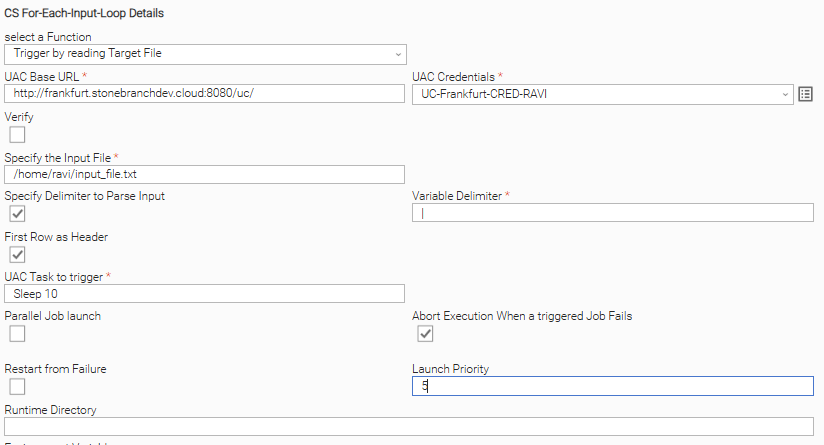

UAC Task launched with Variables :

- Trigger For-Each-Input-Loop Task by reading the UAC Script of type data
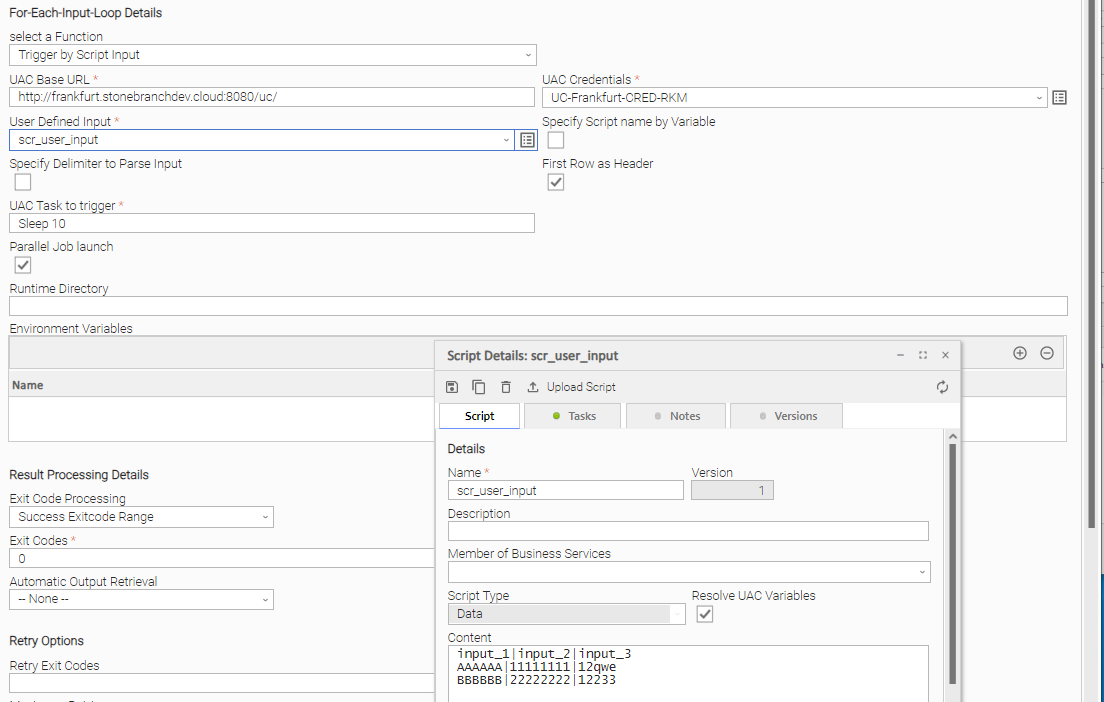
- Trigger For-Each-Input-Loop Task by reading the UAC script with input variables from the predecessor task
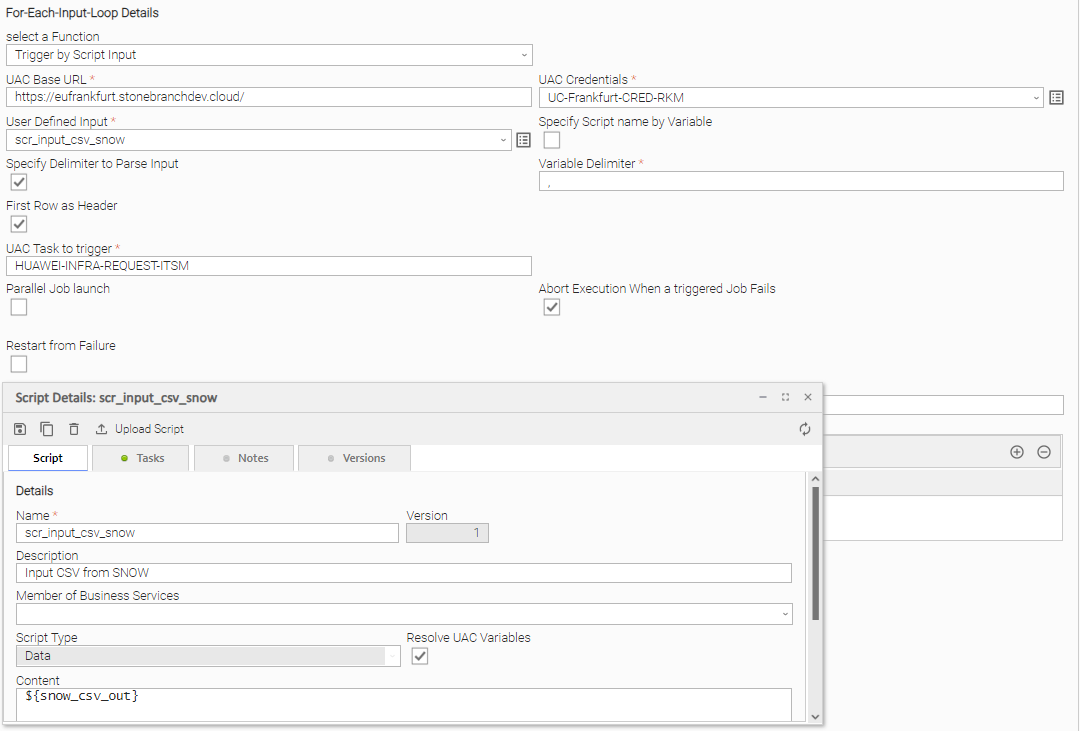
- Task execution output: For-Each-Input-Loop
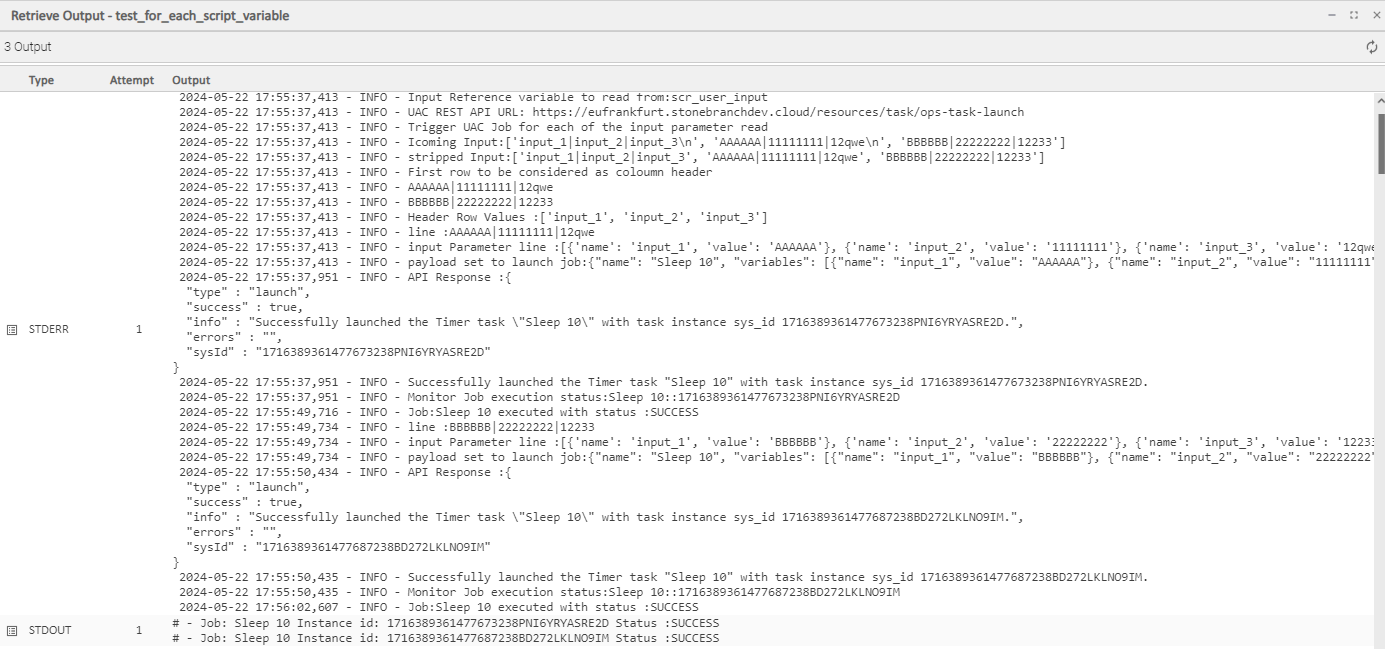
- Example Workflow: Process Files in Loop
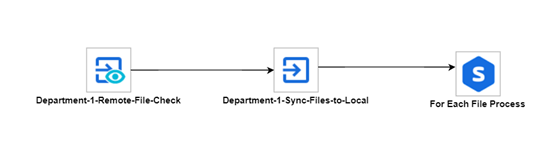
- Example Workflow: Process Servicenow Infra Create RITM request in a loop
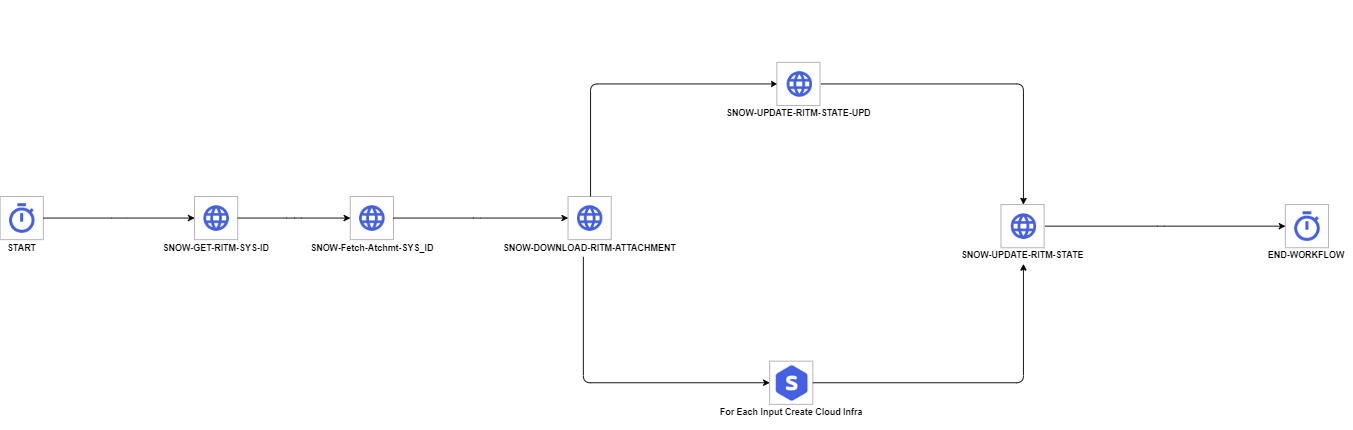
- Example Workflow: Handling SAP Transport request from Azure DevOps in a loop
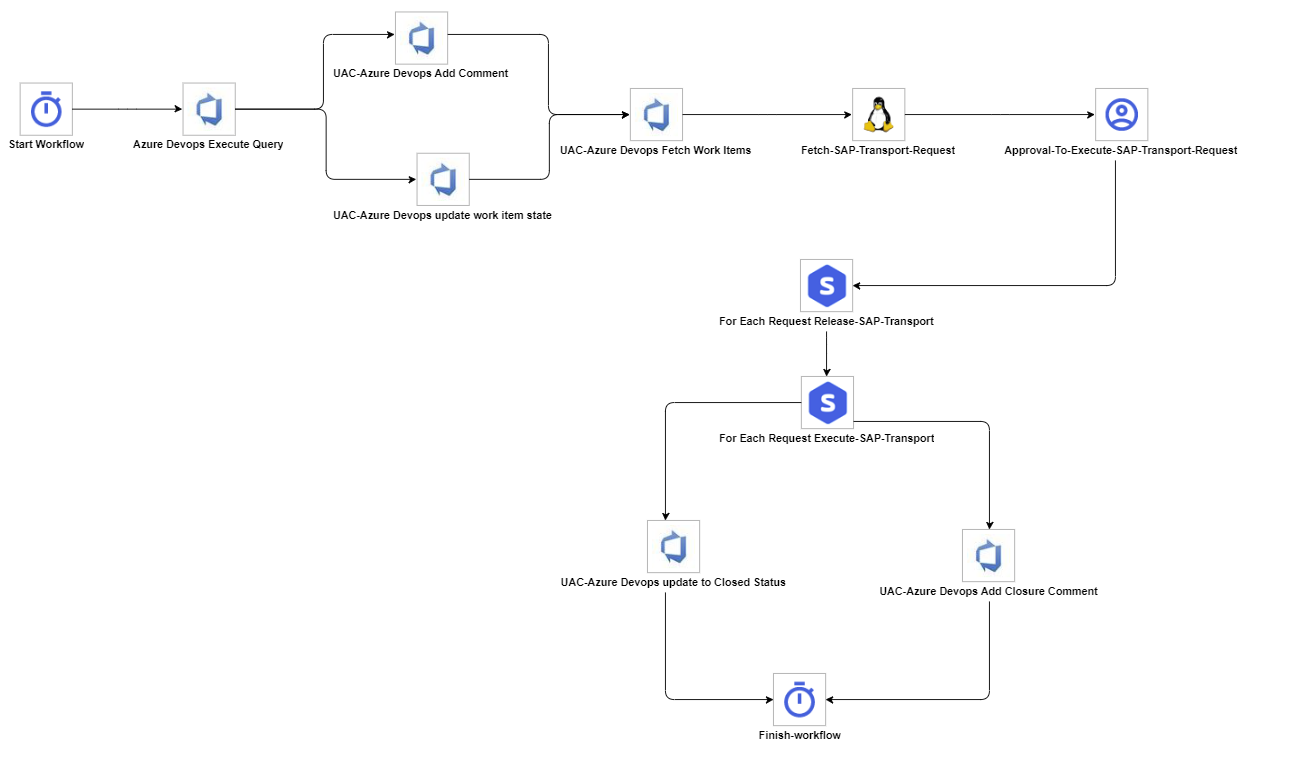
Exit Codes
The exit codes for these Universal Templates are described below.
Exit Code | Status Classification Code | Status Classification Description | Status Description |
|---|---|---|---|
0 | SUCCESS | Successful Execution | SUCCESS: Successful Task execution |
1 | FAILED | Failed Execution | FAILURE: Authentication configuration error - token not found or invalid auth_type value |
2 | FAILED | Failed Execution | FAILURE: Input list is empty - no data rows to process |
3 | FAILED | Failed Execution | FAILURE: Input file exists but contains no data rows |
4 | FAILED | Failed Execution | FAILURE: Input file was parsed but resulted in no usable data (e.g. file contains only a header row) |
5 | FAILED | Failed Execution | FAILURE: Exception while monitoring the sequentially launched UAC Task |
6 | FAILED | Failed Execution | FAILURE: Invalid input_function value |
7 | FAILED | Failed Execution | FAILURE: Input file does not exist |
10 | FAILED | Failed Execution | FAILURE: Exception or API error while launching UAC Task / inserting Task into Workflow, or exception during parallel job monitoring |
20 | FAILED | Failed Execution | FAILURE: Required Python library not installed - openpyxl (for .xlsx) or xlrd (for .xls) |
21 | FAILED | Failed Execution | FAILURE: Error reading Excel (.xlsx / .xls) or CSV file |
99 | FAILED | Failed Execution | FAILURE: UAC API response code is not 200 when launching Job or inserting Task into Workflow |
100 | FAILED | Failed Execution | FAILURE: One or more launched Tasks or Workflows ended in a failed status |
STDOUT and STDERR
STDOUT and STDERR provide additional information to the User. The populated content can be changed in future versions of this extension without notice. Backward compatibility is not guaranteed.
Document References
This document references the following documents.
Document Link | Description |
|---|---|
User documentation for creating, working with and understanding Universal Templates and Integrations. | |
User documentation for creating Universal Tasks in the Universal Controller user interface. | |
User documentation for creating and working with credentials. | |
User documentation for Resolvable Credentials Permitted Property. |
Integration Modifications
Modifications applied by users or customers, before or after import, might affect the supportability of this integration. The following modifications are discouraged to retain the support level as applied for this integration.
- Python code modifications should not be done.
- Template Modifications
- General Section
- "Name", "Extension", "Variable Prefix", "Icon" should not be changed.
- Universal Template Details Section
- "Template Type", "Agent Type", "Send Extension Variables", "Always Cancel on Force Finish" should not be changed.
- Result Processing Defaults Section
- Success and Failure Exit codes should not be changed.
- Success and Failure Output processing should not be changed.
- Fields Restriction Section
The setup of the template does not impose any restrictions, However with respect to "Exit Code Processing Fields" section.- Success/Failure exit codes need to be respected.
- In principle, as STDERR and STDOUT outputs can change in follow-up releases of this integration, they should not be considered as a reliable source for determining success or failure of a task.
- General Section
Users and customers are encouraged to report defects, or feature requests at Stonebranch Support Desk.
Changelog
ut-cs-for-each-input-loop-1.3.0 (2026-07-21)
Enhancements
- Added : Surface the output of each launched child task or workflow during execution. By default, the child task's STDOUT is displayed; you can now also choose to retrieve all outputs (STDOUT, STDERR, and Extension Output).
- Added : New "Retrieve STDERR only on failure" option, which includes STDERR only for child tasks that finish in a failed state.
- Added : Child task output is retrieved on demand from the agent, so it is displayed even when the referenced task does not have automatic output retrieval enabled.
ut-cs-for-each-input-loop-1.2.0 (2026-05-14)
Enhancements
- Added : Support for predecessors and successors, enabling clearer and more flexible workflow dependencies
- Added : Proper handling of multiple instances of the same task, avoiding conflicts by using unique identifiers
- Added : Bearer Token Authentication, simplifying and securing authentication for users
Fixes
- Improved task layout by positioning inserted tasks horizontally with consistent 150px spacing
- Corrected variable substitution so
${{var}}is properly rendered as${var}in task names and dependencies
ut-cs-for-each-input-loop-1.1.0 (2025-01-16)
Enhancements
- Supports a Controller with the "Task Field Resolution Required" system property enabled
- Virtual Resource priority can be specified for the launched Task
ut-cs-for-each-input-loop-1.0.1 (2024-08-01)
Fixes
- Exits with RC 2 when the input list is empty
ut-cs-for-each-input-loop-1.0.0 (2024-05-29)
Initial Version