UAC Utility: UC Task Comparison Tool
Disclaimer
Your use of this download is governed by Stonebranch's Terms of Use.
Version Information
Template Name | Extension Name | Version | Status |
|---|---|---|---|
Compare | ue-compare | 1 (Current 1.0.0) | Initial version. |
Refer to Changelog for version history information.
Overview
This integration for Stonebranch Universal Automation Center (UAC) enables users to validate the consistency of Task definitions across two different Universal Controllers. This integration is designed to help teams ensure configuration alignment between environments.
By selecting a Task from a primary controller, the integration retrieves and compares its definition against the corresponding Task on a secondary controller. If discrepancies are detected, the integration produces a clear, well-structured output on the STDOUT to highlight differences. Optionally, users can enforce strict validation by failing the task when mismatches are found.
Key Features
Feature | Description |
|---|---|
Cross-Controller Task Comparison | Compare a single Task definition between two Universal Controllers to ensure consistency across environments. |
Dynamic Task Selection | The Task Name field is dynamically populated from the primary controller, allowing users to easily browse available Tasks. It also supports glob patterns. For example, "Task_*". |
Requirements
This integration requires a Universal Agent and a Python runtime to execute the Universal Task.
Area | Details |
|---|---|
Python Version | Requires Python 3.11, tested with Python 3.11.8. |
Universal Agent Compatibility |
|
Universal Controller Compatibility | Universal Controller Version >= 7.6.0.0. |
Network and Connectivity | Network Connectivity towards the Primary and Secondary Universal Controllers. |
Supported Actions
Compare Task
Compares the definition of a specified Task between two Universal Controllers.
Action Output
- EXTENSION
- STDOUT
- STDERR
exit_code,status,status_description: General info regarding the task execution. In case of failure, it is set according to the specific error that happened during the execution. A list of possible values is provided in the exit codes table in this document.invocation.fields: The task configuration used for this task execution.result.diff: Raw diff output generated by the extension.- Included only when differences are found between the tasks.
Examples:Successful Execution of "Compare Task" Action
Failed Execution
The STDOUT output produced during the execution of the task instance.
Output can be controlled via the STDOUT Options input field. Available choices are
- "Enable Pod Monitoring", which streams information about the state of pods relating to the deployed job.
- "Include Container Logs" which outputs logs for all containers tied to the deployed job.
Both options are only applicable if Wait for Success or Failure has been selected.
Example:STDOUT, generated by the above successful task.
Shows the logs from the Task Instance execution. The verbosity is controlled by the Task configuration Log Level.
Example:STDERR, generated by the above successful task.
Configuration Examples
Compare Task and Fail on Differences
This configuration compares a task on two Controllers with different versions. The task is retrieved from both the Controllers and compared. If a difference is detected, the task instance fails, and the differences are printed to the STDOUT.
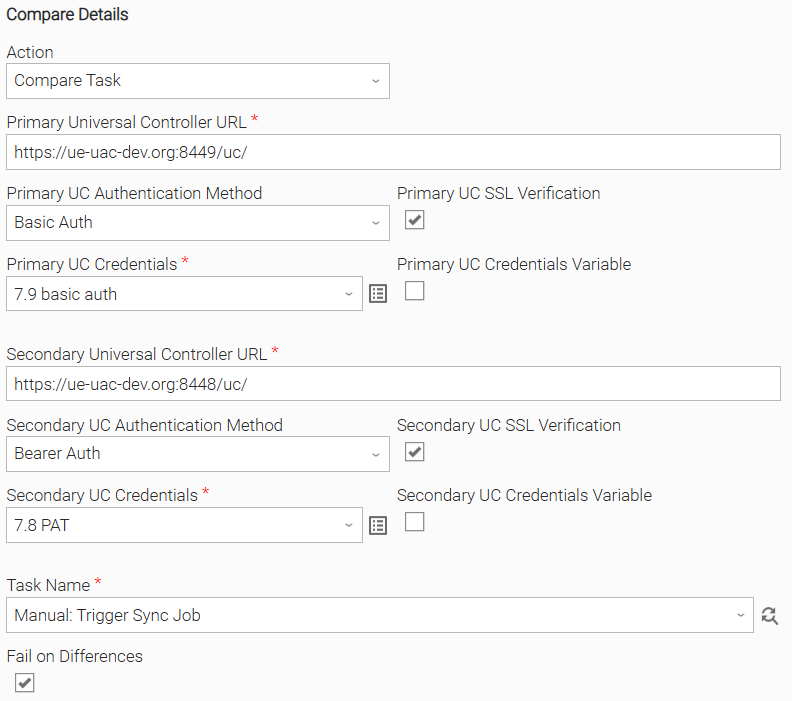
Input Fields
Name | Type | Description | Version Information |
|---|---|---|---|
Action | Choice | The action to be executed. The following options are available.
| Introduced in 1.0.0 |
Primary Universal Controller URL | Text | The Full URL of the Primary Universal Controller instance. For example, | Introduced in 1.0.0 |
Primary UC Authentication Method | Choice | The type of authentication method to use for authenticating with the Primary Universal Controller. Available options are as follows.
| Introduced in 1.0.0 |
Primary UC SSL Verification | Checkbox | Enable verification of the Primary Universal Controller server's SSL certificate. Disable to skip verification. CA Bundle is specified using the UE_PRIMARY_UC_SSL_CERT_FILE environment variable. | Introduced in 1.0.0 |
Primary UC Credentials | Credentials | The Credentials definition should be as follows.
| Introduced in 1.0.0 |
Secondary Universal Controller URL | Text | The Full URL of the Secondary Universal Controller instance. For example, https://uac-prod-02.example.com/uc | Introduced in 1.0.0 |
Secondary UC Authentication Method | Choice | The type of authentication method to use for authenticating with the Secondary Universal Controller. Available options are as follows.
| Introduced in 1.0.0 |
Secondary UC SSL Verification | Checkbox | Enable verification of the Secondary Universal Controller server's SSL certificate. Disable to skip verification. CA Bundle is specified using the UE_SECONDARY_UC_SSL_CERT_FILE environment variable. | Introduced in 1.0.0 |
Secondary UC Credentials | Credentials | The Credentials definition should be as follows.
| Introduced in 1.0.0 |
Task Name | Dynamic Choice | Dynamic Choice field for the retrieval and selection of the Name of the task to compare. Fetches the task names from the Primary Controller filtered by the text provided in its field. Additionally, it supports glob. For example, to list all tasks starting with | Introduced in 1.0.0 |
Fail on Differences | Checkbox | When enabled, the extension fails if differences are detected between the two task definitions. See Exit Codes. When disabled, the extension succeeds regardless of any differences between the two task definitions. | Introduced in 1.0.0 |
Environment Variables
Environment Variables can be set from the Environment Variables task definition table. The following environment variables can affect the behavior of the extension.
Environment Variable Name | Description | Version Information |
|---|---|---|
UE_PRIMARY_UC_SSL_CERT_PATH | When connecting to the Primary Universal Controller using HTTPS, it might be necessary to provide a CA Bundle. To do so, set the UE_PRIMARY_UC_SSL_CERT_PATH environment variable to the path of the desired CA Bundle. | Introduced in 1.0.0 |
UE_SECONDARY_UC_SSL_CERT_PATH | When connecting to the Secondary Universal Controller using HTTPS, it might be necessary to provide a CA Bundle. To do so, set the UE_SECONDARY_UC_SSL_CERT_PATH environment variable to the path of the desired CA Bundle. | Introduced in 1.0.0 |
UE_HTTP_TIMEOUT | Specifies the timeout (in seconds) for HTTP requests made by the Task Instance. A higher value allows for slower responses, while a lower value enforces stricter time constraints. If not set, a default of 60 seconds is used. When a timeout happens, the Task Instance fails. | Introduced in 1.0.0 |
Exit Codes
Exit Code | Status | Status Description | Meaning |
|---|---|---|---|
0 | Success | If no differences are found,
If differences are found and the Fail on Differences input field is not checked,
| Successful Execution. If the Fail on Differences input field is not checked, it means that the two task definitions have been compared successfully. If the Fail on Differences input field is checked, it means that the two task definitions are identical. |
1 | Failure | "Execution Failed: <<Error Description>>" | Failed Execution.
|
20 | Failure | "Data Validation Error: <<Error Description>>" | Input fields validation error. |
41 | Failure | If differences are found and the Fail on Differences input field is checked,
| Failed Execution.
|
42 | Failure | "STDOUT Render Error: <<Error Description>>" | Failed Execution.
|
101 | Failure | "Primary Universal Controller Task Fetch Error: <<Error Description>>" | Failed Execution.
|
102 | Failure | "Primary Universal Controller Task Not Found Error" | Task does not exist on the Primary Controller. |
201 | Failure | "Secondary Universal Controller Task Fetch Error: <<Error Description>>" | Failed Execution.
|
202 | Failure | "Secondary Universal Controller Task Not Found Error" | Task does not exist on the Secondary Controller. |
STDOUT and STDERR
STDOUT is used for displaying the differences between task definitions after comparing them.
STDERR provides additional information to the user, the verbosity of which is controlled by the Log Level Task Definition field.
Backwards compatibility is not guaranteed for the content of STDOUT/STDERR and can be changed in future versions without notice
How To
Import the Universal Template into your Controller:
- Extract the zip file that you downloaded from the Integration Hub.
- In the Controller UI, select Services > Import Integration Template option.
- Browse to the "export" folder under the extracted files for the ZIP file (Name of the file will be unv_tmplt_*.zip) and click Import.
- When the file is imported successfully, refresh the Universal Templates list; the Universal Template will appear on the list.
Modifications of this integration, applied by users or customers, before or after import, might affect the supportability of this integration. For more information refer to Integration Modifications.
Configure Universal Task
For a new Universal Task, create a new task and enter the required input fields.
Integration Modifications
Modifications applied by users or customers, before or after import, might affect the supportability of this integration. The following modifications are discouraged to retain the support level as applied for this integration.
- Python code modifications should not be done.
- Template Modifications
- General Section
- "Name", "Extension", "Variable Prefix", and "Icon" should not be changed.
- Universal Template Details Section
- "Template Type", "Agent Type", "Send Extension Variables", and "Always Cancel on Force Finish" should not be changed.
- Result Processing Defaults Section
- Success and Failure Exit codes should not be changed.
- Success and Failure Output processing should not be changed.
- Fields Restriction Section
The setup of the template does not impose any restrictions. However, concerning the "Exit Code Processing Fields" section.- Success/Failure exit codes need to be respected.
- In principle, as STDERR and STDOUT outputs can change in follow-up releases of this integration, they should not be considered as a reliable source for determining the success or failure of a task.
- General Section
Users and customers are encouraged to report defects or feature requests at the Stonebranch Support Desk.
Changelog
ue-compare-1.0.0 (2026-04-23)
Initial Version