UAC Utility: UDMG Vault Sync
Disclaimer
Your use of this download is governed by Stonebranch's Terms of Use.
Version Information
Template Name | Extension Name | Version | Status |
|---|---|---|---|
UDMG Vault Sync | ue-udmg-vault-sync | 1.0.0 | Initial Version. |
Refer to Changelog for version history information.
Overview
Universal Data Mover Gateway (UDMG) is Stonebranch's managed file-transfer solution. It keeps the keys, certificates and passwords used to exchange files with partners as credentials, stored per domain. In many organizations the authoritative copy of that material lives in a secret store such as AWS Secrets Manager, Azure Key Vault or HashiCorp Vault.
This Universal Task allows customers to keep UDMG credentials in sync with their secret store straight from the Universal Controller. A secret is read from AWS Secrets Manager, Azure Key Vault, HashiCorp Vault or any REST endpoint, and the UDMG credential is created, or updated when it already exists. For AWS KMS, the public half of an asymmetric RSA key is published to UDMG as an OpenPGP public key, while the private key never leaves KMS.
Key Features
Feature | Description |
|---|---|
Five Secret Sources | Reads secrets from AWS Secrets Manager, AWS KMS, Azure Key Vault, HashiCorp Vault (KV version 2) or a generic REST API. |
Create or Update UDMG Credentials | Creates the UDMG credential when it is missing and replaces its value when it exists, for PGP and SSH keys, X.509 certificates, passwords, and usernames with an SSH private key. |
Flexible Authentication | Authenticates with UAC Credentials or with the standard AWS, Azure and Vault environment variables of the Agent, including IAM roles, Azure service principals with a client secret or a certificate, managed and workload identities, and Vault AppRole. Authenticates with UDMG using Basic authentication or a personal access token. |
Value Selection from JSON Secrets | Selects one value out of a JSON secret or a multi-key Vault entry by key name or JSONPath expression. |
AWS KMS Keys as OpenPGP Public Keys | Publishes the public half of an asymmetric KMS key as a self-signed OpenPGP public key with a stable fingerprint. |
Requirements
This integration requires a Universal Agent and a Python runtime to execute the Universal Task.
Area | Details |
|---|---|
Python Version | Requires Python 3.11 or 3.14, tested with Agent bundled python distribution. |
Universal Agent Compatibility |
|
Universal Controller Compatibility | Universal Controller Version >= 7.8.0.0. |
Universal Data Mover Gateway | Tested with UDMG 3.4. The UDMG user of UDMG Credentials requires permission to read, create and update the credentials of the UDMG Domain. With UDMG Authentication "Token", a personal access token must be issued to that user. |
AWS Permissions |
|
Azure Key Vault Permissions | The identity requires permission to get secrets of the vault, for example the Key Vault Secrets User role. For "Service Principal (Certificate)", the public certificate ( |
HashiCorp Vault Permissions | A KV version 2 secrets engine. The token, or the token issued to the AppRole, requires the |
Network and Connectivity | Network connectivity to UDMG and to the selected source is required: the AWS STS, Secrets Manager and KMS endpoints of the region, |
Supported Actions
There is one Top-Level action controlled by the Action Field:
- Sync Credential: Reads the secret from the selected source and creates or updates the UDMG credential with it.
Before the secret is read, the credential is looked up in UDMG. If it exists with a type other than Credential Type, the Task Instance fails without reading the secret, because UDMG cannot change the type of a credential. After the write, the credential is read back from UDMG to confirm it was stored. An empty secret fails the Task Instance and nothing is written to UDMG.
Action Output
- EXTENSION
- STDOUT
The extension output provides the following information:
exit_code, status_description: General info regarding the task execution. For more information refer to exit codes table.invocation.fields: The task configuration used for this execution.result.source_provider,result.auth_method: The source the secret was read from, and the authentication method used for it.result.source_secret,result.secret_key: The secret name, key ID or URL that was read, and the Secret Key applied to it (nullwhen not set).result.udmg_domain,result.udmg_credential,result.udmg_credential_type: The UDMG domain, the name of the credential, and its UDMG type, for examplepgp:public:key.result.operation:CreatedorUpdated.result.udmg_version: The version of the credential in UDMG after the write.result.synced_at: When the credential was written, in UTC (ISO 8601).result.errors: List of errors that might have occurred during execution.
Examples:Successful execution
Failed execution
STDOUT is controlled by the STDOUT Options field. Include Step Log prints one line per step as the sync runs, prefixed with the system it concerns. Include Summary Table prints a table at the end of the run: what was synchronized or, when the run fails, what was being synchronized with the Sync Status and the error. The secret itself is never printed.
Example:
[HashiCorp Vault] Using AppRole authentication
[UDMG] Credential 'partner-acme-pgp' exists (pgp:public:key, version 3)
[HashiCorp Vault] Retrieved secret 'udmg/partners/acme' (key: pgp_public)
[UDMG] Updated credential 'partner-acme-pgp' in domain 'partners' (version 4)
┌─────────────────┬───────────────────────────┐
│ Item            │ Value                     │
├─────────────────┼───────────────────────────┤
│ Source Provider │ HashiCorp Vault           │
│ Authentication  │ AppRole                   │
│ Source Secret   │ udmg/partners/acme        │
│ Secret Key      │ pgp_public                │
│ UDMG Domain     │ partners                  │
│ UDMG Credential │ partner-acme-pgp          │
│ Credential Type │ pgp:public:key            │
│ Operation       │ Updated                   │
│ UDMG Version    │ 4                         │
│ Synced At       │ 2026-10-19T14:02:11+00:00 │
└─────────────────┴───────────────────────────┘
Configuration Examples
Example: HashiCorp Vault, AppRole, value selected from a multi-key entry
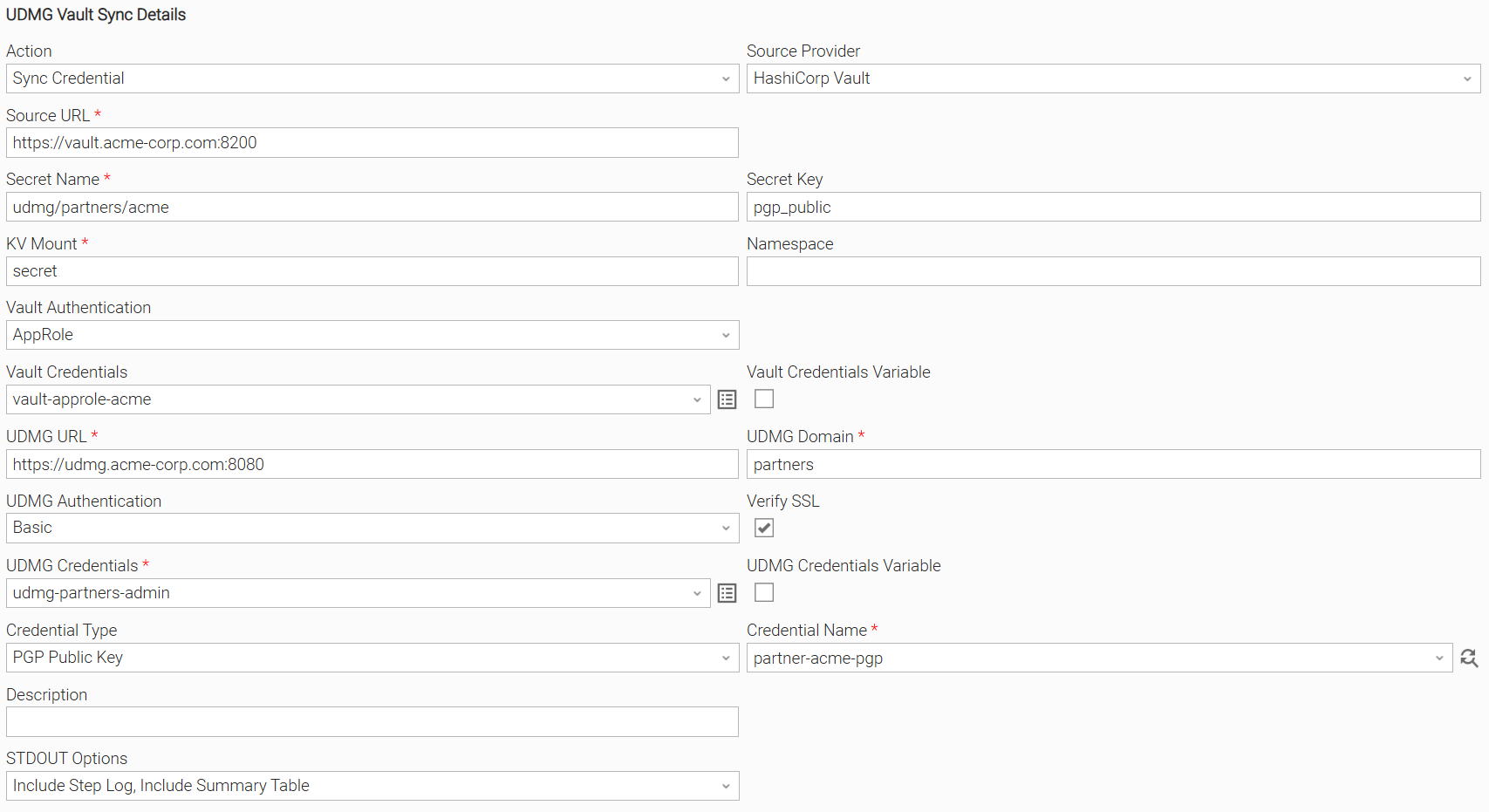
Source Provider is "HashiCorp Vault" with Source URL https://vault.acme-corp.com:8200, KV Mount secret and Secret Name udmg/partners/acme, an entry that holds the keys pgp_public and pgp_private. Secret Key is pgp_public. Vault Authentication is "AppRole", with the Role ID as user and the Secret ID as password of Vault Credentials. The public key is written to the UDMG credential partner-acme-pgp of type "PGP Public Key" in domain partners, which is created on the first run and updated on every later run. Both STDOUT Options are selected.
Example: AWS Secrets Manager, Agent IAM Role, cross-account Assume Role
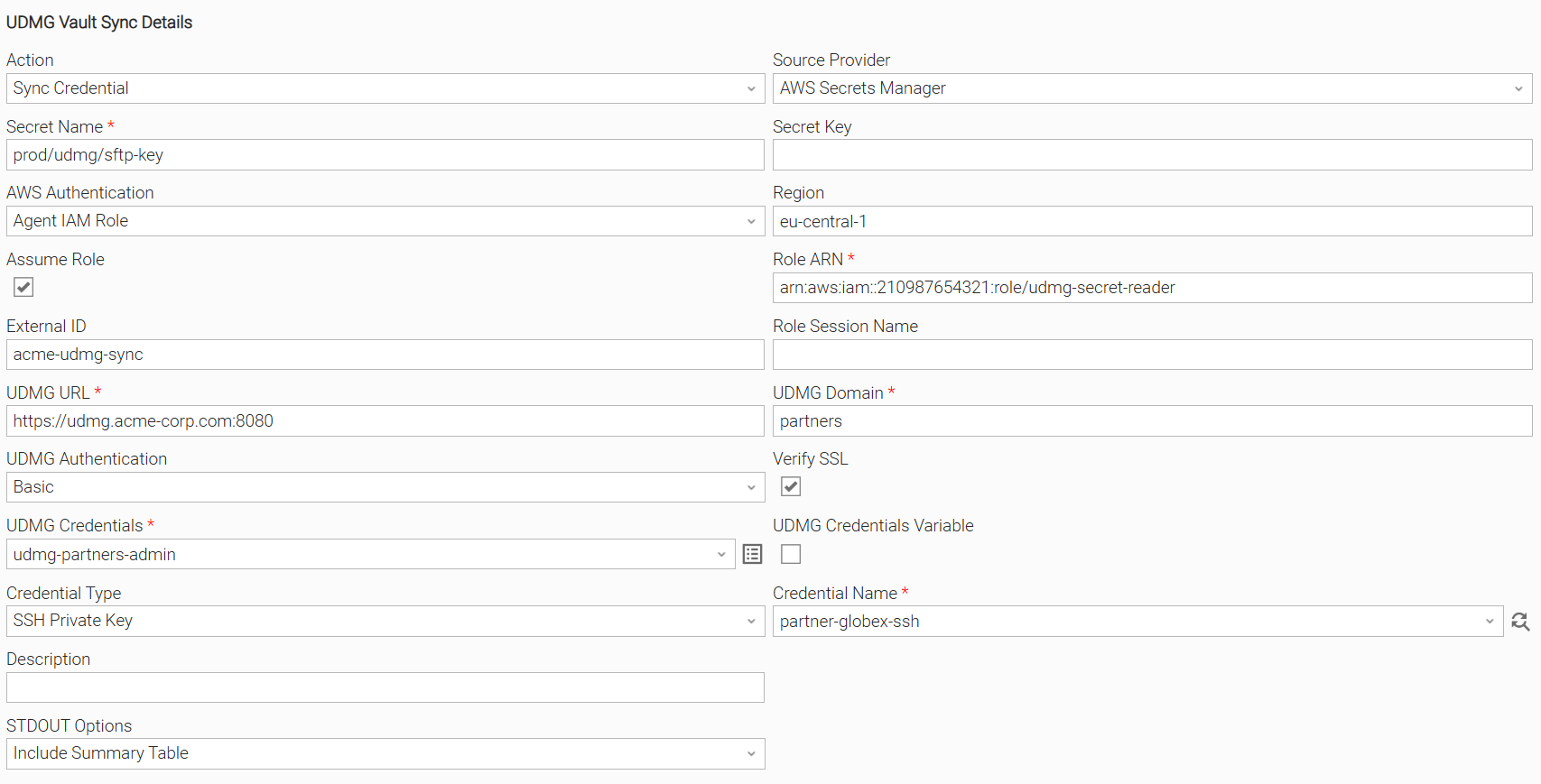
Source Provider is "AWS Secrets Manager" with Secret Name prod/udmg/sftp-key and Region eu-central-1. AWS Authentication is "Agent IAM Role", so the instance profile of the Agent's EC2 host is used, and Assume Role is checked with the Role ARN and External ID of a role in the account that owns the secret. The plain-text secret is written whole to the UDMG credential partner-globex-ssh of type "SSH Private Key".
Example: Azure Key Vault, Managed Identity, X.509 certificate
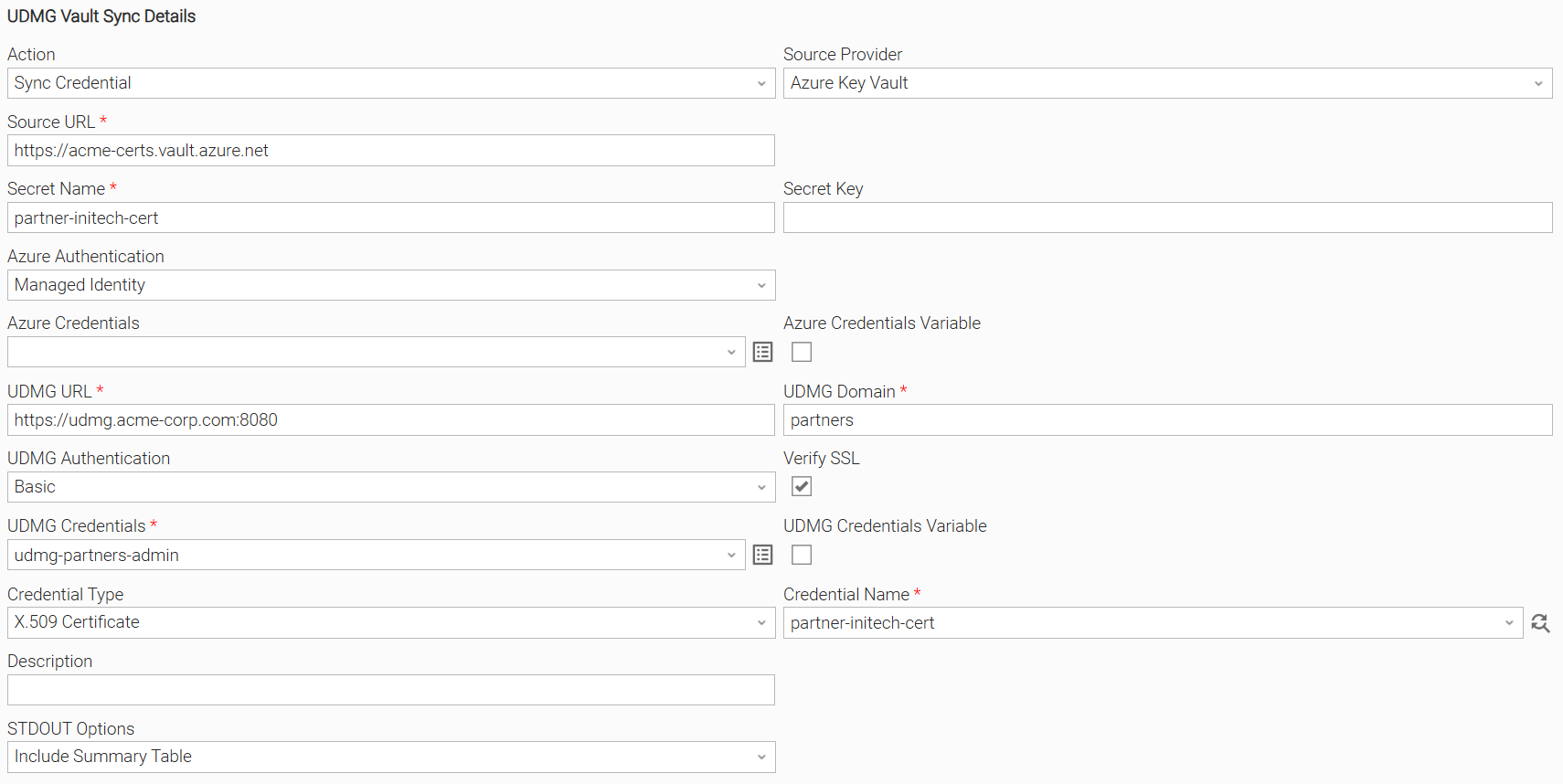
Source Provider is "Azure Key Vault" with Source URL https://acme-certs.vault.azure.net and Secret Name partner-initech-cert. Azure Authentication is "Managed Identity" with Azure Credentials left empty, so the system-assigned identity of the Agent's Azure VM is used. The PEM certificate is written to the UDMG credential partner-initech-cert of type "X.509 Certificate".
Example: AWS KMS key published as an OpenPGP public key
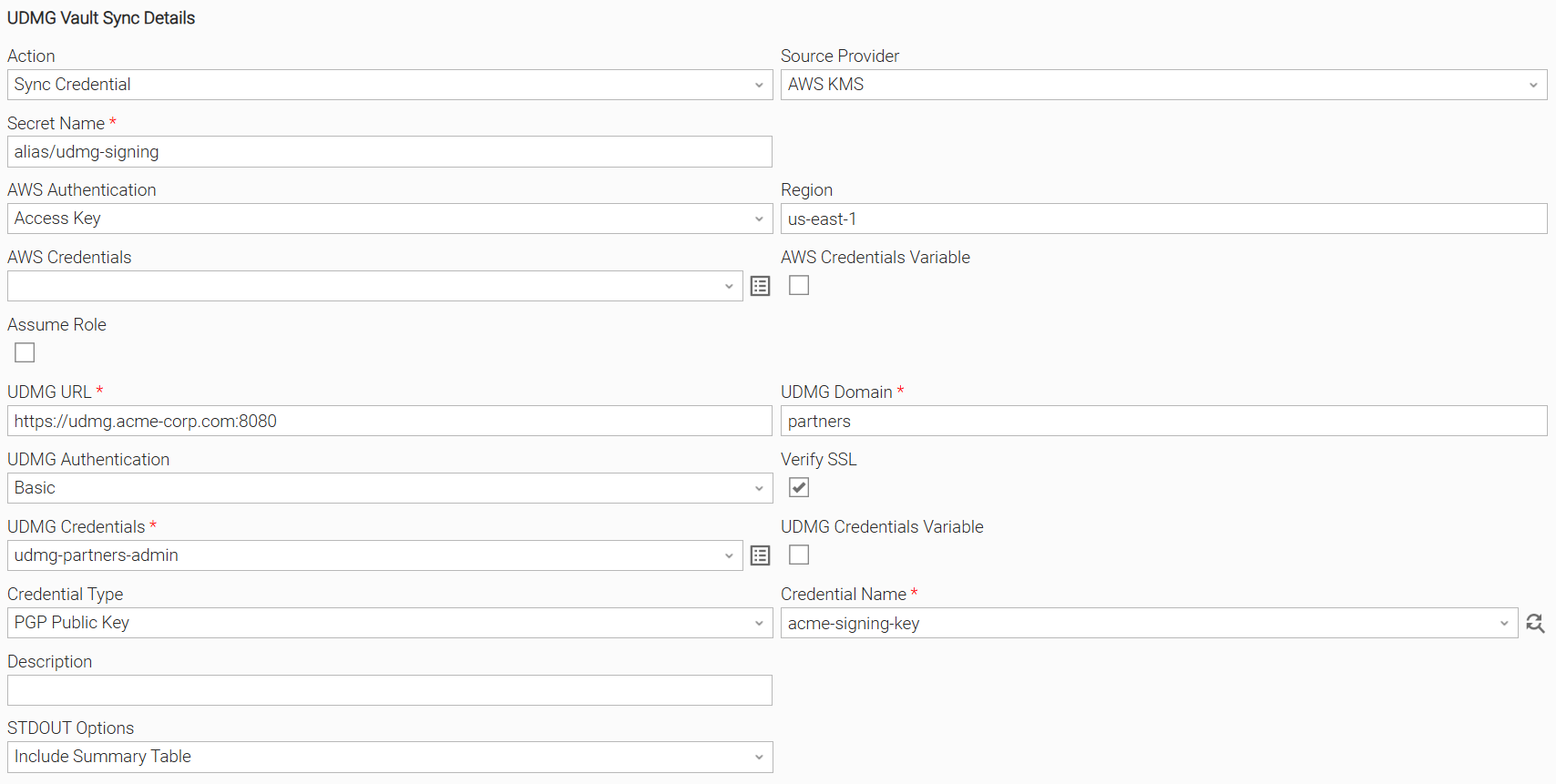
Source Provider is "AWS KMS" with Secret Name alias/udmg-signing and Region us-east-1. AWS Authentication is "Access Key" with AWS Credentials left empty, so AWS_ACCESS_KEY_ID and AWS_SECRET_ACCESS_KEY of the Agent are used. The public key of the KMS key is converted into a self-signed OpenPGP public key and written to the UDMG credential acme-signing-key of type "PGP Public Key", the only type AWS KMS supports. The key is flagged for certification and signing only: it verifies signatures made with the KMS key, and cannot be used to encrypt data to.
Input Fields
Name | Type | Description | Version Information |
|---|---|---|---|
Action | Choice | The action to perform. Available options:
| Introduced in 1.0.0 |
Source Provider | Choice | The system the secret is read from. Available options:
| Introduced in 1.0.0 |
Source URL | Text | The vault URL for Azure Key Vault (for example Redirects are followed for Generic REST API only; the This field is required when Source Provider is "Azure Key Vault", "HashiCorp Vault" or "Generic REST API". | Introduced in 1.0.0 |
Secret Name | Text | The secret name or ARN for AWS Secrets Manager, the key ID, key ARN or alias for AWS KMS, the secret name for Azure Key Vault, or the path of the entry below KV Mount for HashiCorp Vault. This field is required when Source Provider is "AWS Secrets Manager", "AWS KMS", "Azure Key Vault" or "HashiCorp Vault". | Introduced in 1.0.0 |
Secret Key | Text | The value to synchronize out of a JSON secret or a HashiCorp Vault entry: a top-level key by its exact name, or else a JSONPath expression such as Available if Source Provider is not "AWS KMS". | Introduced in 1.0.0 |
AWS Authentication | Choice | The way to authenticate with AWS. Available options:
This field is required when Source Provider is "AWS Secrets Manager" or "AWS KMS". | Introduced in 1.0.0 |
Region | Text | The AWS region, for example Available if Source Provider is "AWS Secrets Manager" or "AWS KMS". | Introduced in 1.0.0 |
AWS Credentials | Credential | The Access Key ID (user) and Secret Access Key (password). When empty, Available if AWS Authentication is "Access Key". | Introduced in 1.0.0 |
Assume Role | Checkbox | Check to assume an IAM role with AWS STS after authenticating, for example for cross-account access. Available if Source Provider is "AWS Secrets Manager" or "AWS KMS". | Introduced in 1.0.0 |
Role ARN | Text | The ARN of the role to assume, for example This field is required when Assume Role is checked. | Introduced in 1.0.0 |
External ID | Text | The external ID required by the trust policy of the role. Available if Assume Role is checked. | Introduced in 1.0.0 |
Role Session Name | Text | The session name recorded in AWS CloudTrail. Defaults to Available if Assume Role is checked. | Introduced in 1.0.0 |
Azure Authentication | Choice | The way to authenticate with Microsoft Entra ID. Available options:
This field is required when Source Provider is "Azure Key Vault". | Introduced in 1.0.0 |
Tenant ID | Text | The Microsoft Entra tenant ID. When empty, Available if Azure Authentication is "Service Principal", "Service Principal (Certificate)" or "Workload Identity". | Introduced in 1.0.0 |
Azure Credentials | Credential | The client ID (user) and, for Service Principal, the client secret (token). For Service Principal (Certificate), the path of the certificate file on the Agent (Key Location), a PEM file with its private key or a PFX, and the certificate's password, if any (passphrase). When empty, Available if Azure Authentication is "Service Principal", "Service Principal (Certificate)", "Managed Identity" or "Workload Identity". | Introduced in 1.0.0 |
KV Mount | Text | The mount path of the KV version 2 secrets engine. Defaults to This field is required when Source Provider is "HashiCorp Vault". | Introduced in 1.0.0 |
Namespace | Text | The Vault Enterprise namespace. Available if Source Provider is "HashiCorp Vault". | Introduced in 1.0.0 |
Vault Authentication | Choice | The way to authenticate with HashiCorp Vault. Available options:
This field is required when Source Provider is "HashiCorp Vault". | Introduced in 1.0.0 |
Vault Credentials | Credential | For Token, the Vault token (token); when empty, Available if Vault Authentication is "Token" or "AppRole". | Introduced in 1.0.0 |
REST Authentication | Choice | The authentication of the GET request. Available options:
This field is required when Source Provider is "Generic REST API". | Introduced in 1.0.0 |
REST Credentials | Credential | For Bearer Token, the token (token). For Basic, the user and password. For Authorization Header, the whole header value (token). This field is required when REST Authentication is "Bearer Token", "Basic" or "Authorization Header". | Introduced in 1.0.0 |
UDMG URL | Text | The base URL of the UDMG server, for example | Introduced in 1.0.0 |
UDMG Domain | Text | The UDMG domain that holds the credential. | Introduced in 1.0.0 |
UDMG Authentication | Choice | The way to authenticate with UDMG. Available options:
| Introduced in 1.0.0 |
Verify SSL | Checkbox | Check to verify the SSL certificates of UDMG and of the source. A CA bundle can be given with | Introduced in 1.0.0 |
UDMG Credentials | Credential | A UDMG user of the domain: the user and password for UDMG Authentication "Basic", or the user's personal access token (token) for "Token". | Introduced in 1.0.0 |
Credential Type | Choice | The type of the UDMG credential. An existing credential must already have this type, as UDMG cannot change it. AWS KMS supports "PGP Public Key" only. Available options:
| Introduced in 1.0.0 |
Credential Name | Dynamic Choice | The name of the UDMG credential to create or update. The list shows the domain's credentials of the selected Credential Type. To create a credential, type a new name. | Introduced in 1.0.0 |
Username | Text | The username stored with the password or the SSH private key. This field is required when Credential Type is "Password" or "Username and Key". | Introduced in 1.0.0 |
Description | Text | The description of a credential created by the task. Updating an existing credential keeps its description. | Introduced in 1.0.0 |
STDOUT Options | Multiple Choice | The content printed to STDOUT. Available options:
| Introduced in 1.0.0 |
Output Fields
The following output-only fields provide better visibility during the execution of Universal Task Instances.
Name | Type | Description | Version Information |
|---|---|---|---|
Sync Status | Text | The outcome of the sync: | Introduced in 1.0.0 |
Last Synced | Text | When the credential was last written, in UTC (ISO 8601). | Introduced in 1.0.0 |
Environment Variables
Environment Variables can be set from the Environment Variables task definition table. The AWS, Azure and Vault variables are also read from the environment of the Universal Agent.
Environment Variable Name | Description | Version Information |
|---|---|---|
UE_HTTP_TIMEOUT | The timeout, in seconds, of each request to UDMG and to the source. Defaults to | Introduced in 1.0.0 |
UE_RECONNECT_RETRIES | The number of retries after a timeout, a connection error, a | Introduced in 1.0.0 |
UE_RECONNECT_INTERVAL | The number of seconds between retries of requests to UDMG, HashiCorp Vault and the REST endpoint; a | Introduced in 1.0.0 |
UE_SSL_CERT | The path of a CA bundle used for SSL verification when Verify SSL is checked. When not set, or when the file does not exist, the system CA bundle is used. The bundle replaces the system CA bundle for UDMG and the source alike: when UDMG uses an internal CA and the source is AWS or Azure, the file must hold that CA together with the public root CAs (for example the content of | Introduced in 1.0.0 |
AWS_ACCESS_KEY_ID, AWS_SECRET_ACCESS_KEY, AWS_SESSION_TOKEN | The AWS key pair, and optional session token, used by "Access Key" authentication when AWS Credentials is empty. | Introduced in 1.0.0 |
AWS_REGION, AWS_DEFAULT_REGION | The AWS region used when Region is empty, in this order of precedence. | Introduced in 1.0.0 |
AZURE_TENANT_ID, AZURE_CLIENT_ID, AZURE_CLIENT_SECRET | The tenant, client ID and client secret used by "Service Principal" authentication, and the tenant and client ID used by "Service Principal (Certificate)" and "Workload Identity", when the corresponding fields are empty. | Introduced in 1.0.0 |
AZURE_CLIENT_CERTIFICATE_PATH, AZURE_CLIENT_CERTIFICATE_PASSWORD | The path of the certificate file on the Agent (a PEM file with its private key, or a PFX) and its password, used by "Service Principal (Certificate)" authentication when the Key Location and passphrase of Azure Credentials are empty. The password is optional. | Introduced in 1.0.0 |
AZURE_CLIENT_SEND_CERTIFICATE_CHAIN | When | Introduced in 1.0.0 |
AZURE_FEDERATED_TOKEN_FILE | The path of the federated token file used by "Workload Identity" authentication. Set by AKS workload identity. | Introduced in 1.0.0 |
VAULT_TOKEN | The Vault token used by "Token" authentication when Vault Credentials holds no token. | Introduced in 1.0.0 |
Importable Configuration Examples
This integration provides importable configuration examples along with their dependencies, grouped as Use Cases to better describe end to end capabilities.
These examples aid in allowing task authors to get more familiar with the configuration of tasks and related Use Cases. Such tasks should be imported in a Test system and should not be used directly in production.
Initial Preparation Steps
- STEP 1: Go to Stonebranch Integration Hub and download the "UAC Utility: UDMG Vault Sync" integration. Use Case 5 also needs the "Email" integration, so download that one too. Extract the downloaded archives in a local directory.
- STEP 2: Locate and import both integrations to the target Universal Controller. For more information refer to the How To section in this document.
- STEP 3: Inside the directory named "configuration_examples" you will find a list of definition zip files. Upload them one by one in the order given below, by using the "Upload" functionality of Universal Controller:
- 1_variables.zip
- 2_credentials.zip
- 3_tasks.zip
- 4_workflows.zip
- STEP 4: Update the uploaded UAC Credentials:
- "UC1: UDMG Vault Sync - UDMG Credentials", and the UC2, UC3 and UC4 credentials of the same name: a UDMG user of the domain in
ue_udmg_vault_sync_udmg_domain. Put its user name in "Runtime User" and its password in "Runtime Password". - "UC1: UDMG Vault Sync - Vault AppRole Credentials": the AppRole Role ID in "Runtime User" and the Secret ID in "Runtime Password".
- "UC5: UDMG Vault Sync - Microsoft Graph Application Credentials (Client ID/Secret)": the Client ID of the Microsoft Graph application that sends the email in "Runtime User", and its Client Secret in "Runtime Password".
- "UC1: UDMG Vault Sync - UDMG Credentials", and the UC2, UC3 and UC4 credentials of the same name: a UDMG user of the domain in
- STEP 5: Update the UAC global variables introduced with the 1_variables.zip file. Their names are prefixed with "ue_udmg_vault_sync". Review the descriptions of the variables as they include information on how they should be populated.
ue_udmg_vault_sync_agent: the Agent that runs the tasks.ue_udmg_vault_sync_udmg_url: the base URL of UDMG.ue_udmg_vault_sync_udmg_domain: the UDMG domain the credentials are written to. It is set topartners.ue_udmg_vault_sync_aws_role_arnandue_udmg_vault_sync_aws_external_id: Use Case 2 only. The role to assume and the External ID its trust policy requires.ue_udmg_vault_sync_email_to,ue_udmg_vault_sync_email_subject,ue_udmg_vault_sync_ms_tenant_idandue_udmg_vault_sync_sender_acc_identifier: Use Case 5 only. The recipients, the subject, the Microsoft Entra ID tenant, and the mailbox that sends the email. The sending mailbox is also used as From, Cc and Reply To.
- STEP 6: The source fields of each task (Source URL, Secret Name, Secret Key, Region) hold the values of the Configuration Examples section. Point them at a secret in your own store before you launch a task.
- The order indicated above ensures that the dependencies of the imported entities need to be uploaded first.
- All imported tasks and credentials are prefixed with "UC<N>: UDMG Vault Sync".
How to "Upload" Definition Files to a Universal Controller
The "Upload" functionality of Universal Controller allows Users to import definitions exported with the "Download" functionality.
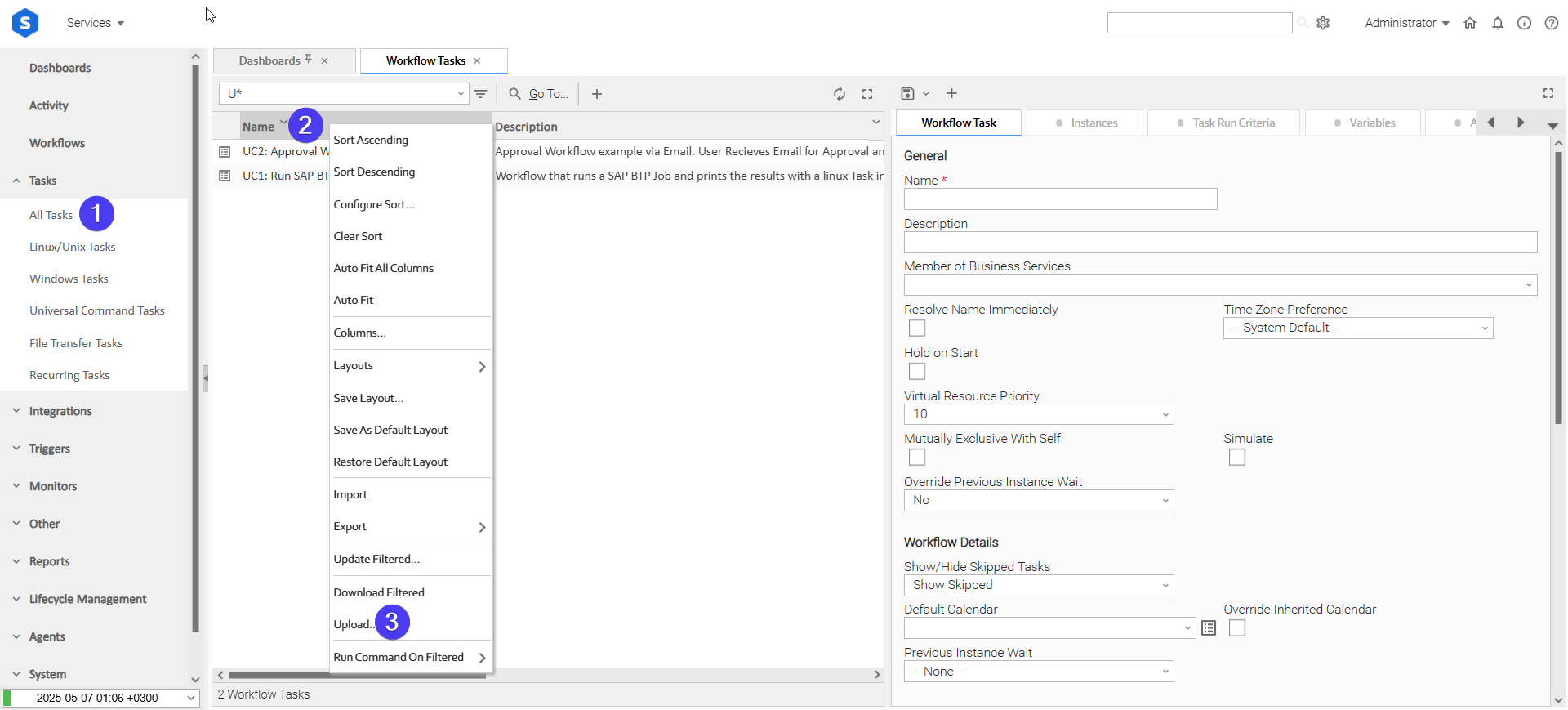
Login to Universal Controller and:
- STEP 1: Click "Tasks" → "All Tasks"
- STEP 2: Right click on the top of the column named "Name"
- STEP 3: Click "Upload..."
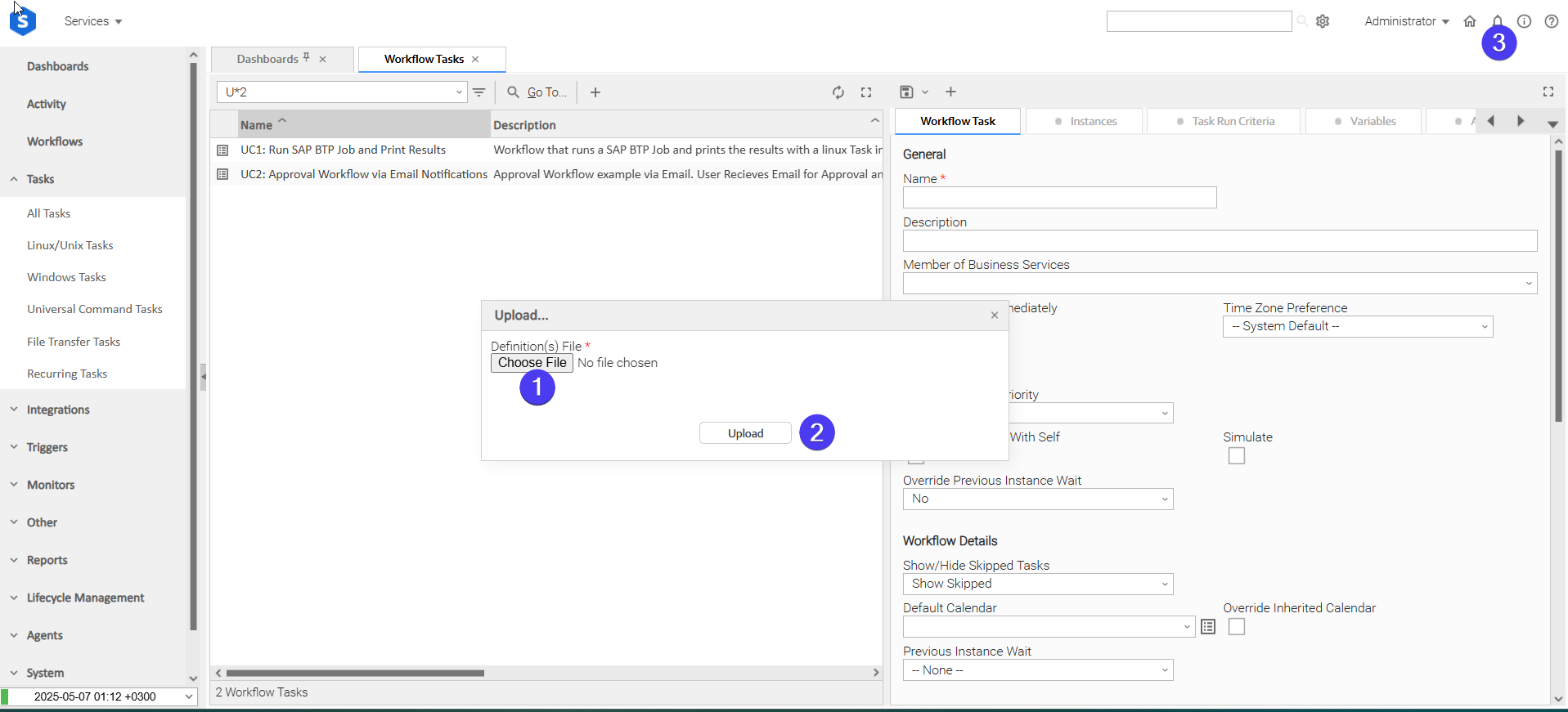
In the pop-up "Upload..." dialogue:
- STEP 1: Click "Choose File".
- STEP 2: Select the appropriate zip definition file and click "Upload".
- STEP 3: Observe the Console for possible errors.
Use Case 1: HashiCorp Vault, AppRole, Value Selected from a Multi-Key Entry
Description
The task "UC1: UDMG Vault Sync - Vault AppRole" logs in to HashiCorp Vault with AppRole and reads the entry udmg/partners/acme from the secret KV mount. That entry holds two keys, pgp_public and pgp_private. The task takes pgp_public and writes it to the UDMG credential partner-acme-pgp of type "PGP Public Key". The first run creates the credential, and every later run updates it. Both STDOUT Options are selected, so STDOUT shows the step log as well as the summary table.
Entities: the task, the credentials "UC1: UDMG Vault Sync - Vault AppRole Credentials" and "UC1: UDMG Vault Sync - UDMG Credentials", and the variables ue_udmg_vault_sync_agent, ue_udmg_vault_sync_udmg_url and ue_udmg_vault_sync_udmg_domain.
How to Run
Execution Steps:
- STEP 1: Ensure all Initial Preparation Steps have been completed successfully.
- STEP 2: Launch the task "UC1: UDMG Vault Sync - Vault AppRole".
- STEP 3: Review the STDOUT and the Output Only fields of the task instance.
Expected Results:
- Sync Status reads
Createdon the first run andUpdatedafter that. Last Synced holds the time of the write in UTC. - STDOUT shows the step log and the summary table.
- The task instance completes in the Success state.
Use Case 2: AWS Secrets Manager, Agent IAM Role, Cross-Account Assume Role
Description
The task "UC2: UDMG Vault Sync - AWS Assume Role" reads the secret prod/udmg/sftp-key from AWS Secrets Manager in eu-central-1. It starts from the instance profile of the Agent's EC2 host, then assumes the role in ue_udmg_vault_sync_aws_role_arn with the External ID in ue_udmg_vault_sync_aws_external_id, in the account that owns the secret. The plain-text secret is written whole to the UDMG credential partner-globex-ssh of type "SSH Private Key".
Entities: the task, the credentials "UC2: UDMG Vault Sync - UDMG Credentials", and the variables ue_udmg_vault_sync_agent, ue_udmg_vault_sync_udmg_url, ue_udmg_vault_sync_udmg_domain, ue_udmg_vault_sync_aws_role_arn and ue_udmg_vault_sync_aws_external_id.
How to Run
Execution Steps:
- STEP 1: Ensure all Initial Preparation Steps have been completed successfully, and that the Agent runs on an EC2 host whose instance profile may assume the role.
- STEP 2: Launch the task "UC2: UDMG Vault Sync - AWS Assume Role".
- STEP 3: Review the STDOUT and the Output Only fields of the task instance.
Expected Results:
- Sync Status reads
CreatedorUpdated, and Last Synced holds the time of the write. - STDOUT shows the summary table.
- The task instance completes in the Success state.
Use Case 3: Azure Key Vault, Managed Identity, X.509 Certificate
Description
The task "UC3: UDMG Vault Sync - Azure Managed Identity" reads the secret partner-initech-cert from the vault https://acme-certs.vault.azure.net. Azure Credentials is empty, so the task signs in with the system-assigned identity of the Agent's Azure VM. The PEM certificate is written to the UDMG credential partner-initech-cert of type "X.509 Certificate".
Entities: the task, the credentials "UC3: UDMG Vault Sync - UDMG Credentials", and the variables ue_udmg_vault_sync_agent, ue_udmg_vault_sync_udmg_url and ue_udmg_vault_sync_udmg_domain.
How to Run
Execution Steps:
- STEP 1: Ensure all Initial Preparation Steps have been completed successfully, and that the Agent runs on an Azure VM whose identity may read secrets from the vault.
- STEP 2: Launch the task "UC3: UDMG Vault Sync - Azure Managed Identity".
- STEP 3: Review the STDOUT and the Output Only fields of the task instance.
Expected Results:
- Sync Status reads
CreatedorUpdated, and Last Synced holds the time of the write. - STDOUT shows the summary table.
- The task instance completes in the Success state.
Use Case 4: AWS KMS Key Published as an OpenPGP Public Key
Description
The task "UC4: UDMG Vault Sync - AWS KMS" reads the public key of the KMS key alias/udmg-signing in us-east-1. AWS Credentials is empty, so the task uses AWS_ACCESS_KEY_ID and AWS_SECRET_ACCESS_KEY from the Agent's environment. The task turns the public key into a self-signed OpenPGP public key and writes it to the UDMG credential acme-signing-key of type "PGP Public Key". The private key never leaves KMS. UDMG can use this key to verify signatures made with the KMS key, but not to encrypt data to it.
Entities: the task, the credentials "UC4: UDMG Vault Sync - UDMG Credentials", and the variables ue_udmg_vault_sync_agent, ue_udmg_vault_sync_udmg_url and ue_udmg_vault_sync_udmg_domain.
How to Run
Execution Steps:
- STEP 1: Ensure all Initial Preparation Steps have been completed successfully, and that
AWS_ACCESS_KEY_IDandAWS_SECRET_ACCESS_KEYare set in the Agent's environment. - STEP 2: Launch the task "UC4: UDMG Vault Sync - AWS KMS".
- STEP 3: Review the STDOUT and the Output Only fields of the task instance.
Expected Results:
- Sync Status reads
CreatedorUpdated, and Last Synced holds the time of the write. - STDOUT shows the summary table.
- The task instance completes in the Success state.
Use Case 5: Sync with Email Notification
Description
The workflow "UC5: UDMG Vault Sync - Sync with Email Notification" runs the Use Case 1 sync and then emails the result. Which email it sends depends on how the sync task ends. Both emails go out through the Email integration with Microsoft App Only Authentication.
The components of the workflow are described below:
- "UC1: UDMG Vault Sync - Vault AppRole": the task of Use Case 1. It syncs the
pgp_publicvalue of the HashiCorp Vault entryudmg/partners/acmeto the UDMG credentialpartner-acme-pgp. - "UC5: UDMG Vault Sync - Send Email for Success": runs only if (1) succeeds. It tells the recipients in
ue_udmg_vault_sync_email_tothatpartner-acme-pgpwas synced. - "UC5: UDMG Vault Sync - Send Email for Failure": runs only if (1) fails. It tells the same recipients that the sync of
partner-acme-pgpfailed, and points them to the Sync Status field and the STDERR of the task instance for the reason.
Entities: the workflow, the two email tasks, the credentials "UC5: UDMG Vault Sync - Microsoft Graph Application Credentials (Client ID/Secret)" and the Use Case 1 credentials, and the variables of Use Case 1 plus ue_udmg_vault_sync_email_to, ue_udmg_vault_sync_email_subject, ue_udmg_vault_sync_ms_tenant_id and ue_udmg_vault_sync_sender_acc_identifier.
How to Run
Execution Steps:
- STEP 1: Ensure all Initial Preparation Steps have been completed successfully, including the Email integration and the Use Case 5 credentials and variables.
- STEP 2: Launch the workflow "UC5: UDMG Vault Sync - Sync with Email Notification".
- STEP 3: Review the task instances of the workflow and the mailbox of the recipients.
Expected Results:
- When (1) succeeds, (2) runs and the recipients get the success email. (3) does not run.
- When (1) fails, (3) runs and the recipients get the failure email. (2) does not run.
- Sync Status and Last Synced of task (1) show the outcome of the sync, as in Use Case 1.
Exit Codes
Exit Code | Status | Description |
|---|---|---|
0 | Success | Successful Execution. |
1 | Failure | Generic Error. Raised when not falling into the other Error Codes. |
2 | Failure | Authentication error. The provided credentials are invalid or insufficient, on the source or on UDMG, including an unknown UDMG domain, or an Azure certificate that cannot be loaded. |
3 | Failure | Authorization error. The identity is authenticated but not allowed to perform the request, including a refused AWS STS AssumeRole or a missing AWS KMS permission. |
4 | Failure | Not found. The secret or the KMS key does not exist, or Secret Key matches nothing in the secret. |
5 | Failure | Invalid secret. The secret is empty, is an Azure secret that is disabled, expired or not yet valid, is not JSON although Secret Key is set, selects an object or a list, is a HashiCorp Vault entry with several keys and no Secret Key, or is a KMS key that cannot be converted to OpenPGP. |
6 | Failure | Credential type mismatch. The UDMG credential exists with a type other than Credential Type. |
7 | Failure | UDMG error. UDMG refused the request, for example because it rejects the key material for the Credential Type. The status description carries what UDMG reported. |
10 | Failure | Timeout. A request to UDMG or to the source timed out on every attempt. |
11 | Failure | Connection error. UDMG or the source could not be reached, or its SSL certificate could not be verified. |
20 | Failure | Input fields validation error. |
Document References
Document Link | Description |
|---|---|
The call used to read a secret, and the permissions it requires. | |
How to create the asymmetric RSA signing key that AWS KMS publishes as an OpenPGP public key. | |
How to grant an identity access to the secrets of a vault. | |
The API used to read an entry, and the path a policy has to grant. | |
How to set up an AppRole and obtain its Role ID and Secret ID. |
Changelog
ue-udmg-vault-sync-1.0.0 (2026-11-24)
Initial Version