UAC Utility: Web Service
Disclaimer
Your use of this download is governed by Stonebranch's Terms of Use.
Version Information
Template Name | Extension Name | Version | Status |
|---|---|---|---|
Web Service Integration | ue-webservice | 1.8.0 | Fixes and new Features are introduced. |
Refer to Changelog for version history information.
Overview
A Web service is a method of communication between two electronic devices over a network. This Universal Extension provides the capability to call endpoints of foreign APIs. It is beneficial for Stonebranch SaaS customers that are accessing the Universal Controller in the Stonebranch AWS Cloud and having their Universal Agents deployed in their data center. As the integration is triggered from the Universal Agent, no additional firewall port for the Universal Agent needs to be opened.
Key Features
Feature | Description |
|---|---|
Send HTTP(S)/REST requests | This integration supports sending requests over HTTP(S)/REST protocol, using the following methods:
|
Connectivity and Authentication Options | A variety of authentication options are supported:
Additionally, a Proxy server can be configured to be used between the Universal Agent and target endpoint. |
Custom exit code processing | This integration provides the capability to the user, to configure custom exit codes based on the web service response payload (Supported for JSON payloads). |
Requirements
This integration requires a Universal Agent and a Python runtime to execute the Universal Task.
Area | Details |
|---|---|
Python Version | Requires Python 3.11 or 3.14. Tested with the Universal Agent bundled Python distribution. |
Universal Agent Compatibility |
|
Universal Controller Compatibility | Universal Controller Version >= 7.8.0.0. |
Network and Connectivity | The Universal Agent needs to have connectivity to the Web Service endpoint, and Access Token endpoint in case Authentication Type is "OAuth 2.0" and Proxy if the connection is through a Proxy. |
Supported Actions
This integration is responsible for sending HTTP(S)/REST requests.
Action Output
- EXTENSION
- STDOUT
The extension output provides the following information:
exit_code, status, status_description: General info regarding the task execution.invocation.fields: The task configuration used for this task execution.result.code:The HTTP response coderesult.headers: The response headersresult.body:The response body in string formatresult.body_json:The response body in JSON formatresult.errors: List of errors that might have occurred during execution.
Examples:Successful Execution
Failed Execution
If the field "Print Result Body To" is set to STDOUT, the body of the response will be printed here.
Example:STDOUT Output
STDOUT and STDERR provide additional information to User. The populated content can be changed in future versions without notice. Backward compatibility is not guaranteed.
Configuration Examples
The following examples demonstrate the available authentication types, combined with some of the key features of this integration.
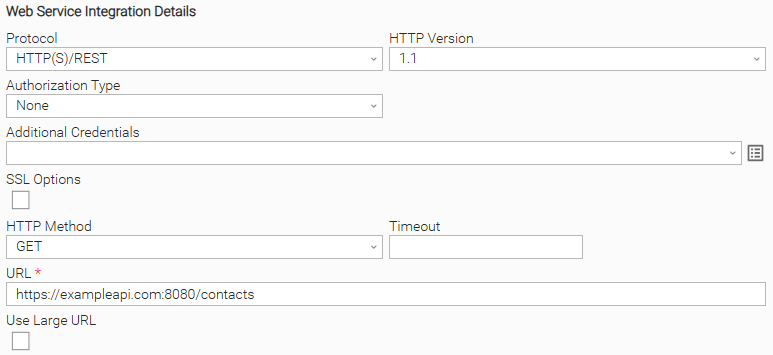
Example 1: No Authorization With Exit Code Mapping Task Configuration
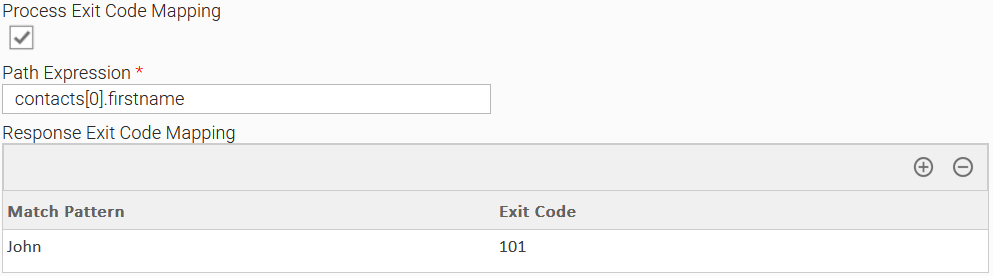
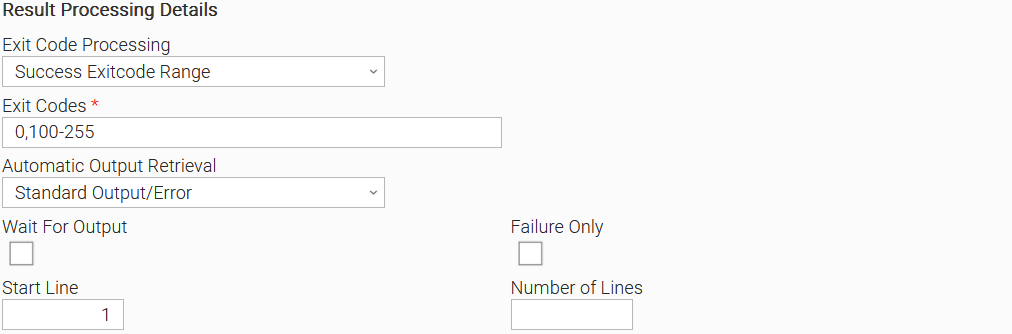
Example of Universal Task where Authorization Type is "None", and the user expects an exit code equal to "101" if the employee's first name is "John".
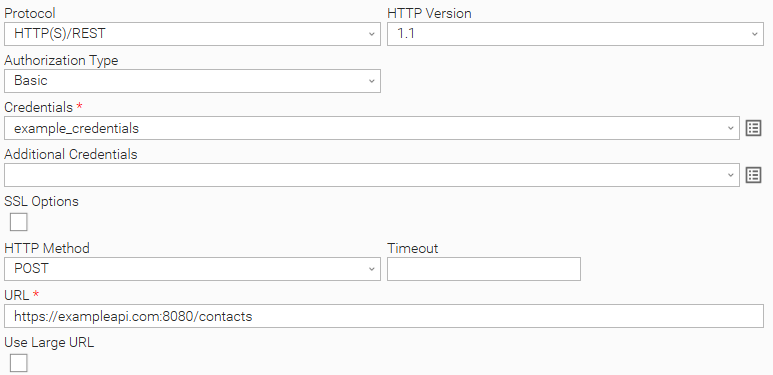
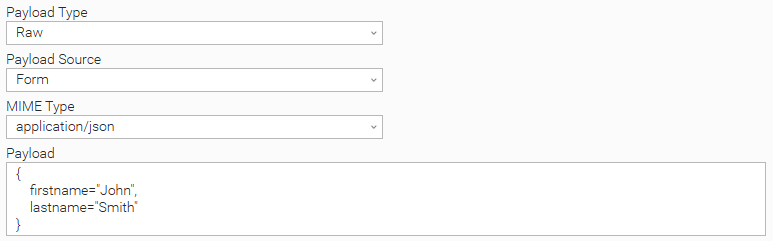
Example 2: Basic Authorization Task Configuration for a POST request with JSON payload
Example of Universal Task where Authorization Type is "Basic".
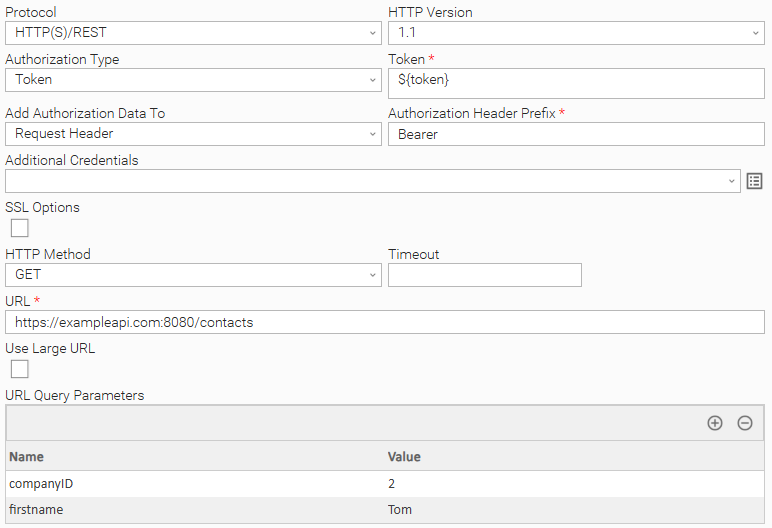
Example 3: Token Authorization Task Configuration with URL Query parameters
Example of Universal Task where Authorization Type is "Token", and URL Query parameters are used.
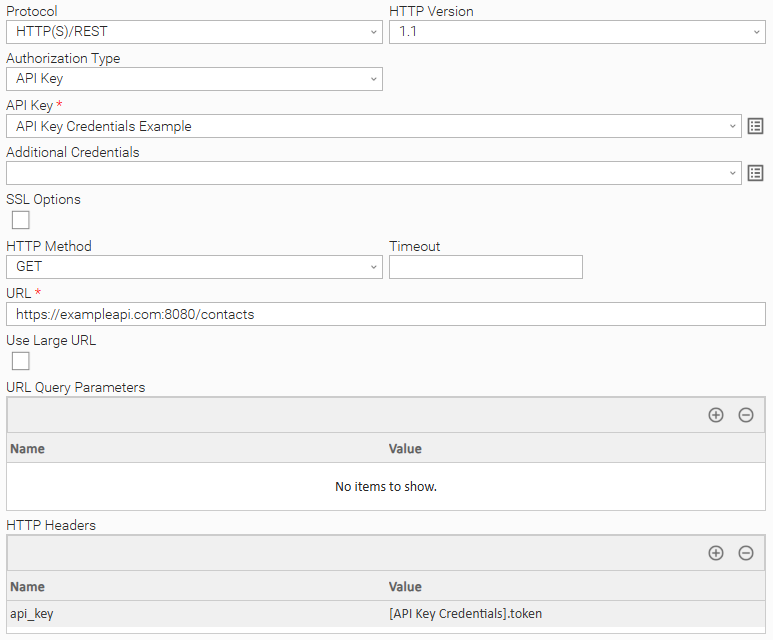
Example 4: API Key Authorization Task Configuration
Example of Universal Task where Authorization Type is "API Key".
To see how to pass the API Key as HTTP Header refer to Passing Credentials as Query Parameters, Headers, or as Form Data.
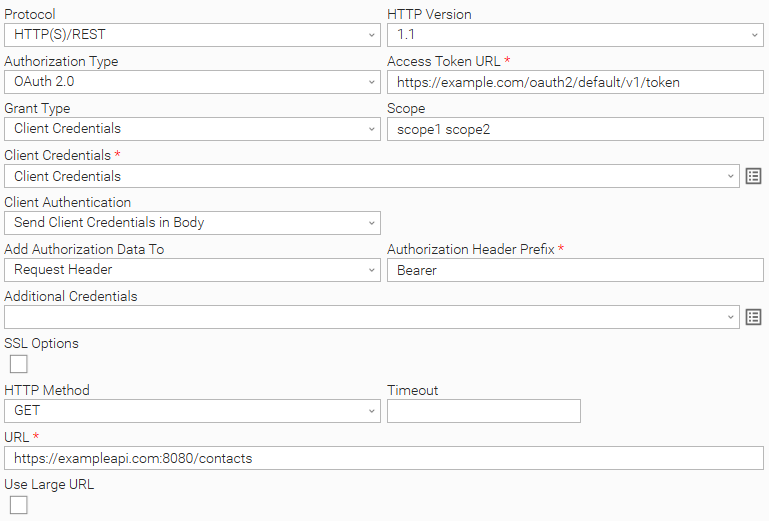
Example 5: OAuth2.0 Authorization Task Configuration
Example of Universal Task where Authorization Type is "OAuth 2.0" and Grant Type is "Client Credentials".
To see how to pass credential fields as HTTP Headers, refer to Passing Credentials as Query Parameters, Headers, or as Form Data.
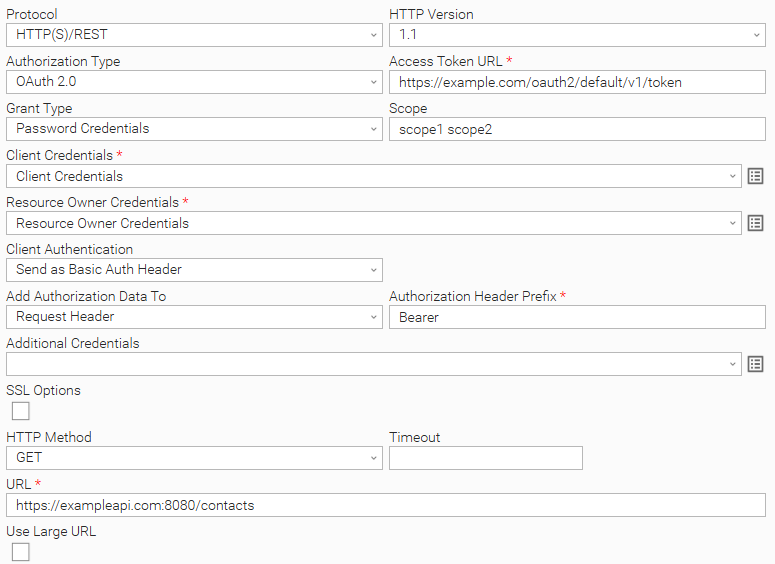
Example of Universal Task where Authorization Type is "OAuth 2.0" and Grant Type is "Password Credentials".
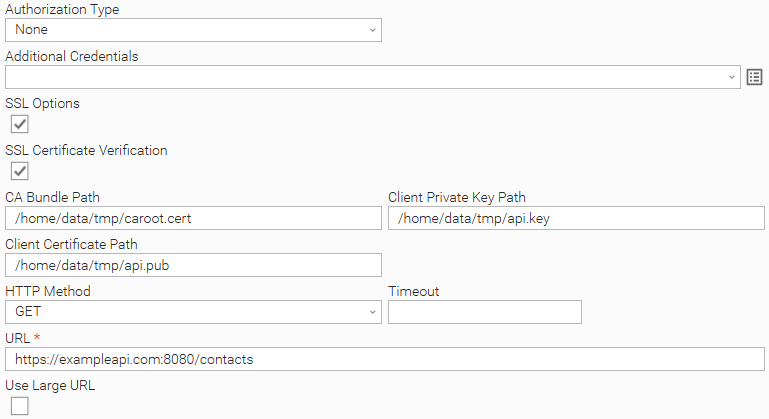
Example 6: Task Configuration with SSL Client Authentication
Example of a Universal Task with SSL Client Authentication.
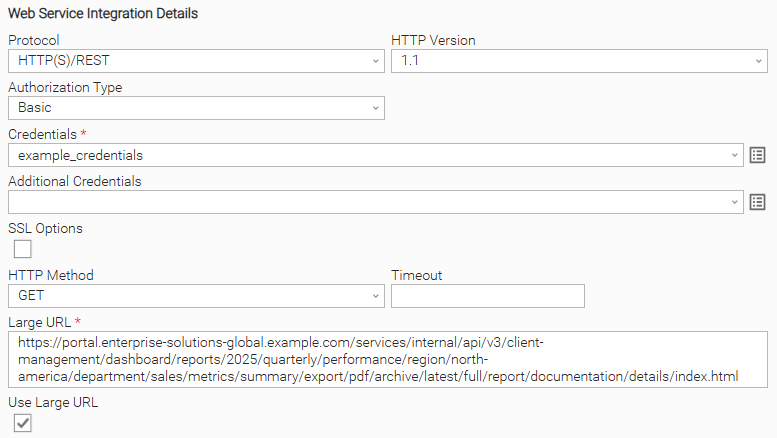
Example 7: Basic Authorization With Large URL
Example of a Universal Task where Authorization Type is "Basic", and the user attempts to access a URL exceeding 255 characters in length.
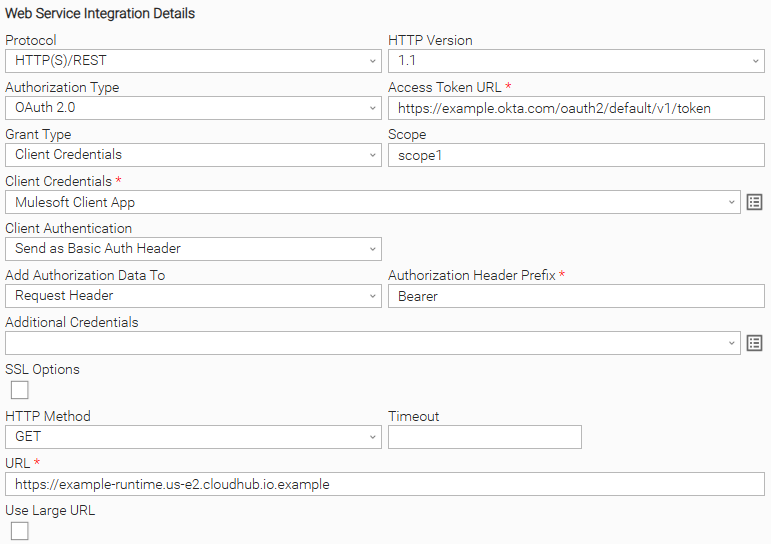
Example 8: Mulesoft
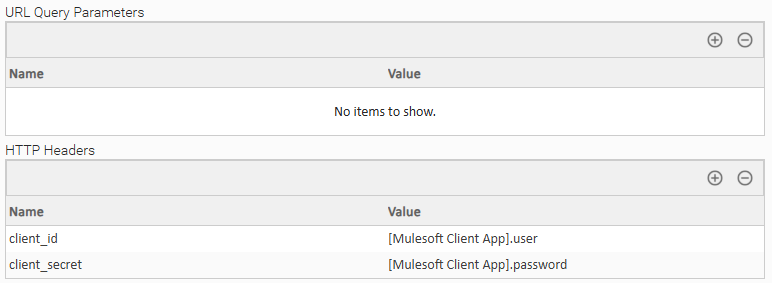
The following example shows the configuration of a task for a call to a Mulesoft API that has OpenID Connect access token enforcement and Client ID Enforcement policies enabled, and Okta is used as a Client Provider. OAuth2 Client Credentials flow is used in the following example.
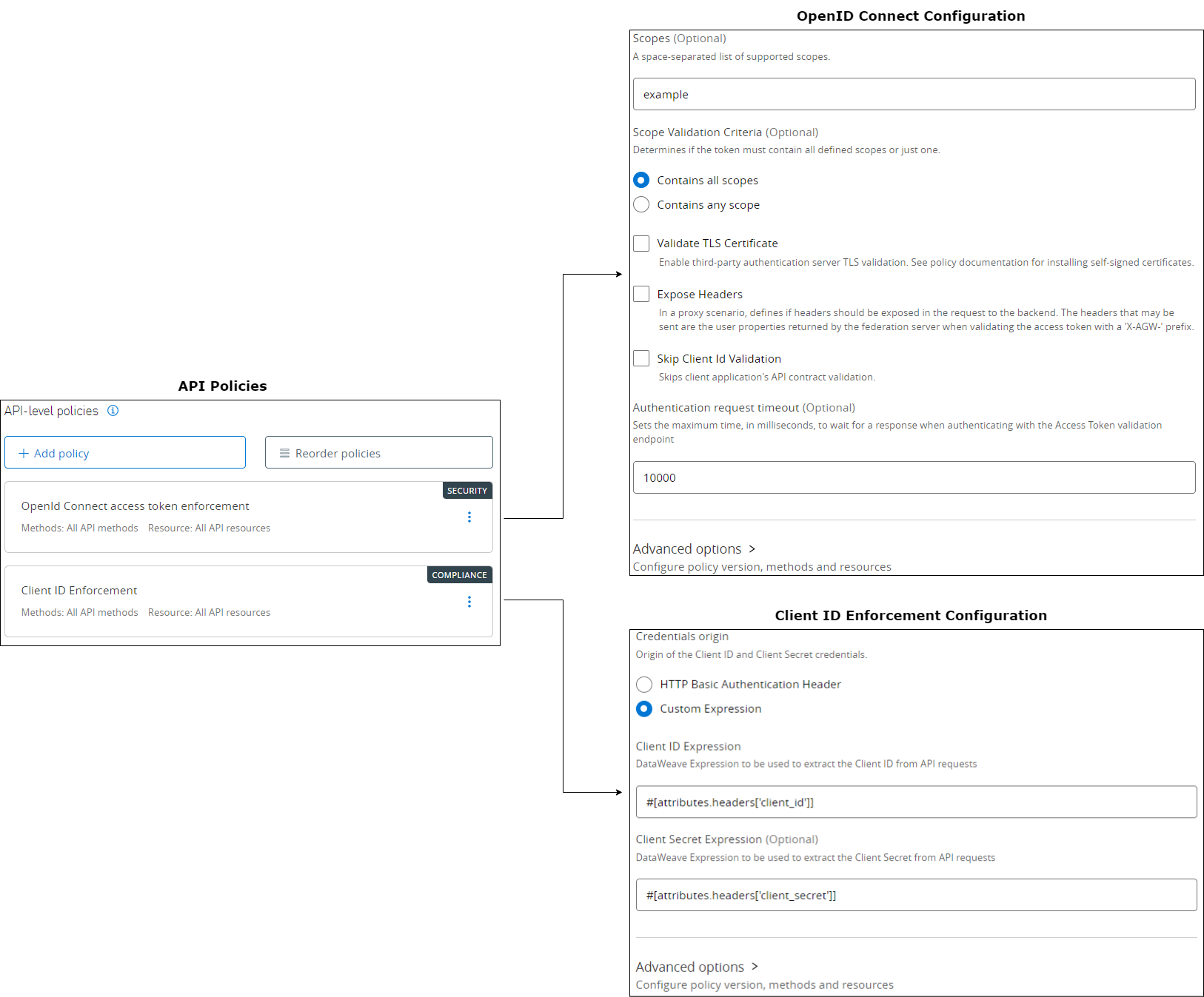
Task Configuration
As is evident from the Client ID enforcement configuration, Client Credentials are also passed as HTTP Headers.
To see how to pass the client credentials as HTTP Headers, refer to Passing Credentials as Query Parameters, Headers, or as Form Data.
Input Fields
Name | Type | Description | Version Information |
|---|---|---|---|
Protocol | Choice | The communication protocol to be used towards the foreign API. Available options:
| Introduced in 1.0.0 |
HTTP Version | Choice | The Hypertext Transfer Protocol version. Available options:
| Introduced in 1.0.0 |
Authorization Type | Choice | The authorization type to be used for communicating with the foreign API. Available options:
| Introduced in 1.0.0 Modified in 1.3.0 |
Credentials | Credential | Credentials for "Basic" Authorization Type. The Credentials definition should be as follows.
Required when Authorization Type is "Basic". | Introduced in 1.0.0 |
API Key | Credential | Credentials for "API Key" Authorization Type. API Key should either be stored as the "Password" or "Token" Credential attribute, during Credential definition. API Keys can either be provided as URL Query Parameters or as Request Headers. Example configuration is described in section API Key Authorization Task Configuration. Required when Authorization Type is "API Key". | Introduced in 1.3.0 |
Grant Type | Choice | The OAuth 2.0 Grant Type used to get the token. Available options:
Required when Authorization Type is "OAuth 2.0". | Introduced in 1.3.0 |
Access Token URL | Text | The endpoint of the Authentication Server for the retrieval of access token. It is used to exchange the Client Credentials (and the Resource Owner Credentials in the case of "Password Credentials" Grant Type) for an access token. Required when Authorization Type is "OAuth 2.0". | Introduced in 1.3.0 |
Scope | Text | A space-separated list of scopes used during retrieval of an OAuth 2.0 access token. Required when Authorization Type is "OAuth 2.0". | Introduced in 1.3.0 |
Client Credentials | Credential | Used for retrieval of OAuth 2.0 access token. The Credential definition should be as follows.
Required when Authorization Type is "OAuth 2.0". | Introduced in 1.3.0 |
Resource Owner Credentials | Credential | Used for retrieval of OAuth 2.0 access token. The Credential definition should be as follows.
Required when Grant Type is "Password Credentials". | Introduced in 1.3.0 |
Client Authentication | Choice | Controls whether the Client Credentials are sent in the request body or as a basic authentication header during retrieval of OAuth 2.0 access token. Available options:
Required when Authorization Type is "OAuth 2.0". | Introduced in 1.3.0 |
Token | Large Text | The authentication access token. Required when Authorization Type is "Token". | Introduced in 1.0.0 |
Add Authorization Data To | Choice | Specifies where to include the Token in the request. Available options:
Required when Authorization Type is "Token" or "OAuth 2.0". | Introduced in 1.0.0 |
Authorization Header Prefix | Text | The prefix for the Token. Defaults to "Bearer". The token value is appended to the Authorization Header Prefix in the request Authorization header. For example: Bearer <token_value>. Required when Add Authorization Data To is "Request Header". | Introduced in 1.0.0 |
Additional Credentials | Credential | Additional credentials that might be required to be used either as Query Parameters or as HTTP Headers. For more information on how to pass credentials as part of URL Query Parameters refer to Passing Credentials as Query Parameters, Headers, or as Form Data. | Introduced in 1.3.0 |
Use Large URL | Checkbox | Indicates whether the Large URL field should be used instead of the standard URL field. Unchecked by default. | Introduced in 1.6.0 |
URL | Text | The URL to be called (maximum length of 255 characters). Required when Use Large URL is unchecked. | Introduced in 1.0.0 |
Large URL | Large Text | The URL to be called (exceeding 255 characters). Required when Use Large URL is checked. | Introduced in 1.6.0 |
HTTP Method | Choice | The HTTP method to be used in the request. Available options:
| Introduced in 1.0.0 |
Timeout | Float | The time (in seconds) that the request will wait for the server to send data before closing the connection. If Timeout is not filled, the request will wait (hang) until the connection is closed. | Introduced in 1.0.0 |
URL Query Parameters | Array | The list of parameters key/value pairs to be sent in the query string for the request. | Introduced in 1.0.0 |
Payload Type | Choice | The type of data to be sent in the request body. Available options:
Required when HTTP Method is "GET", "POST", "PUT" or "PATCH". | Introduced in 1.0.0 |
Payload Source | Choice | For Payload Type of value "Raw", specifies how the payload will be provided. Available options:
Required when Payload Type is "Raw". | Introduced in 1.0.0 |
MIME Type | Choice | The MIME type to be used in the request's header. Available options:
Required when Payload Type is "Raw". | Introduced in 1.0.0 |
Other Value For MIME Type | Text | The MIME type to be included in request's header in case "Other" is selected as MIME Type value. Required when MIME Type is "Other". | Introduced in 1.0.0 |
Form Data | Array | The list of parameters key/value pairs to be sent in the request body. The request header will include "x-www-form-urlencoded" as a "Content-Type" in this case. | Introduced in 1.0.0 |
Payload | Large Text | The payload to be sent in the request body. Required when Payload Source is "Form". | Introduced in 1.0.0 Modified in 1.2.1 |
Payload Script | Script | The script to be used as a payload source. Required when Payload Source is "Script". | Introduced in 1.0.0 |
HTTP Headers | Array | The list of HTTP Headers key/value pairs to be sent with the request. If "Content-Type" header is provided, it will be disregarded by the extension, as the MIME Type field is used for this purpose. | Introduced in 1.0.0 |
Proxies (Deprecated) | Text | The field is deprecated. For backward compatibility reasons, the field is kept and functioning as of version 1.3.1. However, it is strongly advised to migrate the task definition to the new logic to avoid disruptions in the future. For more information refer to Set Proxies with Environment Variables and Known Issues. | Introduced in 1.0.0 Deprecated in 1.4.0 |
SSL Options | Checkbox | Displays the available SSL options. Unchecked by default. | Introduced in 1.0.0 |
SSL Certificate Verification | Checkbox | Enables certificate verification. Certificate verification is auto-enabled in case field "CA Bundle Path" field is populated. Checked by default. Required when SSL Options is checked. | Introduced in 1.0.0 |
CA Bundle Path | Text | Path and file name of the Certificate Authority bundle to use in certificate verification. The file should be in PEM format. | Introduced in 1.0.0 |
Client Private Key Path | Text | Path and file name of the private key file for SSL client-side authentication. The file must be in PEM format. | Introduced in 1.0.0 |
Client Certificate Path | Text | Path and file name of the public key certificate for SSL client-side authentication. The file must be in PEM format. | Introduced in 1.0.0 |
Print Result Body To | Choice | Specifies where to print the web service output payload. Available options:
| Introduced in 1.1.0 |
Process Exit Code Mapping | Checkbox | Specifies whether or not exit code mapping is enabled. Unchecked by default. | Introduced in 1.1.0 |
Path Expression | Text | The JSON path which is used to check the provided patterns that are set up on the Response Exit Code Mapping array. Field visible only when Process Exit Code Mapping is checked and it is required when visible. | Introduced in 1.1.0 |
Response Exit Code Mapping | Array | An array that maps regular expression patterns to exit codes. Provided exit codes should be in the range [100-255]. Field visible only when Process Exit Code Mapping is checked and it is required when visible. | Introduced in 1.1.0 |
Output Fields
The following output-only fields provide better visibility during the execution of Universal Task Instances.
Name | Type | Description | Version Information |
|---|---|---|---|
Response Code | Text | The webservice response code. | Introduced in 1.0.0 |
Exit Codes
The exit codes for this Universal Extension are described in the following table.
Exit Code | Status | Description |
|---|---|---|
0 | Success | Successful Execution. |
1 | Failure | Generic Error. Raised when not falling into the other Error Codes. |
3 | Failure | Insufficient Permissions. The authorization credentials provided for the request are invalid. |
20 | Failure | Input fields validation error. |
21 | Failure | Bad request to third-party API. Client side error when sending the request. |
22 | Failure | Validation error response from third-party API. Server side error. |
23 | Failure | Destination URL not found or redirected. |
24 | Failure | An error occurred during Exit Code Mapping. For example, the response body is not in JSON format, the Path Expression matches no data, or no match is found for the provided expression. |
Exit Code Mapping
As part of task configuration, it is possible for the user to define custom exit codes that depend on the contents of the web service response body.
This might be useful in the following cases:
-
When the task is used in a workflow, and based on the contents of the web service response body, the workflow needs to follow a different path. Exit codes can be used in workflows to follow different branches.
-
When retry needs to be configured based on the content of the web service response body. Task retry can be configured based on the exit code.
For example, a user can configure the Universal Controller task to retry execution when the exit code is X. Exit code X can be configured by the user when the web service response payload field JSON "document.status" is equal to value "Under Processing".
The fields related to this functionality are the following:
- Process Exit Code Mapping
Should be checked to enable this functionality. - Path ExpressionThe JSONPath expression (JSONPath Syntax).
- Response Exit Code MappingA list of pairs (Pattern/Exit Code). If the pattern provided as python regular expression is matched, then the configured exit code will be applied.
The web service output JSON body is parsed with the Path Expression. The matched response body content is evaluated against the list of patterns provided on Response Exit code Mapping array. When a pattern is matched, the extension will return the respective exit code.
The following features and restrictions are applied.
- It is possible to provide multiple pairs of Pattern/Exit Code. The extension will return the corresponding exit code, on the first match in the array.
- Provide
.*as a pattern, to match any value returned by the JSONPath. - Provided exit codes should be between 100 and 255.
- An error will be raised in case:
- No match found.
- A Wrong Path Expression is provided.
- The result body is not of type JSON.
- The custom exit codes that intend to be considered successful, have to be configured appropriately in the Result Processing Details section.
- Exit Code ProcessingOption "Success Exit Code Range" to be selected in this field.
- Exit CodesTo be filled with the list of exit codes that the user expects to reflect successful execution (Ranges can be provided. For example 0,100-255).
SSL Client Authentication
An additional security layer can be achieved with two-way SSL verification, where both the Server is verified by the Client, and the Client is verified by the Server. This scenario is common for hosts with self-signed certificate.
Related Universal Task fields:
- SSL Options: Enabled
- SSL Certificate Verification: Enabled
- CA Bundle Path: Populated
- Client Certificate Path: Populated
- Client Private Key Path: Populated
When the communication between the client and the server is based on HTTPS and SSL Certificate Verification is not enabled, communication is still encrypted. However, certificates are not verified. An appropriate warning is printed on the STDERR output
SSL Certificate Authority File Discovery
This Universal Extension is bundled with certifi library, utilized as the default certificate discovery mechanism. However, more complex SSL verification scenarios are supported, according to the configured fields as described below.
Server SSL verification by default CA
Certifi provides a wide range of certificates signed by well-known Certificate Authorities, used for SSL Server verification.
Related Universal Task fields:
- SSL Options: Enabled
- SSL Certificate Verification: Enabled
Server SSL verification by custom CA
For SSL Server verification against hosts that have certificates signed by a custom Certificate Authority, a Certificate Authority Bundle should be provided as input.
Related Universal Task fields:
- SSL Options: Enabled
- SSL Certificate Verification: Enabled
- CA Bundle Path: Populated
Passing Credentials as Query Parameters, Headers, or as Form Data
There are cases where the endpoint might require credentials to be passed either as part of Query Parameters, as Headers or in a URL-encoded form. For example, Mulesoft APIs can include Client ID Enforcement Policy for which a Client ID and a Client Secret are mandatory to be passed on top of other authorization/authentication inputs.
Additional Query Parameters can be passed through the "URL Query Parameters" field, additional HTTP Headers can be passed through the "HTTP Headers" field and form data can be passed through the "Form Data" field. All of them are Array fields. Array "Name" represents the Query Parameter Name, the Header Name, or the Form Data Key, and "Value" represents the value to be used. "Value" could be a specific string, or be in the format of [credential_name].attribute where
credential_name:The name of a Credential which is selected by a Credential field used in the task. Only Credential names that are selected in the task's credential fields can be used.attribute:The attribute of the specific Credential with possible values being the following.- user
- password
- passphrase
- token
If the provided credential_nameis a valid Credential name and attributeis in the above domain, then a match is found and the specific Credential attribute is used. Else the provided input is used as a literal string.
Example: Let's suppose that a credential with name = "valid_credential_name" and password = "example_pass" is passed to a task. The expression [valid_credential_name].password will be resolved to example_pass.
Set Proxies with Environment Variables
If a proxy is required to route the traffic between the Universal Task and the configured endpoint, then HTTP_PROXY and/or HTTPS_PROXY environment variables need to be set. HTTP_PROXY environment variable defines the proxy used in case of HTTP communication between the Universal Task and the endpoint, while the HTTPS_PROXY environment variable defines the proxy used in case of HTTPS communication between the Universal Task and the endpoint. In the majority of cases, only one proxy is used that routes both HTTP and HTTPS traffic (in such cases HTTP_PROXY/HTTPS_PROXY environment variables point to the same value).
The format is explained by the following examples:
User Scenario: Passing a single proxy for HTTP and HTTPS traffic

User Scenario: Passing different proxies with credentials for HTTP and HTTPS traffic

Document References
This document references the following documents.
Document Link | Description |
|---|---|
User documentation for creating, working with and understanding Universal Templates and Integrations. | |
User documentation for creating Universal Tasks in the Universal Controller user interface. | |
Specification of the Client Credentials and Resource Owner Password Credentials grants used by the "OAuth 2.0" Authorization Type. | |
JSONPath syntax used by the Path Expression field during exit code mapping. | |
Regular expression syntax used by the patterns of the Response Exit Code Mapping field. | |
Format of the HTTP_PROXY and HTTPS_PROXY environment variables used to route requests through a proxy. |
Known Issues
- The "proxies" field does not work correctly in some cases. Task authors are advised to use HTTP_PROXY and HTTPS_PROXY environment variables on task definition, or alternatively set those variables on the runtime user environment, leaving this field empty. For more information refer to Set Proxies with Environment Variables.
Changelog
ue-webservice-1.8.0 (2026-10-20)
Deprecations and Breaking Changes
Breaking Change: Universal Controller and Universal Agent 7.8.0.0 or later, and Python 3.11 or later, are required.
Enhancements
Added: Support for Universal Agent 8.1 and Python 3.14.Changed: A failed task always returns Extension Output.
ue-webservice 1.7.0 (2026-06-09)
Enhancements
Added: Ability to provide a payload when sending aGETrequest (#57699)Fixed: SSL options were not respected when retrieving tokens (#57406)
ue-webservice 1.6.0 (2025-05-22)
Enhancements
Added: Support for large URLs. (#44642)
ue-webservice 1.5.2 (2025-05-08)
Fixes
Fixed:Fix JSON response handling to ensure the JSON body is visible in the proper field in EXTENSION OUTPUT. (#45639)
ue-webservice 1.5.1 (2025-05-02)
Fixes
Fixed:Fix exceptions handling during HTTP errors to ensure error response details are visible in STDOUT and EXTENSION OUTPUT. (#45594, #136561)
ue-webservice 1.5.0 (2025-01-23)
Enhancements
Added: Enabled Credential Variable for Credential Fields applicable from version 7.6 onwards. (#43967, #121610)
ue-webservice 1.4.2 (2024-09-20)
Fixes
Fixed:Include more logging messages and catch of various exceptions to provide better understanding for different positive and negative cases. (#41619)
ue-webservice 1.4.1 (2023-10-18)
Fixes
Fixed:Fix URL validation introduced on 1.3.0 (#34401)
ue-webservice 1.4.0 (2023-07-26)
Deprecations and Breaking Changes
Deprecated: "Proxies" field is deprecated. For backward compatibility reasons, the field is kept and functioning as of version 1.3.1. However, it is strongly advised to migrate the task definition to the new logic to avoid disruptions in the future. For more information refer to Set Proxies with Environment Variables and Known Issues. (#33623)
Enhancements
Added: Support for passing additional credential information in URL-Encoded Form (#33612)
ue-webservice 1.3.1 (2023-04-28)
Fixes
Fixed: STDOUT should include only the body of the webservice response (#32520)Fixed: Misleading warning message "...not designated as Output Only" is removed from UC logs (#32394)Fixed: Security Enhancements (#32631)
ue-webservice 1.3.0 (2023-03-23)
Enhancements
Added: Support for API Keys (#31456)Added: Support for retrieving OAuth 2.0 token using "Password Credentials" or "Client Credentials" grant and calling a Web Service within the same task (#31479)Added: Support for passing additional credential information as Query Parameters or as Headers (#31478)
ue-webservice 1.2.1 (2022-12-22)
Enhancements
Changed: The following Input Field Labels are improved to bring more context on the surrounding functionality (#31203):- Choice OAuth2Token in Authorization Type renamed to: Token
- Optional text field OAuthToken renamed to: Token
- Checkbox field Use SSL renamed to: SSL Options
- Checkbox field SSL Hostname Check renamed to: SSL Certificate Verification
- Optional text field Trusted Certificate File renamed to: CA Bundle Path
- Optional text field Public Key Certificate renamed to: Client Certificate Path
- Optional text field Private Key Certificate renamed to: Client Private Key Path
Changed: Payload input field is not mandatory anymore (#30639)
Up to ue-webservice-1.2.0, input field Payload was mandatory for HTTP Methods POST, PUT, PATCH. Starting from version 1.2.1 it is not necessary to provide data payload.
Fixes
Fixed: Field Pattern in Response Exit Code Mapping table is now evaluated as python regular expression, instead of a literal string (#31224)Fixed: Parse properly the JSON response when this is a list of objects (#30966)
ue-webservice 1.2.0 (2022-06-23)
Deprecations and Breaking Changes
Deprecated: "Print Result Body to" STDOUT functionality is intended to be used only for informational purposes. Users authoring workflows that read STDOUT from tasks originating from this Universal Template are encouraged to retrieve information from EXTENSION_OUTPUT instead of STDOUT to avoid disruptions. In future releases, the Response Body will be part only of EXTENSION_OUTPUT. (#28541)
Enhancements
Added: JSON body response formatted and printed in the Extension Output in new JSON attribute 'body_json' (#28541)
Fixes
Fixed: JSON body was not printed on STDOUT in certain cases of content-type combinations (#28080)
ue-webservice 1.1.0 (2022-03-10)
Enhancements
Added: Exit Code Mapping (#27233)Added: Print Response status on output only field (#26782)Added: Print Response Body in STDOUT (#26766)