UDMG File Transfer
Disclaimer
Your use of this download is governed by Stonebranch's Terms of Use.
Version Information
Template Name | Extension Name | Version |
|---|---|---|
UDMG File Transfer | ue-mft-transfer | 1 (Current 1.4.1) |
Refer to Changelog for version history information.
Overview
UDMG (Universal Data Mover Gateway) is a business-to-business MFT (Managed File Transfer) Solution. It provides the capabilities to securely manage File transfers with external business partners (i.e. Customers or Suppliers) and between any endpoint in today's Hybrid-IT infrastructure, on-premises, or in the cloud (public and or private).
This Universal Extension provides the capability to perform file transfer where UDMG is the client and upload or download files to remote partners.
Key Features
Feature | Description |
|---|---|
Actions |
|
File Transfer Control |
|
Input/Output |
|
Other |
|
Software Requirements
This integration requires a Universal Agent and a Python runtime to execute the Universal Task.
Area | Details |
|---|---|
Universal Agent & Python version | Python 3.7 and Agent Version >= 7.3.0.0. Python 3.11 and Agent Version >= 7.6.0.0. |
Universal Controller | Universal Controller Version >= 7.3.0.0. |
UDMG Server | UDMG Server 1.2.1.0 or higher. |
Network and Connectivity | Universal Agent requires connectivity towards the UDMG Server REST API. |
Configuration Examples
|
|
Scenario A Example for sending a file to a | Scenario A The partner configuration on UDMG. |
|
|
Scenario B Example of downloading a file from an | Scenario B The partner configuration on UDMG. |
|
|
Scenario C Example of downloading multiple files from an | Scenario D Example of listing files from an |
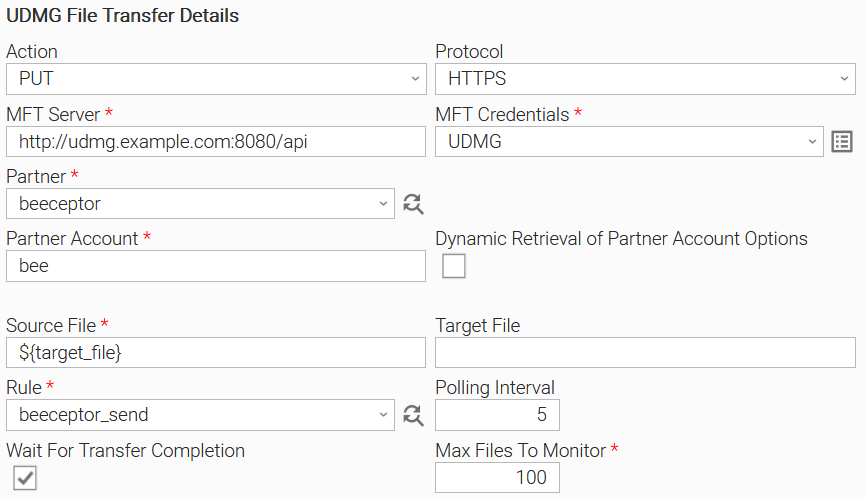
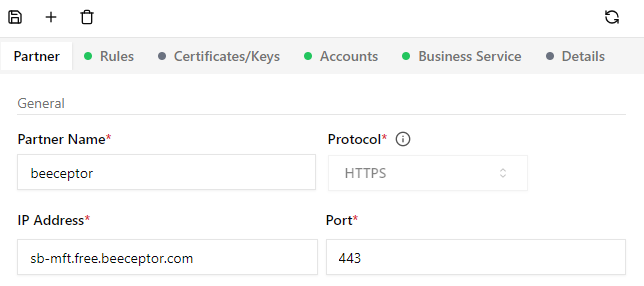
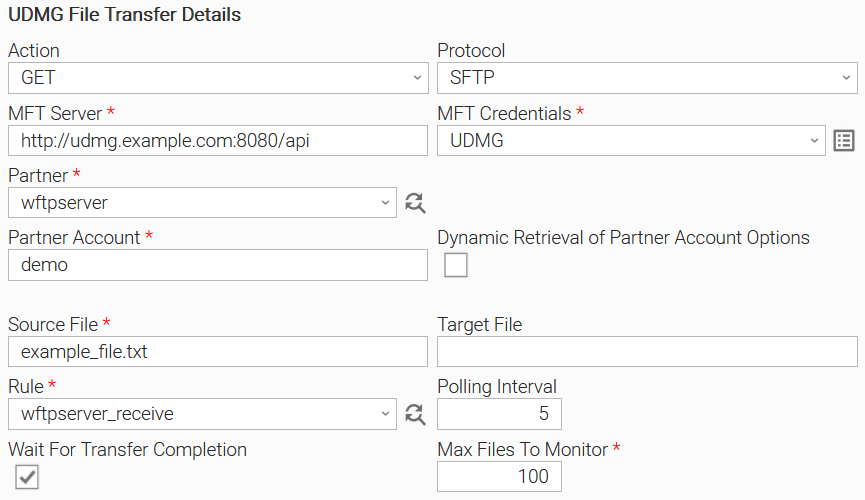
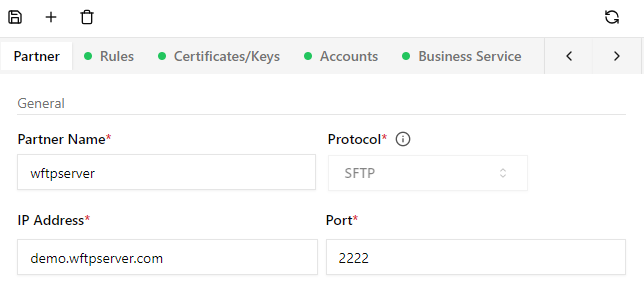
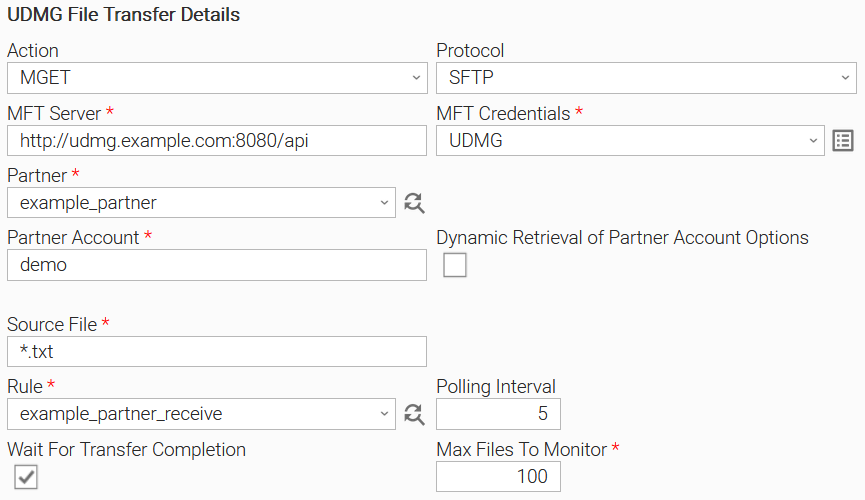
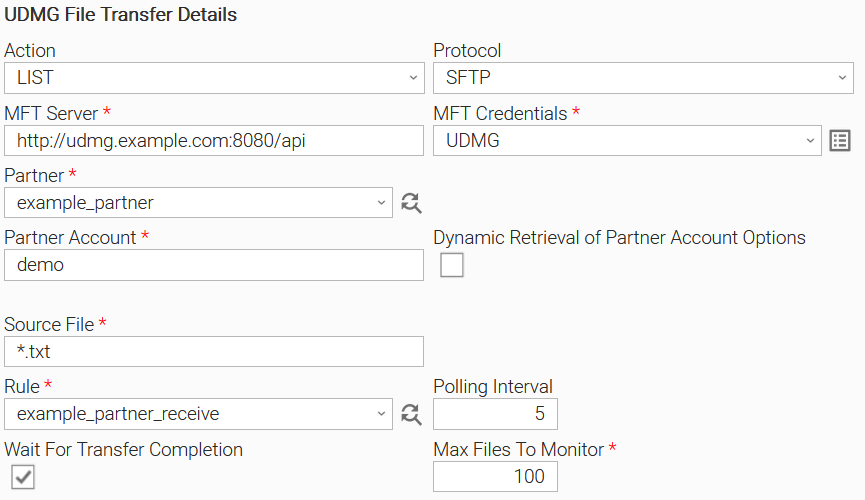
Action Output
EXTENSION
- "exit_code", "status", "status_description": General info regarding the task execution. In case of failure, it's set according to the specific error that happened during the execution. A list of possible values is provided in the exit codes table in this document.
- "invocation" > "fields": The task configuration used for this task execution.
- "result": For a comprehensive overview of the results, please refer to the table below.
Examples:
Example of a Single download from SFTP
{
    "exit_code": 0,
    "status_description": "Task executed successfully",
    "invocation": {
        "fields": {
            "credentials_user": "admin",
            "credentials_password": "****",
            "action": "GET",
            "protocol": "sftp",
            "mft_server": "http://udmg.somehost.com:8080/api",
            "file": "readme.txt",
            "output": null,
            "partner": "rebex",
            "rule": "rebex_receive_example",
            "use_dynamic_partner_account": false,
            "partner_account_dynamic": null,
            "user": "demo",
            "wait_for_completion": true,
            "transfer_date": null,
            "polling_interval": 5,
            "max_file_to_monitor": 100,
            "ue_task_uuid": "16835525405027449004GAT04TVODUWH"
        }
    },
    "result": {
        "mft_transfer": {
            "transfer_id": "478",
            "start": "2023-05-11 10:04:36.433385+00:00",
            "stop": "2023-05-11 10:04:40.908049+00:00",
            "status": "DONE",
            "step": "StepNone",
            "transfer_progress": "405  Bytes",
            "task_number": null,
            "error_code": "TeOk",
            "error_msg": null,
            "local_file": "/data/in/readme.txt",
            "remote_file": "/pub/example/readme.txt",
            "transfer_uuid": "1656601189657083904",
            "transfer_info": {
                "udmg_file_computed_extension": ".txt",
                "udmg_file_computed_mimetype": "text/plain; charset=utf-8",
                "udmg_sftp_client_version": "SSH-2.0-Go",
                "udmg_sftp_config_ciphers": [
                    "aes128-gcm@openssh.com",
                    "chacha20-poly1305@openssh.com",
                    "aes128-ctr",
                    "aes192-ctr",
                    "aes256-ctr"
                ],
                "udmg_sftp_config_kex": [
                    "curve25519-sha256@libssh.org",
                    "ecdh-sha2-nistp256",
                    "ecdh-sha2-nistp384",
                    "ecdh-sha2-nistp521",
                    "diffie-hellman-group-exchange-sha256",
                    "diffie-hellman-group1-sha1",
                    "diffie-hellman-group14-sha1"
                ],
                "udmg_sftp_config_mac": [
                    "hmac-sha2-256-etm@openssh.com",
                    "hmac-sha2-256",
                    "hmac-sha1",
                    "hmac-sha1-96"
                ],
                "udmg_sftp_failed_auth_methods": [
                    "none"
                ],
                "udmg_sftp_hostkey_algo": "ssh-rsa",
                "udmg_sftp_kex_algo": "curve25519-sha256@libssh.org",
                "udmg_sftp_read_algos": {
                    "cipher": "aes128-gcm@openssh.com",
                    "compression": "none",
                    "mac": ""
                },
                "udmg_sftp_server_version": "SSH-2.0-RebexSSH_5.0.8466.0",
                "udmg_sftp_sucessful_auth_methods": "password",
                "udmg_sftp_write_algos": {
                    "cipher": "aes128-gcm@openssh.com",
                    "compression": "none",
                    "mac": ""
                },
                "udmg_ue_task_uuid": "16835525405027449004GAT04TVODUWH",
                "udmg_xfer_log": "/config/logs/478.log"
            }
        },
        "mft_transfer_files_summary": {
            "done": 1,
            "error": 0,
            "cancelled": 0
        },
        "errors": []
    }
}
Example of a Wildcard download from SFTP with 3 matching files
{
    "exit_code": 0,
    "status_description": "Task executed successfully",
    "invocation": {
        "fields": {
            "credentials_user": "admin",
            "credentials_password": "****",
            "action": "MGET",
            "protocol": "sftp",
            "mft_server": "http://udmg.somehost.com:8080/api",
            "file": "m*.png",
            "output": null,
            "partner": "rebex",
            "rule": "rebex_receive_example",
            "use_dynamic_partner_account": false,
            "partner_account_dynamic": null,
            "user": "demo",
            "wait_for_completion": true,
            "transfer_date": null,
            "polling_interval": 5,
            "max_file_to_monitor": 100,
            "ue_task_uuid": "168355254050277290080KCA7YT971DJ"
        }
    },
    "result": {
        "mft_transfer": {
            "transfer_id": "479",
            "start": "2023-05-11 10:44:30.493303+00:00",
            "stop": "2023-05-11 10:44:31.144255+00:00",
            "status": "DONE",
            "step": "StepNone",
            "transfer_progress": "3 out of 3 files",
            "task_number": null,
            "error_code": "TeOk",
            "error_msg": null,
            "local_file": "/data/in/m*.png",
            "remote_file": "/pub/example/m*.png",
            "transfer_uuid": "1656611231072518144",
            "transfer_info": {
                "udmg_sftp_client_version": "SSH-2.0-Go",
                "udmg_sftp_config_ciphers": [
                    "aes128-gcm@openssh.com",
                    "chacha20-poly1305@openssh.com",
                    "aes128-ctr",
                    "aes192-ctr",
                    "aes256-ctr"
                ],
                "udmg_sftp_config_kex": [
                    "curve25519-sha256@libssh.org",
                    "ecdh-sha2-nistp256",
                    "ecdh-sha2-nistp384",
                    "ecdh-sha2-nistp521",
                    "diffie-hellman-group-exchange-sha256",
                    "diffie-hellman-group1-sha1",
                    "diffie-hellman-group14-sha1"
                ],
                "udmg_sftp_config_mac": [
                    "hmac-sha2-256-etm@openssh.com",
                    "hmac-sha2-256",
                    "hmac-sha1",
                    "hmac-sha1-96"
                ],
                "udmg_sftp_failed_auth_methods": [
                    "none"
                ],
                "udmg_sftp_hostkey_algo": "ssh-rsa",
                "udmg_sftp_kex_algo": "curve25519-sha256@libssh.org",
                "udmg_sftp_read_algos": {
                    "cipher": "aes128-gcm@openssh.com",
                    "compression": "none",
                    "mac": ""
                },
                "udmg_sftp_server_version": "SSH-2.0-RebexSSH_5.0.8466.0",
                "udmg_sftp_sucessful_auth_methods": "password",
                "udmg_sftp_write_algos": {
                    "cipher": "aes128-gcm@openssh.com",
                    "compression": "none",
                    "mac": ""
                },
                "udmg_ue_task_uuid": "168355254050277290080KCA7YT971DJ",
                "udmg_xfer_childIDs": [
                    480,
                    481,
                    482
                ],
                "udmg_xfer_files": [
                    "mail-editor.png",
                    "mail-send-winforms.png",
                    "mime-explorer.png"
                ],
                "udmg_xfer_log": "/config/logs/479.log",
                "udmg_xfer_wildcard": true
            }
        },
        "mft_transfer_files_summary": {
            "done": 3,
            "error": 0,
            "cancelled": 0
        },
        "errors": []
    }
}
Example of a wildcard list from SFTP with 2 matching files
{
    "exit_code": 0,
    "status": "SUCCESS",
    "status_description": "SUCCESS",
    "invocation": {
        "fields": { ... }
    },
    "result": {
        "mft_transfer": {
            "transfer_id": "145",
            "start": "2023-05-26T12:36:36.405685+00:00",
            "stop": "2023-05-26T12:36:37.022167",
            "status": "DONE",
            "step": "StepNone",
            "progress": 2,
            "task_number": null,
            "error_code": "TeOk",
            "error_msg": null,
            "local_file": "/home/udmg/udmg-server/in/wince*.png",
            "remote_file": "/pub/example/wince*.png",
            "transfer_uuid": "1662075259576123392",
            "transfer_info": {
                "udmg_sftp_hostkey_algo": "ssh-rsa",
                "udmg_sftp_kex_algo": "curve25519-sha256@libssh.org",
                "udmg_sftp_read_algos": {
                    "cipher": "aes128-gcm@openssh.com",
                    "compression": "none",
                    "mac": ""
                },
                "udmg_sftp_server_version": "SSH-2.0-RebexSSH_5.0.8466.0",
                "udmg_sftp_sucessful_auth_methods": "password",
                "udmg_sftp_write_algos": {
                    "cipher": "aes128-gcm@openssh.com",
                    "compression": "none",
                    "mac": ""
                },
                "udmg_xfer_files": [
          "winceclient.png",
          "winceclientSmall.png"
                ],
                "udmg_xfer_log": "/home/mft-user/waarp/log/145.log",
                "udmg_xfer_wildcard": true,
                "udmg_xfer_cmd": "list",
                "udmg_ue_task_uuid": "8a801e6d164c4648a32f94dbcd1bb19a"
            }
        }
    }
}
The Extension output contains the attribute result which contains the following sub-attributes:
Attribute | Type | Description | Version Information |
|---|---|---|---|
mft_transfer | object | The details of the main transfer record (the single transfer or the parent transfer in case of Wildcard Transfer). | Introduced in 1.0.0 |
mft_transfer.transfer_id | string | The identifier of the transfer on UDMG. | Introduced in 1.0.0 |
mft_transfer.status | string | The current status of the transfer | Introduced in 1.0.0 |
mft_transfer.start | string | The date and time the transfer has started (UDMG Server time) | Introduced in 1.0.0 |
mft_transfer.stop | string | The date and time the transfer has ended (UDMG Server time). For a wildcard transfer, this is when the listing of matching files and the registration of the child transfers is completed. | Introduced in 1.0.0 |
mft_transfer.step | string | The current processing step of the transfer | Introduced in 1.0.0 |
mft_transfer.transfer_progress | text | The progress of the data transfer in human-readable format
| Introduced in 1.0.0 |
mft_transfer.error_code | string | The error code of the transfer (if an error occurred). | Introduced in 1.0.0 |
mft_transfer.error_msg | string | The error message (if an error occurred). | Introduced in 1.0.0 |
mft_transfer.task_number | string | The task number in the processing step. | Introduced in 1.0.0 |
mft_transfer.local_file | string | Local file path. | Introduced in 1.0.0 |
mft_transfer.remote_file | string | Remote file path. | Introduced in 1.0.0 |
mft_transfer.transfer_uuid | string | The UUID of the transfer on UDMG. | Introduced in 1.1.0 |
mft_transfer.transfer_info | object | The transfer information fields. Set of metadata associated with the transfer on the UDMG Server. Fields with the udmg_ prefix are set internally by the UDMG server. Fields with the udmg_ue prefix are set by the UDMG File Transfer task. | Introduced in 1.1.0 |
mft_transfer.transfer_info.udmg_ue_task_uuid | string | The UUID of the UDMG File Transfer task. | Introduced in 1.2.0 |
mft_transfer.transfer_info.udmg_xfer_wildcard | boolean | Indicator that this is a wildcard transfer. Only for MPUT and MGET. | Introduced in 1.2.0 |
mft_transfer.transfer_info.udmg_xfer_cmd | string | ' Only for LIST. | Introduced in 1.3.0 |
mft_transfer.transfer_info.udmg_xfer_childIDs | array | A list of UDMG transfer IDs that are created in the context of this file file transfer. For each file matching the filename input, one file transfer process is created in UDMG. Only for MPUT and MGET. | Introduced in 1.2.0 |
mft_transfer.transfer_info.udmg_xfer_files | array | The list of files that matched the user input. Each of these files is transferred with a separate file transfer execution, which transfer IDs can be found in "udmg_xfer_childIDs" list. Only for MPUT and MGET. | Introduced in 1.2.0 |
mft_transfer_files_summary | object | Summary counters | Introduced in 1.2.0 |
mft_transfer_files_summary.done | number | Number of file transfers with success. | Introduced in 1.0.0 |
mft_transfer_files_summary.error | number | The number of file transfers in error state. | Introduced in 1.0.0 |
mft_transfer_files_summary.cancelled | number | The number of file transfers that are canceled. | Introduced in 1.0.0 |
errors | array | List of errors for the child transfers. | Introduced in 1.2.0 |
Input Fields
Field | Type | Mandatory | Description | Version Information |
|---|---|---|---|---|
Action | Choice | Yes | Action performed upon the task execution.
| Introduced in 1.0.0 |
Protocol | Choice | Yes | The transfer protocol.
info The protocol serves as a filter for the Partner list. The actual protocol for the file transfer is the one that is configured on UDMG for the selected Partner | Introduced in 1.0.0 |
MFT Server | Text | Yes | UDMG Server URL. This is the URL for the REST API endpoint, the port is configured in the UDMG Server configuration file. | Introduced in 1.0.0 |
MFT Credentials | Credentials | Yes | UDMG Server Credentials. The Credentials definition should be as follows.
The user must have read permissions for rules and partners, read/write permission for transfers | Introduced in 1.0.0 |
Source File | Text | Yes | The name of the source file, or the search pattern:
| Introduced in 1.0.0 |
Target File | Text | No | The name of the file on the target system after the transfer,
| Introduced in 1.1.0 |
Partner | Dynamic Choice | Yes | Dynamically fetched list of partner names. | Introduced in 1.0.0 |
Rule | Dynamic Choice | Yes | Dynamically fetched list of transfer rules. | Introduced in 1.0.0 |
Dynamic Retrieval of Partner Account Options | Boolean | No | If enabled, the partner account field will be replaced by a dynamic choice field variant. The default value is false. | Introduced in 1.4.0 |
Partner Account | Text | Yes | The name of the account to use for the connection to the selected Partner. The field is visible when Dynamic Retrieval of Partner Account Options is false. | Introduced in 1.0.0 |
Partner Account | Dynamic Choice | Yes | The name of the account to use for the connection to the selected Partner. The field is visible when Dynamic Retrieval of Partner Account Options is true. | Introduced in 1.4.0 |
Wait for Transfer Completion | Boolean | Yes | By checking this field, the extension monitors the completion of the transfer on UDMG before completing its execution.
The default value is true. | Introduced in 1.2.0 |
Polling Interval | Integer | No | The amount of time (in seconds) the task will wait before polling to check the transfer status. Valid values start from 1. The default value is 5. | Introduced in 1.0.0 |
Max Files to Monitor | Integer | Yes | The number of files, above which no monitor will be done, apart from the successful trigger of the file transfer. In practice, this means that for the actions MGET & MPUT, if a wildcard transfer results in more child transfers than the number indicated, the extension will not check the transfer status of these files, and proceed to completion with a special return code (see corresponding section in this document). The default value is 100. | Introduced in 1.2.0 |
Dynamic Commands
Command Name | Allowed Task Instance Status | Description |
|---|---|---|
Pause | RUNNING | Issue the pause command on the UDMG transfer. For a wildcard transfer (MPUT or MGET), the pause command is issued for all child transfers on UDMG. Only the eligible children in status PLANNED or RUNNING, are considered. Failure on one transfer does not block the execution of the other transfers. |
Resume | RUNNING | Issue the resume command on the UDMG transfer. For a wildcard transfer (MPUT or MGET), the resume command is issued for all child transfers on UDMG. Only the eligible children in status INTERRUPTED or PAUSED, are considered. Failure on one transfer does not block the execution of the other transfers. |
Cancelation
When the task instance is canceled on the Controller, a cancel command is issued on the UDMG transfer to attempt a graceful termination.
- If the transfer has no children (PUT, GET, LIST action):
- Fetch the UDMG transfer status and update the output-only fields.
- Proceed to cancel the UDMG transfer only when its status is one of PLANNED, RUNNING, INTERRUPTED, PAUSED, or ERROR.
- Update output only fields when the operation is completed.
- If the transfer has children (MPUT, MGET action): cancel the execution of all of the eligible child transfers on UDMG ( in status PLANNED, RUNNING, INTERRUPTED, PAUSED, ERROR). Failure on one transfer does not block the execution of the other transfers.
Re-Run
When the task instance is re-run on the Controller, a resume command is issued on the UDMG transfer for the file transfers in status ERROR.
- If the transfer has no children (PUT, GET, LIST action):
- Fetch the UDMG transfer status and update the output-only fields.
- Proceed to resume the UDMG transfer only when its status is ERROR, otherwise
- Continue the monitoring until the UDMG transfer is completed.
- If the transfer has children (MPUT, MGET action): resume the execution of all of the eligible child transfers on UDMG (in status ERROR). Failure on one transfer does not block the execution of the other transfers.
Task Output
Output Only Fields
Field | Type | Description | Version Information |
|---|---|---|---|
Transfer ID | Text | The identifier of the transfer on UDMG. | Introduced in 1.0.0 |
Transfer Status | Text | The current status of the transfer. Used for Task instance Extension Status. | Introduced in 1.0.0 |
Transfer Start Time | Text | The date and time the transfer has started (UDMG Server time). | Introduced in 1.0.0 |
Transfer End Time | Text | The date and time the transfer has ended (UDMG Server time). For a wildcard transfer, this is when the listing of matching files and the registration of the child transfers is completed. | Introduced in 1.0.0 |
Transfer Step | Text | The current processing step of the transfer. | Introduced in 1.0.0 |
Transfer Progress | Text | The progress of the data transfer in human-readable format.
| Introduced in 1.0.0 Modified in 1.2.0 |
Error Code | Text | The UDMG transfer error code. See the table below. | Introduced in 1.0.0 |
Error Message | Text | The error message (if an error occurred). | Introduced in 1.0.0 |
Transfer Task Number | Text | The task number in the processing step. | Introduced in 1.0.0 |
Local File | Text | Local file path. | Introduced in 1.0.0 |
Remote File | Text | Remote file path. | Introduced in 1.0.0 |
Transfer UUID | Text | The UUID of the transfer on UDMG. | Introduced in 1.1.0 |
These fields are also available as task instance variables, with the ops_mft_ prefix:
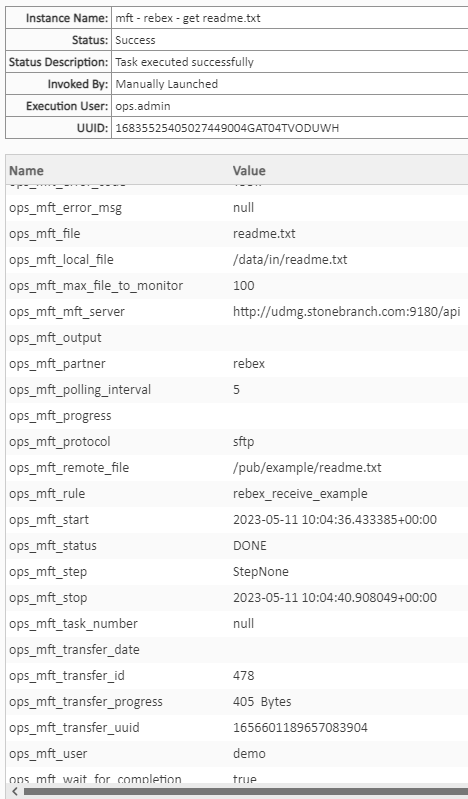
UDMG Transfer Error Code
Error Code | Description |
|---|---|
TeOk | This is the code used by default. It indicates that there is no error |
TeUnknown | Indicates an unknown error (the details of the error can give more information). |
TeInternal | Indicates that an internal error occurred in the UDMG Server (lost connection to the database, etc.) |
TeUnimplemented | Indicates that the partner wanted to use a valid functionality, but which is not implemented by the UDMG Server. |
TeConnection | Indicates that the connection to a remote partner cannot be established. This is the most general error code. A more specific code, if available, should be used. |
TeConnectionReset | Corresponds to "connection reset by peer". |
TeUnknownRemote | Indicates that the requested remote partner is not known in the UDMG Server database. For security reasons, the external use of this error code (returning this error to a client) is discouraged for incoming connections in favor of TeBadAuthentication, at the risk of leaking information (here, the account exists, but authentication failed). |
TeExceededLimit | Indicates that the transfer cannot be processed because the defined limits have been reached (number of connections, number of transfers, etc.) |
TeBadAuthentication | Indicates a connection error caused by incorrect authentication data (user, password, certificate, etc. Details of the error can provide more information). |
TeDataTransfer | Indicates that an error occurred during data transfer. This is a general error and a more specific code, if available, should be used. |
TeIntegrity | Indicates that the integrity check has failed. |
TeFinalization | Indicates that an error occurred during the finalization of the transfer. |
TeExternalOperation | Indicates that an error occurred during the execution of pre-transfer, post-transfer, or error processing. |
TeStopped | Indicates that the transfer was stopped. |
TeCancelled | Indicates that the transfer was canceled. |
TeFileNotFound | Indicates that the requested file was not found. |
TeForbidden | Indicates that the remote partner is not allowed to perform an action. |
TeBadSize | Indicates an error related to the size of the file (it exceeds a quota, there is not enough space left on the destination disk, etc.) |
TeShuttingDown | Indicates that the UDMG Server is shutting down |
Exit Codes
The exit codes for this Universal Extension are described below.
Exit Code | Status Classification Code | Status Classification Description | Status Description |
|---|---|---|---|
0 | SUCCESS | Successful Execution | SUCCESS |
1 | FAIL | Failed Execution | FAIL: < Error Description > |
2 | AUTHENTICATION_ERROR | Bad Credentials | AUTHENTICATION_ERROR: Account cannot be authenticated. |
3 | AUTHORIZATION_ERROR | Insufficient Permissions | AUTHORIZATION_ERROR: Account is not authorized to perform the requested action. |
10 | CONNECTION_ERROR | Bad connection data or connection timed out | CONNECTION_ERROR: < Error Description > |
11 | CONNECTION_ERROR | Extension-specific connection error | CONNECTION_ERROR: 404 page not found |
20 | DATA_VALIDATION_ERROR | Input fields Validation Error | DATA_VALIDATION_ERROR: 400 bad request: |
21 | TRANSFER_STATUS_ERROR | Transfer Execution Error | TRANSFER_STATUS_ERROR: Transfer failed with error code: TeUnknown |
22 | TRANSFER_STATUS_ERROR | Transfer Execution Error | TRANSFER_STATUS_ERROR: Transfer failed with error code: TeInternal |
23 | TRANSFER_STATUS_ERROR | Transfer Execution Error | TRANSFER_STATUS_ERROR: Transfer failed with error code: TeUnimplemented |
24 | TRANSFER_STATUS_ERROR | Transfer Execution Error | TRANSFER_STATUS_ERROR: Transfer failed with error code: TeConnection |
25 | TRANSFER_STATUS_ERROR | Transfer Execution Error | TRANSFER_STATUS_ERROR: Transfer failed with error code: TeConnectionReset |
26 | TRANSFER_STATUS_ERROR | Transfer Execution Error | TRANSFER_STATUS_ERROR: Transfer failed with error code: TeUnknownRemote |
27 | TRANSFER_STATUS_ERROR | Transfer Execution Error | TRANSFER_STATUS_ERROR: Transfer failed with error code: TeExceededLimit |
28 | TRANSFER_STATUS_ERROR | Transfer Execution Error | TRANSFER_STATUS_ERROR: Transfer failed with error code: TeBadAuthentication |
29 | TRANSFER_STATUS_ERROR | Transfer Execution Error | TRANSFER_STATUS_ERROR: Transfer failed with error code: TeDataTransfer |
30 | TRANSFER_STATUS_ERROR | Transfer Execution Error | TRANSFER_STATUS_ERROR: Transfer failed with error code: TeIntegrity |
31 | TRANSFER_STATUS_ERROR | Transfer Execution Error | TRANSFER_STATUS_ERROR: Transfer failed with error code: TeFinalization |
32 | TRANSFER_STATUS_ERROR | Transfer Execution Error | TRANSFER_STATUS_ERROR: Transfer failed with error code: TeExternalOperation |
33 | TRANSFER_STATUS_ERROR | Transfer Execution Error | TRANSFER_STATUS_ERROR: Transfer failed with error code: TeWarning |
34 | TRANSFER_STATUS_ERROR | Transfer Execution Error | TRANSFER_STATUS_ERROR: Transfer failed with error code: TeStopped |
35 | TRANSFER_STATUS_ERROR | Transfer Execution Error | TRANSFER_STATUS_ERROR: Transfer failed with error code: TeCancelled |
36 | TRANSFER_STATUS_ERROR | Transfer Execution Error | TRANSFER_STATUS_ERROR: Transfer failed with error code: TeFileNotFound |
37 | TRANSFER_STATUS_ERROR | Transfer Execution Error | TRANSFER_STATUS_ERROR: Transfer failed with error code: TeForbidden |
38 | TRANSFER_STATUS_ERROR | Transfer Execution Error | TRANSFER_STATUS_ERROR: Transfer failed with error code: TeBadSize |
39 | TRANSFER_STATUS_ERROR | Transfer Execution Error | TRANSFER_STATUS_ERROR: Transfer failed with error code: TeShuttingDown |
90 | CHILD_TRANSFERS_NOT_MONITORED_WARNING | API Limitations | CHILD_TRANSFERS_NOT_MONITORED_WARNING: Too many child transfers, skipped monitoring their completion status |
100 | TRANSFER_STATUS_CANCEL | Unexpected Transfer Status | TRANSFER_STATUS_CANCEL: Unexpected CANCELLED status |
STDOUT and STDERR
STDOUT and STDERR provide additional information for the user. The populated content can be changed in future versions of this extension without notice. Backward compatibility is not guaranteed.
More structured information can be retrieved from the EXTENSION output.
STDERR provides additional information to the user about the task instance execution. Verbosity is increased with the Task Log Level, The Debug and Trace levels can lead to extensive details and are only recommended for troubleshooting.
STDOUT provides a summary report for the wildcard transfers, but only if Wait For Transfer Completion is set.
For MPUT and MGET actions, the list of the child file transfers with the following details.
Field | Description |
|---|---|
id | The identifier of the transfer on UDMG |
status | The current status of the transfer |
localFilepath | The path of the file on the local disk |
start | The date and time the transfer has started (UDMG Server time) |
stop | The date and time the transfer has ended (UDMG Server time) |
filesize | The size of the file in bytes (or -1 when unknown) |
progress | The progress of the data transfer in bytes |
remoteID | The UUID of the transfer on UDMG |
errorCode | The UDMG transfer error code. |
errorMessage | The error message (if an error occurred) |
step | The current processing step of the transfer |
taskNumber | The task number in the processing step. |
remoteFilepath | The path to the file on the remote partner |
rule | The name of the transfer rule |
isSend | Indicates whether the transfer is a send (true) or a receive (false) |
requested | The name of the server/partner that requested the transfer |
requester | The name of the account that requested the transfer |
Example of STDOUT for a wildcard download from SFTP with 3 matching files
id  status    localFilepath                    start                             stop                                filesize    progress             remoteID  errorCode    errorMsg    step      taskNumber    remoteFilepath                       rule                   isSend    requested    requester
----  --------  -------------------------------  --------------------------------  --------------------------------  ----------  ----------  -------------------  -----------  ----------  --------  ------------  -----------------------------------  ---------------------  --------  -----------  -----------
 480  DONE      /data/in/mail-editor.png         2023-05-11 10:44:30.493303+00:00  2023-05-11 10:44:40.853704+00:00       16471       16471  1656611233584906240  TeOk                     StepNone                /pub/example/mail-editor.png         rebex_receive_example  False     rebex        demo
 481  DONE      /data/in/mail-send-winforms.png  2023-05-11 10:44:30.493303+00:00  2023-05-11 10:44:50.856191+00:00       35414       35414  1656611233622654976  TeOk                     StepNone                /pub/example/mail-send-winforms.png  rebex_receive_example  False     rebex        demo
 482  DONE      /data/in/mime-explorer.png       2023-05-11 10:44:30.493303+00:00  2023-05-11 10:45:00.860761+00:00       49011       49011  1656611233656209408  TeOk                     StepNone                /pub/example/mime-explorer.png       rebex_receive_example  False     rebex        demo
For a LIST action, the list of matching files is presented:
Field | Description |
|---|---|
Filename | The name of a file on the remote path that matched with the wildcard pattern. |
Example of the STDOUT for a wildcard list from SFTP with 2 matching files
Filename
------------------------------------------------
winceclient.png
winceclientSmall.png
How To
Import Universal Template
To use the Universal Template, you first must perform the following steps.
- This Universal Task requires the Resolvable Credentials feature. Check that the Resolvable Credentials Permitted system property has been set to true.
- Import the Universal Template into your Controller.
- When the files have been imported successfully, refresh the Universal Templates list; the Universal Template will appear on the list.
Modifications of this integration, applied by users or customers, before or after import, might affect the supportability of this integration. For more information refer to Integration Modifications, below.
Configure Universal Task
For a new Universal Task, create a new task, and enter the required input fields.
Integration Modifications
Modifications applied by users or customers, before or after import, might affect the supportability of this integration. The following modifications are discouraged to retain the support level as applied for this integration.
- Python code modifications should not be done.
- Template Modifications
- General Section
- "Name", "Extension", "Variable Prefix", and "Icon" should not be changed.
- Universal Template Details Section
- "Template Type", "Agent Type", "Send Extension Variables", and "Always Cancel on Force Finish" should not be changed.
- Result Processing Defaults Section
- Success and Failure Exit codes should not be changed.
- Success and Failure Output processing should not be changed.
- Fields Restriction Section
The template setup does not impose any restrictions concerning the "Exit Code Processing Fields" section.- Success/Failure exit codes need to be respected.
- In principle, as STDERR and STDOUT outputs can change in follow-up releases of this integration, they should not be considered reliable sources for determining the success or failure of a task.
- General Section
Users and customers are encouraged to report defects, or feature requests at Stonebranch Support Desk.
Document References
This document references the following documents:
Document Link | Description |
|---|---|
User documentation for creating, working with, and understanding Universal Templates and Integrations. | |
User documentation for creating Universal Tasks in the Universal Controller user interface. | |
User documentation for creating and working with credentials. | |
User documentation for Resolvable Credentials Permitted Property. |
Changelog
ue-mft-transfer-1.4.1 (2024-07-25)
Maintenance Changes
Changed: Refactored the extension (#40864).Changed: Documentation update: added compatibility with Python 3.11 with Universal Agent 7.6 (#41489)
Fixes
Fixed: Error "Partner Account: Field is required" when saving a task after selecting "Dynamic Retrieval of Partner Account Options" on Universal Controller 7.6 (#41543)
ue-mft-transfer-1.4.0 (2024-06-06)
Deprecations and Breaking Changes
Deprecation: Integration is now compatible with Universal Controller and Universal Agent of version 7.3 and up.
Enhancements
Added: Increased the maximum number of retrieved values for dynamic commands from 20 to 1000 (#36860).Added: Support for dynamic retrieval of partner accounts during task configuration (#32194).Added: Enhanced logging on DEBUG log level (#32506).Changed: The Transfer ID output field is now populated instantly (#35768).Changed: API endpoints that support retrieval of entities based on Business Services (introduced on UDMG 1.2) are now used (#35581).Changed: When using UMDG 2.0 and up, the dynamic retrieval of rules is now based on the account (#36832).
Fixes
Fixed: The environment variableUDMG\_CLIENT\_MAX\_THROTTLE\_RATEis now correctly interpreted as a float (#34325).Fixed: Corrected the exit code of tasks when some transfers were manually canceled. The extension now correctly returns exit code 100 (#34316).
ue-mft-transfer-1.3.1 (2024-03-12)
Enhancements
Added:Compatibility with Python 3.11 (#35935).
ue-mft-transfer-1.3.0 (2023-09-29)
Deprecations and Breaking Changes
Breaking Change: "Polling Interval" minimum value is set to 1, a value of 0 could cause an infinite loop (#33815).
Enhancements
Added: new LIST action to retrieve the names of the files matching a wildcard pattern on a remote SFTP partner (#33358).Added: Logging of dynamic command processing in the agent log with TRACE level (#32993).Added: MGET/MPUT: error is raised when monitoring of child transfers is skipped because the list is greater than "Max Files To Monitor": CHILD_TRANSFERS_NOT_MONITORED_WARNING with exit code 90 (#33065).Added: Support for throttling the MGET/MPUT monitoring with the environment variable UDMG_CLIENT_MAX_THROTTLE_RATE. It sets the maximum number of calls per second to the UDMG API during the monitoring phase. Default is 60 (#33432).Changed: "Target File" only visible for GET & PUT actions (#33367).Changed: After a dynamic command, the extension will terminate immediately if the transfer is already completed (#32989).Changed: "Polling Interval" field is always visible, as it is still used to check for parent transfer completion (#32994).Changed: MGET/MPUT: "Transfer Progress" is only updated when a child transfer is completed (DONE, ERROR, CANCELLED) (#33815).Changed: Sorting of the "Action" list (#33064).
Fixes
Fixed: Exit code to be 11 in case of 404 API errors (#28881).Fixed: Extension finishes successfully after unexpected transfer CANCELLED status (#29248).Fixed: Fix Task Cancel to also process child transfers that are in ERROR status (#33804).Fixed: Proper catching of UDMG API errors during wildcard transfer monitoring (#33310).
ue-mft-transfer-1.2.0 (2023-05-09)
Deprecations and Breaking Changes
Breaking Change: Transfer Progress output only field is changed to text value (#32195)
Enhancements
Add: Support Wildcard Transfer (#32198, #32195, #32201)- New actions "MPUT" and "MGET" for wildcard transfers:
- support for wildcard in source file parameter,
- creation of wildcard transfer on UDMG,
- monitoring of child transfers on UDMG,
- tabular report on STDOUT with final child transfer status,
- short summary report in EXTENSION output,
- PAUSE, RESUME, and CANCEL commands are propagated to child transfers
- "Transfer Progress" output field is redefined to show human readable value
- size in KB, MB, or GB for single transfer,
- "x out of y files" for wildcard transfer
- "Max files to monitor" parameter: limit the number of child transfers that are monitored by the task instances, 100 by default.
- "Wait for transfer completion" parameter: task instance only returns when the transfer is completed (with DONE or CANCELLED status) on UDMG.
For wildcard transfers, only returns when all child transfers are completed. Activated by default.
- New actions "MPUT" and "MGET" for wildcard transfers:
Add: Refresh task instance output with re-run (#32463)Add: Keep UC task instance ID in UDMG file transfer metadata field udmg_ue_task_uuid (#30931)
ue-mft-transfer-1.1.0 (2023-01-31)
Deprecations and Breaking Changes
Breaking Change: minimum universal agent version set to 7.3
Enhancements
Add: set target filename (rename file) (#31174)Add: transfer status as UC 7.3 extension status field. (#31041)Add: retry failed transfer with Task Re-run. (#29599)Add: show UUID. (#30733)Add: show transfer info fields. (#30930)Add: support for PeSIT and PeSIT-TLS protocols (#31051)
Fixes
Fix: optimize the number of API calls. (#29247)
ue-mft-transfer-1.0.0 (2022-06-30)
- Initial version