UiPath: Schedule, Trigger, and Monitor Processes
Disclaimer
Your use of this download is governed by Stonebranch's Terms of Use.
Overview
This Universal Task allows Stonebranch users to schedule, trigger, and monitor the UiPath (RPA) process directly from the Universal Controller.
- This task uses a Python request module to make REST-API calls to the UiPath orchestrator.
- It can trigger the RPA process in UiPath using just UiPath process name, orchestrator base URL, UiPath account name and service instance.
- The task triggers the UiPath process for execution, monitors until process completion, and populates the results in Universal Controller.
- It also features a tight integration with ITSM tools, meaning that it can auto-create incidents in case of UiPath RPA process execution failure.
Software Requirements
This integration requires an Universal Agent and a Python runtime to execute the Universal Task against a UiPath orchestrator instance.
Software Requirements for Universal Template and Universal Task
- Requires Python 3.6 or higher. Tested with the Universal Agent bundled Python distribution.
- Python modules required:
- requests
Software Requirements for Universal Agent
Either:
- Universal Agent for Windows x64 Version 6.9.0.0 and later with python options installed
- Universal Agent for Linux Version 6.9.0.0 and later with python options installed
Software Requirements for Universal Controller
- Universal Controller Version 6.9.0.0 and later
Software Requirements for the Application to be Scheduled
This Universal Task can work with the following UiPath Orchestrator versions:
- 2020.10.1
- 2020.4.1
- 2019.10.14
- 2018.4.1
Technical Considerations
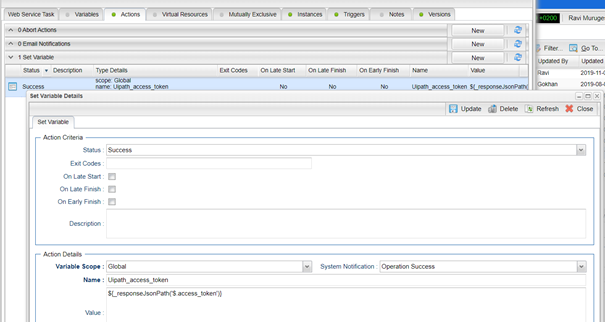
Please note that the UiPath access token is consumed by this Universal Task from the Global Variable named: Uipath_access_token. You can update the access token periodically through a web services task.
UiPath Key Features
Feature | Description |
|---|---|
Trigger a UiPath Job | Trigger a UiPath job/process and monitor the UiPath (RPA) process directly from the Universal Controller. |
Import UiPath Downloadable Universal Template
To use this downloadable Universal Template, you first must perform the following steps:
- This Universal Task requires the Resolvable Credentials feature. Check that the Resolvable Credentials Permitted system property has been set to true.
- To import the Universal Template into your Controller, follow the instructions here.
- When the files have been imported successfully, refresh the Universal Templates list; the Universal Template will appear on the list.
Configure UiPath Universal Task
For the new Universal Task type, create a new task and enter the task-specific details that were created in the Universal Template.
Field Descriptions for UiPath Universal Task
Field | Description |
|---|---|
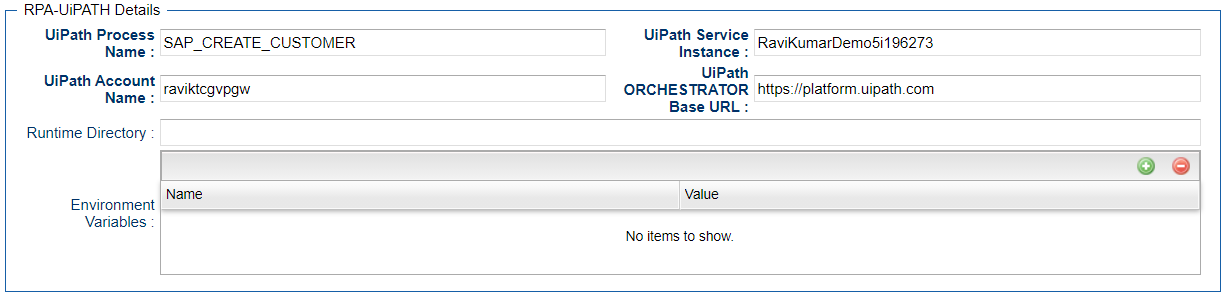
UiPath Process Name | Actual RPA workflow name that needs to be executed by UiPath Bot |
UiPath service Instance | Service instance name can retrieve using the Api get: https://platform.uipath.com/cloudrpa/api/account/[account\_logical\_name]/getAllServiceInstances |
UiPath Orchestrator URL | URL for the UiPath Orchestrator where its installed. Normally the cloud orchestrator/Community URL is |
UiPath Account Name | This is the UiPath Orchestrator Tenant Name: |
Examples for UiPath Universal Tasks
UiPath Sample Universal Task
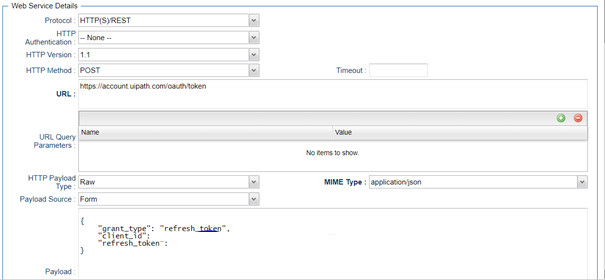
Sample webservices Task for Access Token Generation
Generated Access Token can be Stored in a Global Variable by Using the UAC function for the Above webservices Task in Action Set Variable
Document References
This document references the following documents:
Name | Description |
|---|---|
User documentation for creating Universal Templates in the Universal Controller user interface. | |
User documentation for creating Universal Tasks in the Universal Controller user interface. |