Getting Started with Universal Command Agent for SOA - XD Connector
Objective
The objective of this document is to assist in the following activities regarding the Universal Command Agent for SOA: XD Connector:
- Installing Universal Agent for SOA, which is comprised of:
- Universal Command Agent for SOA
- Universal Event Monitor for SOA
- Validating the WebSphere environment.
- Running the XD Connector on Universal Command Agent for SOA.
Installation Requirements
For installation requirements, see Universal Agent for SOA for UNIX - Installation Requirements.
Installation
For installation information, see Universal Agent for SOA for Linux Installation.
Validating the WebSphere XD Environment
To ensure trouble-free operation of Universal Command Agent for SOA: XD Connector, the WebSphere XD environment must be set up correctly.
The following steps should be made before using the Universal Command Agent for SOA: XD Connector.
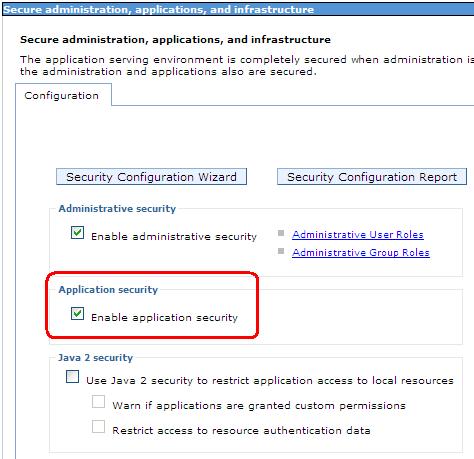
Step 1 | Application Security
|
|---|---|
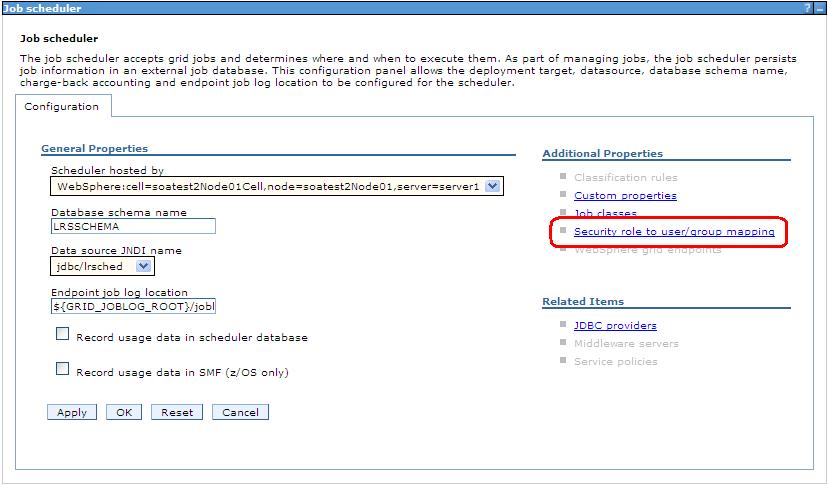
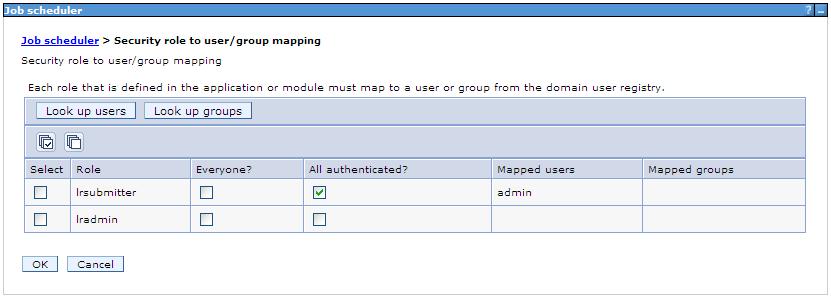
Step 2 | Map Users to Job Scheduler Users that have been set up in WebSphere must be mapped to a user in the job scheduler before they can run operations in the job scheduler.
|
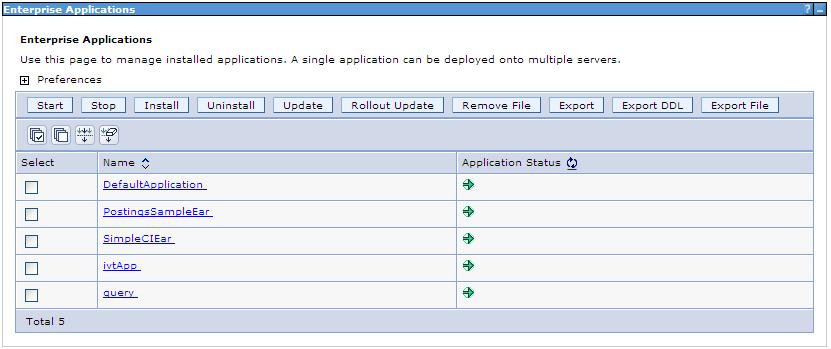
Step 3 | Install the Job Scheduler Sample Applications You must install the SimpleCIEar and PostingsSampleEar applications if you want to validate the WebSphere XD installation and the Universal Command Agent for SOA: XD Connector operation. Go to Applications / Install New Applications in the Integrated Solutions Console menu. Keep in mind that the PostingsSampleEar application requires the database to be set up before you install the application. The following screen illustrates the two applications after they are installed.
|
Step 4 | Run Sample Applications using Now that you have successfully installed the sample applications, you can test that your WebSphere XD environment is set up correctly by running the applications using the
The response to the submit command is:
The syntax for using the status command is: The response to the status command is shown below:
|
 3. When you have submitted the job, you can check its status by using the Job Management Console at
Running a Universal Command Agent for SOA Job on z/OS Connecting to XD Connector
You now can run jobs in WebSphere XD using the Universal Command Agent for SOA: XD Connector.
The following z/OS examples reference the PostingsSampleEar application.
Step 1 | Create the UMCD Manager JCL. This provides the UCMD Manager options, references to the XD Connector options, and the xJCL payload. It has the following format: |
|---|---|
Step 2 | Create the XD Connector Command Options Data Set Member. This member contains the command options for the XD Connector that specify the required information to submit a job to the WebSphere XD environment. It is referenced with the SCR ddname and has the following format: |
Step 3 | Create the xJCL Payload Data Set Member. This member contains the xJCL that WebSphere XD will use to run the job specified in the xJCL and is read via STDIN. The xJCL length depends on the job it describes. Verify that your data set member record length can accommodate the maximum line length in your xJCL. The xJCL is an XML document. It is referenced using the UNVIN ddname, and can be referenced in your WebSphere XD install by going to: (Your path may be different, depending on how you configured your WebSphere XD install.) |