Universal Virtual Terminal Script Interpreter Usage
UNVVT is used to execute a CL script. The script can reside in the IFS file system, the LIB file system, or the Universal Controller’s script library (when executed from an IBM I task in the Controller).
UNVVT can be executed in the following environments:
- From an IBM i task in the Controller
- From a Universal Extension task executing on an IBM i system
- From the IBM i command line
Below is an example that runs UNVVT to execute a script that works with a virtual terminal session. The example executes UNVVT from an IBM i task in the Universal Controller and runs a script from the Controller's script library.
IBM i task definition
The IBM i task definition calls the CL command UNVVT and executes a script "UNVVT - Example 1" that is defined in the Controller's script library:
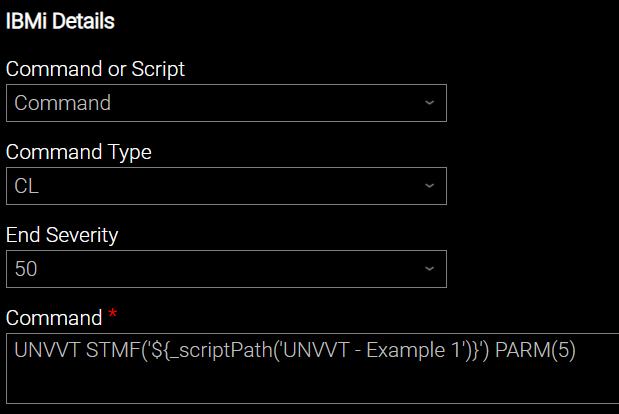
Note that the command is passing value 5 into the script with the UNVVT option PARM(5).
Script content
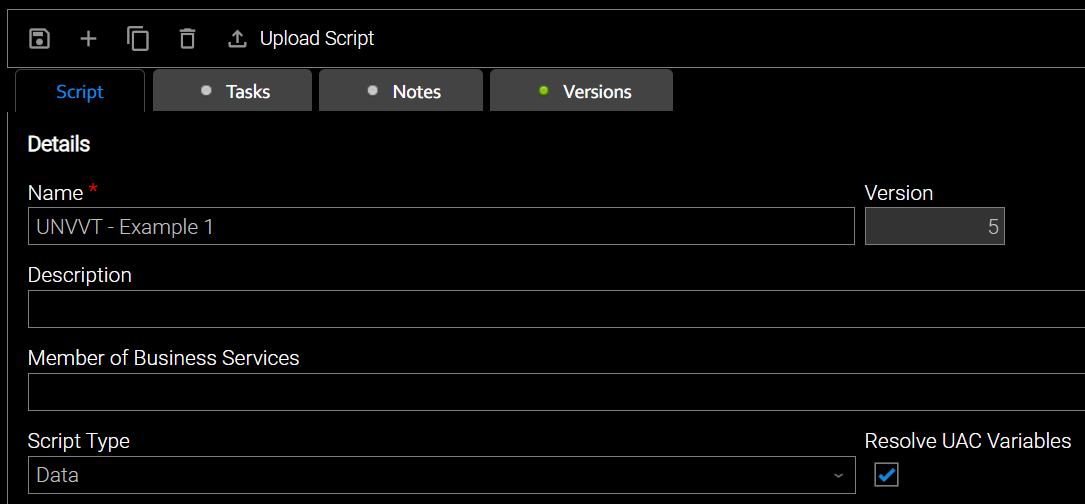
The script content shown below is taken from a script library member with the following settings:
PGM PARM(&FILECOUNT)

	# Open a virtual terminal session and log into interactive job.
	UNVVTSND OPENVT(*YES) DATA((6 53 ${_credentialUser('VTUSER1')}) +
	                           (7 53 ${_credentialPwd('VTUSER1')})) +
		DSPLY(*YES)

	# The following lines will allow the script to "Attempt to recover previous
	# interactive job". This can be helpful while testing/debugging a new script.
	# UNVVTSND CURSOR(22 7) DATA((22 7 1)) DSPLY(*YES)
	# MONMSG

	# Clear potential message "Message queue <user> is allocated to another job"
	# if user has another session open.
	UNVVTSND

	# Initialize the loop counter variable
	CHGVAR VAR(&COUNT) VALUE(*CALC(0 + 1) LEN(2))

	# Create &FILECOUNT number of files in QTEMP
LOOP:
	# Create a file
	UNVVTSND DATA((20 7 'CRTSRCPF FILE(QTEMP/TEST&COUNT) MBR(*FILE)')) DSPLY(*YES)
	MONMSG

	# Increment the loop counter and check the condition
	CHGVAR VAR(&COUNT) VALUE(*CALC(&COUNT + 1) LEN(2))
	IF COND(&COUNT *LE &FILECOUNT) THEN(GOTO CMDLBL(LOOP))

# End of loop

	# Display the files and validate
	UNVVTSND DATA((20 7 'WRKOBJ QTEMP/TEST*')) VALIDATION((08 'TEST01' 7) +
                                                          (09 'TEST02' 7) +
                                                          (10 'TEST03' 7) +
                                                          (11 'TEST04' 7) +
                                                          (12 'TEST05' 7)) DSPLY(*YES)
	MONMSG

	# Back out of any screen if errors occurred.
	UNVVTSND KEY(F3) DSPLY(*YES)

	# Log out of interactive job and close the virtual terminal.
	UNVVTSND CLOSEVT(*YES) DATA((20 7 'SIGNOFF LOG(*LIST)')) DSPLY(*YES)
	RETURN
Script behavior
This script will:
- Open a virtual terminal and log onto the interactive job session.
- Create some files in the QTEMP library.
- Display the file objects that were created and validate their existence on the virtual terminal screen.
- Log out of the virtual terminal session and close the virtual terminal.
Lines 4 and 5 execute UNVVTSND to log into the virtual terminal session using resolvable credential VTUSER1. In order to execute the script in your environment, you would need to define resolvable credential VTUSER1 in the Controller with valid credentials for the target IBM i system. Alternatively, replace VTUSER1 with a valid resolvable credential defined in your Controller.
The number of files to create will be passed into the script on line one in variable &FILECOUNT via the PARM() option of the UNVVT command line - 5 in this example (see task definition above).
Based on the file count passed to the script, the script will loop over the file creation on line 23. Each loop will create a new file named TEST\<*loopcount*\>, where loopcount is the current value of variable &LOOPCOUNT.
After file creation, the &LOOPCOUNT variable is incremented on line 27. Then, the IF statement on line 28 determines if an additional loop iteration is required. Otherwise, the script continues (exiting the loop).
After completing the file creation, line 32 displays the file objects in the QTEMP library (within the interactive virtual terminal session). Additionally, lines 32, 33, 34, 35, and 36 (of the same UNVVTSND command) validate that the expected file names are displayed on the resulting screen. Note that this contrived example requires that you create at least 5 files for the validation to pass.
This example script includes MONMSG after many of the commands to help the script reach a successful conclusion even if the user makes adjustments to parameters that would otherwise cause the script to fail. A real-world script would be more judicious with the use of MONMSG.
Also, lines 10 and 11 of the script are commented out but can be uncommented to allow the script to attempt to reconnect to a previous interactive job that may have failed while experimenting.
Task output
Running the example above will produce output similar to the following:
STDOUT
*---+----1----+----2----+----3----+----4----+----5----+----6----+----7----+----8
01: Sign On :01
02: System . . . . . : K703D071 :02
03: Subsystem . . . . : QBASE :03
04: Display . . . . . : QPADEV0004 :04
05: :05
06: User . . . . . . . . . . . . . . :06
07: Password . . . . . . . . . . . . :07
08: :08
09: Menu . . . . . . . . . . . . . . :09
10: Current library . . . . . . . . . :10
11: :11
12: :12
13: :13
14: :14
15: :15
16: :16
17: :17
18: :18
19: :19
20: :20
21: :21
22: :22
23: :23
24: (C) COPYRIGHT IBM CORP. 1980, 2021. :24
*---+----1----+----2----+----3----+----4----+----5----+----6----+----7----+----8
*---+----1----+----2----+----3----+----4----+----5----+----6----+----7----+----8
01: MAIN IBM i Main Menu :01
02: System: K703D071 :02
03: Select one of the following: :03
04: :04
05: 1. User tasks :05
06: 2. Office tasks :06
07: :07
08: 4. Files, libraries, and folders :08
09: :09
10: 6. Communications :10
11: :11
12: 8. Problem handling :12
13: 9. Display a menu :13
14: 10. Information Assistant options :14
15: 11. IBM i Access tasks :15
16: :16
17: 90. Sign off :17
18: :18
19: Selection or command :19
20: ===> :20
21: :21
22: F3=Exit F4=Prompt F9=Retrieve F12=Cancel F13=Information Assistant :22
23: F23=Set initial menu :23
24: (C) COPYRIGHT IBM CORP. 1980, 2021. :24
*---+----1----+----2----+----3----+----4----+----5----+----6----+----7----+----8
*---+----1----+----2----+----3----+----4----+----5----+----6----+----7----+----8
01: MAIN IBM i Main Menu :01
02: System: K703D071 :02
03: Select one of the following: :03
04: :04
05: 1. User tasks :05
06: 2. Office tasks :06
07: :07
08: 4. Files, libraries, and folders :08
09: :09
10: 6. Communications :10
11: :11
12: 8. Problem handling :12
13: 9. Display a menu :13
14: 10. Information Assistant options :14
15: 11. IBM i Access tasks :15
16: :16
17: 90. Sign off :17
18: :18
19: Selection or command :19
20: ===> :20
21: :21
22: F3=Exit F4=Prompt F9=Retrieve F12=Cancel F13=Information Assistant :22
23: F23=Set initial menu :23
24: Type option number or command. :24
*---+----1----+----2----+----3----+----4----+----5----+----6----+----7----+----8
*---+----1----+----2----+----3----+----4----+----5----+----6----+----7----+----8
01: MAIN IBM i Main Menu :01
02: System: K703D071 :02
03: Select one of the following: :03
04: :04
05: 1. User tasks :05
06: 2. Office tasks :06
07: :07
08: 4. Files, libraries, and folders :08
09: :09
10: 6. Communications :10
11: :11
12: 8. Problem handling :12
13: 9. Display a menu :13
14: 10. Information Assistant options :14
15: 11. IBM i Access tasks :15
16: :16
17: 90. Sign off :17
18: :18
19: Selection or command :19
20: ===> :20
21: :21
22: F3=Exit F4=Prompt F9=Retrieve F12=Cancel F13=Information Assistant :22
23: F23=Set initial menu :23
24: File TEST01 created in library QTEMP. + :24
*---+----1----+----2----+----3----+----4----+----5----+----6----+----7----+----8
*---+----1----+----2----+----3----+----4----+----5----+----6----+----7----+----8
01: MAIN IBM i Main Menu :01
02: System: K703D071 :02
03: Select one of the following: :03
04: :04
05: 1. User tasks :05
06: 2. Office tasks :06
07: :07
08: 4. Files, libraries, and folders :08
09: :09
10: 6. Communications :10
11: :11
12: 8. Problem handling :12
13: 9. Display a menu :13
14: 10. Information Assistant options :14
15: 11. IBM i Access tasks :15
16: :16
17: 90. Sign off :17
18: :18
19: Selection or command :19
20: ===> :20
21: :21
22: F3=Exit F4=Prompt F9=Retrieve F12=Cancel F13=Information Assistant :22
23: F23=Set initial menu :23
24: File TEST02 created in library QTEMP. + :24
*---+----1----+----2----+----3----+----4----+----5----+----6----+----7----+----8
*---+----1----+----2----+----3----+----4----+----5----+----6----+----7----+----8
01: MAIN IBM i Main Menu :01
02: System: K703D071 :02
03: Select one of the following: :03
04: :04
05: 1. User tasks :05
06: 2. Office tasks :06
07: :07
08: 4. Files, libraries, and folders :08
09: :09
10: 6. Communications :10
11: :11
12: 8. Problem handling :12
13: 9. Display a menu :13
14: 10. Information Assistant options :14
15: 11. IBM i Access tasks :15
16: :16
17: 90. Sign off :17
18: :18
19: Selection or command :19
20: ===> :20
21: :21
22: F3=Exit F4=Prompt F9=Retrieve F12=Cancel F13=Information Assistant :22
23: F23=Set initial menu :23
24: File TEST03 created in library QTEMP. + :24
*---+----1----+----2----+----3----+----4----+----5----+----6----+----7----+----8
*---+----1----+----2----+----3----+----4----+----5----+----6----+----7----+----8
01: MAIN IBM i Main Menu :01
02: System: K703D071 :02
03: Select one of the following: :03
04: :04
05: 1. User tasks :05
06: 2. Office tasks :06
07: :07
08: 4. Files, libraries, and folders :08
09: :09
10: 6. Communications :10
11: :11
12: 8. Problem handling :12
13: 9. Display a menu :13
14: 10. Information Assistant options :14
15: 11. IBM i Access tasks :15
16: :16
17: 90. Sign off :17
18: :18
19: Selection or command :19
20: ===> :20
21: :21
22: F3=Exit F4=Prompt F9=Retrieve F12=Cancel F13=Information Assistant :22
23: F23=Set initial menu :23
24: File TEST04 created in library QTEMP. + :24
*---+----1----+----2----+----3----+----4----+----5----+----6----+----7----+----8
*---+----1----+----2----+----3----+----4----+----5----+----6----+----7----+----8
01: MAIN IBM i Main Menu :01
02: System: K703D071 :02
03: Select one of the following: :03
04: :04
05: 1. User tasks :05
06: 2. Office tasks :06
07: :07
08: 4. Files, libraries, and folders :08
09: :09
10: 6. Communications :10
11: :11
12: 8. Problem handling :12
13: 9. Display a menu :13
14: 10. Information Assistant options :14
15: 11. IBM i Access tasks :15
16: :16
17: 90. Sign off :17
18: :18
19: Selection or command :19
20: ===> :20
21: :21
22: F3=Exit F4=Prompt F9=Retrieve F12=Cancel F13=Information Assistant :22
23: F23=Set initial menu :23
24: File TEST05 created in library QTEMP. + :24
*---+----1----+----2----+----3----+----4----+----5----+----6----+----7----+----8
*---+----1----+----2----+----3----+----4----+----5----+----6----+----7----+----8
01: Work with Objects :01
02: :02
03: Type options, press Enter. :03
04: 2=Edit authority 3=Copy 4=Delete 5=Display authority 7=Rename :04
05: 8=Display description 13=Change description :05
06: :06
07: Opt Object Type Library Attribute Text :07
08: TEST01 *FILE QTEMP PF :08
09: TEST02 *FILE QTEMP PF :09
10: TEST03 *FILE QTEMP PF :10
11: TEST04 *FILE QTEMP PF :11
12: TEST05 *FILE QTEMP PF :12
13: :13
14: :14
15: :15
16: :16
17: :17
18: :18
19: Bottom :19
20: Parameters for options 5, 7 and 13 or command :20
21: ===> :21
22: F3=Exit F4=Prompt F5=Refresh F9=Retrieve F11=Display names and types :22
23: F12=Cancel F16=Repeat position to F17=Position to :23
24: :24
*---+----1----+----2----+----3----+----4----+----5----+----6----+----7----+----8
*---+----1----+----2----+----3----+----4----+----5----+----6----+----7----+----8
01: MAIN IBM i Main Menu :01
02: System: K703D071 :02
03: Select one of the following: :03
04: :04
05: 1. User tasks :05
06: 2. Office tasks :06
07: :07
08: 4. Files, libraries, and folders :08
09: :09
10: 6. Communications :10
11: :11
12: 8. Problem handling :12
13: 9. Display a menu :13
14: 10. Information Assistant options :14
15: 11. IBM i Access tasks :15
16: :16
17: 90. Sign off :17
18: :18
19: Selection or command :19
20: ===> :20
21: :21
22: F3=Exit F4=Prompt F9=Retrieve F12=Cancel F13=Information Assistant :22
23: F23=Set initial menu :23
24: :24
*---+----1----+----2----+----3----+----4----+----5----+----6----+----7----+----8
*---+----1----+----2----+----3----+----4----+----5----+----6----+----7----+----8
01: Sign On :01
02: System . . . . . : K703D071 :02
03: Subsystem . . . . : QBASE :03
04: Display . . . . . : QPADEV0004 :04
05: :05
06: User . . . . . . . . . . . . . . :06
07: Password . . . . . . . . . . . . :07
08: :08
09: Menu . . . . . . . . . . . . . . :09
10: Current library . . . . . . . . . :10
11: :11
12: :12
13: :13
14: :14
15: :15
16: :16
17: :17
18: :18
19: :19
20: :20
21: :21
22: :22
23: :23
24: (C) COPYRIGHT IBM CORP. 1980, 2021. :24
*---+----1----+----2----+----3----+----4----+----5----+----6----+----7----+----8
STDERR
001: PGM PARM(&FILECOUNT)
002:
003:     # Open a virtual terminal session
004:     UNVVTSND OPENVT(*YES) DATA((6 53 VTUSER1) +
005:                                (7 53 ****)) +
006:         DSPLY(*YES)
007:
008:     # The following lines will allow the script to "Attempt to recover previous
009:     # interactive job".  This can be helpful while testing/debugging a new script.
010:     # UNVVTSND CURSOR(22 7) DATA((22 7 1)) DSPLY(*YES)
011:     # MONMSG
012:
013:     # Clear potential message "Message queue <user> is allocated to another job"
014:     # if user has another session open.
015:     UNVVTSND
016:
017:     # Initialize the loop counter variable
018:     CHGVAR VAR(&COUNT) VALUE(*CALC(0 + 1) LEN(2))
019:
020:     # Create &FILECOUNT number of files in QTEMP
021: LOOP:
022:     # Create a file
023:     UNVVTSND DATA((20 7 'CRTSRCPF FILE(QTEMP/TEST&COUNT) MBR(*FILE)')) DSPLY(*YES)
024:     MONMSG
025:
026:     # Increment the loop counter and check the condition
027:     CHGVAR VAR(&COUNT) VALUE(*CALC(&COUNT + 1) LEN(2))
028:     IF COND(&COUNT *LE &FILECOUNT) THEN(GOTO CMDLBL(LOOP))
029: # End of loop
030:
031:     # Display the files and validate
032:     UNVVTSND DATA((20 7 'WRKOBJ QTEMP/TEST*')) VALIDATION((08 'TEST01' 7) +
033:                                                           (09 'TEST02' 7) +
034:                                                           (10 'TEST03' 7) +
035:                                                           (11 'TEST04' 7) +
036:                                                           (12 'TEST05' 7)) DSPLY(*YES)
037:     MONMSG
038:
039:     UNVVTSND KEY(F3) DSPLY(*YES)
040:     UNVVTSND CLOSEVT(*YES) DATA((20 7 'SIGNOFF LOG(*LIST)')) DSPLY(*YES)
041:     RETURN
042:
043:
===> UNVVTSND OPENVT(*YES) DATA((6 53 VTUSER1) (7 53 ****)) DSPLY(*YES)
Data queue created.
VT handle data area created.
UNVVTSND completed successfully.
===> UNVVTSND
UNVVTSND completed successfully.
===> UNVVTSND DATA((20 7 'CRTSRCPF FILE(QTEMP/TEST01) MBR(*FILE)')) DSPLY(*YES)
NOTE: Ignoring exceptions for this command
UNVVTSND completed successfully.
===> UNVVTSND DATA((20 7 'CRTSRCPF FILE(QTEMP/TEST02) MBR(*FILE)')) DSPLY(*YES)
NOTE: Ignoring exceptions for this command
UNVVTSND completed successfully.
===> UNVVTSND DATA((20 7 'CRTSRCPF FILE(QTEMP/TEST03) MBR(*FILE)')) DSPLY(*YES)
NOTE: Ignoring exceptions for this command
UNVVTSND completed successfully.
===> UNVVTSND DATA((20 7 'CRTSRCPF FILE(QTEMP/TEST04) MBR(*FILE)')) DSPLY(*YES)
NOTE: Ignoring exceptions for this command
UNVVTSND completed successfully.
===> UNVVTSND DATA((20 7 'CRTSRCPF FILE(QTEMP/TEST05) MBR(*FILE)')) DSPLY(*YES)
NOTE: Ignoring exceptions for this command
UNVVTSND completed successfully.
===> UNVVTSND DATA((20 7 'WRKOBJ QTEMP/TEST*')) VALIDATION((08 'TEST01' 7) (09 'TEST02' 7) (10 'TEST03' 7) (11 'TEST04' 7) (12 'TEST05' 7)) DSPLY(*YES)
NOTE: Ignoring exceptions for this command
Validation rule 1 succeeded.
Validation rule 2 succeeded.
Validation rule 3 succeeded.
Validation rule 4 succeeded.
Validation rule 5 succeeded.
UNVVTSND completed successfully.
===> UNVVTSND KEY(F3) DSPLY(*YES)
UNVVTSND completed successfully.
===> UNVVTSND CLOSEVT(*YES) DATA((20 7 'SIGNOFF LOG(*LIST)')) DSPLY(*YES)
VT handle data area deleted.
UNVVTSND completed successfully.
UNVVT script execution has ended with a maximum severity code of 0.