IBM i Agent
The IBM i Agent resource provides information about Universal Agent for IBM i running on an IBM i platform. To run an IBM i task, you need an IBM i Agent installed and running on the target machine.
IBM i Agent Details
IBM i Agent Details provide the information necessary for the scheduler to locate and communicate with the machine where the Agent resides. Universal Controller creates this record automatically when the Agent connects with the Controller.
To view IBM i Agent Details:
Step 1 | From the Agents & Connections navigation pane, select Agents > IBM i Agents. The IBM i Agents list displays a list of connected IBM i Agents. info You also can select Agents > All Agents from the Agents & Connections navigation pane to display a list of all connected Agents: IBM i, Linux/Unix, Windows, and z/OS. |
|---|---|
Step 2 | Click the Details icon or click anywhere in the Agent row to display Details for that agent.
Most fields are read-only; however, you can make the following changes:
You also can choose to temporarily suspend the agent's ability to run tasks. See the field descriptions, below, for details about all fields in the IBM i Agent Details. |
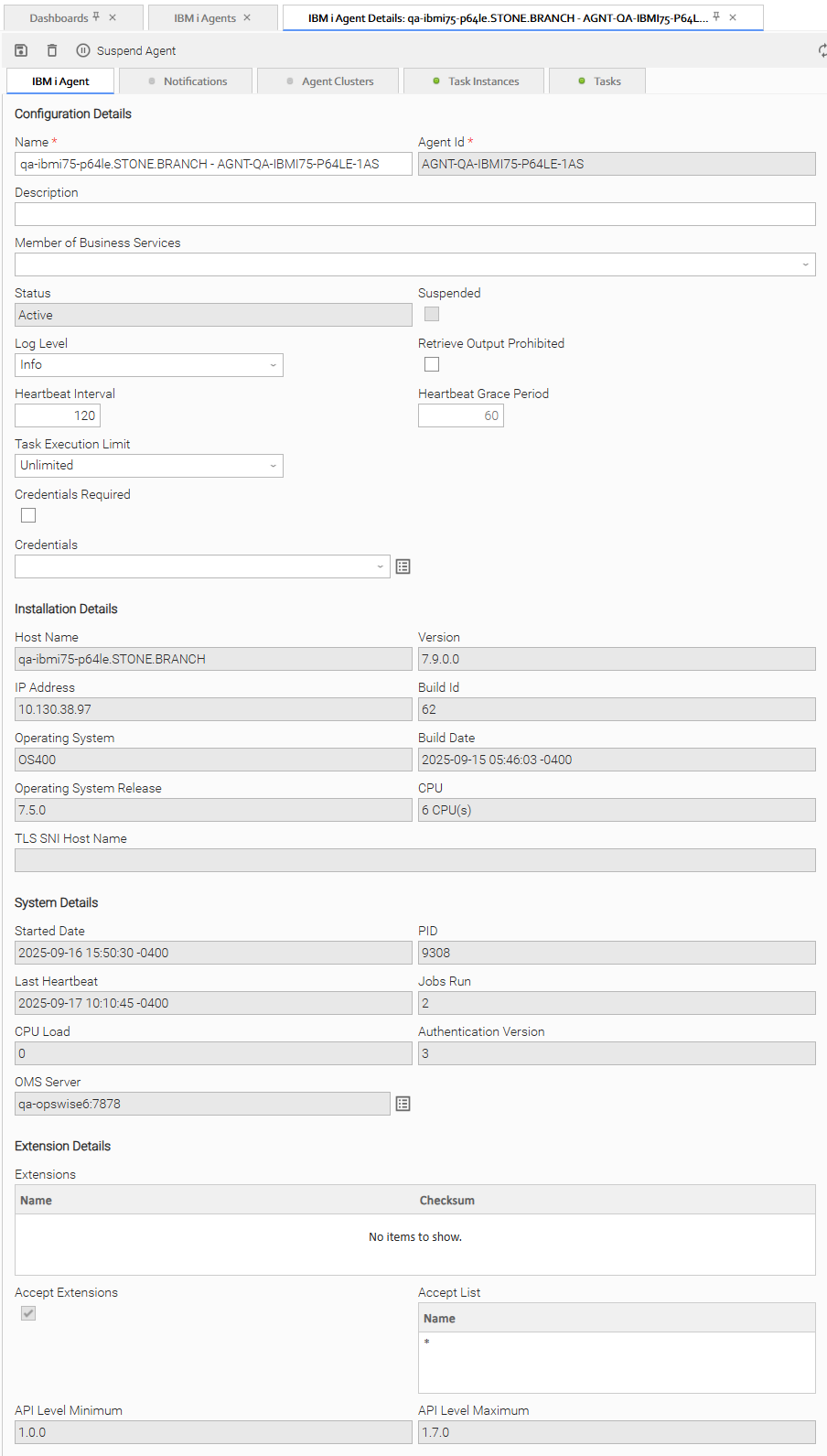
IBM i Agent Details Field Descriptions
The following tables describe the fields, buttons, and tabs in the IBM i Agent Details.
Configuration Details
This section contains detailed information about the configuration of the Agent.
Field Name | Description |
|---|---|
Name | User-defined during installation; name used within the Controller to identify this Agent. |
Agent ID | Unique ID for this Agent, created during installation. |
Description | Description of this record. Maximum length is 255 characters. |
Member of Business Services | User-defined; Allows you to select one or more Business Services that this record belongs to. (You also can Check All or Uncheck All Business Services for this record.) You can select up to 62 Business Services for any record type, and enter a maximum of 2048 characters for each Business Service. If the Business Service Visibility Restricted Universal Controller system property is set to true, depending on your assigned (or inherited) Permissions or Roles, Business Services available for selection may be restricted. |
Status | System-supplied; status of the Agent. |
Suspended | Indication that the Agent's ability to run tasks has been suspended. |
Log Level | User-modifiable; level of logging that the Agent will perform. info You cannot modify a Log Level from a non-active (Passive or Offline) mode. Modifying this field changes the log level of the messages that appear in the Options:
info A Trace file is not created when the Trace option is selected. |
Retrieve Output Prohibited | If enabled, disallows any Retrieve Output request (automatic or manual) from being performed. |
Heartbeat Interval | User-modifiable; heartbeat interval (in seconds). The heartbeat is a status message sent from the Agent to the Controller. If you change the heartbeat interval, it only affects new Agents that are registered after the change. It does not affect the heartbeat interval of existing Agents. info You cannot modify a Heartbeat Interval from a non-active (Passive or Offline) mode. |
Heartbeat Grace Period | User-modifiable; grace period, in seconds, that the Controller will allow for a delayed heartbeat message. |
Task Execution Limit | Specification for whether a Limited or Unlimited number of task instances can be run concurrently on the Agent. (Default is Unlimited.) For purposes of imposing this task execution limit, running task instances are those in any of these statuses: Cancel Pending, Queued, Received, Running, Submitted, and Started. |
Limit Amount | If Task Execution Limit = Limited; Number of tasks that can be running at the same time by the Agent. |
Credentials Required | Specifies if credentials are required to execute any task on the agent. |
Credentials | Credentials under which this Agent runs tasks. These credentials are overridden by any credentials provided in the task definition for any tasks being run by this Agent. |
Installation Details
This section contains detailed information about the installation of the Agent.
Field Name | Description |
|---|---|
Host Name | User-provided during installation; IP address or domain/name of the host machine where the resource resides. |
IP Address | User-provided during installation; TCP/IP address of the machine where the Agent is running. If the currently logged in user is a non-Administrator (ops_admin) user, and the Agent Address Information Restricted Universal Controller system property is set to true, the IP Address field will display ***** instead of the actual value. info This also applies to the ipAddress of z/OS secondary Agents. |
Operating System | System-supplied; operating system on which the Agent is running. |
Operating System Release | System-supplied; release information for the operating system on which the Agent is running. |
Version | System-supplied; version number of the Agent program. |
Build ID | System-supplied, provided by the Agent; build ID of the Agent. Internal use only. |
Build Date | System-supplied, provided by the Agent; date the Agent program was last built. |
CPU | System-supplied; information about the CPU on the Agent machine. |
TLS SNI Host name | User-provided/Configured during agent installation; Publicly accessible IP address or domain/name of the host machine where the resource resides. |
Transient | If checked, the Agent is Transient and will be deleted or decommissioned when the Agent shuts down or goes offline. Transient Agents are suspended from any Agent Clusters that they may belong to. info An Agent is transient if it has been identified as transient in the TRANSIENT UAG configuration option. |
Decommissioned | If checked, the Agent has been decommissioned and is not available for use. An Agent becomes Decommissioned if it is a Transient Agent and has shut down or gone offline and could not be removed/deleted from the system because it is being referenced by a task. |
Decommissioned Date | Date when the Agent was decommissioned. |
System Details
This section contains detailed information about the Agent system.
Field Name | Description |
|---|---|
Started Date | System-supplied; date/timestamp when the Agent was last started. |
Last Heartbeat | System-supplied; date and time the most recent heartbeat was received from the resource. |
CPU Load | System-supplied; current CPU load on the Agent machine, expressed as a percentage. For example, 1 means 1% currently utilized. |
OMS Server | Host name of the OMS Server. |
PID | System-supplied, provided by the Agent; process ID of the Agent. |
Jobs Run | Total number of jobs that have been run through the Controller to this Agent. |
Current Task Count | If Task Execution Limit = Limited; Current number of tasks currently being run by this Agent. (See Resetting the Current Task Count for information on resetting the current task count.) |
Authentication Version | This value is used by the Controller to determine what level of encryption is to be used for sensitive data between the Agent and the Controller. The most secure method available is used per that agent. Options:
|
Extension Details
This section contains detailed information about Universal Extensions.
Field Name | Description |
|---|---|
API Level Minimum | Minimum extension API level supported. |
API Level Maximum | Maximum extension API level supported. |
Extensions | List of deployed Universal Extensions and their corresponding checksums. |
Accept Extensions | Specification (true or false) for whether or not the Agent will accept deployment of Universal Extensions. |
Accept List | If Accept Extensions true; list of specific Universal Extensions that are allowed to be deployed to the agent, or * for no deployment restrictions. |
Metadata
This section contains Metadata information about this record.
Field Name | Description |
|---|---|
UUID | Universally Unique Identifier of this record. |
Replicated | If using a Universal Reporting Server, this field is automatically set to true if this record was replicated from another Controller. |
Updated By | Name of the user that last updated this record. |
Updated | Date and time that this record was last updated. |
Created By | Name of the user that created this record. |
Created | Date and time that this record was created. |
Buttons
This section identifies the buttons displayed above and below the Agent Details that let you perform various actions.
Field Name | Description |
|---|---|
Update | Saves updates to the record. |
Suspend Agent | Suspends the Agent's ability to run tasks. |
Resume Agent | Resumes the suspended Agent's ability to run tasks. |
Delete | Deletes the current record. |
Refresh | Refreshes any dynamic data displayed in the Details. |
Close | For pop-up view only; closes the pop-up view of this task. |
Tabs
This section identifies the tabs across the top of the Agent Details that provide access to additional information about the Agent.
For an Agent-Only installation of Universal Controller, the Agent Clusters, Task Instances, and Tasks tabs do not display.
Field Name | Description |
|---|---|
Agent Clusters | Lists all agent clusters that this Agent belongs to. |
Notifications | Lists all notifications that have been defined for this Agent. |
Task Instances | System-supplied; lists all task instances that have run or are ready to run on this Agent since it last started. |
Tasks | System-supplied; lists all tasks that specify this Agent in its Details, and lets you create a new task that specifies this Agent. |