Replication Settings
Overview
If using a Universal Reporting Server to replicate data from a source Controller, you can configure Replication Settings via the user interface of the Reporting Server, given the necessary permissions. Users with the ops_admin role can read/update the Replication Settings and run the Enable, Disable, and Test Connection commands. Users with the ops_service role can only read the Replication Settings.
Although you can only update Replication Settings from the Reporting Server, you can view the Synchronization Status in the Replication Settings on the source Controller as well.
Replication details include the information required to connect to the source Controller database, as well as the replication configuration for each of the artifacts being replicated (Activity, Agents, Audits, and/or History).
You can also view system-supplied information about the synchronization status of the items being replicated.
Defining Replication Settings
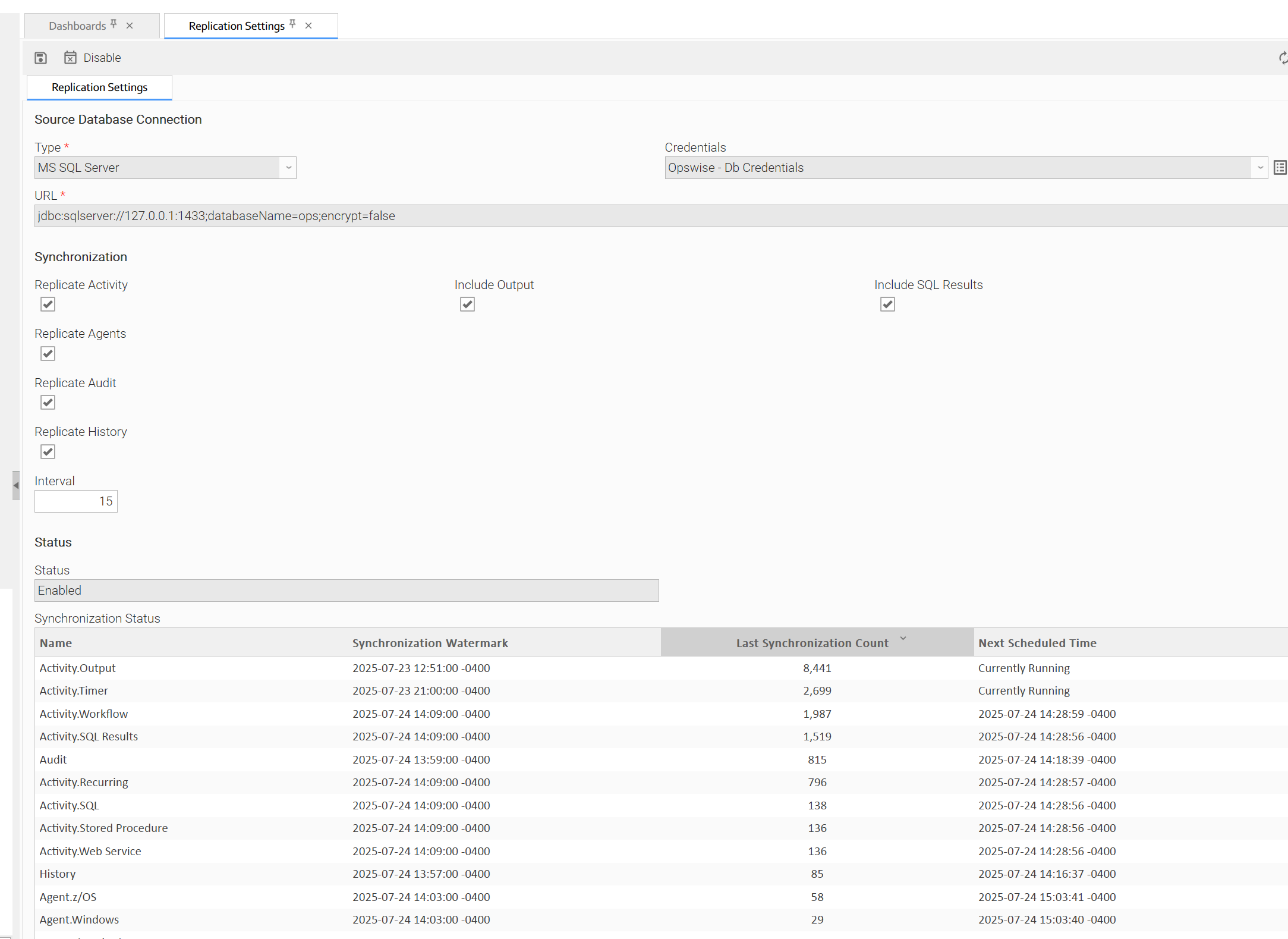
Step 1 | From the Automation Center navigation pane, select Administration > Replication Settings. The Replication Settings page displays.
|
|---|---|
Step 2 | Enter / select your Replication Settings, using the field descriptions below as a guide.
|
Step 3 | Click the |
 button.
For information on how to access additional details - such as Metadata and complete database Details - for Replication Settings (or any type of record), see Records.
Replication Settings Details Field Descriptions
Source Database Connection
This section contains information about the source Controller database used by the Reporting Server.
The fields of this section will be read-only when replication is enabled.
If replication is enabled, it will be disabled automatically when updating the Replication Settings if no artifacts are set to replicate.
Field Name | Description |
|---|---|
Type | Specifies the type of the remote database. Options:
|
URL | The JDBC URL used to connect to the remote database. info If the URL is changed and synchronization was already initialized, a confirmation dialog will be shown to allow the user to clear the Synchronization Status so that replication starts from the beginning instead of the last Synchronization Watermark. |
Credentials | The user and password used to connect to the Remote Database. |
Synchronization
This section contains options for customizing replication behavior.
Field Name | Description |
|---|---|
Replicate Activity | Specifies whether or not to replicate Activity. |
Include Output | If Replicate Activity is enabled; Specifies whether or not to replicate Activity Output. |
Include SQL Results | If Replicate Activity is enabled; Specifies whether or not to replicate Activity SQL Results. |
Replicate Agents | Specifies whether or not to replicate Agents. |
Replicate Audit | Specifies whether or not to replicate Audits. |
Replicate History | Specifies whether or not to replicate History. |
Interval | The number of minutes between synchronization requests. Must be at least 5. info The synchronization Interval for Agents cannot be less than 60 minutes. If you specify an Interval less than 60, it will be applied to all other record types, but the Agent synchronization Interval will remain at 60 minutes. |
Status
This section contains information about replication status.
Field Name | Description |
|---|---|
Status | System-supplied; current replication status. Options:
|
Synchronization Status | System-supplied; A read-only list displaying the current synchronization status of the items being replicated. The table includes the following columns:
info You can clear or reset the Synchronization Status with the Update Synchronization Status Server Operation. |
Buttons
This section identifies the buttons displayed above the Replications Settings that let you perform various actions.
Field Name | Description |
|---|---|
Enable | If replication is disabled and the user has the ops_admin role; Enables replication. This command will be ignored if no items are set to be replicated in the Synchronization section of the Replication Settings details. |
Disable | If replication is enabled and the user has the ops_admin role; Disables replication. |
Test Connection | If the user has the ops_admin role; Tests the connection to the source database. info If the Replication Settings form has unsaved changes, then the record values will be used when testing the connection. |