Reporting Server Overview
A Universal Reporting Server is a separate Universal Controller instance dedicated to storing historical data from a source Universal Controller (Production Server). This allows you to maintain minimal data on the Production Server for optimal performance, while preserving access to historical information.
The Reporting Server works by replicating data from the Production Server. The following items can be replicated:
You can enable replication for any of these items via Replication Settings. Aside from Activity Output and SQL Results, related data (usually seen as tabs on the record form), cannot be replicated.
Once an item is replicated, it can be safely backed up and purged from the Production Server. The Production Server can run more efficiently if it does not have to store large amounts of data.
The Reporting Server is designed specifically for data storage and analytics. You can generate and email Reports about replicated data, but all active workload automation should continue to run on the Production Server. See Reporting Server Restrictions for details on functionality limitations of a Reporting Server.
Setting Up a Reporting Server
Step 1 | Install a Universal Controller as a Reporting Server, following the Installation instructions below. |
|---|---|
Step 2 | Configure Replication Settings to control what data gets replicated on the Reporting Server. |
Step 3 | Review Reporting Server Restrictions to understand what the Reporting Server can and cannot do. |
Installation
To install a Universal Controller as a Reporting Server, follow the usual process for Installing Universal Controller, and use the following Command Line Switch during installation:
--reportingserver true
Licensing
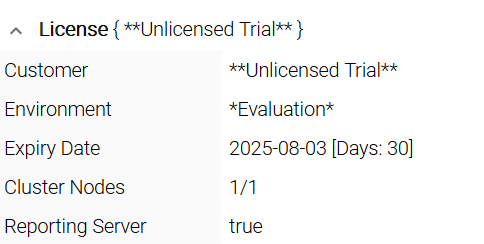
A Universal Controller acting as a Reporting Server has its own reporting license. A trial license of the Reporting Server is included.
A Reporting Server license cannot be used on a non-Reporting Server (and vice versa).
The License section of the System Details Widget for a Reporting Server shows limited information, as many of the fields for a non-reporting license regarding Agents and Task executions are not applicable. Additionally, the Reporting Server field indicates that this Controller instance is a Reporting Server.