Dynamic Choice Field
On this page, we will enhance the ue-task Extension developed in the previous chapter by adding two Dynamic Choice Fields to the "UE Task" template. A corresponding change will be made in extension.py to implement the functionality that will populate the Dynamic Choice Fields.
These choice fields will be available to "UE Task" task types at definition time and allow the user to select values that are populated by the target agent system prior to task submission.
This page will cover the following:
- Add Dynamic Choice fields to the "UE Task" Universal Template.
- Add backing implementation for Dynamic Choice fields to the extension.py file in the sample-task Extension project.
- Rebuild and upload the modified Extension.
- Populate the Dynamic Choice fields on a task definition form.
Step 1 - Add Dynamic Choice fields to the "UE Task" Universal Template
Go back to the "UE Task" Universal Template form.
Click on the "New" option in the "Fields" tab of the template

In the new field popup windows, create a new Dynamic Choice field with a name of “primary_choice_field”:
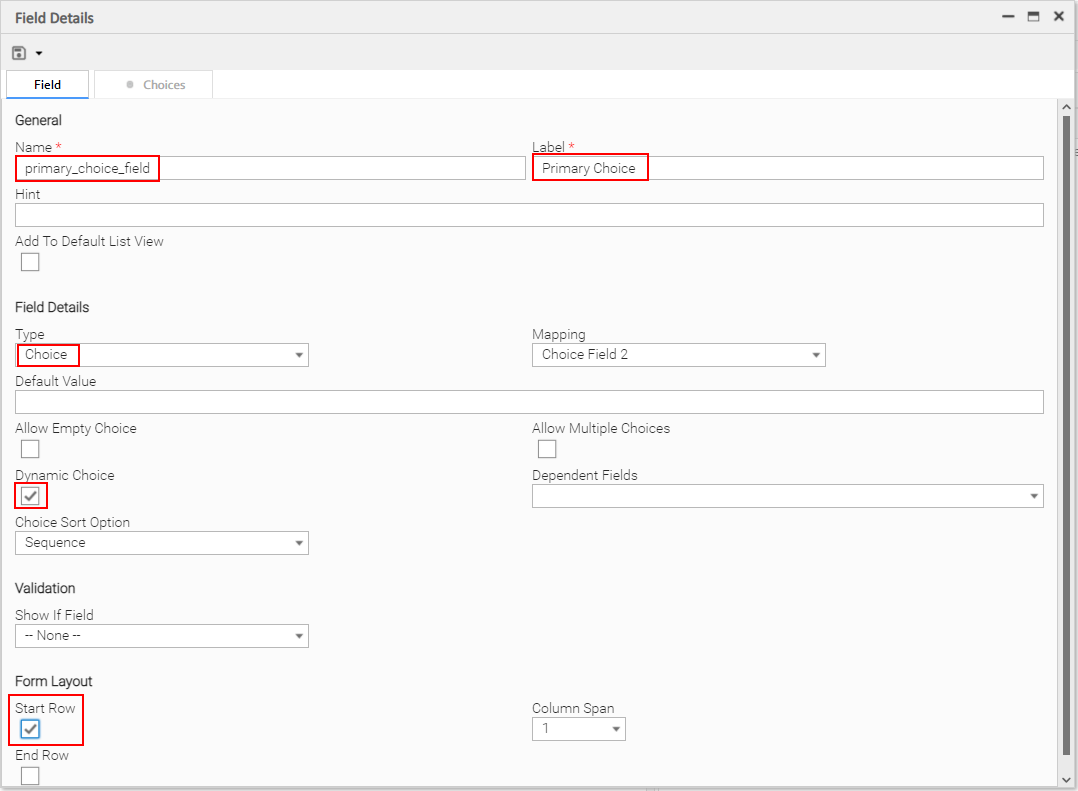
Note that "Start Row" is checked in the Form Layout section. This is not required. It is selected only to achieve a better layout of form fields.
Click the dropdown next to the "Save" icon and select "Save & New":

Next, create a second Dynamic Choice field with a name of "secondary_choice_field".
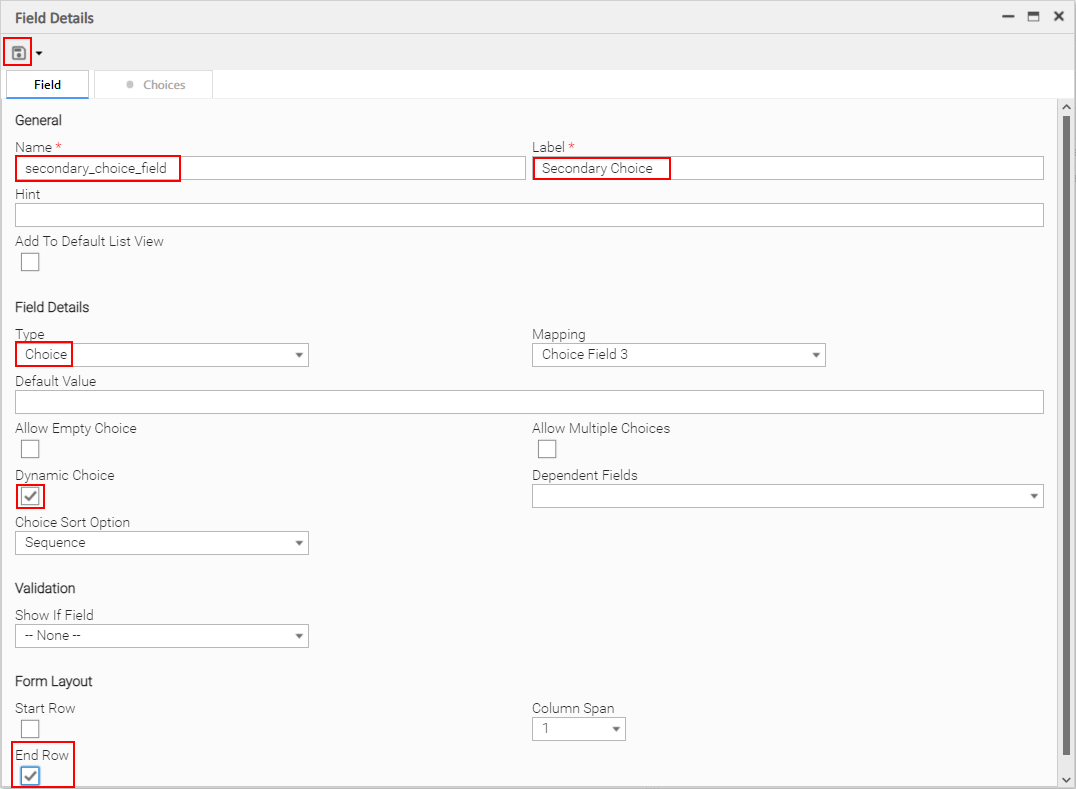
Note that "End Row" is checked in the Form Layout section. This is not required. It is selected only to achieve a better layout of form fields.
Click the "Save" icon to save the field.
Step 2 - Add backing implementation for Dynamic Choice fields to extension.py
Open file ~/dev/extensions/sample-task/src/extension.py in your editor of choice.
Add the implementation of the primary_choice_field and secondary_choice_field Dynamic Choice Commands:
from __future__ import (print_function)
from universal_extension import UniversalExtension
from universal_extension import ExtensionResult
from universal_extension import logger
from universal_extension.deco import dynamic_choice_command

class Extension(UniversalExtension):
    """Required class that serves as the entry point for the extension
    """

    def __init__(self):
        """Initializes an instance of the 'Extension' class
        """
        # Call the base class initializer
        super(Extension, self).__init__()

    @dynamic_choice_command("primary_choice_field")
    def primary_choice_command(self, fields):
        """Dynamic choice command implementation for
        primary_choice_field.

        Parameters
        ----------
        fields : dict
            populated with the values of the dependent fields
        """
        return ExtensionResult(
            rc=0,
            message="Values for choice field: 'primary_choice_field'",
            values=["Start", "Pause", "Stop", "Build", "Destroy"]
        )

    @dynamic_choice_command("secondary_choice_field")
    def secondary_choice_command(self, fields):
        """Dynamic choice command implementation for
        secondary_choice_field.

        Parameters
        ----------
        fields : dict
            populated with the values of the dependent fields
        """
        return ExtensionResult(
            rc=0,
            message="Values for choice field: 'secondary_choice_field'",
            values=["System", "Command", "Application", "Transfer", "Evidence"]
        )

    def extension_start(self, fields):
        """Required method that serves as the starting point for work performed
        for a task instance.

        Parameters
        ----------
        fields : dict
            populated with field values from the associated task instance
            launched in the Controller

        Returns
        -------
        ExtensionResult
            once the work is done, an instance of ExtensionResult must be
            returned. See the documentation for a full list of parameters that
            can be passed to the ExtensionResult class constructor
        """

        # Get the value of the 'action' field
        action = fields.get('action', [""])[0]

        if action.lower() == 'print':
            # Print to standard output...
            print("Hello STDOUT!")
        else:
            # Log to standard error...
            logger.info('Hello STDERR!')

        # Return the result with a payload containing a Hello message...
        return ExtensionResult(
            unv_output='Hello Extension!'
        )
Line 5 | We added an import for the dynamic_choice_command decorator which comes from the UniversalExtension base package. |
Lines 18 to 32 | The complete implementation of the Dynamic Choice command that supports the Dynamic Choice field primary_choice_field defined in the Universal Template. |
Lines 34 to 48 | The complete implementation of the Dynamic Choice command that supports the Dynamic Choice field secondary_choice_field defined in the Universal Template. |
The value supplied to the dynamic_choice_command decorator must match the field name of the associated Dynamic Choice field in the Controller's Universal Template (for example, @dynamic_choice_command("primary_choice_field")).
Step 3 - Build and Upload the Extension Zip Archive Using the UIP VS Code Extension
Save all changes to extension.py.
From the VS Code command pallet, execute the UIP: Push command as shown below:

Recall that the UIP: Push command builds and uploads the Extension zip archive
Click here to expand uip-cli details...
Step 3 Supplemental - Build and Upload the Extension Zip Archive Using the CLI
Save all changes to extension.py.
From the command line, cd to the sample-task directory and execute the push command as shown below:

Recall that the push command builds and uploads the Extension zip archive
Step 4 - Experience the Dynamic Choice Fields in Action
In the Controller, if the UE Task Tasks tab is open, close it now (required to pick up the addition of the Dynamic Choice fields).
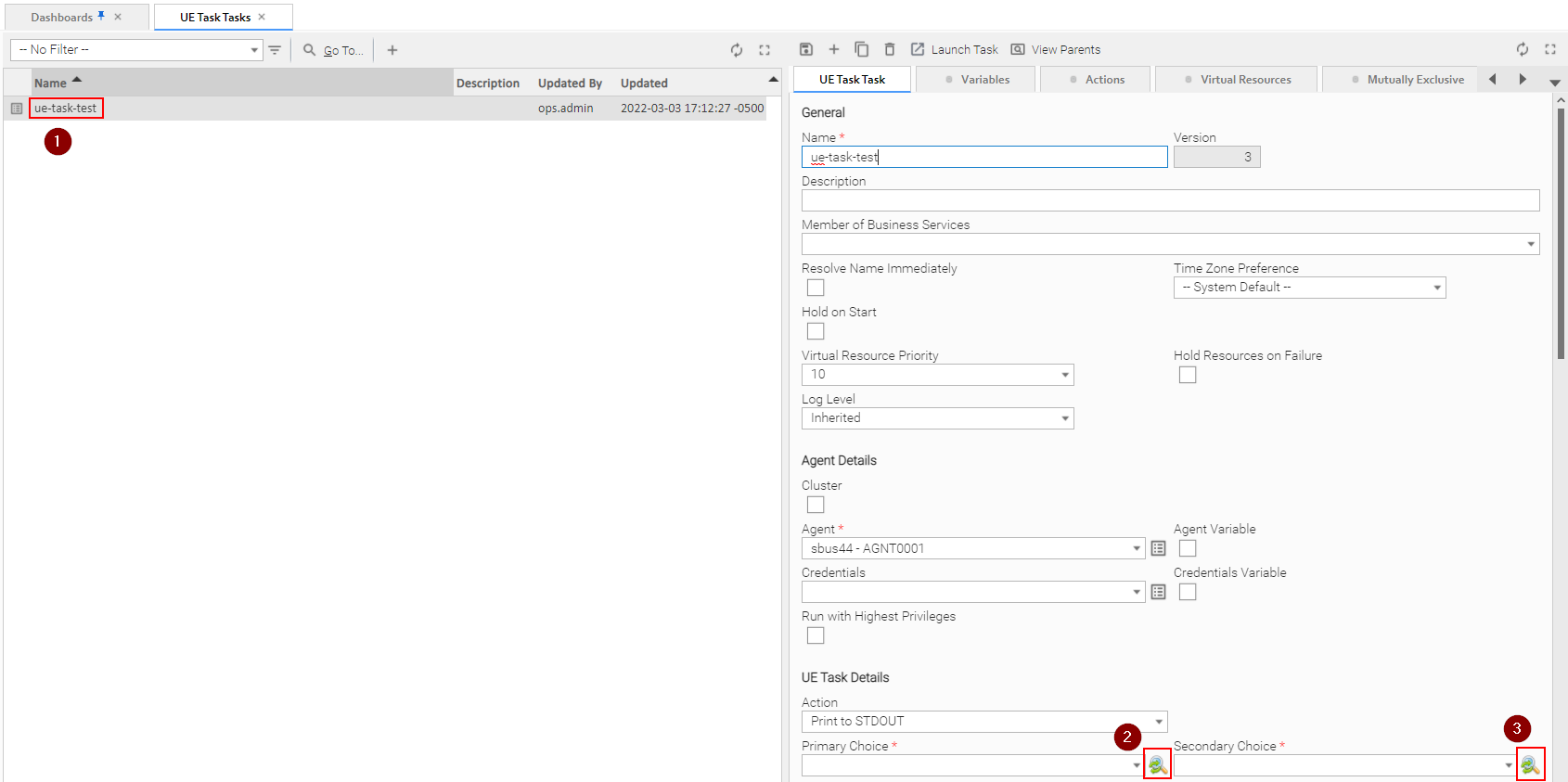
Open UE Task Tasks tab:
-
Select the ue-task-test (or whatever name you gave it) task
-
Select an active agent of version 7.0.0.0 or higher for the task to run on.
-
Click on the “Primary Choice Field” search icon to initiate a Dynamic Command call. Clicking on the “Primary Choice” search icon will open the following dialog. Click the “Submit” button.
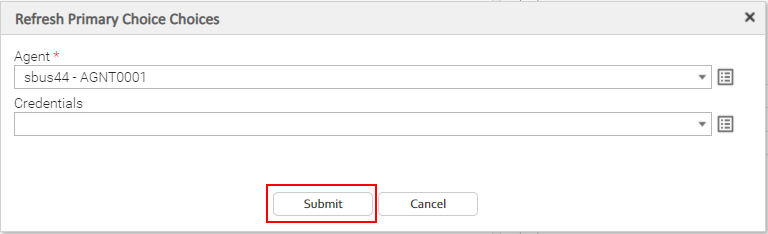
Upon clicking the Submit button, the Primary Choice Field search icon will turn grey for a moment while the Dynamic Command request is sent down to the Agent and results are returned to populate the drop-down.
When the operation is complete, the icon will turn green again and the Primary Choice drop-down will be populated with the values supplied by
@dynamic_choice_command("primary_choice_field")code in the extension on the Agent system.You have just executed a Dynamic Choice Command from the "Primary Choice" Dynamic Choice field!
infoBy clicking the search icon for the first time, the Controller automatically re-deployed the modified Extension archive to the target agent.
Select a value from the “Primary Choice” drop-down.

-
Follow the previous procedure from “3” to execute the Dynamic Choice Command search for the “Secondary Choice field” and select a value from the populated dropdown.
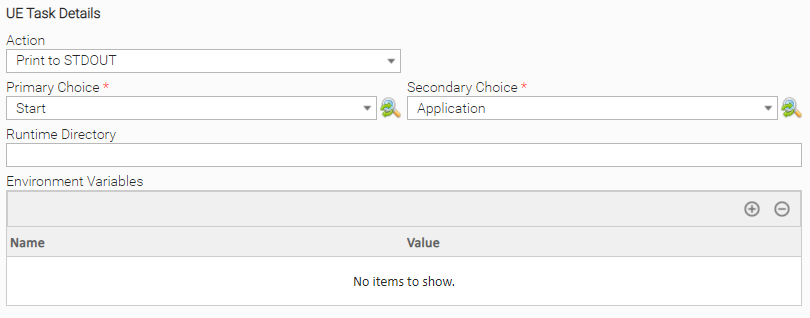
Save the task
Step 5 - Update the Local template.json
In step 1, we modified the Universal Template by adding new Dynamic Choice Fields. Recall that inside ~/dev/extensions/sample-task/src/templates, there is a template.json file. This file should correspond to the Universal Template in the Controller.
Right now, they are not both the same. The Controller's version of template.json has the Dynamic Choice Fields changes. To grab those changes, use the pull command as shown below:
UIP VS Code Extension

Click here to expand uip-cli details...
Step Supplemental - CLI

Now, both the local and Controller's version of the Universal Template are the same.
It is a good practice to keep both of them in-sync. Otherwise, one or the other could be overwritten. For example, if the local template.json does not contain any new changes that the Controller's version of Universal Template does, then issuing the UIP: Push All or push -a command will overwrite the Controller's version of the Universal Template.