System Architecture
Universal Data Mover Gateway (UDMG) is Stonebranch's next-generation Managed File Transfer (MFT) platform designed for secure, scalable, and flexible B2B file exchange.
When paired with UDMG Secure Proxy (USP), the solution delivers end-to-end security and control for managed file transfers. USP enforces authentication and isolation at the edge, while UDMG manages transfer orchestration, partner provisioning, and policy enforcement within the internal network.
While USP provides strong security controls, including full session-break and optional authentication at the edge, UDMG manages core transfer logic, policy enforcement, partner provisioning, and pre/post transaction orchestration.
Together, the combined UDMG + USP solution enables a zero-trust architecture for modern file transfer workflows, reinforcing a defense-in-depth approach that meets the security and scalability demands of the modern enterprise.
The diagram below illustrates a standard deployment architecture across three network zones:
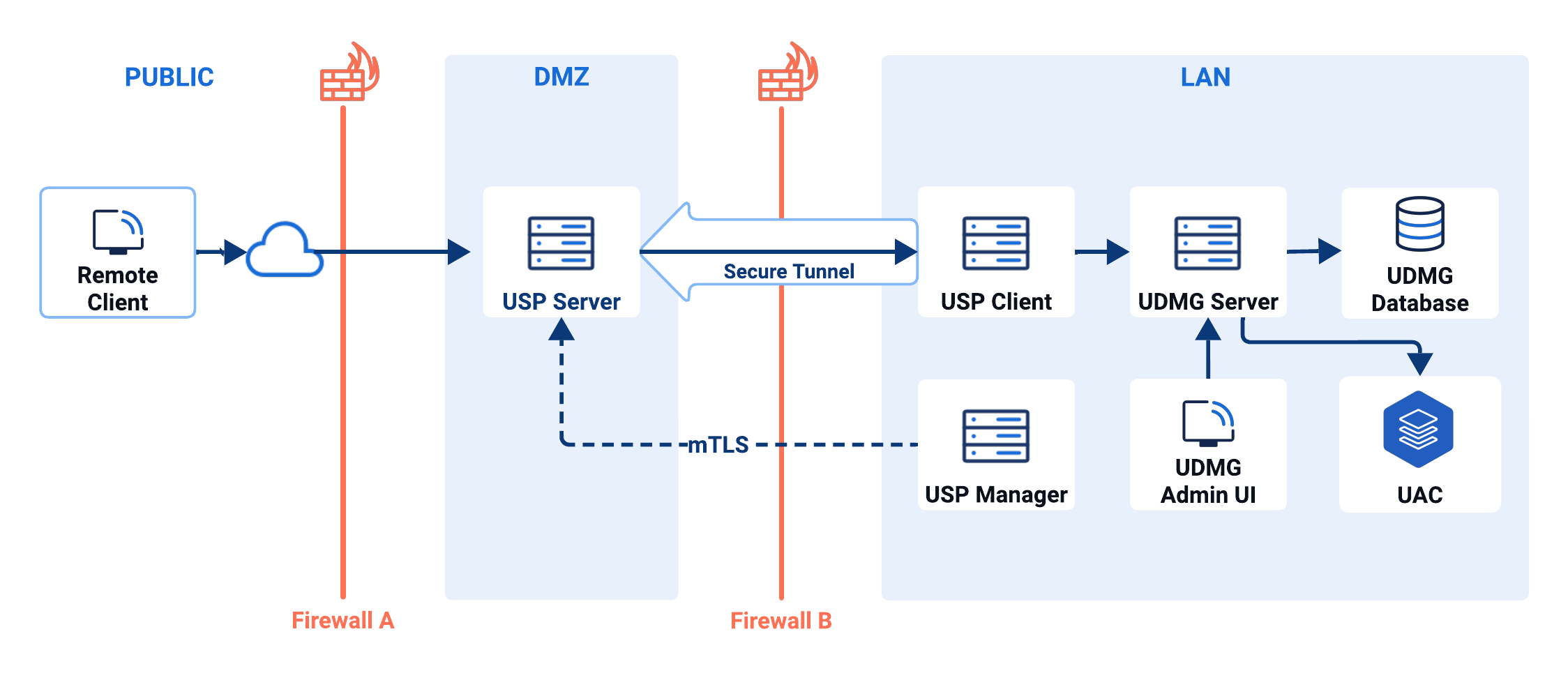
The diagram above shows a basic deployment with a single instance of each component. For production environments that require zero downtime, we recommend using a high-availability deployment.
Diagram Overview
| Zone | Item | Role |
|---|---|---|
| Public | Remote Client | Initiates file transfers to the USP Server instance from an external network. Represents a business partner or external system. |
| DMZ | Firewall A | Controls inbound traffic from the public zone to the DMZ, allowing only specific ports and IP ranges to reach approved services such as USP Server. |
| USP Server | Handles inbound connections from external clients and forwards them to internal targets according to the configured Connection Mode (Session Break or Direct Mode), using a secure tunnel with the USP Client when required. | |
| LAN (Trusted Internal Network) | Firewall B | Secures the internal LAN by permitting only outbound connections. |
| USP Client | Initiates a secure tunnel to the USP Server and securely forwards requests to the UDMG Server. | |
| USP Manager | Centrally manages the USP Server instance, communicating over mutual TLS (mTLS). info As USP Manager stores mTLS and other sensitive credentials, it should be deployed in a secure network—typically the internal LAN—and not in the DMZ. | |
| UDMG Server | Orchestrates transfer workflows and interacts with the UDMG database for configuration and transactional data. | |
| UDMG Admin UI | A browser-based interface for administrators to configure, monitor, and manage UDMG Server. | |
| UDMG Database | Stores configuration, metadata, and operational data used by the UDMG Server and UDMG Admin UI. | |
| UAC | When configured, UDMG can generate events on file transfer completion or failure. These events are pushed to Universal Automation Center (UAC), enabling automated workflows and enterprise-wide integrations. |
Component Breakdown
UDMG Server
UDMG Server is the foundational component of the UDMG product suite. It operates as a headless service, delivering functionality exclusively through API endpoints.
File transfers are processed by the UDMG Server and written to the locations defined by the configured Endpoints. When a file transfer occurs, a Universal Event can be generated. This event can be used to trigger a Universal Monitor Task for file processing or other actions related to the transfer.
UDMG Admin UI
UDMG Admin UI is a web-based administrative interface that provides comprehensive management capabilities for UDMG Server operations. This web application (embedded within the UDMG Server) enables administrators to configure, monitor, and manage UDMG through an intuitive graphical user interface.
The UDMG Admin UI is used to configure Credentials, Endpoints, Pipelines, Account Groups, and Accounts required for file transfers.
UDMG Database
The UDMG Database (not embedded within the UDMG Server) stores all configuration, metadata, and operational state required by UDMG Server. It maintains definitions for Credentials, Endpoints, Pipelines, Account Groups, Accounts, and other configuration items, as well as transactional data generated during file transfer execution.
The database ensures durability and consistency of system state across restarts and upgrades. Supported database engines include MySQL, Microsoft SQL Server, Oracle, and PostgreSQL.
USP
USP is deployed across the DMZ and LAN to provide a secure boundary between external partners and internal systems. In this deployment example, it consists of three components: USP Server, USP Client, and USP Manager.
Together, the USP components provide:
- Session break and inbound authentication (depending on the connection mode).
- Optional secure tunneling through a LAN-hosted USP Client to reach internal targets when direct connectivity is not available.
For a detailed view of UDMG's companion Secure Proxy solution, refer to USP documentation.
UAC
Universal Automation Center (UAC) integrates with UDMG to provide enterprise-scale automation capabilities. When configured, UDMG can generate events on file transfer completion or failure. These events are published to UAC as Universal Events and can trigger Tasks in UAC, enabling automated workflows and enterprise-wide integrations.
This integration enables administrators to orchestrate downstream workflows that respond automatically to file movement, such as validation, enrichment, notification, or integration with other enterprise systems. By combining UDMG's secure file transfer capabilities with UAC's scheduling and automation, organizations can create fully automated, event-driven data pipelines.
For a detailed view of Stonebranch's automation companion, refer to UAC documentation.