Version History
Version History lets any User view all prior versions of a versioned item and compare any one of them to the current configuration. Each version records who made the change, when it was made, and a full snapshot of the configuration at that point in time.
Supported Items
Version History is available for the following Configuration Items:
Version History is also available for Business Services, which link Users to Configuration Items.
Domains, Cluster Nodes, Users, and system settings are not versioned.
Permissions
Any User role can view Version History and compare versions. No additional permissions are required beyond read access to the versioned item.
Accessing Version History
- From the Sidebar, open any versioned item's detail page.
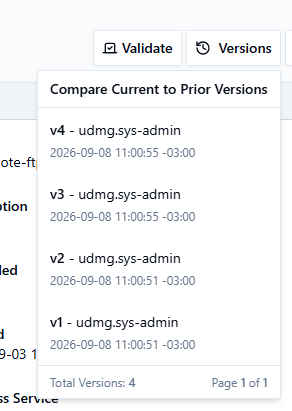
- Click Versions in the header action bar. A dropdown labeled Compare Current to Prior Versions opens.
- The dropdown lists all prior versions in reverse-chronological order. Each entry shows:
- The version number
- The username who made the change
- The timestamp of the change (in UTC or local timezone, depending on your selected timezone)
- The bottom of the dropdown shows the total version count and how many pages (20 versions each) have been loaded so far (for example, Total Versions: 26 Page 1 of 2 means 20 versions are visible, with more available). Scroll to the bottom of the list to load the next page.
- Click a version to open the Version History view for that version.
Version History View
After selecting a version, the Version History view opens. The breadcrumb updates to show the versioned item type, name, and Version History.
The header displays:
- Selected version: The version number you selected.
- Modified date: The timestamp when that version was saved.
- Modified by: The username that made the change.
Click Back to Details to return to the current versioned item's detail view.
Diff View
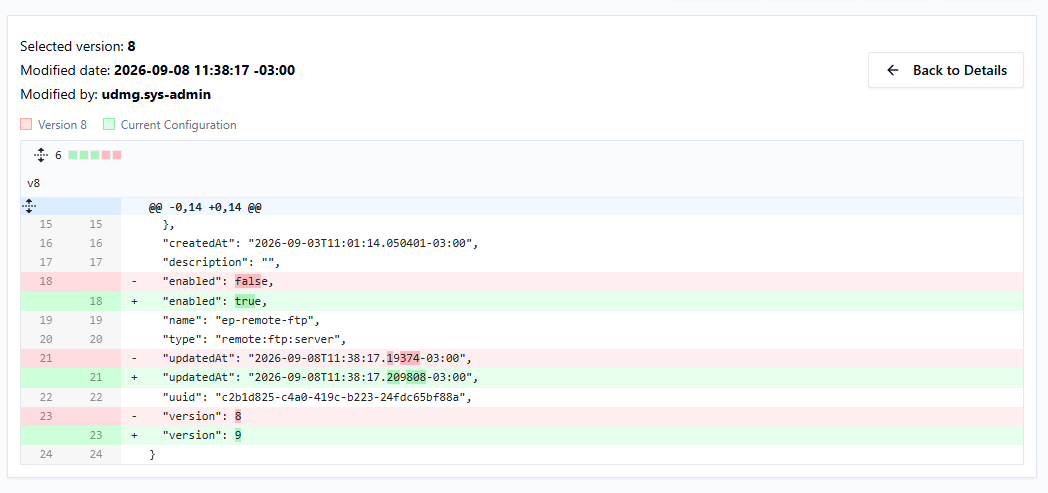
The diff section shows a comparison between the selected prior version and the current live configuration. A legend at the top of the section identifies each side:
- Lines highlighted in red (with a
-prefix) were present in the selected prior version but are no longer in the current configuration. - Lines highlighted in green (with a
+prefix) are present in the current configuration but were not in the selected prior version. - Unchanged lines appear without highlighting, and might be collapsed by default.
The comparison is always between the selected prior version and the current configuration.
Sensitive Fields
Sensitive field values (passwords, credential secrets) are never shown in Version History or the diff view. The diff indicates only whether a sensitive field changed or remained unchanged between versions.
Retention
UDMG retains a configurable number of prior versions per versioned item. The default is 100. When the limit is reached, the oldest version record is automatically removed after each new version is saved. Version records cannot be manually deleted via the UI, API, or CLI.
To change the retention limit, add a versioning block to the UDMG configuration file:
versioning {
  max_versions_per_object = 100
}
Set max_versions_per_object to the number of prior versions to retain per versioned item.