Caddy
Caddy is a performant reverse proxy and web server that can run on a variety of operating systems. It has built-in automatic SSL support via LetsEncrypt.
This guide explains how to deploy Universal Portal via Caddy. Caddy is recommended if you are deploying Universal Portal on a host external to Universal Controller.
Depending on your infrastructure, you can configure Caddy in HTTP or HTTPS mode. For HTTPS, you can use Caddy's built-in automatic SSL support, or provide your company's own certificate.
Automatic SSL requires the Caddy Server to be exposed to public internet, and it is not recommended to do so for production use.
Prerequisites
Before you begin, make sure you already have:
- URL of the Universal Controller (e.g.
http://uac-domain/uc) - SSL Certificate and Private Key
- Note: You can generate a self-signed certificate for testing.
- A domain pointing to your server's IP address.
- ZIP build of Universal Portal.
- You can request this file from your account manager if you do not have it.
- Caddy URL added to your OAuth Provider's Redirect list.
Overview
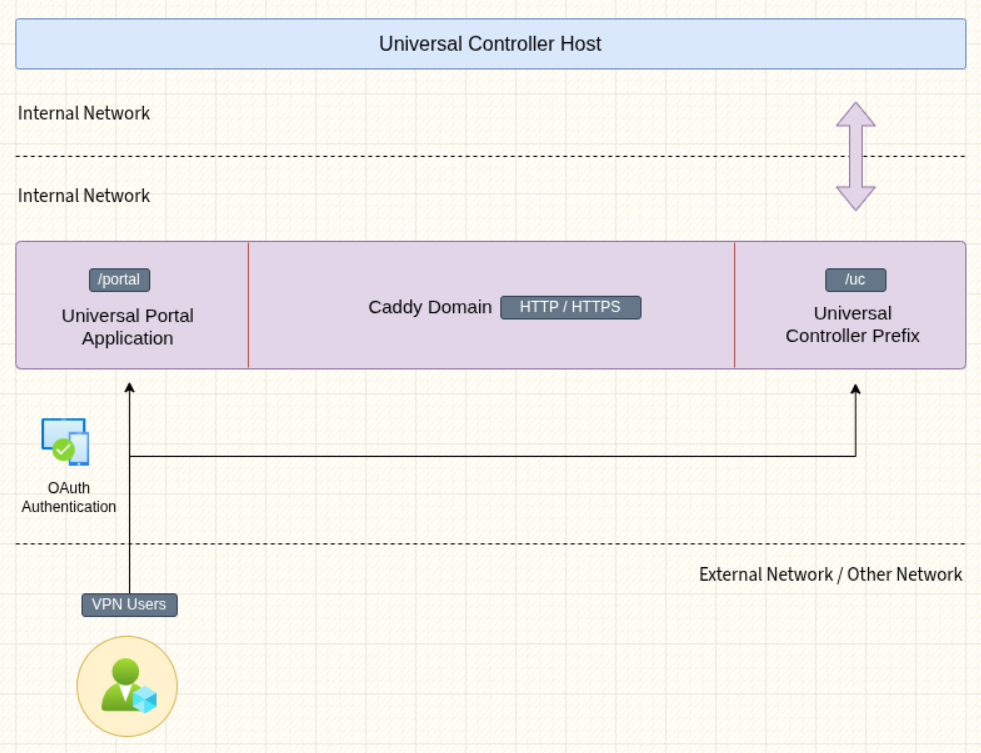
After completing this guide, your deployment may look like the diagram below.
Install and Configure Caddy
If your distribution does not provide the Caddy package through its package manager, you may download it from their Github release page, and place it into your path and configure systemd if needed.
# Download Caddy for your OS
https://github.com/caddyserver/caddy/releases/tag/v2.10.2

# Copy Caddy to your PATH
cp caddy /usr/bin

# Create the deployment folder
mkdir /opt/portal

# Create the certificate folder if using HTTPS
mkdir /opt/portal/certs

# Copy your certificates to /opt/portal/certs if using HTTPS

# ....

# Extract the contents of UP.zip
cd /opt/portal
unzip ~/up.zip

# 1.Create the configuration file for Caddy.

# 2.Choose from HTTP or HTTPS examples.

# 3.Update the lines marked with the 👇 symbol.

# 4.Paste the contents to your Caddyfile.
touch /opt/portal/Caddyfile

# Create a new service file. Suit the service file example for your needs.
touch /etc/systemd/system/portal.service

# Reload systemctl
systemctl daemon-reload

# Start Portal service
systemctl start portal
Systemd Service File
This is an example service file. Depending on your requirements, you can extend it.
# /etc/systemd/system/portal.service
[Unit]
Description=Universal Portal Caddy Service
After=network.target

[Service]
Type=simple
WorkingDirectory=/opt/portal
ExecStart=/usr/bin/caddy run --config /opt/portal/Caddyfile
ExecReload=/usr/bin/caddy reload --config /opt/portal/Caddyfile
ExecStop=/usr/bin/caddy stop

Restart=on-failure
RestartSec=5s

StandardOutput=journal
StandardError=journal
SyslogIdentifier=web

# Optional for security

# User=caddy

# Group=caddy

[Install]
WantedBy=multi-user.target
HTTP Configuration
When TLS termination is handled by your Cloud Load Balancer or another proxy manager in your infrastructure, you may not want to manage certificates on the Caddy server. The configuration example below runs in HTTP-only mode.
# /opt/portal/Caddyfile

# --------------------------------------- global settings -- ;
{
    auto_https off
    auto_https disable_redirects
    admin off
    log {
        output stdout
        format json
    }
    servers {
        timeouts {
            read_header 15s
            read_body   30s
            write       30s
            idle        2m
        }
        protocols h1 h2
    }
}

# ----------------------------------------- common config -- ;
(common_config) {
    handle /uc {
        redir * /uc/
    }
    handle /uc/* {
        uri path_regexp ^ ""
        # [👇 EDIT 👇]
        reverse_proxy localhost:7900
    }
    handle_path /portal {
        redir * /portal/
    }
    handle_path /portal/* {
        root * /opt/portal/dist/app
        file_server
        try_files {path} {path}/ /index.html
    }
    handle /* {
      redir * /portal/
    }
}

# ------------------------------------------ cache config -- ;
(cache_config) {
    @nocache {
        not path *.jpg *.jpeg *.png *.gif *.webp *.svg
    }
    header @nocache {
        Cache-Control "no-store, no-cache, must-revalidate, proxy-revalidate, max-age=0"
        Pragma "no-cache"
        Expires "0"
    }
    @images {
        path *.jpg *.jpeg *.png *.gif *.webp *.svg
    }
    header @images {
        Cache-Control "public, max-age=31536000, immutable"
    }
}

# ------------------------------------------- http config -- ;

# [👇 EDIT 👇]
http://localhost:5555 {
    encode gzip zstd
    import common_config
    import cache_config
}
HTTPS Configuration
HTTPS mode with static certificates is recommended when you require end to end encryption in a cloud environment, or when you want to run Caddy indepedently.
# /opt/portal/Caddyfile

# --------------------------------------- global settings -- ;
{
    auto_https off
    auto_https disable_redirects
    admin off
    log {
        output stdout
        format json
    }
    servers {
        timeouts {
            read_header 15s
            read_body   30s
            write       30s
            idle        2m
        }
        protocols h1 h2
    }
}

# ----------------------------------------- common config -- ;
(common_config) {
    handle /uc {
        redir * /uc/
    }
    handle /uc/* {
        uri path_regexp ^ ""
        # [👇 EDIT 👇]
        reverse_proxy localhost:7900
    }
    handle_path /portal {
        redir * /portal/
    }
    handle_path /portal/* {
        root * /opt/portal/dist/app
        file_server
        try_files {path} {path}/ /index.html
    }
    handle /* {
      redir * /portal/
    }
}

# ------------------------------------------ cache config -- ;
(cache_config) {
    @nocache {
        not path *.jpg *.jpeg *.png *.gif *.webp *.svg
    }
    header @nocache {
        Cache-Control "no-store, no-cache, must-revalidate, proxy-revalidate, max-age=0"
        Pragma "no-cache"
        Expires "0"
    }
    @images {
        path *.jpg *.jpeg *.png *.gif *.webp *.svg
    }
    header @images {
        Cache-Control "public, max-age=31536000, immutable"
    }
}

# ------------------------------------------- http config -- ;
http://localhost:5555 {
    encode gzip zstd
    import common_config
    import cache_config
}

# ------------------------------------------ https config -- ;

# [👇 EDIT 👇]
https://localhost:4444 {
    # [👇 EDIT 👇]
    tls /opt/portal/certs/fullchain.pem /opt/portal/certs/privkey.pem
    encode gzip zstd
    import common_config
    import cache_config
}
Self-Signed Certificate
If you are just trying to test a deployment, you can create a self-signed certificate and private key.
TLS_KEY="/opt/portal/certs/privkey.pem"
TLS_CERT="/opt/portal/certs/fullchain.pem"

openssl req -x509 -nodes -newkey rsa:4096 \
          -keyout "$TLS_KEY" \
          -out "$TLS_CERT" \
          -days 825 \
          -sha256 \
          -subj "/CN=localhost" \
          -addext "subjectAltName=DNS:localhost"