Configuration File
Universal Portal has a local configuration file called config.json, which you can use to customize system behavior.
The config file can be accessed by an unauthenticated browser. You must not keep any passwords, secrets, or other confidential information in this file.
config.json must be a syntactically valid JSON file. If there are syntax errors in this file, Universal Portal will not load.
Example Configuration File
An example config file, with default values for each option, is provided below.
Default configurations
{
    "images": [
        {
            "key": "cron",
            "url": "vendor/widget.svg"
        }
    ],
    "fetchTimeoutInSeconds": {
        "tasks": 120,
        "taskboard" : 120,
        "triggers" : 120
    },
    "refetchIntervalInSeconds": {
        "taskboard": 120,
        "schedule": 120,
        "approval": 30
    },
    "taskboardLimitPerStatus": 24000,
    "fetchLimit": 4,
    "logo": "images/logo.svg",
    "logoDark": "images/logo-dark.svg",
    "default_locale": "en",
    "api": "/uc"
}
Configuration Keys by Type
This section lists all keys in config.json. Keys are grouped by type.
Branding
You can use branding configurations to customize the logos used in Universal Portal.
File paths are relative to the directory where config.json is located.
Key Name | Description | Value Type | Default Value |
|---|---|---|---|
| Path to the image file (svg or png) used as the Company Logo in the User Interface. This image is used as the logo while viewing the Portal in a light color scheme (Daylight Mode or Calm Mode). |
|
|
| Path to the image file (svg or png) used as the Company Logo in the User Interface. This image is used as the logo while viewing the Portal in a dark color scheme (Dark Mode or Evening Mode). |
|
|
| An array of images to use as icons in the User Interface. You can define logos for your own Universal Tasks by adding an entry to the images array with the name of the Template. You can also override logos for built-in task types by adding an entry with the name of the Task type. Each entry in the array is a | Array |
Controller Path
Key Name | Description | Value Type | Default Value |
|---|---|---|---|
| The path where Controller is deployed. Change this value to customize the API prefix. If the Controller was deployed using |
|
|
Default Locale
Key Name | Description | Value Type | Default Value |
|---|---|---|---|
| The default language used in Universal Portal is English, regardless of the language setting of the user's browser. If preferred, you can change the default to another supported language. Options:
tip Users can still change their language setting via User Options. The language setting will persist across logins. |
|
|
Fetch Timeout
Key Name | Description | Value Type | Default Value |
|---|---|---|---|
| On busy controllers, some requests to the Universal Controller could take longer than expected. You can customize the fetch timeout values for Task, Task Instance, and Trigger related APIs. To set fetch timeouts, add the See more details on each option below. | - | - |
| Timeout value for Task related APIs (used on the My Tasks page). |
|
|
| Timeout value for the Task Instance related APIs (used on the Taskboard page). |
|
|
| Timeout value for the Trigger related APIs (used on the Schedule and My Triggers pages). |
|
|
Refresh Interval
Key Name | Description | Value Type | Default Value |
|---|---|---|---|
| Some deployments may have higher or lower data refresh requirements. You can customize the refresh intervals for the Taskboard, Schedule, and Approvals counter. To set refresh intervals, add the See more details on each option below. | - | - |
| Refresh interval for the Taskboard page. |
|
|
| Refresh interval for the Schedule page. |
|
|
| Refresh interval for the Approvals Counter that shows the number of pending approvals. |
|
|
Taskboard Limits
Key Name | Description | Value Type | Default Value |
|---|---|---|---|
| Universal Controllers can generate and return large amounts of data. The UC System Property CLI/Web Service Result Limit restricts the API responses to a fixed number of records. Universal Portal respects this property, but in some use cases, you may want to have a more restrictive API/CLI limit in the Portal than in the Controller. In that case, you can set the This limit applies only to task instances shown on the Taskboard. The number of task instances in each status (Problem, Waiting, Running, and Done) cannot exceed the configured 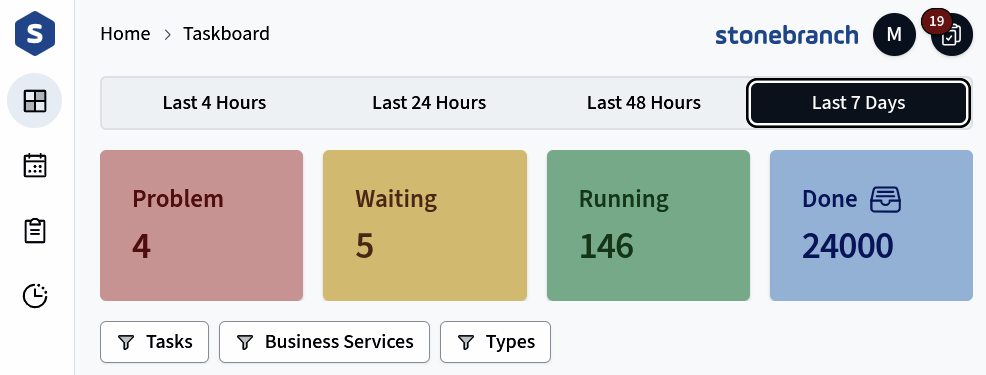 This limit is exclusive to Universal Portal and does not interfere with the CLI/Web Service Result Limit property in the Controller. |
|
|