NGINX
NGINX is high-performance, open-source software that acts as a web server, reverse proxy, load balancer, and HTTP cache. Depending on your infrastructure, you can configure NGINX in HTTP or HTTPS mode.
This guide explains how to deploy Universal Portal via NGINX.
For QA and internal testing, we recommend deploying via Caddy, as it is simpler than using Nginx.
Prerequisites
Before you begin, make sure you already have:
- URL of the Universal Controller (e.g.
http://uac-domain/uc) - SSL Certificate and Private Key
- Note: You can generate a self-signed certificate for testing.
- A domain pointing to your server's IP address
- ZIP build of Universal Portal.
- You can request this file from your account manager if you do not have it.
- NGINX URL added to your OAuth Provider's Redirect list.
Overview
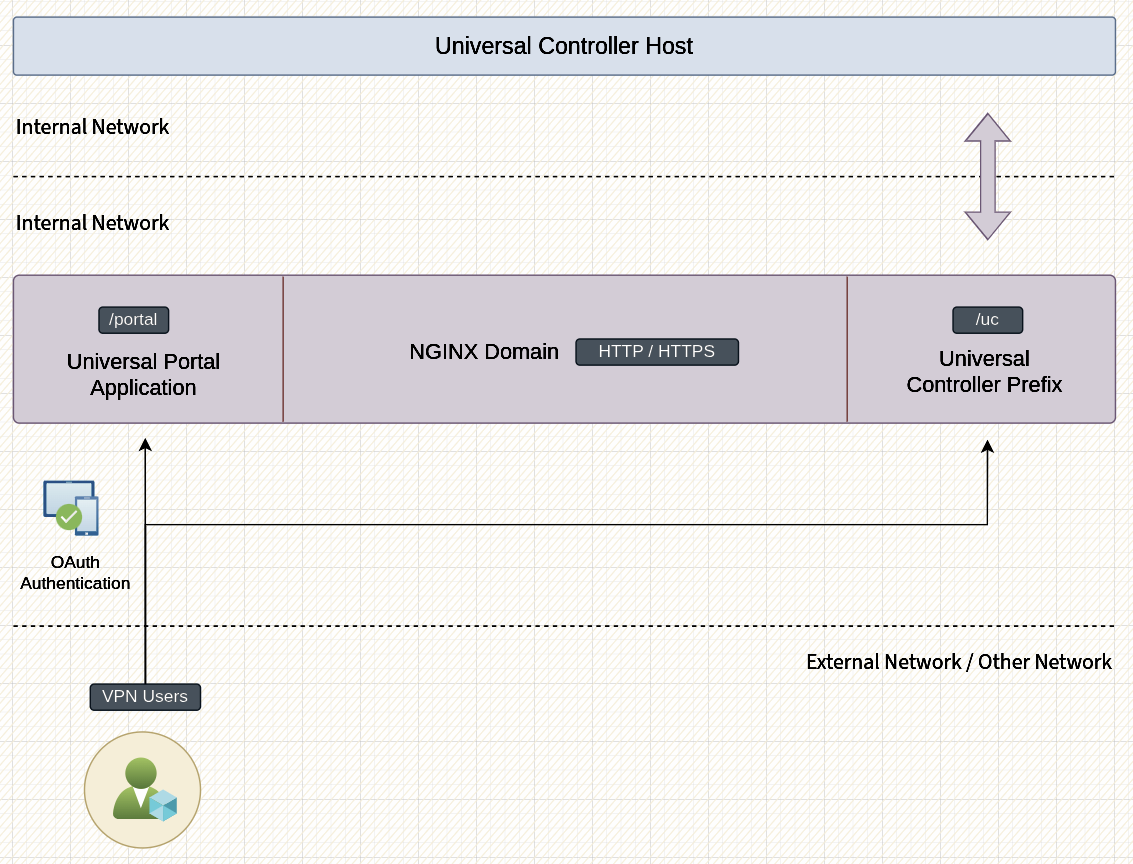
After completing this guide, your deployment will look like the diagram below.
Install and Configure NGINX
On most Linux/Unix distributions, NGINX can be installed using your package manager. Please refer to your operating system documentation on installing NGINX.
# Install NGINX using your OS package manager.

# apt, yum, dnf, nix etc.

# Create the deployment folder
mkdir /opt/portal

# Create the certificate folder if using HTTPS
mkdir /opt/portal/certs

# Copy your certificates to /opt/portal/certs if using HTTPS

# ....

# Extract the contents of UP.zip
cd /opt/portal
unzip ~/up.zip

# 1.Create the configuration file for Caddy.

# 2.Choose from HTTP or HTTPS examples.

# 3.Update the lines marked with the 👇 symbol.

# 4.Paste the contents to your nginx.conf file.
touch /opt/portal/nginx.conf

# Create a new service file. Suit the service file example for your needs.
touch /etc/systemd/system/portal.service

# Reload systemctl
systemctl daemon-reload

# Start Portal service
systemctl start portal
Systemd Service File
This is an example service file. Depending on your requirements, you can extend it.
# /etc/systemd/system/portal.service
[Unit]
Description=Universal Portal NGINX Service
After=network.target

[Service]
Type=simple
WorkingDirectory=/opt/portal
ExecStart=nginx -c /opt/portal/nginx.conf -g 'daemon off;'
ExecReload=nginx -s reload -c /opt/portal/nginx.conf
ExecStop=nginx -s quit -c "/opt/portal/nginx.conf"

Restart=on-failure
RestartSec=5s

StandardOutput=journal
StandardError=journal
SyslogIdentifier=web

[Install]
WantedBy=multi-user.target
HTTP Configuration
When TLS termination is handled by your Cloud Load Balancer or another proxy manager in your infrastructure, you may not want to manage certificates on the NGINX server. The configuration example below runs in HTTP-only mode.
# /opt/portal/Caddyfile
worker_processes auto;
user root;

events {
   worker_connections 1024;
}

http {
   types_hash_max_size 8192;
   types_hash_bucket_size 512;
   server_tokens off;

    include mime.types;
   default_type application/octet-stream;

   sendfile on;
   tcp_nopush on;
   tcp_nodelay on;

   gzip on;
   gzip_vary on;
   gzip_proxied any;
   gzip_comp_level 6;
   gzip_buffers 16 8k;
   gzip_min_length 1024;
   gzip_http_version 1.1;
   gzip_types text/plain
       text/css
       application/json
       application/javascript
       text/xml
       application/xml
       application/xml+rss
       text/javascript;

    # JSON access log
   log_format json escape=json
     '{'
       '"time":"$time_iso8601",'
       '"remote_addr":"$remote_addr",'
       '"method":"$request_method",'
       '"uri":"$request_uri",'
       '"status":$status,'
       '"bytes_sent":$body_bytes_sent,'
       '"referer":"$http_referer",'
       '"user_agent":"$http_user_agent"'
     '}';

    access_log /opt/portal/nginx/access.log json;
   error_log  /opt/portal/nginx/error.log warn;

    # BEGIN_NOTLS
   server {
       # [👇 EDIT 👇]
       listen 5555 default_server;
       server_name _;
   }

    # END_NOTLS

    upstream backend_uc {
       # [👇 EDIT 👇]
       server localhost:7900;
   }
}
HTTPS Configuration
HTTPS mode with static certificates is recommended when you require end to end encryption in a cloud environment, or when you want to run Caddy indepedently.
# /opt/portal/nginx.conf
worker_processes auto;
user root;

events {
   worker_connections 1024;
}

http {
   types_hash_max_size 8192;
   types_hash_bucket_size 512;
   server_tokens off;

    include mime.types;
   default_type application/octet-stream;

    sendfile on;
   tcp_nopush on;
   tcp_nodelay on;

    gzip on;
   gzip_vary on;
   gzip_proxied any;
   gzip_comp_level 6;
   gzip_buffers 16 8k;
   gzip_min_length 1024;
   gzip_http_version 1.1;
   gzip_types text/plain
       text/css
       application/json
       application/javascript
       text/xml
       application/xml
       application/xml+rss
       text/javascript;

    # JSON access log
   log_format json escape=json
     '{'
       '"time":"$time_iso8601",'
       '"remote_addr":"$remote_addr",'
       '"method":"$request_method",'
       '"uri":"$request_uri",'
       '"status":$status,'
       '"bytes_sent":$body_bytes_sent,'
       '"referer":"$http_referer",'
       '"user_agent":"$http_user_agent"'
     '}';

    access_log /opt/portal/access.log json;
   error_log  /opt/portal/error.log warn;

    # BEGIN_TLS
   server {
       # [👇 EDIT 👇]
       listen 5555 default_server;
       server_name _;
       return 301 https://$host$request_uri;
   }

   server {
       # [👇 EDIT 👇]
       listen 4444 ssl default_server;
       server_name _;
       http2 on;

        root /opt/portal/dist/app;
       index index.html;
       try_files $uri $uri/ /index.html;

        # [👇 EDIT 👇]
       ssl_certificate     /opt/portal/certs/fullchain.pem;

        # [👇 EDIT 👇]
       ssl_certificate_key /opt/portal/certs/privkey.pem;
       ssl_protocols TLSv1.2 TLSv1.3;
       ssl_prefer_server_ciphers off;

       location ~* /(uc|portal)$ {
           return 301 $1/;
       }

        location /uc/ {
           proxy_pass http://backend_uc;
           proxy_set_header Host $http_host;
           proxy_set_header X-Real-IP $remote_addr;
           proxy_set_header X-Forwarded-For $proxy_add_x_forwarded_for;
           proxy_set_header X-Forwarded-Proto $scheme;
       }

        location /portal/ {
           root /opt/portal/dist/app;
           index index.html;
           try_files $uri $uri/ /index.html; #b

            rewrite /(portal)/$ /index.html break;
           rewrite /(portal)/(.*)$ /$2 break; #a
       }

        location = / {
           return 301 /portal/;
       }
   }

    # END_TLS
   upstream backend_uc {
       # [👇 EDIT 👇]
       server localhost:7900;
   }
}
Self-Signed Certificate
If you are just trying to test a deployment, you can create a self-signed certificate and private key.
TLS_KEY="/opt/portal/certs/privkey.pem"
TLS_CERT="/opt/portal/certs/fullchain.pem"

openssl req -x509 -nodes -newkey rsa:4096 \
         -keyout "$TLS_KEY" \
         -out "$TLS_CERT" \
         -days 825 \
         -sha256 \
         -subj "/CN=localhost" \
         -addext "subjectAltName=DNS:localhost"